Hunting OpenClaw Exposures: CVE-2026-25253 in Internet-Facing AI Agent Gateways
Published on

In reaction to the recent CVE-2026-25253, our research team set out to understand how this vulnerability appears in real-world deployments and what could be identified at internet scale using Hunt.io.
Our analysis focused on internet-exposed browser automation frameworks affected by CVE-2026-25253, including OpenClaw and its forks Clawdbot and Moltbot, which expose web-based control interfaces that store API credentials for multiple AI services. When deployed without proper access controls, these interfaces are directly reachable from the public internet.
In this report, our team outlines how exposed OpenClaw instances were identified at scale, the infrastructure patterns behind those deployments, and the detection techniques used to fingerprint vulnerable instances using Hunt.io's SQL-based search capabilities.
Key Findings
Identified over 17,500 exposed instances of OpenClaw, Clawdbot, and Moltbot vulnerable to CVE-2026-25253.
The vulnerability allows unauthenticated access to stored API tokens via the /api/export-auth endpoint.
Affected instances store credentials for Claude, OpenAI, Google AI, and other AI services.
Clawdbot Control represents 68.9% of identified deployments, followed by Moltbot Control (22.3%) and OpenClaw Control (8.8%).
Exposed instances were observed across 52 countries, with the highest concentrations in the United States and China.
98.6% of deployments run on cloud or hosting infrastructure, primarily DigitalOcean, Alibaba Cloud, and Tencent.
While port 18789 is the most common, many instances also run on ports 80 and 443, often behind reverse proxies.
Multiple detection methods were validated, including HTML title matching, HTTP header hashing, body hashing, asset fingerprinting, TLS certificate fingerprints, and content-length analysis.
To provide context for these findings, the following section outlines what OpenClaw is and how its control interface is typically deployed.
What is OpenClaw?
OpenClaw (and its popular forks Clawdbot and Moltbot) is an open-source browser automation framework designed to connect large language models like Claude and GPT-4 to web browsers through the Playwright automation library. Users configure the framework with their API keys to enable AI agents to autonomously browse websites, fill out forms, extract data, and perform complex web-based tasks.
The framework exposes a web-based control panel typically accessible on port 18789 that provides a graphical interface for managing automation sessions, viewing real-time browser activity, configuring AI model parameters, and storing authentication credentials. This control panel is the primary attack surface for CVE-2026-25253.
The Vulnerability: CVE-2026-25253 affects all versions of OpenClaw before the security patch. The /api/export-auth endpoint was designed to allow users to back up their stored credentials, but the endpoint lacks any authentication or authorization checks. This means anyone who can reach the service over the network can extract all stored API tokens, including keys for Claude, OpenAI, Google AI, and other services.
To assess the scope of this exposure, our research team analyzed how OpenClaw and its forks are distributed across deployed variants.
Framework Distribution
The affected software ecosystem consists of three related browser automation frameworks sharing a common codebase derived from the original OpenClaw project.
The analysis of 17,470 instances with identifiable HTML titles reveals that Clawdbot Control is the dominant variant at 68.9% of all deployments, followed by Moltbot Control at 22.3% and the original OpenClaw Control at 8.8%.
From a threat hunting perspective, this means detection rules must account for all three title variants to achieve comprehensive coverage. The prevalence of Clawdbot suggests it has become the most actively maintained fork, which may also make it the most likely to receive a timely security patch for CVE-2026-25253.
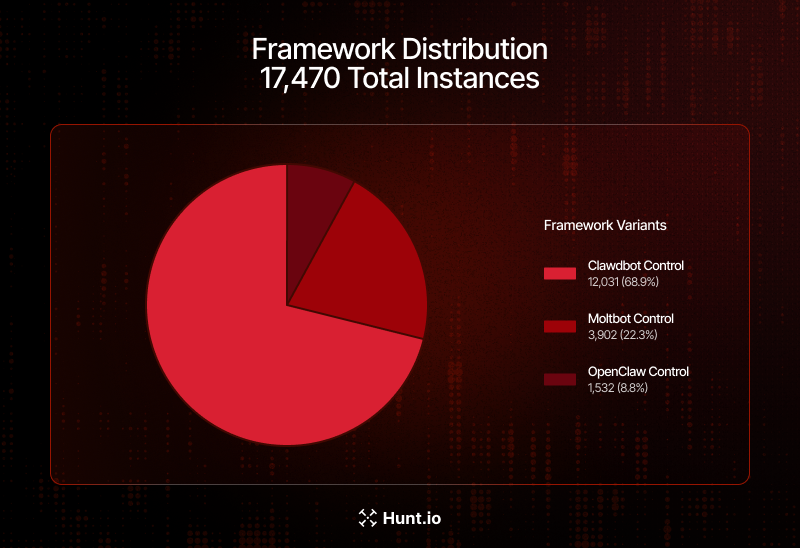 Figure 1: Framework Distribution Across 17,470 Identified Instances
Geographic Distribution
Using Hunt.io Bulk IP Enrichment of 2,500 unique IP addresses through geolocation and ASN analysis reveals the global spread of vulnerable OpenClaw deployments across 52 countries.
The United States leads with 891 instances (35.6%), driven primarily by DigitalOcean data centers in Santa Clara and Clifton. China follows with 648 instances (25.9%), concentrated across Alibaba Cloud and Tencent infrastructure in Beijing, Hangzhou, and Shanghai.
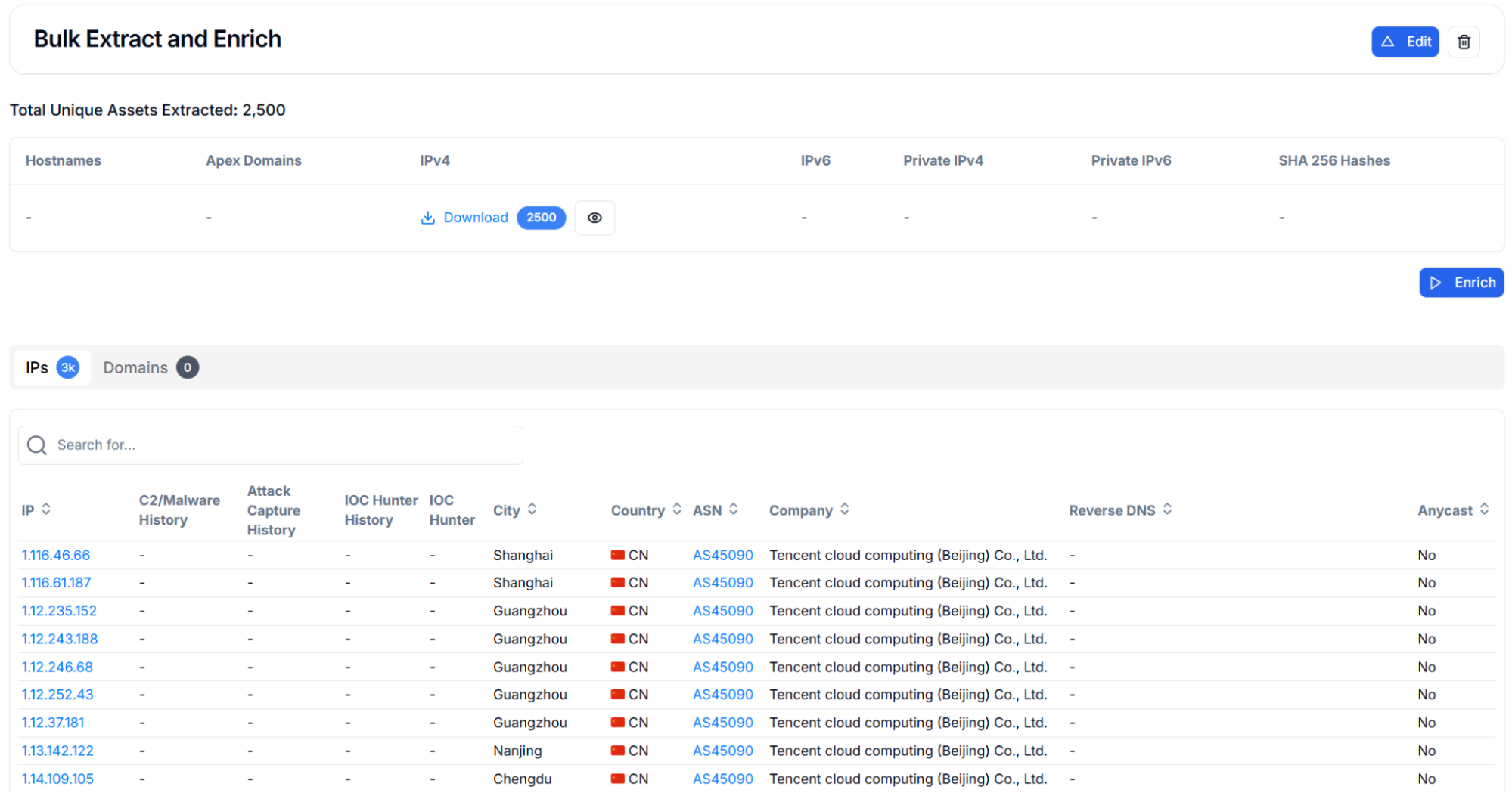 Figure 2: Bulk extraction and enrichment results showing 2,500 unique IPv4 addresses
European and Asian hosting hubs account for the remaining deployments, with Germany (6.6%), Singapore (6.5%), and Hong Kong (4.4%) serving as significant regional nodes.
This concentration aligns with how browser automation workloads are typically deployed, requiring persistent compute resources and stable network connectivity.
.png) Figure 3: Geographic Distribution of Exposed Instances by Country (Top 10)
Figure 3: Geographic Distribution of Exposed Instances by Country (Top 10)Top Cities
City-level analysis reveals that exposed instances cluster around major cloud provider data center locations rather than traditional enterprise hubs. Santa Clara leads with 250 instances corresponding to DigitalOcean and cloud infrastructure in Silicon Valley, while Clifton, New Jersey, accounts for 207 instances on East Coast hosting platforms. In China, Beijing (214), Hangzhou (121), Shanghai (119), and Guangzhou (97) collectively represent substantial Alibaba Cloud and Tencent deployments.
.png) Figure 4: Top 10 Cities Hosting Vulnerable OpenClaw Instances
Figure 4: Top 10 Cities Hosting Vulnerable OpenClaw InstancesInfrastructure Providers
ASN analysis confirms that 98.6% of exposed instances run on commercial hosting and cloud infrastructure, with only 20 instances on ISP networks and 16 on business-class connections. DigitalOcean is the single largest host with 880 instances (35.2%), followed by Alibaba Cloud entities collectively hosting 660 instances (26.4%) across their Hangzhou and US-based data centers. Tencent rounds out the top three with 307 combined instances (12.3%).
.png) Figure 5: Top 10 Infrastructure Providers Hosting Vulnerable Instances
Figure 5: Top 10 Infrastructure Providers Hosting Vulnerable InstancesThe dominance of cloud hosting providers indicates that most OpenClaw deployments are intentional server-side installations rather than accidental exposures from desktop applications. This also means that cloud provider security teams and abuse departments could play a significant role in driving remediation by notifying affected customers of the exposed vulnerability.
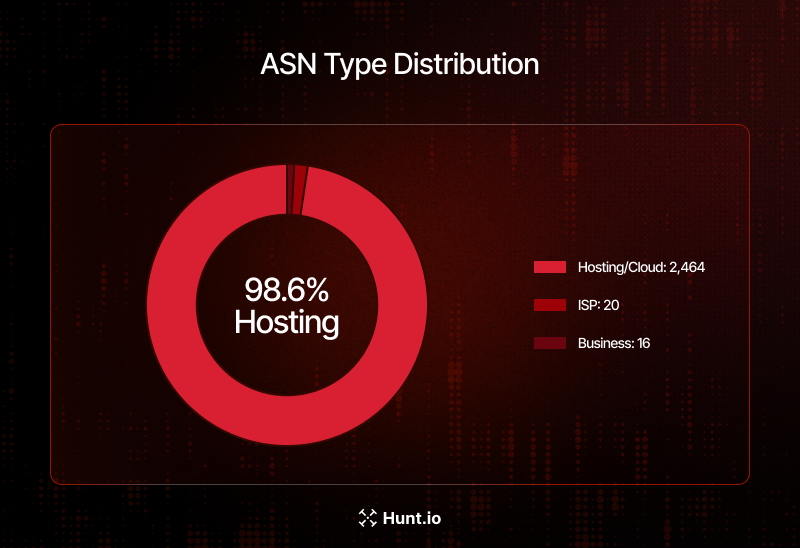 Figure 6: ASN Type Distribution - 98.6% Hosted on Cloud/Hosting Infrastructure
Beyond hosting providers, port usage patterns provide additional insight into how these instances are exposed and accessed.
Port Distribution
Port analysis across all 17,470 identified instances reveals that while the default port 18789 accounts for the largest share at 47.3% (8,258 instances), a substantial number of deployments run on standard web ports. HTTP port 80 hosts 30.1% (5,263 instances) and HTTPS port 443 hosts 18.9% (3,299 instances), indicating widespread use of reverse proxies like nginx to front the application.
The presence of instances on non-standard ports such as 18888 (243 instances) and 8080 (100 instances) suggests custom deployment configurations that may require additional hunting rules. Defenders should note that port-filtered queries targeting only 18789 and 18791 will miss approximately half of all exposed instances, making title-based and body-hash detection methods essential for comprehensive coverage.
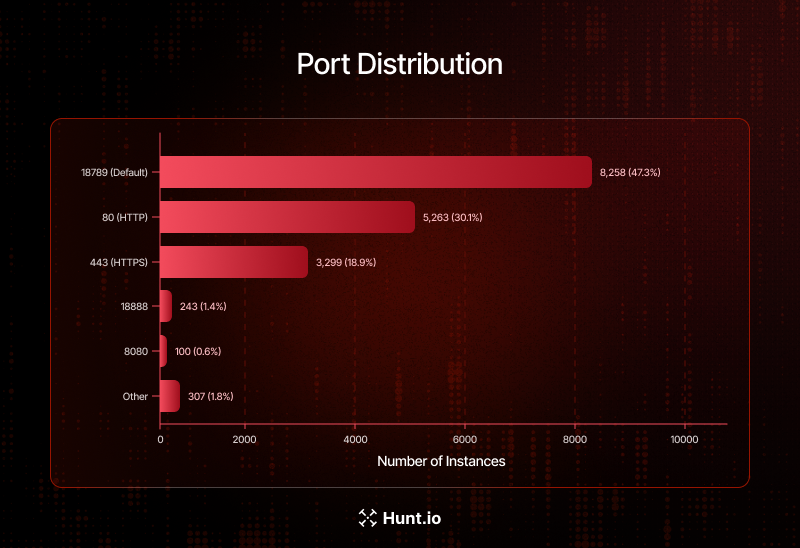 Figure 7: Port Distribution Across All Identified Instances
Based on these exposure patterns, our research team developed multiple detection strategies to identify vulnerable OpenClaw instances at scale.
Hunting Methodology
Using Hunt.io's powerful SQL-based search against our comprehensive internet scanning database, we analyzed exposed OpenClaw instances across the global internet.
The following sections document each fingerprinting technique with the exact HuntSQL queries used, along with screenshots showing real-world results. Security teams can adapt these queries for their own threat hunting operations to identify potentially vulnerable assets within their network perimeter or among their cloud infrastructure.
Detection Strategy 1: HTML Title Matching
The most straightforward and reliable fingerprint for identifying OpenClaw instances is the HTML page title returned by the web control panel. Each fork of the framework uses a distinctive title that clearly identifies the variant: "Clawdbot Control" for the original framework, "Moltbot Control" for the Chinese fork, and "OpenClaw Control" for the community rebrand. These titles remain consistent across deployments and are rarely modified by operators.
We tested two query approaches for maximum coverage. The first uses a simple LIKE pattern matching with wildcards to catch each variant separately.
Query (LIKE method):
SELECT ip, port, hostname, html.head.title
FROM httpv2
WHERE html.head.title LIKE '%Clawdbot Control%'
   OR html.head.title LIKE '%OpenClaw Control%'
   OR html.head.title LIKE '%Moltbot Control%'

                Copy
Sample output:
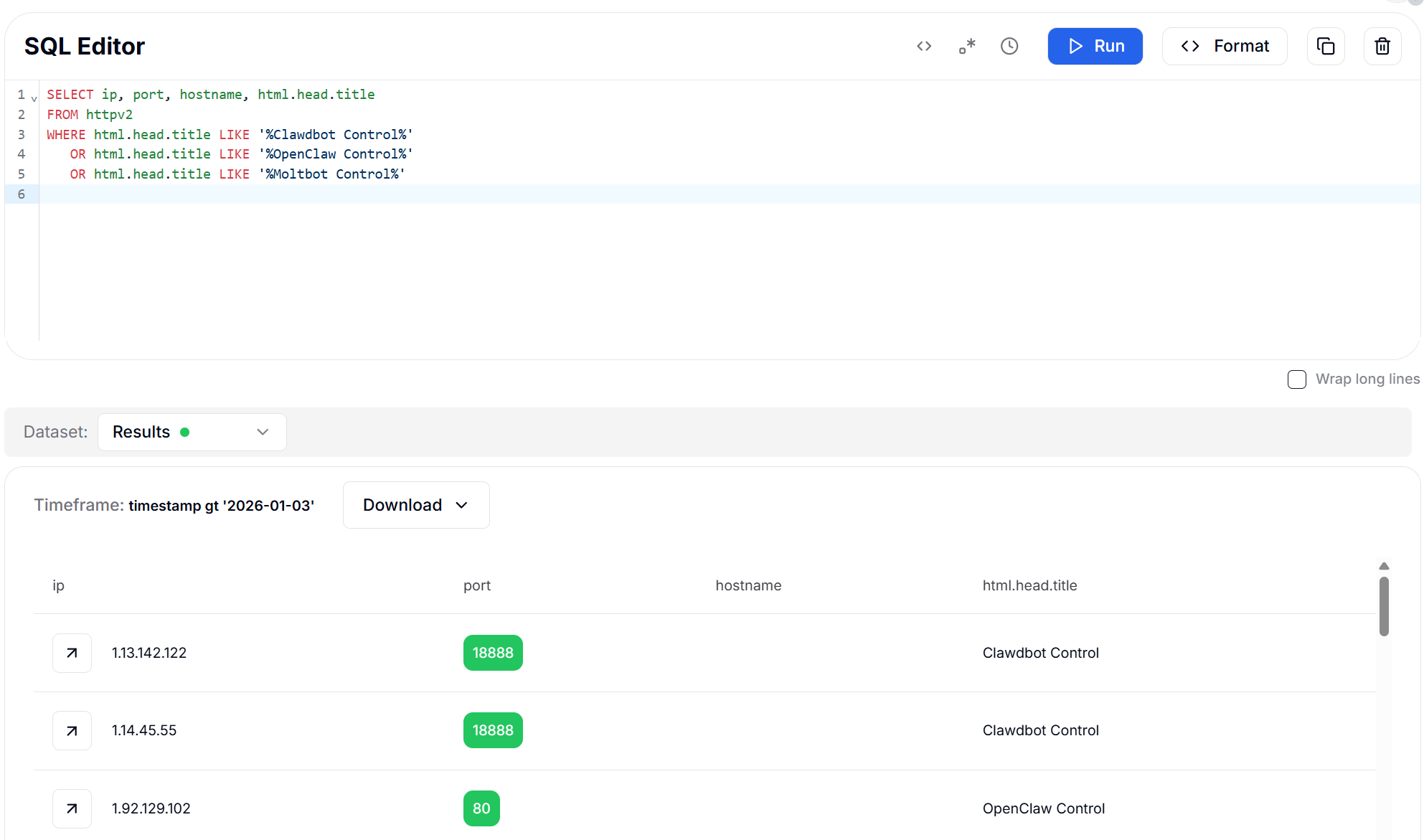 Figure 8: HTML Title Search using LIKE - 17,587 Results
The second uses RLIKE with a case-insensitive regular expression to capture all three variants in a single query.
Query (RLIKE regex method):
SELECT ip, port, hostname, html.head.title
FROM httpv2
WHERE html.head.title RLIKE '(?i)(clawdbot|moltbot|openclaw).*control'

                Copy
Output example:
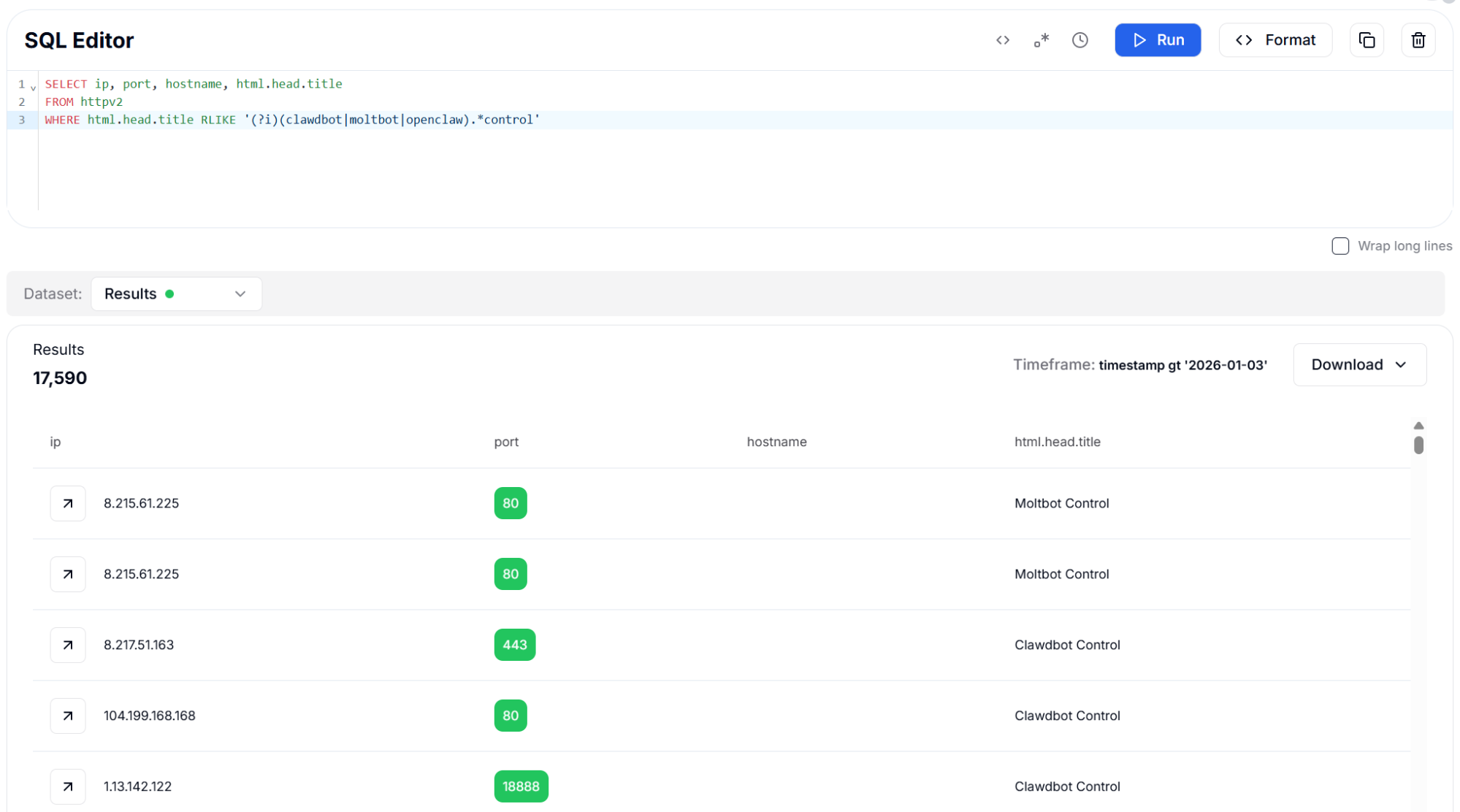 Figure 9: HTML Title Search using RLIKE (Regex) - 17,590 Results
Both approaches proved highly effective, with the regex query returning slightly more results due to its ability to match variations in capitalization and spacing.
This method stands out because it requires no prior knowledge of specific hash values or fingerprints - it directly identifies the application by its self-declared identity. The results show exposed instances running on a wide variety of ports beyond the default, indicating that many operators attempt security through obscurity by changing the listening port.
The regex query captured 17,590 instances across all three variants. Results reveal instances running on various non-standard ports, including 80, 443, 8080, 8081, 9009, 18888, and the default 18789, demonstrating that port-based filtering alone is insufficient for comprehensive detection.
Detection Strategy 2: HTTP Header Fingerprinting
HTTP response headers provide another reliable fingerprinting vector because web servers and application frameworks produce consistent header patterns. OpenClaw instances share characteristic header combinations due to their common Vite-based frontend build system and Express.js backend.
By computing Murmur3 hashes of the response headers, we can efficiently search for matching patterns across billions of HTTP responses in our database.
We tested three different header hash variants to understand their effectiveness: normalized headers (standardized ordering and formatting), sorted headers (alphabetically ordered), and unique headers (deduplicated header names). Each variant captures slightly different aspects of the HTTP response signature, but all three converge on the same set of approximately 8,260 instances when filtered to the default port.
The consistency across all three hash types validates the reliability of header-based fingerprinting for this target. The hash values were extracted from confirmed OpenClaw instances during our initial reconnaissance phase, then used as search signatures to discover additional exposed deployments at scale.
The following query matches normalized HTTP header hashes extracted from confirmed OpenClaw instances.
Query (Normalized Header Hash):
SELECT ip, port, hostname, html.head.title
FROM httpv2
WHERE http.headers.normalized.hash.murmur3 IN (
    '01D737B6D4249593',
    'A21D8F4148A7091A',
    'B5B27B39C533B437',
    '75530A6460E2396C',
    '21DFA63A75ACFD53',
    'D263AF8ACFBCB72B',
    'A905FF566F28EC67',
    '2227E50E61F4757E',
    '91794924F783020C',
    'D417839C4651FBDE'
) AND port IN (18789, 18791)

                Copy
Output example:
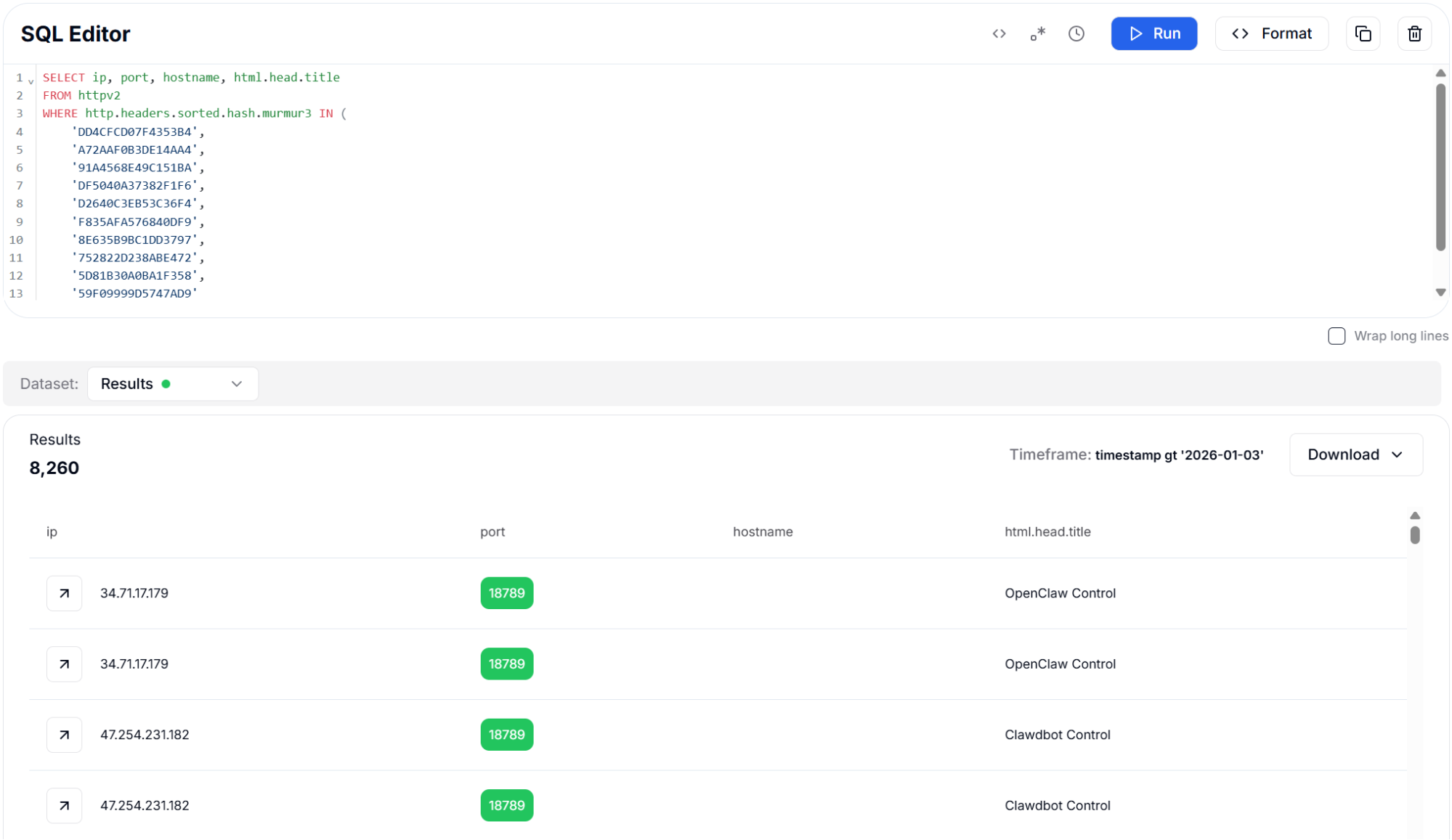 Figure 10: Sorted Header Hash (Murmur3) - 8,260 Results
The following variant uses alphabetically sorted headers to validate consistency across different hash representations.
Query (Sorted Header Hash):
SELECT ip, port, hostname, html.head.title
FROM httpv2
WHERE http.headers.sorted.hash.murmur3 IN (
'DD4CFCD07F4353B4',
'A72AAF0B3DE14AA4',
'91A4568E49C151BA',
'DF5040A37382F1F6',
'D2640C3EB53C36F4',
'F835AFA576840DF9',
'8E635B9BC1DD3797',
'752822D238ABE472',
'5D81B30A0BA1F358',
'59F09999D5747AD9'
) AND port IN (18789, 18791)
Copy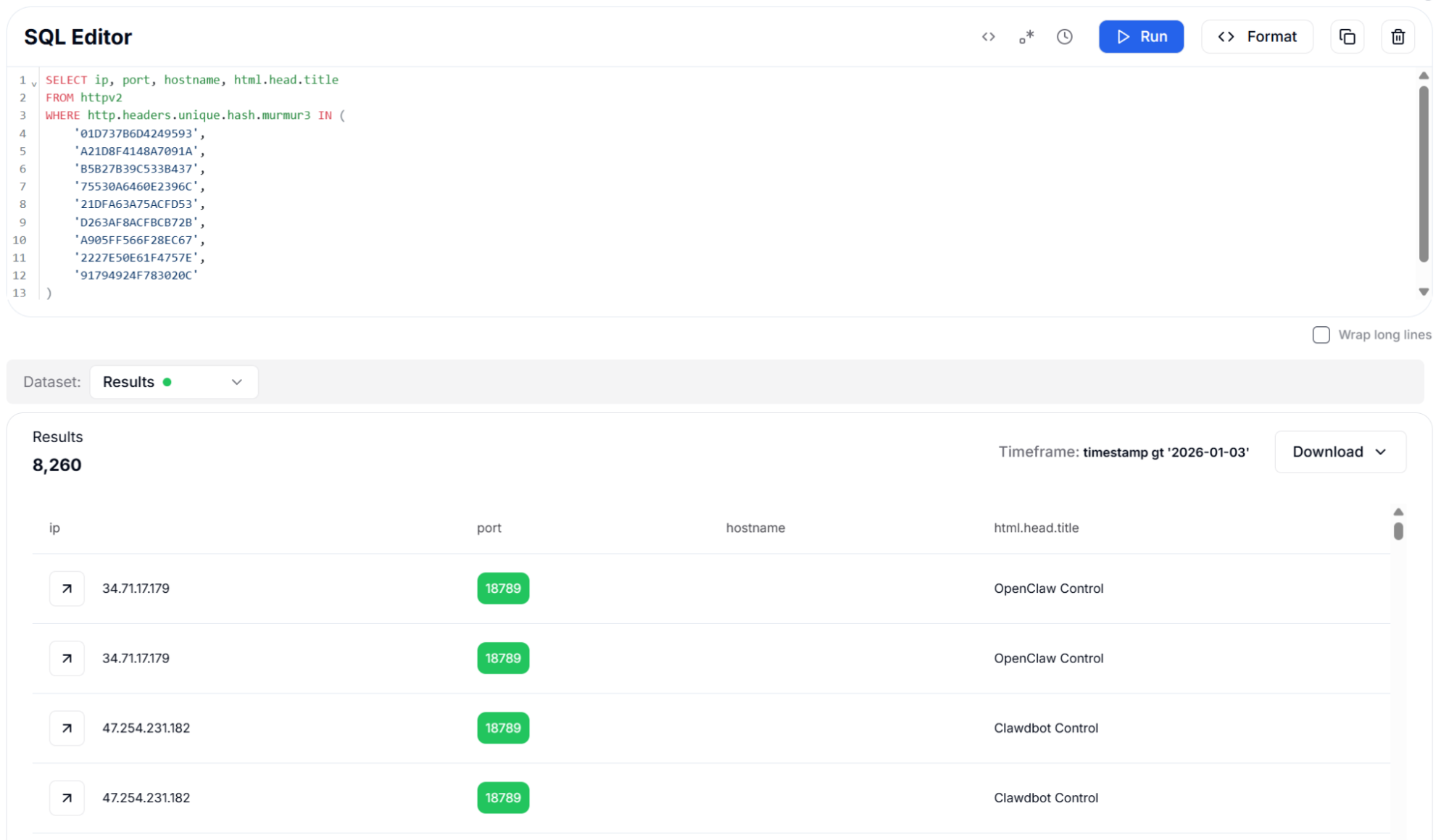 Figure 11: Unique Header Hash (Murmur3) - 8,260 Results
This version relies on deduplicated header names to confirm the same fingerprint using a minimal header set.
Query (Unique Header Hash):
SELECT ip, port, hostname, html.head.title
FROM httpv2
WHERE http.headers.unique.hash.murmur3 IN (
    '01D737B6D4249593',
    'A21D8F4148A7091A',
    'B5B27B39C533B437',
    '75530A6460E2396C',
    '21DFA63A75ACFD53',
    'D263AF8ACFBCB72B',
    'A905FF566F28EC67',
    '2227E50E61F4757E',
    '91794924F783020C'
) AND port IN (18789, 18791)

                Copy
All three header hash approaches identified 8,260 instances on the default port 18789. The consistency across hash types confirms that OpenClaw deployments maintain uniform header signatures, making this an excellent method for high-confidence detection with minimal false positives.
Detection Strategy 3: Redacted Header Hash (SHA256)
SHA256 hashes of redacted HTTP headers offer another fingerprinting approach that strips variable content like timestamps and session identifiers before computing the hash. This technique is particularly useful for identifying applications that include dynamic values in their headers, as the redaction process normalizes these variations. For OpenClaw instances, the redacted header hash provides a stable identifier even when server timestamps or cache headers change between requests.
When combined with CVE-specific port filtering targeting ports 18789 and 18791, this approach identified 7,130 instances. The port filter is essential for reducing false positives, as the header hash alone might match other applications using similar server configurations. Port 18789 is the default gateway API port where the vulnerable /api/export-auth endpoint is exposed, while port 18791 hosts the browser automation control interface.
The next query applies redacted header hashing to account for dynamic header values while retaining a stable fingerprint.
Query:
SELECT ip, port, hostname, html.head.title
FROM httpv2
WHERE http.headers.redacted.hash.sha256 IN (
    'f3fa269c7c4a677782495c3d4ef3854fcbcf78ac286602969fab25b9f0e06f11',
    '567d4fab01006f75e78b7fe5db8c485bb468d7e28edc4258c1568583e3867157',
    'b2de3e48e1a8074e530c932b8ea2531401a78d4d2f28b9eef0461fae13abbd87',
    'ef1f9347760d317fdcb7f65c2a53d1fe0efd901648858412f7089b4b7fd434f5',
    '3a9b51aaeb0062ef7fade4594149a605cd9796a7c9745d75ba646fe0efd2e3c5',
    '776becf0a492a830c10787e589743d42616ca308d5ec375282678e6ed40ae13d'
)
AND port IN (18789, 18791)

                Copy
Output example:
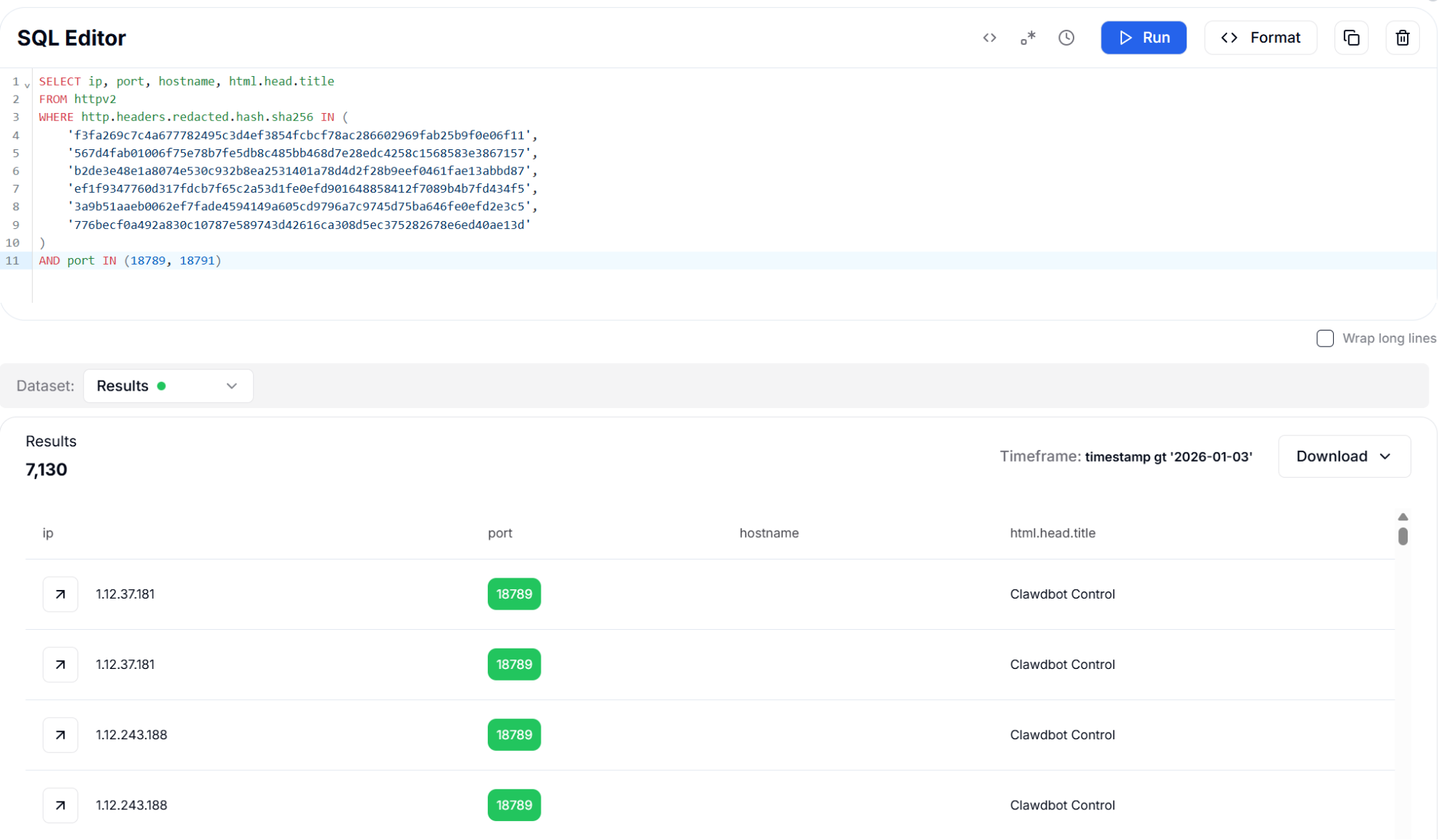 Figure 12: Redacted Header Hash (SHA256) with Port Filter - 7,130 Results
Detection Strategy 4: HTML Body Hashing
The OpenClaw web interface produces consistent HTML output because it is built using Vite with a React frontend that generates deterministic builds. By computing hashes of the HTML response body, we can create stable fingerprints that identify instances regardless of the HTTP headers they return. This approach is particularly effective for detecting instances running behind reverse proxies or load balancers that may modify header values.
We employed three complementary hash algorithms for body fingerprinting. SHA256 provides cryptographically strong exact matching for unmodified deployments. Murmur3 offers faster computation for large-scale scanning operations. TLSH (Trend Micro Locality Sensitive Hash) enables fuzzy matching that can detect modified versions of the framework with minor HTML changes, making it invaluable for finding customized or obfuscated deployments.
The body hashing approach identified approximately 6,800 instances across all three algorithms. The slight variation in results between hash types reflects differences in how each algorithm handles whitespace and encoding variations. TLSH is particularly valuable for detecting instances where operators have made cosmetic modifications to the interface.
The following query uses exact SHA256 hashes of the HTML body to identify unmodified OpenClaw deployments.
Query (SHA256 Body Hash):
SELECT ip, port, hostname, html.head.title
FROM httpv2
WHERE html.body.hash.sha256 IN (
    'DECF58D16C7436B434ED551703F510564AA5E17C19E9CAC5220E0A257DC5D55D',
    '796A9FC9101556A326DBD2B18790EDD6FAF20A38FBFE260C855FDE9560801661',
    '995880C9E738FFE27183671D515FBA80DDB14DDBACE728E91568499B95724CDF',
    '57B7EDD7DDB95F9DC4C4CC6F1976BCEA781AE134B10E013B9EBC390007C3A5F6',
    '9A2EB53F0F3526ED528B342C8300C0BD25312F23B1F22471617E6FEBC32E0B83',
    'F9BCCE51878B4B206F4F9B878F0A93E022E0E3C5C1739851FFA1ED474C865575',
    'E0726B08D60A26BC0CCC3B935959D53655B008619B2B28BC4D0163C8791E415E'
)
AND port IN (18789, 18791)

                Copy
Output example:
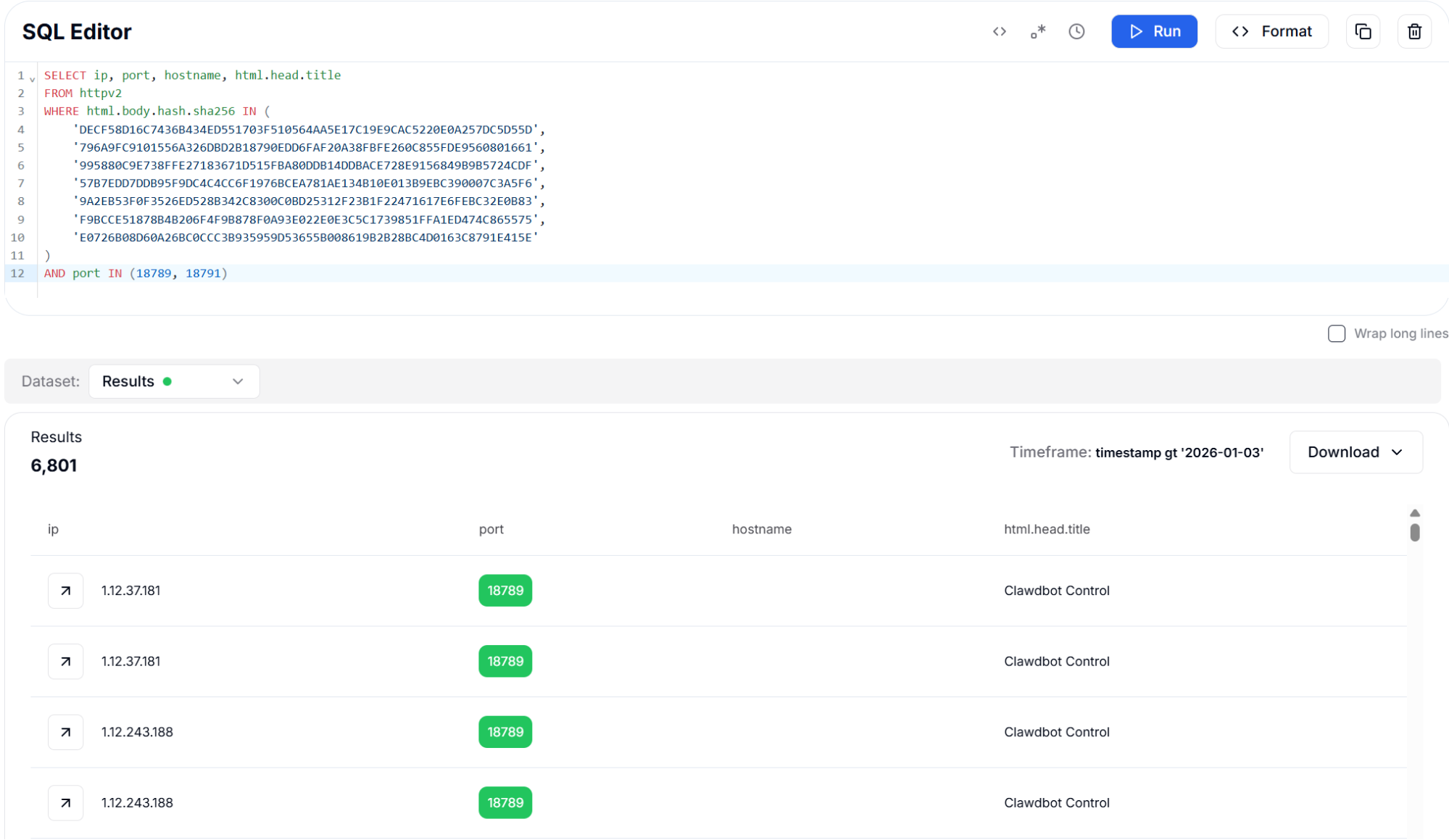 Figure 13: Body Hash (SHA256) with Port Filter - 6,801 Results
This variant applies Murmur3 body hashing to support faster matching across large datasets.
Query (Murmur3 Body Hash):
SELECT ip, port, hostname, html.head.title
FROM httpv2
WHERE html.body.hash.murmur3 IN (
    '2683260611',
    '2640755433',
    '885981446',
    '3742799908',
    '1008552787',
    '743781550',
    '44186107',
    '1133263748',
    '1208028788'
)
AND port IN (18789, 18791)

                Copy
Output example:
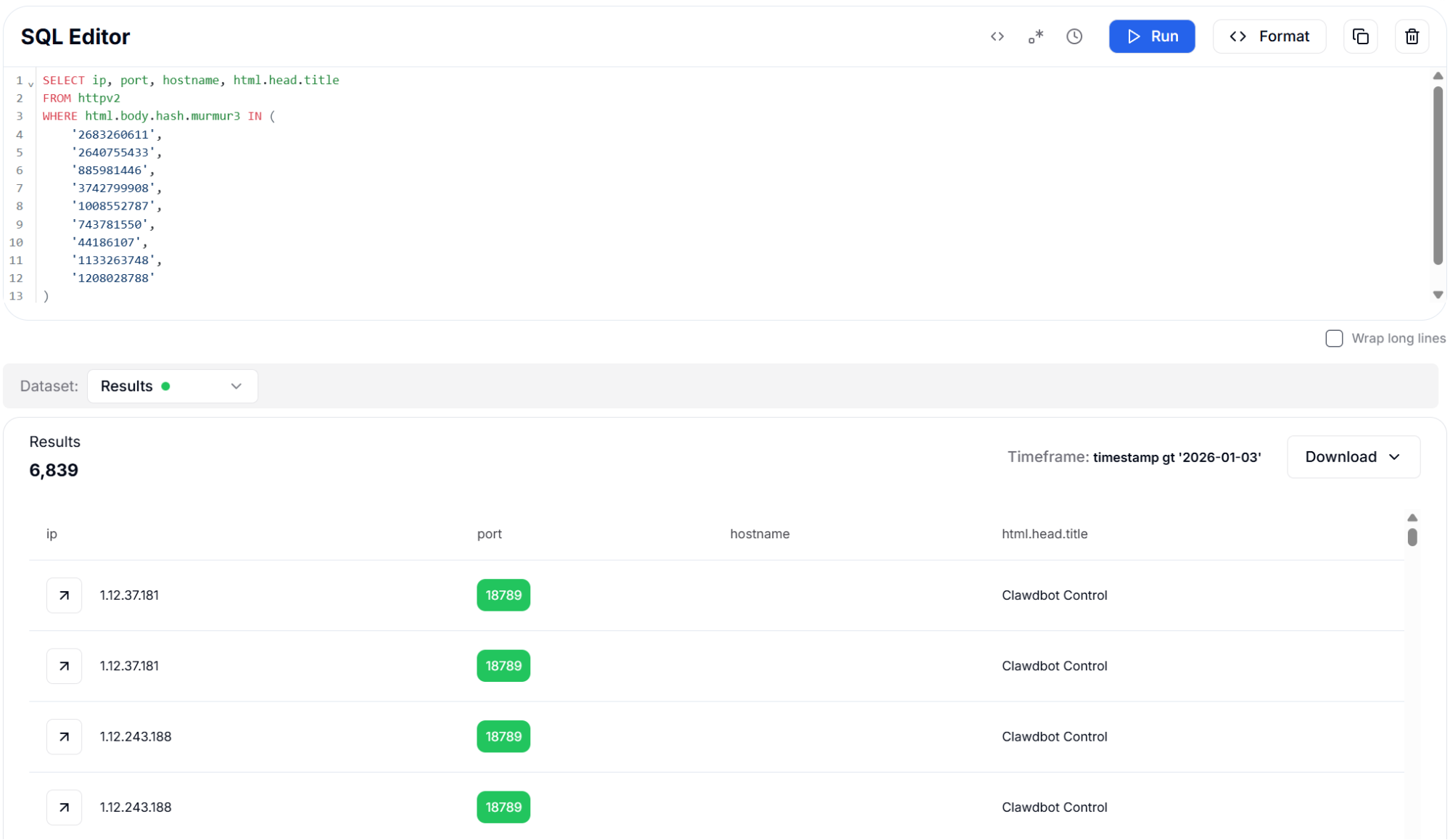 Figure 14: Body Hash (Murmur3) - 6,839 Results
This approach uses TLSH fuzzy hashing to identify instances with minor HTML modifications or customized builds.
Query (TLSH Fuzzy Body Hash):
SELECT ip, port, hostname, html.head.title
FROM httpv2
WHERE html.body.hash.tlsh IN (
    'dc019e0158a08a3773a4432815e6fd186e52a2434789ea4475dbb07d0fc5b93c9db4ec',
    '4e01fe0198a08e1733b4423419b6f8482e6262470789da4075da703c4ec9ba2c9db4f8',
    '09019e4198a08a3773a44422419e6fc186e62a243038def4475db703d1ec5ba2c9db4ec',
    '72011241889089l733a093388ba3bc249a42a24b4b1a5f4435c6307d6fe4fd34ddf4f8',
    'a9011241c8d08d1723a092348ba3bc649a42a24b4b1a5f4435c6307d6fe4bd389df4f8',
    'e601fe0188a08e1733b4422419e2f8582e666143038ada4075da703c4ec8ba2c9db4f8',
    '0801fe0188a08e1733b4422415a6f8482e626143038ada4075da703d1fc8ba2c9db4f8',
    '1501230818e1733f4423419e2fc482e626143038ada4075da703c0fc8ba2cddb4fc',
    '5b019e0598a08a3773b4432815e7fc186e52a2434789eb4475dfb03d0ec5b82c9db4dc'
)
AND port IN (18789, 18791)

                Copy
Output example:
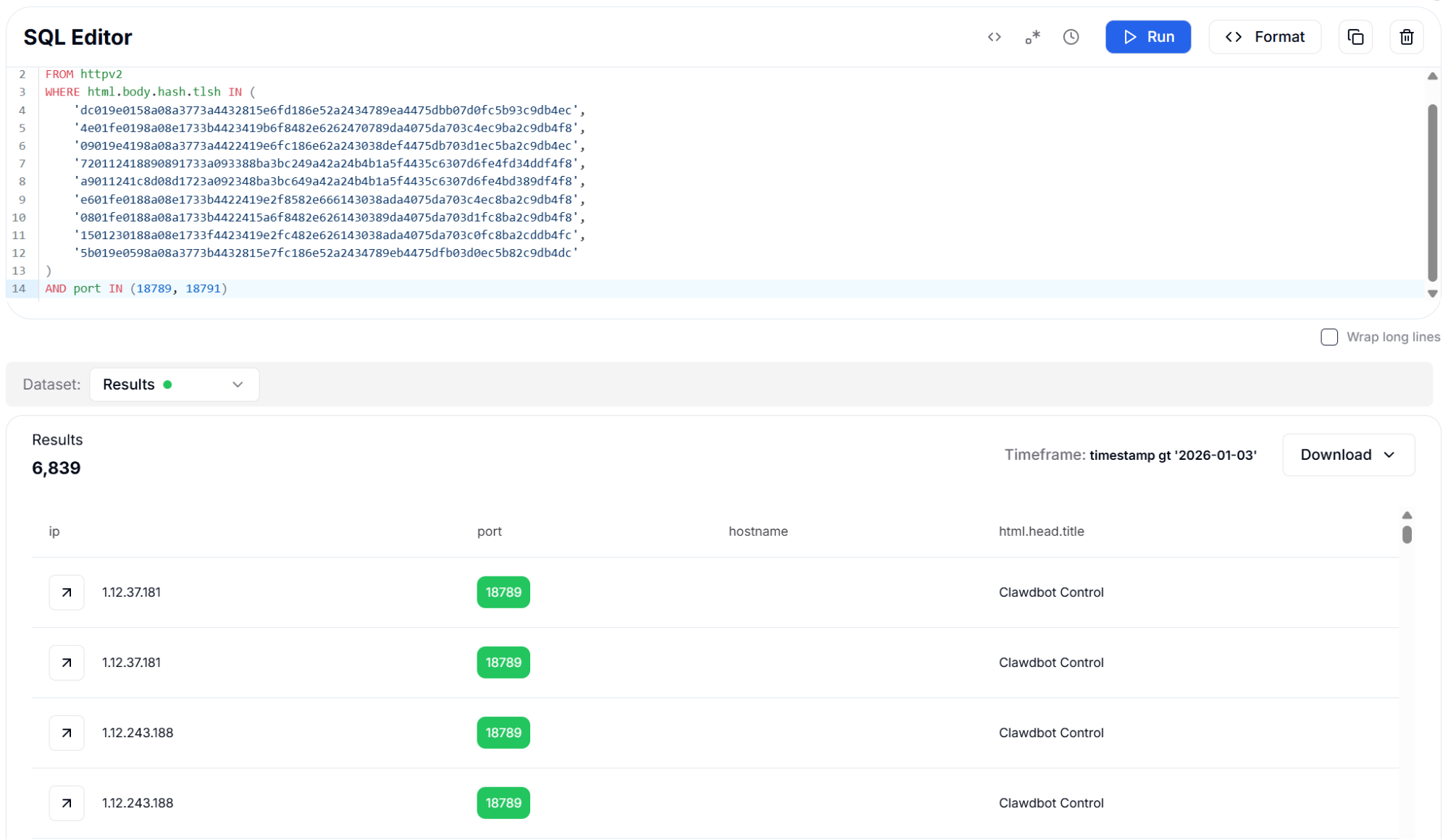 Figure 15: Body Hash (TLSH Fuzzy) with Port Filter - 6,839 Results
Detection Strategy 5: JavaScript and CSS Asset Fingerprints
Modern web applications built with bundlers like Vite include content-addressed asset filenames that incorporate hash values derived from the file contents. For OpenClaw, this means each version release produces unique JavaScript and CSS filenames such as "index-Cl-Y9zqE.js" or "index-DEPfFcOb.css". These hashed filenames serve as version-specific identifiers that remain constant across all deployments of the same build.
By searching for these distinctive asset filenames within the HTML body content, we can identify OpenClaw instances and even determine which specific version they are running. This information is valuable for vulnerability assessment, as different versions may have different security patches applied. The asset fingerprinting approach found over 8,000 instances, providing strong coverage across the deployed population.
This approach remains effective even when minor interface changes are introduced, since asset hashes are embedded in the build process and require a full rebuild to change. Security teams can use these fingerprints to track version distribution and prioritize patching efforts for older, more vulnerable releases.
The next query identifies OpenClaw instances by matching version-specific JavaScript asset filenames embedded in the HTML.
Query (JavaScript Assets):
SELECT ip, port, hostname, html.head.title
FROM httpv2
WHERE (
    html.body.content LIKE '%index-Cl-Y9zqE.js%'
    OR html.body.content LIKE '%index-5xhVxegE.js%'
    OR html.body.content LIKE '%index-BCK1V83p.js%'
    OR html.body.content LIKE '%index-DFDgq9AK.js%'
    OR html.body.content LIKE '%index-CXUONUC9.js%'
    OR html.body.content LIKE '%index-CxUFDXFX.js%'
    OR html.body.content LIKE '%index-Bb7zaWmQ.js%'
    OR html.body.content LIKE '%index-DsXRcnEw.js%'
    OR html.body.content LIKE '%index-CxUwHlqZ.js%'
    OR html.body.content LIKE '%index-kjHVNdSc.js%'
    OR html.body.content LIKE '%index-RnF4fdeM.js%'
) AND port IN (18789, 18791)

                Copy
Output example:
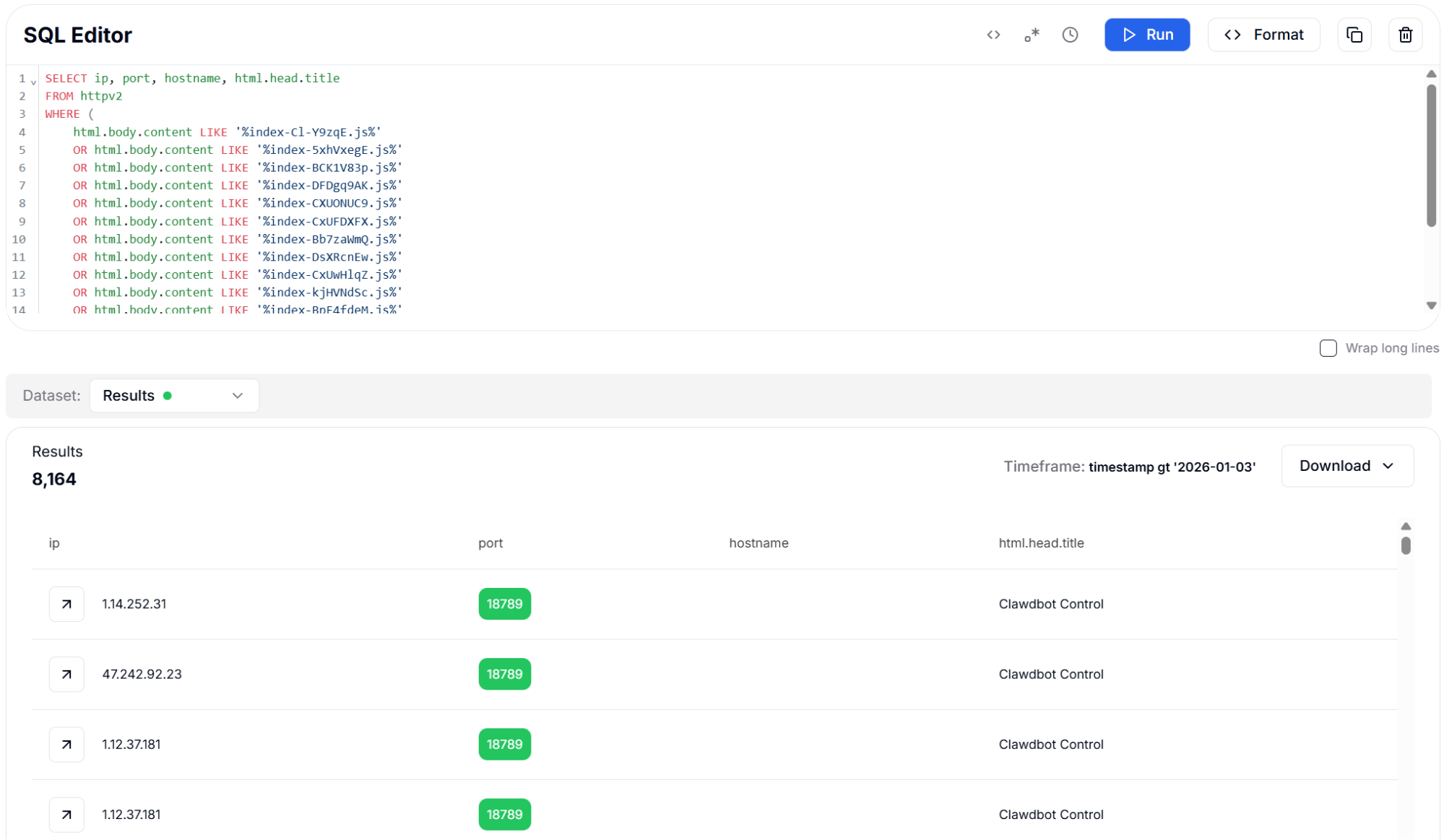 Figure 16: JavaScript Asset Fingerprints - 8,164 Results
The following query applies the same technique using hashed CSS asset filenames to expand version coverage.
Query (CSS Assets):
SELECT ip, port, hostname, html.head.title
FROM httpv2
WHERE (
    html.body.content LIKE '%index-DEPfFcOb.css%'
    OR html.body.content LIKE '%index-BAFzd9IE.css%'
    OR html.body.content LIKE '%index-CjW_qQ45.css%'
    OR html.body.content LIKE '%index-BKPyesll.css%'
    OR html.body.content LIKE '%index-BvhR9FCb.css%'
    OR html.body.content LIKE '%index-BZkju1RS.css%'
    OR html.body.content LIKE '%index-CIRDm-Lu.css%'
    OR html.body.content LIKE '%index-O8nzABV3.css%'
)
AND port IN (18789, 18791)

                Copy
Output example:
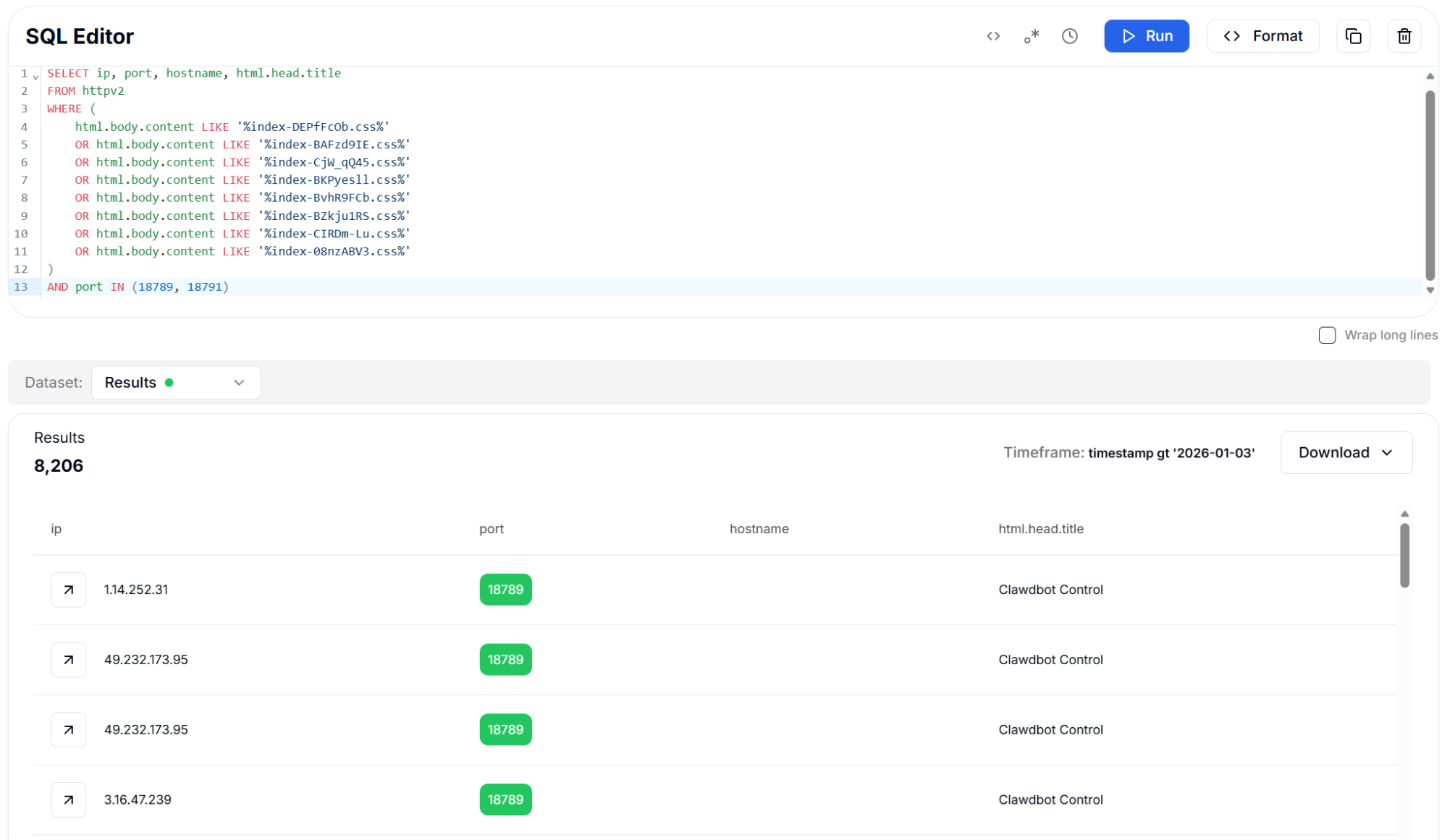 Figure 17: CSS Asset Fingerprints with Port Filter - 8,206 Results
Detection Strategy 6: TLS Certificate Fingerprints (JA4X)
JA4X is a TLS certificate fingerprinting method that creates unique identifiers based on certificate properties including the issuer, subject, and extension information. For OpenClaw instances configured with TLS encryption, these certificate fingerprints provide a reliable identification mechanism that operates at the transport layer, independent of any HTTP-level characteristics.
Our analysis revealed that many OpenClaw deployments use self-signed certificates with distinctive organization names such as "Clawdbot", "Moltbot", or "OpenClaw" in the certificate fields. Others use certificates from common providers like Let's Encrypt, ZeroSSL, or Cloudflare. The JA4X fingerprints capture these patterns, enabling detection even when the HTTP response content has been modified or is unavailable.
This detection method found 189 instances with TLS certificates, representing the subset of deployments that have enabled HTTPS. While this is a smaller population than HTTP-only instances, TLS-enabled deployments represent a smaller subset of exposed instances and can be prioritized separately during remediation efforts.
The following query uses JA4X certificate fingerprints to identify TLS-enabled OpenClaw deployments at the transport layer.
Query:
SELECT ip, port, hostname, html.head.title
FROM httpv2
WHERE tls.cert.hash.ja4x IN (
    'a373a9f83c6b_000000000000_25294184ae24',
    'a373a9f83c6b_7022c563de38_2e3757343cb0',
    '7022c563de38_7022c563de38_795797892f9c',
    '2bab15409345_2bab15409345_795797892f9c',
    'a373a9f83c6b_7022c563de38_f64f03ad387e',
    '7d5dbb3783b4_7022c563de38_f64f03ad387e',
    '2166164053c1_2166164053c1_795797892f9c',
    'a373a9f83c6b_7022c563de38_2cdf432ec278',
    'dc020972a4a8_9fb583da09a2_fb02ba79e164'
)
AND port IN (18789, 18791)

                Copy
Output example:
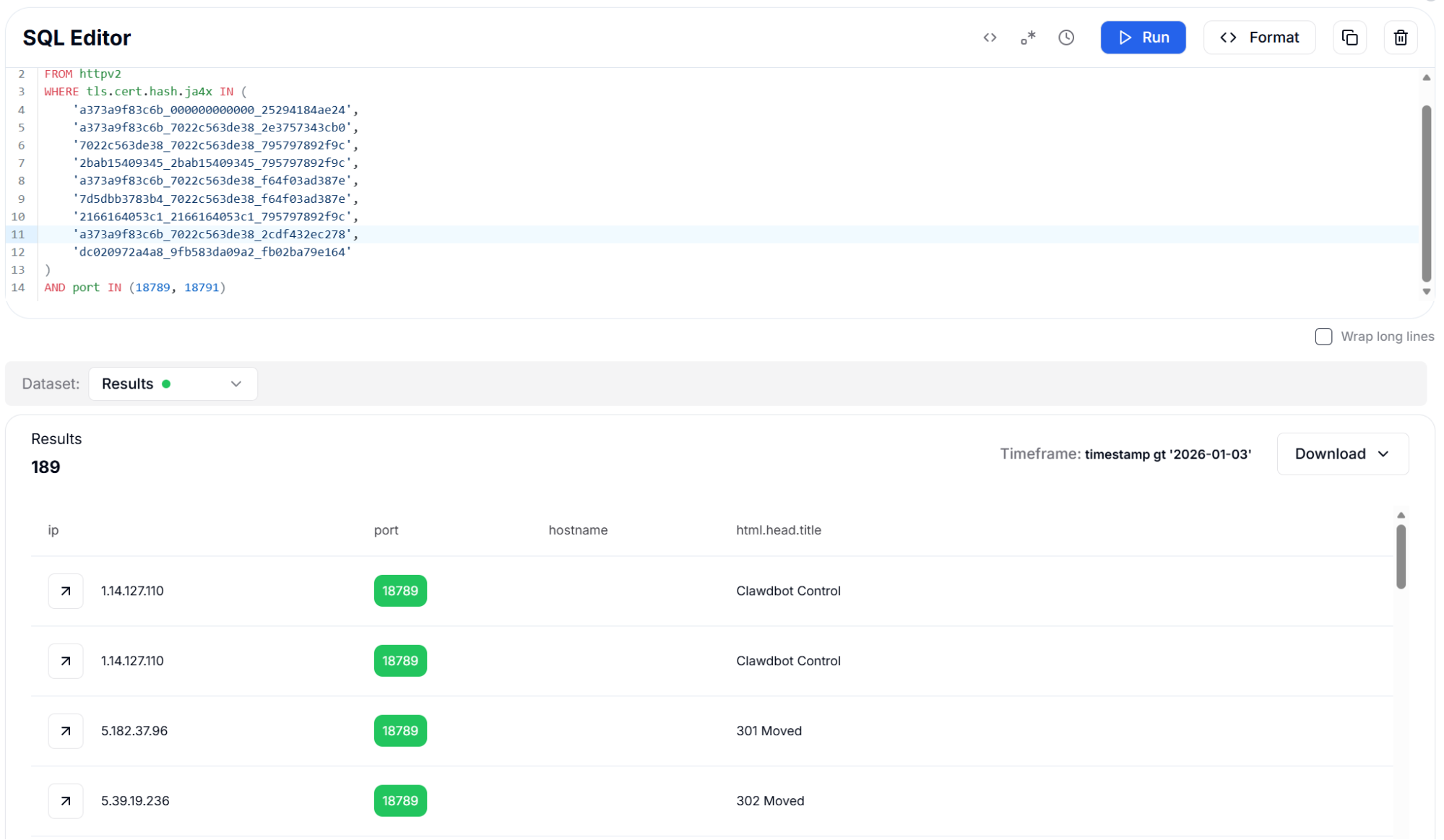 Figure 18: JA4X TLS Certificate Fingerprints - 189 Results
Detection Strategy 7: Content-Length Header
The HTTP Content-Length header indicates the size of the response body in bytes. For web applications with static index pages like OpenClaw, this value remains consistent across deployments of the same version. The framework's default landing page produces response bodies of characteristic sizes: 671 bytes, 668 bytes, 841 bytes, 670 bytes, 669 bytes, and 667 bytes, depending on the specific version and configuration.
While Content-Length alone is not a unique identifier (many applications might produce responses of similar sizes), when combined with port filtering for the CVE-specific ports 18789 and 18791, this simple fingerprint becomes highly effective. The query identified 7,619 instances, demonstrating that even basic HTTP metadata can be valuable for threat hunting when properly contextualized.
This detection method is particularly useful as a quick validation check or for environments where more sophisticated fingerprinting data may not be available. It can also serve as a first-pass filter to reduce the dataset before applying more computationally expensive analysis techniques.
This method relies on consistent Content-Length values observed across OpenClaw versions when combined with port filtering.
Query:
SELECT ip, port, hostname, html.head.title
FROM httpv2
WHERE http.headers.content_length IN ('671', '668', '841', '670', '669', '667')
AND port IN (18789, 18791)

                Copy
Output example:
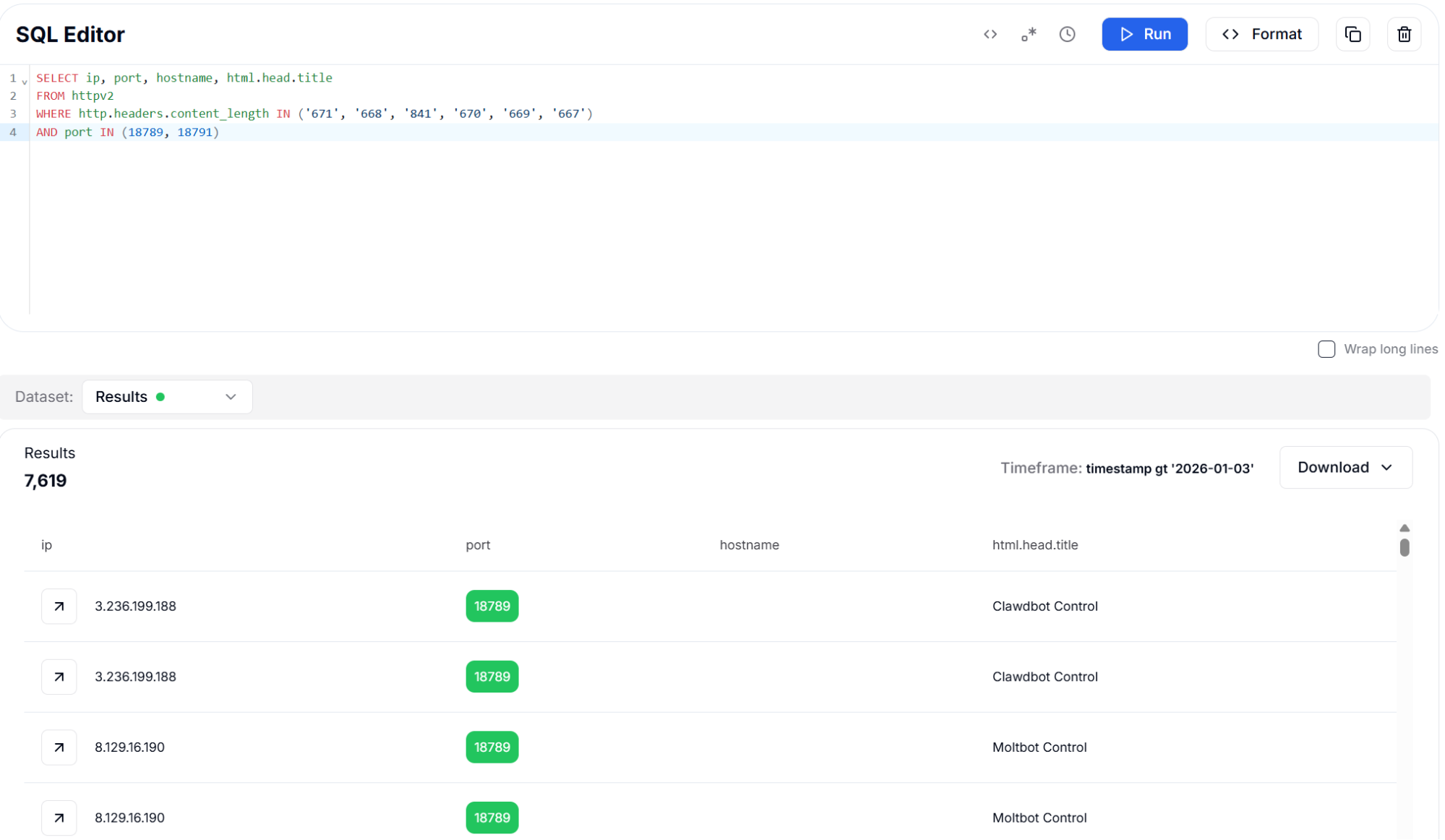 Figure 19: Content-Length Header with Port Filter - 7,619 Results
CVE-2026-25253 Target Ports
The vulnerability specifically affects services running on the default OpenClaw ports documented in the CVE advisory. Understanding the role of each port is essential for both detection and remediation efforts. Port 18789 hosts the main gateway API where the vulnerable authentication export endpoint resides, making it the primary target for exploitation.
| Port | Service | Description |
|---|---|---|
| 18789 | Gateway API | Primary CVE target - /api/export-auth endpoint |
| 18791 | Browser Control | Playwright browser automation interface |
Mitigation Strategies
Immediate Network Isolation: Organizations running OpenClaw, Clawdbot, or Moltbot must immediately restrict network access to ports 18789 and 18791. These services should never be directly exposed to the public internet under any circumstances. Implement firewall rules or network security groups to block inbound connections from untrusted sources.
Credential Rotation: Assume that all API keys and authentication tokens stored in any exposed instance have been compromised. Immediately rotate credentials for Claude, OpenAI, Google AI, and any other AI services that were configured in the framework. Review API usage logs for signs of unauthorized access or unusual activity patterns.
Network Architecture Review: Never expose browser automation frameworks or AI agent tools directly to the internet. Implement defense-in-depth using VPNs, bastion hosts, zero-trust network access (ZTNA) solutions, or private network segments for remote administration. Consider using reverse proxies with authentication requirements.
Patch Management: Apply security patches as soon as they become available from the framework maintainers. Monitor the project repositories and security advisories for updates. Consider implementing automated patch management for development tools and internal applications.
Conclusion
The number of exposed OpenClaw instances identified across the public internet shows the risk of deploying AI automation tools without proper access controls. With over 17,500 exposed instances identified through our scanning efforts, this vulnerability represents a substantial attack surface that could enable mass credential theft, affecting AI service providers and their customers worldwide.
The multi-layered detection methodology presented in this report provides security teams with practical, battle-tested queries for identifying vulnerable assets. By combining HTML title matching, header fingerprinting, body hashing, asset identification, certificate analysis, and content-length filtering, organizations can achieve comprehensive coverage for OpenClaw detection across their network perimeter and cloud infrastructure.
If you want to explore how Hunt.io can be used to track similar exposure patterns or validate findings across your own attack surface, you can book a demo to walk through the workflows used in this research.
In reaction to the recent CVE-2026-25253, our research team set out to understand how this vulnerability appears in real-world deployments and what could be identified at internet scale using Hunt.io.
Our analysis focused on internet-exposed browser automation frameworks affected by CVE-2026-25253, including OpenClaw and its forks Clawdbot and Moltbot, which expose web-based control interfaces that store API credentials for multiple AI services. When deployed without proper access controls, these interfaces are directly reachable from the public internet.
In this report, our team outlines how exposed OpenClaw instances were identified at scale, the infrastructure patterns behind those deployments, and the detection techniques used to fingerprint vulnerable instances using Hunt.io's SQL-based search capabilities.
Key Findings
Identified over 17,500 exposed instances of OpenClaw, Clawdbot, and Moltbot vulnerable to CVE-2026-25253.
The vulnerability allows unauthenticated access to stored API tokens via the /api/export-auth endpoint.
Affected instances store credentials for Claude, OpenAI, Google AI, and other AI services.
Clawdbot Control represents 68.9% of identified deployments, followed by Moltbot Control (22.3%) and OpenClaw Control (8.8%).
Exposed instances were observed across 52 countries, with the highest concentrations in the United States and China.
98.6% of deployments run on cloud or hosting infrastructure, primarily DigitalOcean, Alibaba Cloud, and Tencent.
While port 18789 is the most common, many instances also run on ports 80 and 443, often behind reverse proxies.
Multiple detection methods were validated, including HTML title matching, HTTP header hashing, body hashing, asset fingerprinting, TLS certificate fingerprints, and content-length analysis.
To provide context for these findings, the following section outlines what OpenClaw is and how its control interface is typically deployed.
What is OpenClaw?
OpenClaw (and its popular forks Clawdbot and Moltbot) is an open-source browser automation framework designed to connect large language models like Claude and GPT-4 to web browsers through the Playwright automation library. Users configure the framework with their API keys to enable AI agents to autonomously browse websites, fill out forms, extract data, and perform complex web-based tasks.
The framework exposes a web-based control panel typically accessible on port 18789 that provides a graphical interface for managing automation sessions, viewing real-time browser activity, configuring AI model parameters, and storing authentication credentials. This control panel is the primary attack surface for CVE-2026-25253.
The Vulnerability: CVE-2026-25253 affects all versions of OpenClaw before the security patch. The /api/export-auth endpoint was designed to allow users to back up their stored credentials, but the endpoint lacks any authentication or authorization checks. This means anyone who can reach the service over the network can extract all stored API tokens, including keys for Claude, OpenAI, Google AI, and other services.
To assess the scope of this exposure, our research team analyzed how OpenClaw and its forks are distributed across deployed variants.
Framework Distribution
The affected software ecosystem consists of three related browser automation frameworks sharing a common codebase derived from the original OpenClaw project.
The analysis of 17,470 instances with identifiable HTML titles reveals that Clawdbot Control is the dominant variant at 68.9% of all deployments, followed by Moltbot Control at 22.3% and the original OpenClaw Control at 8.8%.
From a threat hunting perspective, this means detection rules must account for all three title variants to achieve comprehensive coverage. The prevalence of Clawdbot suggests it has become the most actively maintained fork, which may also make it the most likely to receive a timely security patch for CVE-2026-25253.
Figure 1: Framework Distribution Across 17,470 Identified InstancesGeographic Distribution
Using Hunt.io Bulk IP Enrichment of 2,500 unique IP addresses through geolocation and ASN analysis reveals the global spread of vulnerable OpenClaw deployments across 52 countries.
The United States leads with 891 instances (35.6%), driven primarily by DigitalOcean data centers in Santa Clara and Clifton. China follows with 648 instances (25.9%), concentrated across Alibaba Cloud and Tencent infrastructure in Beijing, Hangzhou, and Shanghai.
Figure 2: Bulk extraction and enrichment results showing 2,500 unique IPv4 addressesEuropean and Asian hosting hubs account for the remaining deployments, with Germany (6.6%), Singapore (6.5%), and Hong Kong (4.4%) serving as significant regional nodes.
This concentration aligns with how browser automation workloads are typically deployed, requiring persistent compute resources and stable network connectivity.
Figure 3: Geographic Distribution of Exposed Instances by Country (Top 10)Top Cities
City-level analysis reveals that exposed instances cluster around major cloud provider data center locations rather than traditional enterprise hubs. Santa Clara leads with 250 instances corresponding to DigitalOcean and cloud infrastructure in Silicon Valley, while Clifton, New Jersey, accounts for 207 instances on East Coast hosting platforms. In China, Beijing (214), Hangzhou (121), Shanghai (119), and Guangzhou (97) collectively represent substantial Alibaba Cloud and Tencent deployments.
Figure 4: Top 10 Cities Hosting Vulnerable OpenClaw InstancesInfrastructure Providers
ASN analysis confirms that 98.6% of exposed instances run on commercial hosting and cloud infrastructure, with only 20 instances on ISP networks and 16 on business-class connections. DigitalOcean is the single largest host with 880 instances (35.2%), followed by Alibaba Cloud entities collectively hosting 660 instances (26.4%) across their Hangzhou and US-based data centers. Tencent rounds out the top three with 307 combined instances (12.3%).
Figure 5: Top 10 Infrastructure Providers Hosting Vulnerable InstancesThe dominance of cloud hosting providers indicates that most OpenClaw deployments are intentional server-side installations rather than accidental exposures from desktop applications. This also means that cloud provider security teams and abuse departments could play a significant role in driving remediation by notifying affected customers of the exposed vulnerability.
Figure 6: ASN Type Distribution - 98.6% Hosted on Cloud/Hosting InfrastructureBeyond hosting providers, port usage patterns provide additional insight into how these instances are exposed and accessed.
Port Distribution
Port analysis across all 17,470 identified instances reveals that while the default port 18789 accounts for the largest share at 47.3% (8,258 instances), a substantial number of deployments run on standard web ports. HTTP port 80 hosts 30.1% (5,263 instances) and HTTPS port 443 hosts 18.9% (3,299 instances), indicating widespread use of reverse proxies like nginx to front the application.
The presence of instances on non-standard ports such as 18888 (243 instances) and 8080 (100 instances) suggests custom deployment configurations that may require additional hunting rules. Defenders should note that port-filtered queries targeting only 18789 and 18791 will miss approximately half of all exposed instances, making title-based and body-hash detection methods essential for comprehensive coverage.
Figure 7: Port Distribution Across All Identified InstancesBased on these exposure patterns, our research team developed multiple detection strategies to identify vulnerable OpenClaw instances at scale.
Hunting Methodology
Using Hunt.io's powerful SQL-based search against our comprehensive internet scanning database, we analyzed exposed OpenClaw instances across the global internet.
The following sections document each fingerprinting technique with the exact HuntSQL queries used, along with screenshots showing real-world results. Security teams can adapt these queries for their own threat hunting operations to identify potentially vulnerable assets within their network perimeter or among their cloud infrastructure.
Detection Strategy 1: HTML Title Matching
The most straightforward and reliable fingerprint for identifying OpenClaw instances is the HTML page title returned by the web control panel. Each fork of the framework uses a distinctive title that clearly identifies the variant: "Clawdbot Control" for the original framework, "Moltbot Control" for the Chinese fork, and "OpenClaw Control" for the community rebrand. These titles remain consistent across deployments and are rarely modified by operators.
We tested two query approaches for maximum coverage. The first uses a simple LIKE pattern matching with wildcards to catch each variant separately.
Query (LIKE method):
SELECT ip, port, hostname, html.head.title
FROM httpv2
WHERE html.head.title LIKE '%Clawdbot Control%'
   OR html.head.title LIKE '%OpenClaw Control%'
   OR html.head.title LIKE '%Moltbot Control%'

                Copy
Sample output:
Figure 8: HTML Title Search using LIKE - 17,587 ResultsThe second uses RLIKE with a case-insensitive regular expression to capture all three variants in a single query.
Query (RLIKE regex method):
SELECT ip, port, hostname, html.head.title
FROM httpv2
WHERE html.head.title RLIKE '(?i)(clawdbot|moltbot|openclaw).*control'

                Copy
Output example:
Figure 9: HTML Title Search using RLIKE (Regex) - 17,590 ResultsBoth approaches proved highly effective, with the regex query returning slightly more results due to its ability to match variations in capitalization and spacing.
This method stands out because it requires no prior knowledge of specific hash values or fingerprints - it directly identifies the application by its self-declared identity. The results show exposed instances running on a wide variety of ports beyond the default, indicating that many operators attempt security through obscurity by changing the listening port.
The regex query captured 17,590 instances across all three variants. Results reveal instances running on various non-standard ports, including 80, 443, 8080, 8081, 9009, 18888, and the default 18789, demonstrating that port-based filtering alone is insufficient for comprehensive detection.
Detection Strategy 2: HTTP Header Fingerprinting
HTTP response headers provide another reliable fingerprinting vector because web servers and application frameworks produce consistent header patterns. OpenClaw instances share characteristic header combinations due to their common Vite-based frontend build system and Express.js backend.
By computing Murmur3 hashes of the response headers, we can efficiently search for matching patterns across billions of HTTP responses in our database.
We tested three different header hash variants to understand their effectiveness: normalized headers (standardized ordering and formatting), sorted headers (alphabetically ordered), and unique headers (deduplicated header names). Each variant captures slightly different aspects of the HTTP response signature, but all three converge on the same set of approximately 8,260 instances when filtered to the default port.
The consistency across all three hash types validates the reliability of header-based fingerprinting for this target. The hash values were extracted from confirmed OpenClaw instances during our initial reconnaissance phase, then used as search signatures to discover additional exposed deployments at scale.
The following query matches normalized HTTP header hashes extracted from confirmed OpenClaw instances.
Query (Normalized Header Hash):
SELECT ip, port, hostname, html.head.title
FROM httpv2
WHERE http.headers.normalized.hash.murmur3 IN (
    '01D737B6D4249593',
    'A21D8F4148A7091A',
    'B5B27B39C533B437',
    '75530A6460E2396C',
    '21DFA63A75ACFD53',
    'D263AF8ACFBCB72B',
    'A905FF566F28EC67',
    '2227E50E61F4757E',
    '91794924F783020C',
    'D417839C4651FBDE'
) AND port IN (18789, 18791)

                Copy
Output example:
Figure 10: Sorted Header Hash (Murmur3) - 8,260 ResultsThe following variant uses alphabetically sorted headers to validate consistency across different hash representations.
Query (Sorted Header Hash):
SELECT ip, port, hostname, html.head.title
FROM httpv2
WHERE http.headers.sorted.hash.murmur3 IN (
    'DD4CFCD07F4353B4',
    'A72AAF0B3DE14AA4',
    '91A4568E49C151BA',
    'DF5040A37382F1F6',
    'D2640C3EB53C36F4',
    'F835AFA576840DF9',
    '8E635B9BC1DD3797',
    '752822D238ABE472',
    '5D81B30A0BA1F358',
    '59F09999D5747AD9'
) AND port IN (18789, 18791)

CopyThis version relies on deduplicated header names to confirm the same fingerprint using a minimal header set.
Query (Unique Header Hash):
SELECT ip, port, hostname, html.head.title
FROM httpv2
WHERE http.headers.unique.hash.murmur3 IN (
    '01D737B6D4249593',
    'A21D8F4148A7091A',
    'B5B27B39C533B437',
    '75530A6460E2396C',
    '21DFA63A75ACFD53',
    'D263AF8ACFBCB72B',
    'A905FF566F28EC67',
    '2227E50E61F4757E',
    '91794924F783020C'
) AND port IN (18789, 18791)

                Copy
All three header hash approaches identified 8,260 instances on the default port 18789. The consistency across hash types confirms that OpenClaw deployments maintain uniform header signatures, making this an excellent method for high-confidence detection with minimal false positives.
Detection Strategy 3: Redacted Header Hash (SHA256)
SHA256 hashes of redacted HTTP headers offer another fingerprinting approach that strips variable content like timestamps and session identifiers before computing the hash. This technique is particularly useful for identifying applications that include dynamic values in their headers, as the redaction process normalizes these variations. For OpenClaw instances, the redacted header hash provides a stable identifier even when server timestamps or cache headers change between requests.
When combined with CVE-specific port filtering targeting ports 18789 and 18791, this approach identified 7,130 instances. The port filter is essential for reducing false positives, as the header hash alone might match other applications using similar server configurations. Port 18789 is the default gateway API port where the vulnerable /api/export-auth endpoint is exposed, while port 18791 hosts the browser automation control interface.
The next query applies redacted header hashing to account for dynamic header values while retaining a stable fingerprint.
Query:
SELECT ip, port, hostname, html.head.title
FROM httpv2
WHERE http.headers.redacted.hash.sha256 IN (
    'f3fa269c7c4a677782495c3d4ef3854fcbcf78ac286602969fab25b9f0e06f11',
    '567d4fab01006f75e78b7fe5db8c485bb468d7e28edc4258c1568583e3867157',
    'b2de3e48e1a8074e530c932b8ea2531401a78d4d2f28b9eef0461fae13abbd87',
    'ef1f9347760d317fdcb7f65c2a53d1fe0efd901648858412f7089b4b7fd434f5',
    '3a9b51aaeb0062ef7fade4594149a605cd9796a7c9745d75ba646fe0efd2e3c5',
    '776becf0a492a830c10787e589743d42616ca308d5ec375282678e6ed40ae13d'
)
AND port IN (18789, 18791)

                Copy
Output example:
Figure 12: Redacted Header Hash (SHA256) with Port Filter - 7,130 ResultsDetection Strategy 4: HTML Body Hashing
The OpenClaw web interface produces consistent HTML output because it is built using Vite with a React frontend that generates deterministic builds. By computing hashes of the HTML response body, we can create stable fingerprints that identify instances regardless of the HTTP headers they return. This approach is particularly effective for detecting instances running behind reverse proxies or load balancers that may modify header values.
We employed three complementary hash algorithms for body fingerprinting. SHA256 provides cryptographically strong exact matching for unmodified deployments. Murmur3 offers faster computation for large-scale scanning operations. TLSH (Trend Micro Locality Sensitive Hash) enables fuzzy matching that can detect modified versions of the framework with minor HTML changes, making it invaluable for finding customized or obfuscated deployments.
The body hashing approach identified approximately 6,800 instances across all three algorithms. The slight variation in results between hash types reflects differences in how each algorithm handles whitespace and encoding variations. TLSH is particularly valuable for detecting instances where operators have made cosmetic modifications to the interface.
The following query uses exact SHA256 hashes of the HTML body to identify unmodified OpenClaw deployments.
Query (SHA256 Body Hash):
SELECT ip, port, hostname, html.head.title
FROM httpv2
WHERE html.body.hash.sha256 IN (
    'DECF58D16C7436B434ED551703F510564AA5E17C19E9CAC5220E0A257DC5D55D',
    '796A9FC9101556A326DBD2B18790EDD6FAF20A38FBFE260C855FDE9560801661',
    '995880C9E738FFE27183671D515FBA80DDB14DDBACE728E91568499B95724CDF',
    '57B7EDD7DDB95F9DC4C4CC6F1976BCEA781AE134B10E013B9EBC390007C3A5F6',
    '9A2EB53F0F3526ED528B342C8300C0BD25312F23B1F22471617E6FEBC32E0B83',
    'F9BCCE51878B4B206F4F9B878F0A93E022E0E3C5C1739851FFA1ED474C865575',
    'E0726B08D60A26BC0CCC3B935959D53655B008619B2B28BC4D0163C8791E415E'
)
AND port IN (18789, 18791)

                Copy
Output example:
Figure 13: Body Hash (SHA256) with Port Filter - 6,801 ResultsThis variant applies Murmur3 body hashing to support faster matching across large datasets.
Query (Murmur3 Body Hash):
SELECT ip, port, hostname, html.head.title
FROM httpv2
WHERE html.body.hash.murmur3 IN (
    '2683260611',
    '2640755433',
    '885981446',
    '3742799908',
    '1008552787',
    '743781550',
    '44186107',
    '1133263748',
    '1208028788'
)
AND port IN (18789, 18791)

                Copy
Output example:
Figure 14: Body Hash (Murmur3) - 6,839 ResultsThis approach uses TLSH fuzzy hashing to identify instances with minor HTML modifications or customized builds.
Query (TLSH Fuzzy Body Hash):
SELECT ip, port, hostname, html.head.title
FROM httpv2
WHERE html.body.hash.tlsh IN (
    'dc019e0158a08a3773a4432815e6fd186e52a2434789ea4475dbb07d0fc5b93c9db4ec',
    '4e01fe0198a08e1733b4423419b6f8482e6262470789da4075da703c4ec9ba2c9db4f8',
    '09019e4198a08a3773a44422419e6fc186e62a243038def4475db703d1ec5ba2c9db4ec',
    '72011241889089l733a093388ba3bc249a42a24b4b1a5f4435c6307d6fe4fd34ddf4f8',
    'a9011241c8d08d1723a092348ba3bc649a42a24b4b1a5f4435c6307d6fe4bd389df4f8',
    'e601fe0188a08e1733b4422419e2f8582e666143038ada4075da703c4ec8ba2c9db4f8',
    '0801fe0188a08e1733b4422415a6f8482e626143038ada4075da703d1fc8ba2c9db4f8',
    '1501230818e1733f4423419e2fc482e626143038ada4075da703c0fc8ba2cddb4fc',
    '5b019e0598a08a3773b4432815e7fc186e52a2434789eb4475dfb03d0ec5b82c9db4dc'
)
AND port IN (18789, 18791)

                Copy
Output example:
Figure 15: Body Hash (TLSH Fuzzy) with Port Filter - 6,839 ResultsDetection Strategy 5: JavaScript and CSS Asset Fingerprints
Modern web applications built with bundlers like Vite include content-addressed asset filenames that incorporate hash values derived from the file contents. For OpenClaw, this means each version release produces unique JavaScript and CSS filenames such as "index-Cl-Y9zqE.js" or "index-DEPfFcOb.css". These hashed filenames serve as version-specific identifiers that remain constant across all deployments of the same build.
By searching for these distinctive asset filenames within the HTML body content, we can identify OpenClaw instances and even determine which specific version they are running. This information is valuable for vulnerability assessment, as different versions may have different security patches applied. The asset fingerprinting approach found over 8,000 instances, providing strong coverage across the deployed population.
This approach remains effective even when minor interface changes are introduced, since asset hashes are embedded in the build process and require a full rebuild to change. Security teams can use these fingerprints to track version distribution and prioritize patching efforts for older, more vulnerable releases.
The next query identifies OpenClaw instances by matching version-specific JavaScript asset filenames embedded in the HTML.
Query (JavaScript Assets):
SELECT ip, port, hostname, html.head.title
FROM httpv2
WHERE (
    html.body.content LIKE '%index-Cl-Y9zqE.js%'
    OR html.body.content LIKE '%index-5xhVxegE.js%'
    OR html.body.content LIKE '%index-BCK1V83p.js%'
    OR html.body.content LIKE '%index-DFDgq9AK.js%'
    OR html.body.content LIKE '%index-CXUONUC9.js%'
    OR html.body.content LIKE '%index-CxUFDXFX.js%'
    OR html.body.content LIKE '%index-Bb7zaWmQ.js%'
    OR html.body.content LIKE '%index-DsXRcnEw.js%'
    OR html.body.content LIKE '%index-CxUwHlqZ.js%'
    OR html.body.content LIKE '%index-kjHVNdSc.js%'
    OR html.body.content LIKE '%index-RnF4fdeM.js%'
) AND port IN (18789, 18791)

                Copy
Output example:
Figure 16: JavaScript Asset Fingerprints - 8,164 ResultsThe following query applies the same technique using hashed CSS asset filenames to expand version coverage.
Query (CSS Assets):
SELECT ip, port, hostname, html.head.title
FROM httpv2
WHERE (
    html.body.content LIKE '%index-DEPfFcOb.css%'
    OR html.body.content LIKE '%index-BAFzd9IE.css%'
    OR html.body.content LIKE '%index-CjW_qQ45.css%'
    OR html.body.content LIKE '%index-BKPyesll.css%'
    OR html.body.content LIKE '%index-BvhR9FCb.css%'
    OR html.body.content LIKE '%index-BZkju1RS.css%'
    OR html.body.content LIKE '%index-CIRDm-Lu.css%'
    OR html.body.content LIKE '%index-O8nzABV3.css%'
)
AND port IN (18789, 18791)

                Copy
Output example:
Figure 17: CSS Asset Fingerprints with Port Filter - 8,206 ResultsDetection Strategy 6: TLS Certificate Fingerprints (JA4X)
JA4X is a TLS certificate fingerprinting method that creates unique identifiers based on certificate properties including the issuer, subject, and extension information. For OpenClaw instances configured with TLS encryption, these certificate fingerprints provide a reliable identification mechanism that operates at the transport layer, independent of any HTTP-level characteristics.
Our analysis revealed that many OpenClaw deployments use self-signed certificates with distinctive organization names such as "Clawdbot", "Moltbot", or "OpenClaw" in the certificate fields. Others use certificates from common providers like Let's Encrypt, ZeroSSL, or Cloudflare. The JA4X fingerprints capture these patterns, enabling detection even when the HTTP response content has been modified or is unavailable.
This detection method found 189 instances with TLS certificates, representing the subset of deployments that have enabled HTTPS. While this is a smaller population than HTTP-only instances, TLS-enabled deployments represent a smaller subset of exposed instances and can be prioritized separately during remediation efforts.
The following query uses JA4X certificate fingerprints to identify TLS-enabled OpenClaw deployments at the transport layer.
Query:
SELECT ip, port, hostname, html.head.title
FROM httpv2
WHERE tls.cert.hash.ja4x IN (
    'a373a9f83c6b_000000000000_25294184ae24',
    'a373a9f83c6b_7022c563de38_2e3757343cb0',
    '7022c563de38_7022c563de38_795797892f9c',
    '2bab15409345_2bab15409345_795797892f9c',
    'a373a9f83c6b_7022c563de38_f64f03ad387e',
    '7d5dbb3783b4_7022c563de38_f64f03ad387e',
    '2166164053c1_2166164053c1_795797892f9c',
    'a373a9f83c6b_7022c563de38_2cdf432ec278',
    'dc020972a4a8_9fb583da09a2_fb02ba79e164'
)
AND port IN (18789, 18791)

                Copy
Output example:
Figure 18: JA4X TLS Certificate Fingerprints - 189 ResultsDetection Strategy 7: Content-Length Header
The HTTP Content-Length header indicates the size of the response body in bytes. For web applications with static index pages like OpenClaw, this value remains consistent across deployments of the same version. The framework's default landing page produces response bodies of characteristic sizes: 671 bytes, 668 bytes, 841 bytes, 670 bytes, 669 bytes, and 667 bytes, depending on the specific version and configuration.
While Content-Length alone is not a unique identifier (many applications might produce responses of similar sizes), when combined with port filtering for the CVE-specific ports 18789 and 18791, this simple fingerprint becomes highly effective. The query identified 7,619 instances, demonstrating that even basic HTTP metadata can be valuable for threat hunting when properly contextualized.
This detection method is particularly useful as a quick validation check or for environments where more sophisticated fingerprinting data may not be available. It can also serve as a first-pass filter to reduce the dataset before applying more computationally expensive analysis techniques.
This method relies on consistent Content-Length values observed across OpenClaw versions when combined with port filtering.
Query:
SELECT ip, port, hostname, html.head.title
FROM httpv2
WHERE http.headers.content_length IN ('671', '668', '841', '670', '669', '667')
AND port IN (18789, 18791)

                Copy
Output example:
Figure 19: Content-Length Header with Port Filter - 7,619 ResultsCVE-2026-25253 Target Ports
The vulnerability specifically affects services running on the default OpenClaw ports documented in the CVE advisory. Understanding the role of each port is essential for both detection and remediation efforts. Port 18789 hosts the main gateway API where the vulnerable authentication export endpoint resides, making it the primary target for exploitation.
| Port | Service | Description |
|---|---|---|
| 18789 | Gateway API | Primary CVE target - /api/export-auth endpoint |
| 18791 | Browser Control | Playwright browser automation interface |
Mitigation Strategies
Immediate Network Isolation: Organizations running OpenClaw, Clawdbot, or Moltbot must immediately restrict network access to ports 18789 and 18791. These services should never be directly exposed to the public internet under any circumstances. Implement firewall rules or network security groups to block inbound connections from untrusted sources.
Credential Rotation: Assume that all API keys and authentication tokens stored in any exposed instance have been compromised. Immediately rotate credentials for Claude, OpenAI, Google AI, and any other AI services that were configured in the framework. Review API usage logs for signs of unauthorized access or unusual activity patterns.
Network Architecture Review: Never expose browser automation frameworks or AI agent tools directly to the internet. Implement defense-in-depth using VPNs, bastion hosts, zero-trust network access (ZTNA) solutions, or private network segments for remote administration. Consider using reverse proxies with authentication requirements.
Patch Management: Apply security patches as soon as they become available from the framework maintainers. Monitor the project repositories and security advisories for updates. Consider implementing automated patch management for development tools and internal applications.
Conclusion
The number of exposed OpenClaw instances identified across the public internet shows the risk of deploying AI automation tools without proper access controls. With over 17,500 exposed instances identified through our scanning efforts, this vulnerability represents a substantial attack surface that could enable mass credential theft, affecting AI service providers and their customers worldwide.
The multi-layered detection methodology presented in this report provides security teams with practical, battle-tested queries for identifying vulnerable assets. By combining HTML title matching, header fingerprinting, body hashing, asset identification, certificate analysis, and content-length filtering, organizations can achieve comprehensive coverage for OpenClaw detection across their network perimeter and cloud infrastructure.
If you want to explore how Hunt.io can be used to track similar exposure patterns or validate findings across your own attack surface, you can book a demo to walk through the workflows used in this research.
Related Posts
Related Posts
Related Posts


