A Practical Guide to Uncovering Malicious Infrastructure With Hunt.io
Published on

Tracking malicious infrastructure is critical to threat hunting and cyber threat intelligence. While traditional hunts focus on detecting compromises within an organization's environment, infrastructure hunting shifts the defender's focus outward, mapping attacker operations before they reach the network.
Threat actors rarely operate from a single server. Instead, they use clusters of domains, IP addresses, and network resources to stage malware, manage command-and-control (C2), and evade detection.
In this post, we walk through how to hunt malicious infrastructure using scan data and certificate analysis. Starting with a single IP address associated with AsyncRAT, we pivot through ports, certificates, and TLS fingerprints to uncover a wider cluster of related systems. By following these indicators, defenders can take a proactive approach, turning isolated data points into a clearer picture of adversary C2 activity.
Step 1: Finding a Starting Point
Every hunt begins somewhere. Sometimes, it starts with a clear lead: an IP address found in a threat feed like IOC Hunter, a domain listed as an indicator of compromise (IoC) in a security report, or an alert in a security incident and event monitoring (SIEM) system. It can also begin with a hunch-an unusual connection in a firewall log or a pattern in network traffic that stands out.
Websites like MalwareBazaar and ThreatFox regularly publish indicators linked to malware infrastructure, making them valuable investigative sources. Discussions on X can also surface real-time threat activity, offering additional context on C2 tactics.
Our investigation starts with 37.72.172[.]58, an IP recently identified in Hunt's internet scans. The server has been associated with AsyncRAT activity, a remote access trojan commonly used to control infected Windows systems, enabling attackers to execute commands, steal data, and monitor victims remotely.
While we know it's associated with suspicious activity, the focus here isn't on attribution; it's on analyzing the IP and uncovering related infrastructure.
Open a text editor or grab a notebook, and follow along as we walk through each step.
Step 2: Querying the IP in Hunt
We'll start by entering the IP into Hunt's search bar. In addition to IP addresses, users can also conduct lookups of domains, ASNs, and even threat actor names. If you haven't checked out our post on the reimagining of Hunt.io with an infrastructure-first approach to threat intelligence, please do.
By default, we are dropped into the Info tab (Figure 1).
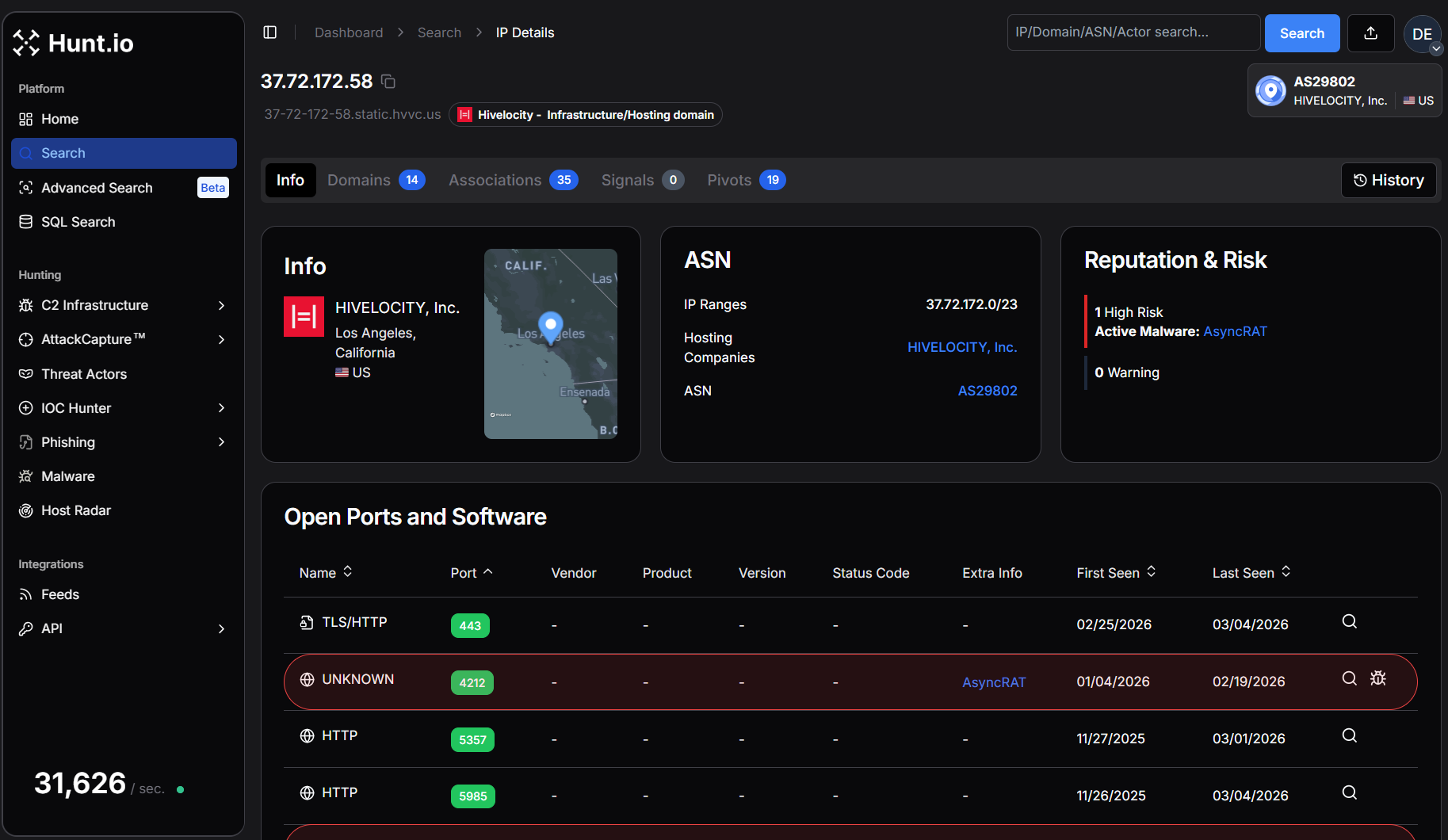 Figure 1. IP overview for our suspicious IP in Hunt.
Breaking Down the Overview Page
The Overview page immediately shows where this IP is hosted, which ports are open, and whether DNS records are associated with it. The Info tab is a starting point, providing key details like the hosting provider, ASN, and software. While this alone won't confirm malicious activity, it helps researchers and defenders decide whether an IP warrants further analysis.
Several other tabs will assist in our hunt going forward:
Domains - Displays any domain names that have resolved to the IP.
Associations - Quickly identifies connections to additional infrastructure through shared SSH keys, TLS certificates, and IOCs.
SSL History - Logs past TLS certificates used by the IP, making it an essential tool for tracking infrastructure reuse.
These tabs will assist us as we continue investigating, offering immediate pivot points that help us map out the surrounding infrastructure.
Step 3: Analyzing ASN & Domain Data
Staying within the overview page, we can see the IP address in question is hosted by HIVELOCITY, Inc. (AS29802) in Los Angeles, California. HIVELOCITY, Inc. provides dedicated server hosting, colocation, and cloud solutions with data centers across the globe. They focus on delivering high-performance infrastructure and 24/7 customer support.
A closer look at the Domain tab reveals 14 hostnames resolving to our IP.
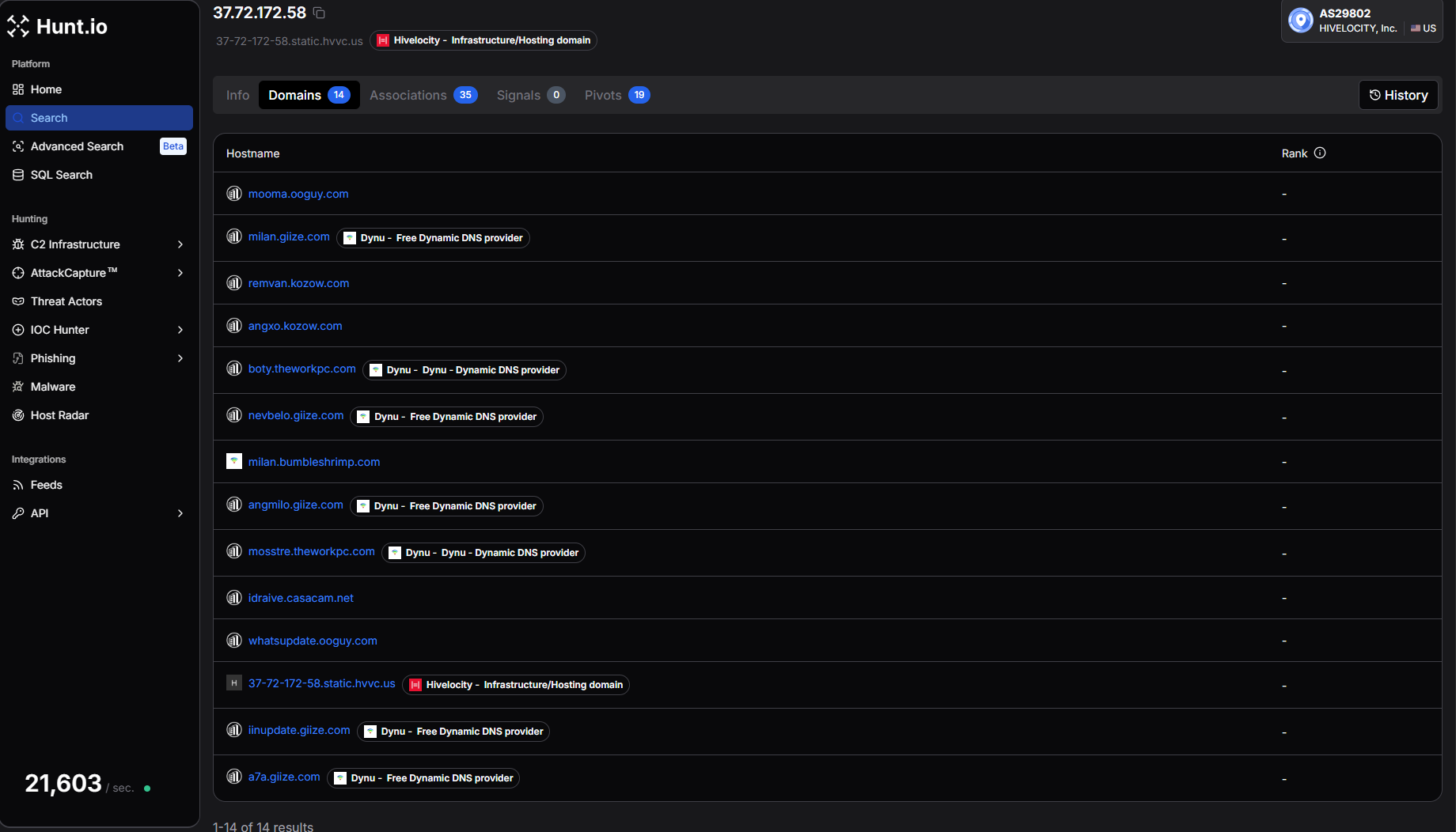 Figure 2. Domain overview in Hunt.
Examples include:
mooma.ooguy[.]com
milan.giize[.]com
remvan.kozow[.]com
angxo.kozow[.]com
boty.theworkpc[.]com
nevbelo.giize[.]com
mosstre.theworkpc[.]com
whatsupdate.ooguy[.]com
iinupdate.giize[.]com
a7a.giize[.]com
Many of these domains are hosted using Dynu, a free dynamic DNS provider. Threat actors frequently abuse dynamic DNS services because they allow domains to remain constant while the underlying IP infrastructure changes. This provides attackers with flexibility when operating command-and-control servers.
The presence of multiple dynamic DNS hostnames resolving to the same IP address suggests this system is not typical shared hosting. Instead, it appears to be a dedicated server being used for command-and-control infrastructure.
At this stage, we've established:
An IP associated with AsyncRAT activity
Multiple domains from dynamic DNS providers
A dedicated hosting provider
Starting your hunt by analyzing domain names provides insight into how a server is likely being used, offering an early look at the threat actor's intent before examining the ports and services.
Step 4: Ports, Services, and Server Responses
Network ports tell the story of a server's purpose on the internet, whether for malware delivery, phishing, or command-and-control (C2). The ports that are exposed, the protocols in use, and how services respond can reveal unique patterns that can be used to track malicious activity.
Our suspect IP exposes a wide range of ports, including 443, 4212, 5357, 5985, 6066, 6606, 7000, 7707, 8088, 8808, 33890, and 47001. Several of these ports have been observed hosting services associated with AsyncRAT, while others return responses consistent with Windows HTTP services and proxy infrastructure.
Examining Protocol Responses
Looking at the port history, multiple TLS ports were flagged with AsyncRAT activity, including 6066, 6606, 7000, 7707, 8088, and 8808. These ports were first observed between December 2025 and January 2026 and remained active through early March 2026.
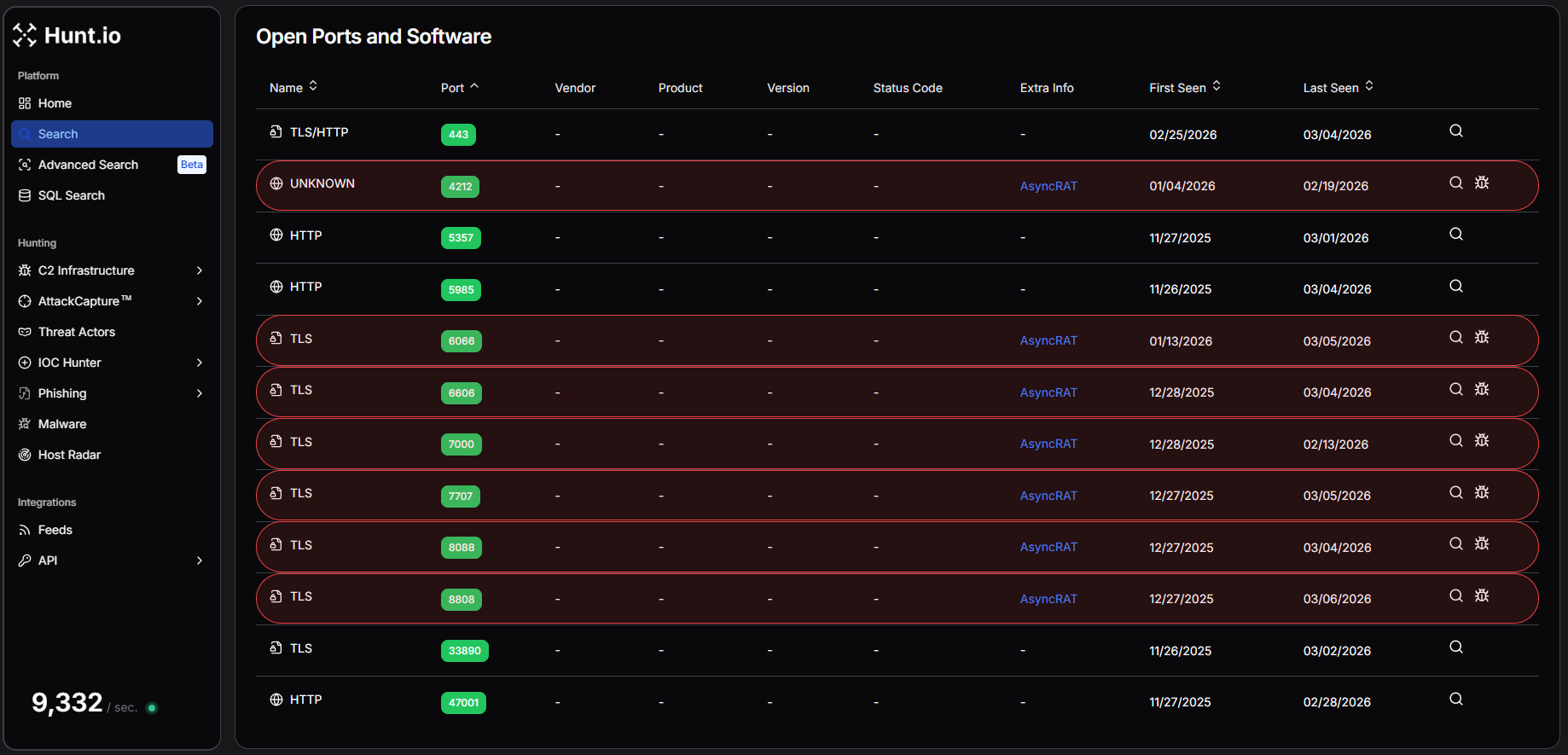 Figure 3. Hunt's Intelligence on IP Address "37.72.172[.]58" shows maximum ports attributed to AsyncRAT activities.
Examining the response data further reveals several interesting characteristics.
Port 22 returns an SSH banner identifying the service as OpenSSH_9.6p1 running on Ubuntu, indicating the server is likely managed through a Linux environment. Port 443, which typically hosts HTTPS services, returns an error indicating that an HTTP request was sent to an HTTPS server, suggesting TLS is enabled but no standard web application is running.
Additional HTTP services appear on ports 5357, 5985, and 47001, all returning responses from Microsoft-HTTPAPI/2.0. These ports are commonly associated with Windows HTTP services and Windows Remote Management (WinRM).
More revealing are the TLS responses observed across the AsyncRAT ports. Within the TLS handshake data, we repeatedly see a certificate subject containing the string:
AsyncRAT Server
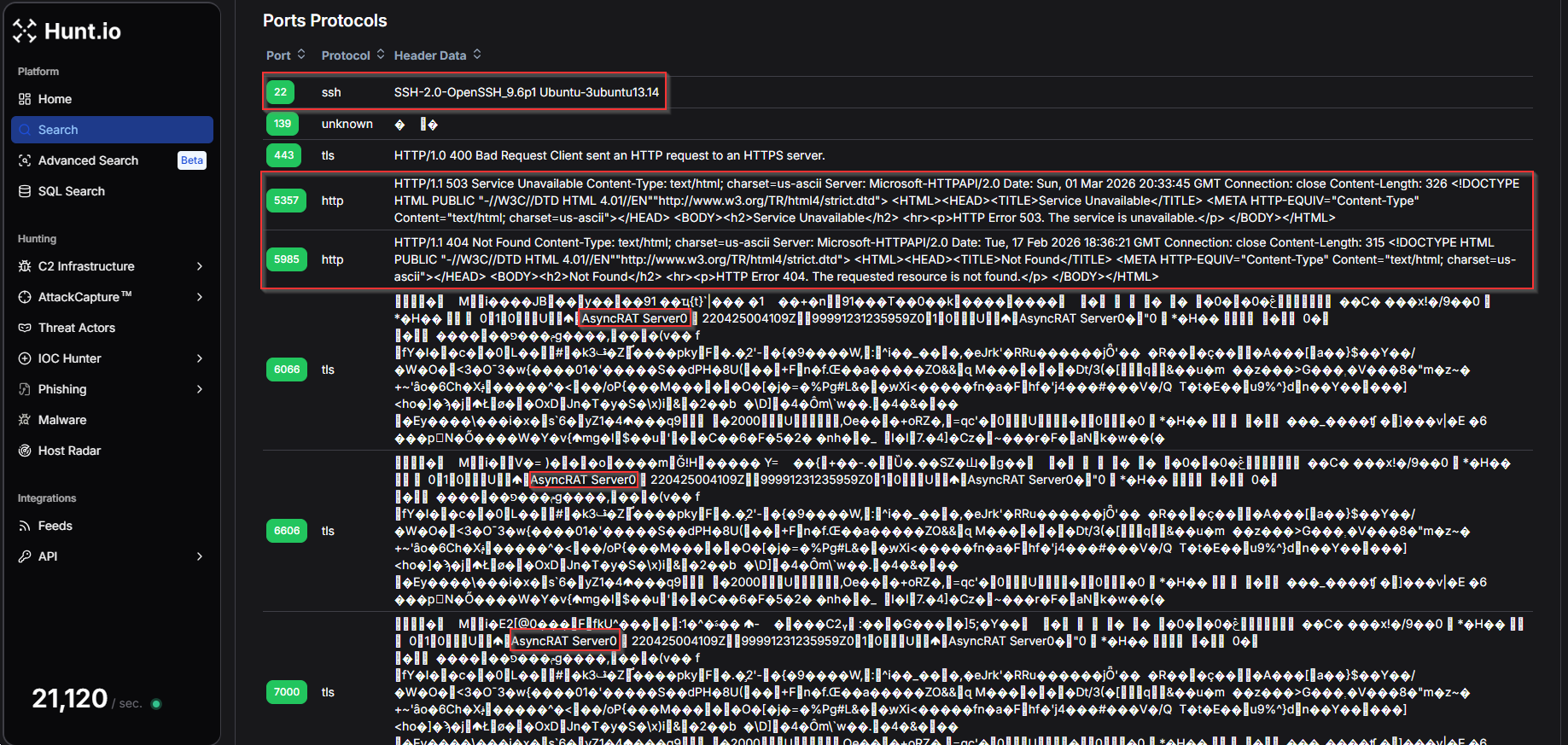 Figure 4. Protocol Header data from Hunt.io Protocol history of ports and services for IP addresses.
To understand how frequently the AsyncRAT Server string appears within Hunt's scan data, we created a HuntSQL query using the protocol dataset. By searching for occurrences of the string within captured header data, we can identify additional servers exposing the same characteristic response.
Example Query:
SELECT
  *
FROM
  protocol
WHERE
  data LIKE '%AsyncRAT%'

                Copy
Example Output:
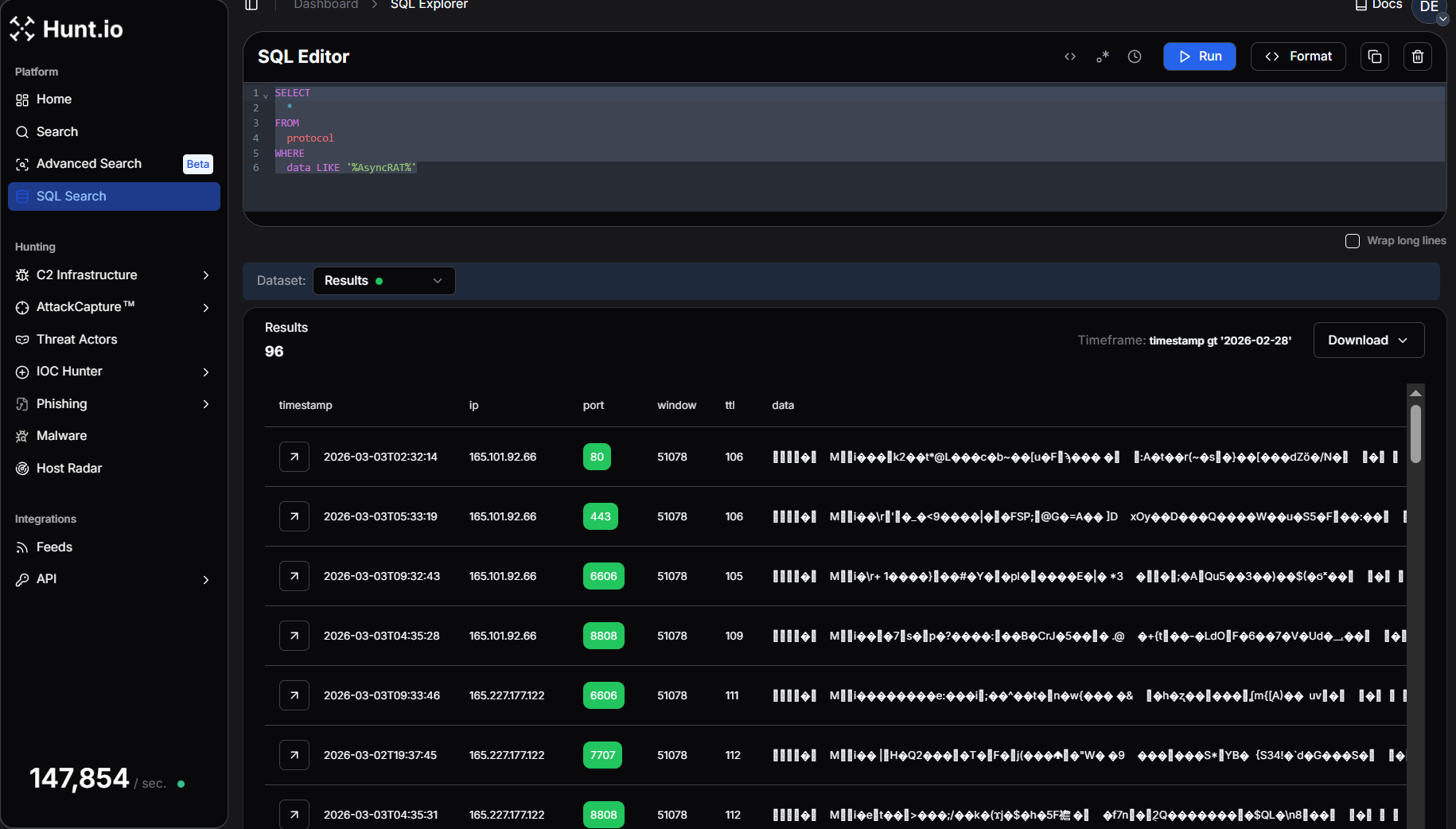 Figure 5. Hunt SQL results after querying for the AsyncRAT string inside protocol responses.
Running this query returns 96 results, confirming that the AsyncRAT response pattern is present across multiple systems in the dataset.
This reinforces the value of protocol response data during infrastructure hunting, as unique strings embedded within TLS or service responses can act as reliable fingerprints for identifying related malware servers.
At this stage of the investigation, the port and protocol data provide strong evidence that the IP address is operating as part of an AsyncRAT C2 infrastructure, exposing multiple listener ports alongside supporting services that may help manage or proxy attacker traffic.
Step 5: Analyzing TLS Certificates for Clues
TLS certificates are a valuable tool for tracking adversary infrastructure. Unlike domains and IP addresses, which are easy to change, certificates often persist across multiple systems, exposing connections that threat actors might try to obscure. Whether issued by a legitimate Certificate Authority or self-signed, TLS data can reveal patterns that help analysts identify related activity before an operation gains traction.
In Hunt.io, the SSL History tabprovides a timeline of certificates previously used on the server, offering valuable context on how the IP has been configured over time. In this case, we see three interesting certificates from February 12th, giving us a fresh lead to explore.
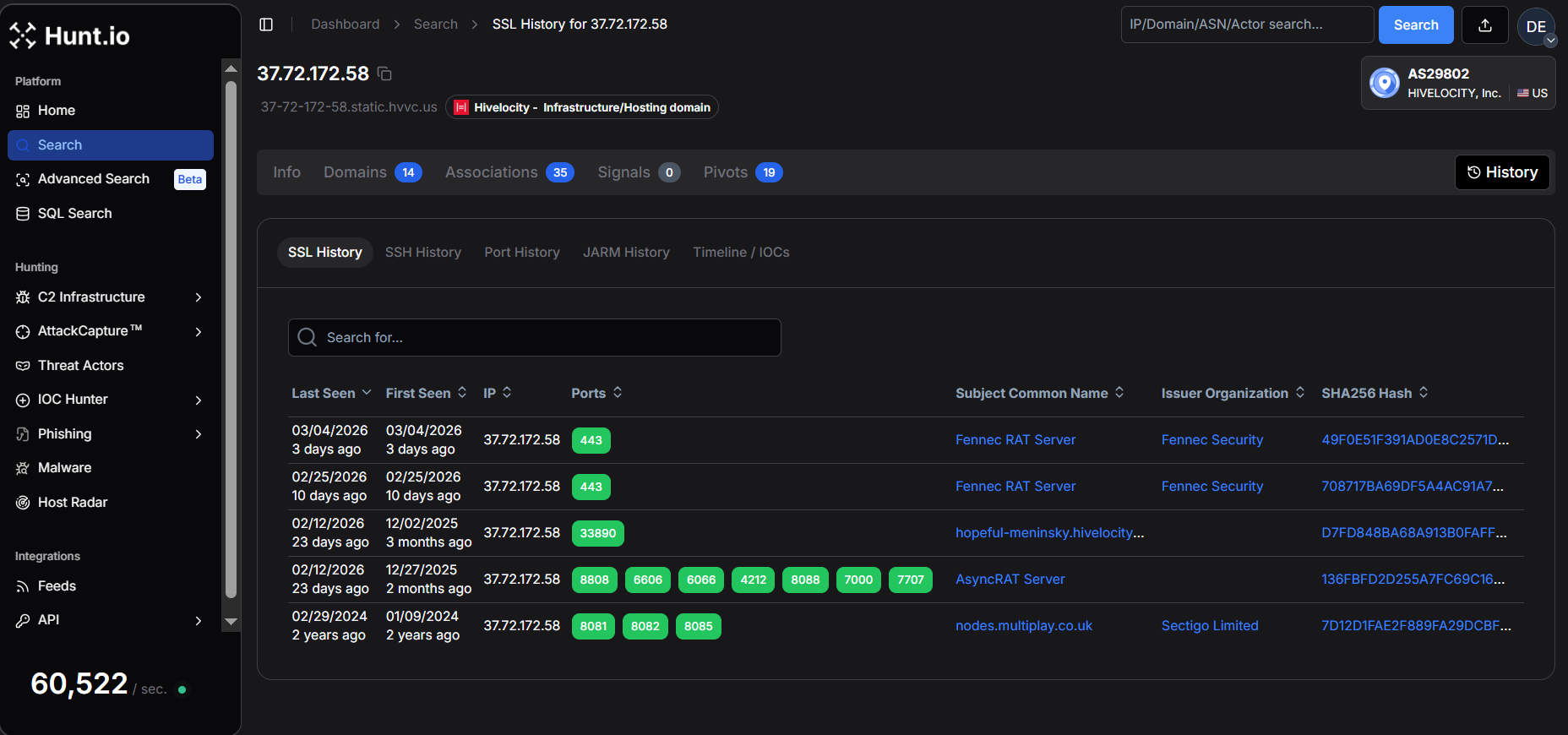 Figure 6. SSL History in Hunt.
One of the most notable certificates has the subject common name "AsyncRAT Server" and was first issued on April 25, 2022, and is configured to expire on December 31, 2105, an unusually long validity period that is typical of self-signed certificates generated by malware frameworks.
The 'Certificate Details' view provides key metadata, including the validity period, SHA-256 fingerprint, and JA4X hash.
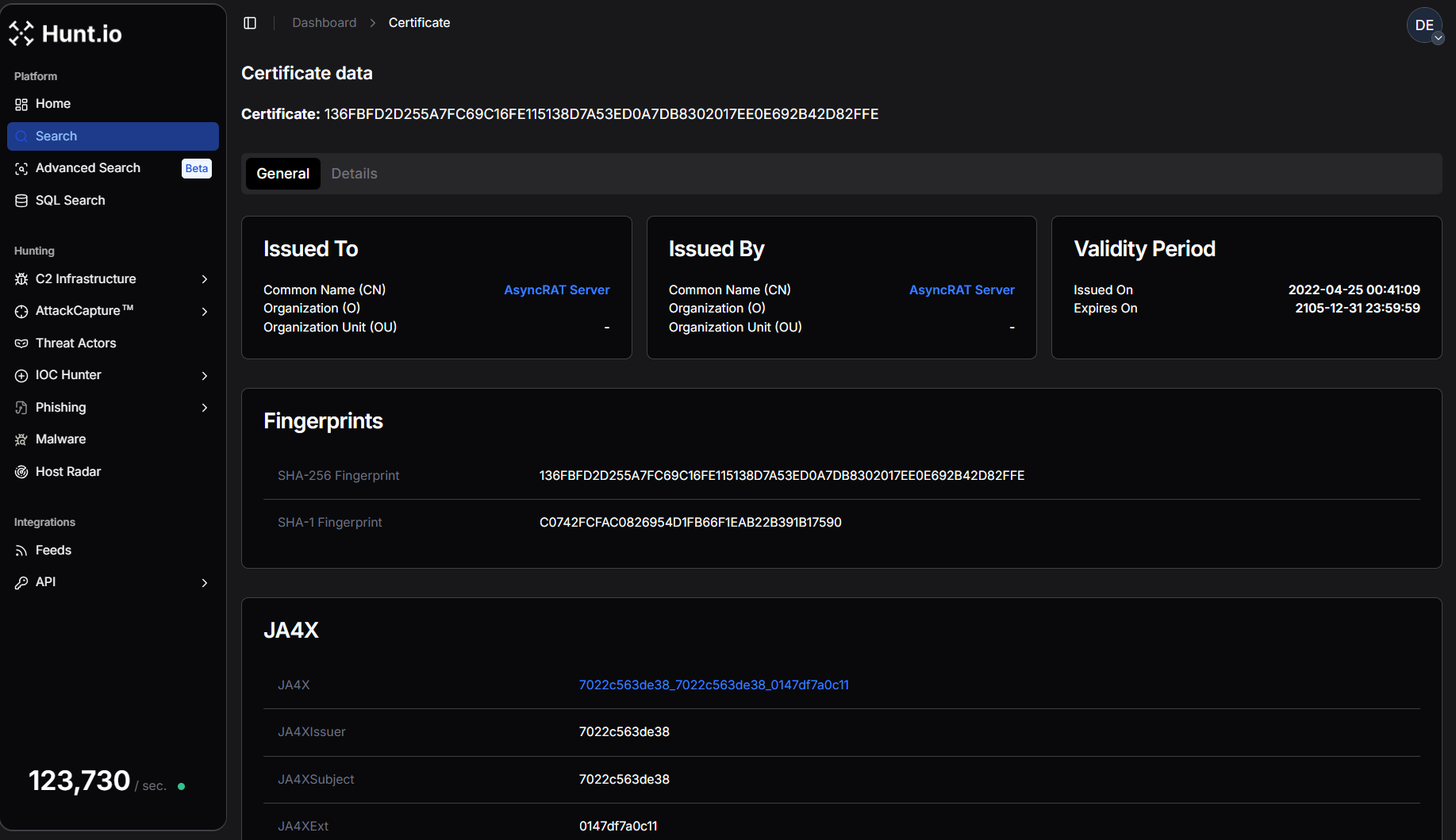 Figure 7. AsyncRAT Certificate data in Hunt.
The certificate is self-issued, meaning the issuer and subject are identical, another common characteristic of malware command-and-control infrastructure.
SHA256: 136FBFD2D255A7FC69C16FE115138D7A53ED0A7DB8302017EE0E692B42D82FFE
CN: AsyncRAT Server
Issued: 2022-04-25
Expires: 2105-12-31

                Copy
On port 443, the server began presenting a completely different certificate associated with Fennec RAT. Two separate Fennec certificates were observed within a short time window. The first certificate was issued on February 25, 2026, while a second certificate was generated on March 4, 2026, suggesting the operator may have rotated or regenerated the certificate.
SHA256: 708717BA69DF5A4AC91A7358C2D0316A7F047AF8B5332FEBC9FE9C892458E025
CN: Fennec RAT Server
Organization: Fennec Security
Issued: 2026-02-25
Expires: 2036-02-23

                Copy
SHA256: 49F0E51F391AD0E8C2571D70A9D95D835CA70A71F4D0AE6D4E0EA7D9AE68AB80
CN: Fennec RAT Server
Organization: Fennec Security
Issued: 2026-03-04\
Expires: 2036-03-01
Copy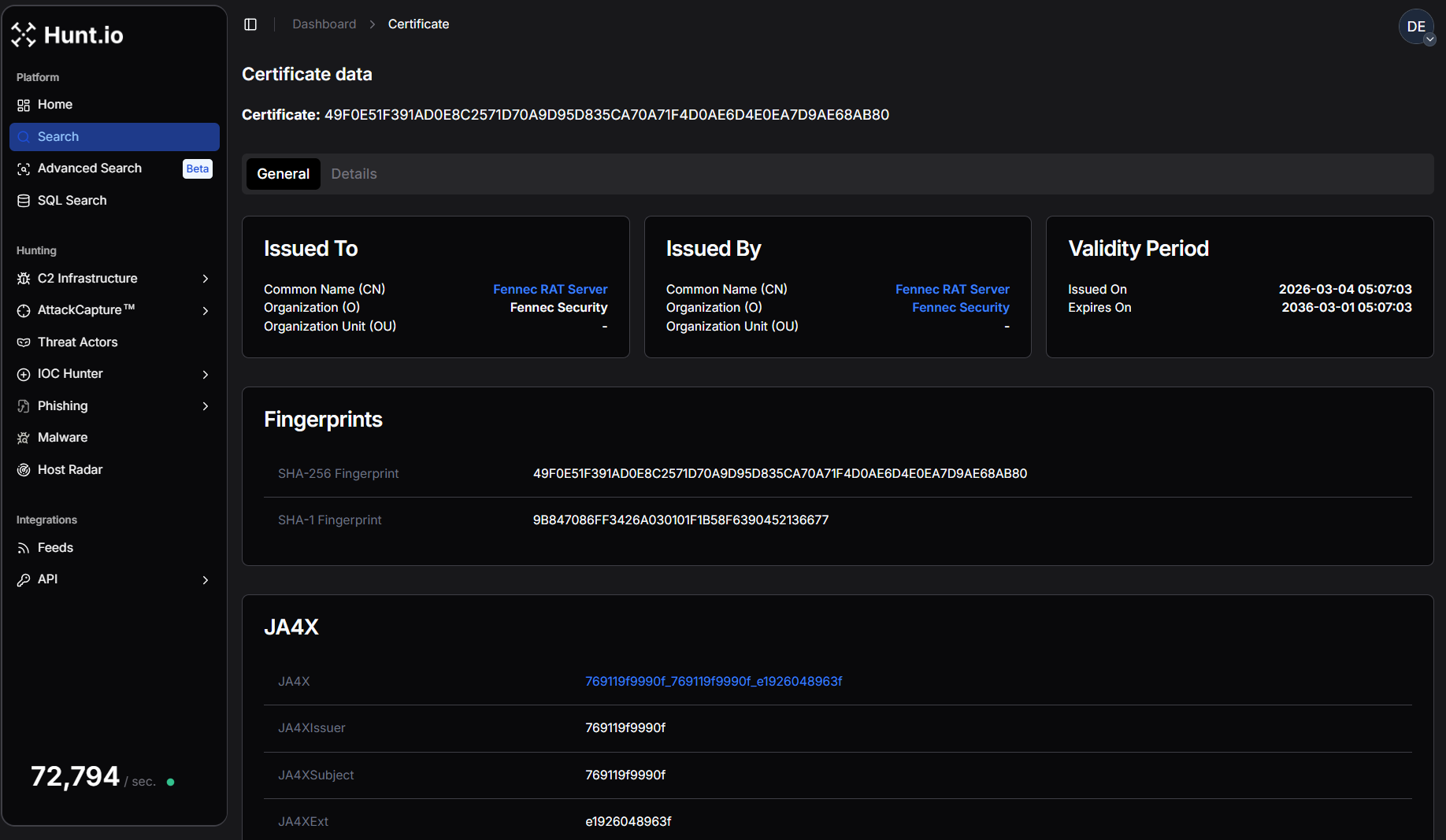 Figure 8. One of the Fennec RAT Certificate data in Hunt.
Both certificates share identical structural characteristics and include the organization field "Fennec Security." The JA4X TLS fingerprint also remains consistent between them, indicating they were likely generated using the same certificate creation process or toolkit.
To better understand whether this certificate appears elsewhere in the certificate dataset, we crafted HuntSQL to pivot on the issuer common name "Fennec RAT Server."
Example Query:
SELECT
  ip,
  port,
  min(timestamp),
  max(timestamp)
FROM
  certificates
WHERE
  issuer.common_name == "Fennec RAT Server"
  AND timestamp > NOW - 30 DAY
GROUP BY
  ip,
  port

                Copy
Example Output:
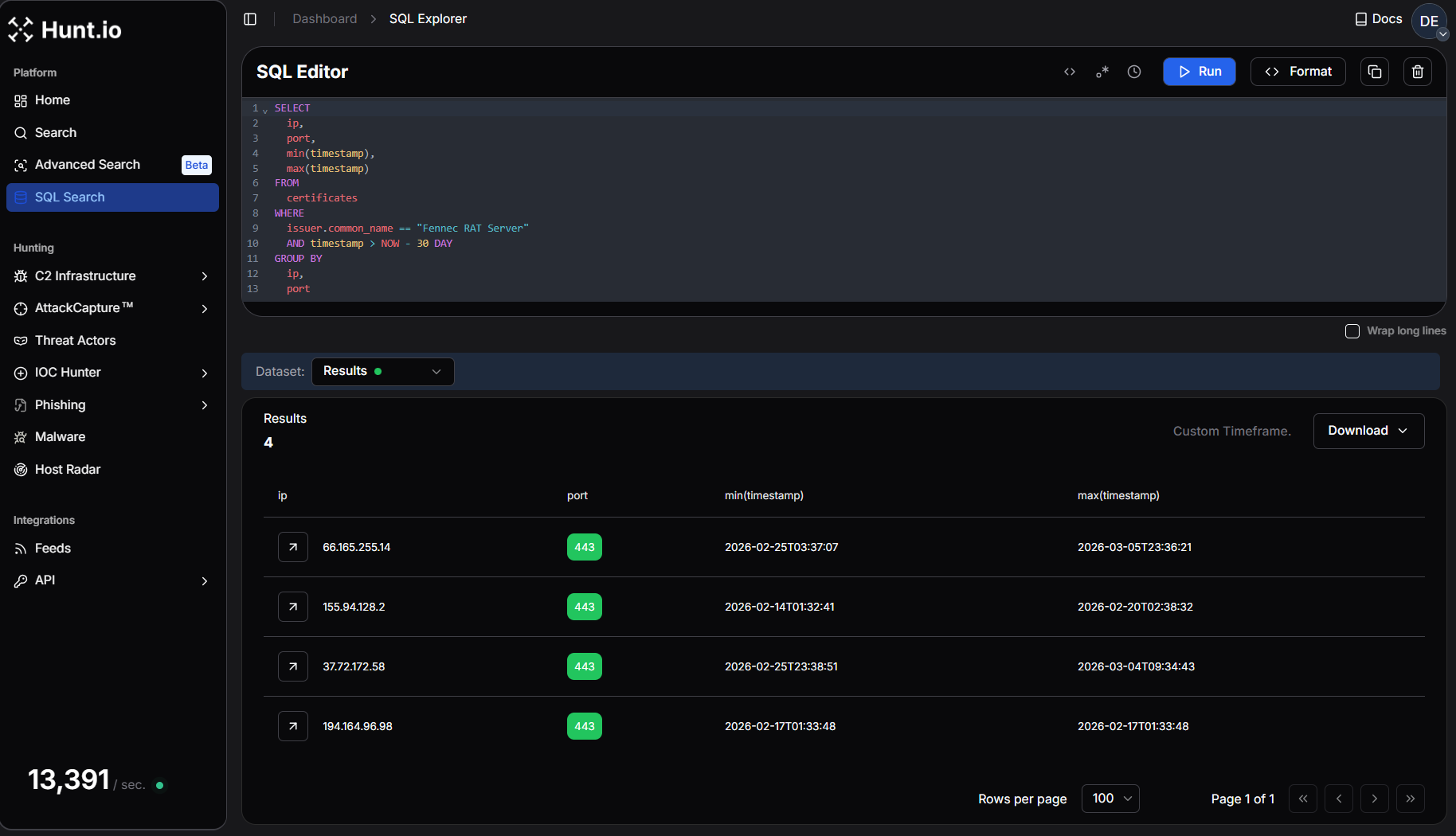 Figure 9. Pivot on Fennec RAT Server Certificate Details using HuntSQL query to find new similar IP addresses.
This query returns 3 additional IP addresses that have recently presented the same certificate issuer.
The presence of multiple hosts using certificates issued by "Fennec RAT Server" suggests that this infrastructure may be part of a broader cluster of systems associated with the same malware toolkit or operator.
Before moving forward, we'll record AsyncRAT certificate hashes for tracking:
SHA-256 Fingerprint:
136FBFD2D255A7FC69C16FE115138D7A53ED0A7DB8302017EE0E692B42D82FFE
JA4X Hash:
7022c563de38_7022c563de38_0147df7a0c11

                Copy
What is JA4X?
JA4X, part of the JA4+ fingerprinting suite, provides a powerful way to track TLS certificates based on how they are generated rather than their specific values. Instead of relying on standard certificate hashes, which change when a cert is reissued, JA4X fingerprints the underlying structure, making it useful for linking malware C2 servers.
Step 6: Let's Build A Query!
While certificate hashes can change when a certificate is regenerated, TLS fingerprinting techniques such as JA4X allow researchers to track certificates based on how they are generated rather than their exact values.
Using the JA4X fingerprint associated with the AsyncRAT certificate, we can search Hunt's scan dataset for matching servers.
To build our HuntSQL query, we'll match the JA4X hash and the subject common name ('AsyncRAT Server') to uncover other servers with identical certificate structures.
Example Query:
SELECT
  ip,
  subject.common_name
FROM
  certificates
WHERE
  subject.common_name == "AsyncRAT Server"
  AND ja4x.full == "7022c563de38_7022c563de38_0147df7a0c11"
  AND timestamp > NOW - 30 DAY
GROUP BY
  ip,
  subject.common_name

                Copy
Example Output:
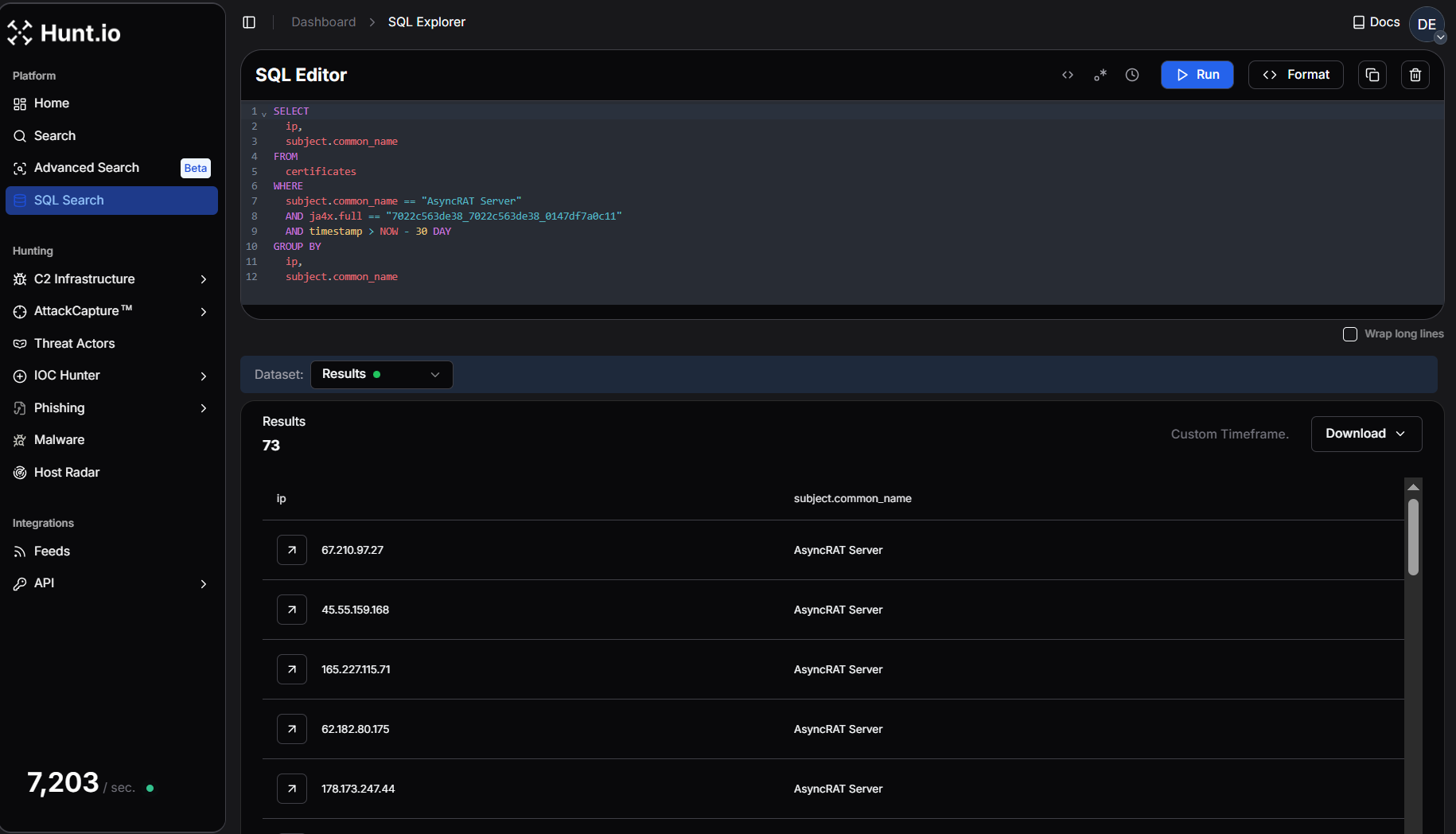 Figure 10. HuntSQL query shows 73 results having a similar Ja4x fingerprint with the AsyncRAT subject common name.
The results return 73 servers across Hunt's dataset. A result set of this size indicates that the AsyncRAT certificate structure is reused across a larger infrastructure cluster. This confirms that the server we started with is not operating in isolation but is part of a wider ecosystem of AsyncRAT command-and-control infrastructure.
Conclusion
Hunting and tracking adversary infrastructure requires persistence, creativity, and a structured approach to analyzing multiple data points. Starting with a single IP, we leveraged Hunt to examine domains, ports, HTTP responses, and TLS certificates, ultimately identifying potential connections that could expand an investigation. While not every lead will result in a direct pivot, refining your methodology and layering intelligence sources will improve the ability to track threat actor operations over time.
Tips for Getting Started
Start Small, Expand Methodically - A single IP, domain, or certificate can reveal hidden overlaps, but avoid jumping too quickly between data points-build a foundation first.
Look for Patterns, Not Just IOCs - Threat actors reuse hosting providers, SSL configurations, and infrastructure tactics, so focus on behavioral fingerprints rather than isolated indicators.
Use Multiple Intelligence Sources - No single dataset is perfect. Correlate findings across Hunt, passive DNS, WHOIS records, and threat intel feeds to validate and expand investigations.
Infrastructure Identified via Certificate Pivoting
| IP | Malware | Country | ASN | Company |
|---|---|---|---|---|
| 107.172.31.102 | AsyncRAT | US | AS36352 | CloudIT |
| 107.172.10.190 | AsyncRAT | US | AS36352 | HostPapa |
| 109.115.66.21 | AsyncRAT | IT | AS30722 | Vodafone Italia |
| 118.99.99.72 | AsyncRAT | ID | AS17451 | metroNET By Biznet |
| 130.12.181.114 | AsyncRAT | DE | AS36680 | Netiface LLC |
| 136.116.198.124 | AsyncRAT | US | AS396982 | Google LLC |
| 104.243.248.63 | AsyncRAT | DE | AS3223 | VOXILITY-DE |
| 151.241.113.151 | AsyncRAT | US | AS63473 | HostHatch |
| 15.235.151.217 | AsyncRAT | SG | AS16276 | OVH |
| 138.252.132.58 | AsyncRAT | VN | AS154339 | Zyn Data Technology |
| 165.227.115.71 | AsyncRAT | US | AS14061 | DigitalOcean |
| 154.38.185.247 | AsyncRAT | US | AS40021 | Contabo |
| 155.94.128.2 | Fennec RAT | US | AS23273 | HostPapa |
| 162.243.20.131 | AsyncRAT | US | AS14061 | DigitalOcean |
| 157.20.182.25 | AsyncRAT | NL | AS152485 | Hosterdaddy |
| 157.20.182.24 | AsyncRAT | NL | AS152485 | Hosterdaddy |
| 115.75.66.68 | AsyncRAT | VN | AS7552 | Viettel Group |
| 107.172.31.101 | AsyncRAT | US | AS36352 | CloudIT |
| 178.16.55.142 | AsyncRAT | NL | AS202412 | OMEGATECH |
| 144.172.91.208 | AsyncRAT | US | AS14956 | RouterHosting |
| 144.126.159.54 | AsyncRAT | US | AS40021 | Contabo |
| 178.16.55.108 | AsyncRAT | NL | AS202412 | OMEGATECH |
| 176.65.132.128 | AsyncRAT | NL | AS51396 | VMHeaven |
| 172.111.151.97 | AsyncRAT | US | AS9009 | Internet Security US |
| 173.211.46.18 | AsyncRAT | US | AS212238 | Internet Utilities NA |
| 169.40.135.7 | AsyncRAT | DE | AS209274 | TerraTransit AG |
| 191.93.118.254 | AsyncRAT | CO | AS27831 | Colombia Móvil |
| 144.126.149.104 | AsyncRAT | US | AS40021 | Contabo |
| 185.44.66.103 | AsyncRAT | US | AS49683 | MASSIVEGRID LTD |
| 185.241.211.23 | AsyncRAT | US | AS210558 | 1337 Services GmbH |
| 158.94.208.206 | AsyncRAT | DE | AS202412 | OMEGATECH |
| 185.203.240.170 | AsyncRAT | PL | AS210895 | Podaon SIA |
| 162.243.28.13 | AsyncRAT | US | AS14061 | DigitalOcean |
| 185.196.9.158 | AsyncRAT | CH | AS42624 | Global-Data System |
| 158.94.208.111 | AsyncRAT | DE | AS202412 | OMEGATECH |
| 178.16.54.184 | AsyncRAT | NL | AS202412 | OMEGATECH |
| 178.173.247.44 | AsyncRAT | US | AS931 | Krixe Pte. Ltd. |
| 178.16.54.125 | AsyncRAT | NL | AS202412 | OMEGATECH |
| 203.188.171.16 | AsyncRAT | US | AS19318 | 1337 Services GmbH |
| 193.26.115.183 | AsyncRAT | US | AS210558 | 1337 Services GmbH |
| 196.251.107.104 | AsyncRAT | DE | AS214351 | internet-security |
| 195.66.215.248 | AsyncRAT | UA | AS30860 | Virtual Systems LLC |
| 209.54.101.176 | AsyncRAT | US | AS36352 | Mullvad VPN |
| 193.142.146.179 | AsyncRAT | NL | AS213438 | ColocaTel Datacenter |
| 188.227.197.38 | AsyncRAT | CA | AS400897 | PetroSky |
| 188.137.176.37 | AsyncRAT | NL | AS211381 | Podaon SIA |
| 194.164.96.98 | Fennec RAT | GB | AS212027 | |
| 45.55.159.168 | AsyncRAT | US | AS14061 | DigitalOcean |
| 207.231.111.146 | AsyncRAT | US | AS62633 | HostRush |
| 216.126.224.83 | AsyncRAT | US | AS14956 | RouterHosting |
| 37.72.172.58 | Fennec RAT | US | AS29802 | Hivelocity LLC |
| 38.255.58.201 | AsyncRAT | GB | AS931 | Hyonix |
| 211.197.94.135 | AsyncRAT | KR | AS4766 | Korea Telecom |
| 3.234.97.76 | AsyncRAT | US | AS14618 | Amazon AWS |
| 23.95.106.22 | AsyncRAT | US | AS36352 | HostPapa |
| 64.89.163.73 | AsyncRAT | DE | AS401626 | Meowcore Softworks |
| 45.84.198.55 | AsyncRAT | DE | AS49581 | Mo's Operations GmbH |
| 51.89.110.168 | AsyncRAT | DE | AS16276 | OVH |
| 213.152.161.48 | AsyncRAT | NL | AS49453 | AirVPN |
| 67.210.97.27 | AsyncRAT | US | AS398256 | Internet Utilities NA |
| 66.165.255.14 | Fennec RAT | US | AS29802 | Hivelocity |
| 50.114.206.110 | AsyncRAT | US | AS62564 | Ace Data Centers |
| 83.243.122.167 | AsyncRAT | AT | AS57169 | EDIS Infrastructure |
| 85.209.120.47 | AsyncRAT | TR | AS205463 | VDS GLOBAL |
| 67.211.213.203 | AsyncRAT | US | AS19318 | Interserver |
| 74.81.49.18 | AsyncRAT | US | AS22439 | Perfect International |
| 62.182.80.175 | AsyncRAT | UA | AS30860 | Virtual Systems LLC |
| 84.200.73.102 | AsyncRAT | DE | AS214036 | UltaHost |
| 85.17.54.227 | AsyncRAT | NL | AS60781 | InnoSys ICT |
| 91.92.241.103 | AsyncRAT | NL | AS202412 | OMEGATECH |
| 75.69.164.4 | AsyncRAT | US | AS7922 | Comcast Cable |
| 91.92.241.142 | AsyncRAT | NL | AS202412 | OMEGATECH |
| 217.216.32.194 | AsyncRAT | SG | AS141995 | Contabo GmbH |
| 94.154.35.73 | AsyncRAT | NL | AS202412 | |
| 45.9.156.30 | AsyncRAT | BG | AS211619 | MAXKO |
| 91.231.222.220 | AsyncRAT | SI | AS36680 | Kavoshgar Rayaneh Mozhan |
Tracking malicious infrastructure is critical to threat hunting and cyber threat intelligence. While traditional hunts focus on detecting compromises within an organization's environment, infrastructure hunting shifts the defender's focus outward, mapping attacker operations before they reach the network.
Threat actors rarely operate from a single server. Instead, they use clusters of domains, IP addresses, and network resources to stage malware, manage command-and-control (C2), and evade detection.
In this post, we walk through how to hunt malicious infrastructure using scan data and certificate analysis. Starting with a single IP address associated with AsyncRAT, we pivot through ports, certificates, and TLS fingerprints to uncover a wider cluster of related systems. By following these indicators, defenders can take a proactive approach, turning isolated data points into a clearer picture of adversary C2 activity.
Step 1: Finding a Starting Point
Every hunt begins somewhere. Sometimes, it starts with a clear lead: an IP address found in a threat feed like IOC Hunter, a domain listed as an indicator of compromise (IoC) in a security report, or an alert in a security incident and event monitoring (SIEM) system. It can also begin with a hunch-an unusual connection in a firewall log or a pattern in network traffic that stands out.
Websites like MalwareBazaar and ThreatFox regularly publish indicators linked to malware infrastructure, making them valuable investigative sources. Discussions on X can also surface real-time threat activity, offering additional context on C2 tactics.
Our investigation starts with 37.72.172[.]58, an IP recently identified in Hunt's internet scans. The server has been associated with AsyncRAT activity, a remote access trojan commonly used to control infected Windows systems, enabling attackers to execute commands, steal data, and monitor victims remotely.
While we know it's associated with suspicious activity, the focus here isn't on attribution; it's on analyzing the IP and uncovering related infrastructure.
Open a text editor or grab a notebook, and follow along as we walk through each step.
Step 2: Querying the IP in Hunt
We'll start by entering the IP into Hunt's search bar. In addition to IP addresses, users can also conduct lookups of domains, ASNs, and even threat actor names. If you haven't checked out our post on the reimagining of Hunt.io with an infrastructure-first approach to threat intelligence, please do.
By default, we are dropped into the Info tab (Figure 1).
Figure 1. IP overview for our suspicious IP in Hunt.Breaking Down the Overview Page
The Overview page immediately shows where this IP is hosted, which ports are open, and whether DNS records are associated with it. The Info tab is a starting point, providing key details like the hosting provider, ASN, and software. While this alone won't confirm malicious activity, it helps researchers and defenders decide whether an IP warrants further analysis.
Several other tabs will assist in our hunt going forward:
Domains - Displays any domain names that have resolved to the IP.
Associations - Quickly identifies connections to additional infrastructure through shared SSH keys, TLS certificates, and IOCs.
SSL History - Logs past TLS certificates used by the IP, making it an essential tool for tracking infrastructure reuse.
These tabs will assist us as we continue investigating, offering immediate pivot points that help us map out the surrounding infrastructure.
Step 3: Analyzing ASN & Domain Data
Staying within the overview page, we can see the IP address in question is hosted by HIVELOCITY, Inc. (AS29802) in Los Angeles, California. HIVELOCITY, Inc. provides dedicated server hosting, colocation, and cloud solutions with data centers across the globe. They focus on delivering high-performance infrastructure and 24/7 customer support.
A closer look at the Domain tab reveals 14 hostnames resolving to our IP.
Figure 2. Domain overview in Hunt.Examples include:
mooma.ooguy[.]com
milan.giize[.]com
remvan.kozow[.]com
angxo.kozow[.]com
boty.theworkpc[.]com
nevbelo.giize[.]com
mosstre.theworkpc[.]com
whatsupdate.ooguy[.]com
iinupdate.giize[.]com
a7a.giize[.]com
Many of these domains are hosted using Dynu, a free dynamic DNS provider. Threat actors frequently abuse dynamic DNS services because they allow domains to remain constant while the underlying IP infrastructure changes. This provides attackers with flexibility when operating command-and-control servers.
The presence of multiple dynamic DNS hostnames resolving to the same IP address suggests this system is not typical shared hosting. Instead, it appears to be a dedicated server being used for command-and-control infrastructure.
At this stage, we've established:
An IP associated with AsyncRAT activity
Multiple domains from dynamic DNS providers
A dedicated hosting provider
Starting your hunt by analyzing domain names provides insight into how a server is likely being used, offering an early look at the threat actor's intent before examining the ports and services.
Step 4: Ports, Services, and Server Responses
Network ports tell the story of a server's purpose on the internet, whether for malware delivery, phishing, or command-and-control (C2). The ports that are exposed, the protocols in use, and how services respond can reveal unique patterns that can be used to track malicious activity.
Our suspect IP exposes a wide range of ports, including 443, 4212, 5357, 5985, 6066, 6606, 7000, 7707, 8088, 8808, 33890, and 47001. Several of these ports have been observed hosting services associated with AsyncRAT, while others return responses consistent with Windows HTTP services and proxy infrastructure.
Examining Protocol Responses
Looking at the port history, multiple TLS ports were flagged with AsyncRAT activity, including 6066, 6606, 7000, 7707, 8088, and 8808. These ports were first observed between December 2025 and January 2026 and remained active through early March 2026.
Figure 3. Hunt's Intelligence on IP Address "37.72.172[.]58" shows maximum ports attributed to AsyncRAT activities.Examining the response data further reveals several interesting characteristics.
Port 22 returns an SSH banner identifying the service as OpenSSH_9.6p1 running on Ubuntu, indicating the server is likely managed through a Linux environment. Port 443, which typically hosts HTTPS services, returns an error indicating that an HTTP request was sent to an HTTPS server, suggesting TLS is enabled but no standard web application is running.
Additional HTTP services appear on ports 5357, 5985, and 47001, all returning responses from Microsoft-HTTPAPI/2.0. These ports are commonly associated with Windows HTTP services and Windows Remote Management (WinRM).
More revealing are the TLS responses observed across the AsyncRAT ports. Within the TLS handshake data, we repeatedly see a certificate subject containing the string:
AsyncRAT Server
Figure 4. Protocol Header data from Hunt.io Protocol history of ports and services for IP addresses.To understand how frequently the AsyncRAT Server string appears within Hunt's scan data, we created a HuntSQL query using the protocol dataset. By searching for occurrences of the string within captured header data, we can identify additional servers exposing the same characteristic response.
Example Query:
SELECT
  *
FROM
  protocol
WHERE
  data LIKE '%AsyncRAT%'

                Copy
Example Output:
Figure 5. Hunt SQL results after querying for the AsyncRAT string inside protocol responses.Running this query returns 96 results, confirming that the AsyncRAT response pattern is present across multiple systems in the dataset.
This reinforces the value of protocol response data during infrastructure hunting, as unique strings embedded within TLS or service responses can act as reliable fingerprints for identifying related malware servers.
At this stage of the investigation, the port and protocol data provide strong evidence that the IP address is operating as part of an AsyncRAT C2 infrastructure, exposing multiple listener ports alongside supporting services that may help manage or proxy attacker traffic.
Step 5: Analyzing TLS Certificates for Clues
TLS certificates are a valuable tool for tracking adversary infrastructure. Unlike domains and IP addresses, which are easy to change, certificates often persist across multiple systems, exposing connections that threat actors might try to obscure. Whether issued by a legitimate Certificate Authority or self-signed, TLS data can reveal patterns that help analysts identify related activity before an operation gains traction.
In Hunt.io, the SSL History tabprovides a timeline of certificates previously used on the server, offering valuable context on how the IP has been configured over time. In this case, we see three interesting certificates from February 12th, giving us a fresh lead to explore.
Figure 6. SSL History in Hunt.One of the most notable certificates has the subject common name "AsyncRAT Server" and was first issued on April 25, 2022, and is configured to expire on December 31, 2105, an unusually long validity period that is typical of self-signed certificates generated by malware frameworks.
The 'Certificate Details' view provides key metadata, including the validity period, SHA-256 fingerprint, and JA4X hash.
Figure 7. AsyncRAT Certificate data in Hunt.The certificate is self-issued, meaning the issuer and subject are identical, another common characteristic of malware command-and-control infrastructure.
SHA256: 136FBFD2D255A7FC69C16FE115138D7A53ED0A7DB8302017EE0E692B42D82FFE
CN: AsyncRAT Server
Issued: 2022-04-25
Expires: 2105-12-31

                Copy
On port 443, the server began presenting a completely different certificate associated with Fennec RAT. Two separate Fennec certificates were observed within a short time window. The first certificate was issued on February 25, 2026, while a second certificate was generated on March 4, 2026, suggesting the operator may have rotated or regenerated the certificate.
SHA256: 708717BA69DF5A4AC91A7358C2D0316A7F047AF8B5332FEBC9FE9C892458E025
CN: Fennec RAT Server
Organization: Fennec Security
Issued: 2026-02-25
Expires: 2036-02-23

                Copy
SHA256: 49F0E51F391AD0E8C2571D70A9D95D835CA70A71F4D0AE6D4E0EA7D9AE68AB80
CN: Fennec RAT Server
Organization: Fennec Security
Issued: 2026-03-04\
Expires: 2036-03-01
CopyBoth certificates share identical structural characteristics and include the organization field "Fennec Security." The JA4X TLS fingerprint also remains consistent between them, indicating they were likely generated using the same certificate creation process or toolkit.
To better understand whether this certificate appears elsewhere in the certificate dataset, we crafted HuntSQL to pivot on the issuer common name "Fennec RAT Server."
Example Query:
SELECT
  ip,
  port,
  min(timestamp),
  max(timestamp)
FROM
  certificates
WHERE
  issuer.common_name == "Fennec RAT Server"
  AND timestamp > NOW - 30 DAY
GROUP BY
  ip,
  port

                Copy
Example Output:
Figure 9. Pivot on Fennec RAT Server Certificate Details using HuntSQL query to find new similar IP addresses.This query returns 3 additional IP addresses that have recently presented the same certificate issuer.
The presence of multiple hosts using certificates issued by "Fennec RAT Server" suggests that this infrastructure may be part of a broader cluster of systems associated with the same malware toolkit or operator.
Before moving forward, we'll record AsyncRAT certificate hashes for tracking:
SHA-256 Fingerprint:
136FBFD2D255A7FC69C16FE115138D7A53ED0A7DB8302017EE0E692B42D82FFE
JA4X Hash:
7022c563de38_7022c563de38_0147df7a0c11

                Copy
What is JA4X?
JA4X, part of the JA4+ fingerprinting suite, provides a powerful way to track TLS certificates based on how they are generated rather than their specific values. Instead of relying on standard certificate hashes, which change when a cert is reissued, JA4X fingerprints the underlying structure, making it useful for linking malware C2 servers.
Step 6: Let's Build A Query!
While certificate hashes can change when a certificate is regenerated, TLS fingerprinting techniques such as JA4X allow researchers to track certificates based on how they are generated rather than their exact values.
Using the JA4X fingerprint associated with the AsyncRAT certificate, we can search Hunt's scan dataset for matching servers.
To build our HuntSQL query, we'll match the JA4X hash and the subject common name ('AsyncRAT Server') to uncover other servers with identical certificate structures.
Example Query:
SELECT
  ip,
  subject.common_name
FROM
  certificates
WHERE
  subject.common_name == "AsyncRAT Server"
  AND ja4x.full == "7022c563de38_7022c563de38_0147df7a0c11"
  AND timestamp > NOW - 30 DAY
GROUP BY
  ip,
  subject.common_name

                Copy
Example Output:
Figure 10. HuntSQL query shows 73 results having a similar Ja4x fingerprint with the AsyncRAT subject common name.The results return 73 servers across Hunt's dataset. A result set of this size indicates that the AsyncRAT certificate structure is reused across a larger infrastructure cluster. This confirms that the server we started with is not operating in isolation but is part of a wider ecosystem of AsyncRAT command-and-control infrastructure.
Conclusion
Hunting and tracking adversary infrastructure requires persistence, creativity, and a structured approach to analyzing multiple data points. Starting with a single IP, we leveraged Hunt to examine domains, ports, HTTP responses, and TLS certificates, ultimately identifying potential connections that could expand an investigation. While not every lead will result in a direct pivot, refining your methodology and layering intelligence sources will improve the ability to track threat actor operations over time.
Tips for Getting Started
Start Small, Expand Methodically - A single IP, domain, or certificate can reveal hidden overlaps, but avoid jumping too quickly between data points-build a foundation first.
Look for Patterns, Not Just IOCs - Threat actors reuse hosting providers, SSL configurations, and infrastructure tactics, so focus on behavioral fingerprints rather than isolated indicators.
Use Multiple Intelligence Sources - No single dataset is perfect. Correlate findings across Hunt, passive DNS, WHOIS records, and threat intel feeds to validate and expand investigations.
Infrastructure Identified via Certificate Pivoting
| IP | Malware | Country | ASN | Company |
|---|---|---|---|---|
| 107.172.31.102 | AsyncRAT | US | AS36352 | CloudIT |
| 107.172.10.190 | AsyncRAT | US | AS36352 | HostPapa |
| 109.115.66.21 | AsyncRAT | IT | AS30722 | Vodafone Italia |
| 118.99.99.72 | AsyncRAT | ID | AS17451 | metroNET By Biznet |
| 130.12.181.114 | AsyncRAT | DE | AS36680 | Netiface LLC |
| 136.116.198.124 | AsyncRAT | US | AS396982 | Google LLC |
| 104.243.248.63 | AsyncRAT | DE | AS3223 | VOXILITY-DE |
| 151.241.113.151 | AsyncRAT | US | AS63473 | HostHatch |
| 15.235.151.217 | AsyncRAT | SG | AS16276 | OVH |
| 138.252.132.58 | AsyncRAT | VN | AS154339 | Zyn Data Technology |
| 165.227.115.71 | AsyncRAT | US | AS14061 | DigitalOcean |
| 154.38.185.247 | AsyncRAT | US | AS40021 | Contabo |
| 155.94.128.2 | Fennec RAT | US | AS23273 | HostPapa |
| 162.243.20.131 | AsyncRAT | US | AS14061 | DigitalOcean |
| 157.20.182.25 | AsyncRAT | NL | AS152485 | Hosterdaddy |
| 157.20.182.24 | AsyncRAT | NL | AS152485 | Hosterdaddy |
| 115.75.66.68 | AsyncRAT | VN | AS7552 | Viettel Group |
| 107.172.31.101 | AsyncRAT | US | AS36352 | CloudIT |
| 178.16.55.142 | AsyncRAT | NL | AS202412 | OMEGATECH |
| 144.172.91.208 | AsyncRAT | US | AS14956 | RouterHosting |
| 144.126.159.54 | AsyncRAT | US | AS40021 | Contabo |
| 178.16.55.108 | AsyncRAT | NL | AS202412 | OMEGATECH |
| 176.65.132.128 | AsyncRAT | NL | AS51396 | VMHeaven |
| 172.111.151.97 | AsyncRAT | US | AS9009 | Internet Security US |
| 173.211.46.18 | AsyncRAT | US | AS212238 | Internet Utilities NA |
| 169.40.135.7 | AsyncRAT | DE | AS209274 | TerraTransit AG |
| 191.93.118.254 | AsyncRAT | CO | AS27831 | Colombia Móvil |
| 144.126.149.104 | AsyncRAT | US | AS40021 | Contabo |
| 185.44.66.103 | AsyncRAT | US | AS49683 | MASSIVEGRID LTD |
| 185.241.211.23 | AsyncRAT | US | AS210558 | 1337 Services GmbH |
| 158.94.208.206 | AsyncRAT | DE | AS202412 | OMEGATECH |
| 185.203.240.170 | AsyncRAT | PL | AS210895 | Podaon SIA |
| 162.243.28.13 | AsyncRAT | US | AS14061 | DigitalOcean |
| 185.196.9.158 | AsyncRAT | CH | AS42624 | Global-Data System |
| 158.94.208.111 | AsyncRAT | DE | AS202412 | OMEGATECH |
| 178.16.54.184 | AsyncRAT | NL | AS202412 | OMEGATECH |
| 178.173.247.44 | AsyncRAT | US | AS931 | Krixe Pte. Ltd. |
| 178.16.54.125 | AsyncRAT | NL | AS202412 | OMEGATECH |
| 203.188.171.16 | AsyncRAT | US | AS19318 | 1337 Services GmbH |
| 193.26.115.183 | AsyncRAT | US | AS210558 | 1337 Services GmbH |
| 196.251.107.104 | AsyncRAT | DE | AS214351 | internet-security |
| 195.66.215.248 | AsyncRAT | UA | AS30860 | Virtual Systems LLC |
| 209.54.101.176 | AsyncRAT | US | AS36352 | Mullvad VPN |
| 193.142.146.179 | AsyncRAT | NL | AS213438 | ColocaTel Datacenter |
| 188.227.197.38 | AsyncRAT | CA | AS400897 | PetroSky |
| 188.137.176.37 | AsyncRAT | NL | AS211381 | Podaon SIA |
| 194.164.96.98 | Fennec RAT | GB | AS212027 | |
| 45.55.159.168 | AsyncRAT | US | AS14061 | DigitalOcean |
| 207.231.111.146 | AsyncRAT | US | AS62633 | HostRush |
| 216.126.224.83 | AsyncRAT | US | AS14956 | RouterHosting |
| 37.72.172.58 | Fennec RAT | US | AS29802 | Hivelocity LLC |
| 38.255.58.201 | AsyncRAT | GB | AS931 | Hyonix |
| 211.197.94.135 | AsyncRAT | KR | AS4766 | Korea Telecom |
| 3.234.97.76 | AsyncRAT | US | AS14618 | Amazon AWS |
| 23.95.106.22 | AsyncRAT | US | AS36352 | HostPapa |
| 64.89.163.73 | AsyncRAT | DE | AS401626 | Meowcore Softworks |
| 45.84.198.55 | AsyncRAT | DE | AS49581 | Mo's Operations GmbH |
| 51.89.110.168 | AsyncRAT | DE | AS16276 | OVH |
| 213.152.161.48 | AsyncRAT | NL | AS49453 | AirVPN |
| 67.210.97.27 | AsyncRAT | US | AS398256 | Internet Utilities NA |
| 66.165.255.14 | Fennec RAT | US | AS29802 | Hivelocity |
| 50.114.206.110 | AsyncRAT | US | AS62564 | Ace Data Centers |
| 83.243.122.167 | AsyncRAT | AT | AS57169 | EDIS Infrastructure |
| 85.209.120.47 | AsyncRAT | TR | AS205463 | VDS GLOBAL |
| 67.211.213.203 | AsyncRAT | US | AS19318 | Interserver |
| 74.81.49.18 | AsyncRAT | US | AS22439 | Perfect International |
| 62.182.80.175 | AsyncRAT | UA | AS30860 | Virtual Systems LLC |
| 84.200.73.102 | AsyncRAT | DE | AS214036 | UltaHost |
| 85.17.54.227 | AsyncRAT | NL | AS60781 | InnoSys ICT |
| 91.92.241.103 | AsyncRAT | NL | AS202412 | OMEGATECH |
| 75.69.164.4 | AsyncRAT | US | AS7922 | Comcast Cable |
| 91.92.241.142 | AsyncRAT | NL | AS202412 | OMEGATECH |
| 217.216.32.194 | AsyncRAT | SG | AS141995 | Contabo GmbH |
| 94.154.35.73 | AsyncRAT | NL | AS202412 | |
| 45.9.156.30 | AsyncRAT | BG | AS211619 | MAXKO |
| 91.231.222.220 | AsyncRAT | SI | AS36680 | Kavoshgar Rayaneh Mozhan |
Related Posts
Related Posts
Related Posts