
API: Keys, Usage, and Logs
The API is how you pull Hunt.io data into your own tools: a SIEM, an EDR, a firewall, or an enrichment pipeline. The API section in the portal is where you create keys, watch your usage, and review request logs. The full endpoint reference, with request examples and client libraries, lives at a.hunt.io.
The API reaches the same data you browse in the product. It backs Search and HuntSQL, complements the bulk Feeds with query-time access, and shares credentials handling with MCP Setup for AI clients. If you are just getting set up, start at Getting Started.
Open API from the Integrations group in the sidebar. It has these sub-sections: Key Management, Usage, and Log.
Key Management
Create and manage API keys here. When you create a key you give it a name, for example "Production API." The secret is shown exactly once at creation, so copy it and store it somewhere safe before you close the dialog. Name keys by where they are used, which makes them easy to rotate later.
Usage
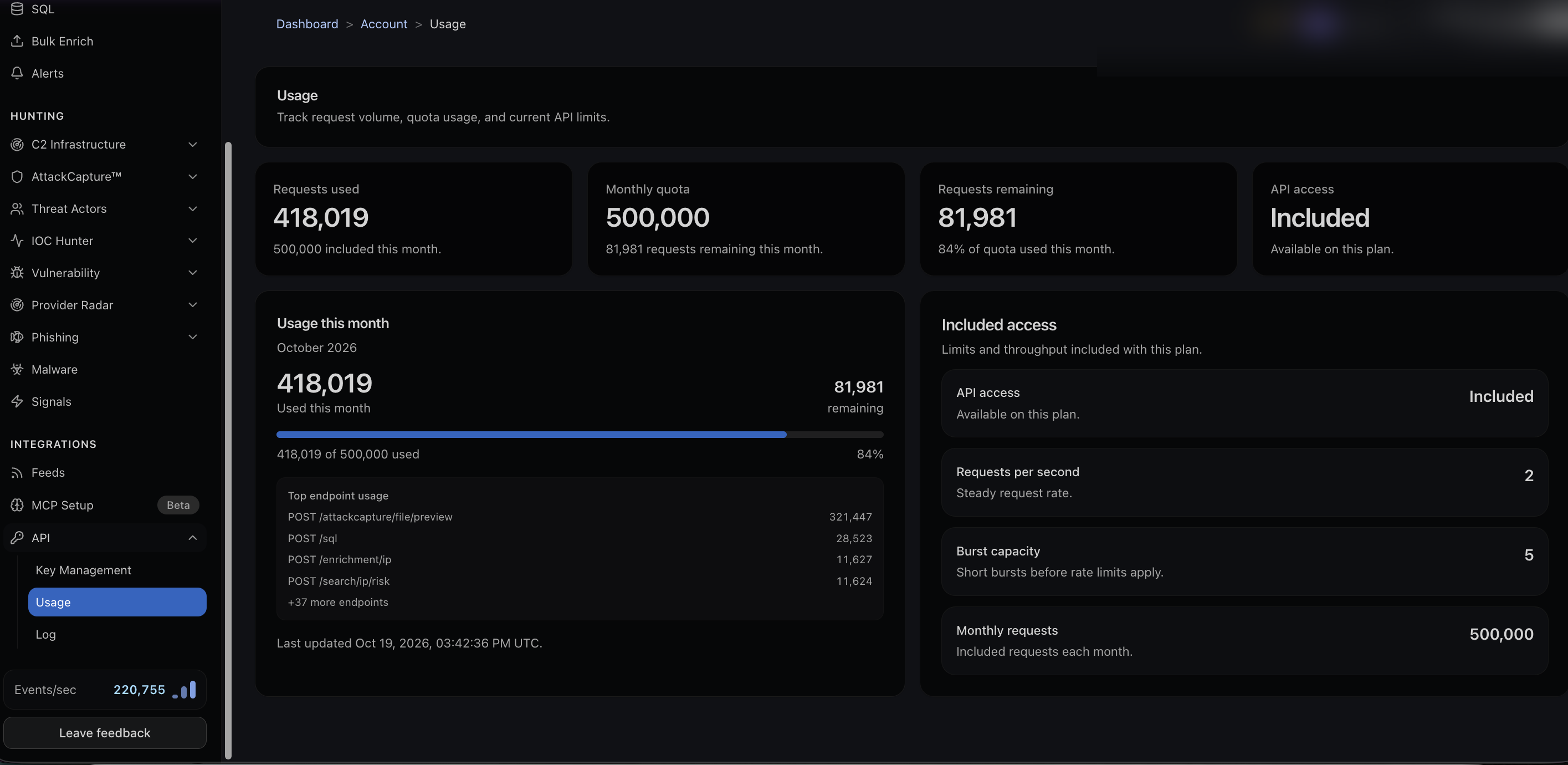
Usage tracks your request volume against your plan. It shows requests used, your monthly quota, requests remaining, and the percentage of quota used this month. Below that you get your top endpoints by request count and your limits:
Requests per second, the steady request rate.
Burst capacity, short bursts allowed before rate limiting applies.
Monthly requests, the included quota.
Watching top endpoint usage tells you where your quota is actually going, which is useful before you scale an integration.
Log
The Log sub-section is your request history, for confirming what a key has been doing and for debugging an integration.
API: Keys, Usage, and Logs
The API is how you pull Hunt.io data into your own tools: a SIEM, an EDR, a firewall, or an enrichment pipeline. The API section in the portal is where you create keys, watch your usage, and review request logs. The full endpoint reference, with request examples and client libraries, lives at a.hunt.io.
The API reaches the same data you browse in the product. It backs Search and HuntSQL, complements the bulk Feeds with query-time access, and shares credentials handling with MCP Setup for AI clients. If you are just getting set up, start at Getting Started.
Open API from the Integrations group in the sidebar. It has these sub-sections: Key Management, Usage, and Log.
Key Management
Create and manage API keys here. When you create a key you give it a name, for example "Production API." The secret is shown exactly once at creation, so copy it and store it somewhere safe before you close the dialog. Name keys by where they are used, which makes them easy to rotate later.
Usage
Usage tracks your request volume against your plan. It shows requests used, your monthly quota, requests remaining, and the percentage of quota used this month. Below that you get your top endpoints by request count and your limits:
Requests per second, the steady request rate.
Burst capacity, short bursts allowed before rate limiting applies.
Monthly requests, the included quota.
Watching top endpoint usage tells you where your quota is actually going, which is useful before you scale an integration.
Log
The Log sub-section is your request history, for confirming what a key has been doing and for debugging an integration.
API: Keys, Usage, and Logs
The API is how you pull Hunt.io data into your own tools: a SIEM, an EDR, a firewall, or an enrichment pipeline. The API section in the portal is where you create keys, watch your usage, and review request logs. The full endpoint reference, with request examples and client libraries, lives at a.hunt.io.
The API reaches the same data you browse in the product. It backs Search and HuntSQL, complements the bulk Feeds with query-time access, and shares credentials handling with MCP Setup for AI clients. If you are just getting set up, start at Getting Started.
Open API from the Integrations group in the sidebar. It has these sub-sections: Key Management, Usage, and Log.
Key Management
Create and manage API keys here. When you create a key you give it a name, for example "Production API." The secret is shown exactly once at creation, so copy it and store it somewhere safe before you close the dialog. Name keys by where they are used, which makes them easy to rotate later.
Usage
Usage tracks your request volume against your plan. It shows requests used, your monthly quota, requests remaining, and the percentage of quota used this month. Below that you get your top endpoints by request count and your limits:
Requests per second, the steady request rate.
Burst capacity, short bursts allowed before rate limiting applies.
Monthly requests, the included quota.
Watching top endpoint usage tells you where your quota is actually going, which is useful before you scale an integration.
Log
The Log sub-section is your request history, for confirming what a key has been doing and for debugging an integration.
Frequently asked questions
Frequently asked questions
How do I know if I am close to my quota?
How should I name keys?
I lost my API secret. Can I see it again?
Where is the full API reference?
Hunt adversary infrastructure in real time. Surface C2 servers, enrich IOCs,
and map attacker activity at scale with our unified threat hunting platform.

Hunt adversary infrastructure in real time. Surface C2 servers, enrich IOCs,
and map attacker activity at scale with our unified threat hunting platform.
Hunt adversary infrastructure in real time. Surface C2 servers, enrich IOCs,
and map attacker activity at scale with our unified threat hunting platform.