
HuntSQL: Query the Hunt.io Dataset Directly
HuntSQL is a SQL console over Hunt.io scan data. When a single lookup is not specific enough, you write a query and get back exactly the rows you want. It is built for hunters who already think in filters and joins and want to express a hypothesis precisely.
It sits next to the point-and-click tools. Use Search when you have one indicator in hand, HuntSQL when you want a precise slice of the whole dataset, and Bulk Enrich when you have a list to clean and enrich. Any query you rely on can become a saved monitor in Alerts, and the same data is reachable programmatically through the API. If you are just getting set up, see Getting Started.
Open the console
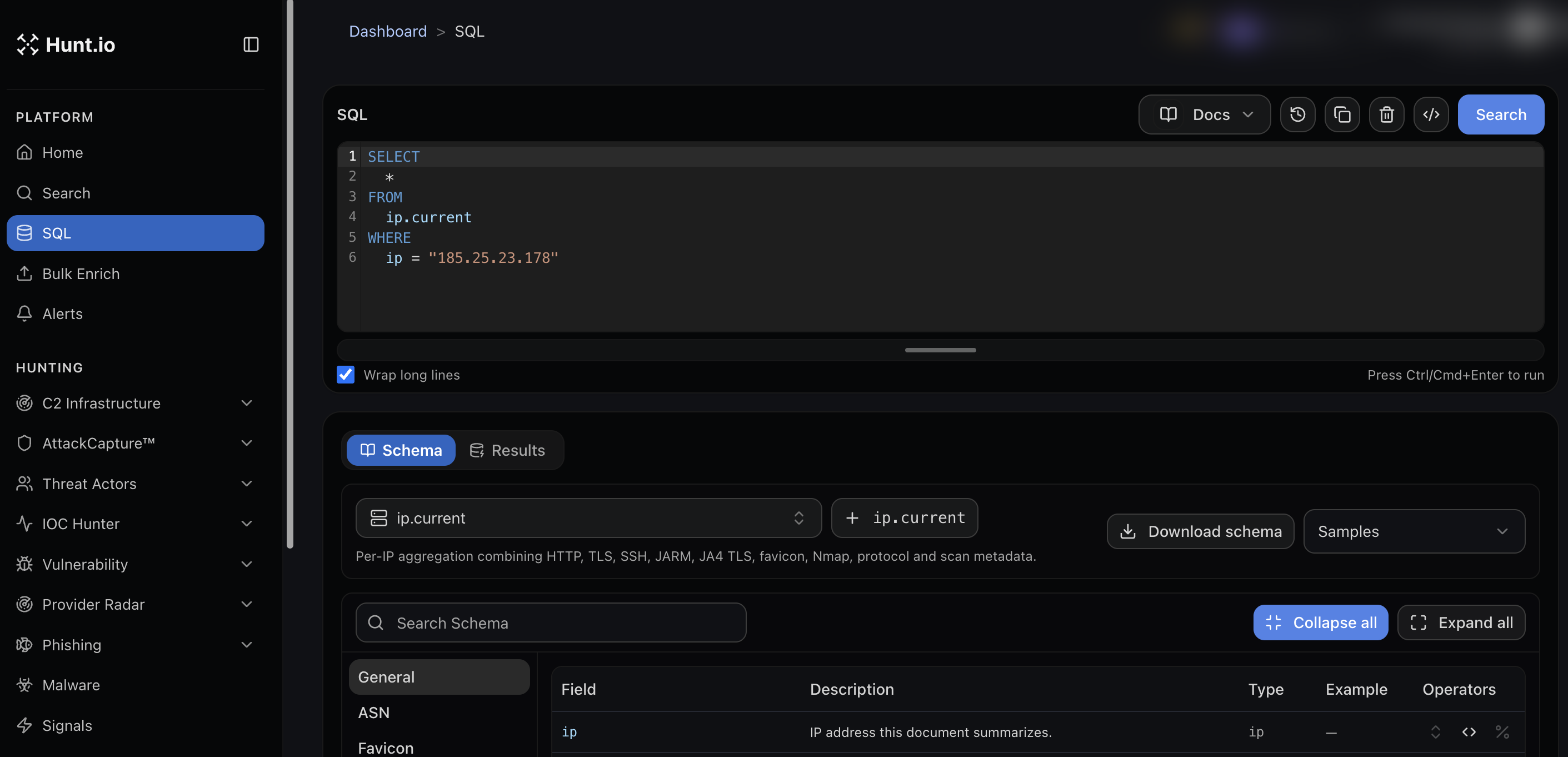
Open SQL from the Platform group in the sidebar. You get an editor, a Run control, and two panels below: Schema and Results. Press Ctrl or Cmd plus Enter to run a query. "Wrap long lines" keeps long queries readable.
A simple query looks like this:
SELECT *
FROM ip.current
WHERE ip = "185.25.23.178"

                Copy
Know your tables
The Schema panel is where you learn what you can query. Pick a table from the selector, then browse or search its fields. Each field lists a description, a type, an example value, and the operators it supports.
The
ip.current table is the per-IP view. It combines HTTP, TLS, SSH, JARM, JA4 TLS, favicon, Nmap, protocol, and scan metadata into one row per IP, so most host-level questions start there. Use Download schema to pull the field list, and the Samples menu for ready-made queries you can adapt.
Work faster
The Docs menu in the editor header links to query help.
The history control reopens queries you ran before.
You can copy, clear, and format from the editor toolbar.
Switch to the Results tab to see rows, then export them.
Turn a query into a monitor
Any query you rely on can become a saved monitor. Paste it into a SQL monitor in Alerts and Hunt.io re-runs it on a schedule and marks new matches.
HuntSQL: Query the Hunt.io Dataset Directly
HuntSQL is a SQL console over Hunt.io scan data. When a single lookup is not specific enough, you write a query and get back exactly the rows you want. It is built for hunters who already think in filters and joins and want to express a hypothesis precisely.
It sits next to the point-and-click tools. Use Search when you have one indicator in hand, HuntSQL when you want a precise slice of the whole dataset, and Bulk Enrich when you have a list to clean and enrich. Any query you rely on can become a saved monitor in Alerts, and the same data is reachable programmatically through the API. If you are just getting set up, see Getting Started.
Open the console
Open SQL from the Platform group in the sidebar. You get an editor, a Run control, and two panels below: Schema and Results. Press Ctrl or Cmd plus Enter to run a query. "Wrap long lines" keeps long queries readable.
A simple query looks like this:
SELECT *
FROM ip.current
WHERE ip = "185.25.23.178"

                Copy
Know your tables
The Schema panel is where you learn what you can query. Pick a table from the selector, then browse or search its fields. Each field lists a description, a type, an example value, and the operators it supports.
The
ip.current table is the per-IP view. It combines HTTP, TLS, SSH, JARM, JA4 TLS, favicon, Nmap, protocol, and scan metadata into one row per IP, so most host-level questions start there. Use Download schema to pull the field list, and the Samples menu for ready-made queries you can adapt.
Work faster
The Docs menu in the editor header links to query help.
The history control reopens queries you ran before.
You can copy, clear, and format from the editor toolbar.
Switch to the Results tab to see rows, then export them.
Turn a query into a monitor
Any query you rely on can become a saved monitor. Paste it into a SQL monitor in Alerts and Hunt.io re-runs it on a schedule and marks new matches.
HuntSQL: Query the Hunt.io Dataset Directly
HuntSQL is a SQL console over Hunt.io scan data. When a single lookup is not specific enough, you write a query and get back exactly the rows you want. It is built for hunters who already think in filters and joins and want to express a hypothesis precisely.
It sits next to the point-and-click tools. Use Search when you have one indicator in hand, HuntSQL when you want a precise slice of the whole dataset, and Bulk Enrich when you have a list to clean and enrich. Any query you rely on can become a saved monitor in Alerts, and the same data is reachable programmatically through the API. If you are just getting set up, see Getting Started.
Open the console
Open SQL from the Platform group in the sidebar. You get an editor, a Run control, and two panels below: Schema and Results. Press Ctrl or Cmd plus Enter to run a query. "Wrap long lines" keeps long queries readable.
A simple query looks like this:
SELECT *
FROM ip.current
WHERE ip = "185.25.23.178"

                Copy
Know your tables
The Schema panel is where you learn what you can query. Pick a table from the selector, then browse or search its fields. Each field lists a description, a type, an example value, and the operators it supports.
The
ip.current table is the per-IP view. It combines HTTP, TLS, SSH, JARM, JA4 TLS, favicon, Nmap, protocol, and scan metadata into one row per IP, so most host-level questions start there. Use Download schema to pull the field list, and the Samples menu for ready-made queries you can adapt.
Work faster
The Docs menu in the editor header links to query help.
The history control reopens queries you ran before.
You can copy, clear, and format from the editor toolbar.
Switch to the Results tab to see rows, then export them.
Turn a query into a monitor
Any query you rely on can become a saved monitor. Paste it into a SQL monitor in Alerts and Hunt.io re-runs it on a schedule and marks new matches.
Frequently asked questions
Frequently asked questions
Can I automate a query?
How do I know which fields and operators exist?
What is HuntSQL?
Which table should I start with?
Related
Related
Hunt adversary infrastructure in real time. Surface C2 servers, enrich IOCs,
and map attacker activity at scale with our unified threat hunting platform.

Hunt adversary infrastructure in real time. Surface C2 servers, enrich IOCs,
and map attacker activity at scale with our unified threat hunting platform.
Hunt adversary infrastructure in real time. Surface C2 servers, enrich IOCs,
and map attacker activity at scale with our unified threat hunting platform.