
MCP Setup: Connect Hunt.io to AI Clients
MCP Setup connects Hunt.io to AI assistants through the Model Context Protocol, so you can query threat infrastructure from inside a chat client instead of switching to the portal. Ask about an IP, a family, or an actor in your assistant, and it pulls live Hunt.io data to answer. This section is marked Beta in the product.
It is the AI-client counterpart to the developer tools: it uses the same account as the API, reaches the same data you browse in Search and Malware, and sits beside the bulk Feeds under Integrations. New to the platform? Start at Getting Started.
Open MCP Setup from the Integrations group in the sidebar.
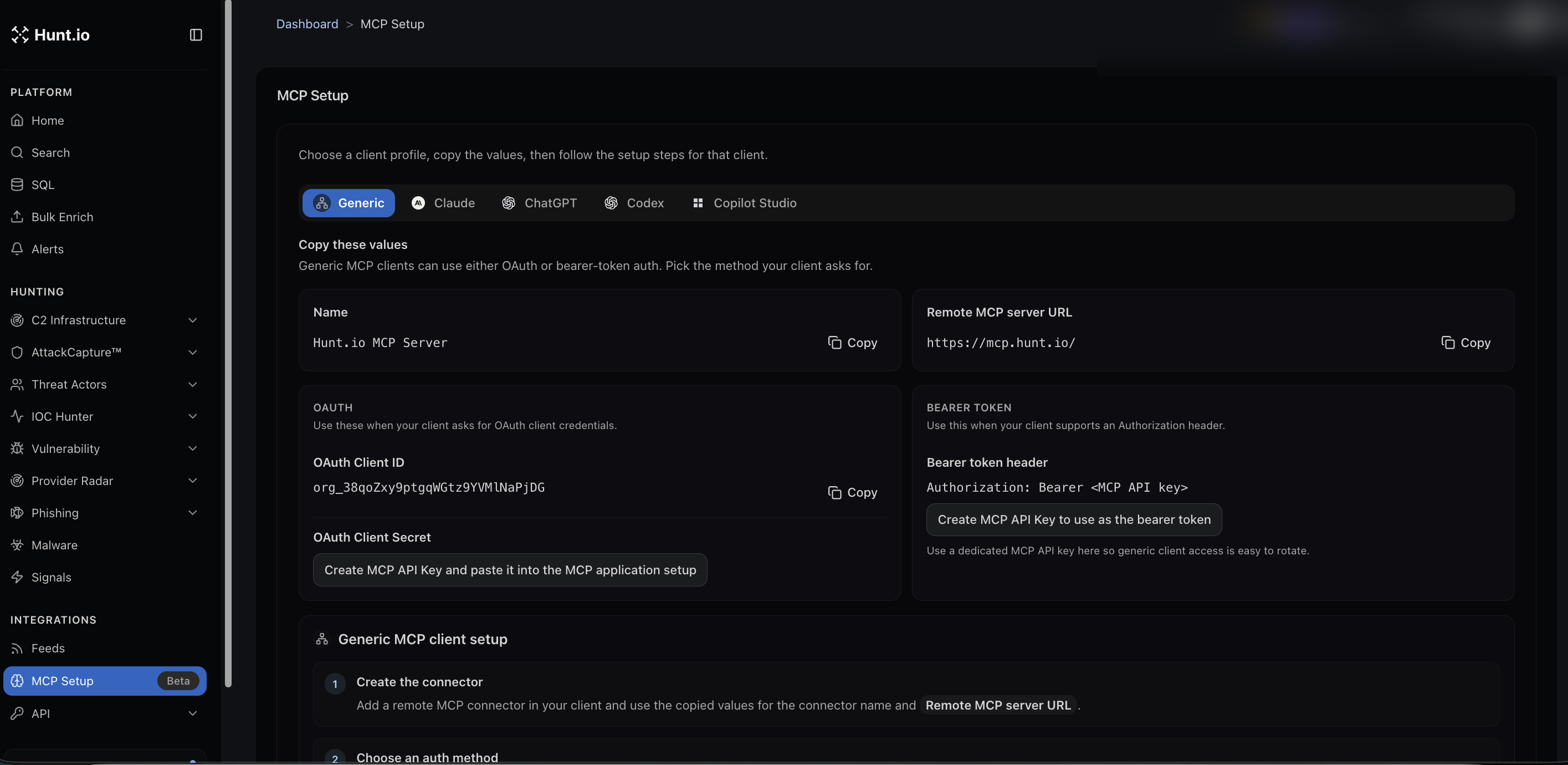
What you need
The remote MCP server is at https://mcp.hunt.io/. The server name to enter in your client is Hunt.io MCP Server. You authenticate one of two ways, depending on what your client supports:
OAuth, using the OAuth client ID shown on the page plus a client secret you create from an MCP API key.
Bearer token, using an
Authorization: Bearer <MCP API key>header. Create a dedicated MCP API key for this so it is easy to rotate on its own.
Client profiles
The page has profiles for common clients: Generic, Claude, ChatGPT, Codex, and Copilot Studio. Pick the one you use, copy the values it shows, and follow its steps. The generic flow is:
Add a remote MCP connector in your client, using the server name and the remote MCP server URL.
Choose an auth method, OAuth or bearer token, to match what your client asks for.
Paste in the matching credentials.
Good practice
Use a dedicated MCP API key rather than reusing a general API key. That keeps AI client access separate and lets you rotate it without breaking your other integrations.
MCP Setup: Connect Hunt.io to AI Clients
MCP Setup connects Hunt.io to AI assistants through the Model Context Protocol, so you can query threat infrastructure from inside a chat client instead of switching to the portal. Ask about an IP, a family, or an actor in your assistant, and it pulls live Hunt.io data to answer. This section is marked Beta in the product.
It is the AI-client counterpart to the developer tools: it uses the same account as the API, reaches the same data you browse in Search and Malware, and sits beside the bulk Feeds under Integrations. New to the platform? Start at Getting Started.
Open MCP Setup from the Integrations group in the sidebar.
What you need
The remote MCP server is at https://mcp.hunt.io/. The server name to enter in your client is Hunt.io MCP Server. You authenticate one of two ways, depending on what your client supports:
OAuth, using the OAuth client ID shown on the page plus a client secret you create from an MCP API key.
Bearer token, using an
Authorization: Bearer <MCP API key>header. Create a dedicated MCP API key for this so it is easy to rotate on its own.
Client profiles
The page has profiles for common clients: Generic, Claude, ChatGPT, Codex, and Copilot Studio. Pick the one you use, copy the values it shows, and follow its steps. The generic flow is:
Add a remote MCP connector in your client, using the server name and the remote MCP server URL.
Choose an auth method, OAuth or bearer token, to match what your client asks for.
Paste in the matching credentials.
Good practice
Use a dedicated MCP API key rather than reusing a general API key. That keeps AI client access separate and lets you rotate it without breaking your other integrations.
MCP Setup: Connect Hunt.io to AI Clients
MCP Setup connects Hunt.io to AI assistants through the Model Context Protocol, so you can query threat infrastructure from inside a chat client instead of switching to the portal. Ask about an IP, a family, or an actor in your assistant, and it pulls live Hunt.io data to answer. This section is marked Beta in the product.
It is the AI-client counterpart to the developer tools: it uses the same account as the API, reaches the same data you browse in Search and Malware, and sits beside the bulk Feeds under Integrations. New to the platform? Start at Getting Started.
Open MCP Setup from the Integrations group in the sidebar.
What you need
The remote MCP server is at https://mcp.hunt.io/. The server name to enter in your client is Hunt.io MCP Server. You authenticate one of two ways, depending on what your client supports:
OAuth, using the OAuth client ID shown on the page plus a client secret you create from an MCP API key.
Bearer token, using an
Authorization: Bearer <MCP API key>header. Create a dedicated MCP API key for this so it is easy to rotate on its own.
Client profiles
The page has profiles for common clients: Generic, Claude, ChatGPT, Codex, and Copilot Studio. Pick the one you use, copy the values it shows, and follow its steps. The generic flow is:
Add a remote MCP connector in your client, using the server name and the remote MCP server URL.
Choose an auth method, OAuth or bearer token, to match what your client asks for.
Paste in the matching credentials.
Good practice
Use a dedicated MCP API key rather than reusing a general API key. That keeps AI client access separate and lets you rotate it without breaking your other integrations.
Frequently asked questions
Frequently asked questions
Is MCP generally available?
OAuth or bearer token?
What is the Hunt.io MCP server URL?
Which AI clients are supported?
Hunt adversary infrastructure in real time. Surface C2 servers, enrich IOCs,
and map attacker activity at scale with our unified threat hunting platform.

Hunt adversary infrastructure in real time. Surface C2 servers, enrich IOCs,
and map attacker activity at scale with our unified threat hunting platform.
Hunt adversary infrastructure in real time. Surface C2 servers, enrich IOCs,
and map attacker activity at scale with our unified threat hunting platform.