
Malware: Family Tracking from Live Hunt Data
The Malware section is a catalog of malware families backed by live infrastructure. For each family you get its aliases and the current IPs, hosts, hashes, and reporting tied to it, so you can move from a name to the infrastructure that is serving it right now.
A family links straight into the rest of your hunting: its live servers in C2 Infrastructure, the reporting that mentions it in IOC Hunter, the groups that run it in Threat Actors, and any staging directories in AttackCapture. Drop a hash or host into Search to pivot from a single indicator.
Open Malware from the Hunting group in the sidebar.
Malware Search
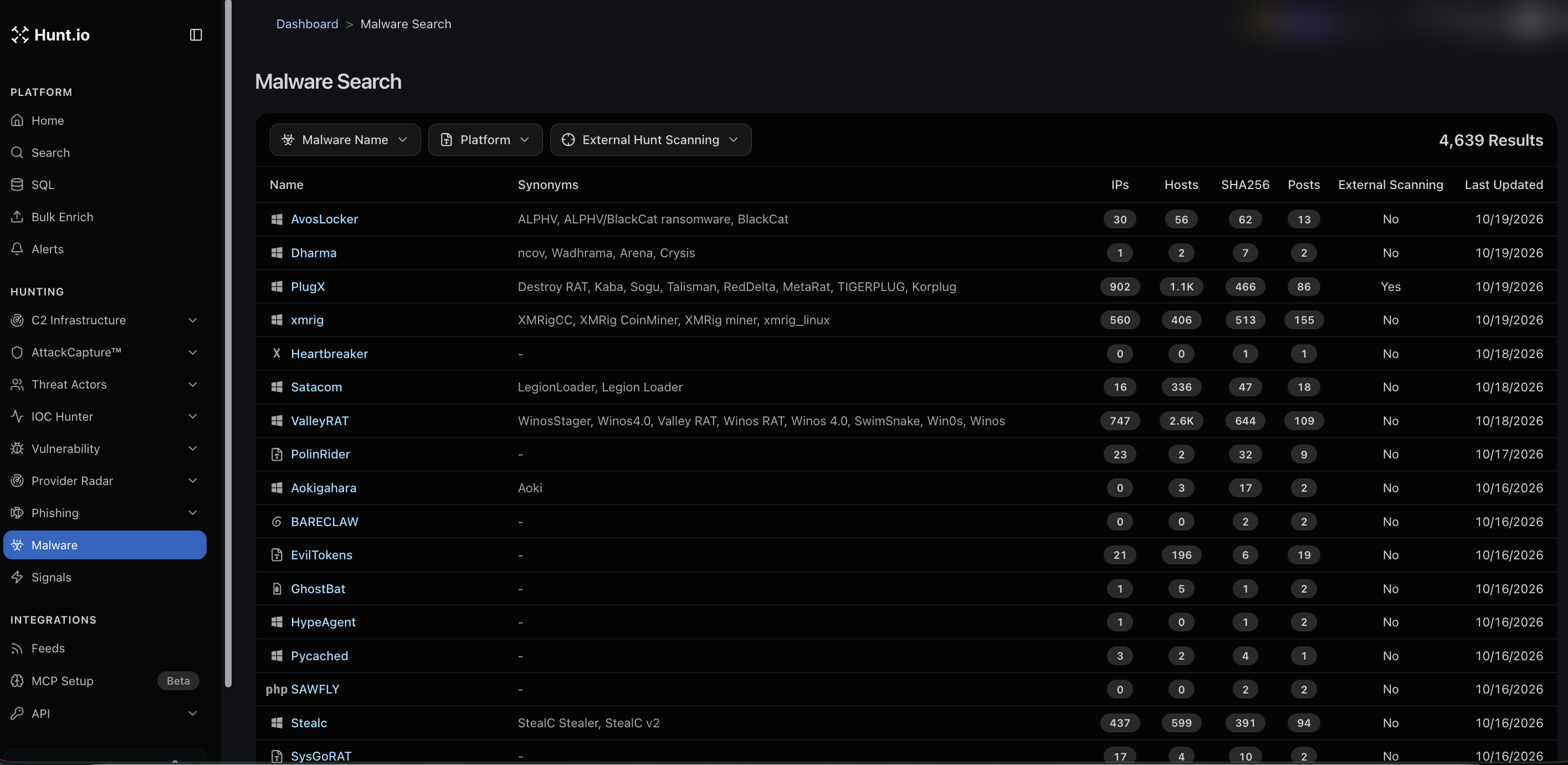
Malware Search is the family index. Each row shows the family name, its synonyms, and counts of IPs, hosts, SHA256s, and posts, whether external hunt scanning is available, and when it was last updated. Filter by malware name, platform, or external hunt scanning. Synonyms matter here: a family like PlugX also appears as Destroy RAT, Kaba, Sogu, Talisman, RedDelta, and others, so searching by any known name finds it.
A family detail page
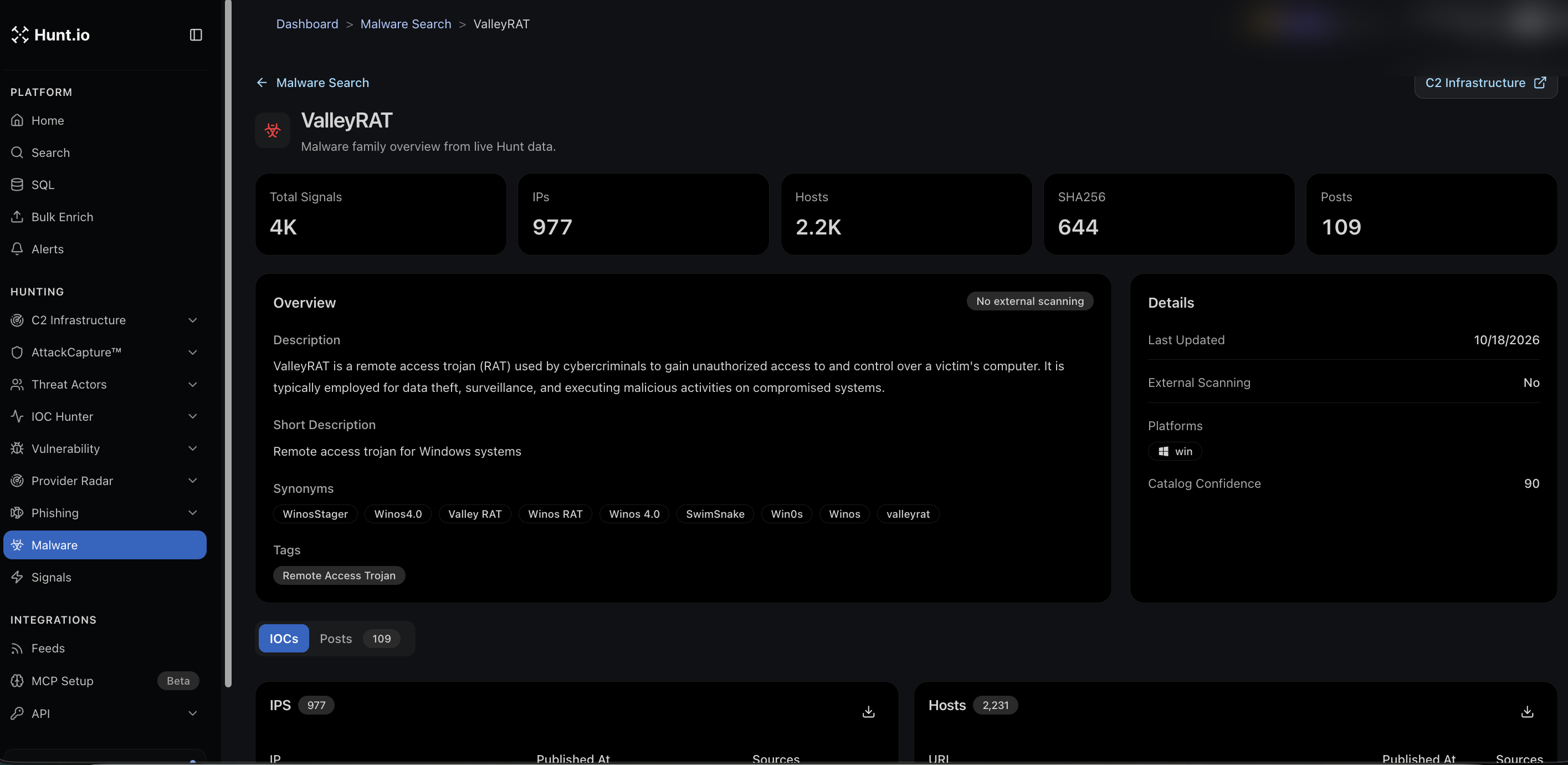
Open a family, for example ValleyRAT, to get its full profile:
Headline counts: total signals, IPs, hosts, SHA256, and posts.
An Overview with the description, a short description, synonyms, and tags such as Remote Access Trojan.
Details including last updated, external scanning status, platforms (for example Windows), and a catalog confidence score.
Tabs for IOCs and Posts, with the IPs and hosts downloadable.
From the family page you can jump straight into C2 Infrastructure scoped to that family, which is the natural next step when you want only the live servers.
How to use it
Look up a family by any alias to confirm you are tracking the same thing a report is.
Pull its current IPs and hosts to check against your telemetry.
Pivot into C2 Infrastructure to see only the active command-and-control servers for that family.
Malware: Family Tracking from Live Hunt Data
The Malware section is a catalog of malware families backed by live infrastructure. For each family you get its aliases and the current IPs, hosts, hashes, and reporting tied to it, so you can move from a name to the infrastructure that is serving it right now.
A family links straight into the rest of your hunting: its live servers in C2 Infrastructure, the reporting that mentions it in IOC Hunter, the groups that run it in Threat Actors, and any staging directories in AttackCapture. Drop a hash or host into Search to pivot from a single indicator.
Open Malware from the Hunting group in the sidebar.
Malware Search
Malware Search is the family index. Each row shows the family name, its synonyms, and counts of IPs, hosts, SHA256s, and posts, whether external hunt scanning is available, and when it was last updated. Filter by malware name, platform, or external hunt scanning. Synonyms matter here: a family like PlugX also appears as Destroy RAT, Kaba, Sogu, Talisman, RedDelta, and others, so searching by any known name finds it.
A family detail page
Open a family, for example ValleyRAT, to get its full profile:
Headline counts: total signals, IPs, hosts, SHA256, and posts.
An Overview with the description, a short description, synonyms, and tags such as Remote Access Trojan.
Details including last updated, external scanning status, platforms (for example Windows), and a catalog confidence score.
Tabs for IOCs and Posts, with the IPs and hosts downloadable.
From the family page you can jump straight into C2 Infrastructure scoped to that family, which is the natural next step when you want only the live servers.
How to use it
Look up a family by any alias to confirm you are tracking the same thing a report is.
Pull its current IPs and hosts to check against your telemetry.
Pivot into C2 Infrastructure to see only the active command-and-control servers for that family.
Malware: Family Tracking from Live Hunt Data
The Malware section is a catalog of malware families backed by live infrastructure. For each family you get its aliases and the current IPs, hosts, hashes, and reporting tied to it, so you can move from a name to the infrastructure that is serving it right now.
A family links straight into the rest of your hunting: its live servers in C2 Infrastructure, the reporting that mentions it in IOC Hunter, the groups that run it in Threat Actors, and any staging directories in AttackCapture. Drop a hash or host into Search to pivot from a single indicator.
Open Malware from the Hunting group in the sidebar.
Malware Search
Malware Search is the family index. Each row shows the family name, its synonyms, and counts of IPs, hosts, SHA256s, and posts, whether external hunt scanning is available, and when it was last updated. Filter by malware name, platform, or external hunt scanning. Synonyms matter here: a family like PlugX also appears as Destroy RAT, Kaba, Sogu, Talisman, RedDelta, and others, so searching by any known name finds it.
A family detail page
Open a family, for example ValleyRAT, to get its full profile:
Headline counts: total signals, IPs, hosts, SHA256, and posts.
An Overview with the description, a short description, synonyms, and tags such as Remote Access Trojan.
Details including last updated, external scanning status, platforms (for example Windows), and a catalog confidence score.
Tabs for IOCs and Posts, with the IPs and hosts downloadable.
From the family page you can jump straight into C2 Infrastructure scoped to that family, which is the natural next step when you want only the live servers.
How to use it
Look up a family by any alias to confirm you are tracking the same thing a report is.
Pull its current IPs and hosts to check against your telemetry.
Pivot into C2 Infrastructure to see only the active command-and-control servers for that family.
Frequently asked questions
Frequently asked questions
Can I search by a malware alias?
Does Hunt.io track where the family has been seen?
How do I get from a family to its live servers?
What is the catalog confidence score?
Related
Related
Hunt adversary infrastructure in real time. Surface C2 servers, enrich IOCs,
and map attacker activity at scale with our unified threat hunting platform.

Hunt adversary infrastructure in real time. Surface C2 servers, enrich IOCs,
and map attacker activity at scale with our unified threat hunting platform.
Hunt adversary infrastructure in real time. Surface C2 servers, enrich IOCs,
and map attacker activity at scale with our unified threat hunting platform.