
C2 Infrastructure: Track Active Command-and-Control Servers
C2 Infrastructure is the running list of command-and-control servers Hunt.io tracks. It is built from the platform's own scanning, so you see live infrastructure tied to known malware families rather than a stale blocklist. Use it to find active C2 before it hits your network, and to confirm what an operator is running right now.
Each server ties back to a Malware family, and you can open any host in Search to pivot further or in Signals to see its sensor activity. Save a family filter as a monitor in Alerts, pull the whole dataset from Feeds, or cross-reference staging servers in AttackCapture.
Open C2 Infrastructure from the Hunting group in the sidebar. It has two sub-sections: Overview and Listing.
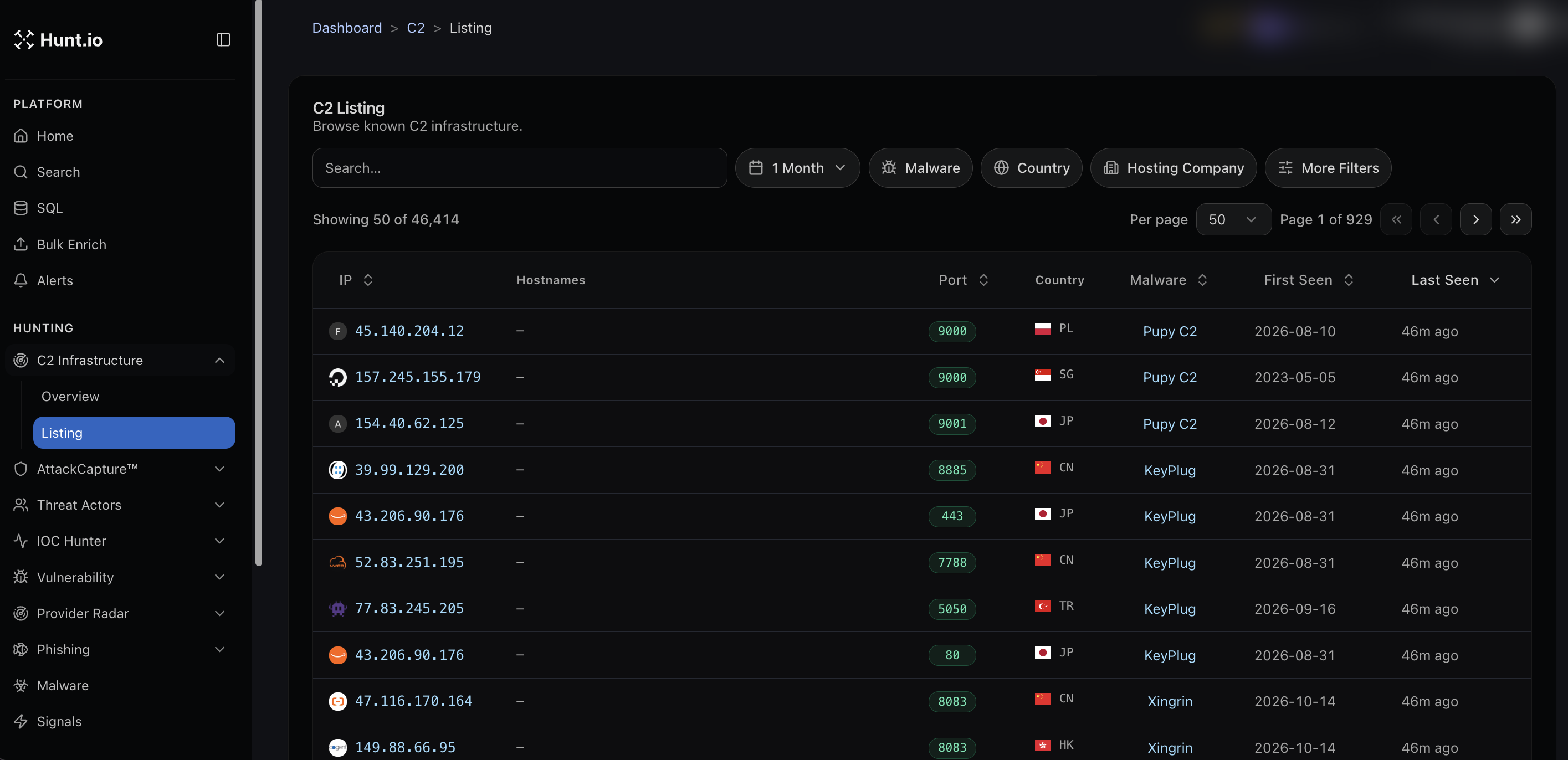
The listing
The Listing browses every tracked C2 host. Each row shows:
IP of the server, with the malware or framework icon.
Hostnames if any resolve to it.
Port the C2 is answering on.
Country of the host.
Malware family, for example Pupy C2, KeyPlug, or Xingrin.
First Seen and Last Seen so you can tell how long it has been up and whether it is still live.
The dataset is large, in the tens of thousands of hosts, and is paginated. Sort any column to order by newest, by port, or by family.
Filter to what matters
Narrow the list with the filters above the table:
A time window, such as the last month.
Malware family.
Country.
Hosting Company.
More Filters for finer control.
A common workflow is to filter by a malware family you are tracking, then sort by Last Seen to pull only the servers that are still active.
Pivot from a host
Click any IP to open its full profile, where you can move into domains, associations, signals, and history. From a malware family detail page you can also jump straight into the C2 Infrastructure view scoped to that family.
C2 Infrastructure: Track Active Command-and-Control Servers
C2 Infrastructure is the running list of command-and-control servers Hunt.io tracks. It is built from the platform's own scanning, so you see live infrastructure tied to known malware families rather than a stale blocklist. Use it to find active C2 before it hits your network, and to confirm what an operator is running right now.
Each server ties back to a Malware family, and you can open any host in Search to pivot further or in Signals to see its sensor activity. Save a family filter as a monitor in Alerts, pull the whole dataset from Feeds, or cross-reference staging servers in AttackCapture.
Open C2 Infrastructure from the Hunting group in the sidebar. It has two sub-sections: Overview and Listing.
The listing
The Listing browses every tracked C2 host. Each row shows:
IP of the server, with the malware or framework icon.
Hostnames if any resolve to it.
Port the C2 is answering on.
Country of the host.
Malware family, for example Pupy C2, KeyPlug, or Xingrin.
First Seen and Last Seen so you can tell how long it has been up and whether it is still live.
The dataset is large, in the tens of thousands of hosts, and is paginated. Sort any column to order by newest, by port, or by family.
Filter to what matters
Narrow the list with the filters above the table:
A time window, such as the last month.
Malware family.
Country.
Hosting Company.
More Filters for finer control.
A common workflow is to filter by a malware family you are tracking, then sort by Last Seen to pull only the servers that are still active.
Pivot from a host
Click any IP to open its full profile, where you can move into domains, associations, signals, and history. From a malware family detail page you can also jump straight into the C2 Infrastructure view scoped to that family.
C2 Infrastructure: Track Active Command-and-Control Servers
C2 Infrastructure is the running list of command-and-control servers Hunt.io tracks. It is built from the platform's own scanning, so you see live infrastructure tied to known malware families rather than a stale blocklist. Use it to find active C2 before it hits your network, and to confirm what an operator is running right now.
Each server ties back to a Malware family, and you can open any host in Search to pivot further or in Signals to see its sensor activity. Save a family filter as a monitor in Alerts, pull the whole dataset from Feeds, or cross-reference staging servers in AttackCapture.
Open C2 Infrastructure from the Hunting group in the sidebar. It has two sub-sections: Overview and Listing.
The listing
The Listing browses every tracked C2 host. Each row shows:
IP of the server, with the malware or framework icon.
Hostnames if any resolve to it.
Port the C2 is answering on.
Country of the host.
Malware family, for example Pupy C2, KeyPlug, or Xingrin.
First Seen and Last Seen so you can tell how long it has been up and whether it is still live.
The dataset is large, in the tens of thousands of hosts, and is paginated. Sort any column to order by newest, by port, or by family.
Filter to what matters
Narrow the list with the filters above the table:
A time window, such as the last month.
Malware family.
Country.
Hosting Company.
More Filters for finer control.
A common workflow is to filter by a malware family you are tracking, then sort by Last Seen to pull only the servers that are still active.
Pivot from a host
Click any IP to open its full profile, where you can move into domains, associations, signals, and history. From a malware family detail page you can also jump straight into the C2 Infrastructure view scoped to that family.
Frequently asked questions
Frequently asked questions
Can I filter C2 by malware family?
Can I get this as a feed?
How do I find only active C2 servers?
Where does Hunt.io get its C2 data?
Hunt adversary infrastructure in real time. Surface C2 servers, enrich IOCs,
and map attacker activity at scale with our unified threat hunting platform.

Hunt adversary infrastructure in real time. Surface C2 servers, enrich IOCs,
and map attacker activity at scale with our unified threat hunting platform.
Hunt adversary infrastructure in real time. Surface C2 servers, enrich IOCs,
and map attacker activity at scale with our unified threat hunting platform.