
Bulk Enrich: Extract and Enrich Indicators at Scale
Bulk Enrich takes a messy block of text and turns it into clean, typed indicators you can act on. Paste in domains, IPs, hashes, emails, or URLs, one per line, and it extracts what matters, groups it by type, and enriches it. It is the fast path when you have a report, an alert dump, or a list and do not want to clean it by hand.
It sits alongside the other entry points: use Search for a single indicator, HuntSQL for a precise query, and Bulk Enrich for a whole list at once. The cleaned indicators pair well with IOC Hunter for context and the downloadable Feeds for bulk data. New to the platform? Start at Getting Started.
Direct URL: portal.hunt.io/bulk. You can also open Bulk Enrich from the Platform group in the sidebar.
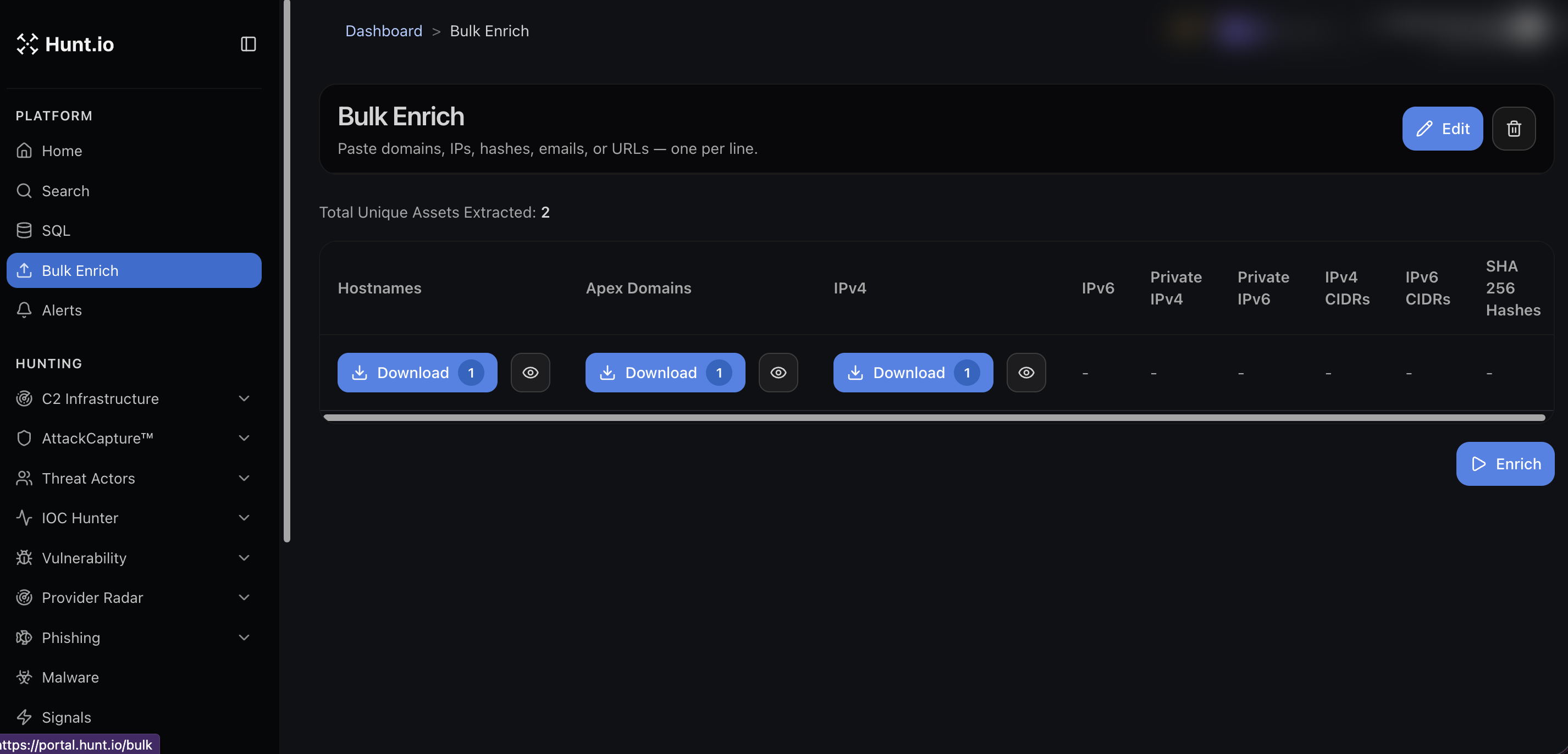
Paste and extract
Paste your text into the input, one item per line. Hunt.io parses it and shows a count of total unique assets, then sorts them into columns:
Hostnames
Apex domains
IPv4 and IPv6
Private IPv4 and private IPv6
IPv4 and IPv6 CIDRs
SHA-256 hashes
Each column has its own count and a Download button, so you can pull just the apex domains, or just the IPv4 addresses, without exporting the rest. The eye icon previews what landed in a column before you download it.
Enrich
Once the assets are extracted, run Enrich to add context such as IP geolocation on top of the extracted indicators. Use Edit to adjust your input and re-run.
When to use it
You pasted a vendor report and want every IP and domain out of it in seconds.
You have a list of hosts and want them deduplicated and split by type before you push them into a SIEM or a block list.
You want apex domains separated from full hostnames for registrar-level pivots.
Bulk Enrich: Extract and Enrich Indicators at Scale
Bulk Enrich takes a messy block of text and turns it into clean, typed indicators you can act on. Paste in domains, IPs, hashes, emails, or URLs, one per line, and it extracts what matters, groups it by type, and enriches it. It is the fast path when you have a report, an alert dump, or a list and do not want to clean it by hand.
It sits alongside the other entry points: use Search for a single indicator, HuntSQL for a precise query, and Bulk Enrich for a whole list at once. The cleaned indicators pair well with IOC Hunter for context and the downloadable Feeds for bulk data. New to the platform? Start at Getting Started.
Direct URL: portal.hunt.io/bulk. You can also open Bulk Enrich from the Platform group in the sidebar.
Paste and extract
Paste your text into the input, one item per line. Hunt.io parses it and shows a count of total unique assets, then sorts them into columns:
Hostnames
Apex domains
IPv4 and IPv6
Private IPv4 and private IPv6
IPv4 and IPv6 CIDRs
SHA-256 hashes
Each column has its own count and a Download button, so you can pull just the apex domains, or just the IPv4 addresses, without exporting the rest. The eye icon previews what landed in a column before you download it.
Enrich
Once the assets are extracted, run Enrich to add context such as IP geolocation on top of the extracted indicators. Use Edit to adjust your input and re-run.
When to use it
You pasted a vendor report and want every IP and domain out of it in seconds.
You have a list of hosts and want them deduplicated and split by type before you push them into a SIEM or a block list.
You want apex domains separated from full hostnames for registrar-level pivots.
Bulk Enrich: Extract and Enrich Indicators at Scale
Bulk Enrich takes a messy block of text and turns it into clean, typed indicators you can act on. Paste in domains, IPs, hashes, emails, or URLs, one per line, and it extracts what matters, groups it by type, and enriches it. It is the fast path when you have a report, an alert dump, or a list and do not want to clean it by hand.
It sits alongside the other entry points: use Search for a single indicator, HuntSQL for a precise query, and Bulk Enrich for a whole list at once. The cleaned indicators pair well with IOC Hunter for context and the downloadable Feeds for bulk data. New to the platform? Start at Getting Started.
Direct URL: portal.hunt.io/bulk. You can also open Bulk Enrich from the Platform group in the sidebar.
Paste and extract
Paste your text into the input, one item per line. Hunt.io parses it and shows a count of total unique assets, then sorts them into columns:
Hostnames
Apex domains
IPv4 and IPv6
Private IPv4 and private IPv6
IPv4 and IPv6 CIDRs
SHA-256 hashes
Each column has its own count and a Download button, so you can pull just the apex domains, or just the IPv4 addresses, without exporting the rest. The eye icon previews what landed in a column before you download it.
Enrich
Once the assets are extracted, run Enrich to add context such as IP geolocation on top of the extracted indicators. Use Edit to adjust your input and re-run.
When to use it
You pasted a vendor report and want every IP and domain out of it in seconds.
You have a list of hosts and want them deduplicated and split by type before you push them into a SIEM or a block list.
You want apex domains separated from full hostnames for registrar-level pivots.
Frequently asked questions
Frequently asked questions
Does it add context to the indicators?
What can I paste into Bulk Enrich?
What does it give me back?
Related
Related
Hunt adversary infrastructure in real time. Surface C2 servers, enrich IOCs,
and map attacker activity at scale with our unified threat hunting platform.

Hunt adversary infrastructure in real time. Surface C2 servers, enrich IOCs,
and map attacker activity at scale with our unified threat hunting platform.
Hunt adversary infrastructure in real time. Surface C2 servers, enrich IOCs,
and map attacker activity at scale with our unified threat hunting platform.