
Threat Actors: Verified Profiles and Infrastructure Pivots
Threat Actors is a library of verified actor profiles with their infrastructure attached. Each profile links an actor to the IPs, hosts, hashes, and write-ups tied to it, so you can go from a name to concrete indicators, and from indicators back to the hosting that supports them.
From a profile you can pivot into the hosting that supports an actor in Provider Radar, the reporting behind it in IOC Hunter, its live servers in C2 Infrastructure, and the families it runs in Malware. Actors who run credential theft also show up in Phishing. You can watch an actor for changes with a monitor in Alerts.
Open Threat Actors from the Hunting group in the sidebar. It has three sub-sections: Overview, Listing, and Global.
Overview
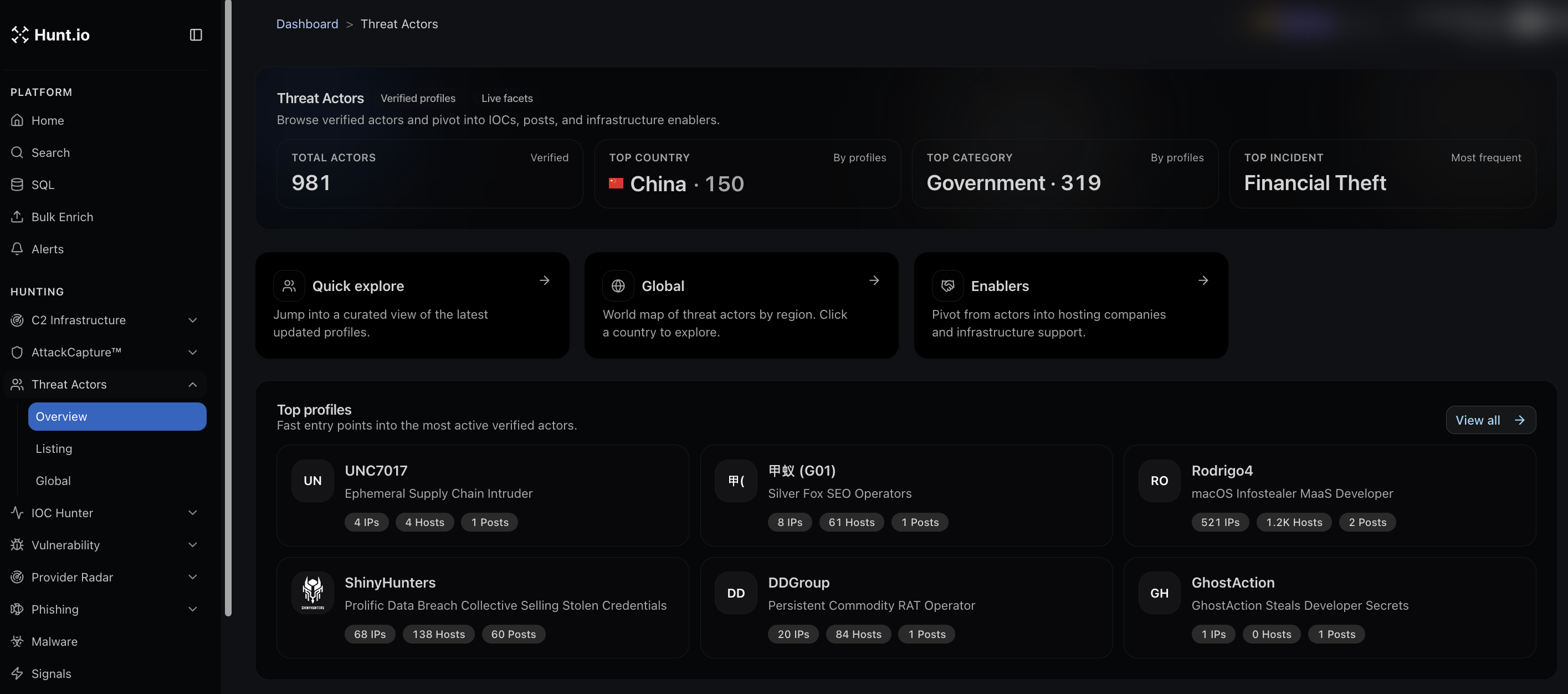
The Overview is the entry point. It shows headline numbers across all verified actors, such as the total number of actors tracked, the top country by profile count, the top victim category, and the most frequent incident type. Three shortcuts sit below:
Quick explore jumps into a curated view of recently updated profiles.
Global opens a world map of actors by region, so you can click a country to explore.
Enablers pivots from actors into the hosting companies and infrastructure that support them.
Top profile cards give you fast entry into the most active actors, each showing its counts of IPs, hosts, and posts.
Listing
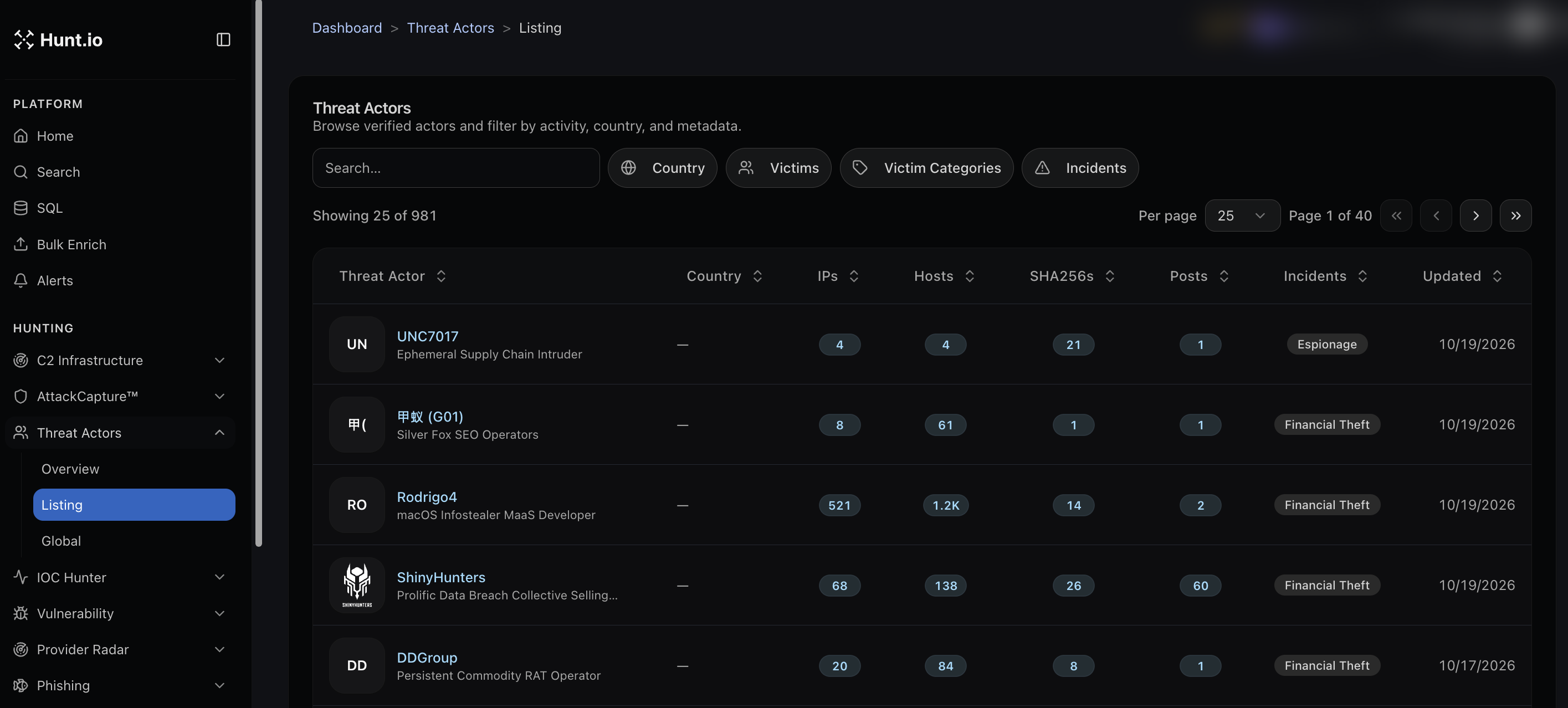
The Listing is the full, filterable table. Each actor row shows its country, and counts for IPs, hosts, SHA256s, and posts, plus its incident type and when it was last updated. Filter by country, victims, victim categories, or incidents, and search by name. Click any actor to open its profile and pivot into its indicators.
How to use it in an investigation
Start from an actor you are tracking and pull its current IPs and hosts to check against your own telemetry.
Use the incident and victim category filters to find actors relevant to your sector.
From a profile, pivot into Enablers to see which hosting providers keep showing up, then take that to Provider Radar.
Threat Actors: Verified Profiles and Infrastructure Pivots
Threat Actors is a library of verified actor profiles with their infrastructure attached. Each profile links an actor to the IPs, hosts, hashes, and write-ups tied to it, so you can go from a name to concrete indicators, and from indicators back to the hosting that supports them.
From a profile you can pivot into the hosting that supports an actor in Provider Radar, the reporting behind it in IOC Hunter, its live servers in C2 Infrastructure, and the families it runs in Malware. Actors who run credential theft also show up in Phishing. You can watch an actor for changes with a monitor in Alerts.
Open Threat Actors from the Hunting group in the sidebar. It has three sub-sections: Overview, Listing, and Global.
Overview
The Overview is the entry point. It shows headline numbers across all verified actors, such as the total number of actors tracked, the top country by profile count, the top victim category, and the most frequent incident type. Three shortcuts sit below:
Quick explore jumps into a curated view of recently updated profiles.
Global opens a world map of actors by region, so you can click a country to explore.
Enablers pivots from actors into the hosting companies and infrastructure that support them.
Top profile cards give you fast entry into the most active actors, each showing its counts of IPs, hosts, and posts.
Listing
The Listing is the full, filterable table. Each actor row shows its country, and counts for IPs, hosts, SHA256s, and posts, plus its incident type and when it was last updated. Filter by country, victims, victim categories, or incidents, and search by name. Click any actor to open its profile and pivot into its indicators.
How to use it in an investigation
Start from an actor you are tracking and pull its current IPs and hosts to check against your own telemetry.
Use the incident and victim category filters to find actors relevant to your sector.
From a profile, pivot into Enablers to see which hosting providers keep showing up, then take that to Provider Radar.
Threat Actors: Verified Profiles and Infrastructure Pivots
Threat Actors is a library of verified actor profiles with their infrastructure attached. Each profile links an actor to the IPs, hosts, hashes, and write-ups tied to it, so you can go from a name to concrete indicators, and from indicators back to the hosting that supports them.
From a profile you can pivot into the hosting that supports an actor in Provider Radar, the reporting behind it in IOC Hunter, its live servers in C2 Infrastructure, and the families it runs in Malware. Actors who run credential theft also show up in Phishing. You can watch an actor for changes with a monitor in Alerts.
Open Threat Actors from the Hunting group in the sidebar. It has three sub-sections: Overview, Listing, and Global.
Overview
The Overview is the entry point. It shows headline numbers across all verified actors, such as the total number of actors tracked, the top country by profile count, the top victim category, and the most frequent incident type. Three shortcuts sit below:
Quick explore jumps into a curated view of recently updated profiles.
Global opens a world map of actors by region, so you can click a country to explore.
Enablers pivots from actors into the hosting companies and infrastructure that support them.
Top profile cards give you fast entry into the most active actors, each showing its counts of IPs, hosts, and posts.
Listing
The Listing is the full, filterable table. Each actor row shows its country, and counts for IPs, hosts, SHA256s, and posts, plus its incident type and when it was last updated. Filter by country, victims, victim categories, or incidents, and search by name. Click any actor to open its profile and pivot into its indicators.
How to use it in an investigation
Start from an actor you are tracking and pull its current IPs and hosts to check against your own telemetry.
Use the incident and victim category filters to find actors relevant to your sector.
From a profile, pivot into Enablers to see which hosting providers keep showing up, then take that to Provider Radar.
Frequently asked questions
Frequently asked questions
Can I find actors that target my industry?
How current are the profiles?
How do I pivot from an actor to its hosting?
What is in a threat actor profile?
Related
Related
Hunt adversary infrastructure in real time. Surface C2 servers, enrich IOCs,
and map attacker activity at scale with our unified threat hunting platform.

Hunt adversary infrastructure in real time. Surface C2 servers, enrich IOCs,
and map attacker activity at scale with our unified threat hunting platform.
Hunt adversary infrastructure in real time. Surface C2 servers, enrich IOCs,
and map attacker activity at scale with our unified threat hunting platform.