The Complete Guide to Hunting Cobalt Strike - Part 4: Operationalizing C2 Feeds with API Automation
The Complete Guide to Hunting Cobalt Strike - Part 4: Operationalizing C2 Feeds with API Automation
Published on
Our previous research examined Cobalt Strike through increasingly automated lenses, starting with exposed artifacts and progressing toward platform-driven discovery.
Part 1 showed how exposed open directories can unintentionally reveal attacker tooling, Part 2 demonstrated how HuntSQL™ can be used to systematically identify live C2 infrastructure, and Part 3 focused on automated discovery inside the Hunt.io interface to quickly map clusters of related servers.
In Part 4, we focus on the C2 feed and demonstrate how to ingest, filter, and normalize Cobalt Strike indicators into three standardized outputs: core, network, and endpoint, enabling operational use in SIEMs, IDS/EDR platforms, sandbox environments, and intelligence-driven threat hunting workflows.
Now we’ll look at the automation workflow. This part moves beyond discovery and shows how live C2 telemetry can be transformed into structured, automated detection pipelines.
Why Targeting Cobalt Strike Infrastructure Matters
Cobalt Strike usage changed between 2025 and 2026. What was once heavily abused in broad cybercrime campaigns is now more frequently tied to state-backed espionage and advanced ransomware groups.
Even after Operation Morpheus disrupted large volumes of unauthorized instances, newly deployed Cobalt Strike listeners continued to surface across select hosting providers. Many of these servers remained active only briefly before disappearing, reflecting deliberate infrastructure rotation to evade detection.
Throughout early 2026, multiple investigations linked Cobalt Strike to supply-chain compromises, government targeting campaigns, and post-exploitation activity across global espionage operations. Whether deployed alongside custom backdoors or used as a follow-on payload, it remains a consistent command-and-control framework in sophisticated intrusions.
When we reviewed Hunt.io telemetry for Cobalt Strike infrastructure in 2025, we saw heavy internet activity. A HuntSQL™ query, designed to retrieve unique IP addresses associated with the malware name Cobalt Strike in 2025, revealed 8,868 distinct IPs.
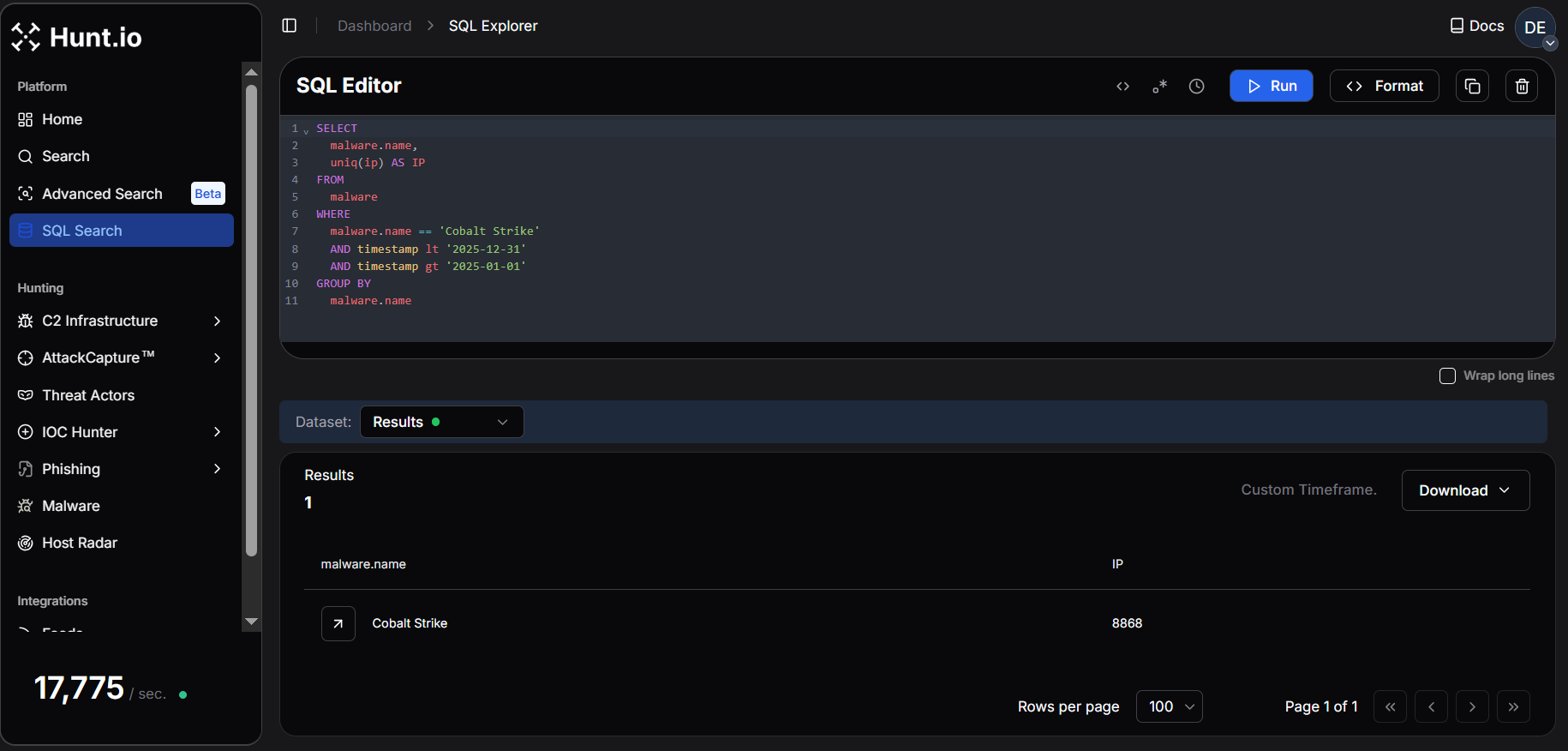 Fig. 01. Hunt.io telemetry showing 8,868 unique IPs associated with Cobalt Strike infrastructure in 2025.
In January 2026, Hunt.io observed 1,921 unique IPs hosting Cobalt Strike infrastructure, indicating a highly active start to the year. This exceeds the average monthly activity in 2025 (~739 IPs/month), highlighting the rapid rotation and dynamic deployment of C2 servers. When infrastructure changes this quickly, manual tracking does not scale. The only realistic option is continuous ingestion and automation.
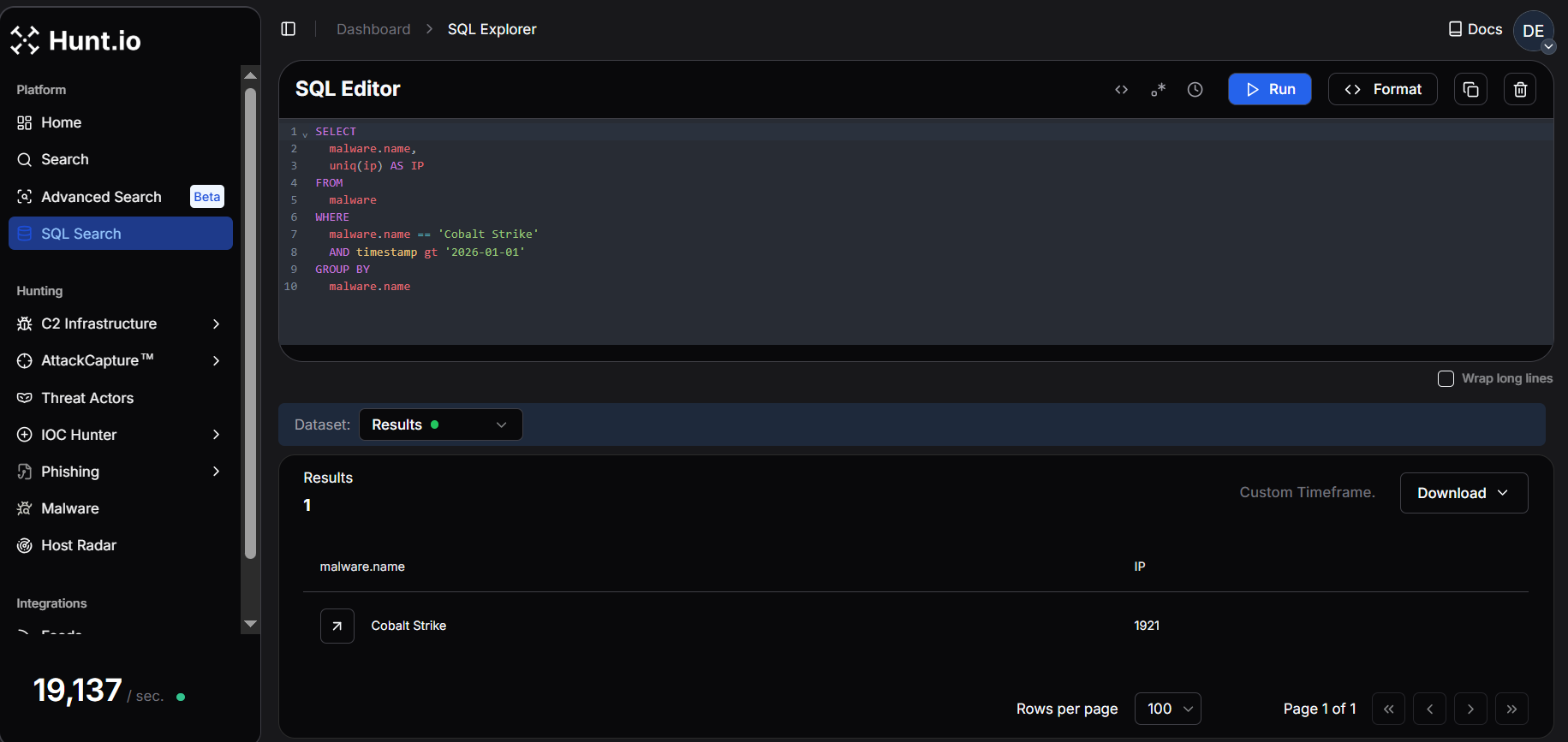 Fig. 02. Hunt.io query results from January 2026 showing 1,921 unique IPs linked to Cobalt Strike infrastructure.
This level of rotation makes static blocking ineffective. Continuous, automated C2 threat intelligence feeds are essential for keeping pace with active infrastructure and operationalizing detection across SIEM, EDR, and network controls. Seeing the volume is one thing. Making it usable inside real detection workflows is another.
Turning the Hunt.io C2 Feed into Detection Data
The goal is simple: pull the feed, filter for Cobalt Strike, and send structured outputs into the tools that use it. For that to work, the feed needs to be structured for automation from the beginning, not cleaned up afterward.
The feed is delivered in structured formats such as JSON and compressed archives, making it straightforward to automate ingestion into platforms like Splunk, Cyware, and OpenCTI. Rather than relying on static reports, the feed allows continuous ingestion of validated C2 data into SIEM, TIP, and detection pipelines.
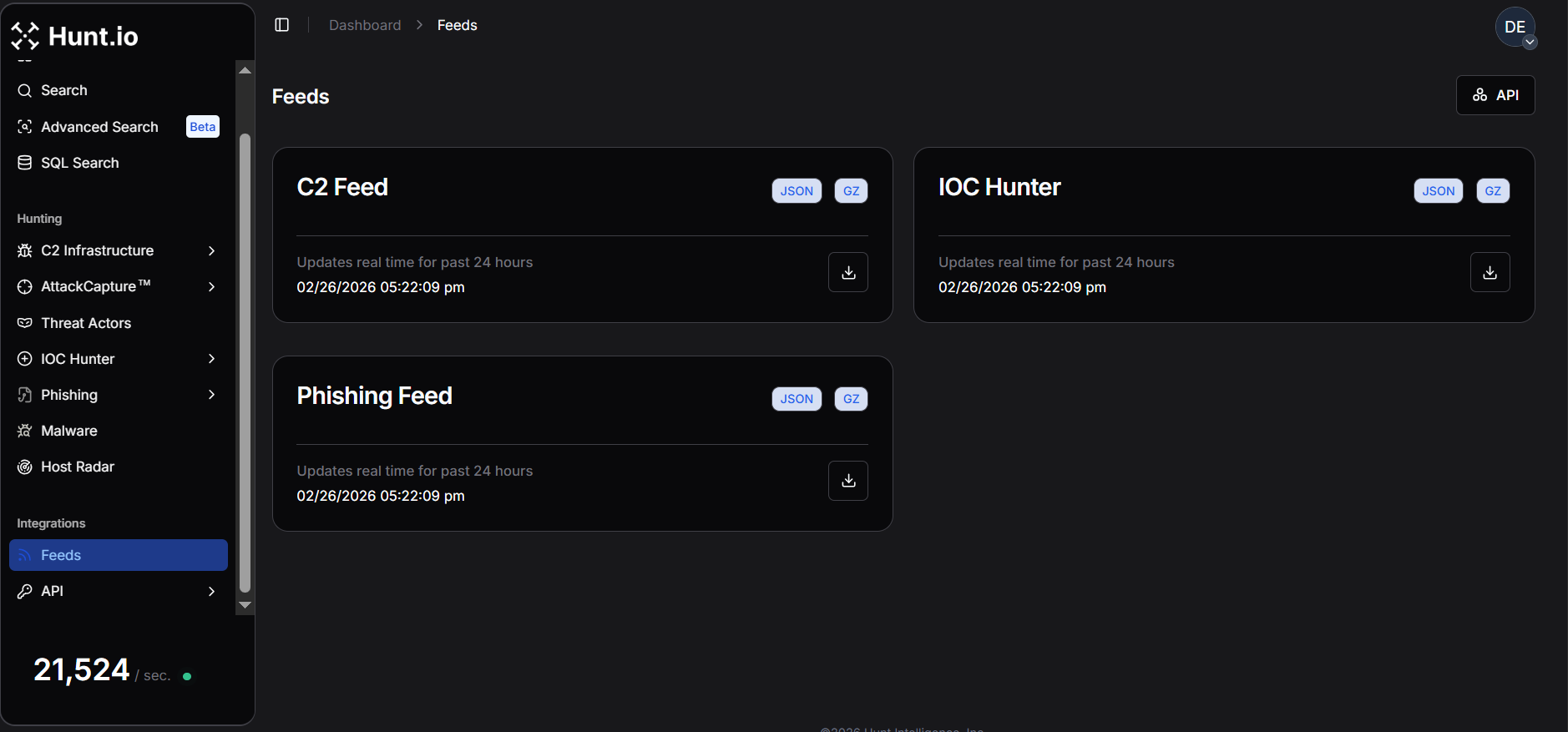 Fig. 03. Hunt.io feed overview showing C2 infrastructure delivered in JSON/GZ for automated ingestion.
Once integrated, it can enrich alerts with infrastructure context, trigger SOAR playbooks on newly observed C2 servers, power real-time dashboards, and support bulk enrichment. This makes C2 intelligence usable inside day-to-day detection workflows.
Cobalt Strike is a strong example of why this matters. It remains one of the most frequently observed C2 frameworks in real-world intrusions, with infrastructure that rotates rapidly. That makes it a good example to demonstrate how the Hunt.io C2 Feed and API can be used to automate detection and investigation end-to-end.
To understand how this works in practice, we'll walk through the Hunt.io C2 API and show how the feed can be programmatically retrieved and operationalized. Once the ingestion model is clear, the next step is pulling the data programmatically instead of relying on manual exports.
Operationalizing the C2 Feed via API
To operationalize the Cobalt Strike C2 feed at scale, we retrieve it from the Hunt.io C2 API, filter for Cobalt Strike, and normalize the output into core, network, and endpoint feeds for consistent SIEM and EDR ingestion.
The Active C2 Server Feed is generated from Hunt.io's proprietary probing and scanning infrastructure, which monitors malicious protocols, suspicious SSL behavior, and attacker-operated services.
The platform tracks activity across 106 malware families and reconnaissance frameworks, helping defenders identify domains and IP addresses used in malicious operations.
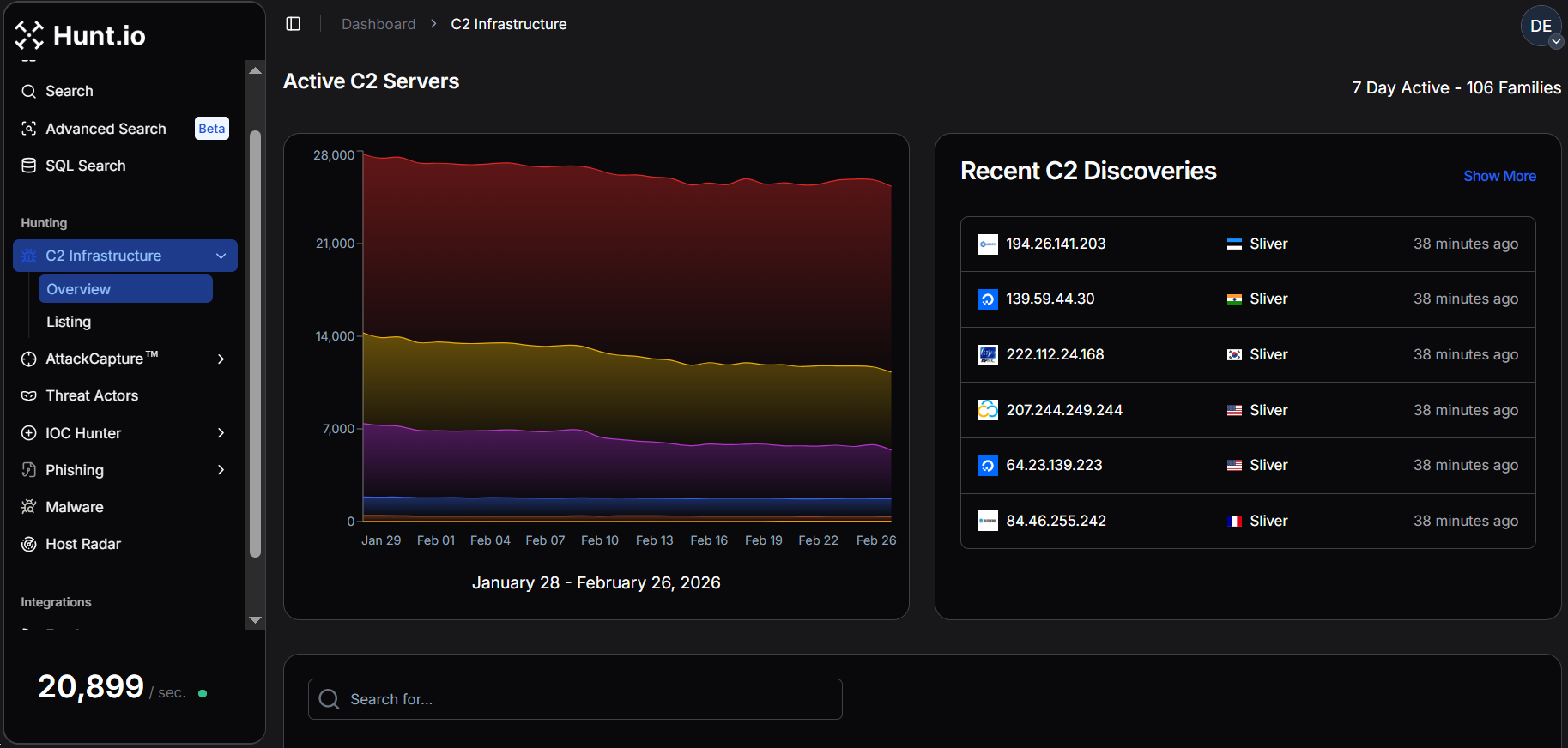 Fig. 04. Active C2 server feed showing seven days of observed infrastructure across 106 malware families.
Beyond the web interface, the C2 feed is available via API as gzip-compressed NDJSON, and can be downloaded programmatically using standard HTTP requests with an API token. A common example uses curl to retrieve the compressed dataset:
Example Request:
curl -o c2.json.gz 'https://api.hunt.io/v1/feeds/c2?domain_exclude_list=50k' -H 'token: <API_TOKEN>'

                Copy
After download, the .gz archive can be decompressed and parsed directly as newline JSON.
Hunt also provides simple integrations using Python's requests library for quick retrieval inside analysis workflows or ingestion pipelines.
Example Code:
import requests
url = "https://api.hunt.io/v1/feeds/c2"
headers = {"accept": "application/json"}
response = requests.get(url, headers=headers)
print(response.text)
Copy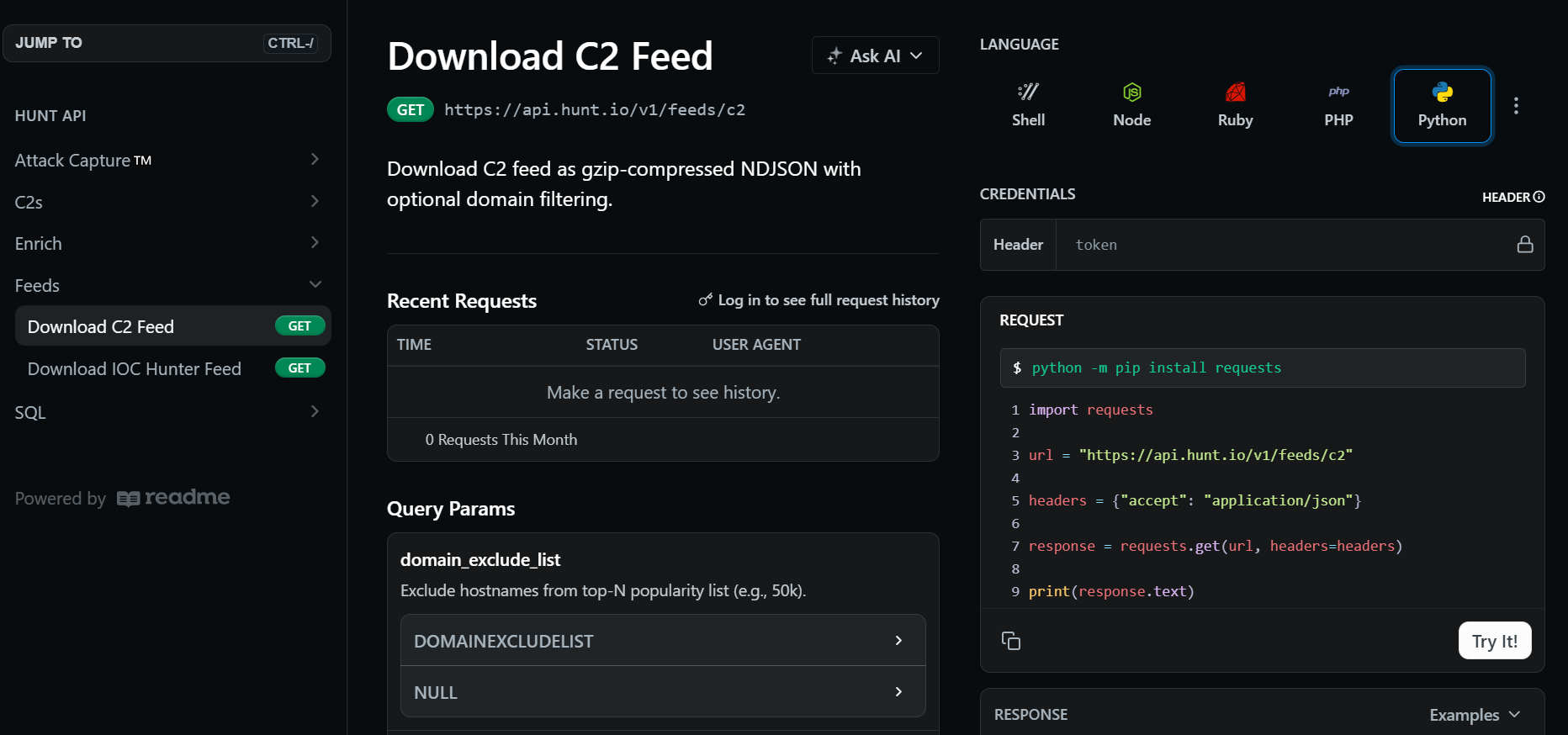 Fig. 05. API-delivered NDJSON C2 feed format used for automated ingestion.
Each record in the feed represents a validated infrastructure node and includes metadata used for detection and correlation. The key fields include:
IP address
Hostname (if present)
Scan URI
Timestamp
Port
Malware family and subsystem
Confidence score
Enrichment metadata (GeoIP, ASN, domain details)
The C2 feed acts as the primary intelligence source and supports focused analysis of C2 infrastructure, particularly Cobalt Strike servers, to support detection engineering, telemetry validation, and SIEM/EDR integration.
Pulling the feed is straightforward. What matters more is how each field translates into detection logic.
Operationalizing Hunt.io Telemetry for Detection Engineering
The Hunt.io C2 feed is more than just a list of malicious IP addresses. Each record includes validated infrastructure, HTTP behavior, and extracted beacon configuration directly from observed Cobalt Strike listeners.
The table below summarizes the key fields in the Cobalt Strike feed and how teams use them for blocking and behavioral detection.
| Field | Description | Operational Use |
|---|---|---|
| ip | Observed C2 server IP address | Firewall blocking, SIEM correlation, enrichment |
| port | Listening service port | Network rules, anomaly detection |
| hostname | Resolved hostname (if present) | DNS monitoring, domain blocking |
| timestamp | First/last observed time | Recency filtering, churn tracking |
| scan_uri | Validated callback path | Proxy/IDS URI detection rules |
| confidence | Hunt.io confidence score | Threshold tuning, false-positive reduction |
| malware_name | Malware family label | Filtering and feed segmentation |
| malware_subsystem | Subsystem classification (C2) | Detection categorization |
| status_code | HTTP response code | Server behavior profiling |
| SETTING_USERAGENT | Beacon user-agent string | Proxy/IDS fingerprinting |
| SETTING_DOMAINS | Callback domains or paths | URI/domain matching |
| SETTING_SUBMITURI | POST endpoint for beacon traffic | HTTP detection signatures |
| SETTING_C2_VERB_GET | GET method usage | Traffic profiling |
| SETTING_C2_VERB_POST | POST method usage | Beacon communication rules |
| SETTING_SLEEPTIME | Sleep interval between callbacks (ms) | Periodic beacon detection |
| SETTING_JITTER | Randomization percentage | Behavioral fingerprinting |
| SETTING_MAXGET | Max payload size | Traffic anomaly analysis |
| SETTING_WATERMARK | Campaign identifier | Infrastructure clustering |
| SETTING_WATERMARKHASH | Hashed watermark value | Cross-host correlation |
| SETTING_PUBKEY | Beacon public key | Campaign grouping and attribution |
| SETTING_SPAWNTO_X86/X64 | Spawn-to process (e.g., rundll32.exe) | EDR process monitoring |
| SETTING_PROCINJ_EXECUTE | Injection methods used | Endpoint behavior detection |
| SETTING_PROCINJ_PERMS | Memory permission settings | Suspicious allocation alerts |
| SETTING_BOF_ALLOCATOR | Memory allocator choice | Post-exploitation hunting |
| SETTING_C2_REQUEST / POSTREQ | HTTP header/parameter construction | Signature engineering |
| SETTING_HOST_HEADER | Custom host header | Proxy/HTTP anomalies |
| SETTING_HTTP_NO_COOKIES | Cookie usage behavior | Traffic fingerprinting |
| geoip_city | Observed city | Threat hunting context |
| geoip_country | Country | Geo-based filtering |
| geoip_asn | Hosting provider/ASN | Infrastructure clustering, provider abuse tracking |
| geoip_asn_num | ASN number | Detection grouping |
| geoip_subnetwork | Network range | Subnet blocking or monitoring |
With those fields mapped out, the data can be separated based on how it will actually be used inside security tooling.
The Cobalt Strike feed includes attributes that map directly to specific defensive use cases, ranging from simple blocking to advanced threat hunting and campaign clustering.
To make this repeatable, we wrapped the retrieval and filtering into a small automation script.
Cobalt Strike C2 Feed Automation - Script Walkthrough
We built a Python automation script that retrieves the Hunt.io C2 feed, filters for Cobalt Strike infrastructure, and restructures the results into multiple outputs.
The authentication is handled through an environment variable, allowing secure API key management without hardcoding secrets.
After filtration, the records are normalized and divided into three structured feeds. The core feed provides lightweight infrastructure indicators suitable for blocking or alerting, the network feed enriches those indicators with protocol and HTTP metadata to support traffic analysis and IDS rules, and the endpoint feed focuses on beacon configuration and geolocation context for deeper hunting and EDR correlation.
Each feed can be exported as JSON, CSV, or STIX 2.1, making the outputs compatible with SIEMs, TIPs, and automated detection pipelines.
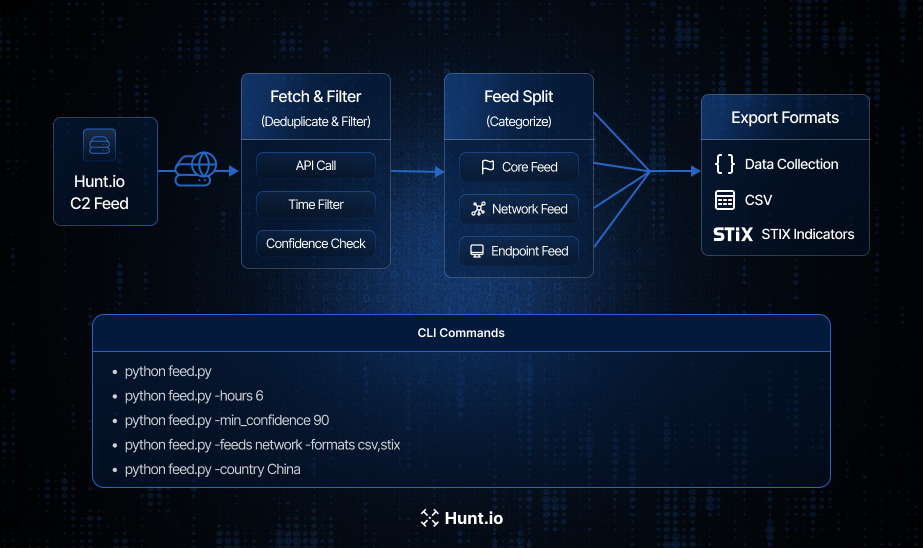 Fig. 06. End-to-end Cobalt Strike feed workflow showing C2 retrieval, filtering, segmentation into core, network, and endpoint feeds, and export to JSON, CSV, and STIX.
The script pulls the Hunt.io C2 feed through the https://api.hunt.io/v1/feeds/c2 endpoint using an authenticated API token.
It also allows users to customize the feed generation, including time range, confidence threshold, country or port filters, feed types (core, network, endpoint), output formats (JSON, CSV, STIX), and the destination directory for generated files.
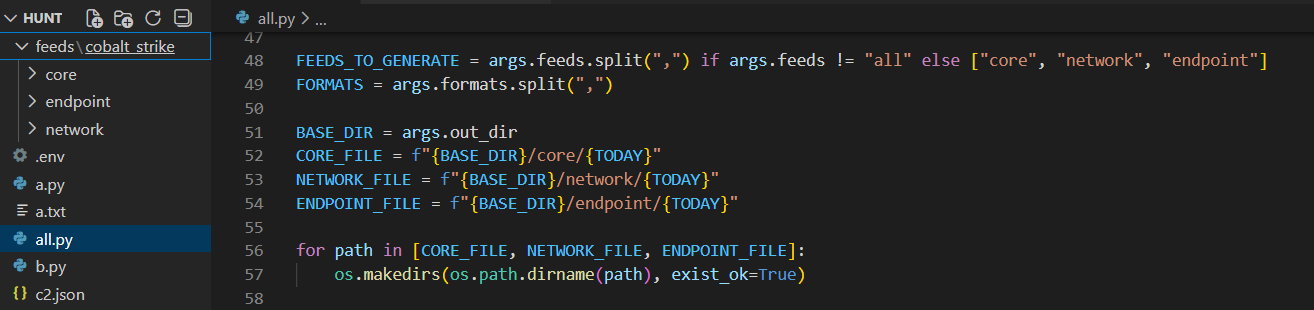 Fig. 07. CLI configuration showing feed types, output formats, and directory structure for generated intelligence.
The script reads the compressed Hunt.io C2 feed line by line and immediately filters for records where malware_name is Cobalt Strike. This ensures only relevant infrastructure is processed, ignoring other malware families and reducing overhead.
From there, the output can be shaped depending on whether the goal is blocking, detection engineering, or deeper investigation.
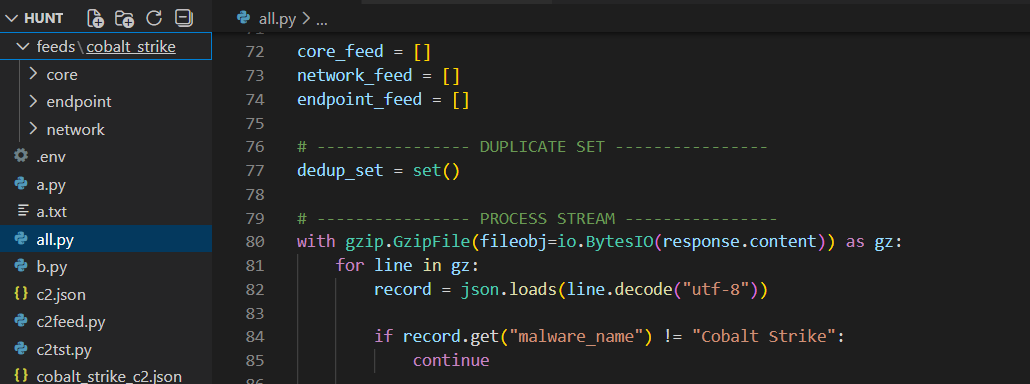 Fig. 08. Streaming the compressed dataset line-by-line and filtering for malware_name = "Cobalt Strike" to isolate relevant infrastructure.
Feed Construction Logic and Operational Use Cases
After the feed is retrieved and filtered exclusively for Cobalt Strike, the pipeline can divide into three distinct feeds (core, network, and endpoint).
Core Feed
The core feed represents the most minimal and portable form of intelligence. It contains only high-confidence infrastructure identifiers such as IP address, port, hostname, timestamp, and confidence score.
core_feed.append({
    "ip": record.get("ip"),
    "port": record.get("port"),
    "hostname": record.get("hostname"),
    "scan_uri": record.get("scan_uri"),
    "timestamp": record.get("timestamp"),
    "confidence": record.get("confidence"),
    "malware_family": "Cobalt Strike",
    "category": "C2",
    "source": "hunt.io"
})

                Copy
The lightweight schema is optimized for rapid ingestion into SIEMs, firewalls, blocklists, and alerting systems where performance and simplicity are critical.
Security teams can use the core feed to immediately deny outbound connections to known Cobalt Strike team servers, create detection rules for suspicious beacon traffic, or enrich alerts with threat intelligence context.
Network Feed
The network feed provides behavioral context by extending the core feed with additional attributes such as HTTP user agents, callback domains, submit URIs, HTTP verbs, ASN ownership, and country information.
network_feed.append({
    "ip": record.get("ip"),
    "port": record.get("port"),
    "hostname": record.get("hostname"),
    "scan_uri": record.get("scan_uri"),
    "timestamp": record.get("timestamp"),
    "confidence": record.get("confidence"),
    "malware_family": "Cobalt Strike",
    "http": {
        "user_agent": extra.get("SETTING_USERAGENT"),
        "domains": extra.get("SETTING_DOMAINS"),
        "submit_uri": extra.get("SETTING_SUBMITURI")
    },
    "geoip": {
        "country": extra.get("geoip_country"),
        "asn": extra.get("geoip_asn")
    },
    "source": "hunt.io"
})

                Copy
Using the network feed, the defenders can now craft IDS/IPS signatures, proxy rules, and traffic fingerprints that detect beacon communications or anomalous request structures commonly associated with Cobalt Strike.
This feed is particularly useful for environments relying on Suricata, Zeek, firewall analytics, or proxy telemetry, where richer context enables more precise and lower-noise detections.
Endpoint Feed
The endpoint feed captures Cobalt Strike beacon-specific attributes such as sleep time, jitter, and GeoIP details, allowing analysts to correlate endpoint logs with known C2 behavior.
endpoint_feed.append({
    "ip": record.get("ip"),
    "port": record.get("port"),
    "timestamp": record.get("timestamp"),
    "confidence": record.get("confidence"),
    "malware_family": "Cobalt Strike",
    "malware_subsystem": "C2",
    "beacon_config": {
        "sleep_time_ms": extra.get("SETTING_SLEEPTIME"),
        "jitter": extra.get("SETTING_JITTER")
    },
    "geoip": {
        "country": extra.get("geoip_country"),
        "city": extra.get("geoip_city"),
        "asn": extra.get("geoip_asn")
    },
    "source": "hunt.io"
})

                Copy
This feed is very valuable for sandbox analysis, intelligence-driven hunting, and long-term threat research, providing context for both malware execution and telemetry correlation across multiple environments.
Once the feeds are structured, they need to fit into whatever systems the team already uses.
Export Functions (JSON / CSV / STIX)
The final stage of the pipeline focuses on exporting the intelligence in multiple interoperable formats. This step is critical because different security platforms consume threat data differently.
A SIEM may prefer structured JSON, legacy tools, or analysts may require CSV, and threat intelligence platforms often expect STIX.
To accomplish this, three dedicated export functions are implemented: save_json(), save_csv(), and save_stix().
JSON Example:
{
  "feed_name": "core",
  "generated_at": "2026-01-27T18:41:38Z",
  "items": [
    {
      "ip": "121.127.232.250",
      "port": 59002,
      "confidence": 80.0,
      "malware_family": "Cobalt Strike"
    }
  ]
}

                Copy
CSV Example:
ip,port,hostname,confidence,http_user_agent,geoip_country,source
159.75.177.25,32130,,80.0,,China,hunt.io

                Copy
STIX Example:
"[ipv4-addr:value = '121.127.232.250' AND network-traffic:dst_port = 59002]"

                Copy
This setup lets the same intelligence be reused for blocking, detection engineering, sharing, and investigation without changing the original dataset.
Different environments have different needs, so the script includes runtime options to control scope and output.
Command-Line Execution Examples
The script exposes flexible CLI options to control time windows, confidence thresholds, feed types, and export formats.
To limit results to recent activity only:
python feed.py --hours 6To focus exclusively on high-confidence infrastructure:
python feed.py --min_confidence 90To generate only the network feed and export it as CSV and STIX:
python feed.py --feeds network --formats csv,stixTo restrict collection to a specific geographic region:
python feed.py --country China
These options allow the same script to be used in multiple operational contexts, such as scheduled daily enrichment jobs, rapid incident response, or targeted regional investigations.
At this point, the data is ready. The question becomes how to wire it into actual detections.
Operational Workflow: From Feed to Detection
While the automated pipeline simplifies data collection, the real value comes from how quickly the intelligence can be operationalized inside day-to-day defensive workflows.
A typical deployment follows a simple loop: ingest the Hunt.io C2 feed, filter for Cobalt Strike, normalize the indicators, and immediately push them into detection and blocking controls. This loop can run hourly, creating a near real-time feedback cycle between internet-wide infrastructure discovery and internal detection logic.
In practice, many teams schedule the script to run every 1-6 hours, automatically updating SIEM lookups, firewall blocklists, and EDR threat intelligence tables.
For example, a Splunk lookup can flag any outbound connection to known Cobalt Strike servers:
Splunk example:
index=proxy OR index=firewall
| lookup cobaltstrike_core ip AS dest_ip OUTPUT confidence
| where isnotnull(confidence)

                Copy
This detection immediately surfaces hosts attempting to communicate with confirmed C2 infrastructure.
Cobalt Strike beacons often reuse consistent HTTP profiles such as user agents, callback URIs, and custom headers, which is useful for network-based fingerprinting and is often more resilient than IP matching alone.
For instance, many beacons repeatedly access predictable paths like /api/poll or /api/event.
Splunk example:
index=proxy uri_path IN ("/api/poll","/api/event")
Similarly, Suricata rules can match unique headers inserted by the beacon during communication:
Suricata example:
alert http any any -> any any (msg:"Possible Cobalt Strike Beacon Header"; http.header; content:"WC1-Session-ID"; sid:4201001;)
These signatures continue to work even as IP addresses change, providing longer-lived detection coverage.
Cobalt Strike beacons typically communicate on predictable intervals defined by their sleep time and jitter configuration. Hunt.io exposes these values directly (for example, a 5000 ms sleep with zero jitter), enabling defenders to hunt for periodic network activity that resembles automated callbacks.
Detecting regular, low-volume connections to the same external host is often a strong behavioral signal of command-and-control traffic.
In Splunk, analysts can model this by identifying connections that occur at consistent frequencies:
Splunk example:
index=proxy
| stats count min(_time) as first max(_time) as last by src_ip dest_ip
| eval interval=(last-first)/count
| where interval < 10

                Copy
This highlights hosts exhibiting short, repetitive beaconing behavior consistent with automated C2 polling.
The feed includes endpoint-relevant artifacts such as spawn-to processes and injection techniques. For example, many Cobalt Strike configurations spawn into rundll32.exe or rely on remote thread injection methods like CreateRemoteThread.
Security teams can create hunting queries that look for suspicious process execution combined with outbound network activity:
Splunk example:
process_name="rundll32.exe" AND network_connection=true AND remote_ip IN cobaltstrike_feed
Likewise, monitoring for memory injection behaviors or unusual parent-child relationships can reveal post-exploitation activity even if the network channel is encrypted or proxied.
These examples show how Hunt.io telemetry fits into a layered detection strategy.
A few practical guidelines help keep the pipeline useful instead of noisy.
Best Practices for Operationalizing Hunt.io C2 Intelligence
Limit ingestion to recent observations (24-72 hours) to avoid stale C2 infrastructure.
Apply minimum confidence thresholds (≥80-90) to reduce false positives.
Separate feeds by purpose: core for blocking, network for detection, endpoint for hunting.
Automate feed retrieval on a recurring schedule (hourly or daily) to keep indicators fresh.
Correlate indicators with internal logs before generating high-severity alerts.
Deduplicate IP/port pairs to prevent redundant detections and SIEM noise.
Normalize formats (JSON/CSV/STIX) for consistent ingestion across tools.
Whitelist internal red-team or testing infrastructure to avoid self-triggered alerts.
Track ASN, geography, and churn patterns to identify emerging campaigns early.
Store historical snapshots to support retroactive investigations and incident scoping.
Enrich alerts with Hunt.io context (malware family, confidence, timestamps) for faster triage.
Distribute intelligence across firewalls, IDS/IPS, SIEM, EDR, and TIPs for defense in depth.
What this creates is a straightforward cycle: collect, filter, normalize, deploy, repeat.
Conclusion
In this part of the series, we showed how to automate collection and structuring of Cobalt Strike infrastructure to harvesting and structuring Cobalt Strike infrastructure intelligence from Hunt.io C2 feeds. By filtering high-confidence indicators and normalizing them into core, network, and endpoint outputs, the data becomes ready for real operational use.
These structured feeds support proactive detection, threat hunting, sandbox analysis, and SIEM or EDR correlation. Automation turns rapidly rotating C2 infrastructure into actionable detection data instead of static reference material.
If you'd like to see how the Hunt.io C2 Feed fits into your own detection workflows, book a demo and explore it in action.
Our previous research examined Cobalt Strike through increasingly automated lenses, starting with exposed artifacts and progressing toward platform-driven discovery.
Part 1 showed how exposed open directories can unintentionally reveal attacker tooling, Part 2 demonstrated how HuntSQL™ can be used to systematically identify live C2 infrastructure, and Part 3 focused on automated discovery inside the Hunt.io interface to quickly map clusters of related servers.
In Part 4, we focus on the C2 feed and demonstrate how to ingest, filter, and normalize Cobalt Strike indicators into three standardized outputs: core, network, and endpoint, enabling operational use in SIEMs, IDS/EDR platforms, sandbox environments, and intelligence-driven threat hunting workflows.
Now we’ll look at the automation workflow. This part moves beyond discovery and shows how live C2 telemetry can be transformed into structured, automated detection pipelines.
Why Targeting Cobalt Strike Infrastructure Matters
Cobalt Strike usage changed between 2025 and 2026. What was once heavily abused in broad cybercrime campaigns is now more frequently tied to state-backed espionage and advanced ransomware groups.
Even after Operation Morpheus disrupted large volumes of unauthorized instances, newly deployed Cobalt Strike listeners continued to surface across select hosting providers. Many of these servers remained active only briefly before disappearing, reflecting deliberate infrastructure rotation to evade detection.
Throughout early 2026, multiple investigations linked Cobalt Strike to supply-chain compromises, government targeting campaigns, and post-exploitation activity across global espionage operations. Whether deployed alongside custom backdoors or used as a follow-on payload, it remains a consistent command-and-control framework in sophisticated intrusions.
When we reviewed Hunt.io telemetry for Cobalt Strike infrastructure in 2025, we saw heavy internet activity. A HuntSQL™ query, designed to retrieve unique IP addresses associated with the malware name Cobalt Strike in 2025, revealed 8,868 distinct IPs.
Fig. 01. Hunt.io telemetry showing 8,868 unique IPs associated with Cobalt Strike infrastructure in 2025.In January 2026, Hunt.io observed 1,921 unique IPs hosting Cobalt Strike infrastructure, indicating a highly active start to the year. This exceeds the average monthly activity in 2025 (~739 IPs/month), highlighting the rapid rotation and dynamic deployment of C2 servers. When infrastructure changes this quickly, manual tracking does not scale. The only realistic option is continuous ingestion and automation.
Fig. 02. Hunt.io query results from January 2026 showing 1,921 unique IPs linked to Cobalt Strike infrastructure.This level of rotation makes static blocking ineffective. Continuous, automated C2 threat intelligence feeds are essential for keeping pace with active infrastructure and operationalizing detection across SIEM, EDR, and network controls. Seeing the volume is one thing. Making it usable inside real detection workflows is another.
Turning the Hunt.io C2 Feed into Detection Data
The goal is simple: pull the feed, filter for Cobalt Strike, and send structured outputs into the tools that use it. For that to work, the feed needs to be structured for automation from the beginning, not cleaned up afterward.
The feed is delivered in structured formats such as JSON and compressed archives, making it straightforward to automate ingestion into platforms like Splunk, Cyware, and OpenCTI. Rather than relying on static reports, the feed allows continuous ingestion of validated C2 data into SIEM, TIP, and detection pipelines.
Fig. 03. Hunt.io feed overview showing C2 infrastructure delivered in JSON/GZ for automated ingestion.Once integrated, it can enrich alerts with infrastructure context, trigger SOAR playbooks on newly observed C2 servers, power real-time dashboards, and support bulk enrichment. This makes C2 intelligence usable inside day-to-day detection workflows.
Cobalt Strike is a strong example of why this matters. It remains one of the most frequently observed C2 frameworks in real-world intrusions, with infrastructure that rotates rapidly. That makes it a good example to demonstrate how the Hunt.io C2 Feed and API can be used to automate detection and investigation end-to-end.
To understand how this works in practice, we'll walk through the Hunt.io C2 API and show how the feed can be programmatically retrieved and operationalized. Once the ingestion model is clear, the next step is pulling the data programmatically instead of relying on manual exports.
Operationalizing the C2 Feed via API
To operationalize the Cobalt Strike C2 feed at scale, we retrieve it from the Hunt.io C2 API, filter for Cobalt Strike, and normalize the output into core, network, and endpoint feeds for consistent SIEM and EDR ingestion.
The Active C2 Server Feed is generated from Hunt.io's proprietary probing and scanning infrastructure, which monitors malicious protocols, suspicious SSL behavior, and attacker-operated services.
The platform tracks activity across 106 malware families and reconnaissance frameworks, helping defenders identify domains and IP addresses used in malicious operations.
Fig. 04. Active C2 server feed showing seven days of observed infrastructure across 106 malware families.Beyond the web interface, the C2 feed is available via API as gzip-compressed NDJSON, and can be downloaded programmatically using standard HTTP requests with an API token. A common example uses curl to retrieve the compressed dataset:
Example Request:
curl -o c2.json.gz 'https://api.hunt.io/v1/feeds/c2?domain_exclude_list=50k' -H 'token: <API_TOKEN>'

                Copy
After download, the .gz archive can be decompressed and parsed directly as newline JSON.
Hunt also provides simple integrations using Python's requests library for quick retrieval inside analysis workflows or ingestion pipelines.
Example Code:
import requests

url = "https://api.hunt.io/v1/feeds/c2"
headers = {"accept": "application/json"}

response = requests.get(url, headers=headers)
print(response.text)

CopyEach record in the feed represents a validated infrastructure node and includes metadata used for detection and correlation. The key fields include:
IP address
Hostname (if present)
Scan URI
Timestamp
Port
Malware family and subsystem
Confidence score
Enrichment metadata (GeoIP, ASN, domain details)
The C2 feed acts as the primary intelligence source and supports focused analysis of C2 infrastructure, particularly Cobalt Strike servers, to support detection engineering, telemetry validation, and SIEM/EDR integration.
Pulling the feed is straightforward. What matters more is how each field translates into detection logic.
Operationalizing Hunt.io Telemetry for Detection Engineering
The Hunt.io C2 feed is more than just a list of malicious IP addresses. Each record includes validated infrastructure, HTTP behavior, and extracted beacon configuration directly from observed Cobalt Strike listeners.
The table below summarizes the key fields in the Cobalt Strike feed and how teams use them for blocking and behavioral detection.
| Field | Description | Operational Use |
|---|---|---|
| ip | Observed C2 server IP address | Firewall blocking, SIEM correlation, enrichment |
| port | Listening service port | Network rules, anomaly detection |
| hostname | Resolved hostname (if present) | DNS monitoring, domain blocking |
| timestamp | First/last observed time | Recency filtering, churn tracking |
| scan_uri | Validated callback path | Proxy/IDS URI detection rules |
| confidence | Hunt.io confidence score | Threshold tuning, false-positive reduction |
| malware_name | Malware family label | Filtering and feed segmentation |
| malware_subsystem | Subsystem classification (C2) | Detection categorization |
| status_code | HTTP response code | Server behavior profiling |
| SETTING_USERAGENT | Beacon user-agent string | Proxy/IDS fingerprinting |
| SETTING_DOMAINS | Callback domains or paths | URI/domain matching |
| SETTING_SUBMITURI | POST endpoint for beacon traffic | HTTP detection signatures |
| SETTING_C2_VERB_GET | GET method usage | Traffic profiling |
| SETTING_C2_VERB_POST | POST method usage | Beacon communication rules |
| SETTING_SLEEPTIME | Sleep interval between callbacks (ms) | Periodic beacon detection |
| SETTING_JITTER | Randomization percentage | Behavioral fingerprinting |
| SETTING_MAXGET | Max payload size | Traffic anomaly analysis |
| SETTING_WATERMARK | Campaign identifier | Infrastructure clustering |
| SETTING_WATERMARKHASH | Hashed watermark value | Cross-host correlation |
| SETTING_PUBKEY | Beacon public key | Campaign grouping and attribution |
| SETTING_SPAWNTO_X86/X64 | Spawn-to process (e.g., rundll32.exe) | EDR process monitoring |
| SETTING_PROCINJ_EXECUTE | Injection methods used | Endpoint behavior detection |
| SETTING_PROCINJ_PERMS | Memory permission settings | Suspicious allocation alerts |
| SETTING_BOF_ALLOCATOR | Memory allocator choice | Post-exploitation hunting |
| SETTING_C2_REQUEST / POSTREQ | HTTP header/parameter construction | Signature engineering |
| SETTING_HOST_HEADER | Custom host header | Proxy/HTTP anomalies |
| SETTING_HTTP_NO_COOKIES | Cookie usage behavior | Traffic fingerprinting |
| geoip_city | Observed city | Threat hunting context |
| geoip_country | Country | Geo-based filtering |
| geoip_asn | Hosting provider/ASN | Infrastructure clustering, provider abuse tracking |
| geoip_asn_num | ASN number | Detection grouping |
| geoip_subnetwork | Network range | Subnet blocking or monitoring |
With those fields mapped out, the data can be separated based on how it will actually be used inside security tooling.
The Cobalt Strike feed includes attributes that map directly to specific defensive use cases, ranging from simple blocking to advanced threat hunting and campaign clustering.
To make this repeatable, we wrapped the retrieval and filtering into a small automation script.
Cobalt Strike C2 Feed Automation - Script Walkthrough
We built a Python automation script that retrieves the Hunt.io C2 feed, filters for Cobalt Strike infrastructure, and restructures the results into multiple outputs.
The authentication is handled through an environment variable, allowing secure API key management without hardcoding secrets.
After filtration, the records are normalized and divided into three structured feeds. The core feed provides lightweight infrastructure indicators suitable for blocking or alerting, the network feed enriches those indicators with protocol and HTTP metadata to support traffic analysis and IDS rules, and the endpoint feed focuses on beacon configuration and geolocation context for deeper hunting and EDR correlation.
Each feed can be exported as JSON, CSV, or STIX 2.1, making the outputs compatible with SIEMs, TIPs, and automated detection pipelines.
Fig. 06. End-to-end Cobalt Strike feed workflow showing C2 retrieval, filtering, segmentation into core, network, and endpoint feeds, and export to JSON, CSV, and STIX.The script pulls the Hunt.io C2 feed through the https://api.hunt.io/v1/feeds/c2 endpoint using an authenticated API token.
It also allows users to customize the feed generation, including time range, confidence threshold, country or port filters, feed types (core, network, endpoint), output formats (JSON, CSV, STIX), and the destination directory for generated files.
Fig. 07. CLI configuration showing feed types, output formats, and directory structure for generated intelligence.The script reads the compressed Hunt.io C2 feed line by line and immediately filters for records where malware_name is Cobalt Strike. This ensures only relevant infrastructure is processed, ignoring other malware families and reducing overhead.
From there, the output can be shaped depending on whether the goal is blocking, detection engineering, or deeper investigation.
Fig. 08. Streaming the compressed dataset line-by-line and filtering for malware_name = "Cobalt Strike" to isolate relevant infrastructure.Feed Construction Logic and Operational Use Cases
After the feed is retrieved and filtered exclusively for Cobalt Strike, the pipeline can divide into three distinct feeds (core, network, and endpoint).
Core Feed
The core feed represents the most minimal and portable form of intelligence. It contains only high-confidence infrastructure identifiers such as IP address, port, hostname, timestamp, and confidence score.
core_feed.append({
    "ip": record.get("ip"),
    "port": record.get("port"),
    "hostname": record.get("hostname"),
    "scan_uri": record.get("scan_uri"),
    "timestamp": record.get("timestamp"),
    "confidence": record.get("confidence"),
    "malware_family": "Cobalt Strike",
    "category": "C2",
    "source": "hunt.io"
})

                Copy
The lightweight schema is optimized for rapid ingestion into SIEMs, firewalls, blocklists, and alerting systems where performance and simplicity are critical.
Security teams can use the core feed to immediately deny outbound connections to known Cobalt Strike team servers, create detection rules for suspicious beacon traffic, or enrich alerts with threat intelligence context.
Network Feed
The network feed provides behavioral context by extending the core feed with additional attributes such as HTTP user agents, callback domains, submit URIs, HTTP verbs, ASN ownership, and country information.
network_feed.append({
    "ip": record.get("ip"),
    "port": record.get("port"),
    "hostname": record.get("hostname"),
    "scan_uri": record.get("scan_uri"),
    "timestamp": record.get("timestamp"),
    "confidence": record.get("confidence"),
    "malware_family": "Cobalt Strike",
    "http": {
        "user_agent": extra.get("SETTING_USERAGENT"),
        "domains": extra.get("SETTING_DOMAINS"),
        "submit_uri": extra.get("SETTING_SUBMITURI")
    },
    "geoip": {
        "country": extra.get("geoip_country"),
        "asn": extra.get("geoip_asn")
    },
    "source": "hunt.io"
})

                Copy
Using the network feed, the defenders can now craft IDS/IPS signatures, proxy rules, and traffic fingerprints that detect beacon communications or anomalous request structures commonly associated with Cobalt Strike.
This feed is particularly useful for environments relying on Suricata, Zeek, firewall analytics, or proxy telemetry, where richer context enables more precise and lower-noise detections.
Endpoint Feed
The endpoint feed captures Cobalt Strike beacon-specific attributes such as sleep time, jitter, and GeoIP details, allowing analysts to correlate endpoint logs with known C2 behavior.
endpoint_feed.append({
    "ip": record.get("ip"),
    "port": record.get("port"),
    "timestamp": record.get("timestamp"),
    "confidence": record.get("confidence"),
    "malware_family": "Cobalt Strike",
    "malware_subsystem": "C2",
    "beacon_config": {
        "sleep_time_ms": extra.get("SETTING_SLEEPTIME"),
        "jitter": extra.get("SETTING_JITTER")
    },
    "geoip": {
        "country": extra.get("geoip_country"),
        "city": extra.get("geoip_city"),
        "asn": extra.get("geoip_asn")
    },
    "source": "hunt.io"
})

                Copy
This feed is very valuable for sandbox analysis, intelligence-driven hunting, and long-term threat research, providing context for both malware execution and telemetry correlation across multiple environments.
Once the feeds are structured, they need to fit into whatever systems the team already uses.
Export Functions (JSON / CSV / STIX)
The final stage of the pipeline focuses on exporting the intelligence in multiple interoperable formats. This step is critical because different security platforms consume threat data differently.
A SIEM may prefer structured JSON, legacy tools, or analysts may require CSV, and threat intelligence platforms often expect STIX.
To accomplish this, three dedicated export functions are implemented: save_json(), save_csv(), and save_stix().
JSON Example:
{
  "feed_name": "core",
  "generated_at": "2026-01-27T18:41:38Z",
  "items": [
    {
      "ip": "121.127.232.250",
      "port": 59002,
      "confidence": 80.0,
      "malware_family": "Cobalt Strike"
    }
  ]
}

                Copy
CSV Example:
ip,port,hostname,confidence,http_user_agent,geoip_country,source
159.75.177.25,32130,,80.0,,China,hunt.io

                Copy
STIX Example:
"[ipv4-addr:value = '121.127.232.250' AND network-traffic:dst_port = 59002]"

                Copy
This setup lets the same intelligence be reused for blocking, detection engineering, sharing, and investigation without changing the original dataset.
Different environments have different needs, so the script includes runtime options to control scope and output.
Command-Line Execution Examples
The script exposes flexible CLI options to control time windows, confidence thresholds, feed types, and export formats.
To limit results to recent activity only:
python feed.py --hours 6To focus exclusively on high-confidence infrastructure:
python feed.py --min_confidence 90To generate only the network feed and export it as CSV and STIX:
python feed.py --feeds network --formats csv,stixTo restrict collection to a specific geographic region:
python feed.py --country China
These options allow the same script to be used in multiple operational contexts, such as scheduled daily enrichment jobs, rapid incident response, or targeted regional investigations.
At this point, the data is ready. The question becomes how to wire it into actual detections.
Operational Workflow: From Feed to Detection
While the automated pipeline simplifies data collection, the real value comes from how quickly the intelligence can be operationalized inside day-to-day defensive workflows.
A typical deployment follows a simple loop: ingest the Hunt.io C2 feed, filter for Cobalt Strike, normalize the indicators, and immediately push them into detection and blocking controls. This loop can run hourly, creating a near real-time feedback cycle between internet-wide infrastructure discovery and internal detection logic.
In practice, many teams schedule the script to run every 1-6 hours, automatically updating SIEM lookups, firewall blocklists, and EDR threat intelligence tables.
For example, a Splunk lookup can flag any outbound connection to known Cobalt Strike servers:
Splunk example:
index=proxy OR index=firewall
| lookup cobaltstrike_core ip AS dest_ip OUTPUT confidence
| where isnotnull(confidence)

                Copy
This detection immediately surfaces hosts attempting to communicate with confirmed C2 infrastructure.
Cobalt Strike beacons often reuse consistent HTTP profiles such as user agents, callback URIs, and custom headers, which is useful for network-based fingerprinting and is often more resilient than IP matching alone.
For instance, many beacons repeatedly access predictable paths like /api/poll or /api/event.
Splunk example:
index=proxy uri_path IN ("/api/poll","/api/event")
Similarly, Suricata rules can match unique headers inserted by the beacon during communication:
Suricata example:
alert http any any -> any any (msg:"Possible Cobalt Strike Beacon Header"; http.header; content:"WC1-Session-ID"; sid:4201001;)
These signatures continue to work even as IP addresses change, providing longer-lived detection coverage.
Cobalt Strike beacons typically communicate on predictable intervals defined by their sleep time and jitter configuration. Hunt.io exposes these values directly (for example, a 5000 ms sleep with zero jitter), enabling defenders to hunt for periodic network activity that resembles automated callbacks.
Detecting regular, low-volume connections to the same external host is often a strong behavioral signal of command-and-control traffic.
In Splunk, analysts can model this by identifying connections that occur at consistent frequencies:
Splunk example:
index=proxy
| stats count min(_time) as first max(_time) as last by src_ip dest_ip
| eval interval=(last-first)/count
| where interval < 10

                Copy
This highlights hosts exhibiting short, repetitive beaconing behavior consistent with automated C2 polling.
The feed includes endpoint-relevant artifacts such as spawn-to processes and injection techniques. For example, many Cobalt Strike configurations spawn into rundll32.exe or rely on remote thread injection methods like CreateRemoteThread.
Security teams can create hunting queries that look for suspicious process execution combined with outbound network activity:
Splunk example:
process_name="rundll32.exe" AND network_connection=true AND remote_ip IN cobaltstrike_feed
Likewise, monitoring for memory injection behaviors or unusual parent-child relationships can reveal post-exploitation activity even if the network channel is encrypted or proxied.
These examples show how Hunt.io telemetry fits into a layered detection strategy.
A few practical guidelines help keep the pipeline useful instead of noisy.
Best Practices for Operationalizing Hunt.io C2 Intelligence
Limit ingestion to recent observations (24-72 hours) to avoid stale C2 infrastructure.
Apply minimum confidence thresholds (≥80-90) to reduce false positives.
Separate feeds by purpose: core for blocking, network for detection, endpoint for hunting.
Automate feed retrieval on a recurring schedule (hourly or daily) to keep indicators fresh.
Correlate indicators with internal logs before generating high-severity alerts.
Deduplicate IP/port pairs to prevent redundant detections and SIEM noise.
Normalize formats (JSON/CSV/STIX) for consistent ingestion across tools.
Whitelist internal red-team or testing infrastructure to avoid self-triggered alerts.
Track ASN, geography, and churn patterns to identify emerging campaigns early.
Store historical snapshots to support retroactive investigations and incident scoping.
Enrich alerts with Hunt.io context (malware family, confidence, timestamps) for faster triage.
Distribute intelligence across firewalls, IDS/IPS, SIEM, EDR, and TIPs for defense in depth.
What this creates is a straightforward cycle: collect, filter, normalize, deploy, repeat.
Conclusion
In this part of the series, we showed how to automate collection and structuring of Cobalt Strike infrastructure to harvesting and structuring Cobalt Strike infrastructure intelligence from Hunt.io C2 feeds. By filtering high-confidence indicators and normalizing them into core, network, and endpoint outputs, the data becomes ready for real operational use.
These structured feeds support proactive detection, threat hunting, sandbox analysis, and SIEM or EDR correlation. Automation turns rapidly rotating C2 infrastructure into actionable detection data instead of static reference material.
If you'd like to see how the Hunt.io C2 Feed fits into your own detection workflows, book a demo and explore it in action.
Related Posts
Related Posts
Related Posts