Advanced Threat Hunting: How It Differs From Traditional Hunting

Most of what gets called threat hunting is really indicator matching. A report comes out, you pull the hashes and IPs from it, and you search your logs to see if any of them showed up. Useful habit. It's also the floor, not the ceiling.
Advanced hunting starts somewhere else. Instead of waiting for indicators, you go after the infrastructure and the behavior while they're still being set up, working from a hypothesis about how a specific actor or tool operates. The tools matter less than the posture. You aim earlier, and you aim higher up the stack.
Traditional hunting, and where it stops paying off
Traditional hunting runs on atomic indicators. Hashes, IPs, domains. They're easy to consume and easy to search, which is why most feeds are built around them. The catch is they're just as easy for an attacker to throw away.
Change a file by one byte and the hash is new. Rotate a server and the IP is dead. By the time an indicator lands in a feed, the operator has usually moved on already, so you end up hunting for things that stopped mattering last week.
That doesn't make it useless. Known-bad matching catches the lazy and the reused, and plenty of intrusions are exactly that. But if it's all you do, you're always a step behind, looking for what someone else already found.
What "advanced" actually means
Advanced hunting climbs the Pyramid of Pain. David Bianco's model ranks indicators by how much it costs an adversary to change them. Hashes and IPs sit at the bottom, trivial to swap. Tools and behavior sit at the top, because changing how you operate is slow and expensive.
Hunt higher up and your findings tend to hold longer. A default string baked into a C2 framework. The way a piece of malware answers a TLS handshake. An SSH key an operator keeps reusing out of habit. None of those rotate on a weekly basis, and some persist across a whole campaign.
Advanced hunting also tends to be proactive. Rather than asking whether a known-bad IP already touched your network, you look for the infrastructure before it gets pointed at anyone. That means fingerprinting servers out on the open internet, reading the small tells that give a tool away, and mapping what connects to what.
Start with a hypothesis
Before any of the pivots, there's a question. Advanced hunting starts from a hypothesis, something specific enough to be wrong. Not "let's look for bad stuff," but "this actor runs Cobalt Strike with the default profile, so some of their servers are probably still presenting the default certificate, and I can find them before they get used."
That framing decides where you look and when you stop. A lot of this work sits in what ATT&CK calls resource development, the stage where an actor is buying domains, staging servers, and standing up C2, before any of it reaches a target. Pin the hypothesis to something you'd expect to see there, then test it against the data. If the answer comes back no, that's still a result. You ruled something out, and the next pass gets narrower.
The techniques that make it advanced
A lot of infrastructure hunting comes down to one motion, pivoting. You take a single detail that's hard to fake and use it to pull in everything that shares it. These are the details worth pivoting on.
TLS certificates. Operators reuse certificates across servers, often without touching them. A self-signed cert with a default common name is a tell. Cobalt Strike's default keystore used a certificate whose common name was "Major Cobalt Strike," and for years plenty of team servers ran with it untouched. Search that string across scan data and you surface deployments that never changed the default.
SELECT ip, port, certificate_hash
FROM certificates
WHERE subject.common_name == 'Major Cobalt Strike'
GROUP BY ip, port, certificate_hash

                Copy
A match means the framework is present and reachable. It doesn't mean the host is malicious. Traditional hunting tends to skip that distinction. We'll come back to it.
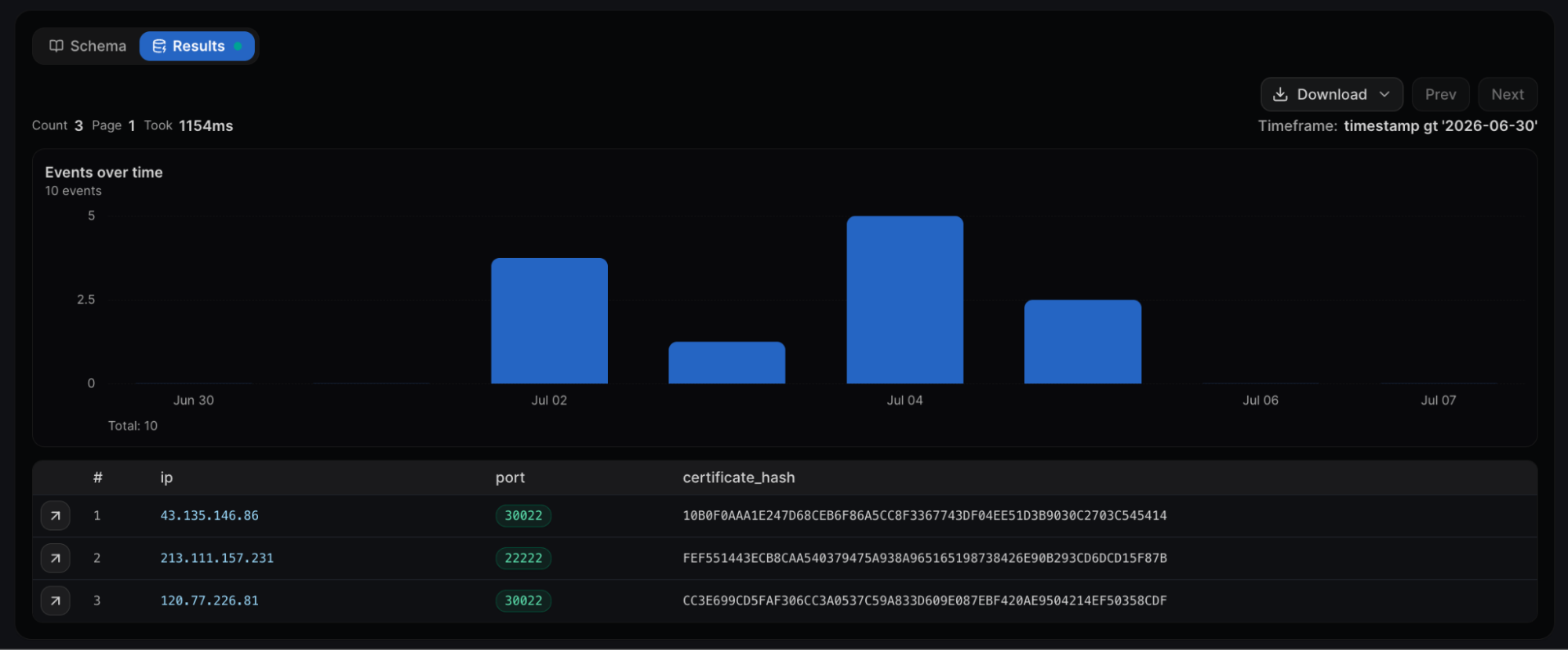 Fig 01. Three hosts sharing the default "Major Cobalt Strike" common name, on different certs and ports.
JARM and JA4. JARM actively fingerprints how a server responds to TLS handshakes. It sends ten crafted client hello packets and turns the responses into a 62 character hash, so two servers running the same TLS stack the same way land on the same JARM, and one value can pull back a set of related servers even when nothing else about them looks connected.
The JA4+ family extends the idea across clients, servers, and certificates. JA4X is a good example, since it fingerprints how a certificate was generated rather than the values written into it, which is what lets a pivot on scan data separate ordinary certificates from a cluster of Cobalt Strike servers built the same way. There's a fuller walk through of each in our JARM and JA4 write-ups.
A JARM rarely stands on its own, and that's the point. In our Oyster backdoor hunt we took the JARM off a known Oyster C2 and paired it with the HTML body hash of the placeholder page the operators reused. That pair returned seven servers, the three already reported plus four unreported ones on OVH, and the new domains followed the same naming theme and later showed Oyster detections on VirusTotal. The JARM found the candidates. The page hash, the naming, and the malware verdicts are what made it safe to call them C2.
SSH keys. Certificates and domains rotate. SSH host key fingerprints tend to stick around, because operators reuse deployment images and automation and never think to regenerate them.
Our researchers tracked a phishing operation aimed at Kuwait where the same SSH key fingerprints turned up on servers that otherwise looked unrelated, and that reuse is what tied the cluster together. A hash pivot would never connect those. A key pivot does. The full Kuwait writeup has the fingerprints and the query.
Passive DNS. A single lookup shows you where a domain points right now. Passive DNS history shows you where it has pointed over time, every A, AAAA, MX, NS, and TXT change along the way. That timeline is where the moves show up. A domain hopping providers right before a campaign. Records that only lived a few hours. The shared host that several unrelated-looking domains all point back to.
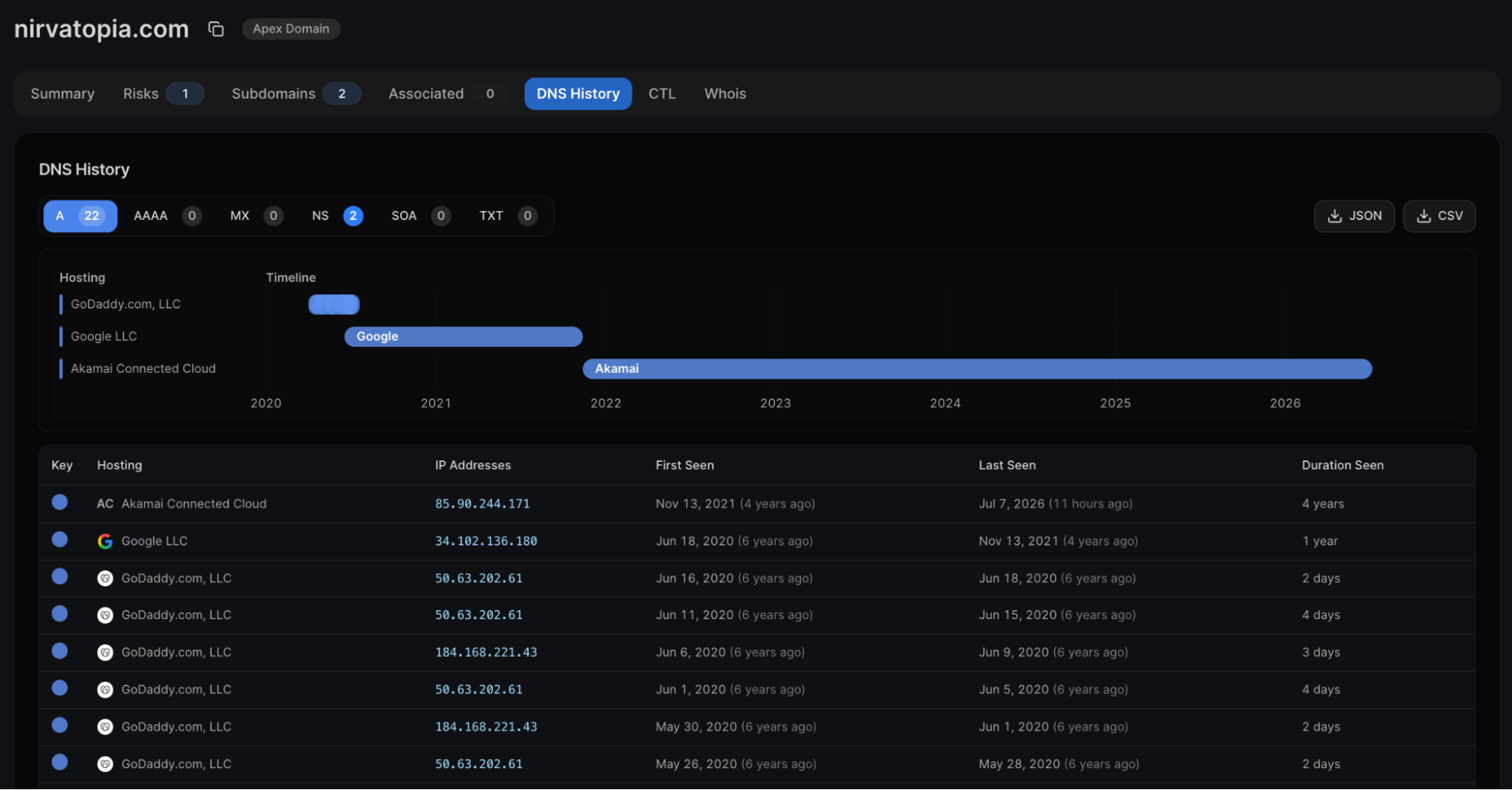 Fig 02. One domain's A records moving across GoDaddy, Google, then Akamai from 2020 to now.
Open directories. Attackers leave servers exposed more often than you'd think. Open directory listings hand you staging folders, payloads, and sometimes the entire kit. Capturing and indexing those can give you a look at an operation, sometimes before the payloads are ever used.
In June 2026 we found the pro-Iranian group Ababil of Minab had left its main staging server wide open, around 5 GB across 2,238 files, including LA Metro database backups and the identities of victims a separate report had chosen to withhold. The server was captured before that report was even published.
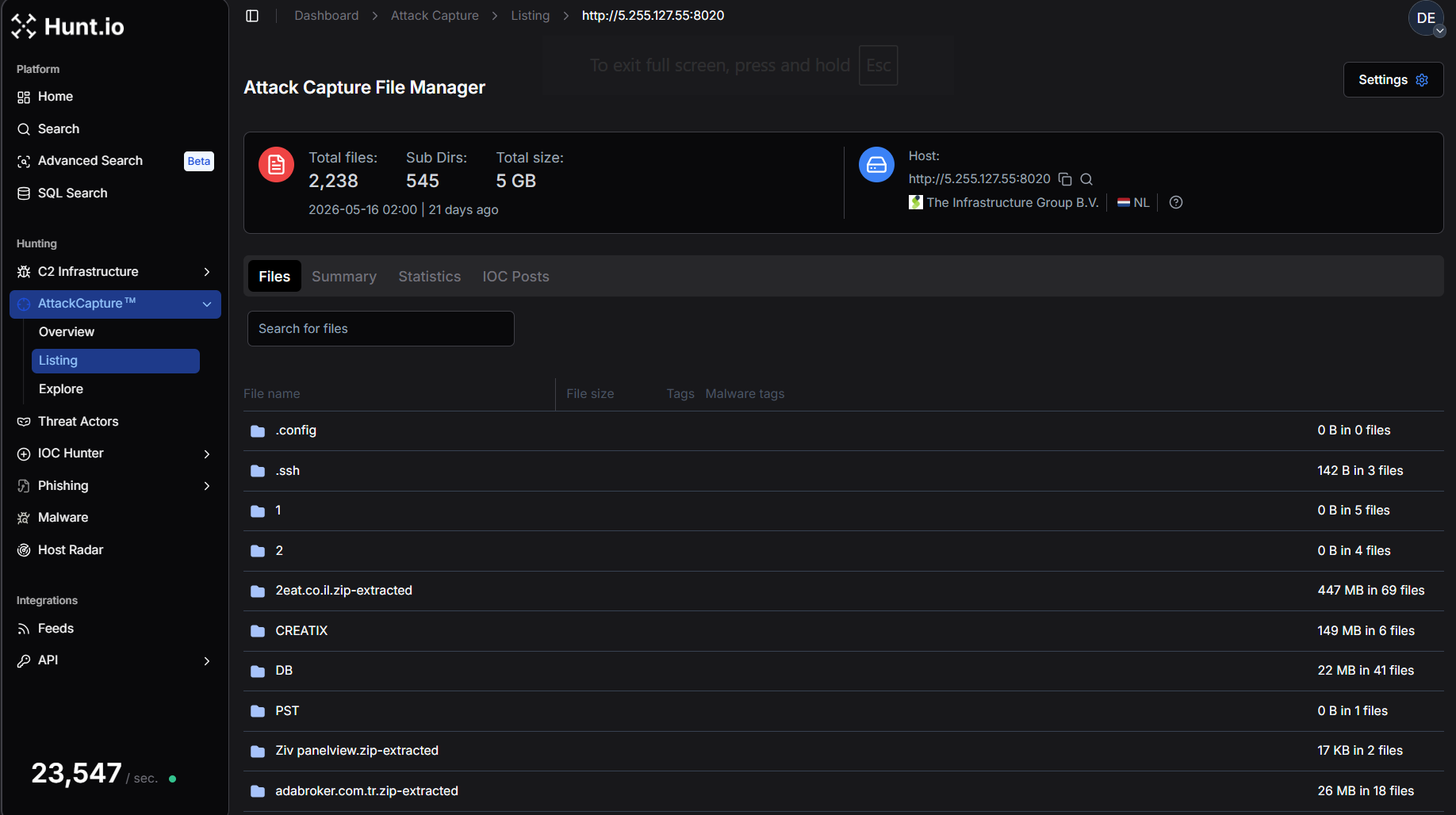 Fig 03. Exposed open directory from pro-Iranian group Ababil of Minab at 5.255.127[.]55:8020, 2,238 files and about 5 GB captured by AttackCapture.
Working around Cloudflare. When a domain sits behind Cloudflare, an IP lookup only shows you the proxy. Cloudflare assigns each domain a specific pair of nameservers, and pivoting on that pair surfaces other domains parked behind the same setup. It groups the campaign even when the origin IPs stay hidden, so the trail doesn't stop cold at the proxy.
Provider and netblock patterns. Bad infrastructure clusters. Operators reuse the same hosts and the same ranges. Looking at a whole netblock instead of one IP shows you the neighbors, and the repetition across a range is often what points you toward a single operation worth a closer look.
Presence is not proof
This is the discipline that separates a hunter from someone running searches. A fingerprint match means the software is present and reachable. It does not mean the host is malicious. A server answering with a Cobalt Strike fingerprint could be a live operation, a red team, or a researcher's box left open to the internet.
So you don't stop at the match. You confirm it. What domains resolve there, how the host behaves when you look closer, whether it overlaps with activity someone has already reported, whether the same operator's key or certificate turns up elsewhere. Traditional hunting labels the hit and moves on. Advanced hunting treats the hit as the start of the question.
It still has to touch your network
Mapping an actor's servers is only half the job. The reason you do it is to go back to your own telemetry and ask whether any of it reached you. Did anything on your network resolve those domains, connect to those IPs, or beacon toward that cluster. That is where external hunting and the environment you defend actually meet.
Then you close the loop. Whatever you found becomes a detection, so the next time that infrastructure appears you're not hunting it by hand.
Automating the pivots
Most of the moves in this post are mechanical. Take a fingerprint, pull the matches, check the overlaps, repeat. That part suits automation well.
Hunt.io runs a remote MCP server at mcp.hunt.io, so you can point an AI client like Claude straight at Hunt data without building an integration. It authenticates with your existing API key, supports dedicated MCP keys with fixed scopes, and ships with 18 tools out of the box.
In practice that means you can hand the model an indicator and have it run the cert, JARM, SSH, and passive DNS pivots, follow the overlaps, and come back with a mapped cluster and a first draft of the writeup. We've shown it tracking IOCs from DPRK and Russian actors, expanding on the findings, and producing a full markdown report from a single prompt.
What it doesn't do is decide for you. The model gathers and connects. You still set the hypothesis going in, and you still make the call on whether a host is confirmed malicious or only present, which is the part that keeps a hunt honest.
Where to start
If your hunting today is mostly indicator matching, moving to advanced starts with what you hunt for, not what you buy. Pick one detail that's hard to fake, a certificate string, a JARM value, an SSH key, and see how far a single pivot carries you. Most people are surprised how much infrastructure hangs off one thread.
You can run these pivots against live data with a free account.
Most of what gets called threat hunting is really indicator matching. A report comes out, you pull the hashes and IPs from it, and you search your logs to see if any of them showed up. Useful habit. It's also the floor, not the ceiling.
Advanced hunting starts somewhere else. Instead of waiting for indicators, you go after the infrastructure and the behavior while they're still being set up, working from a hypothesis about how a specific actor or tool operates. The tools matter less than the posture. You aim earlier, and you aim higher up the stack.
Traditional hunting, and where it stops paying off
Traditional hunting runs on atomic indicators. Hashes, IPs, domains. They're easy to consume and easy to search, which is why most feeds are built around them. The catch is they're just as easy for an attacker to throw away.
Change a file by one byte and the hash is new. Rotate a server and the IP is dead. By the time an indicator lands in a feed, the operator has usually moved on already, so you end up hunting for things that stopped mattering last week.
That doesn't make it useless. Known-bad matching catches the lazy and the reused, and plenty of intrusions are exactly that. But if it's all you do, you're always a step behind, looking for what someone else already found.
What "advanced" actually means
Advanced hunting climbs the Pyramid of Pain. David Bianco's model ranks indicators by how much it costs an adversary to change them. Hashes and IPs sit at the bottom, trivial to swap. Tools and behavior sit at the top, because changing how you operate is slow and expensive.
Hunt higher up and your findings tend to hold longer. A default string baked into a C2 framework. The way a piece of malware answers a TLS handshake. An SSH key an operator keeps reusing out of habit. None of those rotate on a weekly basis, and some persist across a whole campaign.
Advanced hunting also tends to be proactive. Rather than asking whether a known-bad IP already touched your network, you look for the infrastructure before it gets pointed at anyone. That means fingerprinting servers out on the open internet, reading the small tells that give a tool away, and mapping what connects to what.
Start with a hypothesis
Before any of the pivots, there's a question. Advanced hunting starts from a hypothesis, something specific enough to be wrong. Not "let's look for bad stuff," but "this actor runs Cobalt Strike with the default profile, so some of their servers are probably still presenting the default certificate, and I can find them before they get used."
That framing decides where you look and when you stop. A lot of this work sits in what ATT&CK calls resource development, the stage where an actor is buying domains, staging servers, and standing up C2, before any of it reaches a target. Pin the hypothesis to something you'd expect to see there, then test it against the data. If the answer comes back no, that's still a result. You ruled something out, and the next pass gets narrower.
The techniques that make it advanced
A lot of infrastructure hunting comes down to one motion, pivoting. You take a single detail that's hard to fake and use it to pull in everything that shares it. These are the details worth pivoting on.
TLS certificates. Operators reuse certificates across servers, often without touching them. A self-signed cert with a default common name is a tell. Cobalt Strike's default keystore used a certificate whose common name was "Major Cobalt Strike," and for years plenty of team servers ran with it untouched. Search that string across scan data and you surface deployments that never changed the default.
SELECT ip, port, certificate_hash
FROM certificates
WHERE subject.common_name == 'Major Cobalt Strike'
GROUP BY ip, port, certificate_hash

                Copy
A match means the framework is present and reachable. It doesn't mean the host is malicious. Traditional hunting tends to skip that distinction. We'll come back to it.
Fig 01. Three hosts sharing the default "Major Cobalt Strike" common name, on different certs and ports.JARM and JA4. JARM actively fingerprints how a server responds to TLS handshakes. It sends ten crafted client hello packets and turns the responses into a 62 character hash, so two servers running the same TLS stack the same way land on the same JARM, and one value can pull back a set of related servers even when nothing else about them looks connected.
The JA4+ family extends the idea across clients, servers, and certificates. JA4X is a good example, since it fingerprints how a certificate was generated rather than the values written into it, which is what lets a pivot on scan data separate ordinary certificates from a cluster of Cobalt Strike servers built the same way. There's a fuller walk through of each in our JARM and JA4 write-ups.
A JARM rarely stands on its own, and that's the point. In our Oyster backdoor hunt we took the JARM off a known Oyster C2 and paired it with the HTML body hash of the placeholder page the operators reused. That pair returned seven servers, the three already reported plus four unreported ones on OVH, and the new domains followed the same naming theme and later showed Oyster detections on VirusTotal. The JARM found the candidates. The page hash, the naming, and the malware verdicts are what made it safe to call them C2.
SSH keys. Certificates and domains rotate. SSH host key fingerprints tend to stick around, because operators reuse deployment images and automation and never think to regenerate them.
Our researchers tracked a phishing operation aimed at Kuwait where the same SSH key fingerprints turned up on servers that otherwise looked unrelated, and that reuse is what tied the cluster together. A hash pivot would never connect those. A key pivot does. The full Kuwait writeup has the fingerprints and the query.
Passive DNS. A single lookup shows you where a domain points right now. Passive DNS history shows you where it has pointed over time, every A, AAAA, MX, NS, and TXT change along the way. That timeline is where the moves show up. A domain hopping providers right before a campaign. Records that only lived a few hours. The shared host that several unrelated-looking domains all point back to.
Fig 02. One domain's A records moving across GoDaddy, Google, then Akamai from 2020 to now.Open directories. Attackers leave servers exposed more often than you'd think. Open directory listings hand you staging folders, payloads, and sometimes the entire kit. Capturing and indexing those can give you a look at an operation, sometimes before the payloads are ever used.
In June 2026 we found the pro-Iranian group Ababil of Minab had left its main staging server wide open, around 5 GB across 2,238 files, including LA Metro database backups and the identities of victims a separate report had chosen to withhold. The server was captured before that report was even published.
Fig 03. Exposed open directory from pro-Iranian group Ababil of Minab at 5.255.127[.]55:8020, 2,238 files and about 5 GB captured by AttackCapture.Working around Cloudflare. When a domain sits behind Cloudflare, an IP lookup only shows you the proxy. Cloudflare assigns each domain a specific pair of nameservers, and pivoting on that pair surfaces other domains parked behind the same setup. It groups the campaign even when the origin IPs stay hidden, so the trail doesn't stop cold at the proxy.
Provider and netblock patterns. Bad infrastructure clusters. Operators reuse the same hosts and the same ranges. Looking at a whole netblock instead of one IP shows you the neighbors, and the repetition across a range is often what points you toward a single operation worth a closer look.
Presence is not proof
This is the discipline that separates a hunter from someone running searches. A fingerprint match means the software is present and reachable. It does not mean the host is malicious. A server answering with a Cobalt Strike fingerprint could be a live operation, a red team, or a researcher's box left open to the internet.
So you don't stop at the match. You confirm it. What domains resolve there, how the host behaves when you look closer, whether it overlaps with activity someone has already reported, whether the same operator's key or certificate turns up elsewhere. Traditional hunting labels the hit and moves on. Advanced hunting treats the hit as the start of the question.
It still has to touch your network
Mapping an actor's servers is only half the job. The reason you do it is to go back to your own telemetry and ask whether any of it reached you. Did anything on your network resolve those domains, connect to those IPs, or beacon toward that cluster. That is where external hunting and the environment you defend actually meet.
Then you close the loop. Whatever you found becomes a detection, so the next time that infrastructure appears you're not hunting it by hand.
Automating the pivots
Most of the moves in this post are mechanical. Take a fingerprint, pull the matches, check the overlaps, repeat. That part suits automation well.
Hunt.io runs a remote MCP server at mcp.hunt.io, so you can point an AI client like Claude straight at Hunt data without building an integration. It authenticates with your existing API key, supports dedicated MCP keys with fixed scopes, and ships with 18 tools out of the box.
In practice that means you can hand the model an indicator and have it run the cert, JARM, SSH, and passive DNS pivots, follow the overlaps, and come back with a mapped cluster and a first draft of the writeup. We've shown it tracking IOCs from DPRK and Russian actors, expanding on the findings, and producing a full markdown report from a single prompt.
What it doesn't do is decide for you. The model gathers and connects. You still set the hypothesis going in, and you still make the call on whether a host is confirmed malicious or only present, which is the part that keeps a hunt honest.
Where to start
If your hunting today is mostly indicator matching, moving to advanced starts with what you hunt for, not what you buy. Pick one detail that's hard to fake, a certificate string, a JARM value, an SSH key, and see how far a single pivot carries you. Most people are surprised how much infrastructure hangs off one thread.
You can run these pivots against live data with a free account.
Related Posts
Related Posts
Related Posts


Oct 13, 2026
•
13
min read
Jun 4, 2026
•
24
min read
Oct 13, 2026
•
13
min read
Jun 4, 2026
•
24
min read
Hunt adversary infrastructure in real time. Surface C2 servers, enrich IOCs,
and map attacker activity at scale with our unified threat hunting platform.

Hunt adversary infrastructure in real time. Surface C2 servers, enrich IOCs,
and map attacker activity at scale with our unified threat hunting platform.
Hunt adversary infrastructure in real time. Surface C2 servers, enrich IOCs,
and map attacker activity at scale with our unified threat hunting platform.