JARM Fingerprints: A Practical Lens for TLS-Based Threat Hunting


JARM fingerprinting is one of the most practical ways to identify servers through their TLS configuration. By sending customized Client Hello packets and analyzing the Server Hello responses, threat hunters can uncover how systems communicate and detect subtle patterns that expose misconfigurations, cloned servers, or malicious infrastructure hidden within normal network traffic.
This level of visibility is becoming increasingly vital as cyber threats grow more sophisticated. Recent data provided by Sophos shows that 41% of IT and cybersecurity teams feel heightened anxiety about future ransomware attacks after experiencing one, while cyber insurance claims are rising by around 13% each year, according to Coalition.
These trends stress the urgent need for proactive approaches that go beyond traditional detection methods.
At Hunt.io, we've refined how JARM data empowers analysts to move from simple detection to full infrastructure attribution, so let's see it in action.
Key Takeaways for Threat Hunters
JARM fingerprints help identify unique TLS configurations, allowing security teams to compare fingerprints and ensure consistency across networks.
The JARM scanning process uses ten customized TLS client hello packets to collect distinctive TLS server hello responses, generating a 62-character JARM fingerprint hash.
Integrating JARM with platforms like Hunt.io enhances visibility across servers on the internet and supports large-scale comparisons for identifying malicious servers.
What is JARM?
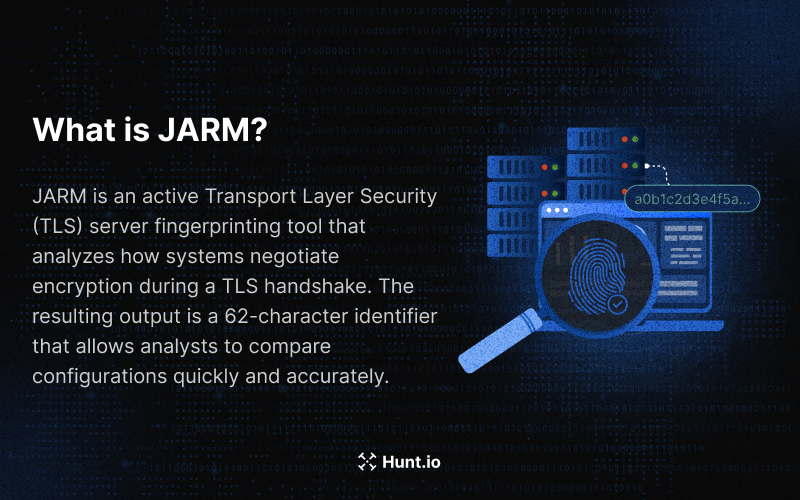
Identifying servers based on how they communicate over the internet can reveal a lot about their nature. That's exactly what JARM does. Developed by Salesforce, JARM is "an active Transport Layer Security (TLS) server fingerprinting tool" that analyzes how systems negotiate encryption during a TLS handshake.
Each fingerprint reflects the way a system handles transport layer security, influenced by cipher choices, TLS versions, and cumulative extensions included during the handshake.
The process begins by sending 10 TLS client hello messages to a target TLS server. Each TLS client hello message triggers a TLS server hello packet in return. JARM analyzes these responses, excluding x509 certificate data and focusing instead on cipher selection and hashed extensions. The resulting output is a 62-character identifier that allows analysts to compare configurations quickly and accurately.
Because these fingerprints are standardized and lightweight, both humans and automated systems can analyze them.
Understanding what JARM is gives us a good foundation, but the real value lies in knowing how it produces those fingerprints.
How JARM Works Behind the Scenes
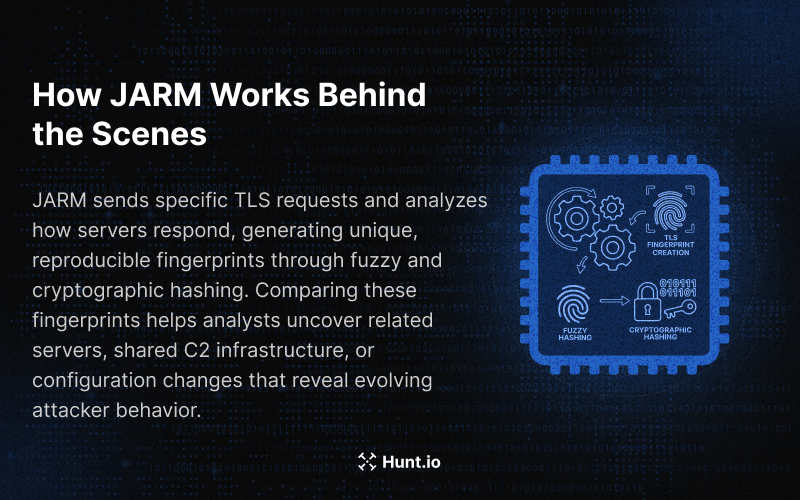
JARM works by sending controlled TLS client probes and recording the aggregated TLS server responses that come back. The fingerprints are influenced by how TLS servers formulate their replies. Each TLS server hello message may differ slightly depending on the operating system, libraries, and different TLS versions.
To create stable identifiers, JARM uses a hybrid fuzzy hash combined with a non-reversible hash algorithm and a secure crypto function that generates a reproducible JARM fingerprint hash.
When comparing JARM fingerprints, threat hunting analysts can identify malicious servers or related infrastructure. If multiple resolved IP addresses share the same JARM fingerprint, it may indicate shared command and control (C2) infrastructure or reused frameworks by the same threat actor.
Even small differences, such as changes in TLS negotiation order, can signal version upgrades or recompiled binaries.
Now that we've explored the theory behind JARM's fingerprinting process, it's time to get practical.
Installing and Executing JARM
Before scanning at scale, it's important to install JARM in a controlled environment. The tool runs easily on most systems that support Python 3.7 or higher. Follow these steps to get started if you're running a modern Linux distro or macOS. If you're using macOS, make sure that Python3 is installed on your system (brew install python3).
Step 1: Environment Setup
Create a working directory and set up a Python virtual environment:
mkdir JARM-scan && cd JARM-scan
python3 -m venv env
source env/bin/activate

                Copy
Then install the official pyJARM package:
pip install pyJARM
This setup isolates dependencies and prevents conflicts with other Python projects. Once installed, verify it with:
python -m pyJARM --help
If you see the command usage output, JARM is ready to use.
Step 2: Running JARM Scans Across Your Network
Running JARM scans provides visibility into TLS servers and their configurations. You can start by scanning a single host:
python -m pyJARM scan example.com 443
This command sends ten TLS client hello packets to the target TLS server, collects the TLS server hello packet responses, and outputs the JARM fingerprint hash.
To scan multiple hosts at once, use a text file with one domain or IP per line:
python -m pyJARM scanlist targets.txt 443
You can also specify different ports, for example:
python -m pyJARM scan example.org 8443
Each scan reveals the TLS version chosen by the server, its cipher preferences, and how TLS servers formulate their handshake. If a server refused the connection, it will be skipped automatically.
Step 3: Comparing and Interpreting Results
Once you have fingerprints, compare them to find similarities:
python compare_JARM.py fingerprints.txt
Servers showing the same JARM fingerprint are likely configured with identical TLS session parameters, suggesting cloned software or shared control infrastructure. Use these matches to identify default applications, verify TLS configuration consistency, or detect unauthorized systems.
For security teams, storing historical SSL fingerprints is invaluable. Comparing past and current data highlights when a TLS configuration changes or when new TLS versions are introduced unexpectedly. Over time, these insights become the foundation for continuous monitoring.
After installation and scanning, the next step is using JARM fingerprints to uncover attacker infrastructure. This is where it becomes truly valuable for threat hunters.
Automated Threat Hunt Using JARM Fingerprints
Scaling JARM Hunting with Hunt.io
Running JARM scans manually is useful for targeted investigations, but it doesn't scale. When you need to search across millions of hosts, correlate fingerprints with other signals, and pivot through related infrastructure quickly, you need something built for that purpose.
Our platform indexes JARM fingerprints at internet scale, continuously, so you're not limited to scanning what you can reach from your own machine. The jarm dataset in HuntSQL lets you query across all observed fingerprints, filter by time window, and group results by IP, port, or fingerprint hash in seconds.
A query like this pulls every host seen with a specific JARM in the last 30 days:
SELECT ip, port, timestamp
FROM jarm
WHERE jarm == '15d3fd16d29d29d00042d43d000000ed1cf37c9a169b41886e27ba8fad60b0'
AND timestamp > NOW - 30 DAY
GROUP BY ip, port, timestamp

                Copy
That's the starting point. From there, you can pivot to TLS certificates, check open ports, cross-reference SSH keys, or look at HTTP response patterns on the same host, all within the same interface.
You can also flip the approach and look for fingerprints being reused across many IPs, which is one of the more reliable signals for shared attacker infrastructure:
SELECT jarm, uniq(ip) AS ip_count, uniq(port) AS port_count
FROM jarm
WHERE timestamp > NOW - 7 DAY
GROUP BY jarm
ORDER BY ip_count DESC, port_count DESC
LIMIT 30

                Copy
This kind of query surfaces frameworks that keep showing up across different hosts, even when the IPs change. Attackers reuse TLS configurations more often than they change them, and that consistency is what makes JARM fingerprinting particularly effective for long-term tracking.
When you click through to an IP in our platform, the JARM tab shows you the full fingerprint history for that host, alongside all the other context you'd need for a real investigation: hosting provider, open ports, domain associations, SSL history, and any signals tied to known malicious activity. You're not piecing things together from separate tools.
The combination of scale, correlation, and pivoting is what separates this from running pyJARM against a handful of targets. One fingerprint from a confirmed C2 host can expose an entire cluster of related infrastructure that you'd never find through traditional IP-based hunting.
Using Advanced Search to Hunt JARM Fingerprints Across the Internet
Paste any JARM hash into Advanced Search and our platform will return every matching host we've seen across the internet, along with ports, hosting providers, HTTP responses, and timestamps.
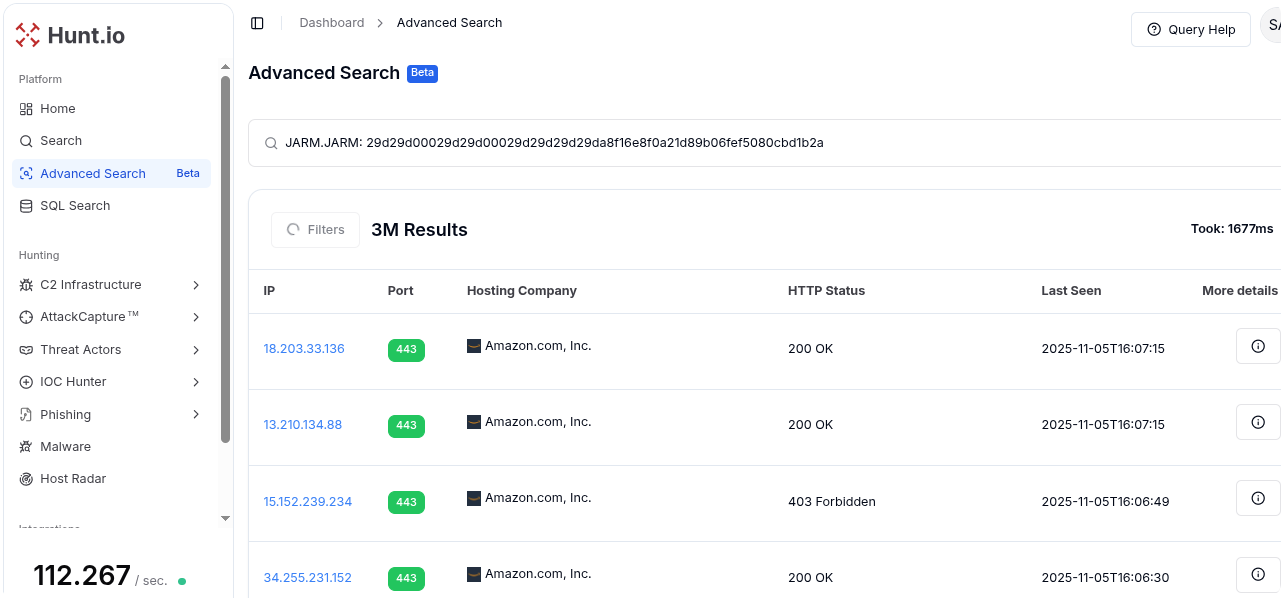
Start with a known malicious JARM hash from a past campaign or public feed and enter it into our Advanced Search feature.
In the screenshot above, a JARM fingerprint was used to identify hosts that exhibit the same TLS behavior. This query returned over 3 million results, listing IP addresses, open ports, hosting companies, HTTP responses, and timestamps for the most recent sightings.
When an IP is clicked, as shown in the image below, Hunt.io opens a detailed IP page. This page provides:
General information: IP location, hosting provider, and ASN data.
Reputation & Risk: Indicators of malicious activity or warnings.
Open Ports and Software: Services detected on the host, with port numbers, service types, and timestamps for first and last sightings.
Domains, Associations, Signals, and Pivots: Links to associated infrastructure that share fingerprints or other identifiers.
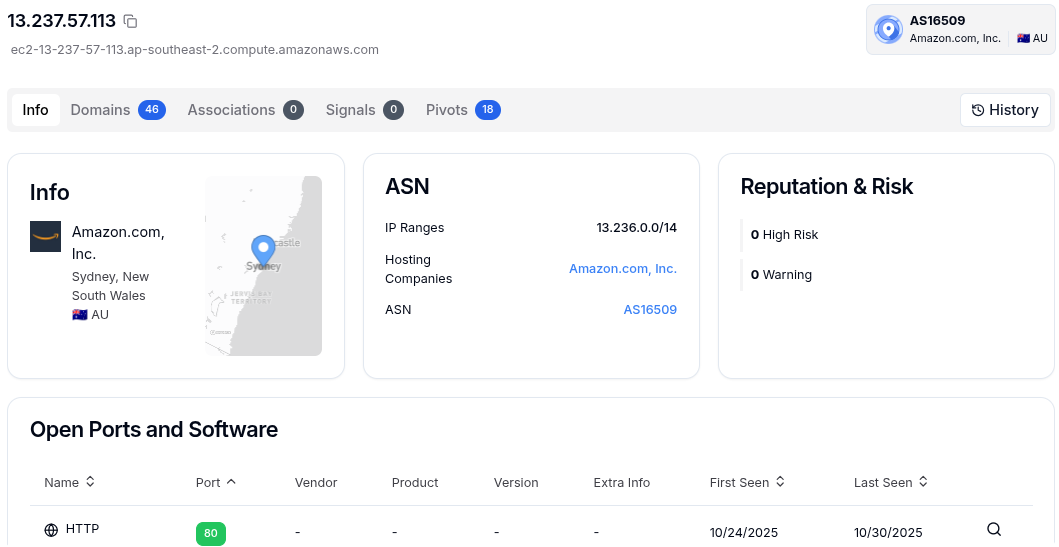
By using these connections (e.g., shared JARM signatures, hosting ranges, or domains), threat hunters can pivot to uncover related servers, identify clusters of potentially malicious infrastructure, and map botnet or campaign activity.
When used inside Hunt.io, a single query can expose entire C2 ecosystems built on reused TLS servers and shared control infrastructure.
Identifying Malicious Servers with JARM Fingerprints
Once analysts have practiced scanning and hunting, identifying malicious servers becomes straightforward. The fun part of JARM is that it blends creativity with technical depth. Analysts can begin with one known malicious fingerprint and trace an entire network of connected systems.
Imagine a JARM hash linked to a malware family panel. When that same fingerprint appears on other servers hosted in new regions but using the same TLS session structure, it's an early sign of active expansion. Analysts can then investigate communication patterns, C2 channels, track the TLS client hello packets used by these nodes, and verify whether the TLS servers responding are part of the same C2 infrastructure.
Over time, these discoveries build a profile of attacker behavior. You start seeing which TLS configurations persist, how TLS servers formulate their replies, and which TLS versions are favored by certain threat groups. This combination of technical fingerprinting and investigative pivoting is what makes JARM a reliable weapon for both threat hunting and long-term intelligence gathering.
Once you've identified patterns and related servers, the next logical move is turning those insights into prevention. JARM fingerprints don't just help you find threats; they also help you stay ahead of them.
Turning JARM Data into Proactive Defense
JARM can also be used for prevention. Hunt.io integrates fingerprinting data into enrichment pipelines to detect TLS servers exhibiting known malicious behavior. Analysts can then group malicious servers automatically, review hash results, and improve network visibility before threats escalate.
Building Blocklists and Threat Hunts with JARM
Teams can create proactive blocklists of fingerprints linked to known threats. Since attackers often reuse the same TLS configuration even when IPs change, these lists remain useful over time. Tracking newly observed TLS works patterns or newly deployed TLS servers helps analysts predict attacker movements.
Enhancing Threat Hunting
Adding JARM to daily workflows allows analysts to capture specific attributes of TLS sessions and observe unique fingerprinting clients across infrastructure. Using our tools, teams can pivot between datasets, compare TLS connections, and identify control infrastructure long before it's weaponized.
It's clear that using JARM for prevention reveals just how versatile it is. Beyond detection and defense, JARM has become an indispensable part of modern threat hunting.

Why JARM Fingerprinting Belongs in Every Threat Hunter's Toolkit
JARM is not new, but it remains one of the most reliable threat hunting tools to identify malicious servers, track related infrastructure, and support network defense. It complements most network security tools and provides deep insight into TLS connections where traditional indicators fail.
Here at Hunt.io, JARM data is part of our daily workflow. We use it to monitor TLS servers, uncover hidden control infrastructure, and enhance the accuracy of our threat hunting operations. By combining fingerprints with broader datasets, we help analysts connect signals others miss and respond faster.
Including JARM fingerprinting in regular workflows gives defenders the power to trace attacker infrastructure, detect reuse, and maintain control of their network with precision and confidence.
Now, theory and methodology are one thing, but nothing shows JARM's power better than real investigations.

Real World JARM Use Cases
Let's take a look at a few cases where our team used JARM fingerprints to uncover malicious infrastructure.
A Simple Approach to Discovering Oyster Backdoor Infrastructure

Our researchers used JARM fingerprints to uncover servers linked to the Oyster (Broomstick/CleanUpLoader) backdoor, a malware disguised as a Microsoft Teams installer. After Rapid7 identified three malicious domains, analysts examined the TLS history of one IP and extracted its JARM hash, which uniquely characterized the server's TLS behavior.
By combining this fingerprint with the HTML response body hash ("Soon") in a custom query, they identified seven IP addresses showing consistent patterns: same ports, certificates, and naming conventions. These findings revealed previously unknown C2 infrastructure hosted mainly on OVH SAS, while maintaining Let's Encrypt certificates.
How to Track Threat Actors Through Real-World IOC Pivoting

During this investigation, analysts observed that a suspicious IP maintained the same JARM fingerprint (2ad2a) across multiple ports, indicating shared TLS setups and possible reuse of malicious servers.
By combining this JARM data with signals like SSH keys, domain associations, and JA3 fingerprints, Hunt.io exposed coordinated patterns across ransomware-related infrastructure. This behavioral evidence allowed teams to connect what seemed like isolated hosts into a single, persistent network.

During this research, our analysts used JARM fingerprinting to detect active PrismX deployments across the internet. After setting up the tool in a controlled environment, they analyzed its TLS handshake behavior and identified a unique JARM hash (3fd21b20d00000021c43d21b21b43d76e1f79b8645e08ae7fa8f07eb5e4202) tied to PrismX's default self-signed certificate.
This fingerprint, combined with the HTTP response headers' SHA256 hash and distinctive HTML titles ("Prism X"), allowed researchers to build precise search queries and locate PrismX login pages without false positives.
Our team found multiple servers matching this JARM signature, some also hosting Cobalt Strike, suggesting shared or multi-tool infrastructures.
Conclusion
JARM fingerprinting empowers analysts to detect, correlate, and prevent threats long before they escalate. By integrating JARM into your workflow, you gain deeper visibility into attacker infrastructure and stronger, data-driven defenses.
At Hunt.io, we help you turn this intelligence into action: book a demo now to see how our platform enhances your threat hunting capabilities.
JARM fingerprinting is one of the most practical ways to identify servers through their TLS configuration. By sending customized Client Hello packets and analyzing the Server Hello responses, threat hunters can uncover how systems communicate and detect subtle patterns that expose misconfigurations, cloned servers, or malicious infrastructure hidden within normal network traffic.
This level of visibility is becoming increasingly vital as cyber threats grow more sophisticated. Recent data provided by Sophos shows that 41% of IT and cybersecurity teams feel heightened anxiety about future ransomware attacks after experiencing one, while cyber insurance claims are rising by around 13% each year, according to Coalition.
These trends stress the urgent need for proactive approaches that go beyond traditional detection methods.
At Hunt.io, we've refined how JARM data empowers analysts to move from simple detection to full infrastructure attribution, so let's see it in action.
Key Takeaways for Threat Hunters
JARM fingerprints help identify unique TLS configurations, allowing security teams to compare fingerprints and ensure consistency across networks.
The JARM scanning process uses ten customized TLS client hello packets to collect distinctive TLS server hello responses, generating a 62-character JARM fingerprint hash.
Integrating JARM with platforms like Hunt.io enhances visibility across servers on the internet and supports large-scale comparisons for identifying malicious servers.
What is JARM?
Identifying servers based on how they communicate over the internet can reveal a lot about their nature. That's exactly what JARM does. Developed by Salesforce, JARM is "an active Transport Layer Security (TLS) server fingerprinting tool" that analyzes how systems negotiate encryption during a TLS handshake.
Each fingerprint reflects the way a system handles transport layer security, influenced by cipher choices, TLS versions, and cumulative extensions included during the handshake.
The process begins by sending 10 TLS client hello messages to a target TLS server. Each TLS client hello message triggers a TLS server hello packet in return. JARM analyzes these responses, excluding x509 certificate data and focusing instead on cipher selection and hashed extensions. The resulting output is a 62-character identifier that allows analysts to compare configurations quickly and accurately.
Because these fingerprints are standardized and lightweight, both humans and automated systems can analyze them.
Understanding what JARM is gives us a good foundation, but the real value lies in knowing how it produces those fingerprints.
How JARM Works Behind the Scenes
JARM works by sending controlled TLS client probes and recording the aggregated TLS server responses that come back. The fingerprints are influenced by how TLS servers formulate their replies. Each TLS server hello message may differ slightly depending on the operating system, libraries, and different TLS versions.
To create stable identifiers, JARM uses a hybrid fuzzy hash combined with a non-reversible hash algorithm and a secure crypto function that generates a reproducible JARM fingerprint hash.
When comparing JARM fingerprints, threat hunting analysts can identify malicious servers or related infrastructure. If multiple resolved IP addresses share the same JARM fingerprint, it may indicate shared command and control (C2) infrastructure or reused frameworks by the same threat actor.
Even small differences, such as changes in TLS negotiation order, can signal version upgrades or recompiled binaries.
Now that we've explored the theory behind JARM's fingerprinting process, it's time to get practical.
Installing and Executing JARM
Before scanning at scale, it's important to install JARM in a controlled environment. The tool runs easily on most systems that support Python 3.7 or higher. Follow these steps to get started if you're running a modern Linux distro or macOS. If you're using macOS, make sure that Python3 is installed on your system (brew install python3).
Step 1: Environment Setup
Create a working directory and set up a Python virtual environment:
mkdir JARM-scan && cd JARM-scan
python3 -m venv env
source env/bin/activate

                Copy
Then install the official pyJARM package:
pip install pyJARM
This setup isolates dependencies and prevents conflicts with other Python projects. Once installed, verify it with:
python -m pyJARM --help
If you see the command usage output, JARM is ready to use.
Step 2: Running JARM Scans Across Your Network
Running JARM scans provides visibility into TLS servers and their configurations. You can start by scanning a single host:
python -m pyJARM scan example.com 443
This command sends ten TLS client hello packets to the target TLS server, collects the TLS server hello packet responses, and outputs the JARM fingerprint hash.
To scan multiple hosts at once, use a text file with one domain or IP per line:
python -m pyJARM scanlist targets.txt 443
You can also specify different ports, for example:
python -m pyJARM scan example.org 8443
Each scan reveals the TLS version chosen by the server, its cipher preferences, and how TLS servers formulate their handshake. If a server refused the connection, it will be skipped automatically.
Step 3: Comparing and Interpreting Results
Once you have fingerprints, compare them to find similarities:
python compare_JARM.py fingerprints.txt
Servers showing the same JARM fingerprint are likely configured with identical TLS session parameters, suggesting cloned software or shared control infrastructure. Use these matches to identify default applications, verify TLS configuration consistency, or detect unauthorized systems.
For security teams, storing historical SSL fingerprints is invaluable. Comparing past and current data highlights when a TLS configuration changes or when new TLS versions are introduced unexpectedly. Over time, these insights become the foundation for continuous monitoring.
After installation and scanning, the next step is using JARM fingerprints to uncover attacker infrastructure. This is where it becomes truly valuable for threat hunters.
Automated Threat Hunt Using JARM Fingerprints
Scaling JARM Hunting with Hunt.io
Running JARM scans manually is useful for targeted investigations, but it doesn't scale. When you need to search across millions of hosts, correlate fingerprints with other signals, and pivot through related infrastructure quickly, you need something built for that purpose.
Our platform indexes JARM fingerprints at internet scale, continuously, so you're not limited to scanning what you can reach from your own machine. The jarm dataset in HuntSQL lets you query across all observed fingerprints, filter by time window, and group results by IP, port, or fingerprint hash in seconds.
A query like this pulls every host seen with a specific JARM in the last 30 days:
SELECT ip, port, timestamp
FROM jarm
WHERE jarm == '15d3fd16d29d29d00042d43d000000ed1cf37c9a169b41886e27ba8fad60b0'
AND timestamp > NOW - 30 DAY
GROUP BY ip, port, timestamp

                Copy
That's the starting point. From there, you can pivot to TLS certificates, check open ports, cross-reference SSH keys, or look at HTTP response patterns on the same host, all within the same interface.
You can also flip the approach and look for fingerprints being reused across many IPs, which is one of the more reliable signals for shared attacker infrastructure:
SELECT jarm, uniq(ip) AS ip_count, uniq(port) AS port_count
FROM jarm
WHERE timestamp > NOW - 7 DAY
GROUP BY jarm
ORDER BY ip_count DESC, port_count DESC
LIMIT 30

                Copy
This kind of query surfaces frameworks that keep showing up across different hosts, even when the IPs change. Attackers reuse TLS configurations more often than they change them, and that consistency is what makes JARM fingerprinting particularly effective for long-term tracking.
When you click through to an IP in our platform, the JARM tab shows you the full fingerprint history for that host, alongside all the other context you'd need for a real investigation: hosting provider, open ports, domain associations, SSL history, and any signals tied to known malicious activity. You're not piecing things together from separate tools.
The combination of scale, correlation, and pivoting is what separates this from running pyJARM against a handful of targets. One fingerprint from a confirmed C2 host can expose an entire cluster of related infrastructure that you'd never find through traditional IP-based hunting.
Using Advanced Search to Hunt JARM Fingerprints Across the Internet
Paste any JARM hash into Advanced Search and our platform will return every matching host we've seen across the internet, along with ports, hosting providers, HTTP responses, and timestamps.
Start with a known malicious JARM hash from a past campaign or public feed and enter it into our Advanced Search feature.
In the screenshot above, a JARM fingerprint was used to identify hosts that exhibit the same TLS behavior. This query returned over 3 million results, listing IP addresses, open ports, hosting companies, HTTP responses, and timestamps for the most recent sightings.
When an IP is clicked, as shown in the image below, Hunt.io opens a detailed IP page. This page provides:
General information: IP location, hosting provider, and ASN data.
Reputation & Risk: Indicators of malicious activity or warnings.
Open Ports and Software: Services detected on the host, with port numbers, service types, and timestamps for first and last sightings.
Domains, Associations, Signals, and Pivots: Links to associated infrastructure that share fingerprints or other identifiers.
By using these connections (e.g., shared JARM signatures, hosting ranges, or domains), threat hunters can pivot to uncover related servers, identify clusters of potentially malicious infrastructure, and map botnet or campaign activity.
When used inside Hunt.io, a single query can expose entire C2 ecosystems built on reused TLS servers and shared control infrastructure.
Identifying Malicious Servers with JARM Fingerprints
Once analysts have practiced scanning and hunting, identifying malicious servers becomes straightforward. The fun part of JARM is that it blends creativity with technical depth. Analysts can begin with one known malicious fingerprint and trace an entire network of connected systems.
Imagine a JARM hash linked to a malware family panel. When that same fingerprint appears on other servers hosted in new regions but using the same TLS session structure, it's an early sign of active expansion. Analysts can then investigate communication patterns, C2 channels, track the TLS client hello packets used by these nodes, and verify whether the TLS servers responding are part of the same C2 infrastructure.
Over time, these discoveries build a profile of attacker behavior. You start seeing which TLS configurations persist, how TLS servers formulate their replies, and which TLS versions are favored by certain threat groups. This combination of technical fingerprinting and investigative pivoting is what makes JARM a reliable weapon for both threat hunting and long-term intelligence gathering.
Once you've identified patterns and related servers, the next logical move is turning those insights into prevention. JARM fingerprints don't just help you find threats; they also help you stay ahead of them.
Turning JARM Data into Proactive Defense
JARM can also be used for prevention. Hunt.io integrates fingerprinting data into enrichment pipelines to detect TLS servers exhibiting known malicious behavior. Analysts can then group malicious servers automatically, review hash results, and improve network visibility before threats escalate.
Building Blocklists and Threat Hunts with JARM
Teams can create proactive blocklists of fingerprints linked to known threats. Since attackers often reuse the same TLS configuration even when IPs change, these lists remain useful over time. Tracking newly observed TLS works patterns or newly deployed TLS servers helps analysts predict attacker movements.
Enhancing Threat Hunting
Adding JARM to daily workflows allows analysts to capture specific attributes of TLS sessions and observe unique fingerprinting clients across infrastructure. Using our tools, teams can pivot between datasets, compare TLS connections, and identify control infrastructure long before it's weaponized.
It's clear that using JARM for prevention reveals just how versatile it is. Beyond detection and defense, JARM has become an indispensable part of modern threat hunting.
Why JARM Fingerprinting Belongs in Every Threat Hunter's Toolkit
JARM is not new, but it remains one of the most reliable threat hunting tools to identify malicious servers, track related infrastructure, and support network defense. It complements most network security tools and provides deep insight into TLS connections where traditional indicators fail.
Here at Hunt.io, JARM data is part of our daily workflow. We use it to monitor TLS servers, uncover hidden control infrastructure, and enhance the accuracy of our threat hunting operations. By combining fingerprints with broader datasets, we help analysts connect signals others miss and respond faster.
Including JARM fingerprinting in regular workflows gives defenders the power to trace attacker infrastructure, detect reuse, and maintain control of their network with precision and confidence.
Now, theory and methodology are one thing, but nothing shows JARM's power better than real investigations.
Real World JARM Use Cases
Let's take a look at a few cases where our team used JARM fingerprints to uncover malicious infrastructure.
A Simple Approach to Discovering Oyster Backdoor Infrastructure
Our researchers used JARM fingerprints to uncover servers linked to the Oyster (Broomstick/CleanUpLoader) backdoor, a malware disguised as a Microsoft Teams installer. After Rapid7 identified three malicious domains, analysts examined the TLS history of one IP and extracted its JARM hash, which uniquely characterized the server's TLS behavior.
By combining this fingerprint with the HTML response body hash ("Soon") in a custom query, they identified seven IP addresses showing consistent patterns: same ports, certificates, and naming conventions. These findings revealed previously unknown C2 infrastructure hosted mainly on OVH SAS, while maintaining Let's Encrypt certificates.
How to Track Threat Actors Through Real-World IOC Pivoting
During this investigation, analysts observed that a suspicious IP maintained the same JARM fingerprint (2ad2a) across multiple ports, indicating shared TLS setups and possible reuse of malicious servers.
By combining this JARM data with signals like SSH keys, domain associations, and JA3 fingerprints, Hunt.io exposed coordinated patterns across ransomware-related infrastructure. This behavioral evidence allowed teams to connect what seemed like isolated hosts into a single, persistent network.
During this research, our analysts used JARM fingerprinting to detect active PrismX deployments across the internet. After setting up the tool in a controlled environment, they analyzed its TLS handshake behavior and identified a unique JARM hash (3fd21b20d00000021c43d21b21b43d76e1f79b8645e08ae7fa8f07eb5e4202) tied to PrismX's default self-signed certificate.
This fingerprint, combined with the HTTP response headers' SHA256 hash and distinctive HTML titles ("Prism X"), allowed researchers to build precise search queries and locate PrismX login pages without false positives.
Our team found multiple servers matching this JARM signature, some also hosting Cobalt Strike, suggesting shared or multi-tool infrastructures.
Conclusion
JARM fingerprinting empowers analysts to detect, correlate, and prevent threats long before they escalate. By integrating JARM into your workflow, you gain deeper visibility into attacker infrastructure and stronger, data-driven defenses.
At Hunt.io, we help you turn this intelligence into action: book a demo now to see how our platform enhances your threat hunting capabilities.
Related Posts
Related Posts
Related Posts


Oct 13, 2026
•
13
min read
Jun 4, 2026
•
24
min read
Mar 19, 2026
•
13
min read
Oct 13, 2026
•
13
min read
Jun 4, 2026
•
24
min read
Hunt adversary infrastructure in real time. Surface C2 servers, enrich IOCs,
and map attacker activity at scale with our unified threat hunting platform.

Hunt adversary infrastructure in real time. Surface C2 servers, enrich IOCs,
and map attacker activity at scale with our unified threat hunting platform.
Hunt adversary infrastructure in real time. Surface C2 servers, enrich IOCs,
and map attacker activity at scale with our unified threat hunting platform.