TaHiTI: The Threat Hunting Framework That Flips the Script on Alert Chasing

If your security teams are still digging through alerts without any context, you're essentially hunting blind. That's why the TaHiTi framework turns everything on its head by basing every hunt on solid threat intelligence instead of vague anomaly searches.
TaHiTi was born in 2018 from a Dutch financial sector consortium led by the Dutch Payments Association, together with the FI-ISAC community. The goal was simple: give security teams a repeatable way to turn real-world adversary intelligence into structured threat hunts. The need for that approach has only grown: global spending on information security is projected to reach $240 billion in 2026, while 76% of security leaders say they are concerned about increasingly sophisticated cyber threats.
In this article, we'll look at how TaHiTi works, what makes it different from other threat hunting frameworks, and why it's become a go-to approach for cloud threat hunting across on-prem and hybrid environments.
Background: From Early Hunting Models to TaHiTi
The evolution of threat hunting frameworks is a reflection of the maturing discipline of proactive security. Back in 2015, the Sqrrl Threat Hunting Framework kicked things off by introducing the concept of hypothesis-driven threat hunting: iterative loops that guided analysts through data exploration. However, it still lacked any explicit mechanisms for how to integrate threat intelligence at scale.
It was this exact gap that the Dutch Payments Association spotted, and they set out to fill it. By working with financial institutions that were fighting advanced persistent threats, they came up with TaHiTi in 2018 to standardize hunts, make it easier to reuse intelligence, and improve collaboration between teams. And then, more recently, SANS introduced the PEAK framework in 2023, offering a broader maturity model for hunting program success.
TaHiTi (Targeted Hunting Integrating Threat Intelligence) was designed specifically for highly regulated, high-risk sectors like payments and banking in Europe, but its principles can be applied to any organization that actually makes use of threat intelligence. Unlike generic hypothesis-driven loops that start with 'what if' questions, TaHiTi begins with 'we know that adversary X uses technique Y, so let's go find evidence of it in our environment'.
The reasons behind TaHiTi's creation were:
The need to standardize threat hunting activities across multiple organizations.
The requirement to reuse threat intelligence reports across multiple hunts.
The demand for better collaboration between CTI, SOC, and incident response teams.
The desire for measurable, repeatable hunting investigations.
With that context in mind, the next step is understanding what actually holds the framework together. TaHiTi isn't just a process; it's built on a set of principles that shape how teams approach every hunt.
Core Principles of the TaHiTI Framework
TaHiTi works as a cyclical framework, integrating threat intelligence at every single step, from the initial scoping right through to the lessons learned. Its documentation states that TaHiTi "seeks to combine threat hunting and threat intelligence to provide a focused and risk-driven approach to threat hunting."
Rather than treating intel as some optional input, the framework demands that it be the foundation for all hunting efforts.
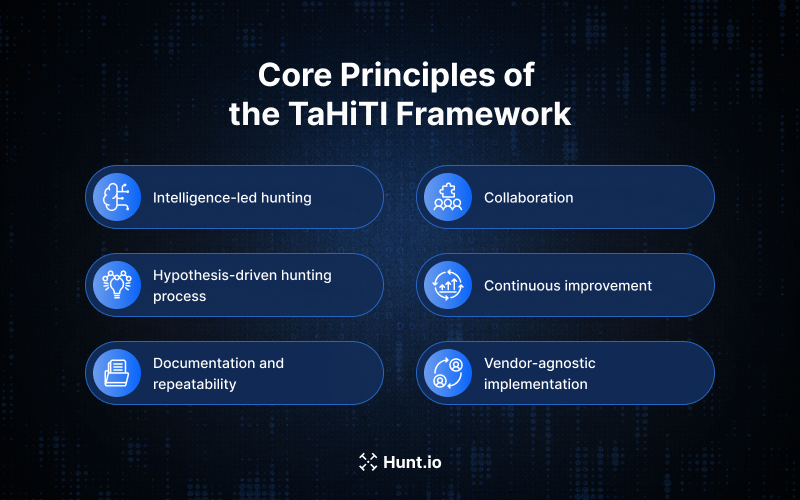
It rests on a few core principles that security teams need to understand before they even start:
Intelligence-led hunting: Every hunt starts with specific campaigns, actor TTPs, or indicators of compromise (IOCs) from curated feeds. This means that hunts are targeting real adversary behaviour, rather than some theoretical risk.
Hypothesis-driven hunting process: Intel is translated into testable hypotheses mapped to MITRE ATT&CK techniques, giving clear success criteria for each hunt.
Documentation and repeatability: All hunts follow standardized templates, so teams can replicate successful approaches and build up institutional knowledge from past hunts.
Collaboration: TaHiTi requires teams to work together between CTI analysts who provide intel, SOC teams who execute the hunts, and incident response teams who deal with the findings.
Continuous improvement: Each hunt generates feedback that refines future intel intake, scoping priorities, and detection rules. The framework creates a feedback loop that keeps on giving.
Vendor-agnostic implementation: TaHiTi can be implemented using existing SIEM/XDR platforms, data lakes, and ticketing tools; no proprietary tech required.
Now that the principles are clear, the framework itself becomes much easier to follow. TaHiTi translates these ideas into a structured sequence of phases that guides analysts from raw intelligence to measurable outcomes.
Phases of the TaHiTI Threat Hunting Framework
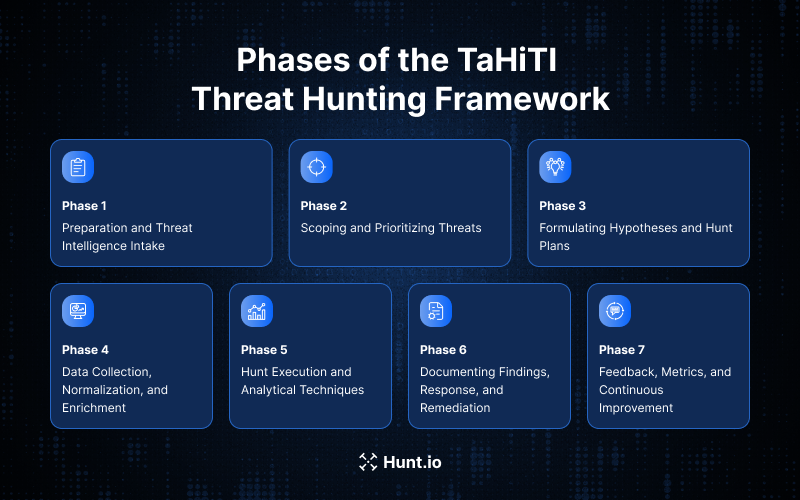
TaHiTI breaks down the threat hunting process into clear, repeatable phases covering preparation, execution, and refinement. Each phase has specific inputs, activities, and outputs that guide security teams through a complete hunting cycle.
The phases flow in sequence:
Phase 1: Preparation and Threat Intelligence Intake
Phase 2: Scoping and Prioritizing Threats
Phase 3: Formulating Hypotheses and Hunt Plans
Phase 4: Data Collection, Normalization, and Enrichment
Phase 5: Hunt Execution and Analytical Techniques
Phase 6: Documenting Findings, Response, and Remediation
Phase 7: Feedback, Metrics, and Continuous Improvement
Let's take a closer look at each phase in detail.
Phase 1: Preparation and Threat Intelligence Intake
This phase is where you connect your external and internal threat intelligence to your hunting pipeline. Without good intel flowing in, TaHiTi hunts are going to be directionless and lacking in context.
Your intel intake should be drawing from a range of sources:
Commercial threat intelligence feeds providing actor profiles and campaign details
ISAC/FS-ISAC style communities sharing sector-specific intel
Open-source intel from places like CERT-EU
Internal incident reports from previous security incidents
Malware sandbox results from samples that have been detonated
The critical need here is for standardization. Raw intelligence coming in a variety of formats is a pain to deal with. To make TaHiTI work effectively, you need to convert intel into a structured format using something like STIX/TAXII or JSON, tag it with relevant MITRE ATT&CK techniques, and assign clear ownership so it can be triaged properly.
Quality is way more important than volume in this phase. A flood of indicators that you're not even sure about is just going to create noise. TaHiTI is all about vetting the intelligence before it ever gets in the hunt queue; only the good stuff should be driving your hunts. That might mean filtering out the commodity malware campaigns that don't even target your sector while prioritizing threat intel reports from threat actors that you know to be targeting your industry or even just your specific tech stack.
Phase 2: Scoping and Prioritizing Threats
Not every bit of intel is worth turning into a hunt. TaHiTI ranks potential threats on things like business impact, exposure, and how relevant it is to your specific organization's risk profile.
When you're doing this prioritization, you should be looking at things like:
Sector relevance: If a campaign is targeting European payment processors, that's way more of a priority for a bank than for a gaming company.
Active campaigns in your region: Intel about operations that were seen recently in your specific geography takes precedence
Technology stack overlap: Things like Azure AD, AWS IAM, or Kubernetes are a real concern only if that's what you're using.
Regulatory impact: If you've got to comply with something like NIS2 or DORA, then certain hunting investigations are going to be a priority.
Teams usually end up implementing a tiering system of high, medium, and low priority hunts, based on these factors. High-priority hunts are the ones that address active, relevant campaigns with potential for significant impact. Medium prioritizes hunts to cover emerging threats that could get worse. Low prioritizes hunts that address theoretical risks or adversaries that are just not very likely to hit you.
Just make sure everyone knows what the priorities are by sharing your prioritized hunt backlog in a central platform or wiki. That way, everyone can contribute to the intel, and everyone knows what the focus areas are.
Phase 3: Formulating Hypotheses and Hunt Plans
Here is where you take your selected threat intel and turn it into something concrete: a testable hypothesis that maps to specific MITRE ATT&CK techniques. A well-formed hypothesis gives threat hunters a clear direction and some measurable success criteria.
Consider this hypothesis, for example:
"If some actor targets European payment processors via T1078.004, then our Azure AD sign-in logs should show some anomalous login patterns from previously unseen IP ranges for privileged accounts."
That's a hypothesis that you can test. You can query Azure AD logs to see if the specified patterns are there, which would confirm or refute the hypothesis.
A hunt plan documents the full scope of each investigation:
What are we trying to find?
Who and what does this affect?
Which time windows and data sources do we need to look at?
What specific searches do we need to run?
What constitutes a confirmed finding versus a clean result?
When do we know to stop?
TaHiTI recommends sticking with a consistent template for hunt plans. Make sure you include specific date ranges, say the last 90 days. This stops scope creep and makes sure hunts stay focused on actionable intel.
Phase 4: Data Collection, Normalization, and Enrichment
Intel-driven hypotheses are useless without the telemetry to test them. This phase is all about making sure you have the right data sources configured, normalized, and enriched before hunt execution even begins.
The data sources you need for TaHiTI hunts include:
| Data Type | Examples | Relevant Hunts |
|---|---|---|
| Endpoint telemetry | EDR/XDR events, process execution logs | Lateral movement, malicious behaviour, process injection |
| Windows event logs | Security, PowerShell, Sysmon | Credential access, persistence mechanisms |
| Cloud logs | AWS CloudTrail, Azure Activity Logs, GCP Audit Logs | Cloud identity abuse, unauthorized access |
| Identity logs | Azure AD, Okta sign-in logs | MFA bypass, suspicious activity on privileged accounts |
| Network telemetry | Flow logs, proxy/DNS logs | Command-and-control, data exfiltration |
| SaaS audit logs | Microsoft 365, Google Workspace | Business email compromise, insider threats |
For multi-cloud and hybrid infrastructures, normalization is huge. Map common fields like user, host, IP address, and device ID into a consistent schema so the queries work across platforms. If you don't do this, your threat hunters are going to end up spending way too much time translating between log formats and not nearly enough time looking for actual threats.
Enrichment, on the other hand, adds context that speeds up analysis:
Geolocation data for IP addresses
Threat intel lookups for domains and file hashes
Asset criticality tags from your CMDB
User role data from HR systems or IAM platforms.
This phase is resource-hungry, but it pays well during the hunt execution. Having properly enriched data lets analysts quickly tell whether a developer accessing cloud storage from an unusual location is just a legitimate user or a potential threat that needs deeper investigation.
Phase 5: Hunt Execution and Analytical Techniques
This is the part of the process where threat hunters are actually running queries, executing a threat hunting playbook, and throwing around exploratory analysis. The goal is to figure out whether the hypothesis is right or wrong, and to document every little thing you find along the way.
The analytical techniques threat hunters use when doing a TaHiTI hunt include:
MITRE ATT&CK aligned query sets: These are pre-built searches that target specific techniques like T1078 (Valid Accounts) or T1530 (Data from Cloud Storage)
Frequency analysis: This is about identifying the events that are occurring at weird rates compared to what you'd normally expect to see
Anomaly detection on behavioural patterns: This is about flagging those login patterns, API calls, or network connections that don't look quite right
Entity pivoting: This involves tracing connections between user-host-IP-process relationships to uncover the attack paths
Targeted IoC sweeps: This is about searching for specific indicators of compromise from threat intelligence
At this stage, combining internal telemetry with external, validated threat intelligence becomes critical. This is where tools like IOC Hunter and HuntSQL™ naturally fit into the workflow.
IOC Hunter allows analysts to start from trusted, pre-validated IOCs extracted from curated public research, eliminating the need to manually parse reports. These indicators are already enriched and ready to use, making it much easier to run targeted IoC sweeps and quickly connect ongoing activity to known threat campaigns.
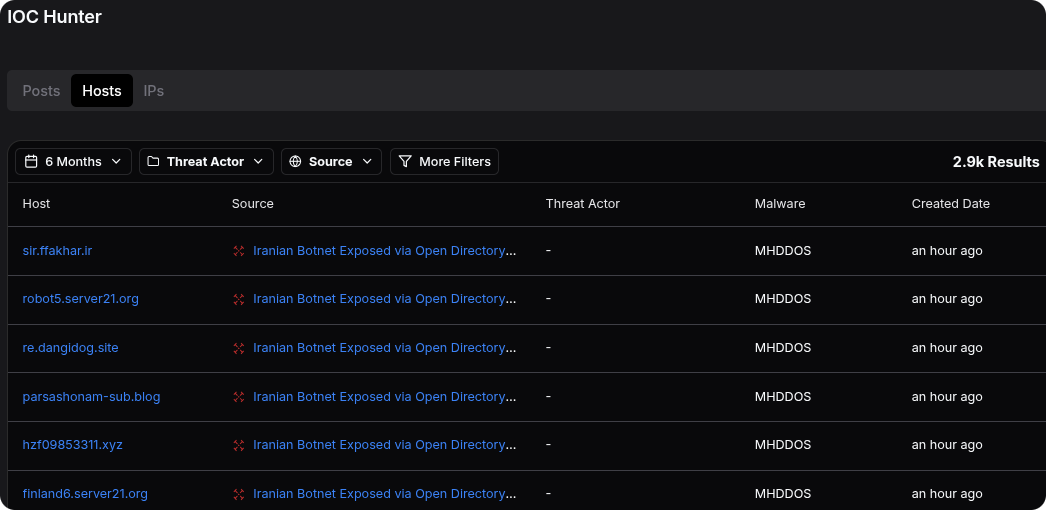
From there, HuntSQL enables deeper investigation by letting hunters query real-world attacker infrastructure using SQL, including confirmed C2 servers, phishing kits, open directories, and malware hosting patterns. Suspicious IPs, domains, or artifacts identified during the hunt can be cross-referenced against our datasets to uncover relationships, infrastructure reuse, or links to specific malware families.
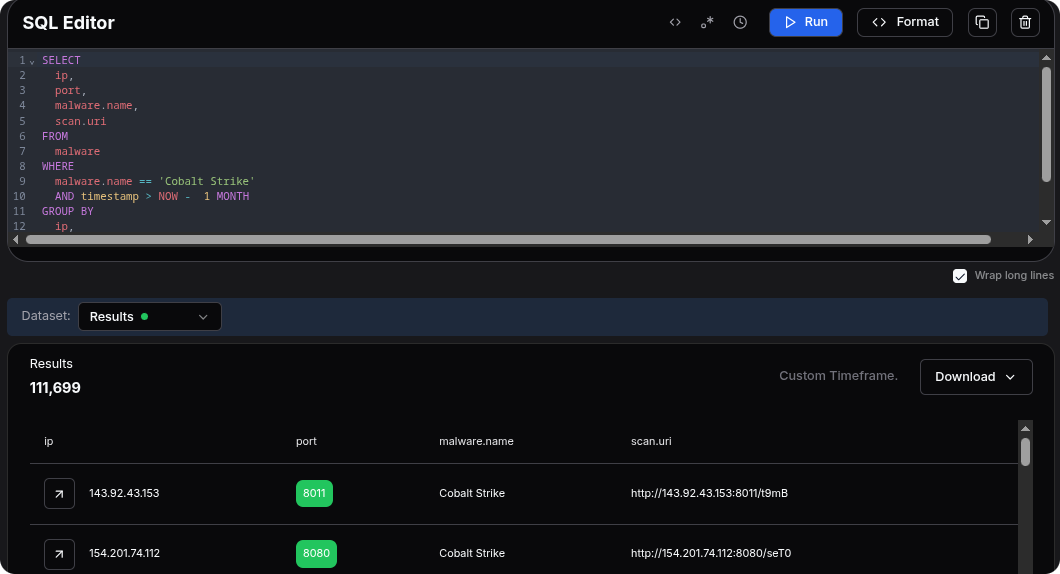
Together, these turn isolated signals into actionable context. Instead of working from raw logs or disconnected indicators, analysts can validate hypotheses faster, pivot more effectively, and build a clearer picture of the threat they are investigating.
So, for example, let's say you're hunting for data exfiltration from cloud storage, which is aligned to T1530. Your hypothesis might be that if some bad guy has got hold of a service account, then S3 or Azure Blob access logs should show some bulk downloads or unusual API calls coming from some unexpected IP ranges.
To test this, you would:
Query S3 access logs or Azure Storage analytics for GetObject/DownloadBlob operations
Filter for service accounts or privileged identities
Do some frequency analysis to identify accounts that are downloading stuff at rates that are way above what you'd normally expect to see
Enrich the source IPs with some geolocation and threat intel
Pivot to the related identities or resources that were accessed by those suspicious accounts
Machine-assisted threat hunting through UEBA or ML-based anomaly models can definitely help you get this done faster, but ultimately, it's the analyst's interpretation that counts. Machines can flag all the statistical outliers, but it's the humans who get to decide whether those outliers actually represent some real malicious activity or just benign noise.
Phase 6: Documenting Findings, Response, and Remediation
The idea with TaHiTI is that the outcome of every hunt, whether you find a threat or not, is valuable. If all you find is clean, then that validates your security posture. If you do find something, then that triggers an incident response. Either way, it all informs future hunts.
So, here are the documentation requirements:
Recording confirmed incidents with links to IR tickets
Capturing near misses (suspicious stuff that ultimately turns out to be fine)
Logging clean results that show you didn't have a specific threat
Preserving evidence: screenshots, query exports, timelines
Describing the impact and root cause analysis when something is found
When you do find actual threats, the findings need to be handed over to the incident response teams or cloud platform teams for containment. This handoff should be formalized: TaHiTI is all about clear escalation paths rather than relying on ad hoc coordination.
So, some concrete response actions might include:
Disabling the compromised accounts in Azure AD or Okta
Revoking the OAuth grants that gave the bad guys unauthorized access
Tightening up the IAM roles in AWS, Azure, or GCP
Patching vulnerable workloads that got identified during the hunt
Updating email filters, WAF rules, or endpoint detection rules
TaHiTI encourages taking the confirmed findings and turning them into new detection capabilities. If you find some attacker behaviour that your existing traditional security tools missed, then you want to create some detection rules so that similar activity triggers automated alerts. This converts one-off hunting discoveries into persistent protection.
Phase 7: Feedback, Metrics, and Continuous Improvement
TaHiTI is a cyclical process. We learn lessons from each hunt and use them to refine future intelligence intake, scoping decisions, and detection capabilities. This feedback loop is what distinguishes mature threat hunting programs from one-off efforts.
So, here are the key metrics to track for hunting program success:
| Metric | What It Measures | Why It Matters |
|---|---|---|
| Hunts per quarter | Program throughput | Ensures consistent hunting cadence |
| Intel-derived vs. incident-derived hunts | Balance of proactive vs. reactive hunting | Validates intel-driven approach |
| Time to confirm/refute hypothesis | Hunt efficiency | Identifies bottlenecks in data access or analysis |
| Hunts yielding new detections | Detection improvement | Shows hunts improving overall security posture |
| Dwell time reduction | Adversary persistence | The ultimate measure of hunting effectiveness |
Compare your current metrics against historical baselines. If you've adopted a structured framework like TaHiTI between 2022 and 2025, you should be seeing some measurable improvements: faster hypothesis resolution, higher detection conversion rates, and reduced attacker dwell time.
Sharing knowledge within the team amplifies these gains. Document your hunt results in searchable wikis, keep runbooks for common hunt types, and do after-action reviews for significant findings. This institutional knowledge means your threat hunting program isn't just dependent on individual analysts, and it makes it much easier for new team members to pick up from where you left off.
By this point, TaHiTi looks like a complete system on its own. But in real environments, teams rarely rely on a single framework. TaHiTi tends to work alongside other models, each covering a different layer of the hunting process.
How TaHiTI Integrates with Other Threat Hunting Frameworks
TaHiTI doesn't exist in isolation. Mature security teams are using multiple frameworks to get a more comprehensive understanding of their threat landscape and hunting operations.
So, the integration pattern is typically like this:
TaHiTI: The threat-intel-driven process layer that sets out how hunts are initiated, executed, and refined.
MITRE ATT&CK: A threat actor technique catalogue that gives everyone a common language to use when talking about adversary techniques and trying to map out their hypotheses.
Sqrrl (now AWS): The original hypothesis-driven loop system that influenced TaHiTI's iterative approach and really got the thought process going.
PEAK (SANS): A more comprehensive framework for how to get better at threat hunting. It covers how to get your whole organization ready, the right people on the job, and what metrics to track.
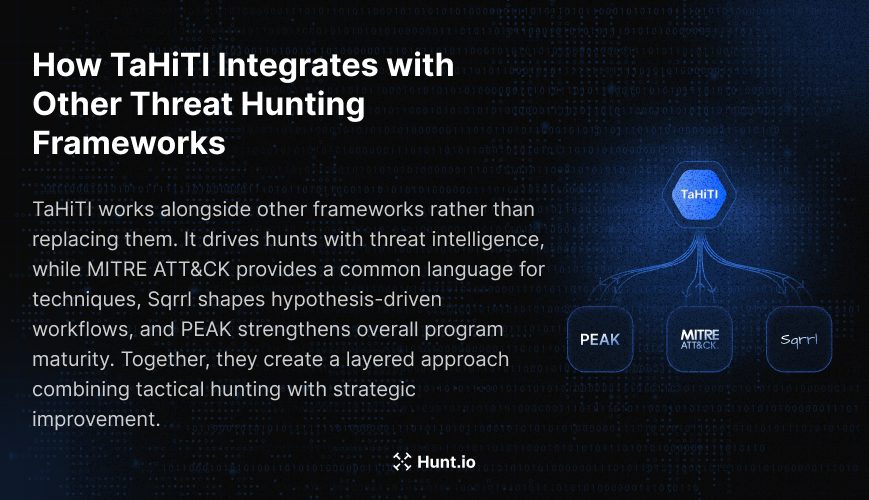
Now let's see a real-world integration example:
Your team uses PEAK to get a handle on your overall threat hunting capabilities and identify where your operation is lacking. Within the 'Prepare' phase of PEAK, you implement TaHiTI to make the process of feeding in threat intelligence and developing hypotheses something that's operationalized. Your hunt hypotheses reference specific MITRE ATT&CK techniques, which makes documentation and communication between teams far easier.
Using a layered approach means that TaHiTI handles the tactical side of the hunt while other frameworks tackle the strategic stuff (like program development, enumerating techniques, and doing behavioural analytics). And among all the threat hunting frameworks out there, TaHiTI stands out because of its clear focus on targeted hunting, and it uses threat intelligence as its main driver.
Understanding how TaHiTi fits with other frameworks is one thing, but applying it in modern environments is where things get more interesting. Cloud and hybrid setups introduce new challenges that directly impact how hunts are scoped and executed.
Applying TaHiTI in Cloud & Hybrid Environments
TaHiTI really comes into its own in modern cloud environments where telemetry is spread out across different providers, and attacks are evolving fast. The framework's hypothesis-driven approach keeps the hunt focused even when you're dealing with data from multiple platforms.
Platform Specific Considerations
AWS: CloudTrail is the main source of audit trail for your API activity, and GuardDuty is your managed threat detection. When doing a TaHiTI hunt, focus on IAM-related events, S3 access patterns, and cross-account activity.
Azure: Azure AD sign-in logs & Azure Activity Logs cover identity and resource operation, while Defender for Cloud & Key Vault logs give you some extra security-specific telemetry. Azure integrates with Microsoft 365, which means you can hunt across all of your productivity workloads.
GCP: Cloud audit logs track admin and data access events, and cloud storage access logs help you out with exfiltration hunts. GCP's org-level logging makes it easy to correlate data across projects.
Kubernetes: The API server audit logs capture control plane activity, while runtime telemetry (from tools like Falco) helps you track what's going on inside your containers. Network policy violations can be a sign that there's lateral movement going on.
Cloud Hunt Scenarios
Scenario 1: Cloud Identity Abuse (T1078.004)
Hypothesis: "If an attacker's got valid cloud credentials, they're gonna try and use them to access resources from unusual places or at weird times."
TaHiTI execution:
You gain some intelligence on credential theft campaigns that have targeted your sector.
You query Azure AD or AWS IAM to see if there's any sign-in activity from new device types or IP ranges.
Correlate that with impossible travel patterns (so, logins from places that are a long way away in a short amount of time).
Then pivot on the resource access patterns for any flagged accounts.
Document what you've found and create some detections for similar patterns.
Scenario 2: Unauthorized Cloud Storage Access (T1530)
Hypothesis: "If some service accounts have been compromised, they'll try to grab bulk data from cloud storage buckets."
TaHiTI execution:
Review some intelligence on data exfiltration techniques that have targeted cloud storage.
Get a baseline level of normal S3 or Azure blob access for service accounts.
Then query for deviations, for instance, too many GetObject calls, new source IPs, unusual times.
Enrich that with threat intel to see if there's any known malicious infrastructure behind it.
Escalate any confirmed anomalies to Incident Response.
Cloud environments make things tough: resources pop up and disappear fast, serverless functions might not log much, and multi-cloud normalization is a lot of work. But TaHiTI's hypothesis-driven approach helps by keeping the hunt focused, without trying to do too much at once and end up with unfocused anomaly detection.
At this stage, the theory is clear, but it helps to see how everything connects in practice. Walking through a full hunt makes it easier to understand how each phase builds on the previous one.
A Practical Example: End-to-End TaHiTI Hunt Walkthrough
Let's walk through a complete TaHiTI hunt that's targeting token theft and MFA fatigue attacks, techniques that were super popular between 2022 and 2024.
Intelligence Intake (Phase 1)
In September 2024, your CTI team got a threat intelligence report about a campaign targeting European financial institutions. The attackers are using MFA fatigue (where they send a bunch of push notifications to exhaust users into approving), followed by OAuth token theft to keep the persistence going. The report includes some specific techniques: T1621 (MFA request generation) and T1528 (steal an application access token).
Scoping and Prioritization (Phase 2)
Your team uses Azure AD with MFA via Microsoft Authenticator. The campaign specifically targeted financial services in Europe, which matches your sector and region. Priority: High. You add that hunt to the active queue, targeting activity between September 2024 and January 2025.
Hypothesis and Hunt Plan (Phase 3)
Hypothesis: If you're seeing MFA fatigue attacks, then Azure AD sign-in logs should show users getting multiple MFA prompts in a short space of time, followed by successful authentication and new OAuth application consent grants.
Hunt Plan:
Scope: All Azure AD users, September 1, 2024 - January 31, 2025
Data sources: Azure AD sign-in logs, Azure AD audit logs.
Success criteria: catching users who get more than 5 MFA prompts in 10 minutes, and get in okay in the end.
Data Collection and Enrichment (Phase 4)
You set up log exports from Azure AD so your SIEM gets all the sign-in logs with details on what authentication method was used and when MFA was requested. That way, you can get department and role data from your HR system onto the user accounts, so you can prioritize investigating anyone with a high level of access.
Hunt Execution (Phase 5)
You write queries to identify:
Users who got tons of MFA challenges but then managed to get in.
People who've managed to get into the system on a brand new device within 24 hours of showing MFA-fatigue patterns.
New OAuth apps that some user went ahead and consented to, even though they were showing suspicious signs in their auth history.
That hunt brings up three accounts: a finance boss, an IT person, and a developer. And in every case, the same story: lots of MFA denials, then they get in, and then they go ahead and consent to a dodgy OAuth app that keeps its access even after the account gets reset.
Findings and Response (Phase 6)
You send the info to incident response, and they:
Revoke all the OAuth consents from that dodgy account.
Kick everyone out of the system and make them re-auth.
Take a good, hard look at the access logs for that app.
Implement some extra checks to make sure devices are on the right side of conditional access.
Detection and Intelligence Feedback (Phase 7)
After the hunt, you create a new detection rule that goes off when a user has more than 3 MFA challenges in under 5 minutes. You write up the whole hunt and share the IOCs with your ISAC community. And the next quarter, you get to see that detection firing up twice, both times it was a confirmed attack, because you'd learned a thing or two from this hunt.
A single successful hunt is useful, but scaling this approach across a team requires more than just methodology. To make TaHiTi work consistently, organizations need the right structure, roles, and operational habits in place.
Organizational Requirements and Best Practices for Adopting TaHiTI
If you want TaHiTI, then you're going to need a few building blocks first. You need some decent logging and telemetry set up, and you need access to threat intel feeds (either commercial, community, or open source). And you need a team that's got people from CTI, SOC, incident response, and cloud/platform operations all working together.
Roles and Responsibilities
Intel Lead: The person who takes care of gathering and prioritizing threat intel.
Hunt Lead: The person who comes up with the hunting hypotheses, plans the hunt and makes sure it all gets done.
Data Engineer: The person who makes sure the data is available, all normalized and enriched.
Hunt Analysts: The people who write the queries, do the analysis and write up the findings.
IR Liaison: The person who deals with the incident response side and makes sure the right people get called in.
Operational Cadence
You want to set up a regular hunting schedule. Some organizations do it monthly, some do it more often; either way, it's good to keep the hunting going while also being able to respond quickly to any emerging threats that come up.
Training Requirements
Your team needs to be up to speed on:
How to interpret threat intel and what makes a good feed.
How to map MITRE ATT&CK techniques to real-world attacks.
The best ways to write queries in your SIEM/XDR platform.
Logging and telemetry specifically for your cloud setup.
Documentation standards and evidence preservation.
Documentation Best Practices
You want to keep your TaHiTI hunt templates standardized so you can reuse them later on. You also want to be able to find old hunts easily, so tag them with keywords like 'TTPs' so you can search for them. And you want to keep a record of everything in a knowledge base that all your security team can get to. That way, you can learn from your past hunts and not have to do the same thing twice.
From Small Bites
Don't try to do it all in one go. Start with a small pilot team or a high-value use case and do it for 3-6 months. Then see how it goes, and use the results to make the case for rolling it out more widely.
Conclusion
TaHiTi brings structure to threat hunting by anchoring every step in real adversary intelligence, making hunts more focused, repeatable, and measurable over time. It's a shift from reactive workflows to a disciplined, intelligence-driven process.
If you're looking to apply this in practice, book a demo now to experience how we support end-to-end threat hunting.
If your security teams are still digging through alerts without any context, you're essentially hunting blind. That's why the TaHiTi framework turns everything on its head by basing every hunt on solid threat intelligence instead of vague anomaly searches.
TaHiTi was born in 2018 from a Dutch financial sector consortium led by the Dutch Payments Association, together with the FI-ISAC community. The goal was simple: give security teams a repeatable way to turn real-world adversary intelligence into structured threat hunts. The need for that approach has only grown: global spending on information security is projected to reach $240 billion in 2026, while 76% of security leaders say they are concerned about increasingly sophisticated cyber threats.
In this article, we'll look at how TaHiTi works, what makes it different from other threat hunting frameworks, and why it's become a go-to approach for cloud threat hunting across on-prem and hybrid environments.
Background: From Early Hunting Models to TaHiTi
The evolution of threat hunting frameworks is a reflection of the maturing discipline of proactive security. Back in 2015, the Sqrrl Threat Hunting Framework kicked things off by introducing the concept of hypothesis-driven threat hunting: iterative loops that guided analysts through data exploration. However, it still lacked any explicit mechanisms for how to integrate threat intelligence at scale.
It was this exact gap that the Dutch Payments Association spotted, and they set out to fill it. By working with financial institutions that were fighting advanced persistent threats, they came up with TaHiTi in 2018 to standardize hunts, make it easier to reuse intelligence, and improve collaboration between teams. And then, more recently, SANS introduced the PEAK framework in 2023, offering a broader maturity model for hunting program success.
TaHiTi (Targeted Hunting Integrating Threat Intelligence) was designed specifically for highly regulated, high-risk sectors like payments and banking in Europe, but its principles can be applied to any organization that actually makes use of threat intelligence. Unlike generic hypothesis-driven loops that start with 'what if' questions, TaHiTi begins with 'we know that adversary X uses technique Y, so let's go find evidence of it in our environment'.
The reasons behind TaHiTi's creation were:
The need to standardize threat hunting activities across multiple organizations.
The requirement to reuse threat intelligence reports across multiple hunts.
The demand for better collaboration between CTI, SOC, and incident response teams.
The desire for measurable, repeatable hunting investigations.
With that context in mind, the next step is understanding what actually holds the framework together. TaHiTi isn't just a process; it's built on a set of principles that shape how teams approach every hunt.
Core Principles of the TaHiTI Framework
TaHiTi works as a cyclical framework, integrating threat intelligence at every single step, from the initial scoping right through to the lessons learned. Its documentation states that TaHiTi "seeks to combine threat hunting and threat intelligence to provide a focused and risk-driven approach to threat hunting."
Rather than treating intel as some optional input, the framework demands that it be the foundation for all hunting efforts.
It rests on a few core principles that security teams need to understand before they even start:
Intelligence-led hunting: Every hunt starts with specific campaigns, actor TTPs, or indicators of compromise (IOCs) from curated feeds. This means that hunts are targeting real adversary behaviour, rather than some theoretical risk.
Hypothesis-driven hunting process: Intel is translated into testable hypotheses mapped to MITRE ATT&CK techniques, giving clear success criteria for each hunt.
Documentation and repeatability: All hunts follow standardized templates, so teams can replicate successful approaches and build up institutional knowledge from past hunts.
Collaboration: TaHiTi requires teams to work together between CTI analysts who provide intel, SOC teams who execute the hunts, and incident response teams who deal with the findings.
Continuous improvement: Each hunt generates feedback that refines future intel intake, scoping priorities, and detection rules. The framework creates a feedback loop that keeps on giving.
Vendor-agnostic implementation: TaHiTi can be implemented using existing SIEM/XDR platforms, data lakes, and ticketing tools; no proprietary tech required.
Now that the principles are clear, the framework itself becomes much easier to follow. TaHiTi translates these ideas into a structured sequence of phases that guides analysts from raw intelligence to measurable outcomes.
Phases of the TaHiTI Threat Hunting Framework
TaHiTI breaks down the threat hunting process into clear, repeatable phases covering preparation, execution, and refinement. Each phase has specific inputs, activities, and outputs that guide security teams through a complete hunting cycle.
The phases flow in sequence:
Phase 1: Preparation and Threat Intelligence Intake
Phase 2: Scoping and Prioritizing Threats
Phase 3: Formulating Hypotheses and Hunt Plans
Phase 4: Data Collection, Normalization, and Enrichment
Phase 5: Hunt Execution and Analytical Techniques
Phase 6: Documenting Findings, Response, and Remediation
Phase 7: Feedback, Metrics, and Continuous Improvement
Let's take a closer look at each phase in detail.
Phase 1: Preparation and Threat Intelligence Intake
This phase is where you connect your external and internal threat intelligence to your hunting pipeline. Without good intel flowing in, TaHiTi hunts are going to be directionless and lacking in context.
Your intel intake should be drawing from a range of sources:
Commercial threat intelligence feeds providing actor profiles and campaign details
ISAC/FS-ISAC style communities sharing sector-specific intel
Open-source intel from places like CERT-EU
Internal incident reports from previous security incidents
Malware sandbox results from samples that have been detonated
The critical need here is for standardization. Raw intelligence coming in a variety of formats is a pain to deal with. To make TaHiTI work effectively, you need to convert intel into a structured format using something like STIX/TAXII or JSON, tag it with relevant MITRE ATT&CK techniques, and assign clear ownership so it can be triaged properly.
Quality is way more important than volume in this phase. A flood of indicators that you're not even sure about is just going to create noise. TaHiTI is all about vetting the intelligence before it ever gets in the hunt queue; only the good stuff should be driving your hunts. That might mean filtering out the commodity malware campaigns that don't even target your sector while prioritizing threat intel reports from threat actors that you know to be targeting your industry or even just your specific tech stack.
Phase 2: Scoping and Prioritizing Threats
Not every bit of intel is worth turning into a hunt. TaHiTI ranks potential threats on things like business impact, exposure, and how relevant it is to your specific organization's risk profile.
When you're doing this prioritization, you should be looking at things like:
Sector relevance: If a campaign is targeting European payment processors, that's way more of a priority for a bank than for a gaming company.
Active campaigns in your region: Intel about operations that were seen recently in your specific geography takes precedence
Technology stack overlap: Things like Azure AD, AWS IAM, or Kubernetes are a real concern only if that's what you're using.
Regulatory impact: If you've got to comply with something like NIS2 or DORA, then certain hunting investigations are going to be a priority.
Teams usually end up implementing a tiering system of high, medium, and low priority hunts, based on these factors. High-priority hunts are the ones that address active, relevant campaigns with potential for significant impact. Medium prioritizes hunts to cover emerging threats that could get worse. Low prioritizes hunts that address theoretical risks or adversaries that are just not very likely to hit you.
Just make sure everyone knows what the priorities are by sharing your prioritized hunt backlog in a central platform or wiki. That way, everyone can contribute to the intel, and everyone knows what the focus areas are.
Phase 3: Formulating Hypotheses and Hunt Plans
Here is where you take your selected threat intel and turn it into something concrete: a testable hypothesis that maps to specific MITRE ATT&CK techniques. A well-formed hypothesis gives threat hunters a clear direction and some measurable success criteria.
Consider this hypothesis, for example:
"If some actor targets European payment processors via T1078.004, then our Azure AD sign-in logs should show some anomalous login patterns from previously unseen IP ranges for privileged accounts."
That's a hypothesis that you can test. You can query Azure AD logs to see if the specified patterns are there, which would confirm or refute the hypothesis.
A hunt plan documents the full scope of each investigation:
What are we trying to find?
Who and what does this affect?
Which time windows and data sources do we need to look at?
What specific searches do we need to run?
What constitutes a confirmed finding versus a clean result?
When do we know to stop?
TaHiTI recommends sticking with a consistent template for hunt plans. Make sure you include specific date ranges, say the last 90 days. This stops scope creep and makes sure hunts stay focused on actionable intel.
Phase 4: Data Collection, Normalization, and Enrichment
Intel-driven hypotheses are useless without the telemetry to test them. This phase is all about making sure you have the right data sources configured, normalized, and enriched before hunt execution even begins.
The data sources you need for TaHiTI hunts include:
| Data Type | Examples | Relevant Hunts |
|---|---|---|
| Endpoint telemetry | EDR/XDR events, process execution logs | Lateral movement, malicious behaviour, process injection |
| Windows event logs | Security, PowerShell, Sysmon | Credential access, persistence mechanisms |
| Cloud logs | AWS CloudTrail, Azure Activity Logs, GCP Audit Logs | Cloud identity abuse, unauthorized access |
| Identity logs | Azure AD, Okta sign-in logs | MFA bypass, suspicious activity on privileged accounts |
| Network telemetry | Flow logs, proxy/DNS logs | Command-and-control, data exfiltration |
| SaaS audit logs | Microsoft 365, Google Workspace | Business email compromise, insider threats |
For multi-cloud and hybrid infrastructures, normalization is huge. Map common fields like user, host, IP address, and device ID into a consistent schema so the queries work across platforms. If you don't do this, your threat hunters are going to end up spending way too much time translating between log formats and not nearly enough time looking for actual threats.
Enrichment, on the other hand, adds context that speeds up analysis:
Geolocation data for IP addresses
Threat intel lookups for domains and file hashes
Asset criticality tags from your CMDB
User role data from HR systems or IAM platforms.
This phase is resource-hungry, but it pays well during the hunt execution. Having properly enriched data lets analysts quickly tell whether a developer accessing cloud storage from an unusual location is just a legitimate user or a potential threat that needs deeper investigation.
Phase 5: Hunt Execution and Analytical Techniques
This is the part of the process where threat hunters are actually running queries, executing a threat hunting playbook, and throwing around exploratory analysis. The goal is to figure out whether the hypothesis is right or wrong, and to document every little thing you find along the way.
The analytical techniques threat hunters use when doing a TaHiTI hunt include:
MITRE ATT&CK aligned query sets: These are pre-built searches that target specific techniques like T1078 (Valid Accounts) or T1530 (Data from Cloud Storage)
Frequency analysis: This is about identifying the events that are occurring at weird rates compared to what you'd normally expect to see
Anomaly detection on behavioural patterns: This is about flagging those login patterns, API calls, or network connections that don't look quite right
Entity pivoting: This involves tracing connections between user-host-IP-process relationships to uncover the attack paths
Targeted IoC sweeps: This is about searching for specific indicators of compromise from threat intelligence
At this stage, combining internal telemetry with external, validated threat intelligence becomes critical. This is where tools like IOC Hunter and HuntSQL™ naturally fit into the workflow.
IOC Hunter allows analysts to start from trusted, pre-validated IOCs extracted from curated public research, eliminating the need to manually parse reports. These indicators are already enriched and ready to use, making it much easier to run targeted IoC sweeps and quickly connect ongoing activity to known threat campaigns.
From there, HuntSQL enables deeper investigation by letting hunters query real-world attacker infrastructure using SQL, including confirmed C2 servers, phishing kits, open directories, and malware hosting patterns. Suspicious IPs, domains, or artifacts identified during the hunt can be cross-referenced against our datasets to uncover relationships, infrastructure reuse, or links to specific malware families.
Together, these turn isolated signals into actionable context. Instead of working from raw logs or disconnected indicators, analysts can validate hypotheses faster, pivot more effectively, and build a clearer picture of the threat they are investigating.
So, for example, let's say you're hunting for data exfiltration from cloud storage, which is aligned to T1530. Your hypothesis might be that if some bad guy has got hold of a service account, then S3 or Azure Blob access logs should show some bulk downloads or unusual API calls coming from some unexpected IP ranges.
To test this, you would:
Query S3 access logs or Azure Storage analytics for GetObject/DownloadBlob operations
Filter for service accounts or privileged identities
Do some frequency analysis to identify accounts that are downloading stuff at rates that are way above what you'd normally expect to see
Enrich the source IPs with some geolocation and threat intel
Pivot to the related identities or resources that were accessed by those suspicious accounts
Machine-assisted threat hunting through UEBA or ML-based anomaly models can definitely help you get this done faster, but ultimately, it's the analyst's interpretation that counts. Machines can flag all the statistical outliers, but it's the humans who get to decide whether those outliers actually represent some real malicious activity or just benign noise.
Phase 6: Documenting Findings, Response, and Remediation
The idea with TaHiTI is that the outcome of every hunt, whether you find a threat or not, is valuable. If all you find is clean, then that validates your security posture. If you do find something, then that triggers an incident response. Either way, it all informs future hunts.
So, here are the documentation requirements:
Recording confirmed incidents with links to IR tickets
Capturing near misses (suspicious stuff that ultimately turns out to be fine)
Logging clean results that show you didn't have a specific threat
Preserving evidence: screenshots, query exports, timelines
Describing the impact and root cause analysis when something is found
When you do find actual threats, the findings need to be handed over to the incident response teams or cloud platform teams for containment. This handoff should be formalized: TaHiTI is all about clear escalation paths rather than relying on ad hoc coordination.
So, some concrete response actions might include:
Disabling the compromised accounts in Azure AD or Okta
Revoking the OAuth grants that gave the bad guys unauthorized access
Tightening up the IAM roles in AWS, Azure, or GCP
Patching vulnerable workloads that got identified during the hunt
Updating email filters, WAF rules, or endpoint detection rules
TaHiTI encourages taking the confirmed findings and turning them into new detection capabilities. If you find some attacker behaviour that your existing traditional security tools missed, then you want to create some detection rules so that similar activity triggers automated alerts. This converts one-off hunting discoveries into persistent protection.
Phase 7: Feedback, Metrics, and Continuous Improvement
TaHiTI is a cyclical process. We learn lessons from each hunt and use them to refine future intelligence intake, scoping decisions, and detection capabilities. This feedback loop is what distinguishes mature threat hunting programs from one-off efforts.
So, here are the key metrics to track for hunting program success:
| Metric | What It Measures | Why It Matters |
|---|---|---|
| Hunts per quarter | Program throughput | Ensures consistent hunting cadence |
| Intel-derived vs. incident-derived hunts | Balance of proactive vs. reactive hunting | Validates intel-driven approach |
| Time to confirm/refute hypothesis | Hunt efficiency | Identifies bottlenecks in data access or analysis |
| Hunts yielding new detections | Detection improvement | Shows hunts improving overall security posture |
| Dwell time reduction | Adversary persistence | The ultimate measure of hunting effectiveness |
Compare your current metrics against historical baselines. If you've adopted a structured framework like TaHiTI between 2022 and 2025, you should be seeing some measurable improvements: faster hypothesis resolution, higher detection conversion rates, and reduced attacker dwell time.
Sharing knowledge within the team amplifies these gains. Document your hunt results in searchable wikis, keep runbooks for common hunt types, and do after-action reviews for significant findings. This institutional knowledge means your threat hunting program isn't just dependent on individual analysts, and it makes it much easier for new team members to pick up from where you left off.
By this point, TaHiTi looks like a complete system on its own. But in real environments, teams rarely rely on a single framework. TaHiTi tends to work alongside other models, each covering a different layer of the hunting process.
How TaHiTI Integrates with Other Threat Hunting Frameworks
TaHiTI doesn't exist in isolation. Mature security teams are using multiple frameworks to get a more comprehensive understanding of their threat landscape and hunting operations.
So, the integration pattern is typically like this:
TaHiTI: The threat-intel-driven process layer that sets out how hunts are initiated, executed, and refined.
MITRE ATT&CK: A threat actor technique catalogue that gives everyone a common language to use when talking about adversary techniques and trying to map out their hypotheses.
Sqrrl (now AWS): The original hypothesis-driven loop system that influenced TaHiTI's iterative approach and really got the thought process going.
PEAK (SANS): A more comprehensive framework for how to get better at threat hunting. It covers how to get your whole organization ready, the right people on the job, and what metrics to track.
Now let's see a real-world integration example:
Your team uses PEAK to get a handle on your overall threat hunting capabilities and identify where your operation is lacking. Within the 'Prepare' phase of PEAK, you implement TaHiTI to make the process of feeding in threat intelligence and developing hypotheses something that's operationalized. Your hunt hypotheses reference specific MITRE ATT&CK techniques, which makes documentation and communication between teams far easier.
Using a layered approach means that TaHiTI handles the tactical side of the hunt while other frameworks tackle the strategic stuff (like program development, enumerating techniques, and doing behavioural analytics). And among all the threat hunting frameworks out there, TaHiTI stands out because of its clear focus on targeted hunting, and it uses threat intelligence as its main driver.
Understanding how TaHiTi fits with other frameworks is one thing, but applying it in modern environments is where things get more interesting. Cloud and hybrid setups introduce new challenges that directly impact how hunts are scoped and executed.
Applying TaHiTI in Cloud & Hybrid Environments
TaHiTI really comes into its own in modern cloud environments where telemetry is spread out across different providers, and attacks are evolving fast. The framework's hypothesis-driven approach keeps the hunt focused even when you're dealing with data from multiple platforms.
Platform Specific Considerations
AWS: CloudTrail is the main source of audit trail for your API activity, and GuardDuty is your managed threat detection. When doing a TaHiTI hunt, focus on IAM-related events, S3 access patterns, and cross-account activity.
Azure: Azure AD sign-in logs & Azure Activity Logs cover identity and resource operation, while Defender for Cloud & Key Vault logs give you some extra security-specific telemetry. Azure integrates with Microsoft 365, which means you can hunt across all of your productivity workloads.
GCP: Cloud audit logs track admin and data access events, and cloud storage access logs help you out with exfiltration hunts. GCP's org-level logging makes it easy to correlate data across projects.
Kubernetes: The API server audit logs capture control plane activity, while runtime telemetry (from tools like Falco) helps you track what's going on inside your containers. Network policy violations can be a sign that there's lateral movement going on.
Cloud Hunt Scenarios
Scenario 1: Cloud Identity Abuse (T1078.004)
Hypothesis: "If an attacker's got valid cloud credentials, they're gonna try and use them to access resources from unusual places or at weird times."
TaHiTI execution:
You gain some intelligence on credential theft campaigns that have targeted your sector.
You query Azure AD or AWS IAM to see if there's any sign-in activity from new device types or IP ranges.
Correlate that with impossible travel patterns (so, logins from places that are a long way away in a short amount of time).
Then pivot on the resource access patterns for any flagged accounts.
Document what you've found and create some detections for similar patterns.
Scenario 2: Unauthorized Cloud Storage Access (T1530)
Hypothesis: "If some service accounts have been compromised, they'll try to grab bulk data from cloud storage buckets."
TaHiTI execution:
Review some intelligence on data exfiltration techniques that have targeted cloud storage.
Get a baseline level of normal S3 or Azure blob access for service accounts.
Then query for deviations, for instance, too many GetObject calls, new source IPs, unusual times.
Enrich that with threat intel to see if there's any known malicious infrastructure behind it.
Escalate any confirmed anomalies to Incident Response.
Cloud environments make things tough: resources pop up and disappear fast, serverless functions might not log much, and multi-cloud normalization is a lot of work. But TaHiTI's hypothesis-driven approach helps by keeping the hunt focused, without trying to do too much at once and end up with unfocused anomaly detection.
At this stage, the theory is clear, but it helps to see how everything connects in practice. Walking through a full hunt makes it easier to understand how each phase builds on the previous one.
A Practical Example: End-to-End TaHiTI Hunt Walkthrough
Let's walk through a complete TaHiTI hunt that's targeting token theft and MFA fatigue attacks, techniques that were super popular between 2022 and 2024.
Intelligence Intake (Phase 1)
In September 2024, your CTI team got a threat intelligence report about a campaign targeting European financial institutions. The attackers are using MFA fatigue (where they send a bunch of push notifications to exhaust users into approving), followed by OAuth token theft to keep the persistence going. The report includes some specific techniques: T1621 (MFA request generation) and T1528 (steal an application access token).
Scoping and Prioritization (Phase 2)
Your team uses Azure AD with MFA via Microsoft Authenticator. The campaign specifically targeted financial services in Europe, which matches your sector and region. Priority: High. You add that hunt to the active queue, targeting activity between September 2024 and January 2025.
Hypothesis and Hunt Plan (Phase 3)
Hypothesis: If you're seeing MFA fatigue attacks, then Azure AD sign-in logs should show users getting multiple MFA prompts in a short space of time, followed by successful authentication and new OAuth application consent grants.
Hunt Plan:
Scope: All Azure AD users, September 1, 2024 - January 31, 2025
Data sources: Azure AD sign-in logs, Azure AD audit logs.
Success criteria: catching users who get more than 5 MFA prompts in 10 minutes, and get in okay in the end.
Data Collection and Enrichment (Phase 4)
You set up log exports from Azure AD so your SIEM gets all the sign-in logs with details on what authentication method was used and when MFA was requested. That way, you can get department and role data from your HR system onto the user accounts, so you can prioritize investigating anyone with a high level of access.
Hunt Execution (Phase 5)
You write queries to identify:
Users who got tons of MFA challenges but then managed to get in.
People who've managed to get into the system on a brand new device within 24 hours of showing MFA-fatigue patterns.
New OAuth apps that some user went ahead and consented to, even though they were showing suspicious signs in their auth history.
That hunt brings up three accounts: a finance boss, an IT person, and a developer. And in every case, the same story: lots of MFA denials, then they get in, and then they go ahead and consent to a dodgy OAuth app that keeps its access even after the account gets reset.
Findings and Response (Phase 6)
You send the info to incident response, and they:
Revoke all the OAuth consents from that dodgy account.
Kick everyone out of the system and make them re-auth.
Take a good, hard look at the access logs for that app.
Implement some extra checks to make sure devices are on the right side of conditional access.
Detection and Intelligence Feedback (Phase 7)
After the hunt, you create a new detection rule that goes off when a user has more than 3 MFA challenges in under 5 minutes. You write up the whole hunt and share the IOCs with your ISAC community. And the next quarter, you get to see that detection firing up twice, both times it was a confirmed attack, because you'd learned a thing or two from this hunt.
A single successful hunt is useful, but scaling this approach across a team requires more than just methodology. To make TaHiTi work consistently, organizations need the right structure, roles, and operational habits in place.
Organizational Requirements and Best Practices for Adopting TaHiTI
If you want TaHiTI, then you're going to need a few building blocks first. You need some decent logging and telemetry set up, and you need access to threat intel feeds (either commercial, community, or open source). And you need a team that's got people from CTI, SOC, incident response, and cloud/platform operations all working together.
Roles and Responsibilities
Intel Lead: The person who takes care of gathering and prioritizing threat intel.
Hunt Lead: The person who comes up with the hunting hypotheses, plans the hunt and makes sure it all gets done.
Data Engineer: The person who makes sure the data is available, all normalized and enriched.
Hunt Analysts: The people who write the queries, do the analysis and write up the findings.
IR Liaison: The person who deals with the incident response side and makes sure the right people get called in.
Operational Cadence
You want to set up a regular hunting schedule. Some organizations do it monthly, some do it more often; either way, it's good to keep the hunting going while also being able to respond quickly to any emerging threats that come up.
Training Requirements
Your team needs to be up to speed on:
How to interpret threat intel and what makes a good feed.
How to map MITRE ATT&CK techniques to real-world attacks.
The best ways to write queries in your SIEM/XDR platform.
Logging and telemetry specifically for your cloud setup.
Documentation standards and evidence preservation.
Documentation Best Practices
You want to keep your TaHiTI hunt templates standardized so you can reuse them later on. You also want to be able to find old hunts easily, so tag them with keywords like 'TTPs' so you can search for them. And you want to keep a record of everything in a knowledge base that all your security team can get to. That way, you can learn from your past hunts and not have to do the same thing twice.
From Small Bites
Don't try to do it all in one go. Start with a small pilot team or a high-value use case and do it for 3-6 months. Then see how it goes, and use the results to make the case for rolling it out more widely.
Conclusion
TaHiTi brings structure to threat hunting by anchoring every step in real adversary intelligence, making hunts more focused, repeatable, and measurable over time. It's a shift from reactive workflows to a disciplined, intelligence-driven process.
If you're looking to apply this in practice, book a demo now to experience how we support end-to-end threat hunting.
Related Posts
Related Posts
Related Posts


Oct 13, 2026
•
13
min read
Mar 19, 2026
•
13
min read
Oct 13, 2026
•
13
min read
Hunt adversary infrastructure in real time. Surface C2 servers, enrich IOCs,
and map attacker activity at scale with our unified threat hunting platform.

Hunt adversary infrastructure in real time. Surface C2 servers, enrich IOCs,
and map attacker activity at scale with our unified threat hunting platform.
Hunt adversary infrastructure in real time. Surface C2 servers, enrich IOCs,
and map attacker activity at scale with our unified threat hunting platform.