Best Open Directory Intelligence Tools for Threat Hunting in 2026

Threat actors make mistakes. One of the most common is leaving their operational infrastructure exposed in open directories, giving defenders a window into their tooling, targets, and attack chains.
Inside these directories, researchers routinely find malware payloads, exploit kits, stolen credentials, C2 configurations, and post-exploitation toolkits staged for deployment. The challenge is finding them at scale and extracting intelligence before they go dark.
This guide covers the best tools for open directory intelligence in 2026, from commercial platforms to open source crawlers and community feeds.
What to Look for in an Open Directory Intelligence Tool
Not every tool approaches this problem the same way. Some scan the entire internet and tag directories they find. Others crawl known malicious URLs and classify what is inside. A few do both. When evaluating tools for open directory intelligence work, these are the capabilities that matter most:
Discovery at scale: Can the tool find open directories across the internet automatically, or does it only work with URLs you already have?
Malicious content classification: Does it distinguish between a benign file server and a directory staging malware or exploit kits?
File-level analysis: Can you inspect individual files, download samples, match against YARA rules, or check hashes against known malware databases?
Keyword and code search: Can you search across directory contents for specific filenames, strings, or code patterns?
Continuous monitoring: Is the data refreshed daily? Can you track changes to a directory over time?
C2 correlation: Does the tool cross-reference open directory hosts with known command and control servers?
API access: Can you pull data programmatically and integrate it into your workflows?
Cost: Is it free, freemium, or enterprise-only?
1. Hunt.io AttackCapture
Type: Commercial platform | Website: hunt.io/features/attackcapture
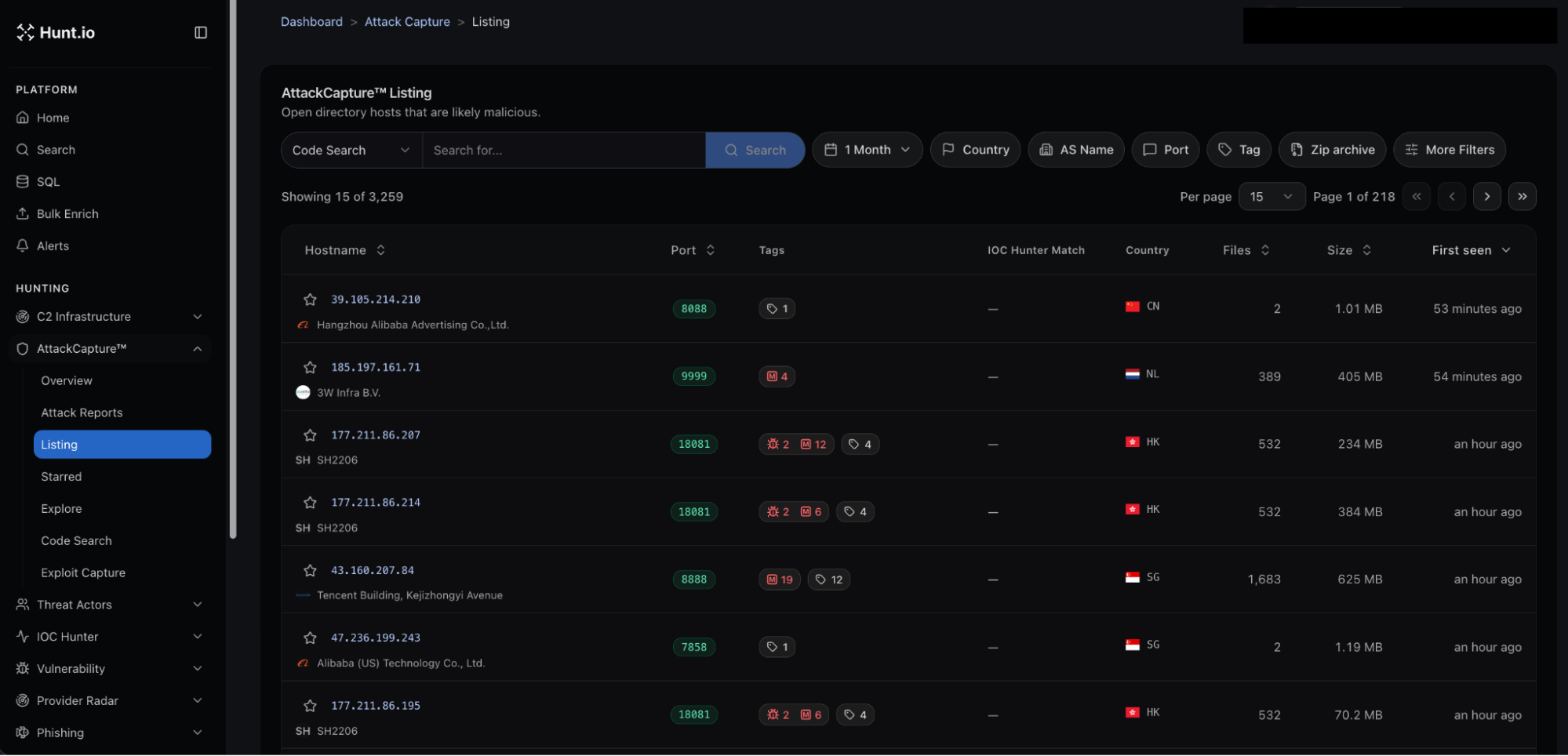 Figure 02: AttackCapture open directory tree view showing a flagged malicious directory with file tags and pattern matches.
Hunt.io's AttackCapture module is purpose-built for open directory intelligence. It continuously scans for exposed directories across the internet, classifies them using keyword pattern matching and co-hosted infrastructure analysis, and makes the contents searchable and downloadable.
The platform uses two approaches to flag directories as malicious. First, it runs file names against a maintained list of keywords and patterns associated with known malware, exploit tools, and attacker utilities.
Second, it checks what else is hosted on the same IP, looking for known C2 panels, malware families, or other indicators of adversarial activity.
What sets AttackCapture apart from generic internet scanners is depth. You can browse directory trees visually, download file archives, and search across all indexed directories by keyword or filename.
Code search lets you find exploit code, reverse shells, and C2 configurations inside open directory contents. The platform recrawls every indexed directory daily, so you can track changes over time.
AttackCapture also generates attack reports with AI-assisted summaries, and tags directories with GitHub project references and known exploit identifiers. Integration with the rest of Hunt.io's platform means you can pivot from an open directory finding into IOC Hunter, HuntSQL queries, and threat actor profiles without leaving the interface. Hunt.io also offers an MCP server that works with AttackCapture data, enabling automated threat hunting workflows through AI-assisted tooling, and MISP integration via the API for teams that need to push findings into their existing threat intelligence sharing pipelines.
Strengths: Dedicated open directory intelligence with daily recrawling, file-level code search, malicious classification, sample downloads, integrated C2 and threat actor correlation, attack reports, MCP server for automated workflows, MISP integration via API, API access.
Limitations: Commercial platform. 14-day free trial available. Not open source.
2. Shodan
Type: Freemium platform | Website: shodan.io
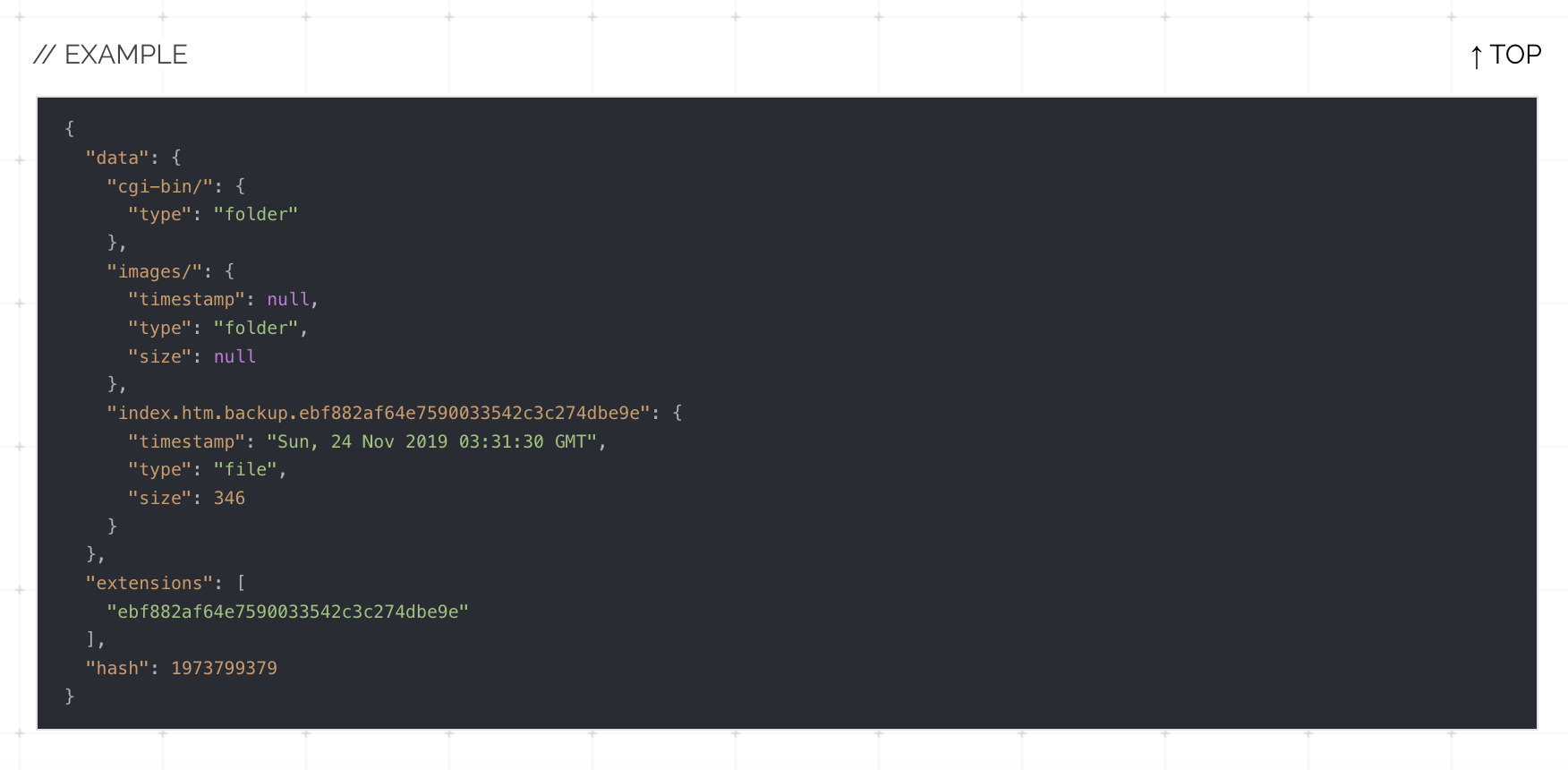 Figure 03: Example of Shodan results for open-dir showing tagged open directory hosts
Shodan has been the go-to internet scanning platform for years, and while it wasn't built specifically for open directory hunting, it has developed solid capabilities in this area. The tag:open-dir filter returns all devices Shodan has classified as hosting an open directory listing, and the open_dir.extension and open_dir.hash filters allow for more precise reconnaissance.
Shodan's Malware Hunter feature adds another layer. It actively probes IPs by pretending to be an infected machine sending C2 callbacks. If the IP responds as a command and control server, it gets tagged accordingly.
Combining tag:open-dir with tag:malware can surface directories hosted on confirmed C2 infrastructure.
Many researchers still use the classic approach of searching for http.title:"index of /" combined with other filters (country, ASN, product) to find specific types of open directories. This is manual work compared to the dedicated tools above, but Shodan's API makes it scriptable, and the community has built tools like C2Hunter and C2Tracker on top of Shodan's data for exactly this purpose.
Strengths: Massive device index, free tier available, strong API, Malware Hunter C2 detection, well-documented query language, huge community and third-party tooling ecosystem.
Limitations: Open directory features are less structured than dedicated tools. No visual directory browsing, no file-level content search, no file download. The free tier is heavily rate-limited. Identifying malicious vs. benign directories requires manual analysis or external tooling.
3. SubCrawl
Type: Open source (Python) | Repository: github.com/hpthreatresearch/subcrawl
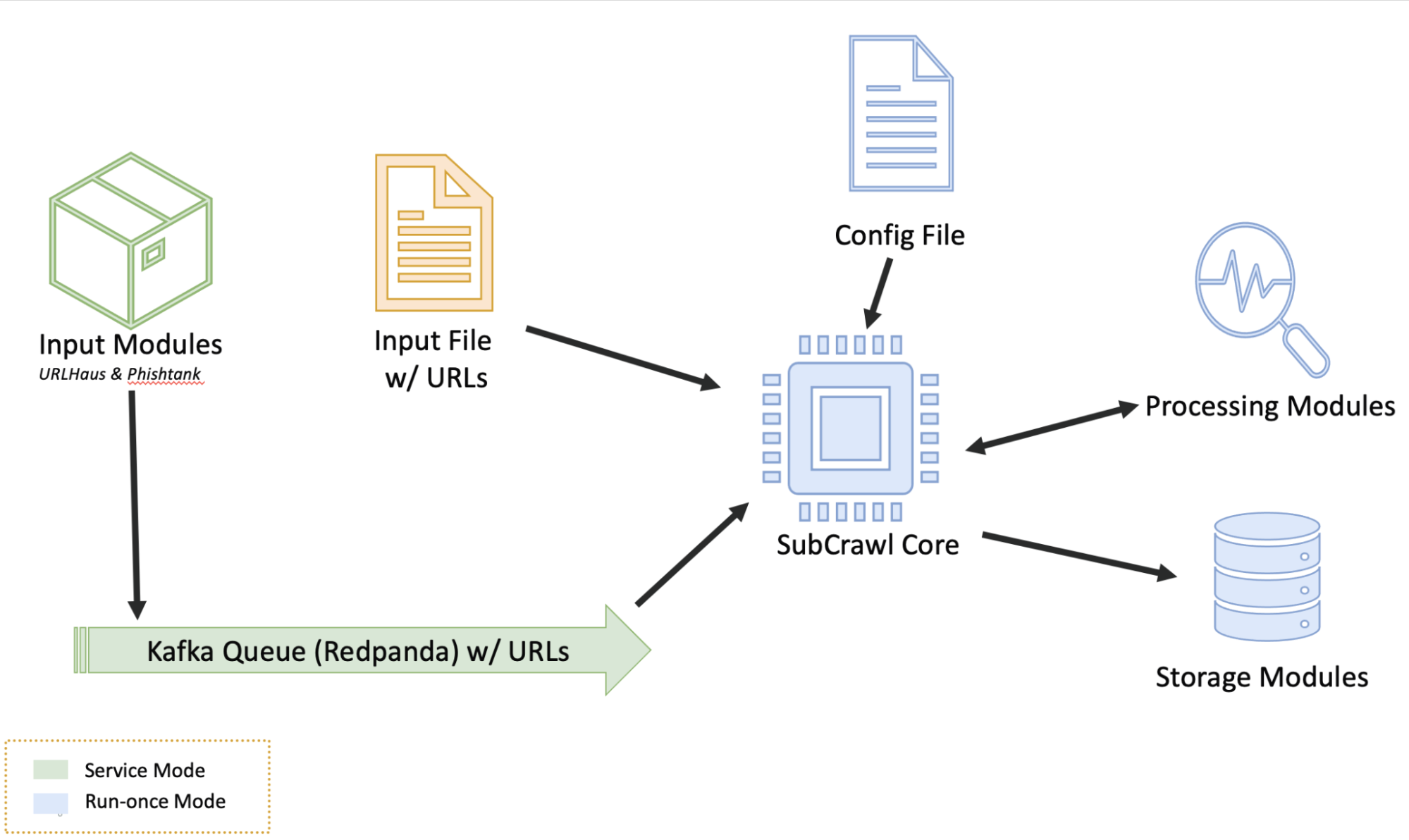 Figure 04: SubCrawl architecture diagram from the GitHub repository showing input, processing, and output modules
SubCrawl was developed by HP Inc's Threat Research team (Patrick Schläpfer, Josh Stroschein, and Alex Holland) and is the most capable open source framework specifically designed for open directory analysis. It takes a modular approach with four components: input modules, processing modules, output modules, and the core crawling engine.
The crawler is smarter than a brute-force directory scanner. When it finds an open directory, it extracts and follows links, determines whether each link is a file or another directory, and recursively maps the entire structure.
For each file it encounters, it generates SHA256 hashes, fuzzy hashes (TLSH, sdhash), JARM fingerprints, and runs content against YARA rules.
SubCrawl supports two operating modes: a one-shot run against a list of URLs, and a service mode that runs continuously with input modules feeding it new targets.
It can pull URLs from sources like URLhaus and output results to the console, SQLite, Elasticsearch, or MISP events for clustering and tracking. The MISP integration is particularly useful because it allows SubCrawl to skip previously scanned targets.
The catch is that SubCrawl is a self-hosted tool. You need to bring your own URL sources, run your own infrastructure, and handle the operational overhead. There's no web UI, no managed scanning, and no built-in internet-wide discovery.
Strengths: Open source and free, modular architecture, YARA rule matching, fuzzy hashing, JARM fingerprinting, MISP integration, can run as a continuous service, well-documented.
Limitations: Requires you to supply your own URLs to scan (no internet-wide discovery). Self-hosted only, CLI-based, requires operational overhead to maintain. Last updated in 2024.
4. OpenDirectoryDownloader
Type: Open source (.NET) | Repository: github.com/KoalaBear84/OpenDirectoryDownloader
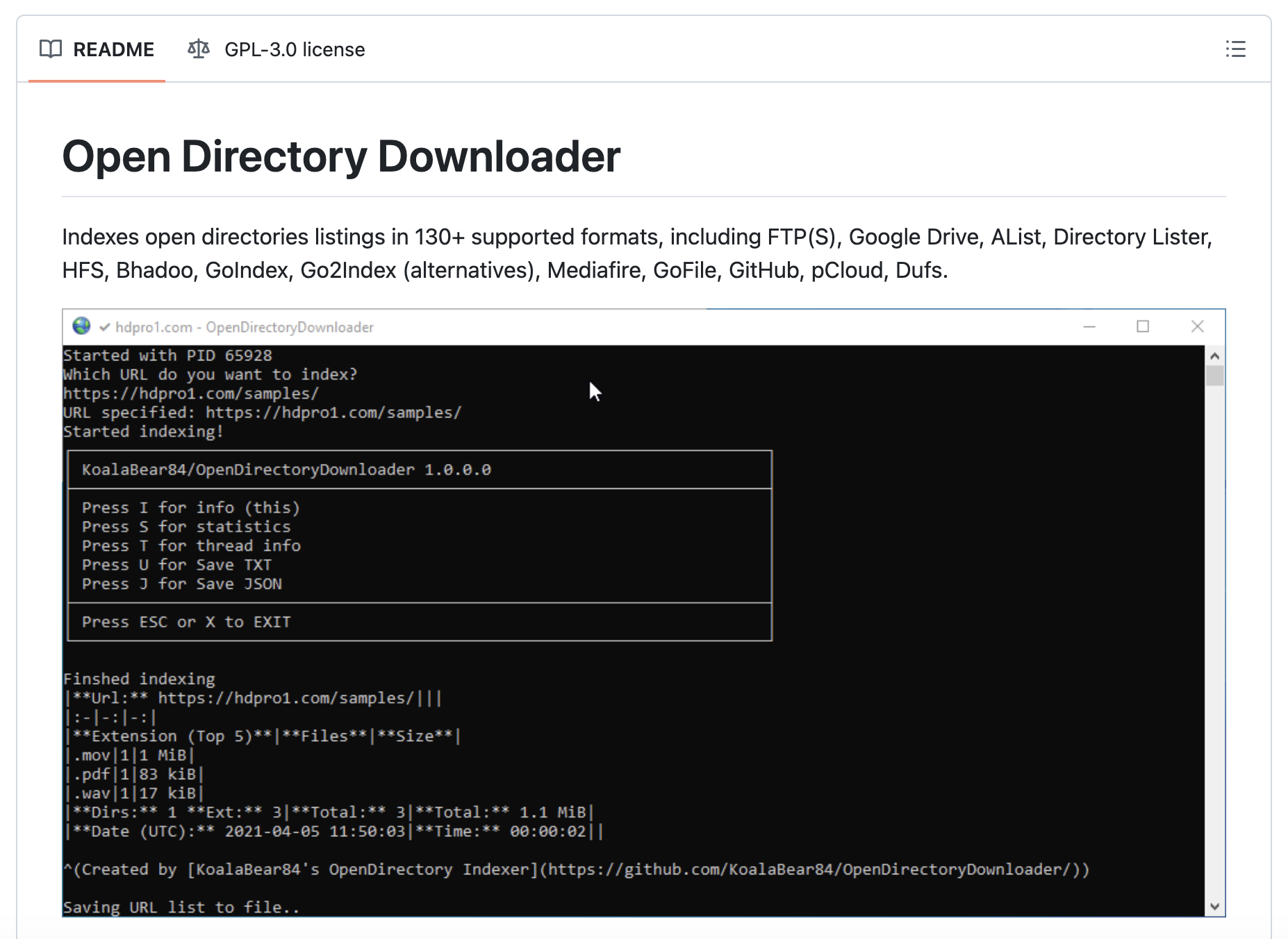 Figure 05: OpenDirectoryDownloader terminal output showing a crawled directory with file counts and sizes
OpenDirectoryDownloader is a widely used open source tool that indexes open directory listings across 130+ supported formats, including standard Apache/Nginx directory listings, FTP(S), HFS (HTTP File Server), Google Drive indexes, and various GoIndex variants. It is actively maintained, with the latest release (v3.6) shipping in mid-2026.
The tool focuses on one job and does it well: given a URL, it crawls the entire directory structure, catalogs every file with its size and path, and outputs the results in a structured format.
It supports SOCKS proxies (useful for crawling .onion directories), custom headers, Docker deployment, and even runs in Google Colab.
OpenDirectoryDownloader doesn't do security analysis. It won't classify files as malicious, match YARA rules, or tell you whether a directory is hosting exploit kits. It is purely a crawling and indexing tool. But it is extremely good at that job, handles edge cases and format variations that trip up other crawlers, and its output can be piped into other tools for analysis.
For threat hunting, it is best used as a utility in a larger workflow: find a suspicious directory through Shodan, Censys, or Hunt.io, then use OpenDirectoryDownloader to grab a complete inventory of everything inside it before the operator notices and takes it down.
Strengths: Open source, actively maintained, supports 130+ directory listing formats, handles FTP/FTPS, proxy support including Tor, Docker support, runs in Google Colab.
Limitations: No security analysis, no malicious classification, no YARA or hash matching, no internet-wide discovery. Strictly a crawler and indexer.
5. ODCrawler
Type: Open source (web app) | Website: odcrawler.xyz | Repository: github.com/Chaphasilor/odcrawler-frontend
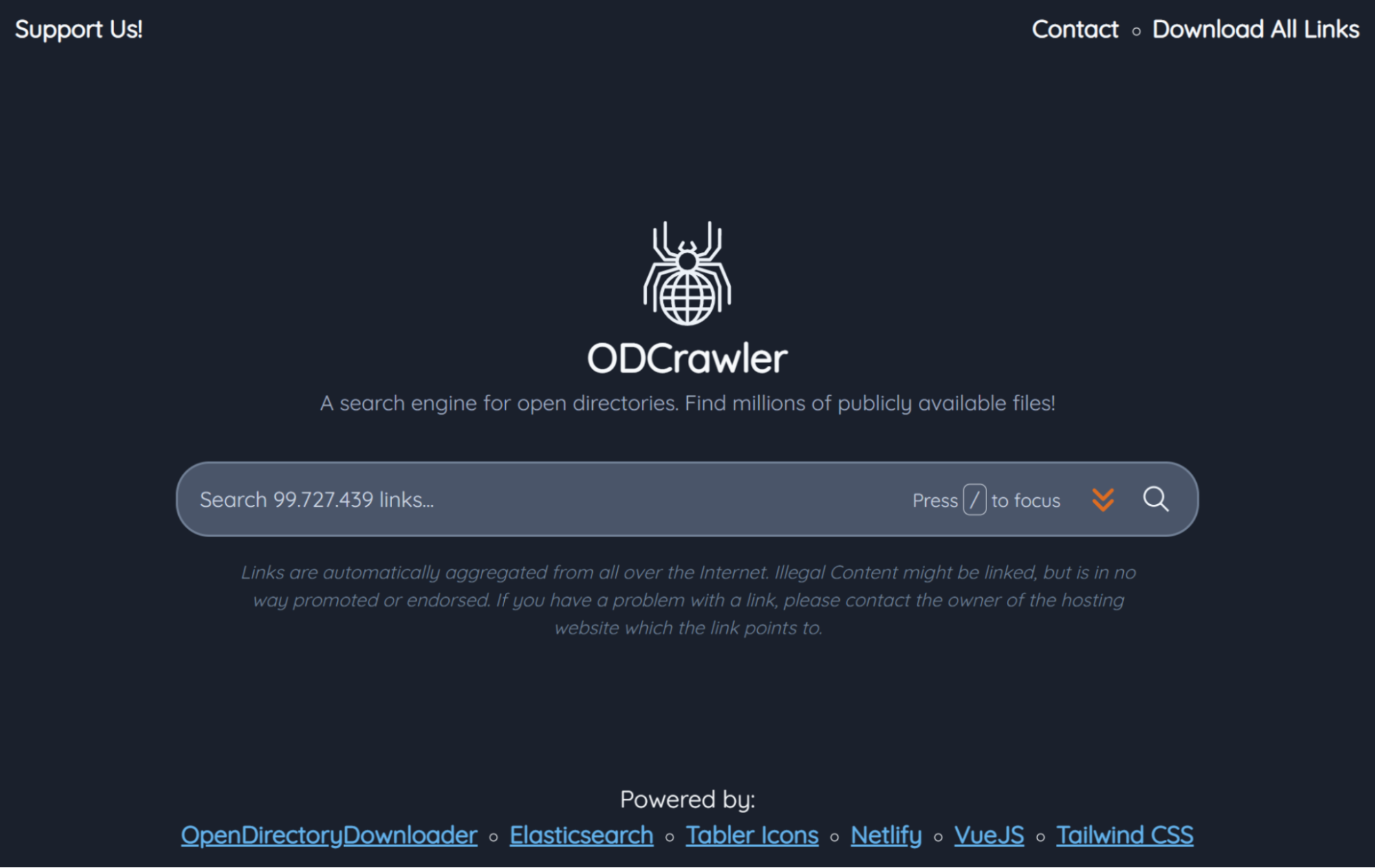 Figure 06: ODCrawler search interface at odcrawler.xyz showing search results for a file query
ODCrawler is a dedicated search engine built specifically for open directories. Created by Chaphasilor, it crawls and indexes the contents of publicly accessible directory listings, then makes every file link searchable by keyword. Because file URLs contain the actual filename at the end, keyword search works surprisingly well for finding specific files across millions of indexed links.
The project has a few components worth knowing about. The frontend is the search interface at odcrawler.xyz. A separate discovery backend handles finding new open directories.
There is even a Reddit bot (odcrawler-scanner) that automatically scans open directories posted on r/opendirectories and submits them for indexing.
ODCrawler is completely free with no ads, no data collection, and no user tracking. The database is also downloadable, so researchers can run their own analysis offline.
For threat hunting, this is useful as a supplementary discovery tool. Search for known malicious filenames or tool names across its indexed directories to find staging servers that other scanners might have missed.
The tool is not focused on threat intelligence specifically. It indexes all open directories without distinguishing between benign and malicious ones. That classification work falls to you or to other tools in your pipeline.
Strengths: Free and open source, purpose-built open directory search engine, millions of indexed files, downloadable database, Reddit bot for automated discovery, no tracking or ads.
Limitations: No malicious content classification. Does not distinguish between benign and threat actor directories. No file analysis, hashing, or sandboxing. Community-maintained with limited infrastructure budget.
6. Open Directory Search Tool (Abifog)
Type: Open source (web app) | Website: opendirsearch.abifog.com | Repository: github.com/IceWreck/OpenDirectorySearchTool
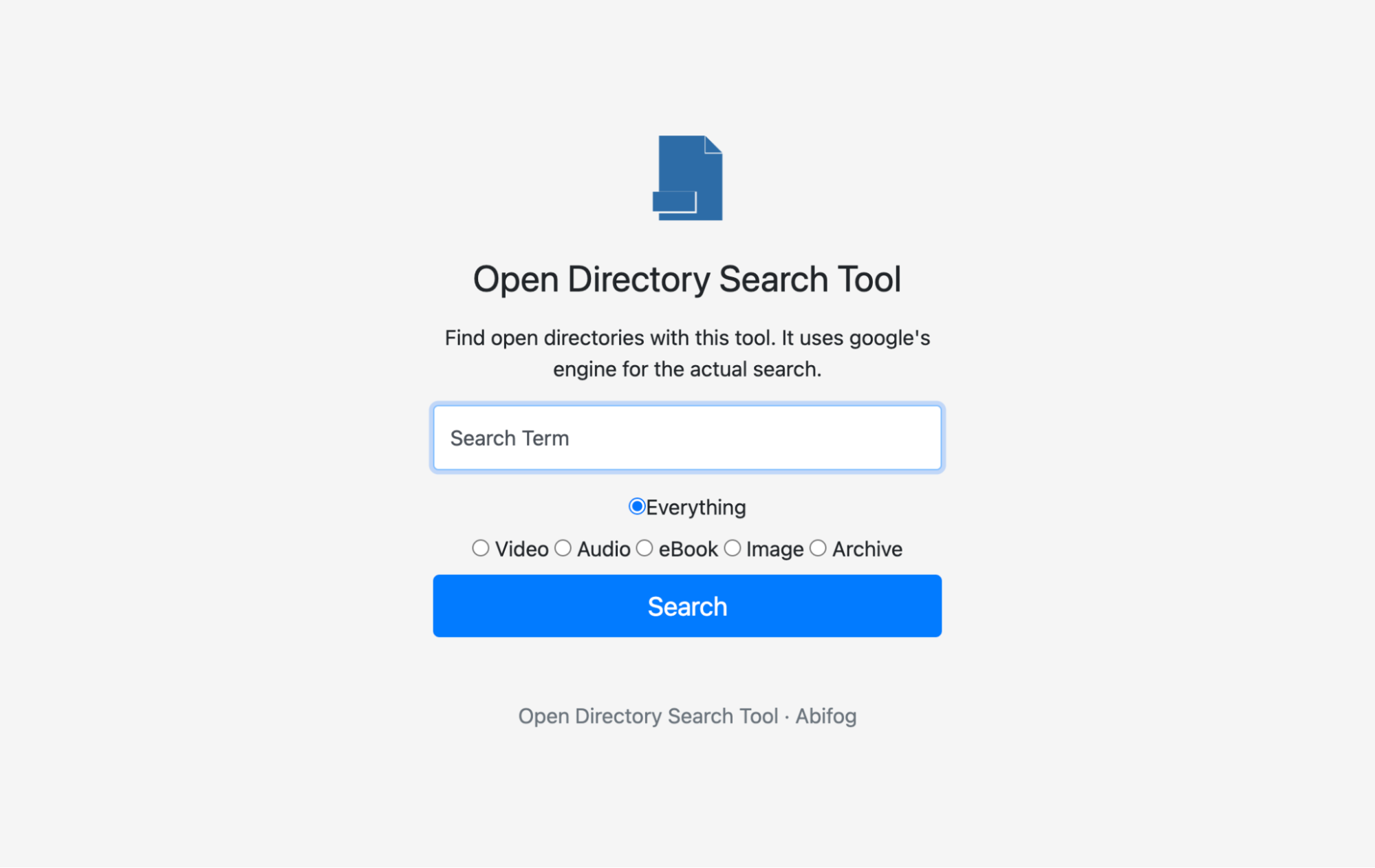 Figure 07: Abifog Open Directory Search Tool form at opendirsearch.abifog.com showing file type filters
Abifog's Open Directory Search Tool takes a different approach. Instead of crawling and indexing directories itself, it generates optimized Google dork queries designed to find open directories across the web.
You enter a search term, select a file type filter (video, audio, ebooks, images, archives, or everything), and the tool constructs and runs a Google search formatted to surface open directory listings matching your criteria.
It is simple by design, and that is actually its strength for quick reconnaissance. When you need to find open directories hosting a specific type of file or a specific tool name, Abifog gets you to results in seconds without needing API keys, accounts, or infrastructure. The tool runs entirely client-side, collects no user data, and is open source.
For threat hunters, the practical use case is rapid discovery. Search for known malware filenames, exploit toolkit names, or attacker tool names to find open directories that Google has indexed but dedicated scanners may not have reached yet.
Google's index is massive and updated constantly, so this approach sometimes surfaces directories that are too new or too short-lived for periodic scanners to catch.
Strengths: Free and open source, no API keys required, runs client-side with no data collection, leverages Google's massive index, instant results, good for quick reconnaissance of specific filenames or tools.
Limitations: Dependent on Google's indexing (directories must be crawled by Google first). No file analysis, classification, or monitoring. Results are Google search results, not structured threat data. Rate-limited by Google's query limits.
7. URLhaus (abuse.ch)
Type: Free community-driven feed | Website: urlhaus.abuse.ch
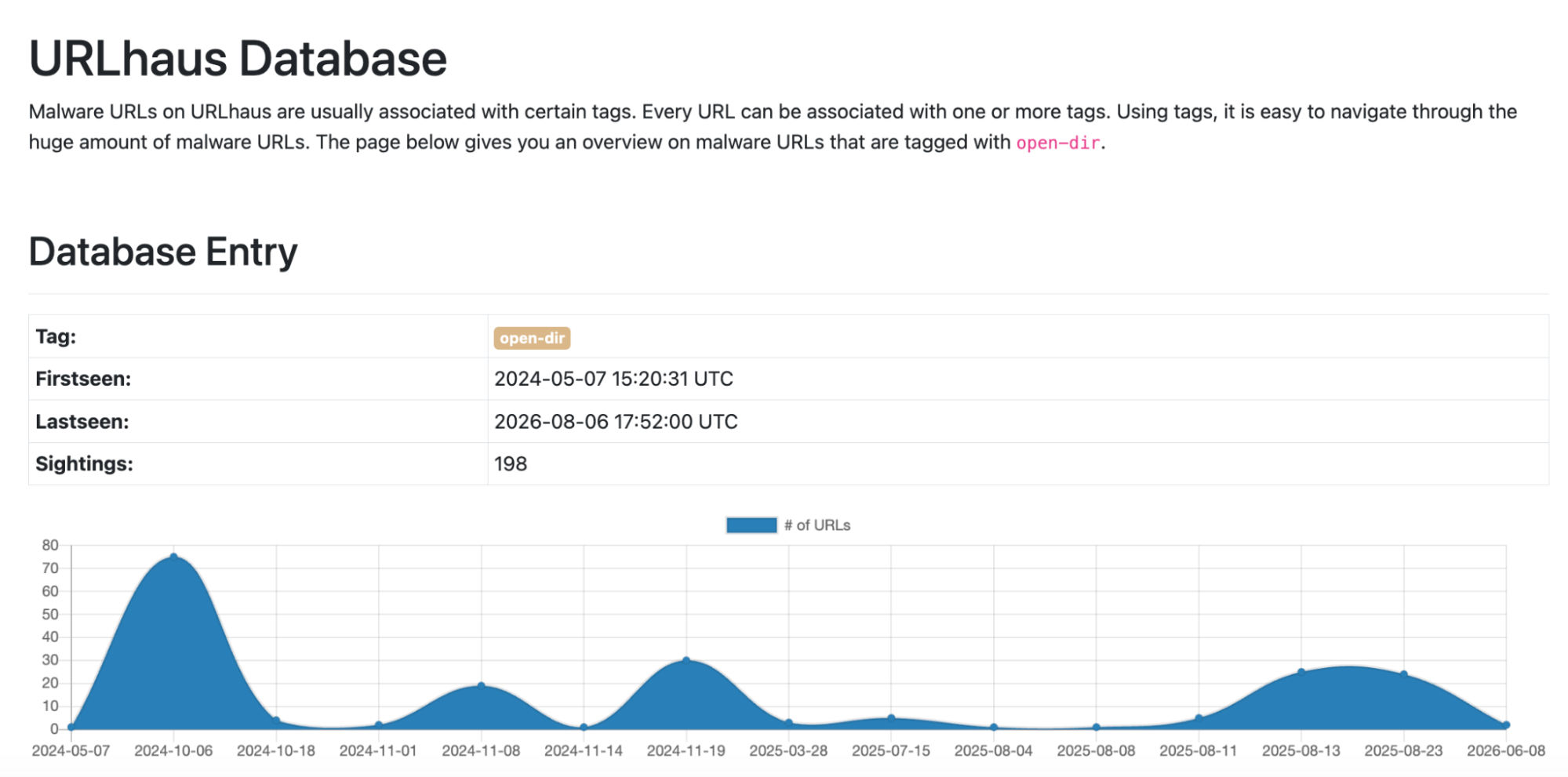 Figure 08: URLhaus recent malware database entries for open-dir tags
URLhaus is a community-driven project from abuse.ch that collects and shares malicious URLs used for malware distribution. It is not an open directory tool per se, but a significant number of the URLs in its database point to open directories serving malware, making it one of the best free sources of open directory targets for threat hunting.
Researchers submit malicious URLs they discover, and URLhaus tags them, tracks their status (online/offline), and associates them with malware families when possible.
The entire dataset is available via a free API with no authentication required. Bulk downloads are available in multiple formats.
URLhaus is commonly used as an input source for other tools. SubCrawl can ingest URLhaus feeds directly and crawl the URLs it provides.
Many SIEM and SOAR platforms have native URLhaus integrations for automated IOC enrichment. Maltego has dedicated URLhaus transforms for link analysis.
The value for open directory intelligence is as a discovery feed rather than an analysis platform. It answers "where are the malicious URLs?" but leaves the analysis of what is inside those directories to other tools.
Strengths: Completely free, no authentication required, community-driven with active contributor base, API available, bulk data downloads, integrates with MISP/Maltego/SIEM platforms, regularly updated.
Limitations: Not an open directory scanner or analysis tool. Community-submitted data means coverage is uneven. No directory browsing, no file analysis, no classification beyond malware family tags.
Side-by-Side Comparison
| Capability | Hunt.io AttackCapture | Shodan | SubCrawl | OpenDirectoryDownloader | ODCrawler | Abifog Search Tool | URLhaus |
|---|---|---|---|---|---|---|---|
| Internet-wide open directory discovery | Yes | Yes | No (bring your own URLs) | No (bring your own URLs) | No (indexes submitted ODs) | Yes (via Google dorks) | No |
| Malicious directory classification | Yes (pattern + co-host analysis) | Partial (tag:open-dir + tag:malware) | Yes (YARA rules) | No | No | No | Partial (community tags) |
| Visual directory browsing | Yes (tree view) | No | No | No | No | No | No |
| File download / sample collection | Yes | No | Yes (with processing modules) | Yes (indexing only) | No | No | No |
| Code search inside files | Yes | No | No | No | No | No | No |
| YARA rule matching | No (pattern-based) | No | Yes | No | No | No | No |
| Daily recrawling / updates | Yes | Varies by scan cycle | Manual or service mode | Manual | Community-driven | Real-time (Google index) | Community-submitted |
| C2 correlation | Yes (integrated) | Yes (Malware Hunter) | No | No | No | No | Partial (malware family tags) |
| API access | Yes | Yes | No (CLI tool) | No (CLI tool) | No | No | Yes (no auth required) |
| MCP server integration | Yes | No | No | No | No | No | No |
| Attack reports / AI summaries | Yes | No | No | No | No | No | No |
| MISP integration | Yes (via API) | No | Yes | No | No | No | Yes |
| Open source | No | No | Yes | Yes | Yes | Yes | Yes (data feed) |
| Free tier | Yes (14-day trial) | Yes (limited) | Yes (fully free) | Yes (fully free) | Yes (fully free) | Yes (fully free) | Yes (fully free) |
Which Tool for Which Job?
| Use case | Best fit |
|---|---|
| Continuous open directory monitoring and threat intelligence at scale | Hunt.io AttackCapture |
| Quick discovery of open directories with broad internet scanning | Shodan |
| Self-hosted open directory crawling with custom YARA rules | SubCrawl |
| Fast indexing and archiving of a known open directory | OpenDirectoryDownloader |
| Searching across millions of indexed open directory files | ODCrawler |
| Rapid reconnaissance using Google's index to find open directories | Open Directory Search Tool (Abifog) |
| Free feed of malicious URLs including open directory targets | URLhaus |
Putting It All Together
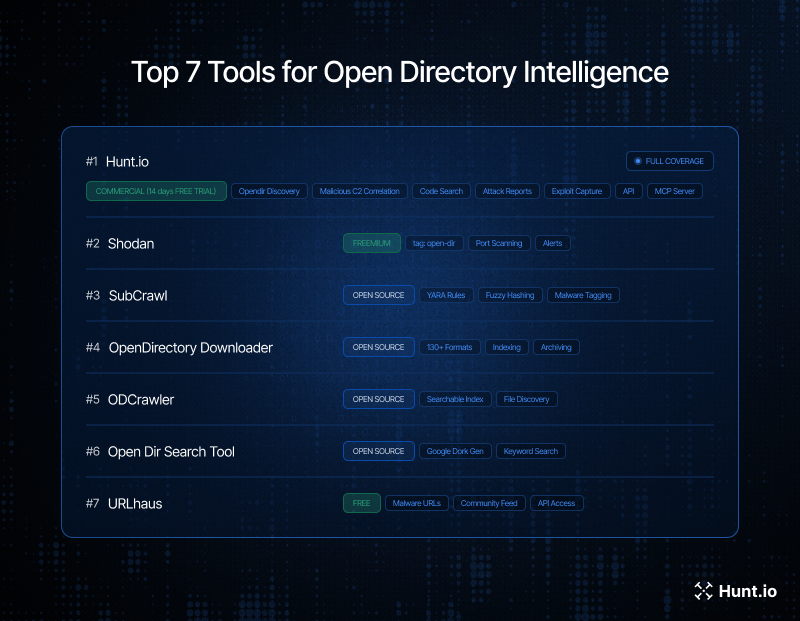
No single tool covers the entire open directory intelligence lifecycle, but Hunt.io's AttackCapture comes the closest. Discovery, classification, code search, daily monitoring, C2 correlation, MCP server automation, and MISP integration, all in one platform.
For everything else, the best approach is combining tools into a pipeline.
For teams building a free stack, combine Shodan for discovery, OpenDirectoryDownloader for archiving, SubCrawl for YARA matching, and URLhaus for community feeds. Book your free demo to see how AttackCapture fits into your workflow.
Threat actors make mistakes. One of the most common is leaving their operational infrastructure exposed in open directories, giving defenders a window into their tooling, targets, and attack chains.
Inside these directories, researchers routinely find malware payloads, exploit kits, stolen credentials, C2 configurations, and post-exploitation toolkits staged for deployment. The challenge is finding them at scale and extracting intelligence before they go dark.
This guide covers the best tools for open directory intelligence in 2026, from commercial platforms to open source crawlers and community feeds.
What to Look for in an Open Directory Intelligence Tool
Not every tool approaches this problem the same way. Some scan the entire internet and tag directories they find. Others crawl known malicious URLs and classify what is inside. A few do both. When evaluating tools for open directory intelligence work, these are the capabilities that matter most:
Discovery at scale: Can the tool find open directories across the internet automatically, or does it only work with URLs you already have?
Malicious content classification: Does it distinguish between a benign file server and a directory staging malware or exploit kits?
File-level analysis: Can you inspect individual files, download samples, match against YARA rules, or check hashes against known malware databases?
Keyword and code search: Can you search across directory contents for specific filenames, strings, or code patterns?
Continuous monitoring: Is the data refreshed daily? Can you track changes to a directory over time?
C2 correlation: Does the tool cross-reference open directory hosts with known command and control servers?
API access: Can you pull data programmatically and integrate it into your workflows?
Cost: Is it free, freemium, or enterprise-only?
1. Hunt.io AttackCapture
Type: Commercial platform | Website: hunt.io/features/attackcapture
Figure 02: AttackCapture open directory tree view showing a flagged malicious directory with file tags and pattern matches.Hunt.io's AttackCapture module is purpose-built for open directory intelligence. It continuously scans for exposed directories across the internet, classifies them using keyword pattern matching and co-hosted infrastructure analysis, and makes the contents searchable and downloadable.
The platform uses two approaches to flag directories as malicious. First, it runs file names against a maintained list of keywords and patterns associated with known malware, exploit tools, and attacker utilities.
Second, it checks what else is hosted on the same IP, looking for known C2 panels, malware families, or other indicators of adversarial activity.
What sets AttackCapture apart from generic internet scanners is depth. You can browse directory trees visually, download file archives, and search across all indexed directories by keyword or filename.
Code search lets you find exploit code, reverse shells, and C2 configurations inside open directory contents. The platform recrawls every indexed directory daily, so you can track changes over time.
AttackCapture also generates attack reports with AI-assisted summaries, and tags directories with GitHub project references and known exploit identifiers. Integration with the rest of Hunt.io's platform means you can pivot from an open directory finding into IOC Hunter, HuntSQL queries, and threat actor profiles without leaving the interface. Hunt.io also offers an MCP server that works with AttackCapture data, enabling automated threat hunting workflows through AI-assisted tooling, and MISP integration via the API for teams that need to push findings into their existing threat intelligence sharing pipelines.
Strengths: Dedicated open directory intelligence with daily recrawling, file-level code search, malicious classification, sample downloads, integrated C2 and threat actor correlation, attack reports, MCP server for automated workflows, MISP integration via API, API access.
Limitations: Commercial platform. 14-day free trial available. Not open source.
2. Shodan
Type: Freemium platform | Website: shodan.io
Figure 03: Example of Shodan results for open-dir showing tagged open directory hostsShodan has been the go-to internet scanning platform for years, and while it wasn't built specifically for open directory hunting, it has developed solid capabilities in this area. The tag:open-dir filter returns all devices Shodan has classified as hosting an open directory listing, and the open_dir.extension and open_dir.hash filters allow for more precise reconnaissance.
Shodan's Malware Hunter feature adds another layer. It actively probes IPs by pretending to be an infected machine sending C2 callbacks. If the IP responds as a command and control server, it gets tagged accordingly.
Combining tag:open-dir with tag:malware can surface directories hosted on confirmed C2 infrastructure.
Many researchers still use the classic approach of searching for http.title:"index of /" combined with other filters (country, ASN, product) to find specific types of open directories. This is manual work compared to the dedicated tools above, but Shodan's API makes it scriptable, and the community has built tools like C2Hunter and C2Tracker on top of Shodan's data for exactly this purpose.
Strengths: Massive device index, free tier available, strong API, Malware Hunter C2 detection, well-documented query language, huge community and third-party tooling ecosystem.
Limitations: Open directory features are less structured than dedicated tools. No visual directory browsing, no file-level content search, no file download. The free tier is heavily rate-limited. Identifying malicious vs. benign directories requires manual analysis or external tooling.
3. SubCrawl
Type: Open source (Python) | Repository: github.com/hpthreatresearch/subcrawl
Figure 04: SubCrawl architecture diagram from the GitHub repository showing input, processing, and output modulesSubCrawl was developed by HP Inc's Threat Research team (Patrick Schläpfer, Josh Stroschein, and Alex Holland) and is the most capable open source framework specifically designed for open directory analysis. It takes a modular approach with four components: input modules, processing modules, output modules, and the core crawling engine.
The crawler is smarter than a brute-force directory scanner. When it finds an open directory, it extracts and follows links, determines whether each link is a file or another directory, and recursively maps the entire structure.
For each file it encounters, it generates SHA256 hashes, fuzzy hashes (TLSH, sdhash), JARM fingerprints, and runs content against YARA rules.
SubCrawl supports two operating modes: a one-shot run against a list of URLs, and a service mode that runs continuously with input modules feeding it new targets.
It can pull URLs from sources like URLhaus and output results to the console, SQLite, Elasticsearch, or MISP events for clustering and tracking. The MISP integration is particularly useful because it allows SubCrawl to skip previously scanned targets.
The catch is that SubCrawl is a self-hosted tool. You need to bring your own URL sources, run your own infrastructure, and handle the operational overhead. There's no web UI, no managed scanning, and no built-in internet-wide discovery.
Strengths: Open source and free, modular architecture, YARA rule matching, fuzzy hashing, JARM fingerprinting, MISP integration, can run as a continuous service, well-documented.
Limitations: Requires you to supply your own URLs to scan (no internet-wide discovery). Self-hosted only, CLI-based, requires operational overhead to maintain. Last updated in 2024.
4. OpenDirectoryDownloader
Type: Open source (.NET) | Repository: github.com/KoalaBear84/OpenDirectoryDownloader
Figure 05: OpenDirectoryDownloader terminal output showing a crawled directory with file counts and sizesOpenDirectoryDownloader is a widely used open source tool that indexes open directory listings across 130+ supported formats, including standard Apache/Nginx directory listings, FTP(S), HFS (HTTP File Server), Google Drive indexes, and various GoIndex variants. It is actively maintained, with the latest release (v3.6) shipping in mid-2026.
The tool focuses on one job and does it well: given a URL, it crawls the entire directory structure, catalogs every file with its size and path, and outputs the results in a structured format.
It supports SOCKS proxies (useful for crawling .onion directories), custom headers, Docker deployment, and even runs in Google Colab.
OpenDirectoryDownloader doesn't do security analysis. It won't classify files as malicious, match YARA rules, or tell you whether a directory is hosting exploit kits. It is purely a crawling and indexing tool. But it is extremely good at that job, handles edge cases and format variations that trip up other crawlers, and its output can be piped into other tools for analysis.
For threat hunting, it is best used as a utility in a larger workflow: find a suspicious directory through Shodan, Censys, or Hunt.io, then use OpenDirectoryDownloader to grab a complete inventory of everything inside it before the operator notices and takes it down.
Strengths: Open source, actively maintained, supports 130+ directory listing formats, handles FTP/FTPS, proxy support including Tor, Docker support, runs in Google Colab.
Limitations: No security analysis, no malicious classification, no YARA or hash matching, no internet-wide discovery. Strictly a crawler and indexer.
5. ODCrawler
Type: Open source (web app) | Website: odcrawler.xyz | Repository: github.com/Chaphasilor/odcrawler-frontend
Figure 06: ODCrawler search interface at odcrawler.xyz showing search results for a file queryODCrawler is a dedicated search engine built specifically for open directories. Created by Chaphasilor, it crawls and indexes the contents of publicly accessible directory listings, then makes every file link searchable by keyword. Because file URLs contain the actual filename at the end, keyword search works surprisingly well for finding specific files across millions of indexed links.
The project has a few components worth knowing about. The frontend is the search interface at odcrawler.xyz. A separate discovery backend handles finding new open directories.
There is even a Reddit bot (odcrawler-scanner) that automatically scans open directories posted on r/opendirectories and submits them for indexing.
ODCrawler is completely free with no ads, no data collection, and no user tracking. The database is also downloadable, so researchers can run their own analysis offline.
For threat hunting, this is useful as a supplementary discovery tool. Search for known malicious filenames or tool names across its indexed directories to find staging servers that other scanners might have missed.
The tool is not focused on threat intelligence specifically. It indexes all open directories without distinguishing between benign and malicious ones. That classification work falls to you or to other tools in your pipeline.
Strengths: Free and open source, purpose-built open directory search engine, millions of indexed files, downloadable database, Reddit bot for automated discovery, no tracking or ads.
Limitations: No malicious content classification. Does not distinguish between benign and threat actor directories. No file analysis, hashing, or sandboxing. Community-maintained with limited infrastructure budget.
6. Open Directory Search Tool (Abifog)
Type: Open source (web app) | Website: opendirsearch.abifog.com | Repository: github.com/IceWreck/OpenDirectorySearchTool
Figure 07: Abifog Open Directory Search Tool form at opendirsearch.abifog.com showing file type filtersAbifog's Open Directory Search Tool takes a different approach. Instead of crawling and indexing directories itself, it generates optimized Google dork queries designed to find open directories across the web.
You enter a search term, select a file type filter (video, audio, ebooks, images, archives, or everything), and the tool constructs and runs a Google search formatted to surface open directory listings matching your criteria.
It is simple by design, and that is actually its strength for quick reconnaissance. When you need to find open directories hosting a specific type of file or a specific tool name, Abifog gets you to results in seconds without needing API keys, accounts, or infrastructure. The tool runs entirely client-side, collects no user data, and is open source.
For threat hunters, the practical use case is rapid discovery. Search for known malware filenames, exploit toolkit names, or attacker tool names to find open directories that Google has indexed but dedicated scanners may not have reached yet.
Google's index is massive and updated constantly, so this approach sometimes surfaces directories that are too new or too short-lived for periodic scanners to catch.
Strengths: Free and open source, no API keys required, runs client-side with no data collection, leverages Google's massive index, instant results, good for quick reconnaissance of specific filenames or tools.
Limitations: Dependent on Google's indexing (directories must be crawled by Google first). No file analysis, classification, or monitoring. Results are Google search results, not structured threat data. Rate-limited by Google's query limits.
7. URLhaus (abuse.ch)
Type: Free community-driven feed | Website: urlhaus.abuse.ch
Figure 08: URLhaus recent malware database entries for open-dir tagsURLhaus is a community-driven project from abuse.ch that collects and shares malicious URLs used for malware distribution. It is not an open directory tool per se, but a significant number of the URLs in its database point to open directories serving malware, making it one of the best free sources of open directory targets for threat hunting.
Researchers submit malicious URLs they discover, and URLhaus tags them, tracks their status (online/offline), and associates them with malware families when possible.
The entire dataset is available via a free API with no authentication required. Bulk downloads are available in multiple formats.
URLhaus is commonly used as an input source for other tools. SubCrawl can ingest URLhaus feeds directly and crawl the URLs it provides.
Many SIEM and SOAR platforms have native URLhaus integrations for automated IOC enrichment. Maltego has dedicated URLhaus transforms for link analysis.
The value for open directory intelligence is as a discovery feed rather than an analysis platform. It answers "where are the malicious URLs?" but leaves the analysis of what is inside those directories to other tools.
Strengths: Completely free, no authentication required, community-driven with active contributor base, API available, bulk data downloads, integrates with MISP/Maltego/SIEM platforms, regularly updated.
Limitations: Not an open directory scanner or analysis tool. Community-submitted data means coverage is uneven. No directory browsing, no file analysis, no classification beyond malware family tags.
Side-by-Side Comparison
| Capability | Hunt.io AttackCapture | Shodan | SubCrawl | OpenDirectoryDownloader | ODCrawler | Abifog Search Tool | URLhaus |
|---|---|---|---|---|---|---|---|
| Internet-wide open directory discovery | Yes | Yes | No (bring your own URLs) | No (bring your own URLs) | No (indexes submitted ODs) | Yes (via Google dorks) | No |
| Malicious directory classification | Yes (pattern + co-host analysis) | Partial (tag:open-dir + tag:malware) | Yes (YARA rules) | No | No | No | Partial (community tags) |
| Visual directory browsing | Yes (tree view) | No | No | No | No | No | No |
| File download / sample collection | Yes | No | Yes (with processing modules) | Yes (indexing only) | No | No | No |
| Code search inside files | Yes | No | No | No | No | No | No |
| YARA rule matching | No (pattern-based) | No | Yes | No | No | No | No |
| Daily recrawling / updates | Yes | Varies by scan cycle | Manual or service mode | Manual | Community-driven | Real-time (Google index) | Community-submitted |
| C2 correlation | Yes (integrated) | Yes (Malware Hunter) | No | No | No | No | Partial (malware family tags) |
| API access | Yes | Yes | No (CLI tool) | No (CLI tool) | No | No | Yes (no auth required) |
| MCP server integration | Yes | No | No | No | No | No | No |
| Attack reports / AI summaries | Yes | No | No | No | No | No | No |
| MISP integration | Yes (via API) | No | Yes | No | No | No | Yes |
| Open source | No | No | Yes | Yes | Yes | Yes | Yes (data feed) |
| Free tier | Yes (14-day trial) | Yes (limited) | Yes (fully free) | Yes (fully free) | Yes (fully free) | Yes (fully free) | Yes (fully free) |
Which Tool for Which Job?
| Use case | Best fit |
|---|---|
| Continuous open directory monitoring and threat intelligence at scale | Hunt.io AttackCapture |
| Quick discovery of open directories with broad internet scanning | Shodan |
| Self-hosted open directory crawling with custom YARA rules | SubCrawl |
| Fast indexing and archiving of a known open directory | OpenDirectoryDownloader |
| Searching across millions of indexed open directory files | ODCrawler |
| Rapid reconnaissance using Google's index to find open directories | Open Directory Search Tool (Abifog) |
| Free feed of malicious URLs including open directory targets | URLhaus |
Putting It All Together
No single tool covers the entire open directory intelligence lifecycle, but Hunt.io's AttackCapture comes the closest. Discovery, classification, code search, daily monitoring, C2 correlation, MCP server automation, and MISP integration, all in one platform.
For everything else, the best approach is combining tools into a pipeline.
For teams building a free stack, combine Shodan for discovery, OpenDirectoryDownloader for archiving, SubCrawl for YARA matching, and URLhaus for community feeds. Book your free demo to see how AttackCapture fits into your workflow.
Related Posts
Related Posts
Related Posts

Jun 4, 2026
•
24
min read

Mar 19, 2026
•
13
min read
Jun 4, 2026
•
24
min read
Hunt adversary infrastructure in real time. Surface C2 servers, enrich IOCs,
and map attacker activity at scale with our unified threat hunting platform.

Hunt adversary infrastructure in real time. Surface C2 servers, enrich IOCs,
and map attacker activity at scale with our unified threat hunting platform.
Hunt adversary infrastructure in real time. Surface C2 servers, enrich IOCs,
and map attacker activity at scale with our unified threat hunting platform.