Best IP Reputation and Enrichment Tools in 2026


An IP address on its own tells you almost nothing. It's a number. The value shows up when you can attach context to it: who hosts it, what services it runs, whether other people have flagged it, what domains resolve to it, and what it was doing last week. That process is IP enrichment, and the reputation piece is one slice of it, the part that answers whether an address has a history of abuse.
For a SOC analyst triaging alerts, enrichment is the difference between closing a ticket in two minutes and chasing a false positive for an hour. For an incident responder, it's how a single indicator of compromise turns into a map of the attacker's wider infrastructure. The tools below take different angles on the same problem. Some focus on abuse scoring, some on scan noise, some on hosting and proxy data, and some on full infrastructure correlation.
This guide covers seven tools security teams actually use for IP reputation and enrichment in 2026, from free community databases to commercial platforms built for pivoting. None of them does everything, so most teams end up running two or three in combination. The sections below cover what each one is good at and where it stops.
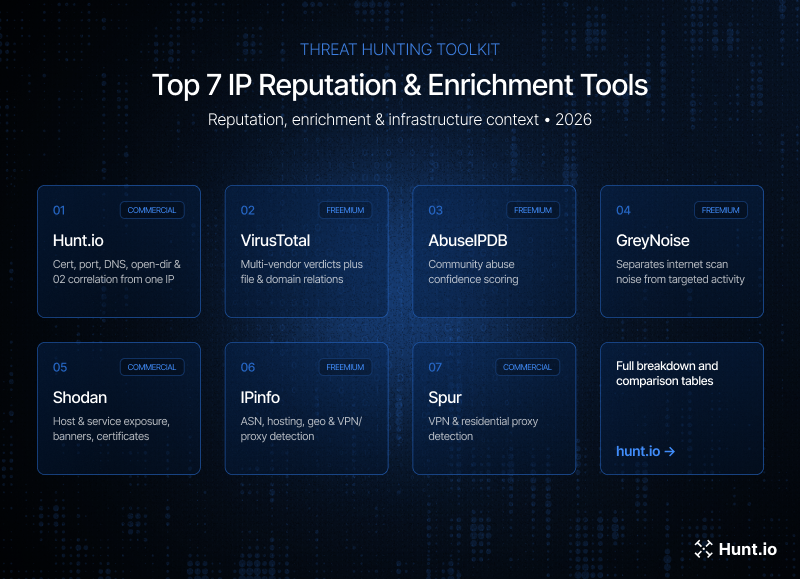 Figure 01.
What to Look For
Before picking a tool, it helps to be clear on what actually makes IP enrichment useful in a hunting or response workflow. A few things separate the tools worth integrating from the ones that just return a geolocation and a flag.
Data sources behind the score. A reputation score is only as good as what feeds it. Community reports, passive DNS, scan data, and malware sandboxing all produce different signals. Knowing what's behind a verdict tells you how much to trust it.
Pivoting depth. Can you move from an IP to the domains hosted on it, the certificates it served, the ASN it sits in, and the other hosts in that same block? Enrichment that dead-ends at a single record is far less useful than enrichment you can pivot through.
API and bulk support. Manual lookups are fine for one address. Real work means enriching hundreds or thousands at once, pushing results into a SIEM or EDR, and automating triage. A usable API and bulk endpoint matter more than the web UI.
Context, not just a verdict. A plain malicious/benign label hides the reasoning. The better tools show you why: what was observed, when, and from which source, so you can make your own call instead of trusting a black box.
False positive handling. Shared hosting, CDNs, and cloud providers mean one IP can serve both legitimate and malicious content. Tools that account for this, or at least surface it, save you from blocking a Cloudflare edge node because one site behind it was bad.
1. Hunt.io
Type: Commercial (14-day free trial) | Website: hunt.io/features
Hunt.io enriches IP addresses from an infrastructure hunting angle rather than a pure reputation-scoring one. Instead of returning a single verdict, it ties an address to the certificates it has served, the open ports and banners observed on it, JARM fingerprints, historical DNS, and any malware or C2 signals collected on that host over time. The point is to let you pivot from one address into the rest of an attacker's infrastructure.
One signal worth calling out: Hunt.io flags when an IP or domain is hosting an exposed open directory. Those often expose the operator's own tooling, logs, and staged payloads, which makes them one of the more useful things you can turn up on a host, since you're seeing what the operator is actually running rather than just which ports are open.
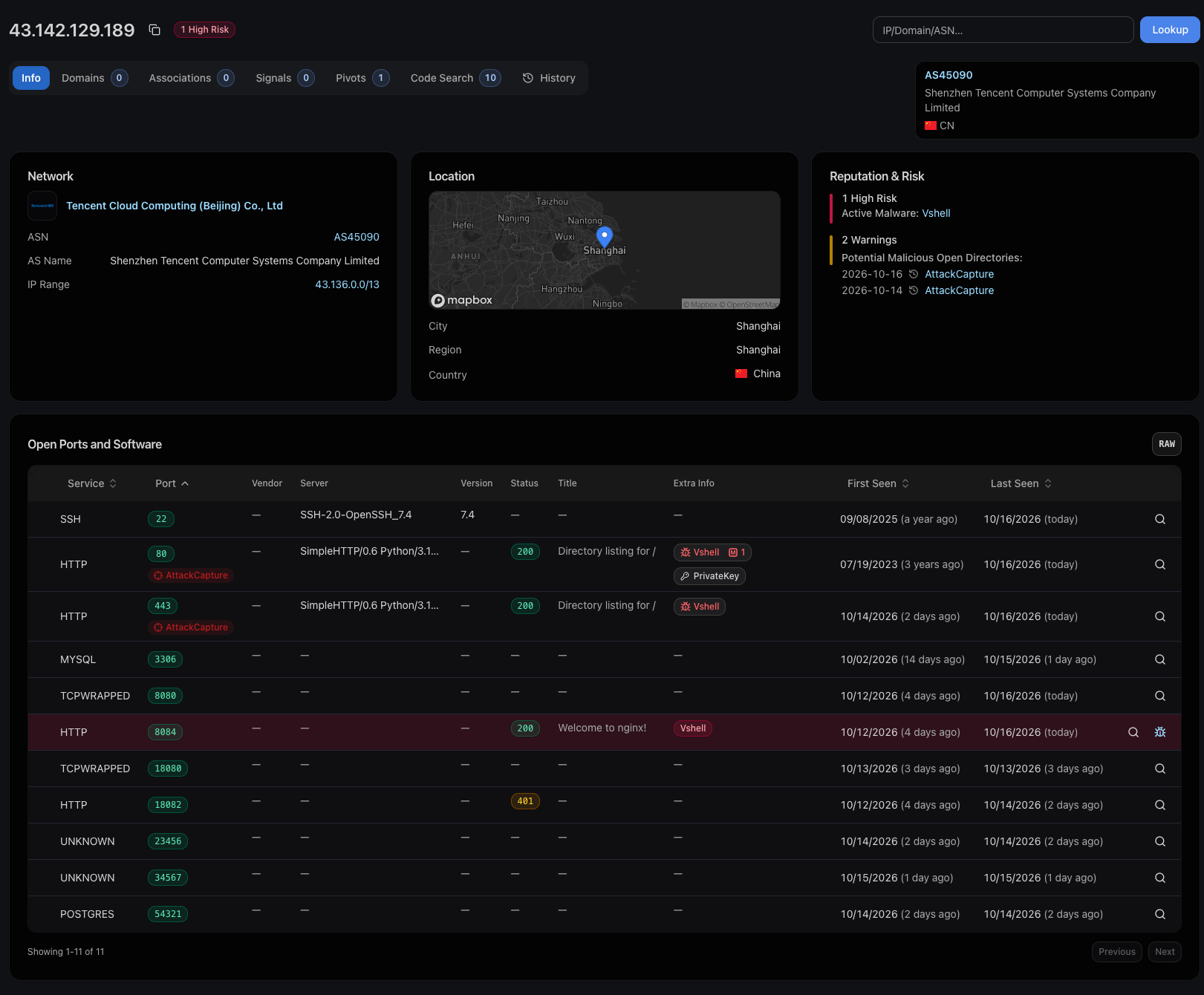
The bulk enrichment endpoint handles lists of IPs at once, which fits triage and feed-processing work where you're enriching hundreds of indicators rather than looking one up by hand. The IOC Hunter feed surfaces indicators tied to tracked campaigns, and HuntSQL lets you query across the dataset directly when you need to run your own logic over cert, port, and host data.
For automated workflows, Hunt.io runs an MCP server that brings enrichment into AI-assisted investigation, and it exposes dedicated domain and IP enrichment API endpoints for pulling host, cert, and DNS context straight into your own tooling.
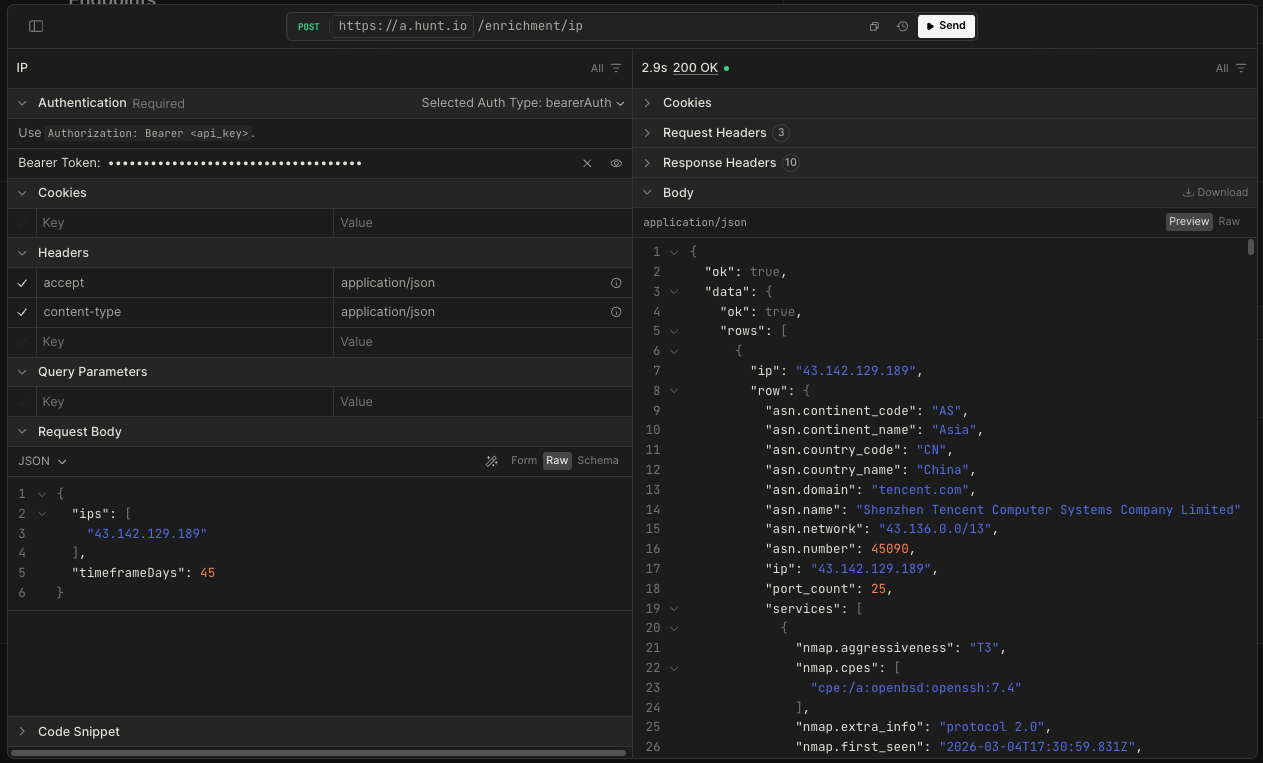 Figure 02. Hunt.io API in action, showing a live IP enrichment
Strengths: Deep pivoting from an IP or domain into certs, ports, DNS, open directories, and C2 signals. Bulk enrichment, a queryable dataset, an MCP server, and dedicated enrichment API endpoints. Correlation with tracked malicious infrastructure.
Limitations: Commercial. It's built for infrastructure hunting, so if all you need is a quick community abuse score, it's more tool than the task requires.
2. VirusTotal
Type: Freemium (free tier + paid Enterprise) | Website: virustotal.com
VirusTotal is the default first stop for most analysts. For an IP, it aggregates verdicts from dozens of security vendors, shows passive DNS resolutions, lists files that have communicated with the address, and surfaces related URLs and samples. The relations tab is where the enrichment value sits, since it lets you move from an IP to the domains and malware tied to it.
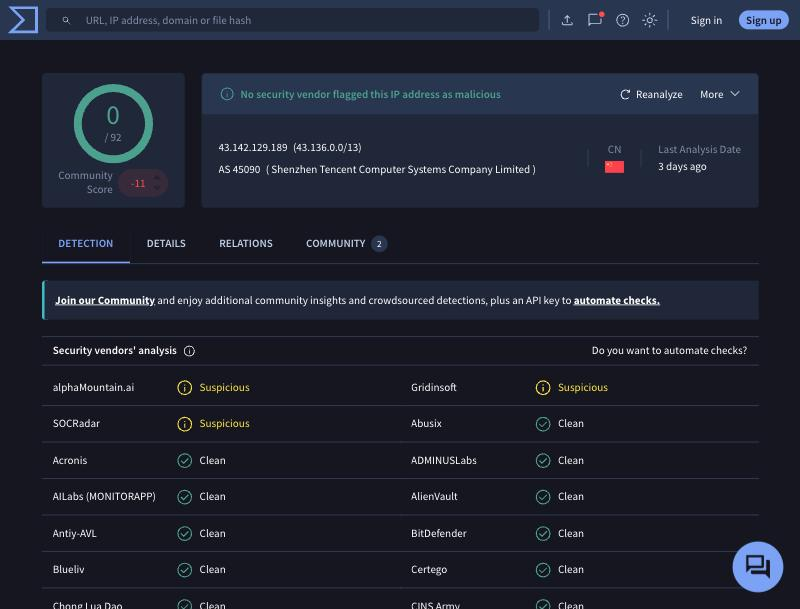 Figure 03.: VirusTotal IP report showing vendor detections and the relations tab with communicating files
The free tier covers manual lookups and light API use. Heavier automation, retrohunt, and the full relationship graph sit behind the paid Enterprise product. One thing to watch: vendor verdicts can lag or disagree, so a low detection count isn't a clean bill of health, and a single detection isn't proof of compromise.
Strengths: Huge aggregation of vendor data, files, and passive DNS. Free tier is genuinely useful. Strong relationship pivoting on paid tiers.
Limitations: Free API has tight rate limits. Vendor verdicts vary in quality. Enrichment is reputation and relations, not live host or infrastructure scanning.
If VirusTotal's limits or pricing push you to look elsewhere, we cover the options in VirusTotal alternatives for threat hunters.
3. AbuseIPDB
Type: Freemium (free tier + paid plans) | Website: abuseipdb.com
AbuseIPDB is a community-driven abuse database. Users and organizations report IPs for things like SSH brute forcing, port scanning, spam, and web attacks, and the platform rolls those reports into a confidence-of-abuse percentage. It answers a narrow but common question fast: has anyone else seen bad behavior from this address recently?
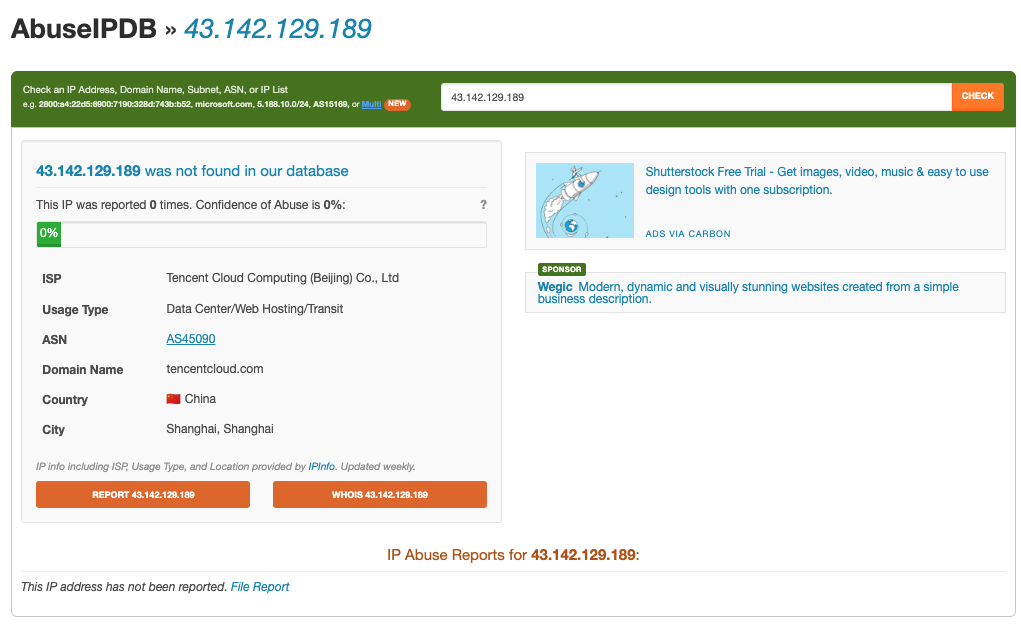 Figure 04. AbuseIPDB report showing abuse confidence score, report categories, and recent reports for an IP
The confidence score, report categories, and timestamps give you quick triage context. The free tier allows a solid number of daily checks and a straightforward API, which makes it easy to wire into firewall rules or alert enrichment. Because it's community-sourced, coverage is uneven: a fresh attacker IP may have zero reports, and shared infrastructure can accumulate reports that don't reflect current ownership.
Strengths: Fast abuse signal with clear categories. Simple API, generous free tier. Easy to automate into blocking and triage.
Limitations: Community reports vary in accuracy. No passive DNS, cert, or host data. Reputation only, so it's a signal, not a full enrichment source.
4. GreyNoise
Type: Freemium (free community tier + paid) | Website: greynoise.io
GreyNoise takes a different angle. It runs a large sensor network that watches internet-wide scanning and crawling, then classifies the IPs doing it. The practical payoff is noise reduction: when an alert fires on an address, GreyNoise can tell you whether it's a known benign scanner like Shodan or a university crawler, mass-scanning opportunistic traffic, or something targeted. That context lets you deprioritize the internet background radiation that clutters most alert queues.
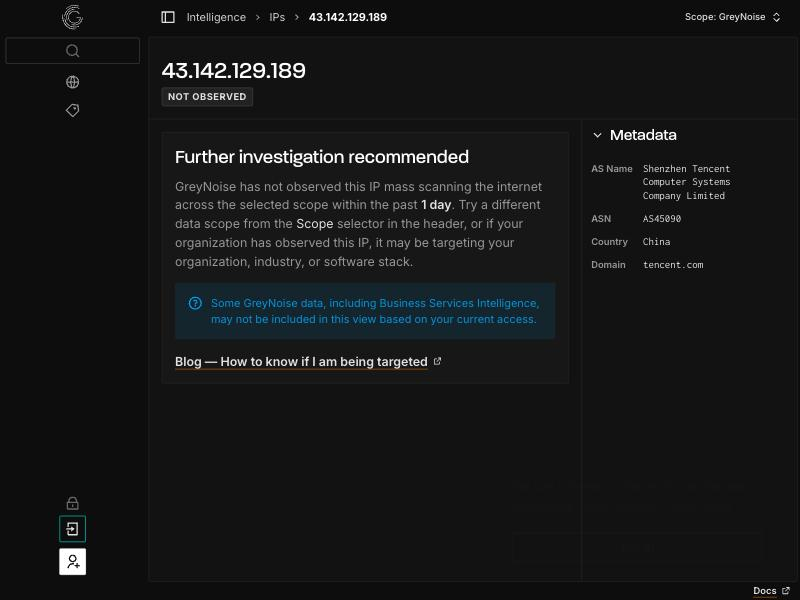 Figure 05. GreyNoise IP lookup showing classification, tags, and observed scanning behavior
It tags what the address was seen doing, which CVEs it was probing, and whether it belongs to a known benign operator. The community tier covers basic lookups, with the richer classification and bulk API on paid plans. GreyNoise is not a reputation database in the AbuseIPDB sense, and it won't tell you much about an IP that isn't actively scanning the internet.
Strengths: Cuts alert noise by separating mass scanners from targeted activity. Clear benign/malicious context. Useful tags on observed behavior.
Limitations: Only covers addresses whose sensors have observed scanning. Not a general enrichment or pivoting tool.
5. Shodan
Type: Commercial (paid membership, some free access) | Website: shodan.io
Shodan scans the internet and indexes what services respond on each host. For an IP, it shows open ports, service banners, product and version strings, TLS certificate details, and often screenshots of exposed interfaces. That makes it strong for the enrichment question of what is this host actually running, which reputation databases don't answer.
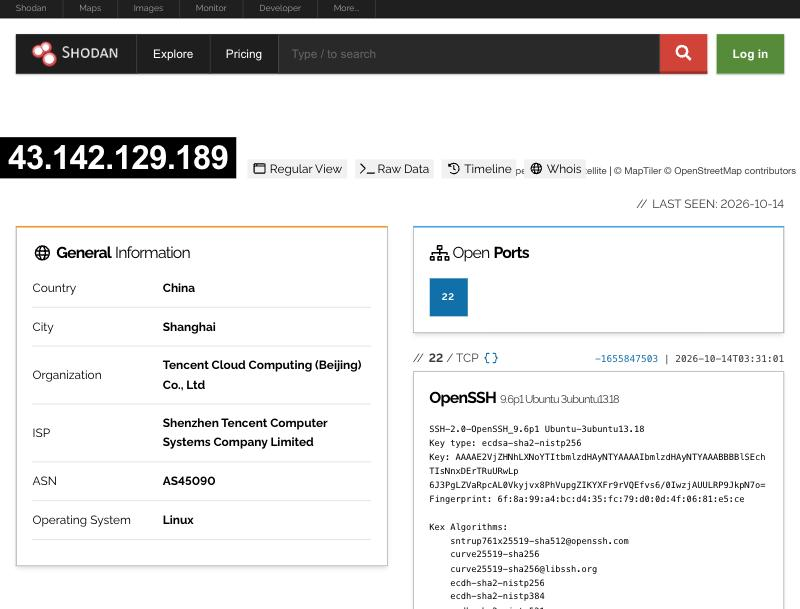 Figure 06. Shodan host page showing open ports, service banners, and certificate details for an IP
The banner and certificate data is useful for pivoting: you can take a cert subject or a distinctive banner string and search for every other host exposing the same thing, which is a common technique for mapping attacker infrastructure. A paid membership unlocks the API, filters, and larger result sets. Shodan reflects what was observed at scan time, so data can be days old, and it describes exposure rather than passing judgment on whether a host is malicious.
Strengths: Rich host and service detail. Strong banner and cert pivoting. Good for finding related exposed infrastructure.
Limitations: Data is as fresh as the last scan. No built-in reputation verdict. Most useful features require a paid plan.
Shodan and Censys cover similar ground as internet-wide scanners. Hunt.io works the same kind of data from a threat intelligence angle, which is why some teams reach for it as the Censys alternative for threat intelligence.
6. IPinfo
Type: Freemium (free tier + paid plans) | Website: ipinfo.io
IPinfo focuses on the structural facts about an address: geolocation, the ASN and organization that owns it, the hosting provider, and whether the IP is a known VPN, proxy, hosting, or relay endpoint. This is the enrichment layer that tells you whether an address belongs to a residential ISP, a data center, or an anonymity service, which often matters more for triage than a reputation score.
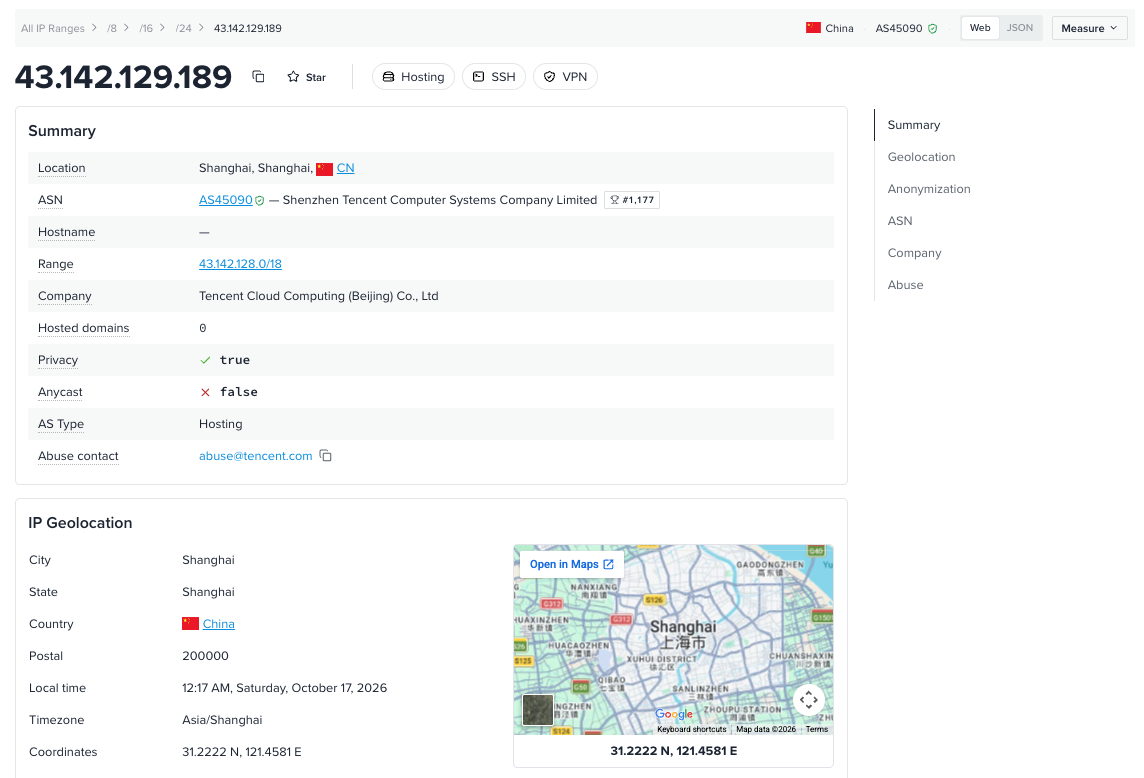 Figure 07. IPinfo lookup showing ASN, hosting provider, and privacy detection flags for an IP
The privacy detection data (VPN, proxy, Tor, hosting) is the differentiator for abuse and fraud work, where knowing an IP is a commercial VPN exit changes how you weigh it. The free tier handles basic geolocation and ASN lookups, with privacy detection and bulk access on paid plans. IPinfo is accurate on the structural data and clean to integrate, but it doesn't track malicious activity, so it complements a reputation source rather than replacing one.
Strengths: Reliable ASN, hosting, and geolocation data. Strong VPN and proxy detection. Clean API and bulk tooling.
Limitations: No abuse or threat verdict. No cert or host scanning. Best paired with a reputation or infrastructure tool.
7. Spur
Type: Commercial | Website: spur.us
Spur specializes in one thing that the general-purpose tools handle poorly: anonymity infrastructure. It tracks commercial VPNs, residential proxy networks, and proxy services, and tells you not just that an IP is a proxy but which service it belongs to. For fraud, account takeover, and abuse investigations, that distinction matters, since residential proxy traffic is a common way attackers blend in with legitimate users.
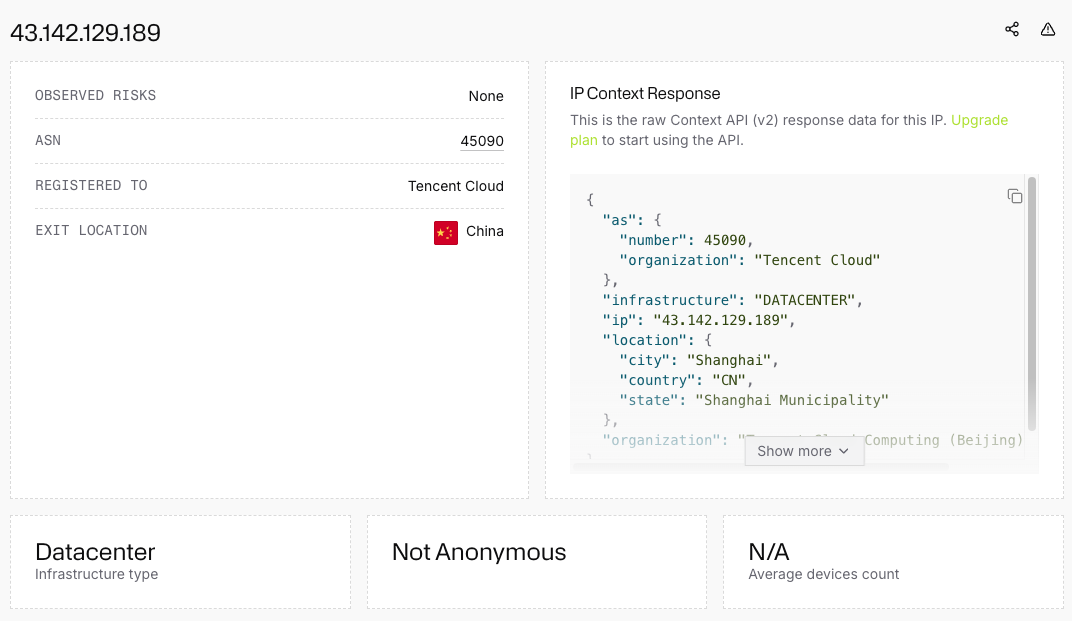 Figure 08. Spur IP context showing the specific VPN or residential proxy service an address is tied to
The data goes deeper than a generic proxy flag, identifying the operator behind the anonymization and, in some cases, the kind of traffic routed through it. This is a narrow focus, and it's clearly aimed at fraud and abuse teams rather than general threat hunting. If your work involves separating real users from proxied traffic, it fills a gap the broader tools leave open.
Strengths: Best-in-class detection of VPN and residential proxy infrastructure. Identifies the specific service behind an address. Strong for fraud and abuse cases.
Limitations: Narrow scope focused on anonymity infrastructure. Commercial only. Not a general reputation or host-enrichment source.
Side-by-Side Comparison
| Tool | Type | Primary Data | Enrichment Angle | API / Bulk | Infrastructure Pivoting |
|---|---|---|---|---|---|
| Hunt.io | Commercial | Certs, ports, DNS, C2 signals, open dirs | Reputation + Infrastructure correlation | Yes / Yes | Deep |
| VirusTotal | Freemium | Vendor verdicts, passive DNS, files | Reputation + relations | Yes / Paid | Medium |
| AbuseIPDB | Freemium | Community abuse reports | Abuse scoring | Yes / Yes | None |
| GreyNoise | Freemium | Internet scan observations | Noise classification | Yes / Paid | Low |
| Shodan | Commercial | Host banners, services, certs | Exposure and service detail | Yes / Paid | Medium |
| IPinfo | Freemium | ASN, hosting, geo, privacy | Structural and ownership | Yes / Yes | Low |
| Spur | Commercial | VPN and proxy networks | Anonymity detection | Yes / Yes | Low |
Which Tool for Which Use Case
| Use Case | Best Tool(s) |
|---|---|
| IP reputation + full infrastructure correlation and pivoting | Hunt.io |
| Quick abuse check before blocking an IP | AbuseIPDB |
| Cutting alert noise from mass scanners | GreyNoise |
| Multi-vendor reputation and related samples | VirusTotal |
| What services a host is actually exposing | Shodan |
| ASN, hosting, and VPN/proxy classification | IPinfo |
| Identifying residential proxy and VPN traffic | Spur |
| Mapping an attacker's wider infrastructure from one IP | Hunt.io, Shodan |
| Automated triage enrichment at scale | Hunt.io, AbuseIPDB, IPinfo |
Putting It All Together
No single tool answers every question about an IP, and the teams that get the most out of enrichment don't try to find one that does. A typical workflow stacks a few of these. An alert fires, GreyNoise tells you whether it's just internet noise, AbuseIPDB gives a fast abuse read, and IPinfo tells you whether you're looking at a residential ISP or a data center. If the address is worth a closer look, Shodan shows what it's running and Hunt.io lets you pivot from the host into the certificates, domains, and C2 signals around it.
The split tends to fall along a line. Reputation tools answer has this been bad before. Infrastructure tools answer what else is connected to this. Both matter, but the second is what turns a single indicator into an understanding of the operation behind it. That's the shift from reacting to one alert at a time toward mapping the infrastructure before it shows up in a feed.
If you want the enrichment and pivoting side in one place, Hunt.io ties IP data to certificate history, live host context, IOC feeds, and bulk enrichment, with HuntSQL for running your own queries across it. There's a 14-day free trial at hunt.io if you want to run it against a live investigation.
An IP address on its own tells you almost nothing. It's a number. The value shows up when you can attach context to it: who hosts it, what services it runs, whether other people have flagged it, what domains resolve to it, and what it was doing last week. That process is IP enrichment, and the reputation piece is one slice of it, the part that answers whether an address has a history of abuse.
For a SOC analyst triaging alerts, enrichment is the difference between closing a ticket in two minutes and chasing a false positive for an hour. For an incident responder, it's how a single indicator of compromise turns into a map of the attacker's wider infrastructure. The tools below take different angles on the same problem. Some focus on abuse scoring, some on scan noise, some on hosting and proxy data, and some on full infrastructure correlation.
This guide covers seven tools security teams actually use for IP reputation and enrichment in 2026, from free community databases to commercial platforms built for pivoting. None of them does everything, so most teams end up running two or three in combination. The sections below cover what each one is good at and where it stops.
Figure 01.
What to Look For
Before picking a tool, it helps to be clear on what actually makes IP enrichment useful in a hunting or response workflow. A few things separate the tools worth integrating from the ones that just return a geolocation and a flag.
Data sources behind the score. A reputation score is only as good as what feeds it. Community reports, passive DNS, scan data, and malware sandboxing all produce different signals. Knowing what's behind a verdict tells you how much to trust it.
Pivoting depth. Can you move from an IP to the domains hosted on it, the certificates it served, the ASN it sits in, and the other hosts in that same block? Enrichment that dead-ends at a single record is far less useful than enrichment you can pivot through.
API and bulk support. Manual lookups are fine for one address. Real work means enriching hundreds or thousands at once, pushing results into a SIEM or EDR, and automating triage. A usable API and bulk endpoint matter more than the web UI.
Context, not just a verdict. A plain malicious/benign label hides the reasoning. The better tools show you why: what was observed, when, and from which source, so you can make your own call instead of trusting a black box.
False positive handling. Shared hosting, CDNs, and cloud providers mean one IP can serve both legitimate and malicious content. Tools that account for this, or at least surface it, save you from blocking a Cloudflare edge node because one site behind it was bad.
1. Hunt.io
Type: Commercial (14-day free trial) | Website: hunt.io/features
Hunt.io enriches IP addresses from an infrastructure hunting angle rather than a pure reputation-scoring one. Instead of returning a single verdict, it ties an address to the certificates it has served, the open ports and banners observed on it, JARM fingerprints, historical DNS, and any malware or C2 signals collected on that host over time. The point is to let you pivot from one address into the rest of an attacker's infrastructure.
One signal worth calling out: Hunt.io flags when an IP or domain is hosting an exposed open directory. Those often expose the operator's own tooling, logs, and staged payloads, which makes them one of the more useful things you can turn up on a host, since you're seeing what the operator is actually running rather than just which ports are open.
The bulk enrichment endpoint handles lists of IPs at once, which fits triage and feed-processing work where you're enriching hundreds of indicators rather than looking one up by hand. The IOC Hunter feed surfaces indicators tied to tracked campaigns, and HuntSQL lets you query across the dataset directly when you need to run your own logic over cert, port, and host data.
For automated workflows, Hunt.io runs an MCP server that brings enrichment into AI-assisted investigation, and it exposes dedicated domain and IP enrichment API endpoints for pulling host, cert, and DNS context straight into your own tooling.
Figure 02. Hunt.io API in action, showing a live IP enrichmentStrengths: Deep pivoting from an IP or domain into certs, ports, DNS, open directories, and C2 signals. Bulk enrichment, a queryable dataset, an MCP server, and dedicated enrichment API endpoints. Correlation with tracked malicious infrastructure.
Limitations: Commercial. It's built for infrastructure hunting, so if all you need is a quick community abuse score, it's more tool than the task requires.
2. VirusTotal
Type: Freemium (free tier + paid Enterprise) | Website: virustotal.com
VirusTotal is the default first stop for most analysts. For an IP, it aggregates verdicts from dozens of security vendors, shows passive DNS resolutions, lists files that have communicated with the address, and surfaces related URLs and samples. The relations tab is where the enrichment value sits, since it lets you move from an IP to the domains and malware tied to it.
Figure 03.: VirusTotal IP report showing vendor detections and the relations tab with communicating filesThe free tier covers manual lookups and light API use. Heavier automation, retrohunt, and the full relationship graph sit behind the paid Enterprise product. One thing to watch: vendor verdicts can lag or disagree, so a low detection count isn't a clean bill of health, and a single detection isn't proof of compromise.
Strengths: Huge aggregation of vendor data, files, and passive DNS. Free tier is genuinely useful. Strong relationship pivoting on paid tiers.
Limitations: Free API has tight rate limits. Vendor verdicts vary in quality. Enrichment is reputation and relations, not live host or infrastructure scanning.
If VirusTotal's limits or pricing push you to look elsewhere, we cover the options in VirusTotal alternatives for threat hunters.
3. AbuseIPDB
Type: Freemium (free tier + paid plans) | Website: abuseipdb.com
AbuseIPDB is a community-driven abuse database. Users and organizations report IPs for things like SSH brute forcing, port scanning, spam, and web attacks, and the platform rolls those reports into a confidence-of-abuse percentage. It answers a narrow but common question fast: has anyone else seen bad behavior from this address recently?
Figure 04. AbuseIPDB report showing abuse confidence score, report categories, and recent reports for an IPThe confidence score, report categories, and timestamps give you quick triage context. The free tier allows a solid number of daily checks and a straightforward API, which makes it easy to wire into firewall rules or alert enrichment. Because it's community-sourced, coverage is uneven: a fresh attacker IP may have zero reports, and shared infrastructure can accumulate reports that don't reflect current ownership.
Strengths: Fast abuse signal with clear categories. Simple API, generous free tier. Easy to automate into blocking and triage.
Limitations: Community reports vary in accuracy. No passive DNS, cert, or host data. Reputation only, so it's a signal, not a full enrichment source.
4. GreyNoise
Type: Freemium (free community tier + paid) | Website: greynoise.io
GreyNoise takes a different angle. It runs a large sensor network that watches internet-wide scanning and crawling, then classifies the IPs doing it. The practical payoff is noise reduction: when an alert fires on an address, GreyNoise can tell you whether it's a known benign scanner like Shodan or a university crawler, mass-scanning opportunistic traffic, or something targeted. That context lets you deprioritize the internet background radiation that clutters most alert queues.
Figure 05. GreyNoise IP lookup showing classification, tags, and observed scanning behaviorIt tags what the address was seen doing, which CVEs it was probing, and whether it belongs to a known benign operator. The community tier covers basic lookups, with the richer classification and bulk API on paid plans. GreyNoise is not a reputation database in the AbuseIPDB sense, and it won't tell you much about an IP that isn't actively scanning the internet.
Strengths: Cuts alert noise by separating mass scanners from targeted activity. Clear benign/malicious context. Useful tags on observed behavior.
Limitations: Only covers addresses whose sensors have observed scanning. Not a general enrichment or pivoting tool.
5. Shodan
Type: Commercial (paid membership, some free access) | Website: shodan.io
Shodan scans the internet and indexes what services respond on each host. For an IP, it shows open ports, service banners, product and version strings, TLS certificate details, and often screenshots of exposed interfaces. That makes it strong for the enrichment question of what is this host actually running, which reputation databases don't answer.
Figure 06. Shodan host page showing open ports, service banners, and certificate details for an IPThe banner and certificate data is useful for pivoting: you can take a cert subject or a distinctive banner string and search for every other host exposing the same thing, which is a common technique for mapping attacker infrastructure. A paid membership unlocks the API, filters, and larger result sets. Shodan reflects what was observed at scan time, so data can be days old, and it describes exposure rather than passing judgment on whether a host is malicious.
Strengths: Rich host and service detail. Strong banner and cert pivoting. Good for finding related exposed infrastructure.
Limitations: Data is as fresh as the last scan. No built-in reputation verdict. Most useful features require a paid plan.
Shodan and Censys cover similar ground as internet-wide scanners. Hunt.io works the same kind of data from a threat intelligence angle, which is why some teams reach for it as the Censys alternative for threat intelligence.
6. IPinfo
Type: Freemium (free tier + paid plans) | Website: ipinfo.io
IPinfo focuses on the structural facts about an address: geolocation, the ASN and organization that owns it, the hosting provider, and whether the IP is a known VPN, proxy, hosting, or relay endpoint. This is the enrichment layer that tells you whether an address belongs to a residential ISP, a data center, or an anonymity service, which often matters more for triage than a reputation score.
Figure 07. IPinfo lookup showing ASN, hosting provider, and privacy detection flags for an IPThe privacy detection data (VPN, proxy, Tor, hosting) is the differentiator for abuse and fraud work, where knowing an IP is a commercial VPN exit changes how you weigh it. The free tier handles basic geolocation and ASN lookups, with privacy detection and bulk access on paid plans. IPinfo is accurate on the structural data and clean to integrate, but it doesn't track malicious activity, so it complements a reputation source rather than replacing one.
Strengths: Reliable ASN, hosting, and geolocation data. Strong VPN and proxy detection. Clean API and bulk tooling.
Limitations: No abuse or threat verdict. No cert or host scanning. Best paired with a reputation or infrastructure tool.
7. Spur
Type: Commercial | Website: spur.us
Spur specializes in one thing that the general-purpose tools handle poorly: anonymity infrastructure. It tracks commercial VPNs, residential proxy networks, and proxy services, and tells you not just that an IP is a proxy but which service it belongs to. For fraud, account takeover, and abuse investigations, that distinction matters, since residential proxy traffic is a common way attackers blend in with legitimate users.
Figure 08. Spur IP context showing the specific VPN or residential proxy service an address is tied toThe data goes deeper than a generic proxy flag, identifying the operator behind the anonymization and, in some cases, the kind of traffic routed through it. This is a narrow focus, and it's clearly aimed at fraud and abuse teams rather than general threat hunting. If your work involves separating real users from proxied traffic, it fills a gap the broader tools leave open.
Strengths: Best-in-class detection of VPN and residential proxy infrastructure. Identifies the specific service behind an address. Strong for fraud and abuse cases.
Limitations: Narrow scope focused on anonymity infrastructure. Commercial only. Not a general reputation or host-enrichment source.
Side-by-Side Comparison
| Tool | Type | Primary Data | Enrichment Angle | API / Bulk | Infrastructure Pivoting |
|---|---|---|---|---|---|
| Hunt.io | Commercial | Certs, ports, DNS, C2 signals, open dirs | Reputation + Infrastructure correlation | Yes / Yes | Deep |
| VirusTotal | Freemium | Vendor verdicts, passive DNS, files | Reputation + relations | Yes / Paid | Medium |
| AbuseIPDB | Freemium | Community abuse reports | Abuse scoring | Yes / Yes | None |
| GreyNoise | Freemium | Internet scan observations | Noise classification | Yes / Paid | Low |
| Shodan | Commercial | Host banners, services, certs | Exposure and service detail | Yes / Paid | Medium |
| IPinfo | Freemium | ASN, hosting, geo, privacy | Structural and ownership | Yes / Yes | Low |
| Spur | Commercial | VPN and proxy networks | Anonymity detection | Yes / Yes | Low |
Which Tool for Which Use Case
| Use Case | Best Tool(s) |
|---|---|
| IP reputation + full infrastructure correlation and pivoting | Hunt.io |
| Quick abuse check before blocking an IP | AbuseIPDB |
| Cutting alert noise from mass scanners | GreyNoise |
| Multi-vendor reputation and related samples | VirusTotal |
| What services a host is actually exposing | Shodan |
| ASN, hosting, and VPN/proxy classification | IPinfo |
| Identifying residential proxy and VPN traffic | Spur |
| Mapping an attacker's wider infrastructure from one IP | Hunt.io, Shodan |
| Automated triage enrichment at scale | Hunt.io, AbuseIPDB, IPinfo |
Putting It All Together
No single tool answers every question about an IP, and the teams that get the most out of enrichment don't try to find one that does. A typical workflow stacks a few of these. An alert fires, GreyNoise tells you whether it's just internet noise, AbuseIPDB gives a fast abuse read, and IPinfo tells you whether you're looking at a residential ISP or a data center. If the address is worth a closer look, Shodan shows what it's running and Hunt.io lets you pivot from the host into the certificates, domains, and C2 signals around it.
The split tends to fall along a line. Reputation tools answer has this been bad before. Infrastructure tools answer what else is connected to this. Both matter, but the second is what turns a single indicator into an understanding of the operation behind it. That's the shift from reacting to one alert at a time toward mapping the infrastructure before it shows up in a feed.
If you want the enrichment and pivoting side in one place, Hunt.io ties IP data to certificate history, live host context, IOC feeds, and bulk enrichment, with HuntSQL for running your own queries across it. There's a 14-day free trial at hunt.io if you want to run it against a live investigation.
Related Posts
Related Posts
Related Posts

Oct 13, 2026
•
13
min read
Jun 4, 2026
•
24
min read

Mar 19, 2026
•
13
min read
Oct 13, 2026
•
13
min read
Jun 4, 2026
•
24
min read
Hunt adversary infrastructure in real time. Surface C2 servers, enrich IOCs,
and map attacker activity at scale with our unified threat hunting platform.

Hunt adversary infrastructure in real time. Surface C2 servers, enrich IOCs,
and map attacker activity at scale with our unified threat hunting platform.
Hunt adversary infrastructure in real time. Surface C2 servers, enrich IOCs,
and map attacker activity at scale with our unified threat hunting platform.